GrapheR is a Graphical User Interface created for simple graphs.
Depends: R (>= 2.10.0), tcltk, mgcv Description: GrapheR is a multiplatform user interface for drawing highly customizable graphs in R. It aims to be a valuable help to quickly draw publishable graphs without any knowledge of R commands. Six kinds of graphs are available: histogram, box-and-whisker plot, bar plot, pie chart, curve and scatter plot. License: GPL-2 LazyLoad: yes Packaged: 2011-01-24 17:47:17 UTC; Maxime Repository: CRAN Date/Publication: 2011-01-24 18:41:47
It is bi-lingual (English and French) and can import in text and csv files
The intention is for even non users of R, to make the simple types of Graphs.
The user interface is quite cleanly designed. It is thus aimed as a data visualization GUI, but for a more basic level than Deducer.
Easy to rename axis ,graph titles as well use sliders for changing line thickness and color
Disadvantages of using GrapheR
Lack of documentation or help. Especially tips on mouseover of some options should be done.
Some of the terms like absicca or ordinate axis may not be easily understood by a business user.
Default values of color are quite plain (black font on white background).
Can flood terminal with lots of repetitive warnings (although use of warnings() function limits it to top 50)
Some of axis names can be auto suggested based on which variable s being chosen for that axis.
Package name GrapheR refers to a graphical calculator in Mac OS – this can hinder search engine results
Using GrapheR
Data Input -Data Input can be customized for CSV and Text files.
GrapheR gives information on loaded variables (numeric versus Factors)
It asks you to choose the type of Graph
It then asks for usual Graph Inputs (see below). Note colors can be customized (partial window). Also number of graphs per Window can be easily customized
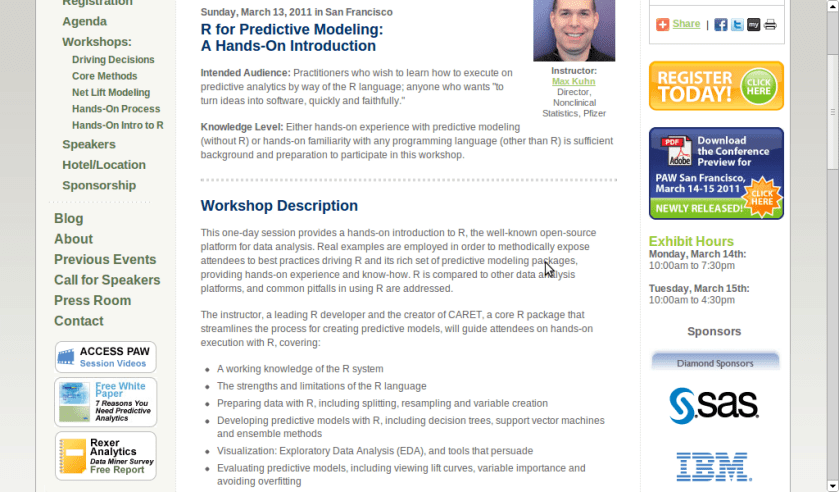
A workshop on using R for Predictive Modeling, by the Director, Non Clinical Stats, Pfizer. Interesting Bay Area Event- part of next edition of Predictive Analytics World
Sunday, March 13, 2011 in San Francisco
R for Predictive Modeling:
A Hands-On Introduction
Intended Audience: Practitioners who wish to learn how to execute on predictive analytics by way of the R language; anyone who wants “to turn ideas into software, quickly and faithfully.”
Knowledge Level: Either hands-on experience with predictive modeling (without R) or hands-on familiarity with any programming language (other than R) is sufficient background and preparation to participate in this workshop.
Workshop Description
This one-day session provides a hands-on introduction to R, the well-known open-source platform for data analysis. Real examples are employed in order to methodically expose attendees to best practices driving R and its rich set of predictive modeling packages, providing hands-on experience and know-how. R is compared to other data analysis platforms, and common pitfalls in using R are addressed.
The instructor, a leading R developer and the creator of CARET, a core R package that streamlines the process for creating predictive models, will guide attendees on hands-on execution with R, covering:
A working knowledge of the R system
The strengths and limitations of the R language
Preparing data with R, including splitting, resampling and variable creation
Developing predictive models with R, including decision trees, support vector machines and ensemble methods
Visualization: Exploratory Data Analysis (EDA), and tools that persuade
Evaluating predictive models, including viewing lift curves, variable importance and avoiding overfitting
Hardware: Bring Your Own Laptop
Each workshop participant is required to bring their own laptop running Windows or OS X. The software used during this training program, R, is free and readily available for download.
Attendees receive an electronic copy of the course materials and related R code at the conclusion of the workshop.
Max Kuhn, Director, Nonclinical Statistics, Pfizer
Max Kuhn is a Director of Nonclinical Statistics at Pfizer Global R&D in Connecticut. He has been apply models in the pharmaceutical industries for over 15 years.
He is a leading R developer and the author of several R packages including the CARET package that provides a simple and consistent interface to over 100 predictive models available in R.
Mr. Kuhn has taught courses on modeling within Pfizer and externally, including a class for the India Ministry of Information Technology.
Wubi only adds an extra option to boot into Ubuntu. Wubi does not require you to modify the partitions of your PC, or to use a different bootloader, and does not install special drivers.
Wine lets you run Windows software on other operating systems. With Wine, you can install and run these applications just like you would in Windows. Read more at http://wiki.winehq.org/Debunking_Wine_Myths
Cygwin is a Linux-like environment for Windows. It consists of two parts:
A DLL (cygwin1.dll) which acts as a Linux API emulation layer providing substantial Linux API functionality.
A collection of tools which provide Linux look and feel
What Isn’t Cygwin?
Cygwin is not a way to run native linux apps on Windows. You have to rebuild your application from source if you want it to run on Windows.
Cygwin is not a way to magically make native Windows apps aware of UNIX ® functionality, like signals, ptys, etc. Again, you need to build your apps from source if you want to take advantage of Cygwin functionality.
VMware Player is the easiest way to run multiple operating systems at the same time on your PC. With its user-friendly interface, VMware Player makes it effortless for anyone to try out Windows 7, Chrome OS or the latest Linux releases, or create isolated virtual machines to safely test new software and surf the Web
The only issue is Rattle can be quite difficult to install due to dependencies on GTK+
After fiddling for a couple of years- this is what I did
1) Created dual boot OS- Basically downloaded the netbook remix from http://ubuntu.com I created a dual boot OS so you can choose at the beginning whether to use Windows or Ubuntu Linux in that session. Alternatively you can download VM Player www.vmware.com/products/player/ if you want to do both
2) Download R packages using Ubuntu packages and Install GTK+ dependencies before that.
GTK + Requires
Libglade
Glib
Cairo
Pango
ATK
If you are a Linux newbie like me who doesnt get the sudo apt get, tar, cd, make , install rigmarole – scoot over to synaptic software packages or just the main ubuntu software centre and download these packages one by one.
For R Dependencies, you need
PMML
XML
RGTK2
Again use r-cran as the prefix to these package names and simply install (almost the same way Windows does it easily -double click)
Save theses to your hard disk (e.g., to your Desktop) but don’t extract them. Then, on GNU/Linux run the install command shown below. This command is entered into a terminal window:
R CMD INSTALL rattle_2.6.0.tar.gz
After installation-
5) Type library(rattle) and rattle.info to get messages on what R packages to update for a proper functioning
</code>

> library(rattle)
Rattle: Graphical interface for data mining using R.
Version 2.6.0 Copyright (c) 2006-2010 Togaware Pty Ltd.
Type 'rattle()' to shake, rattle, and roll your data.
> rattle.info()
Rattle: version 2.6.0
R: version 2.11.1 (2010-05-31) (Revision 52157)

Sysname: Linux
Release: 2.6.35-23-generic
Version: #41-Ubuntu SMP Wed Nov 24 10:18:49 UTC 2010
Nodename: k1-M725R
Machine: i686
Login: k1ng
User: k1ng

Installed Dependencies
RGtk2: version 2.20.3
pmml: version 1.2.26
colorspace: version 1.0-1
cairoDevice: version 2.14
doBy: version 4.1.2
e1071: version 1.5-24
ellipse: version 0.3-5
foreign: version 0.8-41
gdata: version 2.8.1
gtools: version 2.6.2
gplots: version 2.8.0
gWidgetsRGtk2: version 0.0-69
Hmisc: version 3.8-3
kernlab: version 0.9-12
latticist: version 0.9-43
Matrix: version 0.999375-46
mice: version 2.4
network: version 1.5-1
nnet: version 7.3-1
party: version 0.9-99991
playwith: version 0.9-53
randomForest: version 4.5-36 upgrade available 4.6-2
rggobi: version 2.1.16
survival: version 2.36-2
XML: version 3.2-0
bitops: version 1.0-4.1

Upgrade the packages with:

 > install.packages(c("randomForest"))

<code>
Now upgrade whatever package rattle.info tells to upgrade.
This is much simpler and less frustrating than some of the other ways to install Rattle.
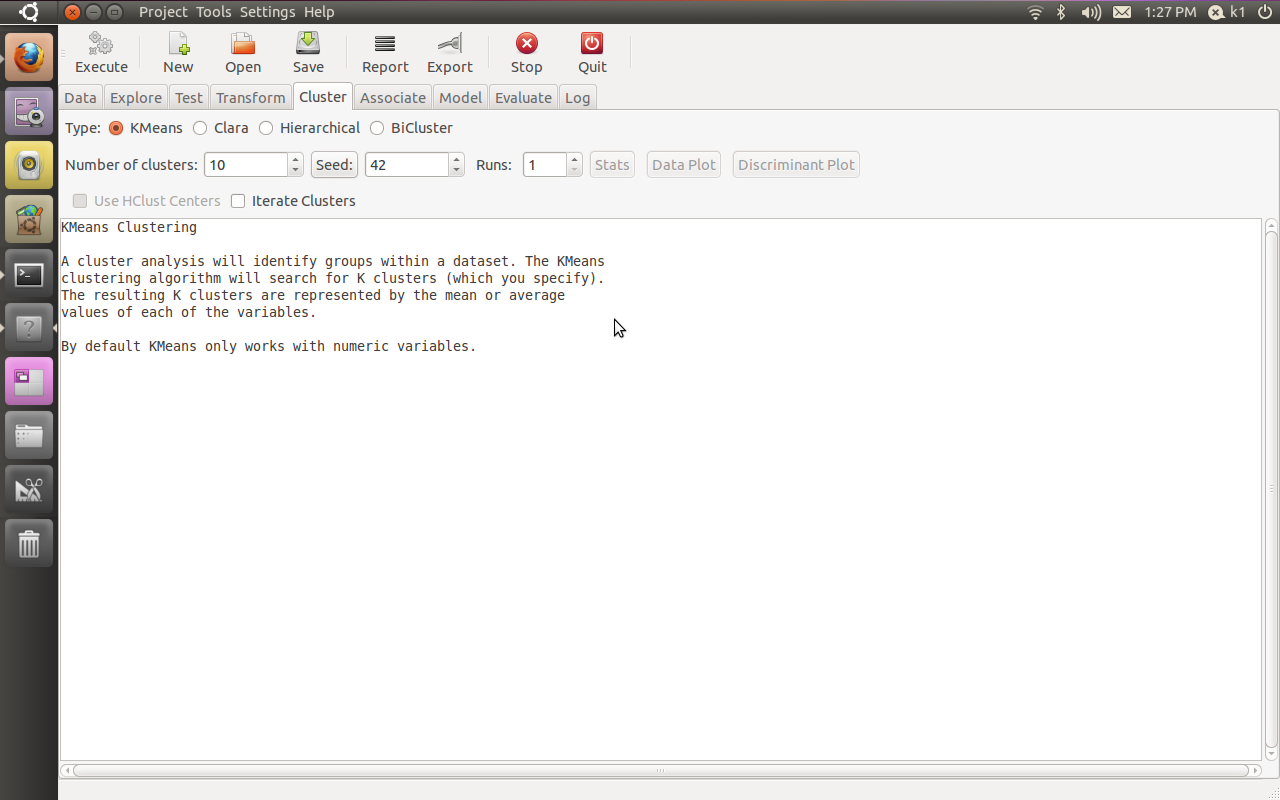
If all goes well, you will see this familiar screen popup when you type
We have a limited number of Chrome notebooks to distribute, and we need to ensure that they find good homes. That’s where you come in. Everything is still very much a work in progress, and it’s users, like you, that often give us our best ideas about what feels clunky or what’s missing. So if you live in the United States, are at least 18 years old, and would like to be considered for our small Pilot program, please fill this out. It should take about 15 minutes. We’ll review the requests that come in and contact you if you’ve been selected.
This application will be open until 11:59:59 PM PST on December 21, 2010.
I had recently asked some friends from my Twitter lists for their take on 2011, atleast 3 of them responded back with the answer, 1 said they were still on it, and 1 claimed a recent office event.
Anyways- I take note of the view of forecasting from
The most primitive method of forecasting is guessing. The result may be rated acceptable if the person making the guess is an expert in the matter.
Ajay- people will forecast in end 2010 and 2011. many of them will get forecasts wrong, some very wrong, but by Dec 2011 most of them would be writing forecasts on 2012. almost no one will get called on by irate users-readers- (hey you got 4 out of 7 wrong last years forecast!) just wont happen. people thrive on hope. so does marketing. in 2011- and before
and some forecasts from Tom Davenport’s The International Institute for Analytics (IIA) at
Regulatory and privacy constraints will continue to hamper growth of marketing analytics.
(I wonder how privacy and analytics can co exist in peace forever- one view is that model building can use anonymized data suppose your IP address was anonymized using a standard secret Coco-Cola formula- then whatever model does get built would not be of concern to you individually as your privacy is protected by the anonymization formula)
Anyway- back to the question I asked-
What are the top 5 events in your industry (events as in things that occured not conferences) and what are the top 3 trends in 2011.
I define my industry as being online technology writing- research (with a heavy skew on stat computing)
My top 5 events for 2010 were-
1) Consolidation- Big 5 software providers in BI and Analytics bought more, sued more, and consolidated more. The valuations rose. and rose. leading to even more smaller players entering. Thus consolidation proved an oxy moron as total number of influential AND disruptive players grew.
2) Cloudy Computing- Computing shifted from the desktop but to the mobile and more to the tablet than to the cloud. Ipad front end with Amazon Ec2 backend- yup it happened.
3) Open Source grew louder- yes it got more clients. and more revenue. did it get more market share. depends on if you define market share by revenues or by users.
Both Open Source and Closed Source had a good year- the pie grew faster and bigger so no one minded as long their slices grew bigger.
4) We didnt see that coming –
Technology continued to surprise with events (thats what we love! the surprises)
Revolution Analytics broke through R’s Big Data Barrier, Tableau Software created a big Buzz, Wikileaks and Chinese FireWalls gave technology an entire new dimension (though not universally popular one).
people fought wars on emails and servers and social media- unfortunately the ones fighting real wars in 2009 continued to fight them in 2010 too
5) Money-
SAP,SAS,IBM,Oracle,Google,Microsoft made more money than ever before. Only Facebook got a movie named on itself. Venture Capitalists pumped in money in promising startups- really as if in a hurry to park money before tax cuts expired in some countries.
2011 Top Three Forecasts
1) Surprises- Expect to get surprised atleast 10 % of the time in business events. As internet grows the communication cycle shortens, the hype cycle amplifies buzz-
more unstructured data is created (esp for marketing analytics) leading to enhanced volatility
2) Growth- Yes we predict technology will grow faster than the automobile industry. Game changers may happen in the form of Chrome OS- really its Linux guys-and customer adaptability to new USER INTERFACES. Design will matter much more in technology on your phone, on your desktop and on your internet. Packaging sells.
False Top Trend 3) I will write a book on business analytics in 2011. yes it is true and I am working with A publisher. No it is not really going to be a top 3 event for anyone except me,publisher and lucky guys who read it.
3) Creating technology and technically enabling creativity will converge at an accelerated rate. use of widgets, guis, snippets, ide will ensure creative left brains can code easier. and right brains can design faster and better due to a global supply chain of techie and artsy professionals.







 Business
 Education
 Non-Profit
 Developer
 Individual
 DECISION STATS