Input Data in R using the top 3 R GUI

PC-DOS was an early OS for personal computers ...
Image via Wikipedia

One area where clearly GUI methods are preferable to command line methods in R, is data input. There is no need of learning read.csv or read.table when these options are only two clicks away in any R GUI. For academics/students there is a definite need to easily access

datasets from attached packages just as it is a need for business analysts to access databases with a few clicks than learn or read pages of pdf on RODBC. However some GUI (like Rattle) need data only in data frames, rather than list or arrays-this limits R’s flexibility. These are my views but you can see and compare views of data input in R Commander, Rattle and Deducer.


WPS Version 2.5.1 Released – can still run SAS language/data and R

However this is what Phil Rack the reseller is quoting on http://www.minequest.com/Pricing.html

Windows Desktop Price: $884 on 32-bit Windows and $1,149 on 64-bit Windows.

The Bridge to R is available on the Windows platforms and is available for free to customers who
license WPS through MineQuest,LLC. Companies and organizations outside of North America
may purchase a license for the Bridge to R which starts at $199 per desktop or $599 per server

Windows Server Price: $1,903 per logical CPU for 32-bit and $2,474 for 64-bit.

Note that Linux server versions are available but do not yet support the Eclipse IDE and are
command line only

WPS sure seems going well-but their pricing is no longer fixed and on the home website, you gotta fill a form. Ditt0 for the 30 day free evaluation

http://www.teamwpc.co.uk/products/wps/modules/core

Data File Formats

The table below provides a summary of data formats presently supported by the WPS Core module.

Data File Format Un-Compressed
Data
Compressed
Data
Read Write Read Write
SD2 (SAS version 6 data set)
SAS7BDAT (SAS version 7 data set)
SAS7BDAT (SAS version 8 data set)
SAS7BDAT (SAS version 9 data set)
SASSEQ (SAS version 8/9 sequential file)
V8SEQ (SAS version 8 sequential file)
V9SEQ (SAS version 9 sequential file)
WPD (WPS native data set)
WPDSEQ (WPS native sequential file)
XPORT (transport format)

Additional access to EXCEL, SPSS and dBASE files is supported by utilising the WPS Engine for DB Filesmodule.

and they have a new product release on Valentine Day 2011 (oh these Europeans!)

From the press release at http://www.teamwpc.co.uk/press/wps2_5_1_released

WPS Version 2.5.1 Released 

New language support, new data engines, larger datasets, improved scalability

LONDON, UK – 14 February 2011 – World Programming today released version 2.5.1 of their WPS software for workstations, servers and mainframes.

WPS is a competitively priced, high performance, highly scalable data processing and analytics software product that allows users to execute programs written in the language of SAS. WPS is supported on a wide variety of hardware and operating system platforms and can connect to and work with many types of data with ease. The WPS user interface (Workbench) is frequently praised for its ease of use and flexibility, with the option to include numerous third-party extensions.

This latest version of the software has the ability to manipulate even greater volumes of data, removing the previous 2^31 (2 billion) limit on number of observations.

Complimenting extended data processing capabilities, World Programming has worked hard to boost the performance, scalability and reliability of the WPS software to give users the confidence they need to run heavy workloads whilst delivering maximum value from available computer power.

WPS version 2.5.1 offers additional flexibility with the release of two new data engines for accessing Greenplum and SAND databases. WPS now comes with eleven data engines and can access a huge range of commonly used and industry-standard file-formats and databases.

Support in WPS for the language of SAS continues to expand with more statistical procedures, data step functions, graphing controls and many other language items and options.

WPS version 2.5.1 is available as a free upgrade to all licensed users of WPS.

Summary of Main New Features:

  • Supporting Even Larger Datasets
    WPS is now able to process very large data sets by lifting completely the previous size limit of 2^31 observations.
  • Performance and Scalability Boosted
    Performance and scalability improvements across the board combine to ensure even the most demanding large and concurrent workloads are processed efficiently and reliably.
  • More Language Support
    WPS 2.5.1 continues the expansion of it’s language support with over 70 new language items, including new Procedures, Data Step functions and many other language items and options.
  • Statistical Analysis
    The procedure support in WPS Statistics has been expanded to include PROC CLUSTER and PROC TREE.
  • Graphical Output
    The graphical output from WPS Graphing has been expanded to accommodate more configurable graphics.
  • Hash Tables
    Support is now provided for hash tables.
  • Greenplum®
    A new WPS Engine for Greenplum provides dedicated support for accessing the Greenplum database.
  • SAND®
    A new WPS Engine for SAND provides dedicated support for accessing the SAND database.
  • Oracle®
    Bulk loading support now available in the WPS Engine for Oracle.
  • SQL Server®
    To enhance existing SQL Server database access, a new SQLSERVR (please note spelling) facility in the ODBC engine.

More Information:

Existing Users should visit www.teamwpc.co.uk/support/wps/release where you can download a readme file containing more information about all the new features and fixes in WPS 2.5.1.

New Users should visit www.teamwpc.co.uk/products/wps where you can explore in more detail all the features available in WPS or request a free evaluation.

and from http://www.teamwpc.co.uk/products/wps/data it seems they are going on the BIG DATA submarine as well-

Data Support 

Extremely Large Data Size Handling

WPS is now able to handle extremely large data sets now that the previous limit of 2^31 observations has been lifted.

Access Standard Databases

Use I/O Features in WPS Core

  • CLIPBOARD (Windows only)
  • DDE (Windows only)
  • EMAIL (via SMTP or MAPI)
  • FTP
  • HTTP
  • PIPE (Windows and UNIX only)
  • SOCKET
  • STDIO
  • URL

Use Standard Data File Formats

QGIS and R

Logo graphic for the Quantum GIS free software...
Image via Wikipedia

Qgis is Quantum GIS http://www.qgis.org/

Quantum GIS (QGIS) is a user friendly Open Source Geographic Information System (GIS) licensed under the GNU General Public License. QGIS is an official project of the Open Source Geospatial Foundation (OSGeo). It runs on Linux, Unix, MacOSX, and Windows and supportsnumerous vector, raster, and database formats and functionalities.

Learn more about QGIS

Quantum GIS provides a continously growing number of capabilities provided by core functions and plugins. You can visualize, manage, edit, analyse data, and compose printable maps

Also you can use both Qgis and R through Python (!!!)

http://www.qgis.org/wiki/HomeRange_plugin#Home-range_analyses_in_QGIS_using_R_through_Python

Interesting app for webs (sometimes better suited than some R map packages)

https://plugins.qgis.org/plugins/HomeRange_plugin/

Based on a Google Summer of Code _

 Also

https://sites.google.com/site/eospansite/introqgis_r

and

HomeRange_plugin

http://hub.qgis.org/projects/quantum-gis/wiki/HomeRange_plugin


Also read-

http://blog.qgis.org/node/51

Related Articles-

R Graphs Resources

https://rforanalytics.wordpress.com/r-graphs-resources/

Using R from other Software

https://rforanalytics.wordpress.com/using-r-from-other-software/

and

Visualize NHL Play-by-Play using Tableau Public and R

http://brocktibert.wordpress.com/2011/02/13/visualize-nhl-play-by-play-using-tableau-public-and-r/

Lyx Releases 2

Ubuntu Login
Image via Wikipedia

Lyx releases new version- now if only there was a SIMPLE way to put R code in a Lyx existing text class (having tried Sweave and sweaved myself into knots ! 😦

and I hope Ubuntu Linux 10.10  netbook fixes the curious case of disappearing menu bar in Lyx

see https://bugs.launchpad.net/ubuntu/+source/indicator-appmenu/+bug/619811

(Hint start Lyx using from the terminal:
QT_X11_NO_NATIVE_MENUBAR=1 lyx)

Latest News from the

http://www.lyx.org/News#item2

We are pleased to announce the release of LyX 1.6.9


Beta Release: LyX 2.0.0 beta 4 released.

February 6, 2011

We are pleased to announce the fourth public pre-release of LyX 2.0.0.
Except usual bugfixing we fixed random crashes connected with the new background export and compilation feature.

As far as new features is considered it is now possible

  • to set the table width,
  • customize the language package per document,
  • export LyX files as a single archive containing linked material (e.g. images) directly via export menu.


Since this is most probably the last beta release we also added convertor for old (1.6) preference files which are automatically checked on the startup now.


Linux Counter- Use Linux so be counted

Here’s a nice website at

http://counter.li.org/

You can basically spend 2 minutes and register yourself publicly/anonymously/or your machine

and some fun at http://counter.li.org/estimates.php

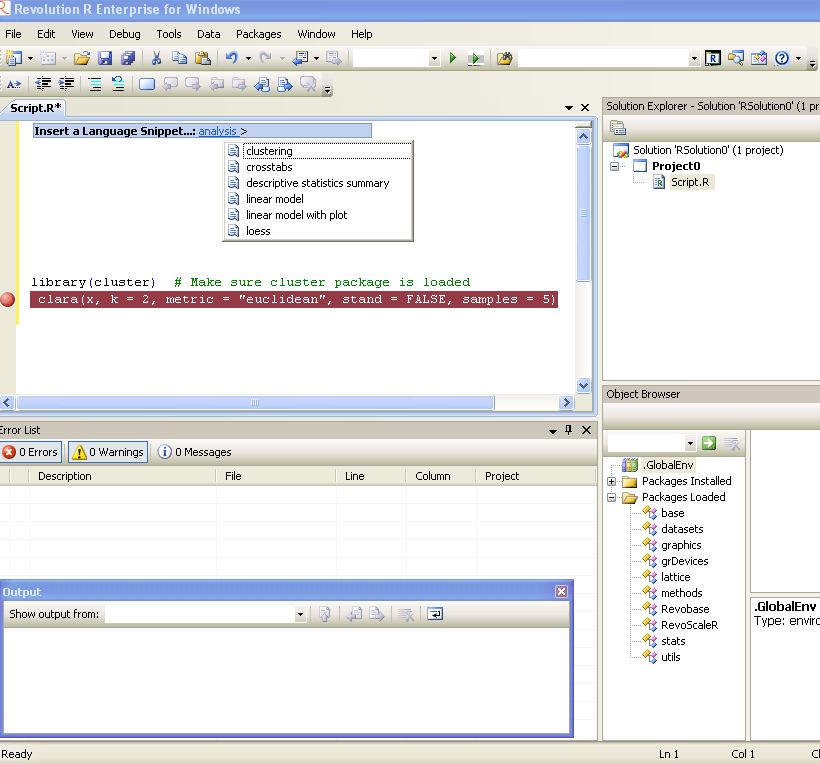
Revolution R Enterprise 4.2

Revo R gets more and more yum yum-

he following new features:

  • Direct import of SAS data sets into the native, efficient XDF file format
  • Direct import of fixed-format text data files into XDF file format
  • New commands to read subsets of rows and variables from XDF files in memory;
  • Many enhancements to the R Productivity Environment (RPE) for Windows
  • Expanded and updated user documentation
  • Added support on Linux for the big-data statistics package RevoScaleR
  • Added support on Windows for Web Services integration of predictive analytics with RevoDeployR.

Revolution R Enterprise 4.2 is available immediately for 64-bit Red Hat Enterprise Linux systems and both 32-bit and 64-bit Windows systems. Pricing starts at $1,000 per single-user workstation

And its free for academic licenses- so come on guys it is worth  atleast one download, and test.

http://www.revolutionanalytics.com/downloads/free-academic.php


SAS to R Challenge: Unique benchmarking

Flag of Town of Cary
Image via Wikipedia

An interesting announcemnet from Revolution Analytics promises to convert your legacy code in SAS language not only cheaper but faster. It’ s a very very interesting challenge and I wonder how SAS users ,corporates, customers as well as the Institute itself reacts

http://www.revolutionanalytics.com/sas-challenge/

Take the SAS to R Challenge

Are you paying for expensive software licenses and hardware to run time-consuming statistical analyses on big data sets?

If you’re doing linear regressions, logistic regressions, predictions, or multivariate crosstabulations* there’s something you should know: Revolution Analytics can get the same results for a substantially lower cost and faster than SAS®.

For a limited time only, Revolution Analytics invites you take the SAS to R Challenge. Let us prove that we can deliver on our promise of replicating your results in R, faster and cheaper than SAS.

Take the challenge

Here’s how it works:

Fill out the short form below, and one of our conversion experts will contact you to discuss the SAS code you want to convert. If we think Revolution R Enterprise can get the same results faster than SAS, we’ll convert your code to R free of charge. Our goal is to demonstrate that Revolution R Enterprise will produce the same results in less time. There’s no obligation, but if you choose to convert, we guarantee that your license cost for Revolution R Enterprise will be less than half what you’re currently paying for the equivalent SAS software.**

It’s that simple.

We’ll show you that you don’t need expensive hardware and software to do high quality statistical analysis of big data. And we’ll show that you don’t need to tie up your computing resources with long running operations. With Revolution R Enterprise, you can run analyses on commodity hardware using Linux or Windows, scale to terabyte-class data problems and do it at processing speeds you would never have thought possible.

Sign up now, and we will be in touch shortly.

Take the challenge


—————————-

SAS is a registered trademark of the SAS Institute, Cary, NC, in the US and other countries.

*Additional statistical algorithms are being rapidly added to Revolution R Enterprise. Custom development services are also available.

**Revolution Analytics retains the right to determine eligibility for this offer. Offer available until March 31, 2011.