Tools for Hackers:Beginners

How to disguise your IP Address from your most wonderful glorious leaders-

From


https://www.torproject.org/projects/torbrowser.html.en

Tor Browser Bundle


The Tor software protects you by bouncing your communications around a distributed network of relays run by volunteers all around the world: it prevents somebody watching your Internet connection from learning what sites you visit, it prevents the sites you visit from learning your physical location, and it lets you access sites which are blocked.

The Tor Browser Bundle lets you use Tor on Windows, Mac OS X, or Linux without needing to install any software. It can run off a USB flash drive, comes with a pre-configured web browser, and is self-contained. The Tor IM Browser Bundleadditionally allows instant messaging and chat over Tor. If you would prefer to use your existing web browser, install Tor permanently, or if you don’t use Windows, see the other ways to download Tor.

Freedom House has produced a video on how to find and use the Tor Browser Bundle. If you don’t see a video below, view it at Youtube . Know of a better video or one translated into your language? Let us know!


and if you now want to see or check your own website for a Denial of Service attack , download this

http://sourceforge.net/projects/loic/

This is the software for which 32 Turkish teenagers got arrested for bringing down their govt websites. Do NOT USE it for ILLEGAL purposes,

because 1) it is hosted on a western website that due to Patriot Act would tracking downloads as well as most likely be inserting some logging code into your computer (especially if you are still on Windows)

2) Turkey being a NATO member got rather immediate notice of this – which makes it very likely that this tool is compromised in the Western Hemisphere. You can probably use this in Eastern Hemisphere country excluding Israel, Turkey, China, India ,Korea or Japan because these countries do have sophisticated hackers working for the government as well.

3) This is just a beginners tool to understand how flooding a website with requests work.

http://sourceforge.net/projects/loic/files/

Basically download, unzip the file

Enter URL and click Lock on to know IP address.

use HTTP Method. Make say 1000 threads.

Then press the IMMA CHARGING MY LAZER big button.

Note the Failed Tab tells you how good or bad this method is.

Note – it wont work on my blogs hosted on wordpress.com- but then those blogs had a root level breach some time back. It did work on both my blogspot and my tumblr blogs, and it completely shattered my son’s self hosted wordpress blog (see below)


RStudio 3- Making R as simple as possible but no simpler

From the nice shiny blog at http://blog.rstudio.org/, a shiny new upgraded software (and I used the Cobalt theme)–this is nice!

awesome coding!!!


http://www.rstudio.org/download/

Download RStudio v0.94

Diagram desktop

If you run R on your desktop:

Download RStudio Desktop

OR

Diagram server

If you run R on a Linux server and want to enable users to remotely access RStudio using a web browser:

Download RStudio Server


RStudio v0.94 — Release Notes

June 15th, 2011


New Features and Enhancements

Source Editor and Console

  • Run code:
    • Run all lines in source file
    • Run to current line
    • Run from current line
    • Redefine current function
    • Re-run previous region
    • Code is now run line-by-line in the console
  • Brace, paren, and quote matching
  • Improved cursor placement after newlines
  • Support for regex find and replace
  • Optional syntax highlighting for console input
  • Press F1 for help on current selection
  • Function navigation / jump to function
  • Column and line number display
  • Manually set/switch document type
  • New themes: Solarized and Solarized Dark

Plots

  • Improved image export:
    • Formats: PNG, JPEG, TIFF, SVG, BMP, Metafile, and Postscript
    • Dynamic resize with preview
    • Option to maintain aspect ratio when resizing
    • Copy to clipboard as bitmap or metafile
  • Improved PDF export:
    • Specify custom sizes
    • Preview before exporting
  • Remove individual plots from history
  • Resizable plot zoom window

History

  • History tab synced to loaded .Rhistory file
  • New commands:
    • Load and save history
    • Remove individual items from history
    • Clear all history
  • New options:
    • Load history from working directory or global history file
    • Save history always or only when saving .RData
    • Remove duplicate entries in history
  • Shortcut keys for inserting into console or source

Packages

  • Check for package updates
  • Filter displayed packages
  • Install multiple packages
  • Remove packages
  • New options:
    • Install from repository or local archive file
    • Target library
    • Install dependencies

Miscellaneous

  • Find text within help topic
  • Sort file listing by name, type, size, or modified
  • Set working directory based on source file, files pane, or browsed for directory.
  • Console titlebar button to view current working directory in files pane
  • Source file menu command
  • Replace space and dash with dot (.) in import dataset generated variable names
  • Add decimal separator preference for import dataset
  • Added .tar.gz (Linux) and .zip (Windows) distributions for non-admin installs
  • Read /etc/paths.d on OS X to ensure RStudio has the same path as terminal sessions do
  • Added manifest to rsession.exe to prevent unwanted program files and registry virtualization

Server

  • Break PAM auth into its own binary for improved compatibility with 3rd party PAM authorization modules.
  • Ensure that AppArmor profile is enforced even after reboot
  • Ability to add custom LD library path for all sessions
  • Improved R discovery:
    • Use which R then fallback to scanning for R script
    • Run R discovery unconfined then switch into restricted profile
  • Default to uncompressed save.image output if the administrator or user hasn’t specified their own options (improved suspend/resume performance)
  • Ensure all running sessions are automatically updated during server version upgrade
  • Added verify-installation command to rstudio-server utility for easily capturing configuration and startup related errors


Bug Fixes

Source Editor

  • Undo to unedited state clears now dirty bit
  • Extract function now captures free variables used on lhs
  • Selected variable highlight now visible in all themes
  • Syncing to source file updates made outside of RStudio now happens immediately at startup and does not cause a scroll to the bottom of the document.
  • Fixed various issues related to copying and pasting into word processors
  • Fixed incorrect syntax highlighting issues in .Rd files
  • Make sure font size for printed source files matches current editor setting
  • Eliminate conflict with Ctrl+F shortcut key on OS X
  • Zoomed Google Chrome browser no longer causes cursor position to be off
  • Don’t prevent opening of unknown file types in the editor

Console

  • Fixed sporadic missing underscores (and other bottom clipping of text) in console
  • Make sure console history is never displayed offscreen
  • Page Up and Page Down now work properly in the console
  • Substantially improved console performance for both rapid output and large quantities of output

Miscellaneous

  • Install successfully on Windows with special characters in home directory name
  • make install more tolerant of configurations where it can’t write into /usr/share
  • Eliminate spurious stderr output in forked children of multicore package
  • Ensure that file modified times always update in the files pane after a save
  • Always default to installing packages into first writeable path of .libPaths()
  • Ensure that LaTeX log files are always preserved after compilePdf
  • Fix conflicts with zap function from epicalc package
  • Eliminate shortcut key conflicts with Ubuntu desktop workspace switching shortcuts
  • Always prompt when attempting to save files of the same name
  • Maximized main window now properly restored when reopening RStudio
  • PAM authorization works correctly even if account has password expiration warning
  • Correct display of manipulate panel when Plots pane is on the left


Previous Release Notes


Free and Open Source cannot get basic economics correct

Nutch robots
Image via Wikipedia

Before you rev up those keyboards, and shoot off a snarky comment- consider this statement- there are many ways to run (and ruin economies). But they still have not found a replacement for money. Yes Happiness is important. Search Engine is good.

So unless they start a new branch of economics with lots more motivational theory and psychology and lot less quant especially for open source projects, money ,revenue, sales is the only true measure of success in enterprise software. Particularly if you have competitors who are making more money selling the same class of software.

Popularity contests are for high school quarterbacks —so even if your open source software is popular in downloads, email discussions, stack overflow or Continue reading “Free and Open Source cannot get basic economics correct”

Libre Office turns six

On September 28th, 2010, The Document Foundation was announced. The last six months, it feels, have just passed within a short glimpse of time. Not only did we release three LibreOffice versions within three months, have created the LibreOffice-Box DVD image, and brought LibreOffice Portable on its way. We also have announced the LibreOffice Conference for October 2011 and have taken part in lots of events worldwide, with FOSDEM and CeBIT being the most prominent ones.

People follow us at Twitter, Identi.ca, XING, LinkedIn and a Facebook group and fan page, they discuss on our mailing lists with more than 6.000 subscriptions, collaborate in our wiki, get insight on our daily work in our blog, and post and blog themselves. From the very first day, openness, transparency and meritocracy have been shaping the framework we want to work in. Our discussions and decisions take place on a public mailing list, and regularly, we hold phone conferences for the Steering Committee and for the marketing teams, where everyone is invited to join. Our ideas and visions have made their way into our Next Decade Manifesto.

We have joined the Open Invention Network as well as the OpenDoc Society, and just last week have become an SPI-associated project, and we see a wide range of support from all over the world. Not only do Novell and Red Hat support our efforts with developers, but just recently, Canonical, creators of Ubuntu, joined as well. All major Linux distributions deliver LibreOffice with their operating systems, and more follow every day.

One of the most stunning contributions, that still leaves us speechless, is the support that we receive from the community. When we asked for 50,000 € capital stock for a German-based foundation, the community showed their support, appreciation and their power, and not only donated it in just eight days, but up to now has supported us with close to 100,000 €! Another one is that driven by our open, vendor neutral approach, combined with our easy hacks, we have included code contributions from over 150 entirely new developers to the project, alongside localisations from over 50 localizers. The community has developed itself better than we could ever dream of, and first meetings like the project’s weekend or the QA meeting of the Germanophone group are already being organized.

What we have seen now is just the beginning of something very big. The Document Foundation has a vision, and the creation of the foundation in Germany is about to happen soon. LibreOffice has been downloaded over 350,000 times within the first week, and we just counted more than 1,3 million downloads just from our download system — not counting packages directly delivered by Linux distributors, other download sites or DVDs included in magazines and newspapers — supported by 65 mirrors from all over the world, and millions already use and contribute to it worldwide. With our participation in the Google Summer of Code, we will engage more students and young developers to be part of our community. Our improved release schedule will ensure that new features and improvements will make their way to end-users soon, and for testers, we even provide daily builds.

We are so excited by what has been achieved over the last six months, and we are immensely grateful to all those who have supported the project in whatever ways they can. It is an honour to be working with you, to be part of one united community! The future as we are shaping it has just begun, and it will be bright and excellent.


from-

List archive: http://listarchives.documentfoundation.org/www/announce/

iTunes finally gets some competition ?- Amazon Cloud Player


An interesting development is Amazon’s Cloud Player (though Cannonical may be credited for thinking of the idea first for Ubuntu One). Since Ubuntu One is dependent on the OS (and not the browser) this makes Amazon \s version more of a  mobile Cloud Player (as it seems to be an Android app and not an app that is independent of any platform, os or browser.

Since Android and Ubuntu are both Linux flavors, I am not sure if Cannonical has an exiting mobile app for Ubuntu One. Apple’s cloud plans also seems kind of ambiguous compared to Microsoft (Azure et al)

I guess we will have to wait for a true Cloud player.


http://www.amazon.com/b/ref=tsm_1_tw_s_dm_liujd5?node=2658409011&tag=cloudplayer-20

How to Get Started with Cloud Drive and Cloud Player


Step 1. Add music to Cloud Drive

Purchase a song or album from the Amazon MP3 Store and click the Save to Amazon Cloud Drive button when your purchase is complete. Your purchase will be saved for free.


Step 2. Play your music in Cloud Player for Web

Click the Launch Amazon Cloud Player button to start listening to your purchase. Add more music from your library by clicking theUpload to Cloud Drive button from the Cloud Player screen. Start with 5 GB of free Cloud Drive storage. Upgrade to 20 GB with an MP3 album purchase (see details). Use Cloud Player to browse and search your library, create playlists, and download to your computer.


Step 3. Enjoy your music on the go with Cloud Player for Android

Install the Amazon MP3 for Android app to use Cloud Player on your Android device. Shop the full Amazon MP3 store, save your purchases to Cloud Drive, stream your Cloud Player library, and download to your device right from your Android phone or tablet.

compare this with

https://one.ubuntu.com/music/

A cloud-enabled music store

The Ubuntu One Music Store is integrated with the Ubuntu One service making it a cloud-enabled digital music store. All purchases are transferred to your Ubuntu One personal cloud for safe storage and then conveniently downloaded to your synchronizing computers. And don’t worry aboutgoing over your storage quota with music purchases. You won’t need to pay more for personal cloud storage of music purchased from the Ubuntu One Music Store.

An Ubuntu One subscription is required to purchase music from the Ubuntu One Music Store. Choose from either the free 2 GB option or the 50 GB plan for $10 (USD) per month to synchronize more of your digital life.

5 regional stores and more in the works

  • The Ubuntu One Music requires Ubuntu 10.04 LTS and offers digital music through five regional stores.
  • The US, UK, and Germany stores offer music from all major and independent labels.
  • The EU store serves most of the EU member countries (2) and offers music from fewer major label artists.
  • The World store offers only independent label music and serves the countries not covered by the other regional stores.


What to do if you see a possible GPL violation

GNU Lesser General Public License
Image via Wikipedia

Well I have played with software (mostly but not exclusively) analytical, and I admire the zeal and energy of both open source and closed source practioners- all having relatively decent people executing strategies their investors or owners tell them to do (closed source) or motivated by their own self sense of cool-change the world-openness (open source)

What I dont get is people stealing open source code- repackaging without adding major contributions- claiming patent pending stuff- and basically making money by creating CLOSED source from the open source software-(as open source is yet to break the enterprise glass cieling)

you are either open source or you arent.

bi- sexuality is okay. bi-codability is not.

Next time you see someone stealing some community’s open source code- refer to this excellent link.


But, we cannot act on our own if we do not hold copyright. Thus, be sure to find out who the copyright holders of the software are before reporting a violation.

http://www.gnu.org/licenses/gpl-violation.html

Violations of the GNU Licenses

If you think you see a violation of the GNU GPLLGPLAGPL, or FDL, the first thing you should do is double-check the facts:

  • Does the distribution contain a copy of the License?
  • Does it clearly state which software is covered by the License? Does it say anything misleading, perhaps giving the impression that something is covered by the License when in fact it is not?
  • Is source code included in the distribution?
  • Is a written offer for source code included with a distribution of just binaries?
  • Is the available source code complete, or is it designed for linking in other non-free modules?

If there seems to be a real violation, the next thing you need to do is record the details carefully:

  • the precise name of the product
  • the name of the person or organization distributing it
  • email addresses, postal addresses and phone numbers for how to contact the distributor(s)
  • the exact name of the package whose license is violated
  • how the license was violated:
    • Is the copyright notice of the copyright holder included?
    • Is the source code completely missing?
    • Is there a written offer for source that’s incomplete in some way? This could happen if it provides a contact address or network URL that’s somehow incorrect.
    • Is there a copy of the license included in the distribution?
    • Is some of the source available, but not all? If so, what parts are missing?

The more of these details that you have, the easier it is for the copyright holder to pursue the matter.

Once you have collected the details, you should send a precise report to the copyright holder of the packages that are being misused. The copyright holder is the one who is legally authorized to take action to enforce the license.

If the copyright holder is the Free Software Foundation, please send the report to <license-violation@gnu.org>. It’s important that we be able to write back to you to get more information about the violation or product. So, if you use an anonymous remailer, please provide a return path of some sort. If you’d like to encrypt your correspondence, just send a brief mail saying so, and we’ll make appropriate arrangements.

Note that the GPL, and other copyleft licenses, are copyright licenses. This means that only the copyright holders are empowered to act against violations. The FSF acts on all GPL violations reported on FSF copyrighted code, and we offer assistance to any other copyright holder who wishes to do the same.

But, we cannot act on our own if we do not hold copyright. Thus, be sure to find out who the copyright holders of the software are before reporting a violation.


Top 10 Games on Linux -sudo update

The phrase "Doom clone" was initiall...
Image via Wikipedia

Here are some cool games I like to play on my Ubuntu 10.10 – I think they run on most other versions of Linux as well. 1) Open ArenaFirst person Shooter– This is like Quake Arena- very very nice graphics and good for playing for a couple of hours while taking a break. It is available here- http://openarena.ws/smfnews.php ideally if you have a bunch of gaming friends, playing on a local network or internet is quite mind blowing entertaining. And it’s free! 2) Armagetron– This is based on the TRON game of light cycles-It is available here at http://www.armagetronad.net/ or you can use Synaptic packages manager for all the games mentioned here

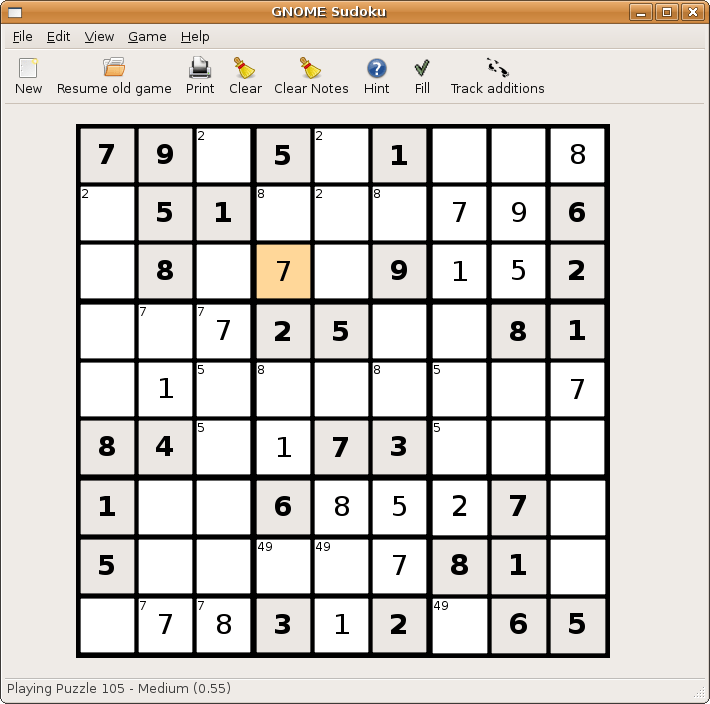
If violence or cars is not your stuff and you like puzzles like Sudoko, well just install the application Sudoko from http://gnome-sudoku.sourceforge.net/ Also recommended for people of various ages as it has multiple levels.

If you ever liked Pinball play the open source version from download at http://pinball.sourceforge.net/ Alternatively you can go to Ubuntu Software Centre>Games>Arcade>Emilio>Pinball and you can also build your own pinball if you like the game well enough. 5) Pacman/Njam- Clone of the original classic game.  Downloadable from http://www.linuxcompatible.org/news/story/pacman_for_linux.html 6) Gweled– This is free clone version of Bejeweled. It now has a new website at http://gweled.org/ http://linux.softpedia.com/progDownload/Gweled-Download-3449.html

Gweled is a GNOME version of a popular PalmOS/Windows/Java game called “Bejeweled” or “Diamond Mine”. The aim of the game is to make alignment of 3 or more gems, both vertically or horizontally by swapping adjacent gems. The game ends when there are no possible moves left. Here are some key features of “Gweled”: · exact same gameplay as the commercial versions · SVG original graphics

7) Hearts – For this card game classis you can use Ubuntu software to install the package or go to http://linuxappfinder.com/package/gnome-hearts 8) Card Games- KPatience has almost 14 card games including solitaire, and free cell. 9) Sauerbraten -First person shooter with good network play, edit maps capabilities. You can read more here- http://sauerbraten.org/ 10) Tetris-KBlocks Tetris is the classic game. If you like classic slow games- Tetris is the best. and I like the toughest Tetris game -Bastet http://fph.altervista.org/prog/bastet.html Even an xkcd toon for it