Google unleashes Fusion Tables

I just discovered Fusion Tables. There is life beyond the amazing Jeff’s Amazon Ec2/s3 after all!

Check out http://www.google.com/fusiontables/public/tour/index.html

Gather, visualize and share data online

Don’t have a Google Account?
Create one now

  • Visualize and publish your data as maps, timelines and charts
  • Host your data tables online
  • Combine data from multiple people

data table turns into map

Google Fusion Tables is a modern data management and publishing web application that makes it easy
to host, manage, collaborate on, visualize, and publish data tables online.

What can I do with Google Fusion Tables?

Import your own data
Upload data tables from spreadsheets or CSV files, even KML. Developers can use the Fusion Tables API to insert, update, delete and query data programmatically. You can export your data as CSV or KML too.

Visualize it instantly
See the data on a map or as a chart immediately. Use filters for more selective visualizations.

Publish your visualization on other web properties
Now that you’ve got that nice map or chart of your data, you can embed it in a web page or blog post. Or send a link by email or IM. It will always display the latest data values from your table and helps you communicate your story more easily.

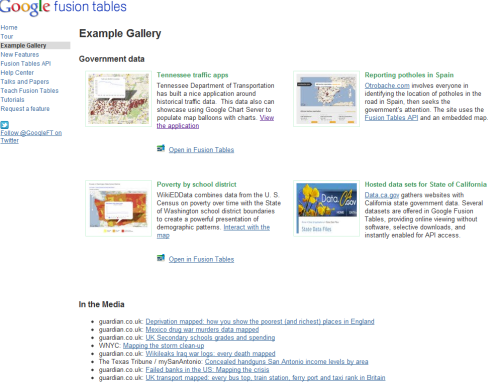
Look at the Fusion Tables Example Gallery

at https://sites.google.com/site/fusiontablestalks/stories

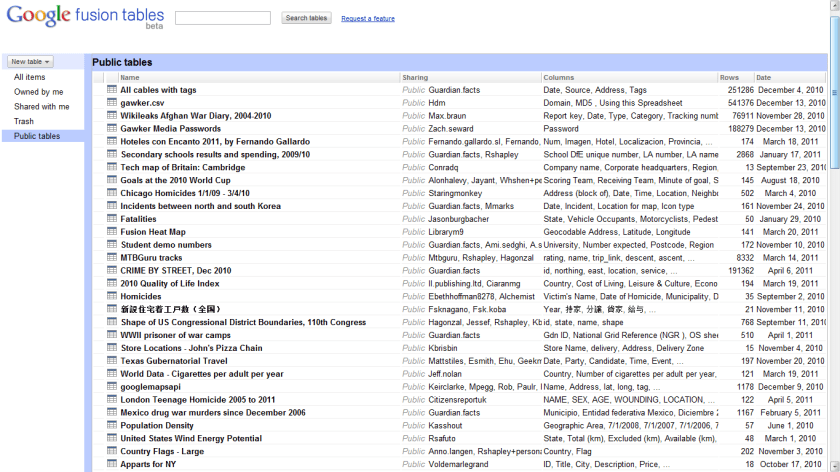
If you are worried about data.gov closing down, heres a snapshot of Fusion Table Public datasets.


The Latest GUI for R- BioR

Once more a spanking new shiny software –

Bio7 is a integrated development environment for ecological modelling based on the Rich-Client-Platformconcept of the Java IDE Eclipse. The Bio7 platform contains several perspectives which arrange several views for a special purpose useful for the development and analysis of ecological models. One special perspective bundles a feature rich GUI (Graphical User Interface) for the statistical software R.
For the bidirectional communication between Java and R the Rserve application is used (as a backend to evaluate R code and transfer data from and to Java).
The Bio7 R perspective (see figure below) is divided into a R-Shell view on the left side (conceptual the R side) and a Table view on the right side (conceptual the Java side).
Data can be imported to a spreadsheet, edited and then transferred to the R workspace. Vice versa data from R can be transferred to a sheet of the Table view and then exported e.g. to an Excel or OpenOffice file.

and

General:

Built upon Eclipse 3.6.1.

Now works with the latest Java version! (Windows version bundled with the latest JRE release).

Removed the Soil perspective (now soils can be modeled with ImageJ (float precision). Active images can be displayed in the 3D discrete view (new example available).

Removed the database perspective and the plant layer. You can now built any discrete models without any plant layer.

Removed several controls in the Control view. Added the “Custom Controls” view. In addition ported the Swing component of the Time panel to Swt.

Deleted the avi to swf converter in the ImageJ menu.

Now patterns can be saved with opened Java editor source. If this file is reopened and dragged on Bio7 the pattern is loaded, the source is compiled and the setup method (if available) is executed. In this way model files can be used for presentations ->drag, setup and run. The save actions are located in the Speadsheet view toolbar.

More options available to disable panel painting and recording of values (if not needed for speed!).

New Setup button in the toolbar of Bio7 to trigger a compiled setup method if available.

Removed the load and save pattern buttons from the toolbar of Bio7. Discrete patterns can now be stored with the available action in the spreadsheet view menu.

New P2 Update Manager available in Bio7.

Updated the Janino Compiler.

New HTML perspective added with a view which embeds the TinyMC editor.

New options to disable painting operations for the discrete panels.

New option to explicitly enable scripts at startup (for a faster startup).

Quadgrid (Hexgrid)

Only states are now available which can be created in the “Spreadsheet” view menu easily. Patterns can be stored and restored as usual but are now stored in an *.exml file.

New method to transfer the quadgrid pattern as a matrix to R.

New method to transfer the population data of all quadgrid states to R.

ImageJ:

Update to the latest version (with additional fixes).

Fixed a bug to rename the image.

Thumbnail browser can now open images recursevely(limited to 1000 pics), the magnifiyng glass can be disabled, too.

Plugins can be installed dynamically with a drag and drop operation on the ImageJ view or toolbar (as known from ImageJ).

Installed plugins now extend the plugin menu as submenus or subsubmenus (not finished yet!).

Plugins can now be created with the Java editor. New Bio7 Wizard available to create a plugin template.

Compiled Java files can be added to a *.jar file with a new available action in the Navigator view (if you rightclick on the files in the Navigator). In this way ImageJ plugins can be packaged in a *.jar.

Floweditor:

Fixed a repaint bug in the debug mode of a flow (now draws correctly the active shape in the flow).

Resize with Strg+Scrollwheel works again.

Comments with more than one line works again.

New Test action to verify connections in a flow.

Debug mode now shows all executed Shapes.

Integrated more default tests (for the verification of a regular flow).

A mouse-click now deletes colored shapes in a flow (e.g. in debug mode).

Points panel:

Integrated (dynamic) Voronoi, Delauney visualization (with area and clip to rectangle action).

Points coordinates can now be set in double precision.

Transfer of point coordinates to R now in double precision.

Bio7 Table:

New import and export of Excel 2007 OOXML.

Row headers can now be resized with the mouse device.

R:

Updated R (2.12.1) and Rserve (0.6.3) to the latest version.

New help action in the R-Shell view.

New action to display help for R specific commands in the embedded Bio7 browser (which opens automatically).

New Key actions to copy the selected variable names to the expression dialog (c=cocatenate (+), a=add (,)).

New action to transfer character or numeric vectors horizontally or vertically in an opened spread (Table view) at selection coordinates.

Empty spaces in the filepath are now allowed under Windows if Rserve is started with a system shell or the RGUI (for the tempfile select a location in the Preferences dialog which is writeable) is started.This works also for the RGUI action.

Improved the search for the “Install packages” action (option “Case Sensitive” added).

API:

New API methods available!

And:

Many fixes since the last version!


Installation

Important information:

A certain firewall software can corrupt the Bio7 *.zip file (as well as other files).
Please ensure that you have downloaded a functioning Bio7 1.5 version. In addition it is also reported that a certain antivirus software detects the bundled R software (on Windows) as malware. Often the R specific “open.exe” is detected as malware. Please use a different scanner to make sure that the software is not infected if you have any doubts. For more details see:

http://r.789695.n4.nabble.com/trojan-at-current-development-version-td3244348.html


PSPP – SPSS 's Open Source Counterpart

A Bold GNU Head
Image via Wikipedia

New Website for Windows Installers for PSPP– try at your own time if you are dedicated to either SPSS or free statistical computing.

http://pspp.awardspace.com/

This page is intended to give a stable root for downloading the PSPP-for-Windows setup from free mirrors.

Highlights of the current PSPP-for-Windows setup
PSPP info:

Current version: Master version = 0.7.6
Release date: See filenames
Information about PSPP: http://www.gnu.org/software/pspp
PSPP Manual: PDF or HTML
(current version will be installed on your PC by the installer package)
Package info:

Windows version: Windows XP and newer
Package Size: 15 Mb
Size on disk: 34 Mb
Technical: MinGW based
Cross-compiled on openSUSE 11.3

Downloads:
There are issues with the latest build. Some users report crashes on their systems on other systems it works fine.

Version Installer for multi-user installation.
Administrator privileges required.
Recommended version.
Installer for single-user installation.
No administrator privileges required
0.7.6-g38ba1e-blp-build20101116
0.7.5-g805e7e-blp-build20100908
0.7.5-g7803d3-blp-build20100820
0.7.5-g333ac4-blp-build20100727
PSPP-Master-2010-11-16
PSPP-Master-2010-09-08
PSPP-Master-2010-08-20
PSPP-Master-2010-07-27
PSPP-Master-single-user-2010-11-16
PSPP-Master-single-user-2010-09-08
PSPP-Master-single-user-2010-08-20
PSPP-Master-single-user-2010-07-27


Sources can be found here.

Also see http://en.wikipedia.org/wiki/PSPP

At the user’s choice, statistical output and graphics are done in ASCIIPDFPostScript or HTML formats. A limited range of statistical graphs can be produced, such as histogramspie-charts and np-charts.

PSPP can import GnumericOpenDocument and Excel spreadsheetsPostgres databasescomma-separated values– and ASCII-files. It can export files in the SPSS ‘portable’ and ‘system’ file formats and to ASCII files. Some of the libraries used by PSPP can be accessed programmatically; PSPP-Perl provides an interface to the libraries used by PSPP.

and

http://www.gnu.org/software/pspp/

A brief list of some of the features of PSPP follows:

  • Supports over 1 billion cases.
  • Supports over 1 billion variables.
  • Syntax and data files are compatible with SPSS.
  • Choice of terminal or graphical user interface.
  • Choice of text, postscript or html output formats.
  • Inter-operates with GnumericOpenOffice.Org and other free software.
  • Easy data import from spreadsheets, text files and database sources.
  • Fast statistical procedures, even on very large data sets.
  • No license fees.
  • No expiration period.
  • No unethical “end user license agreements”.
  • Fully indexed user manual.
  • Free Software; licensed under GPLv3 or later.
  • Cross platform; Runs on many different computers and many different operating systems.


Viva Libre Office

WordPerfect 5.1 for DOS.
Image via Wikipedia

The Document Foundation is happy to announce the release candidate of
LibreOffice 3.3.1. This release candidate is the first in a series of
frequent bugfix releases on top of our LibreOffice 3.3 product. Please
be aware that LibreOffice 3.3.1 RC1 is not yet ready for production
use, you should continue to use LibreOffice for that.

http://listarchives.documentfoundation.org/www/announce/msg00028.html

Following is the list of changes against LibreOffice 3.3:

Key changes at a glance:

* Numerous translation updates
* new mimetype icons for LibreOffice – explained here:
http://luxate.blogspot.com/2011/01/not-even-included-but-already-improved.html
* quite a few crasher fixes

Detailed change log:

* translation updates
* Removed old/unmaintained icon themes
* Fix for https://bugzilla.novell.com/show_bug.cgi?id=664516: Don’t
use a reference or the default formula string will be changed
* Install bash completion for oo* wrappers when enabled
(https://bugzilla.novell.com/show_bug.cgi?id=665402)
* Build fix: get the stlport compat workaround working for gcc 4.6.0
* Build fix: no ddraw.h or ddraw.lib in the June 2010 DirectX SDK,
removed usage
* Windows installer: padded nologobanner.bmp, new size is 102×58
* removed gd – Gaelic, ky – Kirghiz, pap – Papiamento, ti – Tigrinya,
ms – Malay, ps – Pashto, ur – Urdu. UI localization does not exist
in these languages. So it makes no sense to ship packages.
* Build fix: pass thru PYTHON, found by configure. Will be used by
filter/source/config/fragments/makefile.mk.
* Upgraded libwpd (WordPerfect filter) to 0.9.1
* Fixed BrOffice Windows start menu branding
* Removed language code ‘kid’. kid is not Koshin, but key id pseudo
language which is good for debugging UI but should no be included
in the product
* Added ca_XV and ast language/local name and description
* Fixed incorrect page number in page preview mode
(https://bugs.freedesktop.org/show_bug.cgi?id=33155). When the
window is large enough to show several ‘Page X’ strings,
the page number was not properly incremented.
* Fixed incorrect import of cell attributes from Excel
documents. When a cell with non-default formatting attribute starts
with non-first row in a column, the filter would incorrectly apply
the same format to all the cells above it if they didn’t have any
formats.
* Ubuntu: fix for lp#696527 – enable human icon theme in LibreOffice
* Fix for https://bugzilla.redhat.com/show_bug.cgi?id=673819 crash on
changing position of drawing object in header.
* Changed OpenOffice.org to LibreOffice in nsplugin
* Added Occitan dictionary
* Added Ukrainian dictionaries
* Fix window focus for langpack installation on Mac –
https://bugs.freedesktop.org/show_bug.cgi?id=33056
* Added/modified NLPsolver translations from Pootle
* Fix for https://bugzilla.novell.com/show_bug.cgi?id=655763
* Fix for RTF export crasher
(https://bugzilla.novell.com/show_bug.cgi?id=656503)
* Use LibreOffice as product name for EPS Creator header
* Parse svg ‘color’ property (fixes
https://bugs.freedesktop.org/show_bug.cgi?id=33551)
* Use double instead of float in writerfilter import
* Build fix: use PYTHON as passed through by set_soenv.in.
* Fix for https://bugs.freedesktop.org/show_bug.cgi?id=33237 remove
debug line
* Fix for https://bugs.freedesktop.org/show_bug.cgi?id=33237 – fixes
ole object import for writer (docx)
* Fix for https://bugs.freedesktop.org/show_bug.cgi?id=33249
rename OOo -> LibO on Getting Support Page
* Fix ooxml import: handle css::table::BorderLine in addition to
css::table::BorderLine2 That means that table cell properties are
correctly set on import again.
* Fix for https://bugs.freedesktop.org/show_bug.cgi?id=33258
wikihelp: Improve the check for existence of the localized help.
* Fix for https://bugs.freedesktop.org/show_bug.cgi?id=33994 – fixes
several crashes around config UNO API
* Fix for https://bugs.freedesktop.org/show_bug.cgi?id=30879
* Fix for https://bugs.freedesktop.org/show_bug.cgi?id=32872
Implementation names weren’t matching with xcu.
* Fix: don’t pushback and process a corrupt extension
* Fix: wikihelp – do not check for existence of the localized
help. In case we do not have the help installed, it is up to the
online service to decide the fallback in case a language version is
not available.
* Fix README: change su urpmi to sudo urpmi for Mandriva section
* Fix README formatting –
https://bugs.freedesktop.org/show_bug.cgi?id=32741 – using CRLF
instead of LF on WIN platform
* Fix README: word wrap at column 75 for better readability
* Build fix: KDE3 library search order
(https://bugs.freedesktop.org/show_bug.cgi?id=32797). Use LINKFLAGS
instead of STDLIBS.
* Start using technical.dic instead of oracle.dic
(https://bugs.freedesktop.org/show_bug.cgi?id=31798)
* Build fix: add explicit QRegion* for clipRegion to fix compile of
kde backend
* Cleanup: removed obsolete m_bSingleAltPress
* Remove the menu when Left Alt Key was pressed for GTK
* Fix for https://bugs.freedesktop.org/show_bug.cgi?id=33459: use
year of era in long format for zh_TW by default
* Fix wrong collation for Catalan language
* Fix for https://bugs.freedesktop.org/show_bug.cgi?id=31271 wrong
line break with “(”
* Fix for https://bugs.freedesktop.org/show_bug.cgi?id=32561 – crash
when iterating over the database types.
* Default currency for Estonia should be Euro – fixes
https://bugs.freedesktop.org/show_bug.cgi?id=33160
* Avoid a pointless GetHelpText() call in the toolbox. Fixes
https://bugs.freedesktop.org/show_bug.cgi?id=33315. GetHelpText()
can be quite heavy, see
https://bugs.freedesktop.org/show_bug.cgi?id=33088.
* Paint toolbar handle positioned properly
(https://bugs.freedesktop.org/show_bug.cgi?id=32558)
* Build fix: move cxxabi.h after stl headers to workaround gcc 4.6.0
and stlport
* Fix for https://bugs.freedesktop.org/show_bug.cgi?id=33355
manipulate also the C runtime’s environment
* Fix for CTL/Other Default Font #i25247#, #i25561#, #i48064#,
#i92341#
* RTF export crasher
(https://bugzilla.novell.com/show_bug.cgi?id=656503)
* Fixed an infinite loop in RTF exporter
* UI: translations need more space on word count dialog, made space
for it.
* Fix for https://bugzilla.novell.com/show_bug.cgi?id=660816 improve
formfield checkbox binary export (and import)

Again a BIG Thank You!

Again whats Libre Office

What does LibreOffice give you?

Writer is the word processor inside LibreOffice. Use it for everything, from dashing off a quick letter to producing an entire book with tables of contents, embedded illustrations, bibliographies and diagrams. The while-you-type auto-completion, auto-formatting and automatic spelling checking make difficult tasks easy (but are easy to disable if you prefer). Writer is powerful enough to tackle desktop publishing tasks such as creating multi-column newsletters and brochures. The only limit is your imagination.

Calc tames your numbers and helps with difficult decisions when you’re weighing the alternatives. Analyze your data with Calc and then use it to present your final output. Charts and analysis tools help bring transparency to your conclusions. A fully-integrated help system makes easier work of entering complex formulas. Add data from external databases such as SQL or Oracle, then sort and filter them to produce statistical analyses. Use the graphing functions to display large number of 2D and 3D graphics from 13 categories, including line, area, bar, pie, X-Y, and net – with the dozens of variations available, you’re sure to find one that suits your project.

Impress is the fastest and easiest way to create effective multimedia presentations. Stunning animation and sensational special effects help you convince your audience. Create presentations that look even more professional than the standard presentations you commonly see at work. Get your collegues’ and bosses’ attention by creating something a little bit different.

Draw lets you build diagrams and sketches from scratch. A picture is worth a thousand words, so why not try something simple with box and line diagrams? Or else go further and easily build dynamic 3D illustrations and special effects. It’s as simple or as powerful as you want it to be.

Base is the database front-end of the LibreOffice suite. With Base, you can seamlessly integrate your existing database structures into the other components of LibreOffice, or create an interface to use and administer your data as a stand-alone application. You can use imported and linked tables and queries from MySQL, PostgreSQL or Microsoft Access and many other data sources, or design your own with Base, to build powerful front-ends with sophisticated forms, reports and views. Support is built-in or easily addable for a very wide range of database products, notably the standardly-provided HSQL, MySQL, Adabas D, Microsoft Access and PostgreSQL.

Math is a simple equation editor that lets you lay-out and display your mathematical, chemical, electrical or scientific equations quickly in standard written notation. Even the most-complex calculations can be understandable when displayed correctly. E=mc2.

LibreOffice also comes configured with a PDF file creator, meaning you can distribute documents that you’re sure can be opened and read by users of almost any computing device or operating system.

Download LibreOffice now and try it out today.

http://www.libreoffice.org/features/


Lyx Releases 2

Ubuntu Login
Image via Wikipedia

Lyx releases new version- now if only there was a SIMPLE way to put R code in a Lyx existing text class (having tried Sweave and sweaved myself into knots ! 😦

and I hope Ubuntu Linux 10.10  netbook fixes the curious case of disappearing menu bar in Lyx

see https://bugs.launchpad.net/ubuntu/+source/indicator-appmenu/+bug/619811

(Hint start Lyx using from the terminal:
QT_X11_NO_NATIVE_MENUBAR=1 lyx)

Latest News from the

http://www.lyx.org/News#item2

We are pleased to announce the release of LyX 1.6.9


Beta Release: LyX 2.0.0 beta 4 released.

February 6, 2011

We are pleased to announce the fourth public pre-release of LyX 2.0.0.
Except usual bugfixing we fixed random crashes connected with the new background export and compilation feature.

As far as new features is considered it is now possible

  • to set the table width,
  • customize the language package per document,
  • export LyX files as a single archive containing linked material (e.g. images) directly via export menu.


Since this is most probably the last beta release we also added convertor for old (1.6) preference files which are automatically checked on the startup now.


R Commander Plugins-20 and growing!

First graphical user interface in 1973.
Image via Wikipedia
R Commander Extensions: Enhancing a Statistical Graphical User Interface by extending menus to statistical packages

R Commander ( see paper by Prof J Fox at http://www.jstatsoft.org/v14/i09/paper ) is a well known and established graphical user interface to the R analytical environment.
While the original GUI was created for a basic statistics course, the enabling of extensions (or plug-ins  http://www.r-project.org/doc/Rnews/Rnews_2007-3.pdf ) has greatly enhanced the possible use and scope of this software. Here we give a list of all known R Commander Plugins and their uses along with brief comments.

  1. DoE – http://cran.r-project.org/web/packages/RcmdrPlugin.DoE/RcmdrPlugin.DoE.pdf
  2. doex
  3. EHESampling
  4. epack- http://cran.r-project.org/web/packages/RcmdrPlugin.epack/RcmdrPlugin.epack.pdf
  5. Export- http://cran.r-project.org/web/packages/RcmdrPlugin.Export/RcmdrPlugin.Export.pdf
  6. FactoMineR
  7. HH
  8. IPSUR
  9. MAc- http://cran.r-project.org/web/packages/RcmdrPlugin.MAc/RcmdrPlugin.MAc.pdf
  10. MAd
  11. orloca
  12. PT
  13. qcc- http://cran.r-project.org/web/packages/RcmdrPlugin.qcc/RcmdrPlugin.qcc.pdf and http://cran.r-project.org/web/packages/qcc/qcc.pdf
  14. qual
  15. SensoMineR
  16. SLC
  17. sos
  18. survival-http://cran.r-project.org/web/packages/RcmdrPlugin.survival/RcmdrPlugin.survival.pdf
  19. SurvivalT
  20. Teaching Demos

Note the naming convention for above e plugins is always with a Prefix of “RCmdrPlugin.” followed by the names above
Also on loading a Plugin, it must be already installed locally to be visible in R Commander’s list of load-plugin, and R Commander loads the e-plugin after restarting.Hence it is advisable to load all R Commander plugins in the beginning of the analysis session.

However the notable E Plugins are
1) DoE for Design of Experiments-
Full factorial designs, orthogonal main effects designs, regular and non-regular 2-level fractional
factorial designs, central composite and Box-Behnken designs, latin hypercube samples, and simple D-optimal designs can currently be generated from the GUI. Extensions to cover further latin hypercube designs as well as more advanced D-optimal designs (with blocking) are planned for the future.
2) Survival- This package provides an R Commander plug-in for the survival package, with dialogs for Cox models, parametric survival regression models, estimation of survival curves, and testing for differences in survival curves, along with data-management facilities and a variety of tests, diagnostics and graphs.
3) qcc -GUI for  Shewhart quality control charts for continuous, attribute and count data. Cusum and EWMA charts. Operating characteristic curves. Process capability analysis. Pareto chart and cause-and-effect chart. Multivariate control charts
4) epack- an Rcmdr “plug-in” based on the time series functions. Depends also on packages like , tseries, abind,MASS,xts,forecast. It covers Log-Exceptions garch
and following Models -Arima, garch, HoltWinters
5)Export- The package helps users to graphically export Rcmdr output to LaTeX or HTML code,
via xtable() or Hmisc::latex(). The plug-in was originally intended to facilitate exporting Rcmdr
output to formats other than ASCII text and to provide R novices with an easy-to-use,
easy-to-access reference on exporting R objects to formats suited for printed output. The
package documentation contains several pointers on creating reports, either by using
conventional word processors or LaTeX/LyX.
6) MAc- This is an R-Commander plug-in for the MAc package (Meta-Analysis with
Correlations). This package enables the user to conduct a meta-analysis in a menu-driven,
graphical user interface environment (e.g., SPSS), while having the full statistical capabilities of
R and the MAc package. The MAc package itself contains a variety of useful functions for
conducting a research synthesis with correlational data. One of the unique features of the MAc
package is in its integration of user-friendly functions to complete the majority of statistical steps
involved in a meta-analysis with correlations. It uses recommended procedures as described in
The Handbook of Research Synthesis and Meta-Analysis (Cooper, Hedges, & Valentine, 2009).

A query to help for ??Rcmdrplugins reveals the following information which can be quite overwhelming given that almost 20 plugins are now available-

RcmdrPlugin.DoE::DoEGlossary
Glossary for DoE terminology as used in
RcmdrPlugin.DoE
RcmdrPlugin.DoE::Menu.linearModelDesign
RcmdrPlugin.DoE Linear Model Dialog for
experimental data
RcmdrPlugin.DoE::Menu.rsm
RcmdrPlugin.DoE response surface model Dialog
for experimental data
RcmdrPlugin.DoE::RcmdrPlugin.DoE-package
R-Commander plugin package that implements
design of experiments facilities from packages
DoE.base, FrF2 and DoE.wrapper into the
R-Commander
RcmdrPlugin.DoE::RcmdrPlugin.DoEUndocumentedFunctions
Functions used in menus
RcmdrPlugin.doex::ranblockAnova
Internal RcmdrPlugin.doex objects
RcmdrPlugin.doex::RcmdrPlugin.doex-package
Install the DOEX Rcmdr Plug-In
RcmdrPlugin.EHESsampling::OpenSampling1
Internal functions for menu system of
RcmdrPlugin.EHESsampling
RcmdrPlugin.EHESsampling::RcmdrPlugin.EHESsampling-package
Help with EHES sampling
RcmdrPlugin.Export::RcmdrPlugin.Export-package
Graphically export objects to LaTeX or HTML
RcmdrPlugin.FactoMineR::defmacro
Internal RcmdrPlugin.FactoMineR objects
RcmdrPlugin.FactoMineR::RcmdrPlugin.FactoMineR
Graphical User Interface for FactoMineR
RcmdrPlugin.IPSUR::IPSUR-package
An IPSUR Plugin for the R Commander
RcmdrPlugin.MAc::RcmdrPlugin.MAc-package
Meta-Analysis with Correlations (MAc) Rcmdr
Plug-in
RcmdrPlugin.MAd::RcmdrPlugin.MAd-package
Meta-Analysis with Mean Differences (MAd) Rcmdr
Plug-in
RcmdrPlugin.orloca::activeDataSetLocaP
RcmdrPlugin.orloca: A GUI for orloca-package
(internal functions)
RcmdrPlugin.orloca::RcmdrPlugin.orloca-package
RcmdrPlugin.orloca: A GUI for orloca-package
RcmdrPlugin.orloca::RcmdrPlugin.orloca.es
RcmdrPlugin.orloca.es: Una interfaz grafica
para el paquete orloca
RcmdrPlugin.qcc::RcmdrPlugin.qcc-package
Install the Demos Rcmdr Plug-In
RcmdrPlugin.qual::xbara
Internal RcmdrPlugin.qual objects
RcmdrPlugin.qual::RcmdrPlugin.qual-package
Install the quality Rcmdr Plug-In
RcmdrPlugin.SensoMineR::defmacro
Internal RcmdrPlugin.SensoMineR objects
RcmdrPlugin.SensoMineR::RcmdrPlugin.SensoMineR
Graphical User Interface for SensoMineR
RcmdrPlugin.SLC::Rcmdr.help.RcmdrPlugin.SLC
RcmdrPlugin.SLC: A GUI for slc-package
(internal functions)
RcmdrPlugin.SLC::RcmdrPlugin.SLC-package
RcmdrPlugin.SLC: A GUI for SLC R package
RcmdrPlugin.sos::RcmdrPlugin.sos-package
Efficiently search R Help pages
RcmdrPlugin.steepness::Rcmdr.help.RcmdrPlugin.steepness
RcmdrPlugin.steepness: A GUI for
steepness-package (internal functions)
RcmdrPlugin.steepness::RcmdrPlugin.steepness
RcmdrPlugin.steepness: A GUI for steepness R
package
RcmdrPlugin.survival::allVarsClusters
Internal RcmdrPlugin.survival Objects
RcmdrPlugin.survival::RcmdrPlugin.survival-package
Rcmdr Plug-In Package for the survival Package
RcmdrPlugin.TeachingDemos::RcmdrPlugin.TeachingDemos-package
Install the Demos Rcmdr Plug-In


Data Visualization: Central Banks

Iron Ore Company of Canada
Image via Wikipedia

Trying to compare the transparency of central banks via the data visualization of two very different central banks.

One is Reserve Bank of India and the other is Federal Reserve Bank of New York

Here are some points-

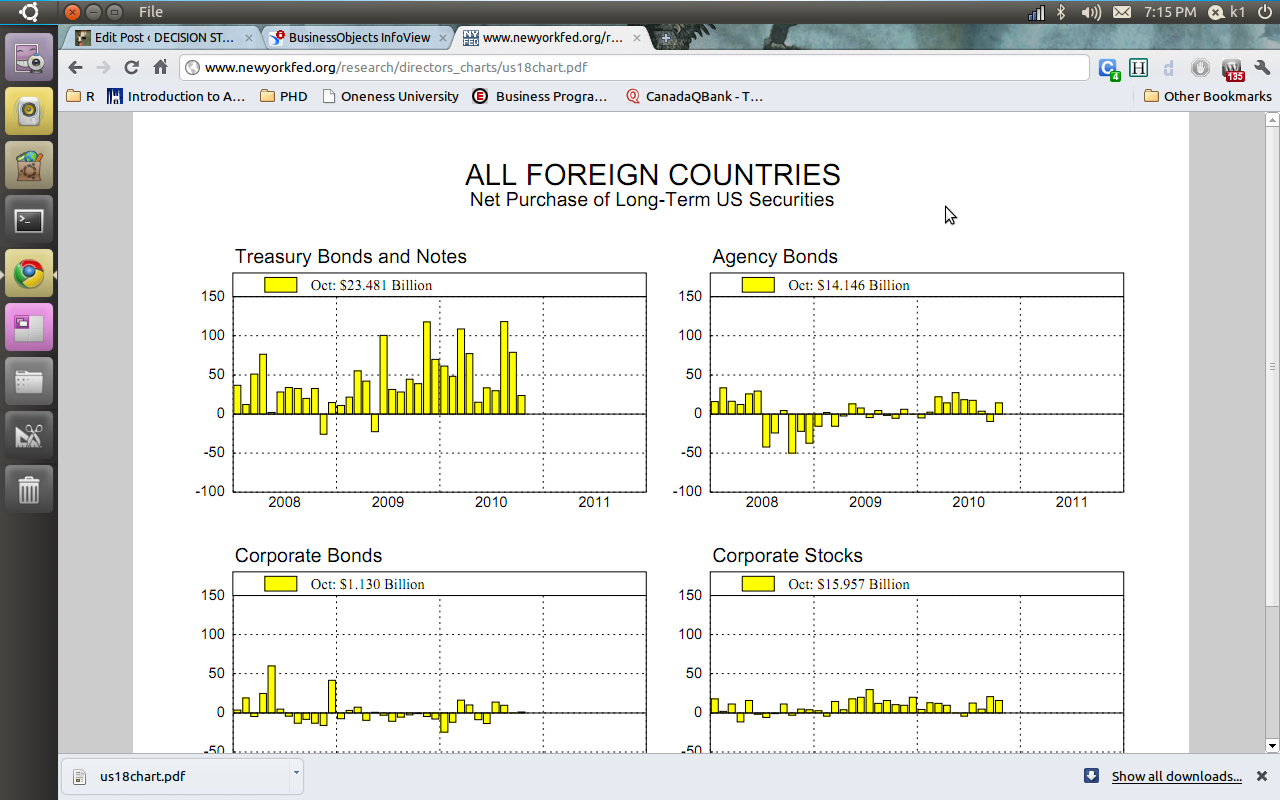
1) The federal bank gives you a huge clutter of charts to choose from and sometimes gives you very difficult to understand charts.

see http://www.newyorkfed.org/research/global_economy/usecon_charts.html

and http://www.newyorkfed.org/research/directors_charts/us18chart.pdf

us18chart

2) The Reserve bank of India choose Business Objects and gives you a proper drilldown kind  of  graph and tables. ( thats a lot of heavy metal and iron ore China needs from India 😉 😉

Foreign Trade – Export      Time-line: ALL

TIME LINE COUNTRY COMMODITY AMOUNT (US $ MILLION) EXPORT QUANTITY
2010:07 (JUL) – P China IRON ORE (Units: TON) 205.06 1878456
2010:06 (JUN) – P China IRON ORE (Units: TON) 427.68 6808528
2010:05 (MAY) – P China IRON ORE (Units: TON) 550.67 5290450
2010:04 (APR) – P China IRON ORE (Units: TON) 922.46 9931500
2010:03 (MAR) – P China IRON ORE (Units: TON) 829.75 13177672
2010:02 (FEB) – P China IRON ORE (Units: TON) 706.04 10141259
2010:01 (JAN) – P China IRON ORE (Units: TON) 577.13 8498784
2009:12 (DEC) – P China IRON ORE (Units: TON) 545.68 9264544
2009:11 (NOV) – P China IRON ORE (Units: TON) 508.17 9509213
2009:10 (OCT) – P China IRON ORE (Units: TON) 422.6 7691652
2009:09 (SEP) – P China IRON ORE (Units: TON) 278.04 4577943
2009:08 (AUG) – P China IRON ORE (Units: TON) 276.96 4371847
2009:07 (JUL) China IRON ORE (Units: TON) 266.11 4642237
2009:06 (JUN) China IRON ORE (Units: TON) 241.08 4584354

Source : DGCI & S, Ministry of Commerce & Industry, GoI


You can see the screenshots of the various visualization tools of the New York Fed Reserve Bank and Indian Reserve Bank- if the US Fed is serious about cutting the debt maybe it should start publishing better visuals