(a) Whoever knowingly and willfully deposits for conveyance in the mail or for a delivery from any post office or by any letter carrier any letter, paper, writing, print, missive, or document containing any threat to take the life of, to kidnap, or to inflict bodily harm upon the President of the United States, the President-elect, the Vice President or other officer next in the order of succession to the office of President of the United States, or the Vice President-elect, or knowingly and willfully otherwise makes any such threat against the President, President-elect, Vice President or other officer next in the order of succession to the office of President, or Vice President-elect, shall be fined under this title or imprisoned not more than five years, or both.
(b) The terms “President-elect” and “Vice President-elect” as used in this section shall mean such persons as are the apparent successful candidates for the offices of President and Vice President, respectively, as ascertained from the results of the general elections held to determine the electors of President and Vice President in accordance with title 3, United States Code, sections 1 and 2. The phrase “other officer next in the order of succession to the office of President” as used in this section shall mean the person next in the order of succession to act as President in accordance with title 3, United States Code, sections 19 and 20.
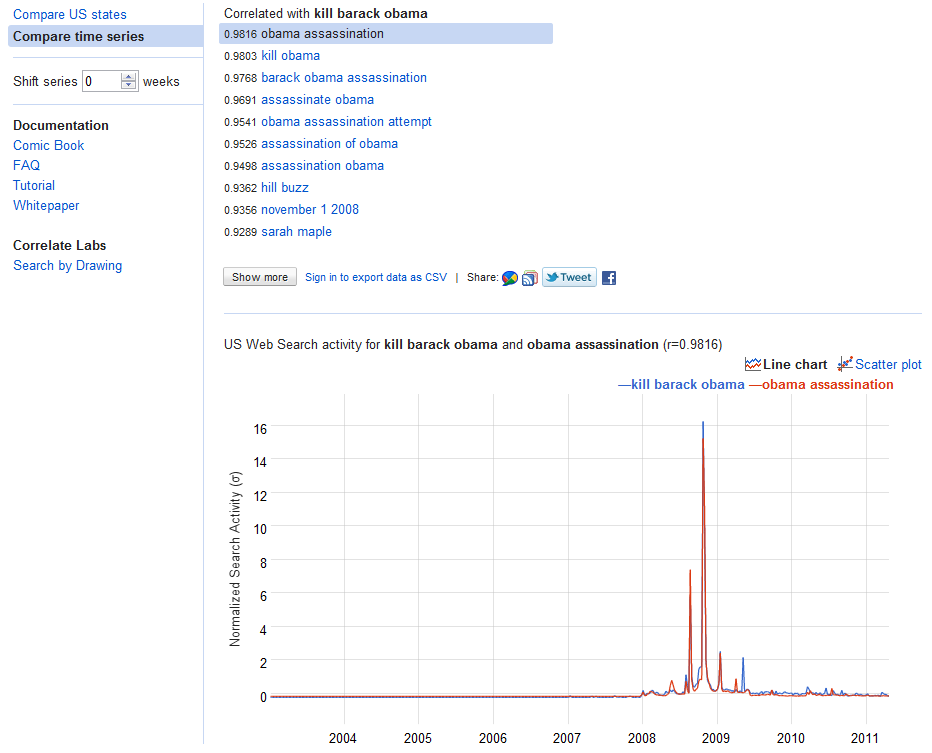
From the new experiment at Google Co Relate (assumptions it will take a long time to actually create a plot or conspiracy to kill the President because of his security cover) this uses the internet to actually find people who are searching for ways to kill the beloved leader of the free world. Includes state by state intensity- and expect these people to be the first to ask for ….MORE privacy (my ass)
Outstandingly attractive scholarships are available for students willing to travel to Yorkshire. Thats where the Battle of Roses was fought by the British Royal Family.
Emphasis and spaces in email above are made by me.
Message from Dr Top i bell ow-
It is not New York but very old York, in the North of England.
The scholarships carry a tax-free stipend and financial assistance will be
given for travel expenses to and from York. Accommodation for successful
students is available on the University of York Campus.
3 years ago, in a mock article I speculated what happened if Microsoft followed Google, and gave away Windows/Office for free while showing you ads. Basically whats the value of a single customer for 3-4 years worth of ads.
On September 28th, 2010, The Document Foundation was announced. The last six months, it feels, have just passed within a short glimpse of time. Not only did we release three LibreOffice versions within three months, have created the LibreOffice-Box DVD image, and brought LibreOffice Portable on its way. We also have announced the LibreOffice Conference for October 2011 and have taken part in lots of events worldwide, with FOSDEM and CeBIT being the most prominent ones.
People follow us at Twitter, Identi.ca, XING, LinkedIn and a Facebook group and fan page, they discuss on our mailing lists with more than 6.000 subscriptions, collaborate in our wiki, get insight on our daily work in our blog, and post and blog themselves. From the very first day, openness, transparency and meritocracy have been shaping the framework we want to work in. Our discussions and decisions take place on a public mailing list, and regularly, we hold phone conferences for the Steering Committee and for the marketing teams, where everyone is invited to join. Our ideas and visions have made their way into our Next Decade Manifesto.
We have joined the Open Invention Network as well as the OpenDoc Society, and just last week have become an SPI-associated project, and we see a wide range of support from all over the world. Not only do Novell and Red Hat support our efforts with developers, but just recently, Canonical, creators of Ubuntu, joined as well. All major Linux distributions deliver LibreOffice with their operating systems, and more follow every day.
One of the most stunning contributions, that still leaves us speechless, is the support that we receive from the community. When we asked for 50,000 € capital stock for a German-based foundation, the community showed their support, appreciation and their power, and not only donated it in just eight days, but up to now has supported us with close to 100,000 €! Another one is that driven by our open, vendor neutral approach, combined with our easy hacks, we have included code contributions from over 150 entirely new developers to the project, alongside localisations from over 50 localizers. The community has developed itself better than we could ever dream of, and first meetings like the project’s weekend or the QA meeting of the Germanophone group are already being organized.
What we have seen now is just the beginning of something very big. The Document Foundation has a vision, and the creation of the foundation in Germany is about to happen soon. LibreOffice has been downloaded over 350,000 times within the first week, and we just counted more than 1,3 million downloads just from our download system — not counting packages directly delivered by Linux distributors, other download sites or DVDs included in magazines and newspapers — supported by 65 mirrors from all over the world, and millions already use and contribute to it worldwide. With our participation in the Google Summer of Code, we will engage more students and young developers to be part of our community. Our improved release schedule will ensure that new features and improvements will make their way to end-users soon, and for testers, we even provide daily builds.
We are so excited by what has been achieved over the last six months, and we are immensely grateful to all those who have supported the project in whatever ways they can. It is an honour to be working with you, to be part of one united community! The future as we are shaping it has just begun, and it will be bright and excellent.
the latest freest office productivity software in the world.
The Document Foundation maintains its release schedule thanks to a growing and vibrant community of developers
The Internet, March 22, 2011 – The Document Foundation announces LibreOffice 3.3.2, the second micro release of the free office suite for personal productivity, which further improves the stability of the software and sets the platform for the next release 3.4, due in mid May. The community of developers has been able to maintain the tight schedule thanks to the increase in the number of contributors, and to the fact that those that have started with easy hacks in September 2010 are now working at substantial features. In addition, they have almost completed the code cleaning process, getting rid of German comments and obsolete functionalities.
“I have started hacking LibreOffice code on September 28, 2010, just a few hours after the announcement of the project, and I found a very welcoming community, where senior developers went out of their way to help newbies like me to become productive. After a few hours I submitted a small patch removing 5 or 6 lines of dead code… enough to get my feet wet and learn the workflow”, says Norbert, a French developer living in the United States. “In a short time, I ended up removing the VOS library – deprecated for a decade – from LibreOffice, and finding and fixing various threading issues in the process”.
LibreOffice 3.3.2 is being released just one day after the closing of the first funding round launched by The Document Foundation to collect donations towards the 50,000-euro capital needed to establish a Stiftung in Germany. In five weeks, the community has donated twice as much, i.e. around 100,000 euros. All additional funds will be used for operating expenses such as infrastructure costs and registration of domain names and trademarks, as well as for community development expenses such as travel funding for TDF representatives speaking at conferences, booth fees for trade shows, and initial financing of merchandising items, DVDs and printed material.
Italo Vignoli, a founder and a steering committee member of The Document Foundation, will be keynoting at Flourish 2011 in Chicago on Sunday, April 3, at 10:30AM, about getting independent from OpenOffice and Oracle, starting The Document Foundation, raising the capital and the first community budget, organizing developers and other work, and outlining a roadmap for future releases and features.
The Document Foundation has the mission of facilitating the evolution of the LibreOffice Community into a new, open, independent, and meritocratic organization within the next few months. An independent foundation is a better reflection of the values of our contributors, users and supporters, and will enable a more effective, efficient and transparent community. TDF will protect past investments by building on the achievements of the first decade, will encourage wide participation within the community, and will co-ordinate activity across the community.
The Document Foundation is happy to announce the release candidate of
LibreOffice 3.3.1. This release candidate is the first in a series of
frequent bugfix releases on top of our LibreOffice 3.3 product. Please
be aware that LibreOffice 3.3.1 RC1 is not yet ready for production
use, you should continue to use LibreOffice for that.
Writer is the word processor inside LibreOffice. Use it for everything, from dashing off a quick letter to producing an entire book with tables of contents, embedded illustrations, bibliographies and diagrams. The while-you-type auto-completion, auto-formatting and automatic spelling checking make difficult tasks easy (but are easy to disable if you prefer). Writer is powerful enough to tackle desktop publishing tasks such as creating multi-column newsletters and brochures. The only limit is your imagination.
Calc tames your numbers and helps with difficult decisions when you’re weighing the alternatives. Analyze your data with Calc and then use it to present your final output. Charts and analysis tools help bring transparency to your conclusions. A fully-integrated help system makes easier work of entering complex formulas. Add data from external databases such as SQL or Oracle, then sort and filter them to produce statistical analyses. Use the graphing functions to display large number of 2D and 3D graphics from 13 categories, including line, area, bar, pie, X-Y, and net – with the dozens of variations available, you’re sure to find one that suits your project.
Impress is the fastest and easiest way to create effective multimedia presentations. Stunning animation and sensational special effects help you convince your audience. Create presentations that look even more professional than the standard presentations you commonly see at work. Get your collegues’ and bosses’ attention by creating something a little bit different.
Draw lets you build diagrams and sketches from scratch. A picture is worth a thousand words, so why not try something simple with box and line diagrams? Or else go further and easily build dynamic 3D illustrations and special effects. It’s as simple or as powerful as you want it to be.
Base is the database front-end of the LibreOffice suite. With Base, you can seamlessly integrate your existing database structures into the other components of LibreOffice, or create an interface to use and administer your data as a stand-alone application. You can use imported and linked tables and queries from MySQL, PostgreSQL or Microsoft Access and many other data sources, or design your own with Base, to build powerful front-ends with sophisticated forms, reports and views. Support is built-in or easily addable for a very wide range of database products, notably the standardly-provided HSQL, MySQL, Adabas D, Microsoft Access and PostgreSQL.
Math is a simple equation editor that lets you lay-out and display your mathematical, chemical, electrical or scientific equations quickly in standard written notation. Even the most-complex calculations can be understandable when displayed correctly. E=mc2.
LibreOffice also comes configured with a PDF file creator, meaning you can distribute documents that you’re sure can be opened and read by users of almost any computing device or operating system.




 What does LibreOffice give you?
 DECISION STATS