Using JMP 9 and R together

An interesting blog post at http://blogs.sas.com/jmp/index.php?/archives/298-JMP-Into-R!.html on using the new JMP 9 with R, and quite possibly using SAS as well.

Example Code-

Here’s the R integration JSL code used to run the bootstrap

rconn = R Connect();
rconn << Submit(“\[
library(boot)

# Load Boot package
library(boot)

RStatFctn <- function(x,d) {return(mean(x[d]))}

b.basic = matrix(data=NA, nrow=1000, ncol=2)
b.normal = matrix(data=NA, nrow=1000, ncol=2)
b.percent =matrix(data=NA, nrow=1000, ncol=2)
b.bca =matrix(data=NA, nrow=1000, ncol=2)

for(i in 1:1000){
rnormdat = rnorm(30,0,1)
b <- boot(rnormdat, RStatFctn, R = 1000)
b.ci=boot.ci(b, conf =095,type=c(“basic”,”norm”,”perc”,”bca”)) b.basic[i,] = b.ci$basic[,4:5]
b.normal[i,] = b.ci$normal[,2:3]
b.percent[i,] = b.ci$percent[,4:5]
b.bca[i,] = b.ci$bca[,4:5]
}
]\”));
b_basic= rconn << Get(b.basic);
b_normal = rconn << Get(b.normal);
b_percent= rconn << Get(b.percent);
b_bca = rconn << Get(b.bca);
rconn << Disconnect();

Using the R Connect() JSL command and assigning it to the object “rconn”, the code sends messages to the JSL scriptable object “rconn” to submit R code via the Submit() command and to retrieve R matrices containing the bootstrap confidence intervals back via the Get() commands.

and I also found interesting what the write has to say about using JMP (for visual analysis) and SAS (bigger datasets handling) and R (for advanced statistics) together

Other standard JMP tools such as the Data Filter can help to explore these results in ways that cannot easily and quickly be done in R

and

With a little JSL and the statistical and graphics platforms of JMP coupled with the breadth and variety of packages and functions in R, one can build complete easy-to-use applications for statistical analysis.

JMP can also integrate with SAS, which adds the ability to work with large-scale data through the file-based system as well as the depth and advanced capabilities of SAS procedures. With these seamless integrations, JMP can become a hub that enables you to connect with both SAS and R, as well as provide unique statistical features such as the JMP Profiler and interactive graphic features such as Graph Builder

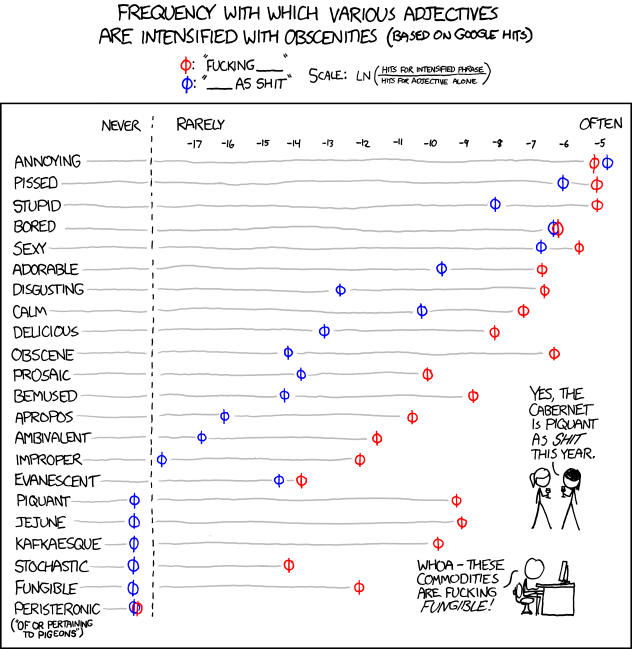
and in the meanwhile here is a data visualization of a frequency analysis of various words bundled together from xkcd.com

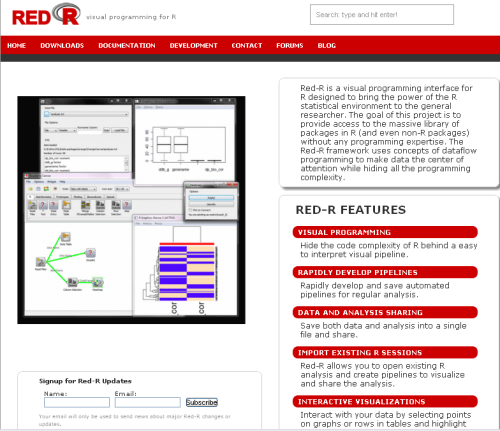
Red R 1.8- Pretty GUI

Red R 1.8 has been compiled and is available for download.

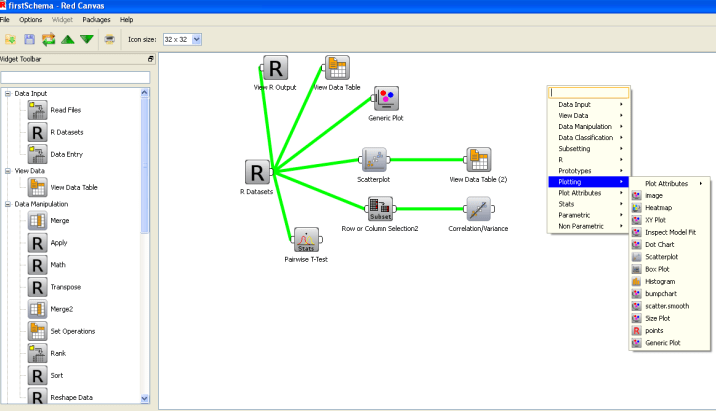
If you have seen Red R, well it resembles software like Enterprise Miner or Rapid Miner in the visual sense as it basically has a work-flow style of showing and setting up data analysis.

I played a bit with it, and this version is a definite improvement over the last ones.- Here is one more really groovy GUI for R- and it’s quite professionally done.

And a Youtube tutorial as well

Take a bow- Kyle and Anup- nice coding indeed.


PAW Reception and R Meetup

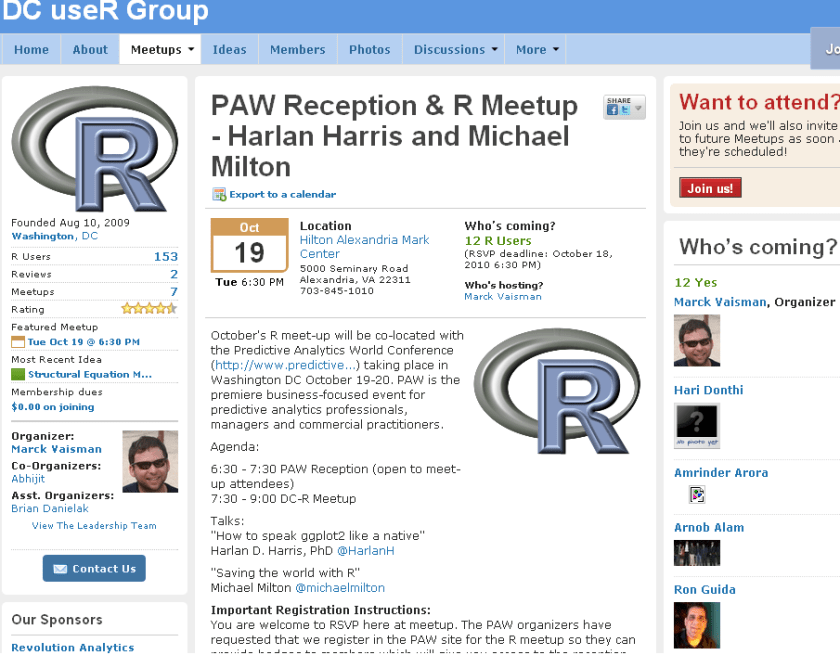
New DC meetup for R Users-

source- http://www.meetup.com/R-users-DC/calendar/14236478/

October’s R meet-up will be co-located with the Predictive Analytics World Conference (http://www.predictive…) taking place in Washington DC October 19-20. PAW is the premiere business-focused event for predictive analytics professionals, managers and commercial practitioners.

Agenda:

6:30 – 7:30 PAW Reception (open to meet-up attendees)
7:30 – 9:00 DC-R Meetup

Talks:
“How to speak ggplot2 like a native”
Harlan D. Harris, PhD @HarlanH

“Saving the world with R”
Michael Milton @michaelmilton

Important Registration Instructions:
You are welcome to RSVP here at meetup. The PAW organizers have requested that we register in the PAW site for the R meetup so they can provide badges to members which will give you access to the reception. There is no charge to register using the PAW site. Please click here to register.


Speaker Bios

Harlan D. Harris, PhD, is a statistical data scientist working for Kaplan Test Prep and Admissions in New York City. He has degrees from the University of Wisconsin-Madison and the University of Illinois at Urbana-Champaign. Prior to turning to the private sector, he worked as a researcher and lecturer in various areas of Artificial Intelligence and Cognitive Science at the University of Illinois, Columbia University, the University of Connecticut, and New York University.

Harlan’s talk is titled “How to speak ggplot2 like a native.”. One of the most innovative ideas in data visualization in recent years is that graphical images can be described using a grammar. Just as a fluent speaker of a language can talk more precisely and clearly than someone using a tourist phrasebook, graphics based on a grammar can yield more insights than graphics based on a limited set of templates (bar chart, pie graph, etc.). There are at least two implementations of the Grammar of Graphics idea in R, of which the most popular is the ggplot2 package written by Prof. Hadley Wickham. Just as with natural languages, ggplot2 has a surface structure made up of R vocabulary elements, as well as a deep structure that mediates the link between the vocabulary and the “semantic” representation of the data shown on a computer screen. In this introductory presentation, the links among these levels of representation are demonstrated, so that new ggplot2 users can build the mental models necessary for fluent and creative visualization of their data.

Michael Milton is a Client Manager at Blue State Digital. When he’s not saving the world by designing interactive marketing strategies that connect passionate users with causes and organizations, he writes about data and analytics. For O’Reilly Media, he wrote Head First Data Analysis and Head First Excel and has created the videos Great R: Level 1 and Getting the Most Out of Google Apps for Business.

Michael’s talk is called “How to Save the World Using R.” In this wide-ranging discussion, Michael will highlight individuals and organizations who are using R to help others as well as ways in which R can be used to promote good statistical thinking.

E-Webinar by PAW

Here is a webinar by Predictive Analytics World conference, sponsored by Netezza.

Introducing the first PAW Hosted eWebinar

The New Age of Analytical Marketing
– October 13 2010 at 2pm (EST)

The volume and variety of online customer data is growing exponentially as consumers continue to shift shopping, communication, social interaction, media consumption and more onto the web. This new customer information, coupled with new marketing channels such as social media and mobile, present marketers with a tremendous opportunity to create richer, more personalized experiences for customers while also increased sales and ROI.

  • Translate new online customer data and marketing channels into improved business results.
  • Make better use of customer analytics.
  • Explore the opportunities and challenges associated with today’s customer analytics best practices.
Moderator Special Guest Speakers:

Eric Siegel, Ph.D.
Founder
Predictive Analytics World

Vineet Singh
Director Innovation, Analytics and Engineering
Intuit

Krishnan Parasuraman
CTI/ Chief Architect
Netezza

http://risingmedia.omnovia.com/registration/96651285353324

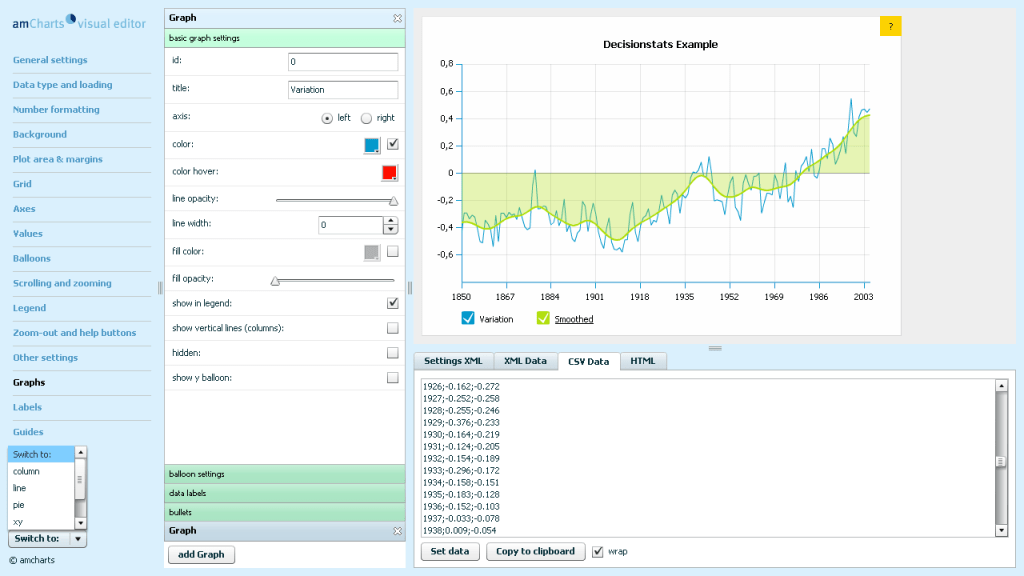
Amcharts- Cool Charts Web Editor

Here is a really good website if you want to create charts for your website. It offers both flash as well as Silverlight charts.

http://extra.amcharts.com/editor/line/

This is an example of a Line Chart. Note since I am on wordpress.com I cant use Javascript so have pasted the screenshot-All you can do is paste the data from csv file, and even the swf file is hosted on their servers.


Sector/ Sphere – Faster than Hadoop/Mapreduce at Terasort

Here is a preview of a relatively young software Sector and Sphere- which are claimed to be better than Hadoop /MapReduce at TeraSort Benchmark among others.

http://sector.sourceforge.net/tech.html

System Overview

The Sector/Sphere stack consists of the Sector distributed file system and the Sphere parallel data processing framework. The objective is to support highly effective and efficient large data storage and processing over commodity computer clusters.

Sector/Sphere Architecture

Sector consists of 4 parts, as shown in the above diagram. The Security server maintains the system security configurations such as user accounts, data IO permissions, and IP access control lists. The master servers maintain file system metadata, schedule jobs, and respond users’ requests. Sector supports multiple active masters that can join and leave at run time and they all actively respond users’ requests. The slave nodes are racks of computers that store and process data. The slaves nodes can be located within a single data center to across multiple data centers with high speed network connections. Finally, the client includes tools and programming APIs to access and process Sector data.

Sphere: Parallel Data Processing Framework

Sphere allows developers to write parallel data processing applications with a very simple set of API. It applies user-defined functions (UDF) on all input data segments in parallel. In a Sphere application, both inputs and outputs are Sector files. Multiple Sphere processing can be combined to support more complicated applications, with inputs/outputs exchanged/shared via the Sector file system.

Data segments are processed at their storage locations whenever possible (data locality). Failed data segments may be restarted on other nodes to achieve fault tolerance.

The Sphere framework can be compared to MapReduce as they both enforce data locality and provide simplified programming interfaces. In fact, Sphere can simulate any MapReduce operations, but Sphere is more efficient and flexible. Sphere can provide better data locality for applications that process files or multiple files as minimum input units and for applications that involve with iterative/combinative processing, which requires coordination of multiple UDFs to obtain the final result.

A Sphere application includes two parts: the client program that organizes inputs (including certain parameters), outputs, and UDFs; and the UDFs that process data segments. Data segmentation, load balancing, and fault tolerance are transparent to developers.

Space: Column-based Distbuted Data Table

Space stores data tables in Sector and uses Sphere for parallel query processing. Space is similar to BigTable. Table is stored by columns and is segmented on to multiple slave nodes. Tables are independent and no relationship between tables are supported. A reduced set of SQL operations is supported, including but not limited to table creation and modification, key-value update and lookup, and select operations based on UDF.

Supported by the Sector data placement mechanism and the Sphere parallel processing framework, Space can support efficient key-value lookup and certain SQL queries on very large data tables.

Space is currently still in development.

and just when you thought Hadoop was the only way to be on the cloud.

http://sector.sourceforge.net/benchmark.html

The Terasort Benchmark

The table below lists the performance (total processing time in seconds) of the Terasort benchmark of both Sphere and Hadoop. (Terasort benchmark: suppose there are N nodes in the system, the benchmark generates a 10GB file on each node and sorts the total N*10GB data. Data generation time is excluded.) Note that it is normal to see a longer processing time for more nodes because the total amount of data also increases proportionally.

The performance value listed in this page was achieved using the Open Cloud Testbed. Currently the testbed consists of 4 racks. Each rack has 32 nodes, including 1 NFS server, 1 head node, and 30 compute/slave nodes. The head node is a Dell 1950, dual dual-core Xeon 3.0GHz, 16GB RAM. The compute nodes are Dell 1435s, single dual core AMD Opteron 2.0GHz, 4GB RAM, and 1TB single disk. The 4 racks are located in JHU (Baltimore), StarLight (Chicago), UIC (Chicago), and Calit2(San Diego). The inter-rack bandwidth is 10GE, supported by CiscoWave deployed over National Lambda Rail.

Sphere
Hadoop (3 replicas)
Hadoop (1 replica)
UIC
1265 2889 2252
UIC + StarLight
1361 2896 2617
UIC + StarLight + Calit2
1430 4341 3069
UIC + StarLight + Calit2 + JHU
1526 6675 3702

The benchmark uses the testfs/testdc examples of Sphere and randomwriter/sort examples of Hadoop. Hadoop parameters were tuned to reach good results.

Updated on Sep. 22, 2009: We have benchmarked the most recent versions of Sector/Sphere (1.24a) and Hadoop (0.20.1) on a new set of servers. Each server node costs $2,200 and consits of a single Intel Xeon E5410 2.4GHz CPU, 16GB RAM, 4*1TB RAID0 disk, and 1Gb/s NIC. The 120 nodes are hosted on 4 racks within the same data center and the inter-rack bandwidth is 20Gb/s.

The table below lists the performance of sorting 1TB data using Sector/Sphere version 1.24a and Hadoop 0.20.1. Related Hadoop parameters have been tuned for better performance (e.g., big block size), while Sector/Sphere does not require tuning. In addition, to achieve the highest performance, replication is disabled in both systems (note that replication does not afftect the performance of Sphere but will significantly decrease the performance of Hadoop).

Number of Racks
Sphere
Hadoop
1
28m 25s 85m 49s
2
15m 20s 37m 0s
3
10m 19s 25m 14s
4
7m 56s 17m 45s

Red Hat worth 7.8 Billion now

I was searching for a Linux install of Revolution’s latest enterprise version, but it seems version 4 will be available on Red Hat Enterprise Linux only by Decemebr 2010. Also even though Revolution once opted for co branding with Canonical’s Karmic Koala, they seem to have ignored Ubuntu from the Enterprise version of Revolution R.

http://www.revolutionanalytics.com/why-revolution-r/which-r-is-right-for-me.php

Base R Revolution R Community Revolution R Enterprise
Buy Now
Target Use Open Source Product Evaluation & Simple Prototyping Business, Research & Academics
Software
100% Compatible with R language X X X
Certified for Stability X X
Command-Line Programming X X X
Getting Started Guide X X
Performance & Scalability
Analyze larger data sets with 64-bit RAM X X
Optimized for Multi-processor workstations X X
Multi-threaded Math libraries X X
Parallel Programming (Single Workstation) X X
Out-of-the-Box Cluster-Ready X
“Big Data” Analysis
Terabyte-Class File Structures X
Specialized “Big Data” Algorithms X
Integrated Web Services
Scalable Web Services Platform X*
User Interface
Visual IDE X
Comprehensive Data Analysis GUI X*
Technical Support
Discussion Forums X X X
Online Support Mailing List Forum X
Email Support X
Phone Support X
Support for Base & Recommended R Packages X X X
Authorized Training & Consulting X
Platforms
Single User X X X
Multi-User Server X X
32-bit Windows X X X
64-bit Windows X X
Mac OS X X X
Ubuntu Linux X X
Red Hat Enterprise Linux X
Cloud-Ready X

and though the page on RED HAT’s Partner page for Revolution seems old/not so updated

https://www.redhat.com/wapps/partnerlocator/web/home.html;#productId=188

, I was still curious to see what the buzz about Red Hat is all about.

And one of the answers is Red Hat is now a 7.8 Billion Dollar Company.

http://www.redhat.com/about/news/prarchive/2010/Q2_2011.html

Red Hat Reports Second Quarter Results

  • Revenue of $220 million, up 20% from the prior year
  • GAAP operating income up 24%, non-GAAP operating income up 25% from the prior year
  • Deferred revenue of $650 million, up 12% from the prior year

RALEIGH, NC – Sept 22, 2010 – Red Hat, Inc. (NYSE: RHT), the world’s leading provider of open source solutions, today announced financial results for its fiscal year 2011 second quarter ended August 31, 2010.

Total revenue for the quarter was $219.8 million, an increase of 20% from the year ago quarter. Subscription revenue for the quarter was $186.2 million, up 19% year-over-year.

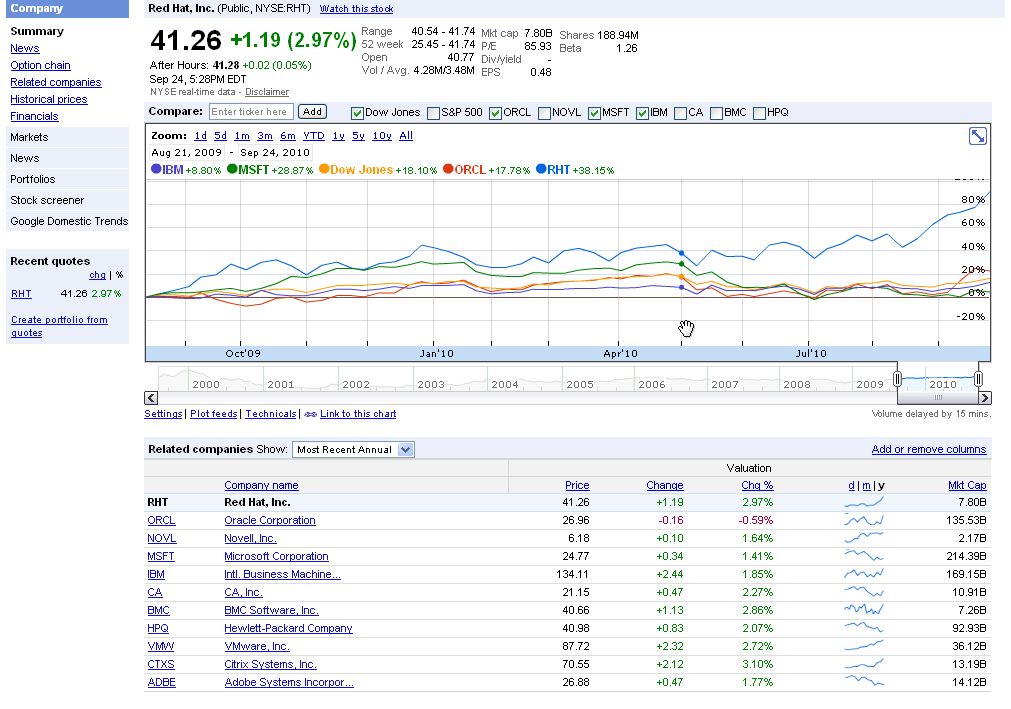
and the stock goes zoom 48 % up for the year

http://www.google.com/finance?chdnp=1&chdd=1&chds=1&chdv=1&chvs=maximized&chdeh=0&chfdeh=0&chdet=1285505944359&chddm=98141&chls=IntervalBasedLine&cmpto=INDEXDJX:.DJI;NASDAQ:ORCL;NASDAQ:MSFT;NYSE:IBM&cmptdms=0;0;0;0&q=NYSE:RHT&ntsp=0

(Note to Google- please put the URL shortener on Google Finance as well)

The software is also reasonably priced starting from 80$ onwards.

https://www.redhat.com/apps/store/desktop/

Basic Subscription

Web support, 2 business day response, unlimited incidents
1 Year
$80
Multi-OS with Basic SubscriptionWeb support, 2 business day response, unlimited incidents
1 Year
$120
Workstation with Basic Subscription
Web support, 2 business day response, unlimited incidents
1 Year
$179
Workstation and Multi-OS with Basic Subscription
Web support, 2 business day response, unlimited incidents
1 Year
$219
Workstation with Standard Subscription
Business Hours phone support, web support, unlimited incidents
1 Year
$299
Workstation and Multi-OS with Standard Subscription
Business Hours phone support, web support, unlimited incidents
1 Year
$339
——————————————————————————————
That should be a good enough case for open source as a business model.