Using Code Snippets in Revolution R

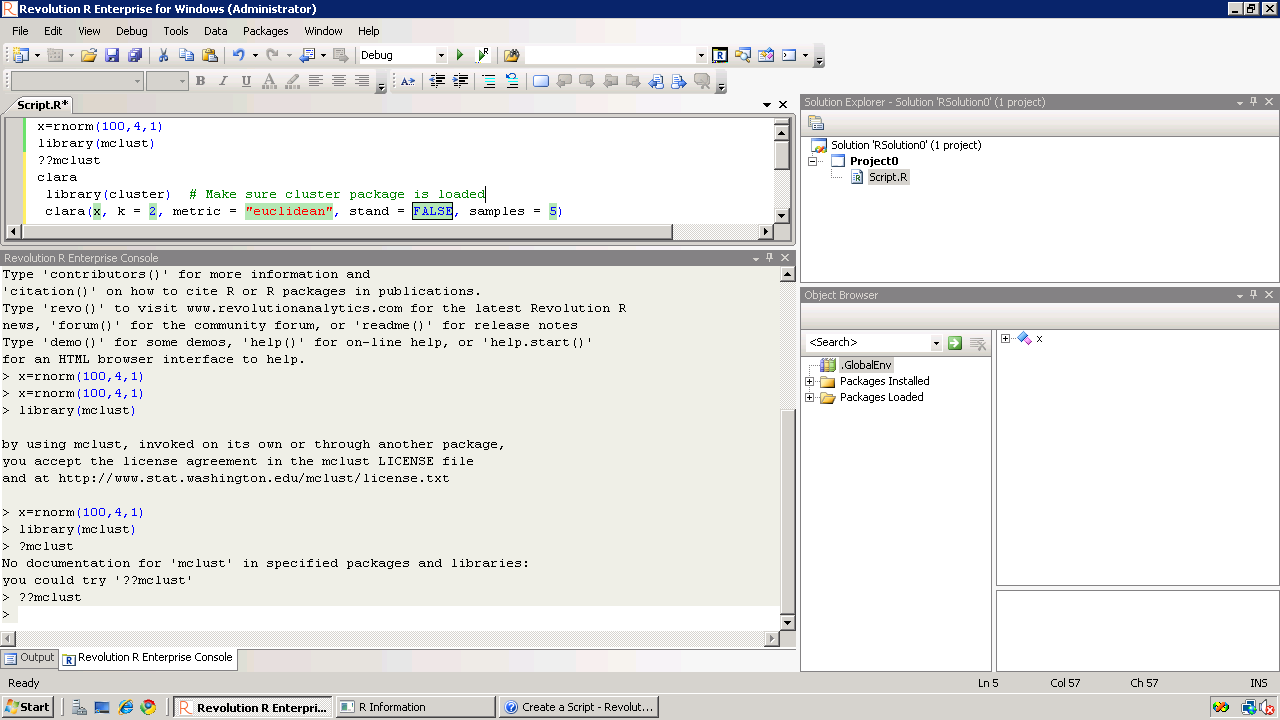
So I am still testing Revo R on the 64 bit AMI i created on the weekend and I really like the code snippets feature in Revolution R.

Code Snippets work in a fairly simply way.

Right click– Click on Insert Code Snippet.

You can get a drop down of tasks to do- (like Analysis) Selecting Analysis we get another list of tasks (like Clustering).

Once you click on Clustering you get various options. Like clicking clara will auto insert the code

Now even if you are averse to using a GUI /or GUI creators don’t have your particular analysis you can basically type in code at an extremely fast pace.

It is useful to people who do not have to type in the entire code, but it is a boon to beginners as the parameters in function inserted by code snippet are automatically selected in multiple colors.

Also separately if are typing code for a function and hover, the various parameters for that particular function are shown.

Quite possibly the fastest way to write R code- and it is un matched by other code editors I am testing including Vim,Notepad++,Eclipse R etc.

The RPE (R Productivity Environment for windows- horrible bureaucratic name is the only flaw here) thus helps as it is quite thoughtfully designed. Interestingly they even have a record macro feature – which I am quite unsure of , but looks like automating some tasks. That’s next 🙂

See screenshot –

It would be quite nice to see the new Revo R GUI if it becomes available if it is equally intuitively designed considering it now has the founders of SPSS and one founder of R* as it’s members-it should be a keenly anticipated product. again Revolution could also try creating a Paid Amazon AMI and try renting the software by the hour at least as technology demonstrator as the big analytics world seems unaware of the work they have been up to.

without getting much noise on how much the other founder of R loves Revo 😉 )

IBM SPSS 19: Marketing Analytics and RFM

What is RFM Analysis?

Recency Frequency Monetization is basically a technique to classify your entire customer list. You may be a retail player with thousands of customers or a enterprise software seller with only two dozen customers.

RFM Analysis can help you cut through and focus on the real customer that drives your profit.

As per Wikipedia

http://en.wikipedia.org/wiki/RFM

RFM is a method used for analyzing customer behavior and defining market segments. It is commonly used in database marketing and direct marketing and has received particular attention in retail.

RFM stands for

  • Recency – How recently a customer has purchased?
  • Frequency – How often he purchases?
  • Monetary Value – How much does he spend?

To create an RFM analysis, one creates categories for each attribute. For instance, the Recency attribute might be broken into three categories: customers with purchases within the last 90 days; between 91 and 365 days; and longer than 365 days. Such categories may be arrived at by applying business rules, or using a data mining technique, such asCHAID, to find meaningful breaks.

—————————————————————————————————-

Even if you dont know what or how to do a RFM, see below for an easy to do way.

I just got myself an evaluation copy of a fully loaded IBM SPSS 19 Module and did some RFM Analysis on some data- the way SPSS recent version is it makes it very very useful even to non statistical tool- but an extremely useful one to a business or marketing user.

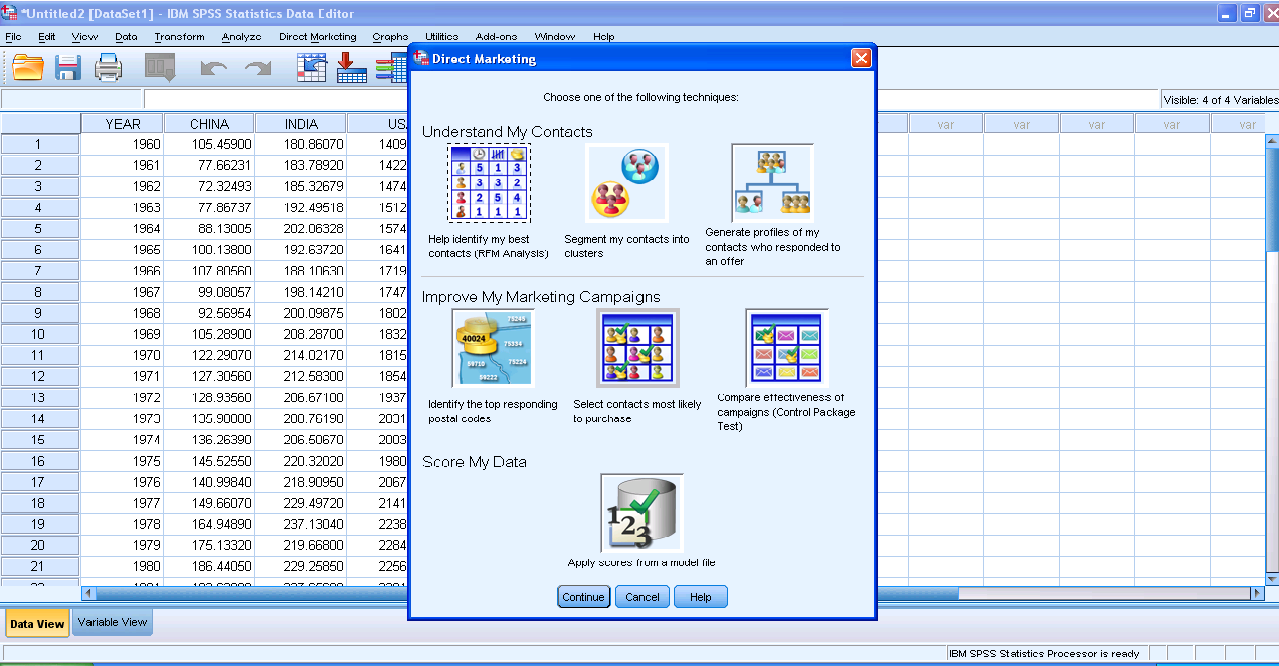
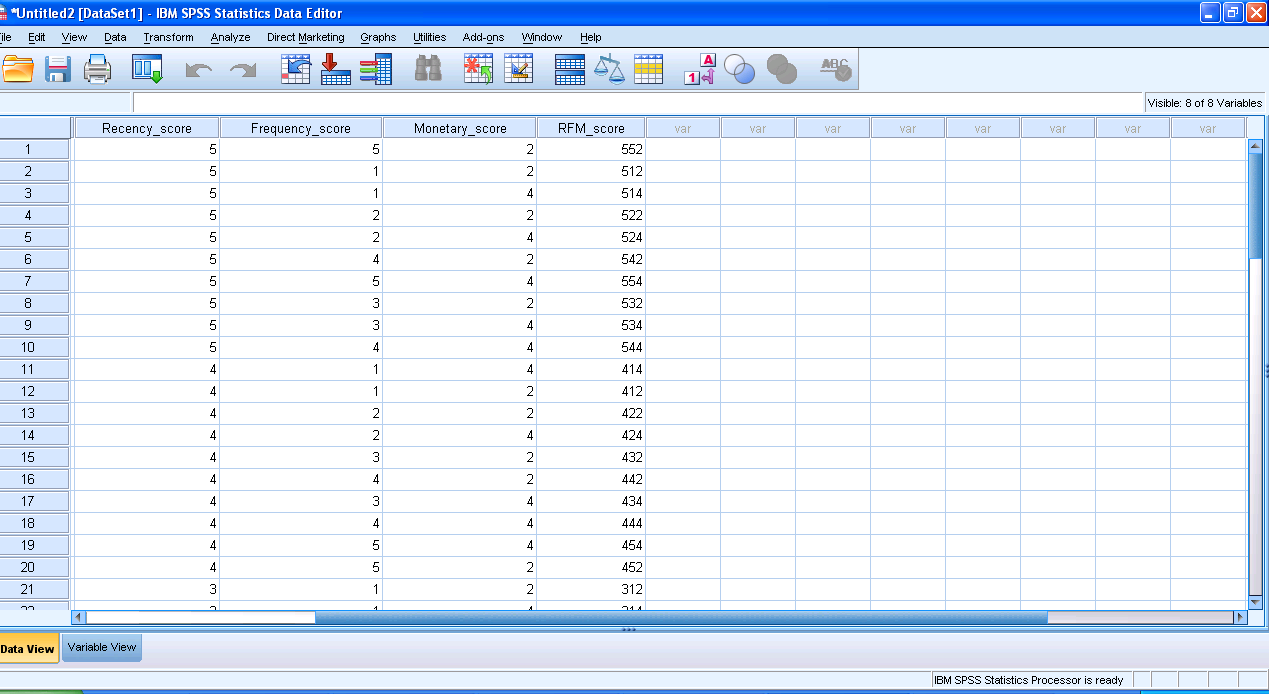
Here are some screenshots to describe the features.

1) A simple dashboard to show functionality (with room for improvement for visual appeal)
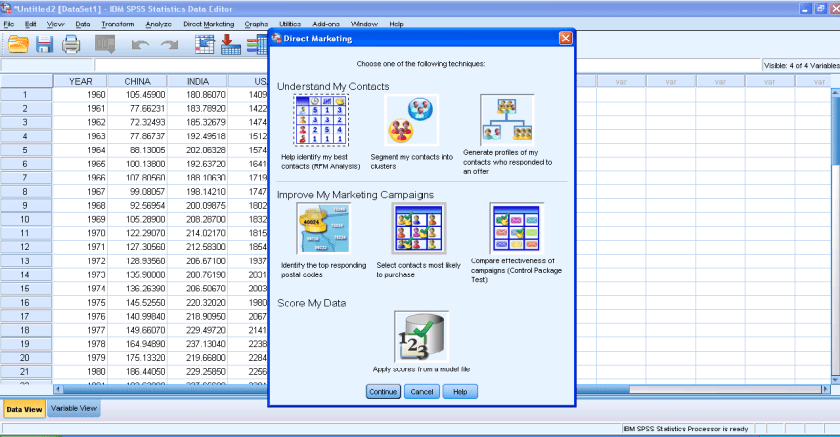
2) Simple Intuitive design to inputting data3) Some options in creating marketing scorecards4) Easy to understand features for a business audiences
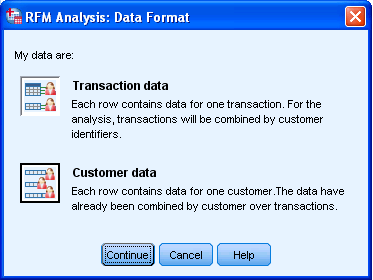
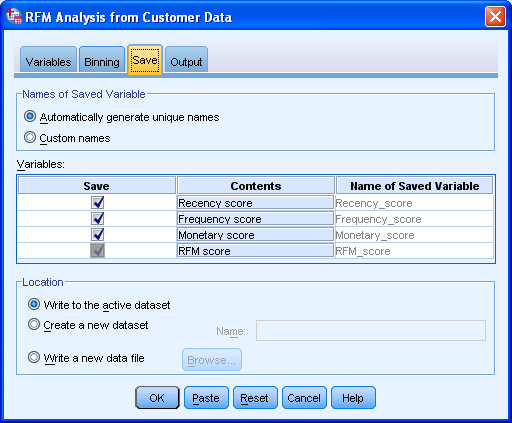
rather than pseudo techie jargon5) Note the clean design of the GUI in specifying data input type6) Again multiple options to export results in a very user friendly manner with options to customize business report7) Graphical output conveniently pasted inside a word document rather than a jumble of images. Auto generated options for customized standard graphs.8) An attractive heatmap to represent monetization for customers. Note the effect that a scale of color shades have in visual representation of data.9) Comparative plots placed side by side with easy to understand explanation (in the output word doc not shown here)10) Auto generated scores attached to data table to enhance usage. 
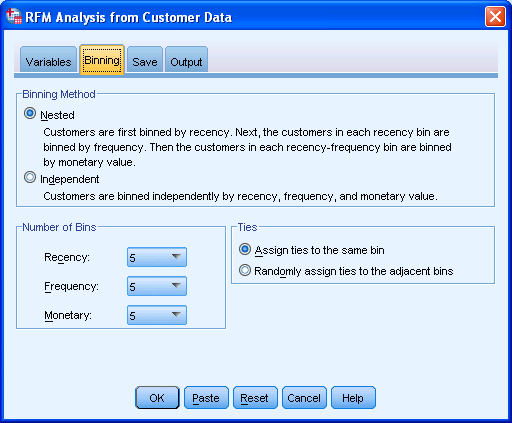
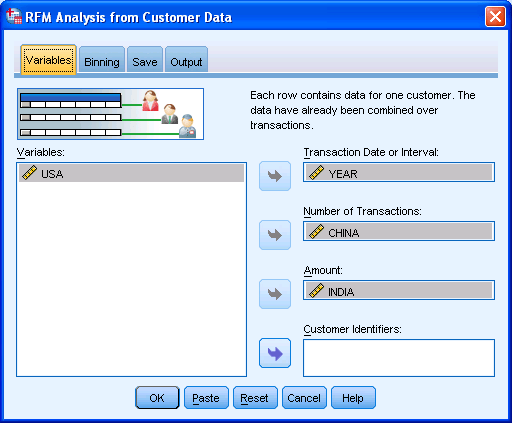
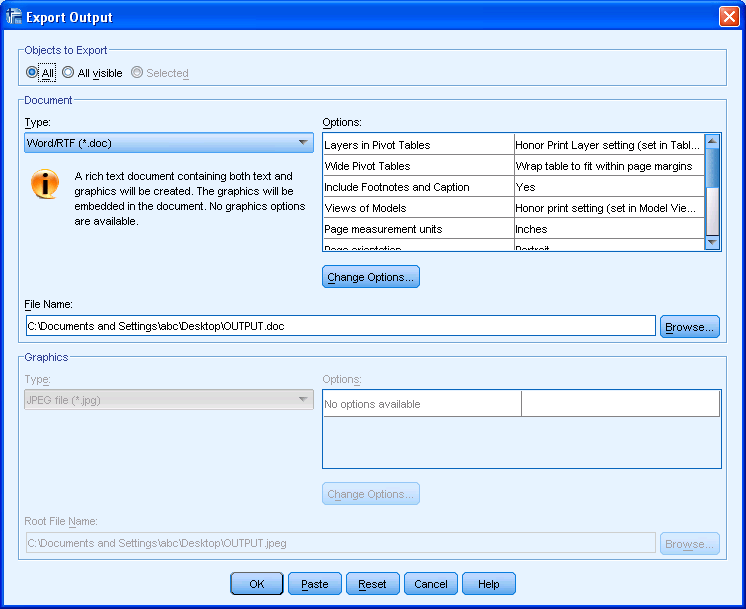
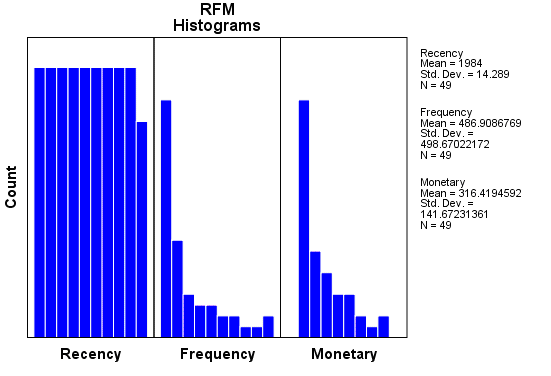
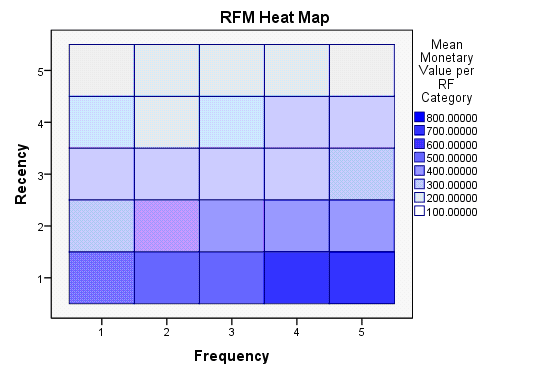
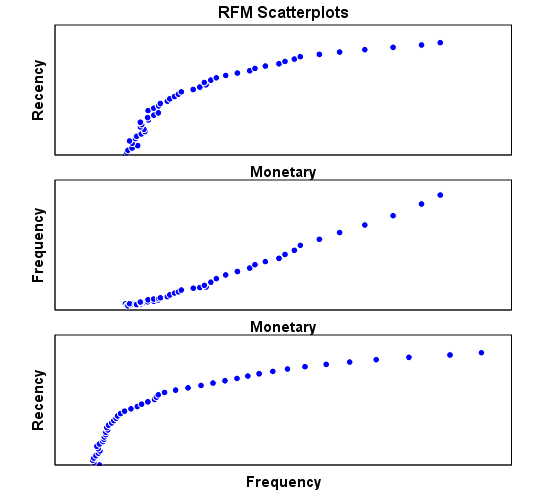
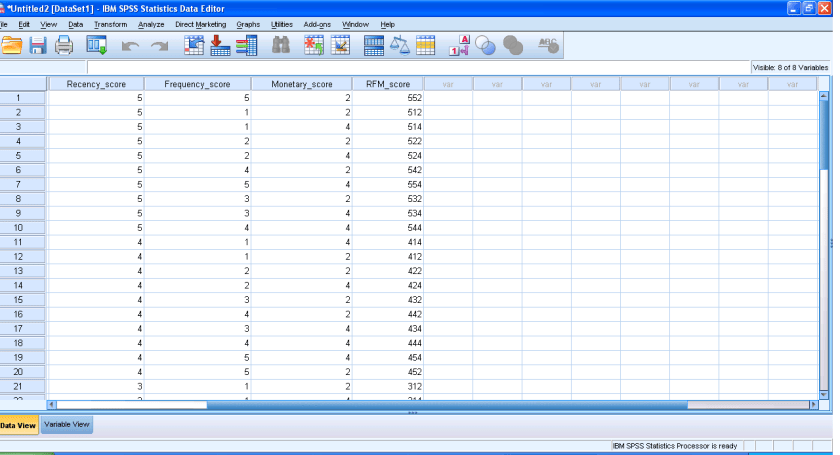
Note here I am evaluating RFM as a marketing technique (which is well known) but also the GUI of IBM SPSS 19 Marketing Analytics. It is simple, and yet powerful into turning what used to be a purely statistical software for nerds into a beautiful easy to implement tool for business users.

So what else can you do in Marketing Analytics with SPSS 19.

IBM SPSS Direct Marketing

The Direct Marketing add-on option allows organizations to ensure their marketing programs are as effective as possible, through techniques specifically designed for direct marketing, including:

• RFM Analysis. This technique identifies existing customers who are most likely to respond to a new offer.

• Cluster Analysis. This is an exploratory tool designed to reveal natural groupings (or clusters) within your data. For example, it can identify different groups of customers based on various demographic and purchasing characteristics.

• Prospect Profiles. This technique uses results from a previous or test campaign to create descriptive profiles. You can use the profiles to target specific groups of contacts in future campaigns.

• Postal Code Response Rates. This technique uses results from a previous campaign to calculate postal code response rates. Those rates can be used to target specific postal codes in future campaigns.

• Propensity to Purchase. This technique uses results from a test mailing or previous campaign to generate propensity scores. The scores indicate which contacts are most likely to respond.

• Control Package Test. This technique compares marketing campaigns to see if there is a significant difference in effectiveness for different packages or offers.

Click here to find out more about Direct Marketing.

Clustering Business Analysts and Industry Analysts

In my interactions with the world at large (mostly online) in the ways of data, statistics and analytics- I come across people who like to call themselves analysts.

As per me, there are 4 kinds of analysts principally,

1) Corporate Analysts- They work for a particular software company. As per them their product is great and infallible, their code has no bugs, and last zillion customer case studies all got a big benefit by buying their software.

They are very good at writing software code themselves, unfortunately this expertise is restricted to Microsoft Outlook (emails) and MS Powerpoint ( presentations). No they are more like salesmen than analysts, but as Arthur Miller said ” All salesmen (person) are dreamers. When the dream dies, the salesman (person) dies (read transfers to bigger job at a rival company)

2) Third -Party Independent Analsyst- The main reason they are third party is they can not be tolerated in a normal corporate culture, their spouse can barely stand them for more than 2 hours a day, and their Intelligence is not matched by their emotional maturity. Alas, after turning independent analysts, they realize they are actually more dependent to people than before, and they quickly polish their behaviour to praise who ever is sponsoring their webinar,  white paper , newsletter, or flying them to junkets. They are more of boutique consultants, but they used to be quite nifty at writing code, when younger, so they call themselves independent and “Noted Industry Analyst”

3) Researcher Analysts- They mostly scrape info from press releases which are mostly written by a hapless overworked communications team thrown at a task at last moment. They get into one hour call with who ever is the press or industry/analyst  relations honcho is- turn the press release into bullet points, and publish on the blog. They call this as research Analysts and give it away for free (but actually couldnt get anyone to pay for it for last 4 years). Couldnt write code if their life depended on it, but usually will find transformation and expert somehwere in their resume/about me web page. May have co -authored a book, which would have gotten them a F for plagiarism had they submitted it as a thesis.

4) Analytical Analysts- They are mostly buried deep within organizational bureaucracies if corporate, or within partnerships if they are independent. Understand coding, innovation (or creativity). Not very aggressive at networking unless provoked by an absolute idiot belonging to first three classes of industry analyst. Prefer to read Atlas Shrugged than argue on business semantics.

Next time you see an industry expert- you know which cluster to classify them 😉

Image Citation-

http://gapingvoidgallery.com/

Creating 3D Graphs with Data in R

Creating 3D graphs  in a 3d scatterplot is a 2 minute task in R using the woderful R Commander GUI. You can see an example video-

I loaded R,                                                                                                                                               then loaded the GUI,                                                                                                                           inputted data (from an attached package) but you can input data from a csv,           then went to Graphs- 3D ScatterPlot.

Here is the result-

and here is the video.

Not bad for 2 minutes of clicking a GUI.

Here is the auto generated code by R Commander.

> data(iris3, package="datasets")
> iris3 <- as.data.frame(iris3)
> names(iris3) <- make.names(names(iris3))
> library(rgl, pos=4)
> library(mgcv, pos=4)
> scatter3d(iris3$Petal.W..Setosa, iris3$Petal.L..Setosa, +   iris3$Sepal.L..Setosa, fit="linear", residuals=TRUE, bg="black", +   axis.scales=TRUE, grid=TRUE, ellipsoid=FALSE, xlab="Petal.W..Setosa", +   ylab="Petal.L..Setosa", zlab="Sepal.L..Setosa")
> scatter3d(iris3$Petal.L..Versicolor, iris3$Petal.L..Setosa, +   iris3$Petal.L..Virginica, fit="linear", residuals=TRUE, bg="white", +   axis.scales=TRUE, grid=TRUE, ellipsoid=FALSE, xlab="Petal.L..Versicolor", +   ylab="Petal.L..Setosa", zlab="Petal.L..Virginica")
> rgl.snapshot("C:/Documents and Settings/abc/Desktop/RGLGraph.png")

Using JMP 9 and R together

An interesting blog post at http://blogs.sas.com/jmp/index.php?/archives/298-JMP-Into-R!.html on using the new JMP 9 with R, and quite possibly using SAS as well.

Example Code-

Here’s the R integration JSL code used to run the bootstrap

rconn = R Connect();
rconn << Submit(“\[
library(boot)

# Load Boot package
library(boot)

RStatFctn <- function(x,d) {return(mean(x[d]))}

b.basic = matrix(data=NA, nrow=1000, ncol=2)
b.normal = matrix(data=NA, nrow=1000, ncol=2)
b.percent =matrix(data=NA, nrow=1000, ncol=2)
b.bca =matrix(data=NA, nrow=1000, ncol=2)

for(i in 1:1000){
rnormdat = rnorm(30,0,1)
b <- boot(rnormdat, RStatFctn, R = 1000)
b.ci=boot.ci(b, conf =095,type=c(“basic”,”norm”,”perc”,”bca”)) b.basic[i,] = b.ci$basic[,4:5]
b.normal[i,] = b.ci$normal[,2:3]
b.percent[i,] = b.ci$percent[,4:5]
b.bca[i,] = b.ci$bca[,4:5]
}
]\”));
b_basic= rconn << Get(b.basic);
b_normal = rconn << Get(b.normal);
b_percent= rconn << Get(b.percent);
b_bca = rconn << Get(b.bca);
rconn << Disconnect();

Using the R Connect() JSL command and assigning it to the object “rconn”, the code sends messages to the JSL scriptable object “rconn” to submit R code via the Submit() command and to retrieve R matrices containing the bootstrap confidence intervals back via the Get() commands.

and I also found interesting what the write has to say about using JMP (for visual analysis) and SAS (bigger datasets handling) and R (for advanced statistics) together

Other standard JMP tools such as the Data Filter can help to explore these results in ways that cannot easily and quickly be done in R

and

With a little JSL and the statistical and graphics platforms of JMP coupled with the breadth and variety of packages and functions in R, one can build complete easy-to-use applications for statistical analysis.

JMP can also integrate with SAS, which adds the ability to work with large-scale data through the file-based system as well as the depth and advanced capabilities of SAS procedures. With these seamless integrations, JMP can become a hub that enables you to connect with both SAS and R, as well as provide unique statistical features such as the JMP Profiler and interactive graphic features such as Graph Builder

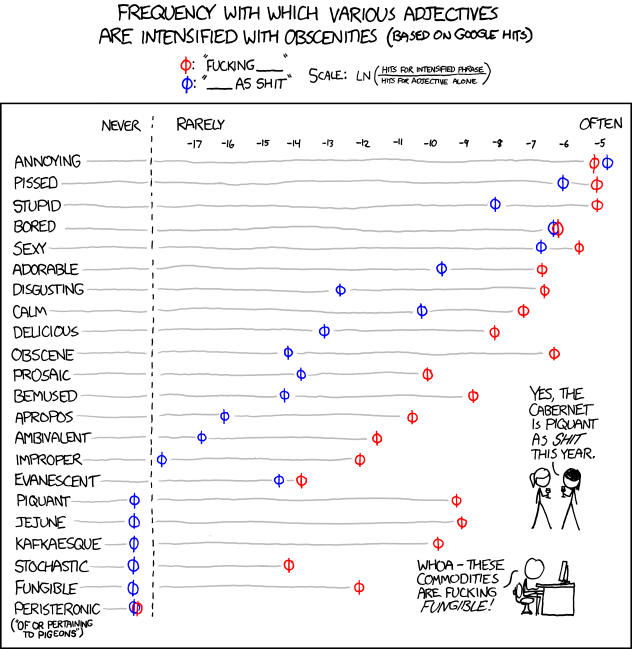
and in the meanwhile here is a data visualization of a frequency analysis of various words bundled together from xkcd.com

When China overtook India- using DEDUCER

I was just reading about the new release of World Bank Data at http://www.r-chart.com/2010/09/new-world-bank-data-available.html Now World Bank Data is something I worked with in the past, but the RWDI package is a great package. (see http://www.r-chart.com/2010/09/new-world-bank-data-available.html)

The whole dataset is a 29 mb in zipped CSV though and is available for terrific macroeconomic analysis _ I downloaded it and loaded it instead.

http://data.worldbank.org/sites/default/files/data/wdiandgdf_csv.zip

I took a small subset of the data –


WDI_GDF_Data <- read.table("C:/Documents and Settings/abc/My Documents/Downloads/WDI_GDF_Data.csv",header=T,sep=",",quote="\"")
 WDI_GDF_Data.sub<-subset(WDI_GDF_Data,Country.Code == "CHN" | Country.Code == "IND" | Country.Code == "USA")
WDI_GDF_Data.sub.sub<-subset(WDI_GDF_Data.sub,Series.Code == "NY.GDP.PCAP.KD")
WDI_GDF_Data.sub.sub<-as.data.frame(t(WDI_GDF_Data.sub.sub))
write.csv(WDI_GDF_Data.sub.sub,'C:/Documents and Settings/abc/Desktop/gdp3.csv')

Note- WordPress.com now supports source code in R via http://en.support.wordpress.com/code/posting-source-code/

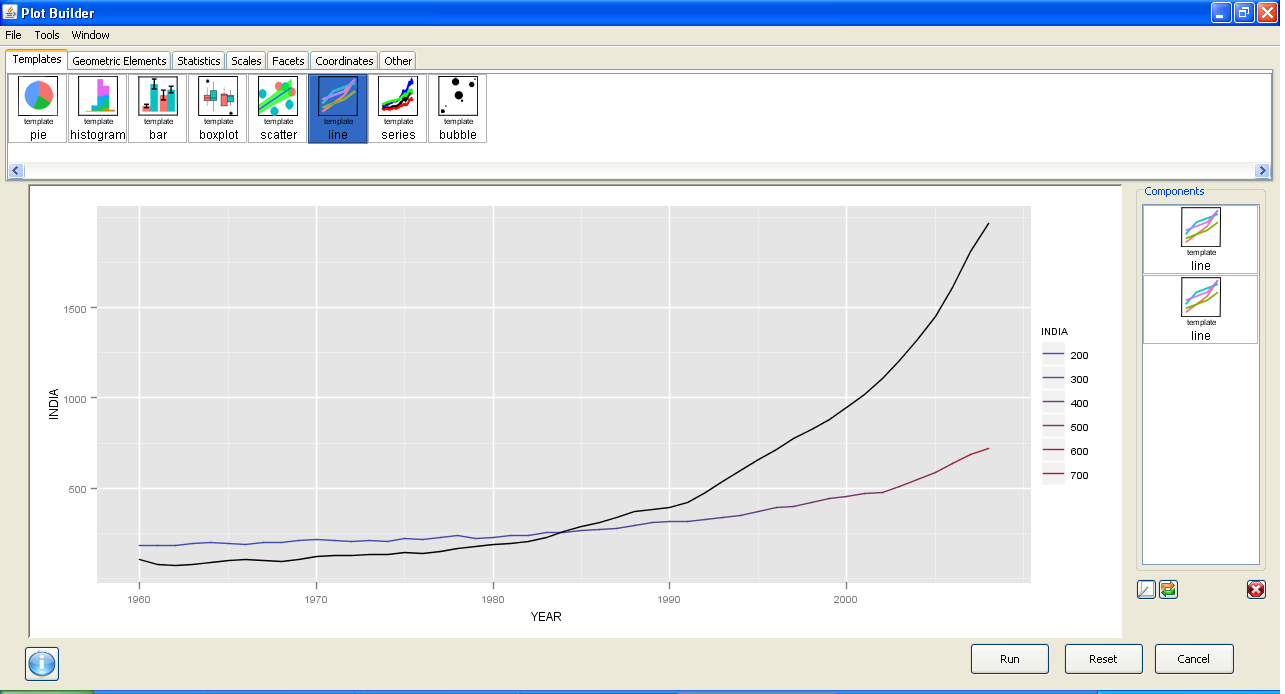
Now this is basic data manipulation- and I used Deducer for it.

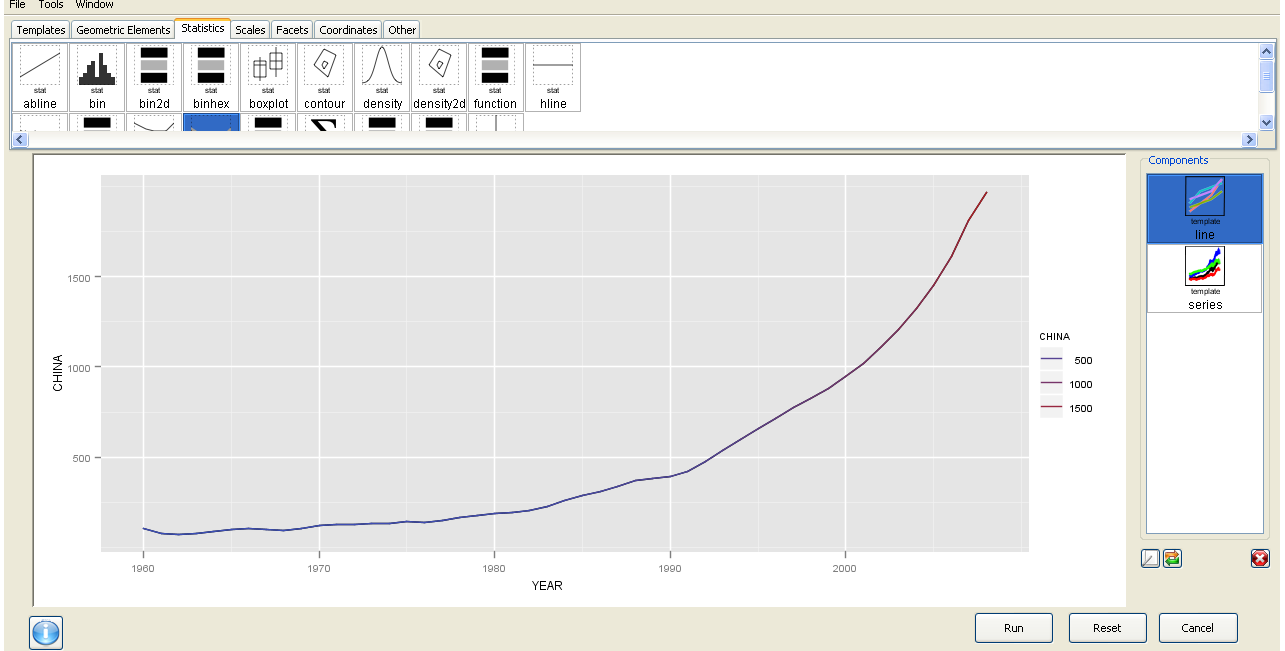
The best thing is the ability to use GGPlot using a GUI.
I am now trying to create more complicated plots for example with more than one Y variable but it is still a work in progress. Overall Deducer has made impressive improvements and with the JGR GUI seems very very promising. The look and feel also shows a combination of features (from SPSS ‘s variable and data view)

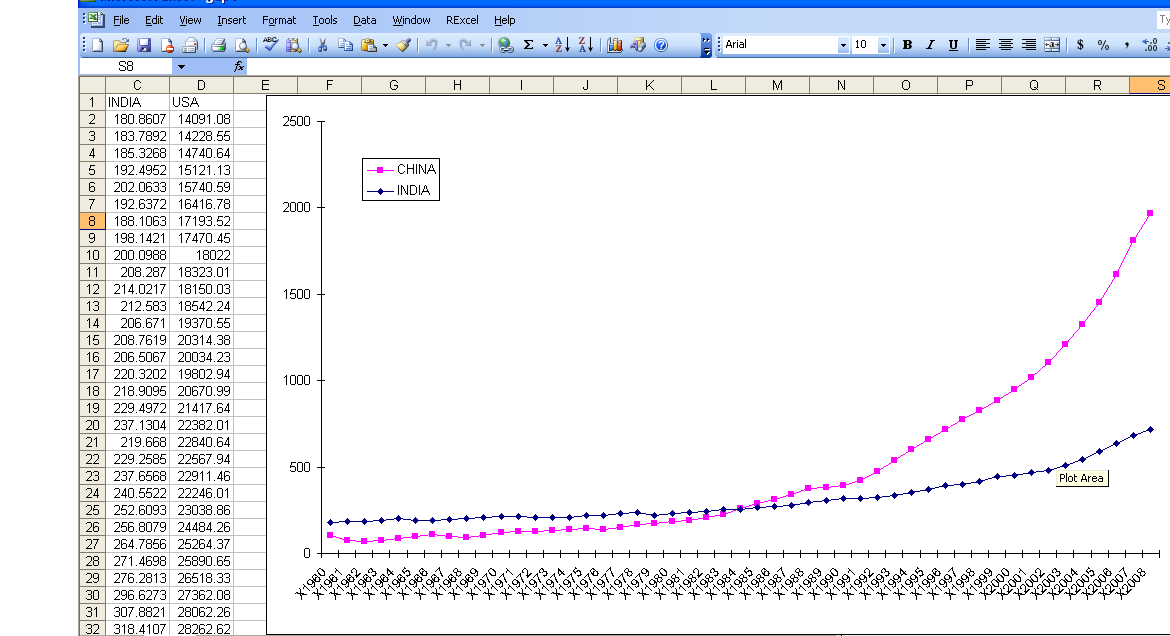
And yes China overtook India in 1985. In GDP per capita. Sigh

GGPLot though overtook Excel graphics as well.


Here is a video which is much better than my screenshots

Hearst DataMining Challenge

Check out the Hearst Data Mining Challenge- a new competition-sponsored by DMA, Hearst Magazine, and EXL

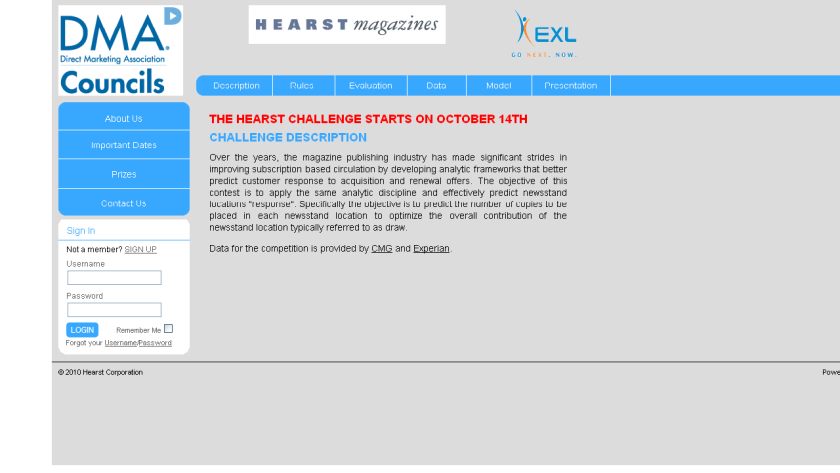
THE HEARST CHALLENGE STARTS ON OCTOBER 14TH

CHALLENGE

DESCRIPTION

Over the years, the magazine publishing industry has made significant strides in improving subscription based circulation by developing analytic frameworks that better predict customer response to acquisition and renewal offers. The objective of this contest is to apply the same analytic discipline and effectively predict newsstand locations “response”. Specifically the objective is to predict the number of copies to be placed in each newsstand location to optimize the overall contribution of the newsstand location typically referred to as draw.

Data for the competition is provided by CMG and Experian.

and

RULES

HOW TO ENTER: Beginning October 14th, 2010 at 12:01 AM (ET) throughDecember 3rd, 2010 at 11:59 PM (ET) go to the Hearst Challenge website located at http://www.HearstChallenge.com (the “Site”) and complete and submit the entry form pursuant to the onscreen instructions. Entrants will be provided a historical sample of newsstand location draw, sales and associated location level data to help develop their predictive algorithm. Hearst will in turn hold back two distinct sets of draw/sales data, one to be used as a validation set by the contestant and one to be used as a final contest evaluation set. Entrants may not include any other external variables for the challenge. Additional details will be provided with the data. Entrants will be able to track their performance against the validation set throughout the course of the challenge via a leader tracking board to be made available on the Site. Entries must include the following documentation:

  • Data file with id variables and expected sales values by store and publication
  • The final model/ algorithm code used to score the final data set
  • Any supporting documentation that pertains to the development of the submitted model/algorithm including variable creation. Variables that were used in the model need to be traced through from input to coefficient / node (if using a tree based methodology).

Check out http://www.hearstchallenge.com/index.php for further details.