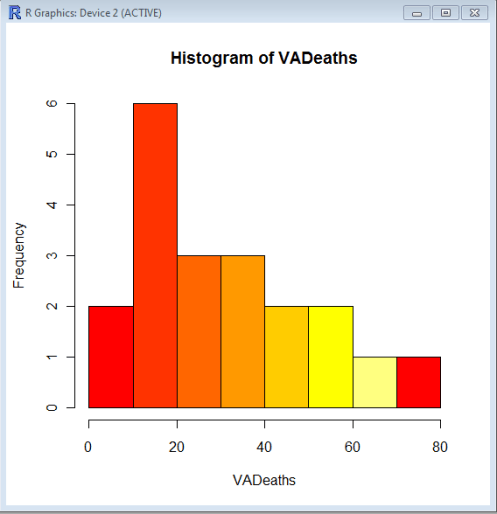
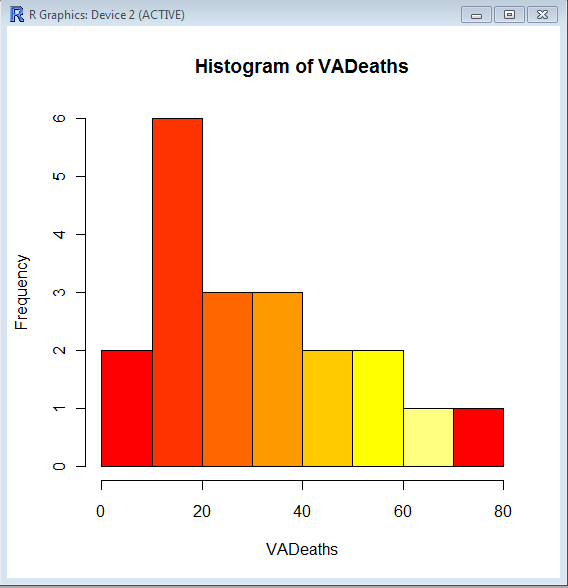
Using Color Palettes in R

If you like me, are unable to decide whether blue or brown is a better color for graph- color palettes in R are a big help for aesthetically acceptable alternatives.

Using the same graphs, I choose the 5 main kinds of color palettes, using them is as easy as specifying the col= parameter in graphical display in Base Graphs. And I modified the n parameter for number of colors to be used- you can specify more or less depending how much you want the gradient or difference in colors to be.

> hist(VADeaths,col=heat.colors(7))

> hist(VADeaths,col=terrain.colors(7))

Continue reading “Using Color Palettes in R”

Predictive Analytics World Conference –New York City and London, UK

Please use the following code  to get a 15% discount on the 2 Day Conference Pass:  AJAYNY11.

Predictive Analytics World Conference –New York City and London, UK
October 17-21, 2011 – New York City, NY (pawcon.com/nyc)
Nov 30 – Dec 1, 2011 – London, UK (pawcon.com/london)

Predictive Analytics World (pawcon.com) is the business-focused event for predictive analytics
professionals, managers and commercial practitioners, covering today’s commercial deployment of
predictive analytics, across industries and across software vendors. The conference delivers case
studies, expertise, and resources to achieve two objectives:

1) Bigger wins: Strengthen the business impact delivered by predictive analytics

2) Broader capabilities: Establish new opportunities with predictive analytics

Case Studies: How the Leading Enterprises Do It

Predictive Analytics World focuses on concrete examples of deployed predictive analytics. The leading
enterprises have signed up to tell their stories, so you can hear from the horse’s mouth precisely how
Fortune 500 analytics competitors and other top practitioners deploy predictive modeling, and what
kind of business impact it delivers.

PAW NEW YORK CITY 2011

PAW’s NYC program is the richest and most diverse yet, featuring over 40 sessions across three tracks
– including both X and Y tracks, and an “Expert/Practitioner” track — so you can witness how predictive
analytics is applied at major companies.

PAW NYC’s agenda covers hot topics and advanced methods such as ensemble models, social data,
search marketing, crowdsourcing, blackbox trading, fraud detection, risk management, survey analysis,
and other innovative applications that benefit organizations in new and creative ways.

WORKSHOPS: PAW NYC also features five full-day pre- and post-conference workshops that
complement the core conference program. Workshop agendas include advanced predictive modeling
methods, hands-on training, an intro to R (the open source analytics system), and enterprise decision
management.

For more see http://www.predictiveanalyticsworld.com/newyork/2011/

PAW LONDON 2011

PAW London’s agenda covers hot topics and advanced methods such as risk management, uplift
(incremental lift) modeling, open source analytics, and crowdsourcing data mining. Case study
presentations cover campaign targeting, churn modeling, next-best-offer, selecting marketing channels,
global analytics deployment, email marketing, HR candidate search, and other innovative applications
that benefit organizations in new and creative ways.

Join PAW and access the best keynotes, sessions, workshops, exposition, expert panel, live demos,
networking coffee breaks, reception, birds-of-a-feather lunches, brand-name enterprise leaders, and

industry heavyweights in the business.

For more see http://www.predictiveanalyticsworld.com/london

CROSS-INDUSTRY APPLICATIONS

Predictive Analytics World is the only conference of its kind, delivering vendor-neutral sessions across
verticals such as banking, financial services, e-commerce, education, government, healthcare, high
technology, insurance, non-profits, publishing, social gaming, retail and telecommunications

And PAW covers the gamut of commercial applications of predictive analytics, including response
modeling, customer retention with churn modeling, product recommendations, fraud detection, online
marketing optimization, human resource decision-making, law enforcement, sales forecasting, and
credit scoring.

Why bring together such a wide range of endeavors? No matter how you use predictive analytics, the
story is the same: Predicatively scoring customers optimizes business performance. Predictive analytics
initiatives across industries leverage the same core predictive modeling technology, share similar project
overhead and data requirements, and face common process challenges and analytical hurdles.

RAVE REVIEWS:

“Hands down, best applied, analytics conference I have ever attended. Great exposure to cutting-edge
predictive techniques and I was able to turn around and apply some of those learnings to my work
immediately. I’ve never been able to say that after any conference I’ve attended before!”

Jon Francis
Senior Statistician
T-Mobile

Read more: Articles and blog entries about PAW can be found at http://www.predictiveanalyticsworld.com/
pressroom.php

VENDORS. Meet the vendors and learn about their solutions, software and service. Discover the best
predictive analytics vendors available to serve your needs – learn what they do and see how they
compare

COLLEAGUES. Mingle, network and hang out with your best and brightest colleagues. Exchange
experiences over lunch, coffee breaks and the conference reception connecting with those professionals
who face the same challenges as you.

GET STARTED. If you’re new to predictive analytics, kicking off a new initiative, or exploring new ways
to position it at your organization, there’s no better place to get your bearings than Predictive Analytics
World. See what other companies are doing, witness vendor demos, participate in discussions with the
experts, network with your colleagues and weigh your options!

For more information:
http://www.predictiveanalyticsworld.com

View videos of PAW Washington DC, Oct 2010 — now available on-demand:
http://www.predictiveanalyticsworld.com/online-video.php

What is predictive analytics? See the Predictive Analytics Guide:
http://www.predictiveanalyticsworld.com/predictive_analytics.php

If you’d like our informative event updates, sign up at:
http://www.predictiveanalyticsworld.com/signup-us.php

To sign up for the PAW group on LinkedIn, see:
http://www.linkedin.com/e/gis/1005097

For inquiries e-mail regsupport@risingmedia.com or call (717) 798-3495.

Augustus- a PMML model producer and consumer. Scoring engine.

A Bold GNU Head
Image via Wikipedia

I just checked out this new software for making PMML models. It is called Augustus and is created by the Open Data Group (http://opendatagroup.com/) , which is headed by Robert Grossman, who was the first proponent of using R on Amazon Ec2.

Probably someone like Zementis ( http://adapasupport.zementis.com/ ) can use this to further test , enhance or benchmark on the Ec2. They did have a joint webinar with Revolution Analytics recently.

https://code.google.com/p/augustus/

Recent News

  • Augustus v 0.4.3.1 has been released
  • Added a guide (pdf) for including Augustus in the Windows System Properties.
  • Updated the install documentation.
  • Augustus 2010.II (Summer) release is available. This is v 0.4.2.0. More information is here.
  • Added performance discussion concerning the optional cyclic garbage collection.

See Recent News for more details and all recent news.

Augustus

Augustus is a PMML 4-compliant scoring engine that works with segmented models. Augustus is designed for use with statistical and data mining models. The new release provides Baseline, Tree and Naive-Bayes producers and consumers.

There is also a version for use with PMML 3 models. It is able to produce and consume models with 10,000s of segments and conforms to a PMML draft RFC for segmented models and ensembles of models. It supports Baseline, Regression, Tree and Naive-Bayes.

Augustus is written in Python and is freely available under the GNU General Public License, version 2.

See the page Which version is right for me for more details regarding the different versions.

PMML

Predictive Model Markup Language (PMML) is an XML mark up language to describe statistical and data mining models. PMML describes the inputs to data mining models, the transformations used to prepare data for data mining, and the parameters which define the models themselves. It is used for a wide variety of applications, including applications in finance, e-business, direct marketing, manufacturing, and defense. PMML is often used so that systems which create statistical and data mining models (“PMML Producers”) can easily inter-operate with systems which deploy PMML models for scoring or other operational purposes (“PMML Consumers”).

Change Detection using Augustus

For information regarding using Augustus with Change Detection and Health and Status Monitoring, please see change-detection.

Open Data

Open Data Group provides management consulting services, outsourced analytical services, analytic staffing, and expert witnesses broadly related to data and analytics. It has experience with customer data, supplier data, financial and trading data, and data from internal business processes.

It has staff in Chicago and San Francisco and clients throughout the U.S. Open Data Group began operations in 2002.


Overview

The above example contains plots generated in R of scoring results from Augustus. Each point on the graph represents a use of the scoring engine and a chart is an aggregation of multiple Augustus runs. A Baseline (Change Detection) model was used to score data with multiple segments.

Typical Use

Augustus is typically used to construct models and score data with models. Augustus includes a dedicated application for creating, or producing, predictive models rendered as PMML-compliant files. Scoring is accomplished by consuming PMML-compliant files describing an appropriate model. Augustus provides a dedicated application for scoring data with four classes of models, Baseline (Change Detection) ModelsTree ModelsRegression Models and Naive Bayes Models. The typical model development and use cycle with Augustus is as follows:

  1. Identify suitable data with which to construct a new model.
  2. Provide a model schema which proscribes the requirements for the model.
  3. Run the Augustus producer to obtain a new model.
  4. Run the Augustus consumer on new data to effect scoring.

Separate consumer and producer applications are supplied for Baseline (Change Detection) models, Tree models, Regression models and for Naive Bayes models. The producer and consumer applications require configuration with XML-formatted files. The specification of the configuration files and model schema are detailed below. The consumers provide for some configurability of the output but users will often provide additional post-processing to render the output according to their needs. A variety of mechanisms exist for transmitting data but user’s may need to provide their own preprocessing to accommodate their particular data source.

In addition to the producer and consumer applications, Augustus is conceptually structured and provided with libraries which are relevant to the development and use of Predictive Models. Broadly speaking, these consist of components that address the use of PMML and components that are specific to Augustus.

Post Processing

Augustus can accommodate a post-processing step. While not necessary, it is often useful to

  • Re-normalize the scoring results or performing an additional transformation.
  • Supplements the results with global meta-data such as timestamps.
  • Formatting of the results.
  • Select certain interesting values from the results.
  • Restructure the data for use with other applications.

Using Views in R and comparing functions across multiple packages

Some RDF hacking relating to updating probabil...
Image via Wikipedia

R has almost 2923 available packages

This makes the task of searching among these packages and comparing functions for the same analytical task across different packages a bit tedious and prone to manual searching (of reading multiple Pdfs of help /vignette of packages) or sending an email to the R help list.

However using R Views is a slightly better way of managing all your analytical requirements for software rather than the large number of packages (see Graphics view below).

CRAN Task Views allow you to browse packages by topic and provide tools to automatically install all packages for special areas of interest. Currently, 28 views are available. http://cran.r-project.org/web/views/

Bayesian Bayesian Inference
ChemPhys Chemometrics and Computational Physics
ClinicalTrials Clinical Trial Design, Monitoring, and Analysis
Cluster Cluster Analysis & Finite Mixture Models
Distributions Probability Distributions
Econometrics Computational Econometrics
Environmetrics Analysis of Ecological and Environmental Data
ExperimentalDesign Design of Experiments (DoE) & Analysis of Experimental Data
Finance Empirical Finance
Genetics Statistical Genetics
Graphics Graphic Displays & Dynamic Graphics & Graphic Devices & Visualization
gR gRaphical Models in R
HighPerformanceComputing High-Performance and Parallel Computing with R
MachineLearning Machine Learning & Statistical Learning
MedicalImaging Medical Image Analysis
Multivariate Multivariate Statistics
NaturalLanguageProcessing Natural Language Processing
OfficialStatistics Official Statistics & Survey Methodology
Optimization Optimization and Mathematical Programming
Pharmacokinetics Analysis of Pharmacokinetic Data
Phylogenetics Phylogenetics, Especially Comparative Methods
Psychometrics Psychometric Models and Methods
ReproducibleResearch Reproducible Research
Robust Robust Statistical Methods
SocialSciences Statistics for the Social Sciences
Spatial Analysis of Spatial Data
Survival Survival Analysis
TimeSeries Time Series Analysis

To automatically install these views, the ctv package needs to be installed, e.g., via

install.packages("ctv")
library("ctv")
Created by Pretty R at inside-R.org


and then the views can be installed via install.views or update.views (which first assesses which of the packages are already installed and up-to-date), e.g.,

install.views("Econometrics")
 update.views("Econometrics")
 Created by Pretty R at inside-R.org

CRAN Task View: Graphic Displays & Dynamic Graphics & Graphic Devices & Visualization

Maintainer: Nicholas Lewin-Koh
Contact: nikko at hailmail.net
Version: 2009-10-28

R is rich with facilities for creating and developing interesting graphics. Base R contains functionality for many plot types including coplots, mosaic plots, biplots, and the list goes on. There are devices such as postscript, png, jpeg and pdf for outputting graphics as well as device drivers for all platforms running R. lattice and grid are supplied with R’s recommended packages and are included in every binary distribution. lattice is an R implementation of William Cleveland’s trellis graphics, while grid defines a much more flexible graphics environment than the base R graphics.

R’s base graphics are implemented in the same way as in the S3 system developed by Becker, Chambers, and Wilks. There is a static device, which is treated as a static canvas and objects are drawn on the device through R plotting commands. The device has a set of global parameters such as margins and layouts which can be manipulated by the user using par() commands. The R graphics engine does not maintain a user visible graphics list, and there is no system of double buffering, so objects cannot be easily edited without redrawing a whole plot. This situation may change in R 2.7.x, where developers are working on double buffering for R devices. Even so, the base R graphics can produce many plots with extremely fine graphics in many specialized instances.

One can quickly run into trouble with R’s base graphic system if one wants to design complex layouts where scaling is maintained properly on resizing, nested graphs are desired or more interactivity is needed. grid was designed by Paul Murrell to overcome some of these limitations and as a result packages like latticeggplot2vcd or hexbin (on Bioconductor ) use grid for the underlying primitives. When using plots designed with grid one needs to keep in mind that grid is based on a system of viewports and graphic objects. To add objects one needs to use grid commands, e.g., grid.polygon() rather than polygon(). Also grid maintains a stack of viewports from the device and one needs to make sure the desired viewport is at the top of the stack. There is a great deal of explanatory documentation included with grid as vignettes.

The graphics packages in R can be organized roughly into the following topics, which range from the more user oriented at the top to the more developer oriented at the bottom. The categories are not mutually exclusive but are for the convenience of presentation:

  • Plotting : Enhancements for specialized plots can be found in plotrix, for polar plotting, vcd for categorical data, hexbin (on Bioconductor ) for hexagon binning, gclus for ordering plots and gplots for some plotting enhancements. Some specialized graphs, like Chernoff faces are implemented in aplpack, which also has a nice implementation of Tukey’s bag plot. For 3D plots latticescatterplot3d and misc3d provide a selection of plots for different kinds of 3D plotting. scatterplot3d is based on R’s base graphics system, while misc3d is based on rgl. The package onion for visualizing quaternions and octonions is well suited to display 3D graphics based on derived meshes.
  • Graphic Applications : This area is not much different from the plotting section except that these packages have tools that may not for display, but can aid in creating effective displays. Also included are packages with more esoteric plotting methods. For specific subject areas, like maps, or clustering the excellent task views contributed by other dedicated useRs is an excellent place to start.
    • Effect ordering : The gclus package focuses on the ordering of graphs to accentuate cluster structure or natural ordering in the data. While not for graphics directly cba and seriation have functions for creating 1 dimensional orderings from higher dimensional criteria. For ordering an array of displays, biclust can be useful.
    • Large Data Sets : Large data sets can present very different challenges from moderate and small datasets. Aside from overplotting, rendering 1,000,000 points can tax even modern GPU’s. For univariate datalvplot produces letter value boxplots which alleviate some of the problems that standard boxplots exhibit for large data sets. For bivariate data ash can produce a bivariate smoothed histogram very quickly, and hexbin, on Bioconductor , can bin bivariate data onto a hexagonal lattice, the advantage being that the irregular lines and orientation of hexagons do not create linear artifacts. For multivariate data, hexbin can be used to create a scatterplot matrix, combined with lattice. An alternative is to use scagnostics to produce a scaterplot matrix of “data about the data”, and look for interesting combinations of variables.
    • Trees and Graphs ape and ade4 have functions for plotting phylogenetic trees, which can be used for plotting dendrograms from clustering procedures. While these packages produce decent graphics, they do not use sophisticated algorithms for node placement, so may not be useful for very large trees. igraph has the Tilford-Rheingold algorithm implementead and is useful for plotting larger trees. diagram as facilities for flow diagrams and simple graphs. For more sophisticated graphs Rgraphviz and igraph have functions for plotting and layout, especially useful for representing large networks.
  • Graphics Systems lattice is built on top of the grid graphics system and is an R implementation of William Cleveland’s trellis system for S-PLUS. lattice allows for building many types of plots with sophisticated layouts based on conditioning. ggplot2 is an R implementation of the system described in “A Grammar of Graphics” by Leland Wilkinson. Like latticeggplot (also built on top of grid) assists in trellis-like graphics, but allows for much more. Since it is built on the idea of a semantics for graphics there is much more emphasis on reshaping data, transformation, and assembling the elements of a plot.
  • Devices : Whereas grid is built on top of the R graphics engine, many in the R community have found the R graphics engine somewhat inflexible and have written separate device drivers that either emphasize interactivity or plotting in various graphics formats. R base supplies devices for PostScript, PDF, JPEG and other formats. Devices on CRAN include cairoDevice which is a device based libcairo, which can actually render to many device types. The cairo device is desgned to work with RGTK2, which is an interface to the Gimp Tool Kit, similar to pyGTK2. GDD provides device drivers for several bitmap formats, including GIF and BMP. RSvgDevice is an SVG device driver and interfaces well with with vector drawing programs, or R web development packages, such as Rpad. When SVG devices are for web display developers should be aware that internet explorer does not support SVG, but has their own standard. Trust Microsoft. rgl provides a device driver based on OpenGL, and is good for 3D and interactive development. Lastly, the Augsburg group supplies a set of packages that includes a Java-based device, JavaGD.
  • Colors : The package colorspace provides a set of functions for transforming between color spaces and mixcolor() for mixing colors within a color space. Based on the HCL colors provided in colorspacevcdprovides a set of functions for choosing color palettes suitable for coding categorical variables ( rainbow_hcl()) and numerical information ( sequential_hcl()diverge_hcl()). Similar types of palettes are provided in RColorBrewer and dichromat is focused on palettes for color-impaired viewers.
  • Interactive Graphics : There are several efforts to implement interactive graphics systems that interface well with R. In an interactive system the user can interactively query the graphics on the screen with the mouse, or a moveable brush to zoom, pan and query on the device as well as link with other views of the data. rggobi embeds the GGobi interactive graphics system within R, so that one can display a data frame or several in GGobi directly from R. The package has functions to support longitudinal data, and graphs using GGobi’s edge set functionality. The RoSuDA repository maintained and developed by the University of Augsburg group has two packages, iplots and iwidgets as well as their Java development environment including a Java device, JavaGD. Their interactive graphics tools contain functions for alpha blending, which produces darker shading around areas with more data. This is exceptionally useful for parallel coordinate plots where many lines can quickly obscure patterns. playwith has facilities for building interactive versions of R graphics using the cairoDevice and RGtk2. Lastly, the rgl package has mechanisms for interactive manipulation of plots, especially 3D rotations and surfaces.
  • Development : For development of specialized graphics packages in R, grid should probably be the first consideration for any new plot type. rgl has better tools for 3D graphics, since the device is interactive, though it can be slow. An alternative is to use Java and the Java device in the RoSuDA packages, though Java has its own drawbacks. For porting plotting code to grid, using the package gridBase presents a nice intermediate step to embed base graphics in grid graphics and vice versa.

It's a code code summer

East-German pupils ("Junge Pioniere"...
Image via Wikipedia

and soc is back!

also expecting some #Rstats entries (open source!)

from https://code.google.com/soc/

Google Summer of Code 2011

Visit the Google Summer of Code 2011 site for more details about the program this year.

For a detailed timeline and further information about the program, review our Frequently Asked Questions.

About Google Summer of Code

Google Summer of Code is a global program that offers student developers stipends to write code for various open source software projects. We have worked with several open source, free software, and technology-related groups to identify and fund several projects over a three month period. Since its inception in 2005, the program has brought together over 4500 successful student participants and over 3000 mentors from over 100 countries worldwide, all for the love of code. Through Google Summer of Code, accepted student applicants are paired with a mentor or mentors from the participating projects, thus gaining exposure to real-world software development scenarios and the opportunity for employment in areas related to their academic pursuits. In turn, the participating projects are able to more easily identify and bring in new developers. Best of all, more source code is created and released for the use and benefit of all.

To learn more about the program, peruse our 2011 Frequently Asked Questions page. You can also subscribe to the Google Open Source Blog or the Google Summer of Code Discussion Group to keep abreast of the latest announcements.

Participating in Google Summer of Code

For those of you who would like to participate in the program, there are many resources available for you to learn more. Check out the information pages from the 20052006200720082009, and 2010 instances of the program to get a better sense of which projects have participated as mentoring organizations in Google Summer of Code each year. If you are interested in a particular mentoring organization, just click on its name and you’ll find more information about the project, a summary of their students’ work and actual source code produced by student participants. You may also find the program Frequently Asked Questions (FAQs) pages for each year to be useful. Finally, check out all the great content and advice on participation produced by the community, for the community, on our program wiki.

If you don’t find what you need in the documentation, you can always ask questions on our program discussion list or the program IRC channel, #gsoc on Freenode.


Protected: Using SAS and C/C++ together

This content is password-protected. To view it, please enter the password below.

Protected: Whats behind that pretty SAS Blog?

This content is password-protected. To view it, please enter the password below.