The following is an auto generated post thanks to WordPress.com stats team- clearly they have got some stuff wrong
1) Defining the speedometer quantitatively
2) The busiest day numbers are plain wrong ( 2 views ??)
3) There is still no geographic data in WordPress -com stats (unlike Google Analytics) and I cant enable Google Analytics on a wordpress.com hosted site.
The stats helper monkeys at WordPress.com mulled over how this blog did in 2010, and here’s a high level summary of its overall blog health:
The Blog-Health-o-Meter™ reads Wow.
Crunchy numbers
The Louvre Museum has 8.5 million visitors per year. This blog was viewed about 97,000 times in 2010. If it were an exhibit at The Louvre Museum, it would take 4 days for that many people to see it.
In 2010, there were 367 new posts, growing the total archive of this blog to 1191 posts. There were 411 pictures uploaded, taking up a total of 121mb. That’s about 1 pictures per day.
The top referring sites in 2010 were r-bloggers.com, reddit.com, rattle.togaware.com, twitter.com, and Google Reader.
Some visitors came searching, mostly for libre office, facebook analytics, test drive a chrome notebook, test drive a chrome notebook., and wps sas lawsuit.
Attractions in 2010
These are the posts and pages that got the most views in 2010.
Using two Chrome Extensions, Disconnect and AdBlock you can be sure of having a vary very clean browsing experience-it is recommended especially if you dont like the auto sharing of your personal preferences and cannot be bothered by the Byzantine maze of social media privacy fineprint.
* Search depersonalization is now optional and off by default. Click the “d” button then the “Depersonalize searches” checkbox to turn this feature on (or back off in case you have trouble getting to Google or Yahoo services). For help with anything else, see the known issues below and ask questions at http://j.mp/dnewgroup.

§

If you’re a typical web user, you’re unintentionally sending your browsing and search history with your name and other personal information to third parties and search engines whenever you’re online.

Take control of the data you share with Disconnect!

From the developer of the top-10-rated Facebook Disconnect extension, Disconnect lets you:

• Disable tracking by third parties like Digg, Facebook, Google, Twitter, and Yahoo, without requiring any setup or significantly degrading the usability of the web.

• Truly depersonalize searches on search engines like Google and Yahoo (by blocking identifying cookies not just changing the appearance of results pages), while staying logged into other services — e.g., so you can search anonymously on Google and access iGoogle at once.

• See how many resource and cookie requests are blocked, in real time
=================

New in version 2.1: Translated into dozens of languages!
New in version 2.0: Ads are blocked from downloading, instead of just being removed after the fact!

=======================

The official AdBlock For Chrome!  Block all advertisements on all web pages.  Your browser is automatically updated with additions to the filter: just click Install, then visit your favorite website and see the ads disappear!

FAQs:1. This is the official AdBlock extension: the original ad blocker written from the ground up to be optimized in Chrome.  There's an unrelated, older Firefox project called Adblock Plus, and they're working on making a Chrome version out of the old AdThwart codebase.  At the moment AdBlock blocks some ads that AdThwart only hides, but they're working to improve it.  It's available at bit.ly/id2Gqx; if you have trouble with AdBlock, they're good guys and a fine alternative!
We have a limited number of Chrome notebooks to distribute, and we need to ensure that they find good homes. That’s where you come in. Everything is still very much a work in progress, and it’s users, like you, that often give us our best ideas about what feels clunky or what’s missing. So if you live in the United States, are at least 18 years old, and would like to be considered for our small Pilot program, please fill this out. It should take about 15 minutes. We’ll review the requests that come in and contact you if you’ve been selected.
This application will be open until 11:59:59 PM PST on December 21, 2010.
Here is a terrific data visualization from Google based on their digitized books collection. How does it work, basically you can test the frequency of various words across time periods from 1700s to 2010.
Like the frequency and intensity of kung fu vs yoga, or pizza versus hot dog. The basic datasets scans millions /billions of words.
When you enter phrases into the Google Books Ngram Viewer, it displays a graph showing how those phrases have occurred in a corpus of books (e.g., “British English”, “English Fiction”, “French”) over the selected years. Let’s look at a sample graph:
This shows trends in three ngrams from 1950 to 2000: “nursery school” (a 2-gram or bigram), “kindergarten” (a 1-gram or unigram), and “child care” (another bigram). What the y-axis shows is this: of all the bigrams contained in our sample of books written in English and published in the United States, what percentage of them are “nursery school” or “child care”? Of all the unigrams, what percentage of them are “kindergarten”? Here, you can see that use of the phrase “child care” started to rise in the late 1960s, overtaking “nursery school” around 1970 and then “kindergarten” around 1973. It peaked shortly after 1990 and has been falling steadily since.
(Interestingly, the results are noticeably different when the corpus is switched to British English.)
Corpora
Below are descriptions of the corpora that can be searched with the Google Books Ngram Viewer. All of these corpora were generated in July 2009; we will update these corpora as our book scanning continues, and the updated versions will have distinct persistent identifiers.
Informal corpus name
Persistent identifier
Description
American English
googlebooks-eng-us-all-20090715
Same filtering as the English corpus but further restricted to books published in the United States.
British English
googlebooks-eng-gb-all-20090715
Same filtering as the English corpus but further restricted to books published in Great Britain.
I had recently asked some friends from my Twitter lists for their take on 2011, atleast 3 of them responded back with the answer, 1 said they were still on it, and 1 claimed a recent office event.
Anyways- I take note of the view of forecasting from
The most primitive method of forecasting is guessing. The result may be rated acceptable if the person making the guess is an expert in the matter.
Ajay- people will forecast in end 2010 and 2011. many of them will get forecasts wrong, some very wrong, but by Dec 2011 most of them would be writing forecasts on 2012. almost no one will get called on by irate users-readers- (hey you got 4 out of 7 wrong last years forecast!) just wont happen. people thrive on hope. so does marketing. in 2011- and before
and some forecasts from Tom Davenport’s The International Institute for Analytics (IIA) at
Regulatory and privacy constraints will continue to hamper growth of marketing analytics.
(I wonder how privacy and analytics can co exist in peace forever- one view is that model building can use anonymized data suppose your IP address was anonymized using a standard secret Coco-Cola formula- then whatever model does get built would not be of concern to you individually as your privacy is protected by the anonymization formula)
Anyway- back to the question I asked-
What are the top 5 events in your industry (events as in things that occured not conferences) and what are the top 3 trends in 2011.
I define my industry as being online technology writing- research (with a heavy skew on stat computing)
My top 5 events for 2010 were-
1) Consolidation- Big 5 software providers in BI and Analytics bought more, sued more, and consolidated more. The valuations rose. and rose. leading to even more smaller players entering. Thus consolidation proved an oxy moron as total number of influential AND disruptive players grew.
2) Cloudy Computing- Computing shifted from the desktop but to the mobile and more to the tablet than to the cloud. Ipad front end with Amazon Ec2 backend- yup it happened.
3) Open Source grew louder- yes it got more clients. and more revenue. did it get more market share. depends on if you define market share by revenues or by users.
Both Open Source and Closed Source had a good year- the pie grew faster and bigger so no one minded as long their slices grew bigger.
4) We didnt see that coming –
Technology continued to surprise with events (thats what we love! the surprises)
Revolution Analytics broke through R’s Big Data Barrier, Tableau Software created a big Buzz, Wikileaks and Chinese FireWalls gave technology an entire new dimension (though not universally popular one).
people fought wars on emails and servers and social media- unfortunately the ones fighting real wars in 2009 continued to fight them in 2010 too
5) Money-
SAP,SAS,IBM,Oracle,Google,Microsoft made more money than ever before. Only Facebook got a movie named on itself. Venture Capitalists pumped in money in promising startups- really as if in a hurry to park money before tax cuts expired in some countries.
2011 Top Three Forecasts
1) Surprises- Expect to get surprised atleast 10 % of the time in business events. As internet grows the communication cycle shortens, the hype cycle amplifies buzz-
more unstructured data is created (esp for marketing analytics) leading to enhanced volatility
2) Growth- Yes we predict technology will grow faster than the automobile industry. Game changers may happen in the form of Chrome OS- really its Linux guys-and customer adaptability to new USER INTERFACES. Design will matter much more in technology on your phone, on your desktop and on your internet. Packaging sells.
False Top Trend 3) I will write a book on business analytics in 2011. yes it is true and I am working with A publisher. No it is not really going to be a top 3 event for anyone except me,publisher and lucky guys who read it.
3) Creating technology and technically enabling creativity will converge at an accelerated rate. use of widgets, guis, snippets, ide will ensure creative left brains can code easier. and right brains can design faster and better due to a global supply chain of techie and artsy professionals.
Ubuntu has a slight glitch plus workaround for installing the RCurl package on which the Google Prediction API is dependent- you need to first install this Ubuntu package for RCurl to install libcurl4-gnutls-dev
Once you install that using Synaptic,
Simply start R
2) Install Packages rjson and Rcurl using install.packages and choosing CRAN
6) Uploading data to Google Storage using the GUI (rather than gs util)
Just go to https://sandbox.google.com/storage/
and thats the Google Storage manager
Notes on Training Data-
Use a csv file
The first column is the score column (like 1,0 or prediction score)
There are no headers- so delete headers from data file and move the dependent variable to the first column (Note I used data from the kaggle contest for R package recommendation at
Once you type in the basic syntax, the first time it will ask for your Google Credentials (email and password)
It then starts showing you time elapsed for training.
Now you can disconnect and go off (actually I got disconnected by accident before coming back in a say 5 minutes so this is the part where I think this is what happened is why it happened, dont blame me, test it for yourself) –
and when you come back (hopefully before token expires) you can see status of your request (see below)
> library(rjson)
> library(RCurl)
Loading required package: bitops
> library(googlepredictionapi)
> my.model <- PredictionApiTrain(data="gs://numtraindata/training_data")
The request for training has sent, now trying to check if training is completed
Training on numtraindata/training_data: time:2.09 seconds
Training on numtraindata/training_data: time:7.00 seconds
7)
Note I changed the format from the URL where my data is located- simply go to your Google Storage Manager and right click on the file name for link address ( https://sandbox.google.com/storage/numtraindata/training_data.csv)
to gs://numtraindata/training_data (that kind of helps in any syntax error)
## Load googlepredictionapi and dependent libraries
library(rjson)
library(RCurl)
library(googlepredictionapi)

## Make a training call to the Prediction API against data in the Google Storage.
## Replace MYBUCKET and MYDATA with your data.
my.model <- PredictionApiTrain(data="gs://MYBUCKET/MYDATA")

## Alternatively, make a training call against training data stored locally as a CSV file.
## Replace MYPATH and MYFILE with your data.
my.model <- PredictionApiTrain(data="MYPATH/MYFILE.csv")
At the time of writing my data was still getting trained, so I will keep you posted on what happens.
We have a limited number of Chrome notebooks to distribute, and we need to ensure that they find good homes. That’s where you come in. Everything is still very much a work in progress, and it’s users, like you, that often give us our best ideas about what feels clunky or what’s missing. So if you live in the United States, are at least 18 years old, and would like to be considered for our small Pilot program, please fill this out. We’ll review the requests that come in and contact you if you’ve been selected.




 (184) – 44,284 users – Weekly installs: 24,086


 Business
 Education
 Non-Profit
 Developer
 Individual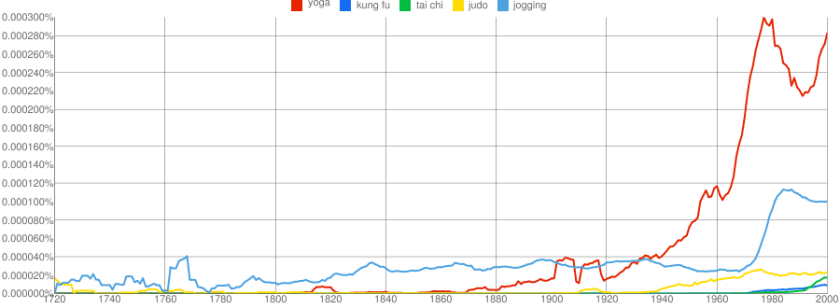


 DECISION STATS