Amazon CC2 – The Big Cloud is finally here

Finally a powerful enough cloud computing instance from Amazon EC2 – called CC2 priced at 3$ per hour (for Windows instances) and 2.4$/hour for Linux

It would be interesting to see how SAS, IBM SPSS or R can leverage these

Storage – On the storage front, the CC2 instance type is packed with 60.5 GB of RAM and 3.37 TB of instance storage.

Processing – The CC2 instance type includes 2 Intel Xeon processors, each with 8 hardware cores. We’ve enabled Hyper-Threading, allowing each core to process a pair of instruction streams in parallel. Net-net, there are 32 hardware execution threads and you can expect 88 EC2 Compute Units (ECU’s) from this 64-bit instance type

On a somewhat smaller scale, you can launch your own array of 290 CC2 instances and create a Top500 supercomputer (63.7 teraFLOPS) at a cost of less than $1000 per hour

http://aws.typepad.com/aws/2011/11/next-generation-cluster-computing-on-amazon-ec2-the-cc2-instance-type.html


and

http://aws.amazon.com/hpc-applications/


Cluster Compute Eight Extra Large specifications:
88 EC2 Compute Units (Eight-core 2 x Intel Xeon)
60.5 GB of memory
3370 GB of instance storage
64-bit platform
I/O Performance: Very High (10 Gigabit Ethernet)
API name: cc2.8xlarge
Price: Starting from $2.40 per hour

But some caveats

  • The instances are available in a single Availability Zone in the US East (Northern Virginia) Region. We plan to add capacity in other EC2 Regions throughout 2012.
  • You can run 2 CC2 instances by default.
  • You cannot currently launch instances of this type within a Virtual Private Cloud (VPC).

Amazing IBM Tech Trends 2011 report

I was reading the amazing Tech Trend 2011 report by IBM at https://www.ibm.com/developerworks/mydeveloperworks/files/app/person/060001TJG2/file/110ccd08-25d9-4932-9bcc-c583868c9f31

What really amazed me is that distortions introduced in Data Visualization even in length of the graphs.

See below and click to enlarge- my notes are in black font, they refer to the length of the weird green bar(?). This I think is one of the worst graphs I have seen this year.


HANA Oncolyzer

An interesting use case of technology for better health is HANA Oncolyzer at http://epic.hpi.uni-potsdam.de/Home/HanaOncolyzer

“Build on the newest in-memory technology the HANA Oncolyzer is able to analyze even huge amounts of medical data in shortest time”, says Dr. Alexander Zeier, Deputy Chair of EPIC. Research institutes and university hospital support from HANA Oncolyzer by building the basis for a flexible exchange of information about efficiency of medicines and treatments.

In near future, the tumor’s DNA of all cancer patients needs to be analyzed to support specific patient therapies. These analyses result in medical data in amount of multiple terabytes. “These data need to be analyzed regarding mutations and anomalies in real-time”, says Matthias Steinbrecher at SAP’s Innovation Center in Potsdam. As one of the aims the research prototype HANA Oncolyzer was developed at our chair in cooperation with SAP’s Innovation Center in Potsdam. “The ‘heart’ of our development builds the in-memory technology that supports the parallel analysis of million of data within seconds in main memory”, saysMatthieu Schapranow, Ph.D. cand. at the HPI.

and

research activities result in 500.000 or more data points per patient.

and

With the help of a dedicated iPad application medical doctors can access all data mobile at any location anytime.


Awesome Case Study by PayPal/ Rapid Miner for Churn

I just saw this awesome case study of using Rapid Miner for predicting Churn in financial services (Paypal). I had been looking for simple yet exhaustive manuals/case studies on churn modeling and this is one the better ones I have seen. http://rapid-i.com/downloads/press/PayPalCaseStudyChurnRiskDetectionv1.1-web.pdf


Moving data between Windows and Ubuntu VMWare partition

I use Windows 7 on my laptop (it came pre-installed) and Ubuntu using the VMWare Player. What are the advantages of using VM Player instead of creating a dual-boot system? Well I can quickly shift from Ubuntu to Windows and bakc again without restarting my computer everytime. Using this approach allows me to utilize software that run only on Windows and run software like Rattle, the R data mining GUI, that are much easier installed on Linux.

However if your statistical software is on your Virtual Disk , and your data is on your Windows disk, you need a way to move data from Windows to Ubuntu.

The solution to this as per Ubuntu forums is –http://communities.vmware.com/thread/55242

Open My Computer, browse to the folder you want to share.  Right-click on the folder, select Properties.  Sharing tab.  Select the radio button to “Share this Folder”.  Change the default generated name if you wish; add a description if you wish.  Click the Permissions button to modify the security settings of what users can read/write to the share.

On the Linux side, it depends on the distro, the shell, and the window manager.

Well Ubuntu makes it really easy to configure the Linux steps to move data within Windows and Linux partitions.


NEW UPDATE-

VMmare makes it easy to share between your Windows (host) and Linux (guest) OS


Step 1
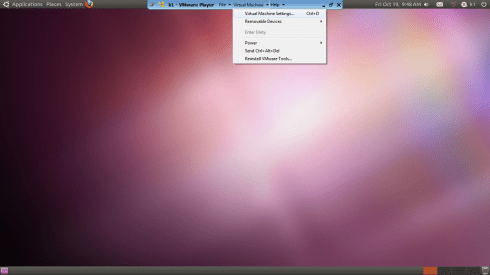
and step 2

Do this


and

Start the Wizard

when you finish the wizard and share a drive or folder- hey where do I see my shared ones-


see this folder in Linux- /mnt/hgfs (bingo!)
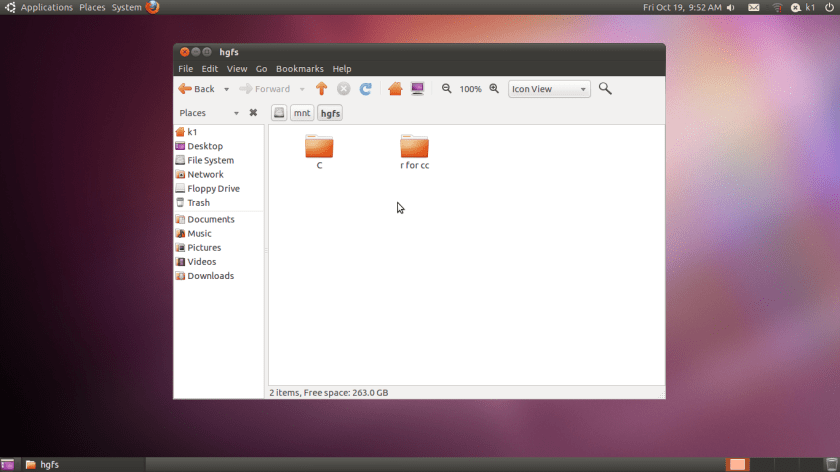
Hacker HW – Make this folder //mnt/hgfs a shortcut in Places your Ubuntu startup

Hacker Hw 2-

Upload using an anon email your VM dark data to Ubuntu one

Delete VM

Purge using software XX

Reinstall VM and bring back backup


Note time to do this


-General Sharing in Windows


Just open the Network tab in Ubuntu- see screenshots below-

Windows will now ask your Ubuntu user for login-

Once Logged in Windows from within Ubuntu Vmware, this is what happens

You see a tab called “users on “windows username”- pc appear on your Ubuntu Desktop  (see top right of the screenshot)

If you double click it- you see your windows path

You can now just click and drag data between your windows and linux partitions , just the way you do it in Windows .

So based on this- if you want to build  decision trees, artifical neural networks, regression models, and even time series models for zero capital expenditure- you can use both Ubuntu/R without compromising on your IT policy of Windows only in your organization (there is a shortage of Ubuntu trained IT administrators in the enterprise world)

Revised Installation Procedure for utilizing both Ubuntu /R/Rattle data mining on your Windows PC.

Using VMWare to build a free data mining system in R, as well as isolate your analytics system (thus using both Linux and Windows without overburdening your machine)

First Time

  1. http://downloads.vmware.com/d/info/desktop_end_user_computing/vmware_player/4_0Download and Install
  2. http://www.ubuntu.com/download/ubuntu/downloadDownload Only
  3. Create New Virtual Image in VM Ware Player
  4. Applications—–Terminal——sudo apt get-install R (to download and install)
  5.                                          sudo R (to open R)
  6. Once R is opened type this  —-install.packages(rattle)—– This will install rattle
  7. library(rattle) will load Rattle—–
  8. rattle() will open the GUI—-
Getting Data from Host to Guest VM
Next Time
  1. Go to VM Player
  2. Open the VM
  3. sudo R in terminal to bring up R
  4. library(rattle) within R
  5. rattle()
At this point even if you dont know any Linux and dont know any R, you can create data mining models using the Rattle GUI (and time series model using E pack in the R Commander GUI) – What can Rattle do in data mining? See this slideshow-http://www.decisionstats.com/data-mining-with-r-gui-rattle-rstats/
If Google Docs is banned as per your enterprise organizational IT policy of having Windows Explorer only- well you can see these screenshots http://rattle.togaware.com/rattle-screenshots.html

The Amazing Microsoft Robotics

Amazing stuff from the makers of Kinetic-

Operating systems of Robots may be the future cash cow of Microsoft , while the pirates of Silicon Valley fight fascinating cloudy wars! 🙂

http://www.microsoft.com/robotics/#Product


Product Information

Microsoft Robotics Developer Studio 4 beta (RDS4 beta) provides a wide range of support to help make it easy to develop robot applications. RDS4 beta includes a programming model that helps make it easy to develop asynchronous, state-driven applications. RDS4 beta provides a common programming framework that can be applied to support a wide variety of robots, enabling code and skill transfer.

RDS4 beta includes a lightweight asynchronous services-oriented runtime, a set of visual authoring and simulation tools, as well as templates, tutorials, and sample code to help you get started.

Microsoft Robotics Developer Studio 4 beta Datasheet – English (PDF Format)

Product VideoView the product video on Channel 9!

This release has extensive support for the Kinect sensor hardware throug the Kinect for Windows SDK allowing developers to create Kinect-enabled robots in the Visual Simulation Environment and in real life. Along with this release comes a standardized reference spec for building a Kinect-based robot.

See how Microsoft Robotics Developer Studio 4 beta is being used to bring ideas to life in the Microsoft Robotics@Home competition.

Lightweight Asynchronous ServicesOriented Runtime

Lightweight Asynchronous ServicesOriented Runtime

Concurrency and Coordination Runtime (CCR) helps make it easier to handle asynchronous input and output by eliminating the conventional complexities of manual threading, locks, and semaphores. Lightweight state-oriented Decentralized Software Services (DSS) framework enables you to create program modules that can interoperate on a robot and connected PCs by using a relatively simple, open protocol.

Visual Programming Language (VPL)

Visual Programming Language

Visual Programming Language (VPL) provides a relatively simple drag-and-drop visual programming language tool that helps make it easy to create robotics applications. VPL also provides the ability to take a collection of connected blocks and reuse them as a single block elsewhere in your program. VPL is also capable of generating human-readable C#.

DSS Manifest Editor

DSS Manifest Editor

DSS Manifest Editor (DSSME) provides a relatively simple creation of application configuration and distribution scenarios.

DSS Log Analyzer

DSS Log Analyzer

The DSS Log Analyzer tool allows you to view message flows across multiple DSS services. DSS Log Analyzer also allows you to inspect message details.

Visual Simulation Environment (VSE)

Visual Simulation Environment

Visual Simulation Environment (VSE) provides the ability to simulate and test robotic applications using a 3D physics-based simulation tool. This allows developers to create robotics applications without the hardware. Sample simulation models and environments enable you to test your application in a variety of 3D virtual environments.

Google Cloud SQL

Another xing bang API from the boyz in Mountain View. (entry by invite only) But it is free and you can test your stuff on a MySQL db =10 GB

Database as a service ? (Maybe)— while Amazon was building fires (and Fire)

—————————————————————–

https://code.google.com/apis/sql/index.html

What is Google Cloud SQL?

Google Cloud SQL is a web service that provides a highly available, fully-managed, hosted SQL storage solution for your App Engine applications.

What are the benefits of using Google Cloud SQL?

You can access a familiar, highly available SQL database from your App Engine applications, without having to worry about provisioning, management, and integration with other Google services.

How much does Google Cloud SQL cost?

We will not be billing for this service in 2011. We will give you at least 30 days’ advance notice before we begin billing in the future. Other services such as Google App Engine, Google Cloud Storage etc. that you use with Google Cloud SQL may have their own payment terms, and you need to pay for them. Please consult their documentation for details.

Currently you are limited to the three instance sizes. What if I need to store more data or need better performance?

In the Limited Preview period, we only have three sizes available. If you have specific needs, we would like to hear from you on our google-cloud-sqldiscussion board.

When is Google Cloud SQL be out of Limited Preview?

We are working hard to make the service generally available.We don’t have a firm date that we can announce right now.

Do you support all the features of MySQL?

In general, Google Cloud SQL supports all the features of MySQL. The following are lists of all the unsupported features and notable differences that Google Cloud SQL has from MySQL.

Unsupported Features:

  • User defined functions
  • MySql replication

Unsupported MySQL statements:

  • LOAD DATA INFILE
  • SELECT ... INTO OUTFILE
  • SELECT ... INTO DUMPFILE
  • INSTALL PLUGIN .. SONAME ...
  • UNINSTALL PLUGIN
  • CREATE FUNCTION ... SONAME ...

Unsupported SQL Functions:

  • LOAD_FILE()

Notable Differences:

  • If you want to import databases with binary data into your Google Cloud SQL instance, you must use the --hex-blob option with mysqldump.Although this is not a required flag when you are using a local MySQL server instance and the MySQL command line, it is required if you want to import any databases with binary data into your Google Cloud SQL instance. For more information, see Importing Data.
How large a database can I use with Google Cloud SQL?
Currently, in this limited preview period, your database instance must be no larger than 10GB.
How can I be notified when there are any changes to Google Cloud SQL?
You can sign up for the sql-announcements forum where we post announcements and news about the Google Cloud SQL.
How can I cancel my Google Cloud SQL account?
To remove all data from your Google Cloud SQL account and disable the service:

  1. Delete all your data. You can remove your tables, databases, and indexes using the drop command. For more information, see SQL DROP statement.
  2. Deactivate the Google Cloud SQL by visiting the Services pane and clicking the On button next to Google Cloud SQL. The button changes from Onto Off.
How do I report a bug, request a feature, or ask a question?
You can report bugs and request a feature on our project page.You can ask a question in our discussion forum.

Getting Started

Can I use languages other than Java or Python?
Only Java and Python are supported for Google Cloud SQL.
Can I use Google Cloud SQL outside of Google App Engine?
The Limited Preview is primarily focused on giving Google App Engine customers the ability to use a familiar relational database environment. Currently, you cannot access Google Cloud SQL from outside Google App Engine.
What database engine are we using in the Google Cloud SQL?
MySql Version 5.1.59
Do I need to install a local version of MySQL to use the Development Server?
Yes.

Managing Your Instances

Do I need to use the Google APIs Console to use Google Cloud SQL?
Yes. For basic tasks like granting access control to applications, creating instances, and deleting instances, you need to use the Google APIs Console.
Can I import or export specific databases?
No, currently it is not possible to export specific databases. You can only export your entire instance.
Do I need a Google Cloud Storage account to import or export my instances?
Yes, you need to sign up for a Google Cloud Storage account or have access to a Google Cloud Storage account to import or export your instances. For more information, see Importing and Exporting Data.
If I delete my instance, can I reuse the instance name?
Yes, but not right away. The instance name is reserved for up to two months before it can be reused.

Tools & Resources

Can I use Django with Google Cloud SQL?
No, currently Google Cloud SQL is not compatible with Django.
What is the best tool to use for interacting with my instance?
There are a variety of tools available for Google Cloud SQL. For executing simple statements, you can use the SQL prompt. For executing more complicated tasks, you might want to use the command line tool. If you want to use a tool with a graphical interface, the SQuirrel SQL Client provides an interface you can use to interact with your instance.

Common Technical Questions

Should I use InnoDB for my tables?
Yes. InnoDB is the default storage engine in MySQL 5.5 and is also the recommended storage engine for Google Cloud SQL. If you do not need any features that require MyISAM, you should use InnoDB. You can convert your existing tables using the following SQL command, replacing tablename with the name of the table to convert:

ALTER tablename ENGINE = InnoDB;

If you have a mysqldump file where all your tables are in MyISAM format, you can convert them by piping the file through a sed script:

mysqldump --databases database_name [-u username -p  password] --hex-blob database_name | sed 's/ENGINE=MyISAM/ENGINE=InnoDB/g' > database_file.sql

Warning: You should not do this if your mysqldump file contains the mysql schema. Those files must remain in MyISAM.

Are there any size or QPS limits?
Yes, the following limits apply to Google Cloud SQL:

Resource Limits from External Requests Limits from Google App Engine
Queries Per Second (QPS) 5 QPS No limit
Maximum Request Size 16 MB
Maximum Response Size 16 MB

Google App Engine Limits

Google App Engine applications are also subject to additional Google App Engine quotas and limits. Requests from Google App Engine applications to Google Cloud SQL are subject to the following time limits:

  • All database requests must finish within the HTTP request timer, around 60 seconds.
  • Offline requests like cron tasks have a time limit of 10 minutes.
  • Backend requests to Google Cloud SQL have a time limit of 10 minutes.

App Engine-specific quotas and access limits are discussed on the Google App Engine Quotas page.

Should I use Google Cloud SQL with my non-High Replication App Engine application?
We recommend that you use Google Cloud SQL with High Replication App Engine applications. While you can use use Google Cloud SQL with applications that do not use high replication, doing so might impact performance.
Source-
https://code.google.com/apis/sql/faq.html#supportmysqlfeatures
