Blog Update

Some changes at Decisionstats-

1) We are back at Decisionstats.com and Decisionstats.wordpress.com will point to that as well. The SEO effects would be interesting and so would be the Instant Pagerank or LinkRank or whatever Coffee/Percolator they use in Cali to index the site.

2) AsterData is no longer a sponsor- but Predictive Analytics Conference is. Welcome PAWS! I have been a blog partner to PAWS ever since it began- and it’s a great marketing fit. Expect to see a lot of exclusive content and interviews from great speakers at PAWS.

3) The Feedblitz newsletter (now at 404 subscribers) is now a weekly subscription to send one big big email rather than lots of email through the week- this is because my blogging frequency is moving up as I collect material for a new book on business analytics that I would probably release in 2011 (if all goes well, touchwood). Linkedin group would be getting a weekly update announcement. If you are connected to Decisionstats on Analyticbridge _ I would soon try to find a way to update the whole post automatically using RSS and Ning.com . or not. Depends.

4) R continues to be a bigger focus. So will SPSS and maybe JMP. Newer softwares or older softwares that change more rapidly would get more coverage. Generally a particular software is covered if it has newer features, or an interesting techie conference, or it gets sued.

5) I will occasionally write a poem or post a video once a week randomly to prove geeks and nerds and analysts can have fun (much more fun actually dont we)

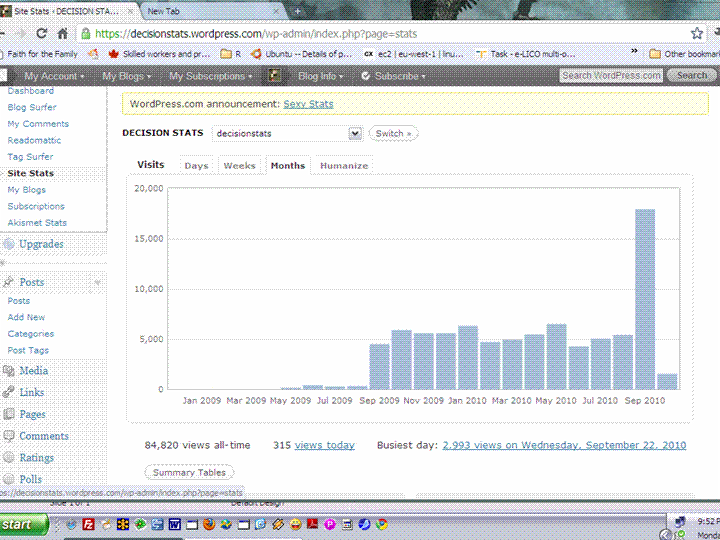
Thanks for reading this. Sept 2010 was the best ever for Decisionstats.com – we crossed 15,000 + visitors and thanks for that again! I promise to bore you less and less as we grow old together on the blog 😉

Gmail Video Chat and Voice

It’s quite handy especially who spend a lot of time on email and on phone- the GmailPhone

Try it in case you havent.

When China overtook India- using DEDUCER

I was just reading about the new release of World Bank Data at http://www.r-chart.com/2010/09/new-world-bank-data-available.html Now World Bank Data is something I worked with in the past, but the RWDI package is a great package. (see http://www.r-chart.com/2010/09/new-world-bank-data-available.html)

The whole dataset is a 29 mb in zipped CSV though and is available for terrific macroeconomic analysis _ I downloaded it and loaded it instead.

http://data.worldbank.org/sites/default/files/data/wdiandgdf_csv.zip

I took a small subset of the data –


WDI_GDF_Data <- read.table("C:/Documents and Settings/abc/My Documents/Downloads/WDI_GDF_Data.csv",header=T,sep=",",quote="\"")
 WDI_GDF_Data.sub<-subset(WDI_GDF_Data,Country.Code == "CHN" | Country.Code == "IND" | Country.Code == "USA")
WDI_GDF_Data.sub.sub<-subset(WDI_GDF_Data.sub,Series.Code == "NY.GDP.PCAP.KD")
WDI_GDF_Data.sub.sub<-as.data.frame(t(WDI_GDF_Data.sub.sub))
write.csv(WDI_GDF_Data.sub.sub,'C:/Documents and Settings/abc/Desktop/gdp3.csv')

Note- WordPress.com now supports source code in R via http://en.support.wordpress.com/code/posting-source-code/

Now this is basic data manipulation- and I used Deducer for it.

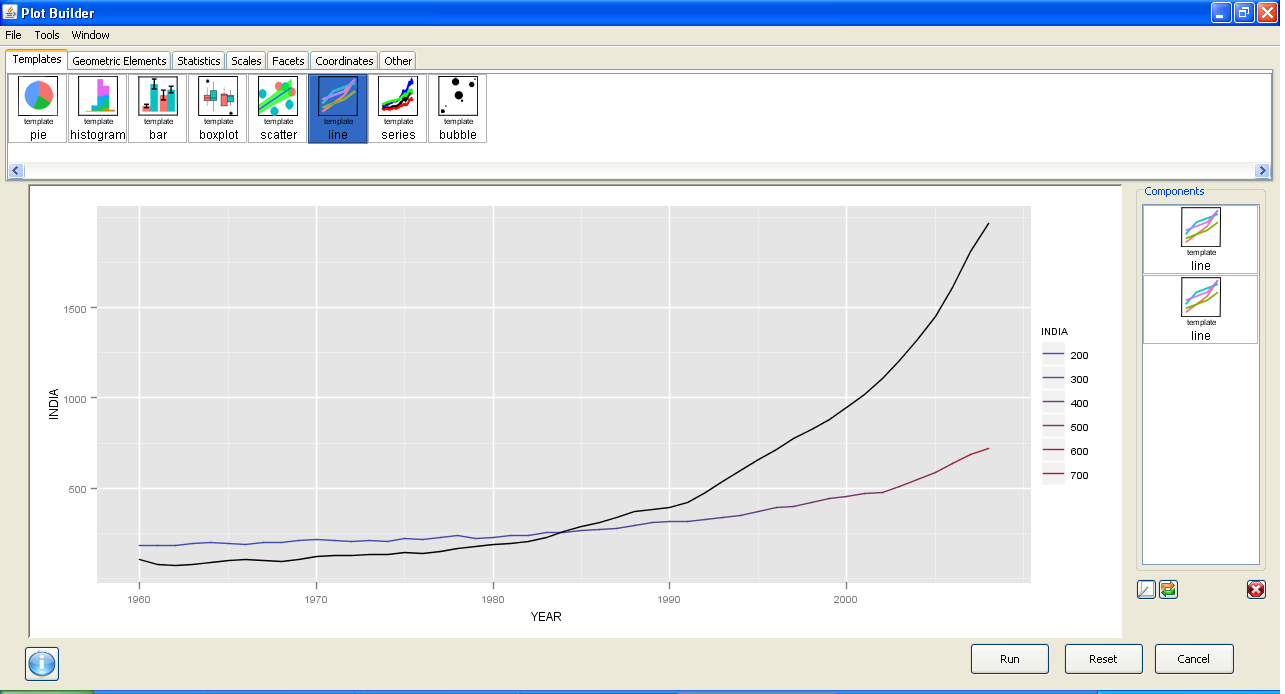
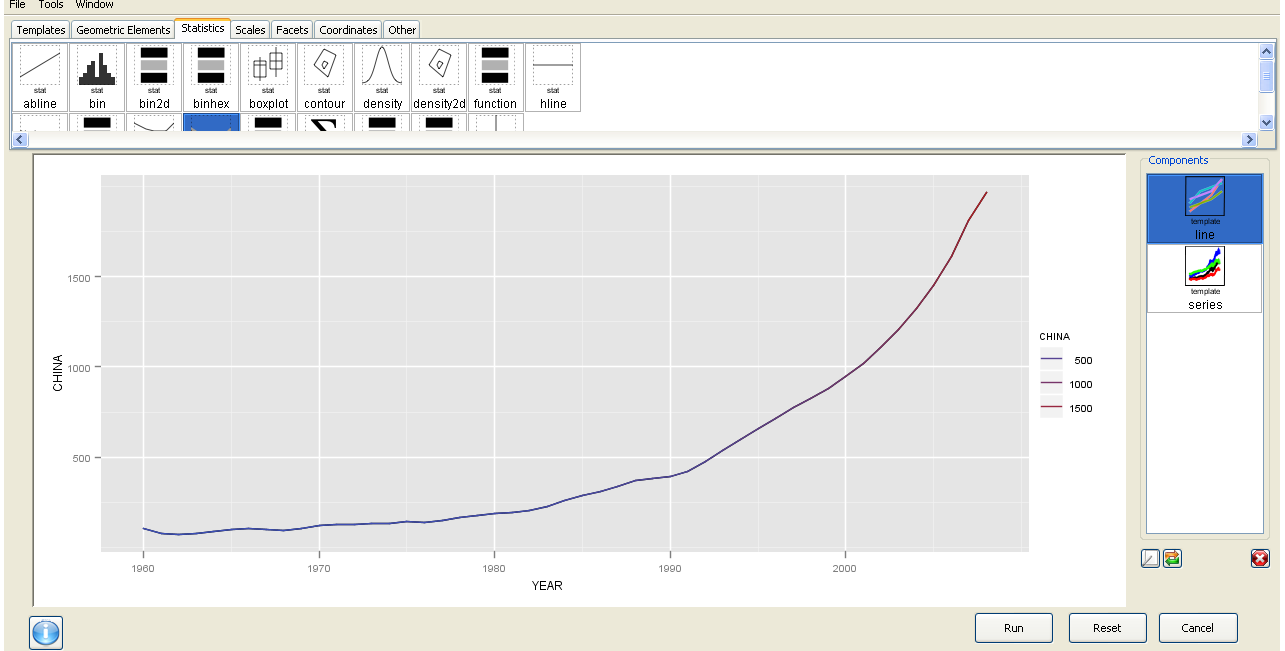
The best thing is the ability to use GGPlot using a GUI.
I am now trying to create more complicated plots for example with more than one Y variable but it is still a work in progress. Overall Deducer has made impressive improvements and with the JGR GUI seems very very promising. The look and feel also shows a combination of features (from SPSS ‘s variable and data view)

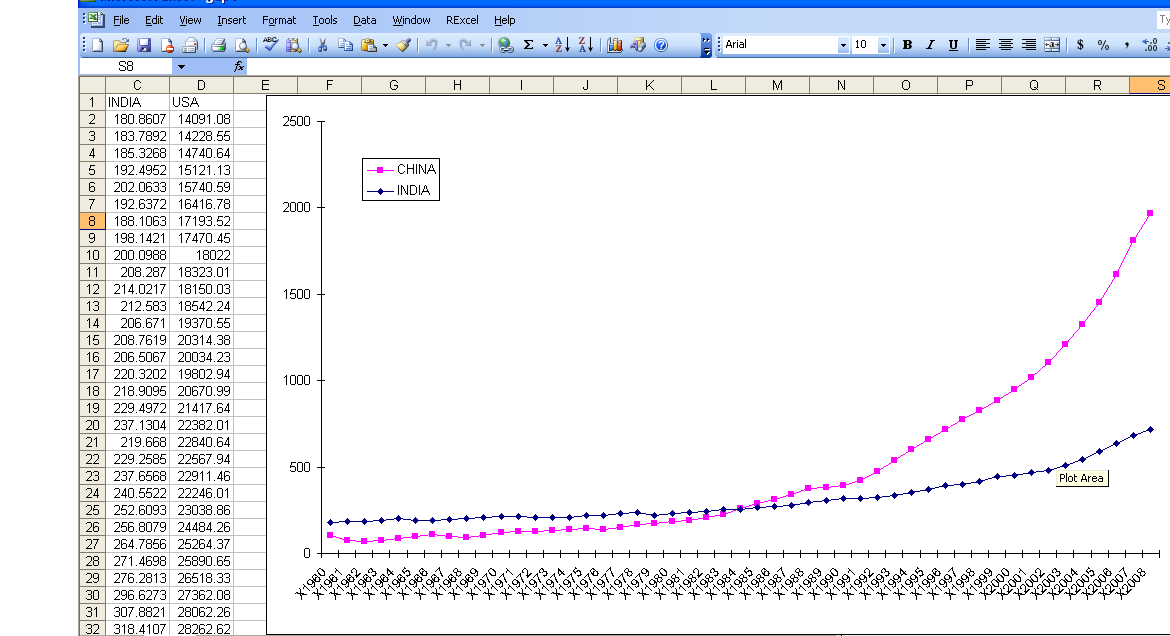
And yes China overtook India in 1985. In GDP per capita. Sigh

GGPLot though overtook Excel graphics as well.


Here is a video which is much better than my screenshots

Matlab-Mathematica-R and GPU Computing

Matlab announced they have a parallel computing toolbox- specially to enable GPU computing as well

http://www.mathworks.com/products/parallel-computing/

Parallel Computing Toolbox™ lets you solve computationally and data-intensive problems using multicore processors, GPUs, and computer clusters. High-level constructs—parallel for-loops, special array types, and parallelized numerical algorithms—let you parallelize MATLAB® applications without CUDA or MPI programming. You can use the toolbox with Simulink® to run multiple simulations of a model in parallel.

MATLAB GPU Support

The toolbox provides eight workers (MATLAB computational engines) to execute applications locally on a multicore desktop. Without changing the code, you can run the same application on a computer cluster or a grid computing service (using MATLAB Distributed Computing Server™). You can run parallel applications interactively or in batch.

Parallel Computing with MATLAB on Amazon Elastic Compute Cloud (EC2)

Also a video of using Mathematica and GPU

Also R has many packages for GPU computing

Parallel computing: GPUs

from http://cran.r-project.org/web/views/HighPerformanceComputing.html

  • The gputools package by Buckner provides several common data-mining algorithms which are implemented using a mixture of nVidia‘s CUDA langauge and cublas library. Given a computer with an nVidia GPU these functions may be substantially more efficient than native R routines. The rpud package provides an optimised distance metric for NVidia-based GPUs.
  • The cudaBayesreg package by da Silva implements the rhierLinearModel from the bayesm package using nVidia’s CUDA langauge and tools to provide high-performance statistical analysis of fMRI voxels.
  • The rgpu package (see below for link) aims to speed up bioinformatics analysis by using the GPU.
  • The magma package provides an interface to the hybrid GPU/CPU library Magma (see below for link).
  • The gcbd package implements a benchmarking framework for BLAS and GPUs (using gputools).

I tried to search for SAS and GPU and SPSS and GPU but got nothing. Maybe they would do well to atleast test these alternative hardwares-

Also see Matlab on GPU comparison for the product Jacket vs Parallel Computing Toolbox

http://www.accelereyes.com/products/compare

September Roundup by Revolution

From the monthly newsletter- which I consider quite useful for keeping updated on application of R

——————————————————————————————————————————————————————————————————–

Revolution News
Every month, we’ll bring you the latest news about Revolution’s products and events in this section.
Follow us on Twitter at @RevolutionR for up-to-the-minute news and updates from Revolution Analytics!

Revolution R Enterprise 4.0 for Windows now available. Based on the latest R 2.11.1 and including the RevoScaleR package for big-data analysis in R, Revolution R Enterprise is now available for download for Windows 32-bit and 64-bit systems. Click here to subscribe, or available free to academia.

New! Integrate R with web applications, BI dashboards and more with web services. RevoDeployR is a new Web Services framework that integrates dynamic R-based computations into applications for business users. It will be available September 30 with Revolution R Enterprise Server on RHEL 5. Click here to learn more.

Free Webinar, September 22: In a joint webinar from Revolution Analytics and Jaspersoft, learn how to use RevoDeployR to integrate advanced analytics on-demand in applications, BI dashboards, and on the web. Register here.

Revolution in the News:
SearchBusinessAnalytics.com previews the forthcoming Revolution R GUI; Channel Register introduces RevoDeployR, while IT Business Edge shows off the Web Services architecture; and ReadWriteWeb.com looks at how RevoScaleR tackles the Big Data explosion.

Inside-R: A new site for the R Community. At www.inside-R.org you’ll find the latest information about R from around the Web, searchable R documentation and packages, hints and tips about R, and more. You can even add a “Download R” badge to your own web-page to help spread the word about R.

R News, Tips and Tricks from the Revolutions blog
The Revolutions blog brings you daily news and tips about R, statistics and open source. Here are some highlights from Revolutions from the past month
.

R’s key role in the oil spill response: Read how NIST’s Division Chief of Statistical Engineering used R to provide critical analysis in real time to the Secretaries of Energy and the Interior, and helped coordinate the government’s response.

Animating data with R and Google Earth: Learn how to use R to create animated visualizations of geographical data with Google Earth, such as this video showing how tuna migrations intersect with the location of the Gulf oil spill.

Are baseball games getting longer? Or is it just Red Sox games? Ryan Elmore uses nonparametric regression in R to find out.

Keynote presentations from useR! 2010: the worldwide R user’s conference was a great success, and there’s a wealth of useful tips and information in the presentations. Video of the keynote presentations are available too: check out in particular Frank Harrell’s talk Information Allergy, and Friedrich Leisch’s talk on reproducible statistical research.

Looking for more R tips and tricks? Check out the monthly round-ups at the Revolutions blog.

Upcoming Events
Every month, we’ll highlight some upcoming events from R Community Calendar.

September 23: The San Diego R User Group has a meetup on BioConductor and microarray data analysis.

September 28: The Sydney Users of R Forum has a meetup on building world-class predictive models in R (with dinner to follow).

September 28: The Los Angeles R User Group presents an introduction to statistical finance with R.

September 28: The Seattle R User Group meets to discuss, “What are you doing with R?”

September 29: The Raleigh-Durham-Chapel Hill R Users Group has its first meeting.

October 7: The NYC R User Group features a presentation by Prof. Andrew Gelman.

There are also new R user groups in SingaporeSeoulDenverBrisbane, and New Jersey.  Please let us know if we’re missing your R user group, or if want to get a new one started.

———————————————————————————————-Editor

David Smith, VP Marketing
david@revolutionanalytics.com
Twitter: @revodavid

subscribe here for Revo’s Monthly newsletter-

Rattle Re-Introduced

Latest version of Rattle just went online-

Here is the change log- Dr Graham Williams is also coming out with a book on using Rattle- the R GUI devoted to data mining.

Source-http://cran.r-project.org/web/packages/rattle/index.html

rattle (2.5.42) unstable; urgency=low

  * Update rattle.info() to recursively identify all dependencies,
 report
    their version number and any updates available from CRAN and generate
    command to update packages that have updates available. See
    ?rattle.info for the options.

  * Fix bug causing R Dataset option of the Evaluate window to always
    revert to the first named dataset.

  * Fix bug in transforms where weights were not being handled in
    refreshing of the Data tab.

  * Fix a bug in box plots when trying to label outliers when there aren't
    any.

 -- Graham Williams <Graham.Williams@togaware.com>  Sun, 
19 Sep 2010 05:01:51 +1000

rattle (2.5.41) unstable; urgency=low

  * Use GtkBuilder for Export dialog.

  * Test use of glade vs GtkBuilder on multiple platforms.

  * Rename rattle.info to rattle.version.

  * Add weight column to data tab.

  * Support weights for nnet, multinom, survival.

  * Add weights information to PMML as a PMML Extension.

  * Ensure GtkFrame is available as a data type whilst waiting for 
updated
    RGtk2.

  * Bug fix to packageIsAvailable not reruning any result.

  * Replace destroy with withdraw for plot window as the former has
    started crashing R.

  * Improve Log formatting for various model build commands.

  * Be sure to include the car package for Anova for multinom models.

  * Release pmml 1.2.24: Bug fix glm binomial regression - note as
    classification model.

 -- Graham Williams <Graham.Williams@togaware.com>  Wed, 15 Sep 2010 
14:56:09 +1000
And a video I did of exploring various Rattle options using Camtasia,
 a very useful software for screen capture and video tutorials
from http://www.techsmith.com/download/camtasiatrial.asp
Updated- my video skils being quite bad- I replaced it with another video. 
However Camtasia is the best screen capture video tool
Also , an update Analyticdroid is on hold for now. see- for more details http://rattle.togaware.com/

Oracle Open World/ RODM package

From the press release, here comes Oracle Open World. They really have an excellent rock concert in that as well.

.NET and Windows @ Oracle Develop and Oracle OpenWorld 2010

Oracle Develop will again feature a .NET track for Oracle developers. Oracle Develop is suited for all levels of .NET developers, from beginner to advanced. It covers introductory Oracle .NET material, new features, deep dive application tuning, and includes three hours of hands-on labs apply what you learned from the sessions.

To register, go to Oracle Develop registration site.

Oracle OpenWorld will include several sessions on using the Oracle Database on Windows and .NET.

Session schedules and locations for Windows and .NET sessions at Oracle Develop and OpenWorld are now available.

Download: 32-bit ODAC 11.2.0.1.2 for Visual Studio 2010 and .NET Framework 4

With ODAC 11.2.0.1.2, developers can connect to Oracle Database versions 9.2 and higher from Visual Studio 2010 and .NET Framework 4. ODAC components support the full framework, as well as the new .NET Framework Client Profile.

Statement of Direction: Oracle Database and Microsoft Entity Framework

Learn about Oracle’s beta and production plans to support Microsoft Entity Framework with Oracle Database.

Also see http://www.oracle.com/technetwork/articles/datawarehouse/saternos-r-161569.html

for

Data Mining Using the RDOM Package

By Casimir Saternos

Some excerpts-

Open R and enter the following command.

> library(RODM)

This command loads the RODM library and as well the dependent RODBC package. The next step is to make a database connection.

> DB <- RODM_open_dbms_connection(dsn="orcl", uid="dm", pwd="dm")

Subsequent commands use the DB object (an instance of the RODBC class) to connect to the database. The DNS specified in the command is the name you used earlier for the Data Source Name during the ODBC connection configuration. You can view the actual R code being executed by the command by simply typing the function name (without parentheses).

> RODM_open_dbms_connection

And say making a Model in Oracle and R-

> numrows <- length(orange_data[,1])
> orange_data.rows <- length(orange_data[,1])
> orange_data.id <- matrix(seq(1, orange_data.rows),  nrow=orange_data.rows, ncol=1, dimnames= list(NULL, c(“CASE_ID”)))
> orange_data <- cbind(orange_data.id, orange_data)

This adjustment to the data frame then needs to be propagated to the database. You can confirm the change using the sqlColumns function, as listed earlier.

> RODM_create_dbms_table(DB, "orange_data")
> sqlColumns(DB, 'orange_data')$COLUMN_NAME

> glm <- RODM_create_glm_model(
database = DB,
data_table_name = “orange_data”,
case_id_column_name = “CASE_ID”,
target_column_name = “circumference”,
model_name = “GLM_MODEL”,
mining_function = “regression”)

Information about this model can then be obtained by analyzing value returned from the model and stored in the variable named glm.

> glm$model.model_settings
> glm$glm.globals
> $glm.coefficients

Once you have a model, you can apply the model to a new set of data. To begin, create or retrieve sample data in the same format as the training data.

> query<-('select 999 case_id, 1 tree, 120 age, 
32 circumference from dual')

> orange_test<-sqlQuery(DB, query)
> RODM_create_dbms_table(DB, "orange_test")
and 
Finally, the model can be applied to the new data set and the results analyzed.

results <- RODM_apply_model(database = DB, 
data_table_name = "orange_test",
model_name = "GLM_MODEL",
supplemental_cols = "circumference")

When your session is complete, you can clean up objects that were created (if you like) and you should close the database connection:

> RODM_drop_model(database=DB,'GLM_MODEL')
> RODM_drop_dbms_table(DB, "orange_test")
> RODM_drop_dbms_table(DB, "orange_data")
> RODM_close_dbms_connection(DB)

See the full article at http://www.oracle.com/technetwork/articles/datawarehouse/saternos-r-161569.html