What to do if you see a possible GPL violation

GNU Lesser General Public License
Image via Wikipedia

Well I have played with software (mostly but not exclusively) analytical, and I admire the zeal and energy of both open source and closed source practioners- all having relatively decent people executing strategies their investors or owners tell them to do (closed source) or motivated by their own self sense of cool-change the world-openness (open source)

What I dont get is people stealing open source code- repackaging without adding major contributions- claiming patent pending stuff- and basically making money by creating CLOSED source from the open source software-(as open source is yet to break the enterprise glass cieling)

you are either open source or you arent.

bi- sexuality is okay. bi-codability is not.

Next time you see someone stealing some community’s open source code- refer to this excellent link.


But, we cannot act on our own if we do not hold copyright. Thus, be sure to find out who the copyright holders of the software are before reporting a violation.

http://www.gnu.org/licenses/gpl-violation.html

Violations of the GNU Licenses

If you think you see a violation of the GNU GPLLGPLAGPL, or FDL, the first thing you should do is double-check the facts:

  • Does the distribution contain a copy of the License?
  • Does it clearly state which software is covered by the License? Does it say anything misleading, perhaps giving the impression that something is covered by the License when in fact it is not?
  • Is source code included in the distribution?
  • Is a written offer for source code included with a distribution of just binaries?
  • Is the available source code complete, or is it designed for linking in other non-free modules?

If there seems to be a real violation, the next thing you need to do is record the details carefully:

  • the precise name of the product
  • the name of the person or organization distributing it
  • email addresses, postal addresses and phone numbers for how to contact the distributor(s)
  • the exact name of the package whose license is violated
  • how the license was violated:
    • Is the copyright notice of the copyright holder included?
    • Is the source code completely missing?
    • Is there a written offer for source that’s incomplete in some way? This could happen if it provides a contact address or network URL that’s somehow incorrect.
    • Is there a copy of the license included in the distribution?
    • Is some of the source available, but not all? If so, what parts are missing?

The more of these details that you have, the easier it is for the copyright holder to pursue the matter.

Once you have collected the details, you should send a precise report to the copyright holder of the packages that are being misused. The copyright holder is the one who is legally authorized to take action to enforce the license.

If the copyright holder is the Free Software Foundation, please send the report to <license-violation@gnu.org>. It’s important that we be able to write back to you to get more information about the violation or product. So, if you use an anonymous remailer, please provide a return path of some sort. If you’d like to encrypt your correspondence, just send a brief mail saying so, and we’ll make appropriate arrangements.

Note that the GPL, and other copyleft licenses, are copyright licenses. This means that only the copyright holders are empowered to act against violations. The FSF acts on all GPL violations reported on FSF copyrighted code, and we offer assistance to any other copyright holder who wishes to do the same.

But, we cannot act on our own if we do not hold copyright. Thus, be sure to find out who the copyright holders of the software are before reporting a violation.


Top 10 Games on Linux -sudo update

The phrase "Doom clone" was initiall...
Image via Wikipedia

Here are some cool games I like to play on my Ubuntu 10.10 – I think they run on most other versions of Linux as well. 1) Open ArenaFirst person Shooter– This is like Quake Arena- very very nice graphics and good for playing for a couple of hours while taking a break. It is available here- http://openarena.ws/smfnews.php ideally if you have a bunch of gaming friends, playing on a local network or internet is quite mind blowing entertaining. And it’s free! 2) Armagetron– This is based on the TRON game of light cycles-It is available here at http://www.armagetronad.net/ or you can use Synaptic packages manager for all the games mentioned here

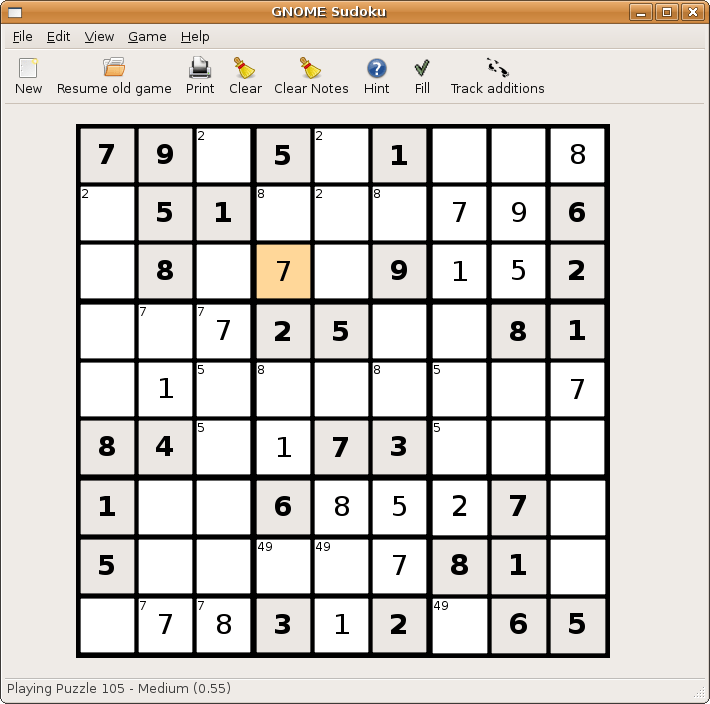
If violence or cars is not your stuff and you like puzzles like Sudoko, well just install the application Sudoko from http://gnome-sudoku.sourceforge.net/ Also recommended for people of various ages as it has multiple levels.

If you ever liked Pinball play the open source version from download at http://pinball.sourceforge.net/ Alternatively you can go to Ubuntu Software Centre>Games>Arcade>Emilio>Pinball and you can also build your own pinball if you like the game well enough. 5) Pacman/Njam- Clone of the original classic game.  Downloadable from http://www.linuxcompatible.org/news/story/pacman_for_linux.html 6) Gweled– This is free clone version of Bejeweled. It now has a new website at http://gweled.org/ http://linux.softpedia.com/progDownload/Gweled-Download-3449.html

Gweled is a GNOME version of a popular PalmOS/Windows/Java game called “Bejeweled” or “Diamond Mine”. The aim of the game is to make alignment of 3 or more gems, both vertically or horizontally by swapping adjacent gems. The game ends when there are no possible moves left. Here are some key features of “Gweled”: · exact same gameplay as the commercial versions · SVG original graphics

7) Hearts – For this card game classis you can use Ubuntu software to install the package or go to http://linuxappfinder.com/package/gnome-hearts 8) Card Games- KPatience has almost 14 card games including solitaire, and free cell. 9) Sauerbraten -First person shooter with good network play, edit maps capabilities. You can read more here- http://sauerbraten.org/ 10) Tetris-KBlocks Tetris is the classic game. If you like classic slow games- Tetris is the best. and I like the toughest Tetris game -Bastet http://fph.altervista.org/prog/bastet.html Even an xkcd toon for it

Input Data in R using the top 3 R GUI

PC-DOS was an early OS for personal computers ...
Image via Wikipedia

One area where clearly GUI methods are preferable to command line methods in R, is data input. There is no need of learning read.csv or read.table when these options are only two clicks away in any R GUI. For academics/students there is a definite need to easily access

datasets from attached packages just as it is a need for business analysts to access databases with a few clicks than learn or read pages of pdf on RODBC. However some GUI (like Rattle) need data only in data frames, rather than list or arrays-this limits R’s flexibility. These are my views but you can see and compare views of data input in R Commander, Rattle and Deducer.


WPS Version 2.5.1 Released – can still run SAS language/data and R

However this is what Phil Rack the reseller is quoting on http://www.minequest.com/Pricing.html

Windows Desktop Price: $884 on 32-bit Windows and $1,149 on 64-bit Windows.

The Bridge to R is available on the Windows platforms and is available for free to customers who
license WPS through MineQuest,LLC. Companies and organizations outside of North America
may purchase a license for the Bridge to R which starts at $199 per desktop or $599 per server

Windows Server Price: $1,903 per logical CPU for 32-bit and $2,474 for 64-bit.

Note that Linux server versions are available but do not yet support the Eclipse IDE and are
command line only

WPS sure seems going well-but their pricing is no longer fixed and on the home website, you gotta fill a form. Ditt0 for the 30 day free evaluation

http://www.teamwpc.co.uk/products/wps/modules/core

Data File Formats

The table below provides a summary of data formats presently supported by the WPS Core module.

Data File Format Un-Compressed
Data
Compressed
Data
Read Write Read Write
SD2 (SAS version 6 data set)
SAS7BDAT (SAS version 7 data set)
SAS7BDAT (SAS version 8 data set)
SAS7BDAT (SAS version 9 data set)
SASSEQ (SAS version 8/9 sequential file)
V8SEQ (SAS version 8 sequential file)
V9SEQ (SAS version 9 sequential file)
WPD (WPS native data set)
WPDSEQ (WPS native sequential file)
XPORT (transport format)

Additional access to EXCEL, SPSS and dBASE files is supported by utilising the WPS Engine for DB Filesmodule.

and they have a new product release on Valentine Day 2011 (oh these Europeans!)

From the press release at http://www.teamwpc.co.uk/press/wps2_5_1_released

WPS Version 2.5.1 Released 

New language support, new data engines, larger datasets, improved scalability

LONDON, UK – 14 February 2011 – World Programming today released version 2.5.1 of their WPS software for workstations, servers and mainframes.

WPS is a competitively priced, high performance, highly scalable data processing and analytics software product that allows users to execute programs written in the language of SAS. WPS is supported on a wide variety of hardware and operating system platforms and can connect to and work with many types of data with ease. The WPS user interface (Workbench) is frequently praised for its ease of use and flexibility, with the option to include numerous third-party extensions.

This latest version of the software has the ability to manipulate even greater volumes of data, removing the previous 2^31 (2 billion) limit on number of observations.

Complimenting extended data processing capabilities, World Programming has worked hard to boost the performance, scalability and reliability of the WPS software to give users the confidence they need to run heavy workloads whilst delivering maximum value from available computer power.

WPS version 2.5.1 offers additional flexibility with the release of two new data engines for accessing Greenplum and SAND databases. WPS now comes with eleven data engines and can access a huge range of commonly used and industry-standard file-formats and databases.

Support in WPS for the language of SAS continues to expand with more statistical procedures, data step functions, graphing controls and many other language items and options.

WPS version 2.5.1 is available as a free upgrade to all licensed users of WPS.

Summary of Main New Features:

  • Supporting Even Larger Datasets
    WPS is now able to process very large data sets by lifting completely the previous size limit of 2^31 observations.
  • Performance and Scalability Boosted
    Performance and scalability improvements across the board combine to ensure even the most demanding large and concurrent workloads are processed efficiently and reliably.
  • More Language Support
    WPS 2.5.1 continues the expansion of it’s language support with over 70 new language items, including new Procedures, Data Step functions and many other language items and options.
  • Statistical Analysis
    The procedure support in WPS Statistics has been expanded to include PROC CLUSTER and PROC TREE.
  • Graphical Output
    The graphical output from WPS Graphing has been expanded to accommodate more configurable graphics.
  • Hash Tables
    Support is now provided for hash tables.
  • Greenplum®
    A new WPS Engine for Greenplum provides dedicated support for accessing the Greenplum database.
  • SAND®
    A new WPS Engine for SAND provides dedicated support for accessing the SAND database.
  • Oracle®
    Bulk loading support now available in the WPS Engine for Oracle.
  • SQL Server®
    To enhance existing SQL Server database access, a new SQLSERVR (please note spelling) facility in the ODBC engine.

More Information:

Existing Users should visit www.teamwpc.co.uk/support/wps/release where you can download a readme file containing more information about all the new features and fixes in WPS 2.5.1.

New Users should visit www.teamwpc.co.uk/products/wps where you can explore in more detail all the features available in WPS or request a free evaluation.

and from http://www.teamwpc.co.uk/products/wps/data it seems they are going on the BIG DATA submarine as well-

Data Support 

Extremely Large Data Size Handling

WPS is now able to handle extremely large data sets now that the previous limit of 2^31 observations has been lifted.

Access Standard Databases

Use I/O Features in WPS Core

  • CLIPBOARD (Windows only)
  • DDE (Windows only)
  • EMAIL (via SMTP or MAPI)
  • FTP
  • HTTP
  • PIPE (Windows and UNIX only)
  • SOCKET
  • STDIO
  • URL

Use Standard Data File Formats

QGIS and R

Logo graphic for the Quantum GIS free software...
Image via Wikipedia

Qgis is Quantum GIS http://www.qgis.org/

Quantum GIS (QGIS) is a user friendly Open Source Geographic Information System (GIS) licensed under the GNU General Public License. QGIS is an official project of the Open Source Geospatial Foundation (OSGeo). It runs on Linux, Unix, MacOSX, and Windows and supportsnumerous vector, raster, and database formats and functionalities.

Learn more about QGIS

Quantum GIS provides a continously growing number of capabilities provided by core functions and plugins. You can visualize, manage, edit, analyse data, and compose printable maps

Also you can use both Qgis and R through Python (!!!)

http://www.qgis.org/wiki/HomeRange_plugin#Home-range_analyses_in_QGIS_using_R_through_Python

Interesting app for webs (sometimes better suited than some R map packages)

https://plugins.qgis.org/plugins/HomeRange_plugin/

Based on a Google Summer of Code _

 Also

https://sites.google.com/site/eospansite/introqgis_r

and

HomeRange_plugin

http://hub.qgis.org/projects/quantum-gis/wiki/HomeRange_plugin


Also read-

http://blog.qgis.org/node/51

Related Articles-

R Graphs Resources

https://rforanalytics.wordpress.com/r-graphs-resources/

Using R from other Software

https://rforanalytics.wordpress.com/using-r-from-other-software/

and

Visualize NHL Play-by-Play using Tableau Public and R

http://brocktibert.wordpress.com/2011/02/13/visualize-nhl-play-by-play-using-tableau-public-and-r/

Lyx Releases 2

Ubuntu Login
Image via Wikipedia

Lyx releases new version- now if only there was a SIMPLE way to put R code in a Lyx existing text class (having tried Sweave and sweaved myself into knots ! 😦

and I hope Ubuntu Linux 10.10  netbook fixes the curious case of disappearing menu bar in Lyx

see https://bugs.launchpad.net/ubuntu/+source/indicator-appmenu/+bug/619811

(Hint start Lyx using from the terminal:
QT_X11_NO_NATIVE_MENUBAR=1 lyx)

Latest News from the

http://www.lyx.org/News#item2

We are pleased to announce the release of LyX 1.6.9


Beta Release: LyX 2.0.0 beta 4 released.

February 6, 2011

We are pleased to announce the fourth public pre-release of LyX 2.0.0.
Except usual bugfixing we fixed random crashes connected with the new background export and compilation feature.

As far as new features is considered it is now possible

  • to set the table width,
  • customize the language package per document,
  • export LyX files as a single archive containing linked material (e.g. images) directly via export menu.


Since this is most probably the last beta release we also added convertor for old (1.6) preference files which are automatically checked on the startup now.


Linux Counter- Use Linux so be counted

Here’s a nice website at

http://counter.li.org/

You can basically spend 2 minutes and register yourself publicly/anonymously/or your machine

and some fun at http://counter.li.org/estimates.php