Review of Google Plus

After resisting for two weeks I have decided to write a Google Plus review. This includes both the changed designed parameters, the invite growth features and all of the main sub-items and activities you can do in the G+  Stream, Share, Hang Out, Pictures, Circles.

Since I have 2500 people in my circles and I am in 91 circles

To keep it simple – I have noted the following 6 main sub-points.

1) Content Dissemination-


  • Sharing Blog Articles
  • Micro-Blogging
  • Sharing Pictures

2) Online Professional Networking  and 3) Online Personal Socializing

4) Spam Control / Malware /Phishing/Porn Protection

5) Time Cost versus Networking Benefit

————————————————————————————————————————————————————–

1) Content Dissemination-

  • Sharing Blog Articles


Sharing is as simple as Facebook but the design makes it simpler.

Note G+ uses lower number of colors, bigger fonts, slightly bigger icons to reduce the appearance of clutter.

Contrast this

with this-


Interesting to see that G+ has four types of media to share- besides writing the status/micro-blog (unfettered by 140 characters). Note these show icons only with hover text to tell you what the icon stands for.

Photo,Video,URL,Location (which seems to be Twitter like in every share)

Facebook has 5 types of Sharing and note the slightly different order as well the fact that both icon and text make it slightly more cluttered- Status (which is redundant clearly ),Photo,Link,Video,Question

G+ thus lacks polls /questions features. It is much easier to share content on Facebook automatically as of now- but for G+ you need to share the URL privately though. There exist G+ meme-s already thanks to re-sharing in G+ plus which seems to be inspired by Tumblr (?).

In addition Google has made your Google Profile the number one SERP for searching your name, so there seem clear tied in benefits of SEO with content disseminated here.

G+ has sharing in circles whereas Facebook has only Everyone, Friends, Friends of Friends ,Customize.  This makes G+ interface slightly better in tweaking the spread of content to targeted audience esp by Bloggers.

  • For sharing Photos– G+ goes in for a whole new separate tab (one out of four) whereas Facebook treats photo sharing less prominently.
  • Google has lesser white space between photos, (The Facebook way used to be just snap photo by iPhone and send by email to auto-post), and the privacy in sharing photos is much better in G+ as the dropdowns in Facebook are not as granular and neither as nifty in icon design.
  •  
  • Also I like the hover and photo grows bigger feature and the auto import from Picassa (but I would like to auto-import into G+ from Flickr just as I can do in Facebook)
  • Google Plus also has a much more detailed version for sharing videos than photos as compared to Facebook  -upload Photo options  versus
  • G+ has much more focus on auto-sharing from mobiles


2) Online Professional Networking  and 3) Online Personal Socializing Organizing Contacts in Google Plus and seperate privacy controls make it easier to customize sharing without getting too complex. You can make as many circles and drag and drop very easily instead of manually clicking a dropdown box. Effectively speaking Facebook has just 4 kinds of circles and it does not distinguish between various types of friends which is great from philosophical point of view but not so goodn enforcing separateness between professional and personal networks. Note Facebook privacy settings are overwhelming despite the groovy data viz

4) Spam Control / Malware /Phishing/Porn Protection 

Spam Control in Facebook versus in Google Plus- note the different options in Google Plus (including the ability to NOT reshare). I am not aware of more enhanced protection than the ones available for Gmail already. Spam is what really killed off a lot many social networks and the ability to control or reduce spam will be a critical design choice

5) Time Cost versus Networking Benefit

Linkedin has the lowest cost in time spent and networking done. If G+ adds a resume section for jobs, recruiters, and adds in Zynga games, the benefit from G+ will expand. As of now G+ is a minimal social network with minimalism as design ethos.

(Zynga would do well to partner with G+)


Introducing Radoop

Thats Right- This is Radoop and it is

Hadoop meats Rapid Miner=Radoop


http://prezi.com/bin/preziloader.swf

http://prezi.com/dxx7m50le5hr/radoop-presentation-at-rcomm-2011/


How to use Video chat on Facebook

  1. Just go to http://www.facebook.com/videocalling
  2. Get Started
  3. See this. You will need to download and install something on your computer.And calls are just one on one (Unlike Google Huddle which can have upto ten people and also doesnot need any installer -esp if you use Chrome)
  4. Send a video message if your friend is not available. (that beats Google Huddle which doesnot seem to have the video inbox feature yet)


Facebook to Google Plus Migration

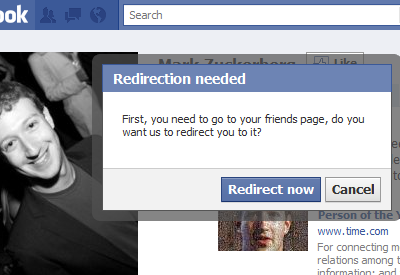
and there is a new tool on that already but you are on your own if your data gets redirected. Does Chrome take legal liability for malware extensions? Dunno-and yes it works on Chrome alone (at the point of speaking)

https://chrome.google.com/webstore/detail/ficlccidpkaiepnnboobcmafnnfoomga


Facebook Friend Exporter
Logo 

Facebook Friend Exporter
Verified author: mohamedmansour.com
Free
Get *your* data contact out of Facebook to Google Contacts or CSV, whether they want you to or not.
103 ratings
5,527 users
Install
Description
Get *your* data contact out of Facebook, whether they want you to or not. You gave them your friends and allowed them to store that data, and you have right to take it back out! Facebook doesn't own my friends. Only available in English Facebook. Any other language will not work.

SOURCE CODE: http://goo.gl/VtRCl (GitHub) fb-exporter

PRE NOTICE:
 1 - Must have English version of Facebook for this to work (you can switch)
 2 - Do not enable SSL for Facebook use HTTP not HTTPS
 3 - If you need any help running this, contact me. Commenting below will be lost.
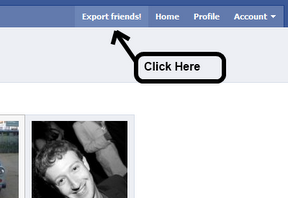
 4 - An "Export" button will appear on Facebooks toolbar after refresh once installed.
 5 - Please disable all Facebook Extensions that you have downloaded, many of them affect the page. For example "Better Facebook" breaks this extension.

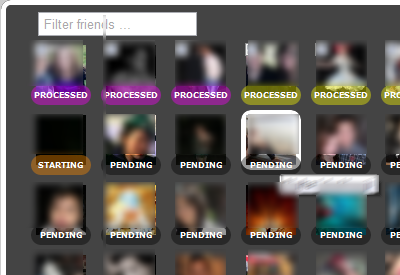
This extension will allow you to get your friends information that they shared to you: Continue reading "Facebook to Google Plus Migration"

Google Takeout rocks!

I love the new Google Takeout. Just take out all the data stored within Google and download.

and unlike Facebook – it kind of builds this almost within a minute thus showing they are serious on privacy. Facebook takes too long to build the archive.

I would also prefer to download the data as a torrent or anything which is resumable if the connection breaks


Coming up-

yet another preview of Google +


Google Product Launches

So dear G launched a whole new set of Products. Some thoughts-

1) Join up the Social Invite List here – it is called Google Plus. We hope it doesnt end up like Buzz http://www.google.com/buzz or Orkut https://groups.google.com/group/opensocial-api/?pli=1 or Plus One http://www.google.com/webmasters/+1/button/ or Wave (email killer) http://googlewave.blogspot.com/

When the biggest cloud computing company in the world announces a phased rollout to a product- we wonder if they are really sure on launching the product rollout or just were in a hurry again.

Machine learning wont work with social , chaps. Well not everything in social. And the Google Social Blog forgot to write about it http://googlesocialweb.blogspot.com/

Well anyways, even Google Finance’s automated announcements feed failed to pick many of their own  product launches (or it does in an automated manner depending on which time period you choose – yes still no social buttons up http://www.google.com/finance?q=google

BACK TO GOOGLE PLUS

https://services.google.com/fb/forms/googleplus/

Google+

Thanks for stopping by.We’re still ironing out a few kinks in Google+, so it’s not quite ready for everyone to climb aboard. But, if you want, we’ll let you know the minute the doors are open for real. Cool? Cool.

  • First Name *
  • Email *

Google+ Privacy Policy

2) Google Web Fonts- Great product, how and hey http://googlewebfonts.blogspot.com/ when do you plan to monetize uhm  web fonts. Not that would be awesome. Not even a single ad on those pages- not even for philanthropy. or poor poets. or even Google Book Authors who self publish . Sound of silence….

http://www.google.com/webfonts/v2


3) Google Analytics gets some groove back. I really want to see much better integration of Google Apps and Google Analytics and Google Desktop search. Ditto for the interface. Enterprise software uses different fonts than retail software, dude. More fries, http://analytics.blogspot.com/ ?

Feature 1- Custom Reports for metrics I can slice and dice on my own

Feature 2 Awesome analytics for In-Page Analytics (beta feature) Beta is boring if overused. Try Theta maybe?

Feature 3 Daily Automated Alerts for Unusual Server /Traffic Activity

Feature 4 event Tracking is cool esp for understanding social media impact


It is still too early for mobile (in terms of traffic) as well as tablet analytics (?)

4) Angry Birds is still the best feature in Chrome  (but there are lots others at http://chrome.blogspot.com/) and esp http://googlecode.blogspot.com/2011/06/working-with-chromes-file-browser.html

Try http://chrome.angrybirds.com/

There are ways to make software that are not evil. Very very disappointed at total lack of monetization of this chrome app. Not even a T Shirt for me to buy ad . sighs

Funny thing- the product manager forgot to take off Facebook like button or even add the +1 button or even the Tweet this button.

Quo Vadis ?


5) What do you love?

http://www.wdyl.com/#

Chrome

If you are new to using Chrome, there are many delightful features just beneath the surface.

If you are an Internet Explorer or Firefox or Safari or Arora or Opera or Sea Monkey browser user- this is one more reason to test, just test Chrome.

Ok so who Made chrome- (note the link i.e about:credits is what you type in chrome to see features)

about:credits

Credits

David M. Gay’s floating point routines
dynamic annotations
Netscape Portable Runtime (NSPR)
Network Security Services (NSS)
purify headers
google-glog’s symbolization library
valgrind
xdg-mime
xdg-user-dirs
google-jstemplateshow licensehomepage
Launchpad Translationsshow licensehomepage
Mozilla Personal Security Managershow licensehomepage
Google Toolbox for Macshow licensehomepage
ActiveX Scripting SDKshow licensehomepage
Almost Native Graphics Layer Engineshow licensehomepage
Apple sample codeshow licensehomepage
Google Cache Invalidation APIshow licensehomepage
Compact Language Detectionshow licensehomepage
OpenGL ES 2.0 Programming Guideshow licensehomepage
OpenGL ES 2.0 Conformance Testsshow licensehomepage
hunspell dictionariesshow licensehomepage
IAccessible2 COM interfaces for accessibilityshow licensehomepage
Chinese and Japanese Word Listshow licensehomepage
ISimpleDOM COM interfaces for accessibilityshow licensehomepage
modp base64 decodershow licensehomepage
NSBezierPath additions from Sean Patrick O’Brienshow licensehomepage
Cocoa extension code from Caminoshow licensehomepage
OTS (OpenType Sanitizer)show licensehomepage
Google Safe Browsingshow licensehomepage
XUL Runner SDKshow licensehomepage
and of course
so thats who made chrome.
  • Will Google be able to monetize Chrome the way it has monetized Android (Atleast by locking in both search,computing and browsing platforms)? I like the Adblock extension- and I would be happy to see more paid extensions. or even two versions one free and other freer (in choice) browsers for ads /security etc. maybe even a premium paid browser which has tor embedded in it , adblock enabled in it, and encrypted chat (like Waste Again) as an extension…. Hmm Hmm Hmm There is a SOCIAL version of Chromium called Rockmelt used ironically by Google Social Nemesis -Facebook (see http://blogs.ft.com/fttechhub/2011/06/facebook-partners-with-rockmelt-on-building-a-social-web-browser/)
  • Will Google share more revenue with open source contributors and thus create a new path in open source revenue generation just like it did with online advertising as an industry? Hmm Hmm Hmm. or Will Facebook continue to lead the way with extensions and applications (which did predate the mobile app place- so thats one innovation u gotta give to Zuk’s boys 😉
Back to Chrome-
To change settings- chrome://settings/browser
but to check what Autofill Data is stored within chrome (thats your credit card and your web form information)
chrome://settings/autofill and chrome://settings/content has all your content settings
Well Chrome is very very secure, or as secure as a browser can be in 2011.
You can set up Google Sync to keep all your data in the cloud, and it has an application specific password as well.
So hopefully you will have much more fun enjoying hacking Chromium 😉
See these