Web R- Elastic R and RevoDeploy R

I had a skype video chat with Karime Chine and he was kind enough to walk me through the new portal Elastic-R at http://www.elastic-r.org

Basically you can work on a collaborative basis in this with multiple users working on excel as well as R projects.

Some screenshots-in a short presentation I made on my notes during K Chine’s presentation

Also, Revolution Analytics is coming out with a Web Services product for R

RevoDeployR: Web Services for R

Both are very powerful uses of R for cloud computing- and it would be interesting if the original cloud computing champion Google gets into the R Project.

Google AppInventor -Android and Business Intelligence

Here is a great new tool for techies to start creating Android Apps right away- even if you have no knowledge of the platform. Of course there are existing great number of apps- including my favorite Android Data Mining App in R – called AnalyticDroid http://analyticdroid.togaware.com/

Basically it calls the Rattle (R Analytical Tool To Learn Easily) Data Mining GUI -enabling data mining from an Android Mobile using remote computing.

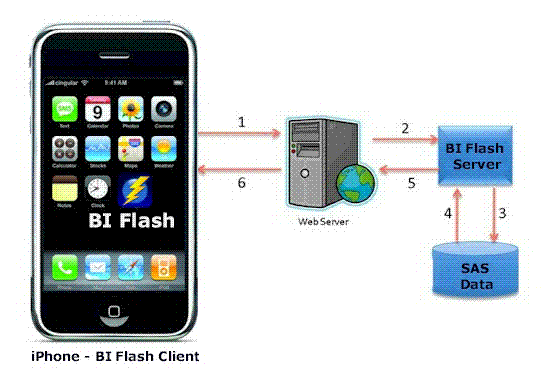
I dont know if any other statistical application is available on Android Mobiles- though SAS did have a presentation on using SAS on IPhone

http://www.wuss.org/proceedings09/09WUSSProceedings/papers/dpr/DPR-Truong.pdf


SAS Mobile -Iphone App

All you need to do is go to http://appinventor.googlelabs.com/about/index.html and request access (yes there is a 2 week approval waiting line)

Because App Inventor provides access to a GPS-location sensor, you can build apps that know where you are. You can build an app to help you remember where you parked your car, an app that shows the location of your friends or colleagues at a concert or conference, or your own custom tour app of your school, workplace, or a museum.
You can write apps that use the phone features of an Android phone. You can write an app that periodically texts “missing you” to your loved ones, or an app “No Text While Driving” that responds to all texts automatically with “sorry, I’m driving and will contact you later”. You can even have the app read the incoming texts aloud to you (though this might lure you into responding).
App Inventor provides a way for you to communicate with the web. If you know how to write web apps, you can use App Inventor to write Android apps that talk to your favorite web sites, such as Amazon and Twitter.

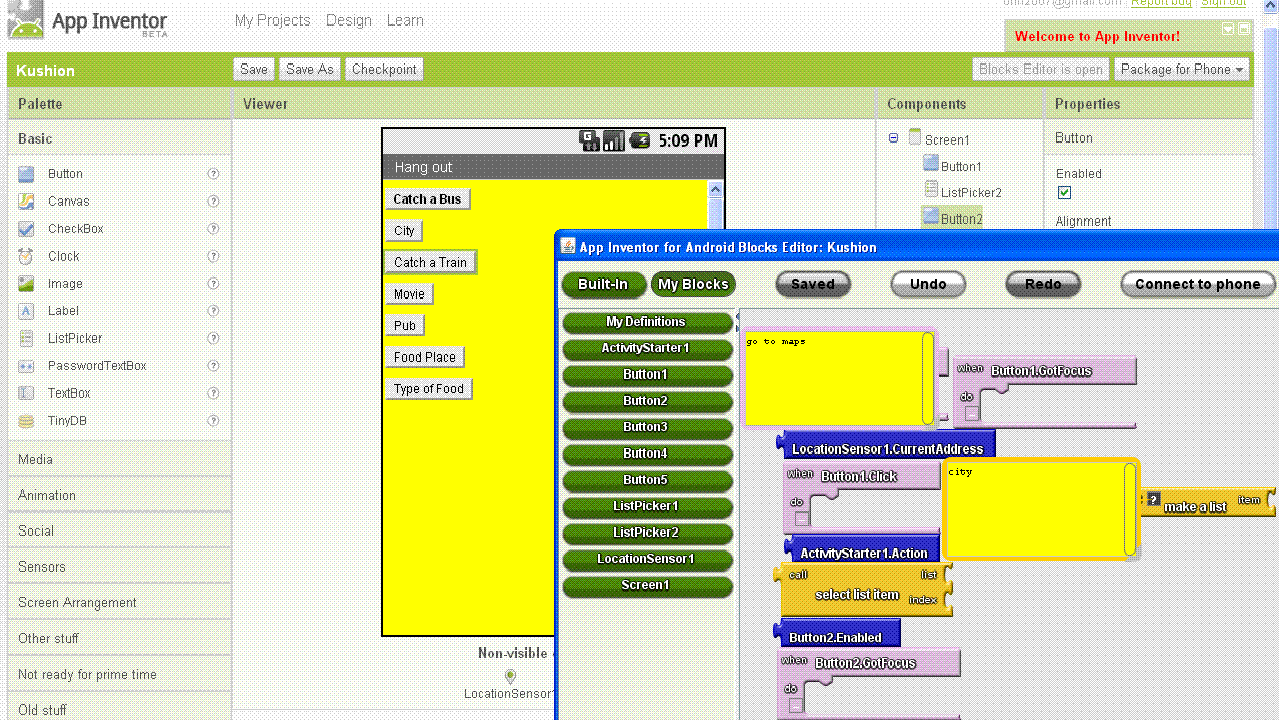
Here is a not so statistical Android App I am trying to create called Hang-Out

using the current GPS location of your phone to find nearest Pub, Movie or Diner and catch Bus- Train based on your location city, the GPS and time of request and schedule of those cities public transport- very much WIP

Amazon announces Micro Instances for cloud computing

From Amazon http://aws.amazon.com/ec2

Micro instances provide 613 MB of memory and support 32-bit and 64-bit platforms on both Linux and Windows. Micro instance pricing for On-Demand instances starts at $0.02 per hour for Linux and $0.03 per hour for Windows.

Customers have asked us for a lower priced instance type that could satisfy the needs of their less demanding applications. Micro instances are optimized for applications that require lower throughput, but which still may consume significant compute cycles periodically. Micro instances provide a small amount of consistent CPU resources, and also allow you to burst CPU capacity when additional cycles are available.

Micro instances are available immediately in all regions, and we invite you to go and try one out for yourself today! Learn more about Amazon EC2’s new Micro instances ataws.amazon.com/ec2.

Micro Instances

Instances of this family provide a small amount of consistent CPU resources and allow you to burst CPU capacity when additional cycles are available. They are well suited for lower throughput applications and web sites that consume significant compute cycles periodically.

  • Micro Instance 613 MB of memory, up to 2 ECUs (for short periodic bursts), EBS storage only, 32-bit or 64-bit platform

So dont buy that new CPU yet- use existing hardware in tandem with these micro instances (and internet) to compute- (but  only if your corporate IP administrator wasn’t trained in Windows only certifications 😉

Using VM Player and Chromium OS on a PC

Here is a short presentation tutorial including screenshots I made of using VM Player and playing with Chromium OS. Note- Its like a Machine (light weight linux) with a Chrome Browser. The real computing is when you use Chrome Extensions and/if you have a underpowered legacy PC.

or you can see the file here if the above does not work 15 Clicks to a Cloud OS

Towards better analytical software

Here are some thoughts on using existing statistical software for better analytics and/or business intelligence (reporting)-

1) User Interface Design Matters- Most stats software have a legacy approach to user interface design. While the Graphical User Interfaces need to more business friendly and user friendly- example you can call a button T Test or You can call it Compare > Means of Samples (with a highlight called T Test). You can call a button Chi Square Test or Call it Compare> Counts Data. Also excessive reliance on drop down ignores the next generation advances in OS- namely touchscreen instead of mouse click and point.

Given the fact that base statistical procedures are the same across softwares, a more thoughtfully designed user interface (or revamped interface) can give softwares an edge over legacy designs.

2) Branding of Software Matters- One notable whine against SAS Institite products is a premier price. But really that software is actually inexpensive if you see other reporting software. What separates a Cognos from a Crystal Reports to a SAS BI is often branding (and user interface design). This plays a role in branding events – social media is often the least expensive branding and marketing channel. Same for WPS and Revolution Analytics.

3) Alliances matter- The alliances of parent companies are reflected in the sales of bundled software. For a complete solution , you need a database plus reporting plus analytical software. If you are not making all three of the above, you need to partner and cross sell. Technically this means that software (either DB, or Reporting or Analytics) needs to talk to as many different kinds of other softwares and formats. This is why ODBC in R is important, and alliances for small companies like Revolution Analytics, WPS and Netezza are just as important as bigger companies like IBM SPSS, SAS Institute or SAP. Also tie-ins with Hadoop (like R and Netezza appliance)  or  Teradata and SAS help create better usage.

4) Cloud Computing Interfaces could be the edge- Maybe cloud computing is all hot air. Prudent business planing demands that any software maker in analytics or business intelligence have an extremely easy to load interface ( whether it is a dedicated on demand website) or an Amazon EC2 image. Easier interfaces win and with the cloud still in early stages can help create an early lead. For R software makers this is critical since R is bad in PC usage for larger sets of data in comparison to counterparts. On the cloud that disadvantage vanishes. An easy to understand cloud interface framework is here ( its 2 years old but still should be okay) http://knol.google.com/k/data-mining-through-cloud-computing#

5) Platforms matter- Softwares should either natively embrace all possible platforms or bundle in middle ware themselves.

Here is a case study SAS stopped supporting Apple OS after Base SAS 7. Today Apple OS is strong  ( 3.47 million Macs during the most recent quarter ) and the only way to use SAS on a Mac is to do either

http://goo.gl/QAs2

or do a install of Ubuntu on the Mac ( https://help.ubuntu.com/community/MacBook ) and do this

http://ubuntuforums.org/showthread.php?t=1494027

Why does this matter? Well SAS is free to academics and students  from this year, but Mac is a preferred computer there. Well WPS can be run straight away on the Mac (though they are curiously not been able to provide academics or discounted student copies 😉 ) as per

http://goo.gl/aVKu

Does this give a disadvantage based on platform. Yes. However JMP continues to be supported on Mac. This is also noteworthy given the upcoming Chromium OS by Google, Windows Azure platform for cloud computing.

Protected: Analyzing SAS Institute-WPS Lawsuit

This content is password-protected. To view it, please enter the password below.

Browser based Music Creation

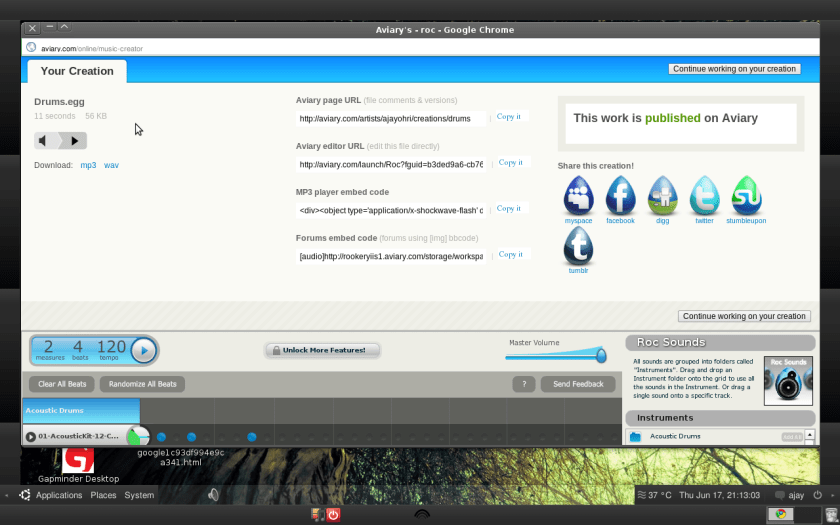
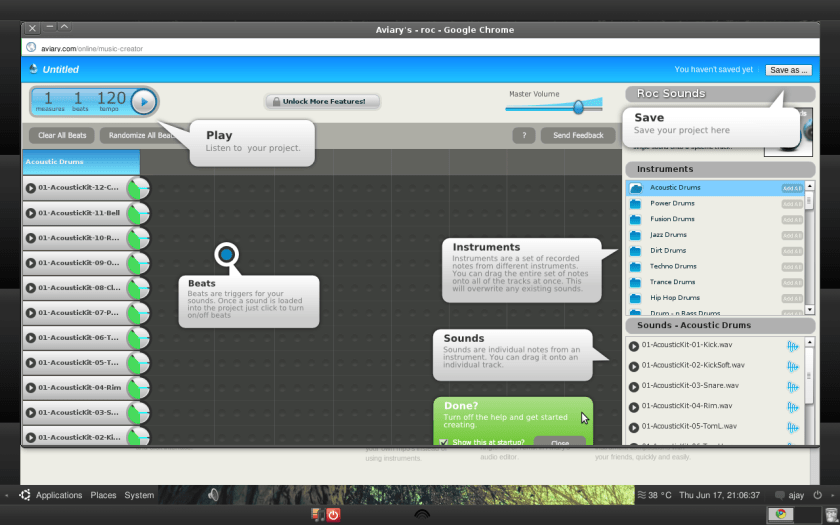
Aviary- the online pioneer in browser based art editing introduced music creation and editing in it’s latest version. If you see the screenshots you will find creating music is now simply a matter of visualization and you can see some screenshots below to see how easy it is to create music.

So if you like music and ever felt the need for music to create for videos or websites , take 5 minutes and try it out at http://aviary.com/