Windows Azure and Amazon Free offer

Simple Cpu Cache Memory Organization
Image via Wikipedia

For Hi-Computing folks try out Azure for free-

http://www.microsoft.com/windowsazure/offers/popup/popup.aspx?lang=en&locale=en-US&offer=MS-AZR-0001P#compute

Windows Azure Platform
Introductory Special

This promotional offer enables you to try a limited amount of the Windows Azure platform at no charge. The subscription includes a base level of monthly compute hours, storage, data transfers, a SQL Azure database, Access Control transactions and Service Bus connections at no charge. Please note that any usage over this introductory base level will be charged at standard rates.

Included each month at no charge:

  • Windows Azure
    • 25 hours of a small compute instance
    • 500 MB of storage
    • 10,000 storage transactions
  • SQL Azure
    • 1GB Web Edition database (available for first 3 months only)
  • Windows Azure platform AppFabric
    • 100,000 Access Control transactions
    • 2 Service Bus connections
  • Data Transfers (per region)
    • 500 MB in
    • 500 MB out

Any monthly usage in excess of the above amounts will be charged at the standard rates. This introductory special will end on March 31, 2011 and all usage will then be charged at the standard rates.

Standard Rates:

Windows Azure

  • Compute*
    • Extra small instance**: $0.05 per hour
    • Small instance (default): $0.12 per hour
    • Medium instance: $0.24 per hour
    • Large instance: $0.48 per hour
    • Extra large instance: $0.96 per hour


http://aws.amazon.com/ec2/pricing/

Free Tier*

As part of AWS’s Free Usage Tier, new AWS customers can get started with Amazon EC2 for free. Upon sign-up, new AWScustomers receive the following EC2 services each month for one year:

  • 750 hours of EC2 running Linux/Unix Micro instance usage
  • 750 hours of Elastic Load Balancing plus 15 GB data processing
  • 10 GB of Amazon Elastic Block Storage (EBS) plus 1 million IOs, 1 GB snapshot storage, 10,000 snapshot Get Requests and 1,000 snapshot Put Requests
  • 15 GB of bandwidth in and 15 GB of bandwidth out aggregated across all AWS services


Paid Instances-


Standard On-Demand Instances Linux/UNIX Usage Windows Usage
Small (Default) $0.085 per hour $0.12 per hour
Large $0.34 per hour $0.48 per hour
Extra Large $0.68 per hour $0.96 per hour
Micro On-Demand Instances
Micro $0.02 per hour $0.03 per hour
High-Memory On-Demand Instances
Extra Large $0.50 per hour $0.62 per hour
Double Extra Large $1.00 per hour $1.24 per hour
Quadruple Extra Large $2.00 per hour $2.48 per hour
High-CPU On-Demand Instances
Medium $0.17 per hour $0.29 per hour
Extra Large $0.68 per hour $1.16 per hour
Cluster Compute Instances
Quadruple Extra Large $1.60 per hour N/A*
Cluster GPU Instances
Quadruple Extra Large $2.10 per hour N/A*
* Windows is not currently available for Cluster Compute or Cluster GPU Instances.


NOTE- Amazon Instance definitions differ slightly from Azure definitions

http://aws.amazon.com/ec2/instance-types/

Available Instance Types

Standard Instances

Instances of this family are well suited for most applications.

Small Instance – default*

1.7 GB memory
1 EC2 Compute Unit (1 virtual core with 1 EC2 Compute Unit)
160 GB instance storage
32-bit platform
I/O Performance: Moderate
API name: m1.small

Large Instance

7.5 GB memory
4 EC2 Compute Units (2 virtual cores with 2 EC2 Compute Units each)
850 GB instance storage
64-bit platform
I/O Performance: High
API name: m1.large

Extra Large Instance

15 GB memory
8 EC2 Compute Units (4 virtual cores with 2 EC2 Compute Units each)
1,690 GB instance storage
64-bit platform
I/O Performance: High
API name: m1.xlarge

Micro Instances

Instances of this family provide a small amount of consistent CPU resources and allow you to burst CPU capacity when additional cycles are available. They are well suited for lower throughput applications and web sites that consume significant compute cycles periodically.

Micro Instance

613 MB memory
Up to 2 EC2 Compute Units (for short periodic bursts)
EBS storage only
32-bit or 64-bit platform
I/O Performance: Low
API name: t1.micro

High-Memory Instances

Instances of this family offer large memory sizes for high throughput applications, including database and memory caching applications.

High-Memory Extra Large Instance

17.1 GB of memory
6.5 EC2 Compute Units (2 virtual cores with 3.25 EC2 Compute Units each)
420 GB of instance storage
64-bit platform
I/O Performance: Moderate
API name: m2.xlarge

High-Memory Double Extra Large Instance

34.2 GB of memory
13 EC2 Compute Units (4 virtual cores with 3.25 EC2 Compute Units each)
850 GB of instance storage
64-bit platform
I/O Performance: High
API name: m2.2xlarge

High-Memory Quadruple Extra Large Instance

68.4 GB of memory
26 EC2 Compute Units (8 virtual cores with 3.25 EC2 Compute Units each)
1690 GB of instance storage
64-bit platform
I/O Performance: High
API name: m2.4xlarge

High-CPU Instances

Instances of this family have proportionally more CPU resources than memory (RAM) and are well suited for compute-intensive applications.

High-CPU Medium Instance

1.7 GB of memory
5 EC2 Compute Units (2 virtual cores with 2.5 EC2 Compute Units each)
350 GB of instance storage
32-bit platform
I/O Performance: Moderate
API name: c1.medium

High-CPU Extra Large Instance

7 GB of memory
20 EC2 Compute Units (8 virtual cores with 2.5 EC2 Compute Units each)
1690 GB of instance storage
64-bit platform
I/O Performance: High
API name: c1.xlarge

Cluster Compute Instances

Instances of this family provide proportionally high CPU resources with increased network performance and are well suited for High Performance Compute (HPC) applications and other demanding network-bound applications. Learn more about use of this instance type for HPC applications.

Cluster Compute Quadruple Extra Large Instance

23 GB of memory
33.5 EC2 Compute Units (2 x Intel Xeon X5570, quad-core “Nehalem” architecture)
1690 GB of instance storage
64-bit platform
I/O Performance: Very High (10 Gigabit Ethernet)
API name: cc1.4xlarge

Cluster GPU Instances

Instances of this family provide general-purpose graphics processing units (GPUs) with proportionally high CPU and increased network performance for applications benefitting from highly parallelized processing, including HPC, rendering and media processing applications. While Cluster Compute Instances provide the ability to create clusters of instances connected by a low latency, high throughput network, Cluster GPU Instances provide an additional option for applications that can benefit from the efficiency gains of the parallel computing power of GPUs over what can be achieved with traditional processors. Learn moreabout use of this instance type for HPC applications.

Cluster GPU Quadruple Extra Large Instance

22 GB of memory
33.5 EC2 Compute Units (2 x Intel Xeon X5570, quad-core “Nehalem” architecture)
2 x NVIDIA Tesla “Fermi” M2050 GPUs
1690 GB of instance storage
64-bit platform
I/O Performance: Very High (10 Gigabit Ethernet)
API name: cg1.4xlarge

versus-

Windows Azure compute instances come in five unique sizes to enable complex applications and workloads.

Compute Instance Size CPU Memory Instance Storage I/O Performance
Extra Small 1 GHz 768 MB 20 GB* Low
Small 1.6 GHz 1.75 GB 225 GB Moderate
Medium 2 x 1.6 GHz 3.5 GB 490 GB High
Large 4 x 1.6 GHz 7 GB 1,000 GB High
Extra large 8 x 1.6 GHz 14 GB 2,040 GB High

*There is a limitation on the Virtual Hard Drive (VHD) size if you are deploying a Virtual Machine role on an extra small instance. The VHD can only be up to 15 GB.


PAW Blog Partnership

Please use the following code  to get a 15% discount on the 2 Day Conference Pass: AJAY11.


Predictive Analytics World announces new full-day workshops coming to San Francisco March 13-19, amounting to seven consecutive days of content.

These workshops deliver top-notch analytical and business expertise across the hottest topics.

Register now for one or more workshops, offered just before and after the full two-day Predictive Analytics World conference program (March 14-15). Early Bird registration ends on January 31st – take advantage of reduced pricing before then.

Driving Enterprise Decisions with Business Analytics – March 13, 2011
James Taylor, CEO, Decision Management Solutions
NEW – R for Predictive Modeling: A Hands-On Introduction – March 13, 2011
Max Kuhn, Director, Nonclinical Statistics, Pfizer
The Best and Worst of Predictive Analytics: Predictive Modeling Methods and Common Data Mining Mistakes – March 16, 2011
John Elder, Ph.D., CEO and Founder, Elder Research, Inc.
Hands-On Predictive Analytics – March 17, 2011
Dean Abbott, President, Abbott Analytics
NEW – Net Lift Models: Optimizing the Impact of Your Marketing – March 18-19, 2011
Kim Larsen, VP of Analytical Insights, Market Share Partners

Download the Conference Preview or view the Predictive Analytics World Agenda online

Make savings now with the early bird rate. Receive $200 off your registration rate for Predictive Analytics World – San Francisco (March 14-15), plus $100 off each workshop for which you register.

Register now before Early Bird Price expires on January 31st!

Additional savings of $200 on the two-day conference pass when you register a colleague at the same time.


Challenges of Analyzing a dataset (with R)

GIF-animation showing a moving echocardiogram;...
Image via Wikipedia

Analyzing data can have many challenges associated with it. In the case of business analytics data, these challenges or constraints can have a marked effect on the quality and timeliness of the analysis as well as the expected versus actual payoff from the analytical results.

Challenges of Analytical Data Processing-

1) Data Formats- Reading in complete data, without losing any part (or meta data), or adding in superfluous details (that increase the scope). Technical constraints of data formats are relatively easy to navigate thanks to ODBC and well documented and easily search-able syntax and language.

The costs of additional data augmentation (should we pay for additional credit bureau data to be appended) , time of storing and processing the data (every column needed for analysis can add in as many rows as whole dataset, which can be a time enhancing problem if you are considering an extra 100 variables with a few million rows), but above all that of business relevance and quality guidelines will ensure basic data input and massaging are considerable parts of whole analytical project timeline.

2) Data Quality-Perfect data exists in a perfect world. The price of perfect information is one business will mostly never budget or wait for. To deliver inferences and results based on summaries of data which has missing, invalid, outlier data embedded within it makes the role of an analyst just as important as which ever tool is chosen to remove outliers, replace missing values, or treat invalid data.

3) Project Scope-

How much data? How much Analytical detail versus High Level Summary? Timelines for delivery as well as refresh of data analysis? Checks (statistical as well as business)?

How easy is it to load and implement the new analysis in existing Information Technology Infrastructure? These are some of the outer parameters that can limit both your analytical project scope, your analytical tool choice, and your processing methodology.
4) Output Results vis a vis stakeholder expectation management-

Stakeholders like to see results, not constraints, hypothesis ,assumptions , p-value, or chi -square value. Output results need to be streamlined to a decision management process to justify the investment of human time and effort in an analytical project, choice,training and navigating analytical tool complexities and constraints are subset of it. Optimum use of graphical display is a part of aligning results to a more palatable form to stakeholders, provided graphics are done nicely.

Eg Marketing wants to get more sales so they need a clear campaign, to target certain customers via specific channels with specified collateral. In order to base their business judgement, business analytics needs to validate , cross validate and sometimes invalidate this business decision making with clear transparent methods and processes.

Given a dataset- the basic analytical steps that an analyst will do with R are as follows. This is meant as a note for analysts at a beginner level with R.

Package -specific syntax

update.packages() #This updates all packages
install.packages(package1) #This installs a package locally, a one time event
library(package1) #This loads a specified package in the current R session, which needs to be done every R session

CRAN________LOCAL HARD DISK_________R SESSION is the top to bottom hierarchy of package storage and invocation.

ls() #This lists all objects or datasets currently active in the R session

> names(assetsCorr)  #This gives the names of variables within a dataframe
[1] “AssetClass”            “LargeStocksUS”         “SmallStocksUS”
[4] “CorporateBondsUS”      “TreasuryBondsUS”       “RealEstateUS”
[7] “StocksCanada”          “StocksUK”              “StocksGermany”
[10] “StocksSwitzerland”     “StocksEmergingMarkets”

> str(assetsCorr) #gives complete structure of dataset
‘data.frame’:    12 obs. of  11 variables:
$ AssetClass           : Factor w/ 12 levels “CorporateBondsUS”,..: 4 5 2 6 1 12 3 7 11 9 …
$ LargeStocksUS        : num  15.3 16.4 1 0 0 …
$ SmallStocksUS        : num  13.49 16.64 0.66 1 0 …
$ CorporateBondsUS     : num  9.26 6.74 0.38 0.46 1 0 0 0 0 0 …
$ TreasuryBondsUS      : num  8.44 6.26 0.33 0.27 0.95 1 0 0 0 0 …
$ RealEstateUS         : num  10.6 17.32 0.08 0.59 0.35 …
$ StocksCanada         : num  10.25 19.78 0.56 0.53 -0.12 …
$ StocksUK             : num  10.66 13.63 0.81 0.41 0.24 …
$ StocksGermany        : num  12.1 20.32 0.76 0.39 0.15 …
$ StocksSwitzerland    : num  15.01 20.8 0.64 0.43 0.55 …
$ StocksEmergingMarkets: num  16.5 36.92 0.3 0.6 0.12 …

> dim(assetsCorr) #gives dimensions observations and variable number
[1] 12 11

str(Dataset) – This gives the structure of the dataset (note structure gives both the names of variables within dataset as well as dimensions of the dataset)

head(dataset,n1) gives the first n1 rows of dataset while
tail(dataset,n2) gives the last n2 rows of a dataset where n1,n2 are numbers and dataset is the name of the object (here a data frame that is being considered)

summary(dataset) gives you a brief summary of all variables while

library(Hmisc)
describe(dataset) gives a detailed description on the variables

simple graphics can be given by

hist(Dataset1)
and
plot(Dataset1)

As you can see in above cases, there are multiple ways to get even basic analysis about data in R- however most of the syntax commands are intutively understood (like hist for histogram, t.test for t test, plot for plot).

For detailed analysis throughout the scope of analysis, for a business analytics user it is recommended to using multiple GUI, and multiple packages. Even for highly specific and specialized analytical tasks it is recommended to check for a GUI that incorporates the required package.

Using R from within Python

Python logo
Image via Wikipedia

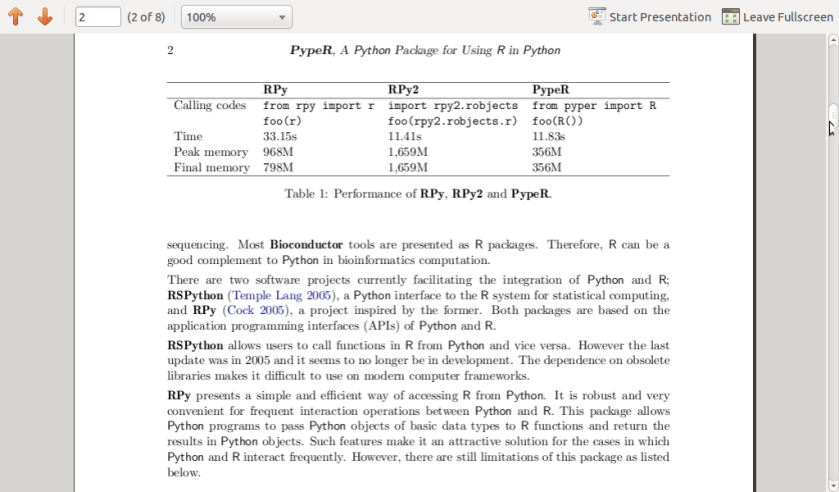
I came across this excellent JSS paper at www.jstatsoft.org/v35/c02/paper

on a Python package called PypeR which allows you to use R from within Python using the pipe functionality.

It is an interesting package and given Python’s increasing buzz , one worthy to be checked out by people using or thinking Python in their packages.


Citation:
	@article{Xia:McClelland:Wang:2010:JSSOBK:v35c02,
	  author =	"Xiao-Qin Xia and Michael McClelland and Yipeng Wang",
	  title =	"PypeR, A Python Package for Using R in Python",
	  journal =	"Journal of Statistical Software, Code Snippets",
	  volume =	"35",
	  number =	"2",
	  pages =	"1--8",
	  day =  	"30",
	  month =	"7",
	  year = 	"2010",
	  CODEN =	"JSSOBK",
	  ISSN = 	"1548-7660",
	  bibdate =	"2010-03-23",
	  URL =  	"http://www.jstatsoft.org/v35/c02",
	  accepted =	"2010-03-23",
	  acknowledgement = "",
	  keywords =	"",
	  submitted =	"2009-10-23",
	}


Interview Luis Torgo Author Data Mining with R

Example of k-nearest neighbour classification
Image via Wikipedia

Here is an interview with Prof Luis Torgo, author of the recent best seller “Data Mining with R-learning with case studies”.

Ajay- Describe your career in science. How do you think can more young people be made interested in science.

Luis- My interest in science only started after I’ve finished my degree. I’ve entered a research lab at the University of Porto and started working on Machine Learning, around 1990. Since then I’ve been involved generally in data analysis topics both from a research perspective as well as from a more applied point of view through interactions with industry partners on several projects. I’ve spent most of my career at the Faculty of Economics of the University of Porto, but since 2008 I’m at the department of Computer Science of the Faculty of Sciences of the same university. At the same time I’ve been a researcher at LIAAD / Inesc Porto LA (www.liaad.up.pt).

I like a lot what I do and like science and the “scientific way of thinking”, but I cannot say that I’ve always thought of this area as my “place”. Most of all I like solving challenging problems through data analysis. If that translates into some scientific outcome than I’m more satisfied but that is not my main goal, though I’m kind of “forced” to think about that because of the constraints of an academic career.

That does not mean I’m not passionate about science, I just think there are many more ways of “doing science” than what is reflected in the usual “scientific indicators” that most institutions seem to be more and more obsessed about.

Regards interesting young people in science that is a hard question that I’m not sure I’m qualified to answer. I do tend to think that young people are more sensible to concrete examples of problems they think are interesting and that science helps in solving, as a way of finding a motivation for facing the hard work they will encounter in a scientific career. I do believe in case studies as a nice way to learn and motivate, and thus my book 😉

Ajay- Describe your new book “Data Mining with R, learning with case studies” Why did you choose a case study based approach? who is the target audience? What is your favorite case study from the book

Luis- This book is about learning how to use R for data mining. The book follows a “learn by doing it” approach to data mining instead of the more common theoretical description of the available techniques in this discipline. This is accomplished by presenting a series of illustrative case studies for which all necessary steps, code and data are provided to the reader. Moreover, the book has an associated web page (www.liaad.up.pt/~ltorgo/DataMiningWithR) where all code inside the book is given so that easy copy-paste is possible for the more lazy readers.

The language used in the book is very informal without many theoretical details on the used data mining techniques. For obtaining these theoretical insights there are already many good data mining books some of which are referred in “further readings” sections given throughout the book. The decision of following this writing style had to do with the intended target audience of the book.

In effect, the objective was to write a monograph that could be used as a supplemental book for practical classes on data mining that exist in several courses, but at the same time that could be attractive to professionals working on data mining in non-academic environments, and thus the choice of this more practically oriented approach.

Regards my favorite case study that is a hard question for an author… still I would probably choose the “Predicting Stock Market Returns” case study (Chapter 3). Not only because I like this challenging problem, but mainly because the case study addresses all aspects of knowledge discovery in a real world scenario and not only the construction of predictive models. It tackles data collection, data pre-processing, model construction, transforming predictions into actions using different trading policies, using business-related performance metrics, implementing a trading simulator for “real-world” evaluation, and laying out grounds for constructing an online trading system.

Obviously, for all these steps there are far too many options to be possible to describe/evaluate all of them in a chapter, still I do believe that for the reader it is important to see the overall picture, and read about the relevant questions on this problem and some possible paths that can be followed at these different steps.

In other words: do not expect to become rich with the solution I describe in the chapter !

Ajay- Apart from R, what other data mining software do you use or have used in the past. How would you compare their advantages and disadvantages with R

Luis- I’ve played around with Clementine, Weka, RapidMiner and Knime, but really only playing with teaching goals, and no serious use/evaluation in the context of data mining projects. For the latter I mainly use R or software developed by myself (either in R or other languages). In this context, I do not think it is fair to compare R with these or other tools as I lack serious experience with them. I can however, tell you about what I see as the main pros and cons of R. The main reason for using R is really not only the power of the tool that does not stop surprising me in terms of what already exists and keeps appearing as contributions of an ever growing community, but mainly the ability of rapidly transforming ideas into prototypes. Regards some of its drawbacks I would probably mention the lack of efficiency when compared to other alternatives and the problem of data set sizes being limited by main memory.

I know that there are several efforts around for solving this latter issue not only from the community (e.g. http://cran.at.r-project.org/web/views/HighPerformanceComputing.html), but also from the industry (e.g. Revolution Analytics), but I would prefer that at this stage this would be a standard feature of the language so the the “normal” user need not worry about it. But then this is a community effort and if I’m not happy with the current status instead of complaining I should do something about it!

Ajay- Describe your writing habit- How do you set about writing the book- did you write a fixed amount daily or do you write in bursts etc

Luis- Unfortunately, I write in bursts whenever I find some time for it. This is much more tiring and time consuming as I need to read back material far too often, but I cannot afford dedicating too much consecutive time to a single task. Actually, I frequently tease my PhD students when they “complain” about the lack of time for doing what they have to, that they should learn to appreciate the luxury of having a single task to complete because it will probably be the last time in their professional life!

Ajay- What do you do to relax or unwind when not working?

Luis- For me, the best way to relax from work is by playing sports. When I’m involved in some game I reset my mind and forget about all other things and this is very relaxing for me. A part from sports I enjoy a lot spending time with my family and friends. A good and long dinner with friends over a good bottle of wine can do miracles when I’m too stressed with work! Finally,I do love traveling around with my family.

Luis Torgo

Short Bio: Luis Torgo has a degree in Systems and Informatics Engineering and a PhD in Computer Science. He is an Associate Professor of the Department of Computer Science of the Faculty of Sciences of the University of Porto. He is also a researcher of the Laboratory of Artificial Intelligence and Data Analysis (LIAAD) belonging to INESC Porto LA. Luis Torgo has been an active researcher in Machine Learning and Data Mining for more than 20 years. He has lead several academic and industrial Data Mining research projects. Luis Torgo accompanies the R project almost since its beginning, using it on his research activities. He teaches R at different levels and has given several courses in different countries.

For reading “Data Mining with R” – you can visit this site, also to avail of a 20% discount the publishers have generously given (message below)-

For more information and to place an order, visit us at http://www.crcpress.com.  Order online and apply 20% Off discount code 907HM at checkout.  CRC is pleased to offer free standard shipping on all online orders!

link to the book page  http://www.crcpress.com/product/isbn/9781439810187

Price: $79.95
Cat. #: K10510
ISBN: 9781439810187
ISBN 10: 1439810184
Publication Date: November 09, 2010
Number of Pages: 305
Availability: In Stock
Binding(s): Hardback 

Assumptions on Guns

This is a very crude yet functional homemade g...
Image via Wikipedia

While sitting in Delhi, India- I sometimes notice that there is one big new worthy gun related incident in the United States every six months (latest incident Gabrielle giffords incident) and the mythical NRA (which seems just as powerful as equally mythical Jewish American or Cuban American lobby ) . As someone who once trained to fire guns (.22 and SLR -rifles actually), comes from a gun friendly culture (namely Punjabi-North Indian), my dad carried a gun sometimes as a police officer during his 30 plus years of service, I dont really like guns (except when they are in a movie). My 3 yr old son likes guns a lot (for some peculiar genetic reason even though we are careful not to show him any violent TV or movie at all).

So to settle the whole guns are good- guns are bad thing I turned to the one resource -Internet

Here are some findings-

1) A lot of hard statistical data on guns is biased by the perspective of the writer- it reminds me of the old saying Lies, True lies and Statistics.

2) There is not a lot of hard data in terms of a universal research which can be quoted- unlike say lung cancer is caused by cigarettes- no broad research which can be definitive in this regards.

3) American , European and Asian attitudes on guns actually seem a function of historical availability , historic crime rates and cultural propensity for guns.

Switzerland and United States are two extreme outlier examples on gun causing violence causal statistics.

4) Lot of old and outdated data quoted selectively.

It seems you can fudge data about guns in the following ways-

1) Use relative per capita numbers vis a vis aggregate numbers

2) Compare and contrast gun numbers with crime numbers selectively

3) Remove drill down of type of firearm- like hand guns, rifles, automatic, semi automatic

Maybe I am being simplistic-but I found it easier to list credible data sources on guns than to summarize all assumptions on guns. Are guns good or bad- i dont know -it depends? Any research you can quote is welcome.

Data Sources on Guns and Firearms and Crime-

1) http://www.justfacts.com/guncontrol.asp

Ownership

* As of 2009, the United States has a population of 307 million people.[5]

* Based on production data from firearm manufacturers,[6] there are roughly 300 million firearms owned by civilians in the United States as of 2010. Of these, about 100 million are handguns.[7]

* Based upon surveys, the following are estimates of private firearm ownership in the U.S. as of 2010:

Households With a Gun Adults Owning a Gun Adults Owning a Handgun
Percentage 40-45% 30-34% 17-19%
Number 47-53 million 70-80 million 40-45 million

[8]

* A 2005 nationwide Gallup poll of 1,012 adults found the following levels of firearm ownership:

Category Percentage Owning 

a Firearm

Households 42%
Individuals 30%
Male 47%
Female 13%
White 33%
Nonwhite 18%
Republican 41%
Independent 27%
Democrat 23%

[9]

* In the same poll, gun owners stated they own firearms for the following reasons:

Protection Against Crime 67%
Target Shooting 66%
Hunting 41%

2) NationMaster.com

http://www.nationmaster.com/graph/cri_mur_wit_fir-crime-murders-with-firearms

VIEW DATA: Totals Per capita
Definition Source Printable version
Bar Graph Pie Chart Map

Showing latest available data.

Rank Countries Amount
# 1 South Africa: 31,918
# 2 Colombia: 21,898
# 3 Thailand: 20,032
# 4 United States: 9,369
# 5 Philippines: 7,708
# 6 Mexico: 2,606
# 7 Slovakia: 2,356
# 8 El Salvador: 1,441
# 9 Zimbabwe: 598
# 10 Peru: 442
# 11 Germany: 269
# 12 Czech Republic: 181
# 13 Ukraine: 173
# 14 Canada: 144
# 15 Albania: 135
# 16 Costa Rica: 131
# 17 Azerbaijan: 120
# 18 Poland: 111
# 19 Uruguay: 109
# 20 Spain: 97
# 21 Portugal: 90
# 22 Croatia: 76
# 23 Switzerland: 68
# 24 Bulgaria: 63
# 25 Australia: 59
# 26 Sweden: 58
# 27 Bolivia: 52
# 28 Japan: 47
# 29 Slovenia: 39
= 30 Hungary: 38
= 30 Belarus: 38
# 32 Latvia: 28
# 33 Burma: 27
# 34 Macedonia, The Former Yugoslav Republic of: 26
# 35 Austria: 25
# 36 Estonia: 21
# 37 Moldova: 20
# 38 Lithuania: 16
= 39 United Kingdom: 14
= 39 Denmark: 14
# 41 Ireland: 12
# 42 New Zealand: 10
# 43 Chile: 9
# 44 Cyprus: 4
# 45 Morocco: 1
= 46 Iceland: 0
= 46 Luxembourg: 0
= 46 Oman: 0
Total: 100,693
Weighted average: 2,097.8

DEFINITION: Total recorded intentional homicides committed with a firearm. Crime statistics are often better indicators of prevalence of law enforcement and willingness to report crime, than actual prevalence.

SOURCE: The Eighth United Nations Survey on Crime Trends and the Operations of Criminal Justice Systems (2002) (United Nations Office on Drugs and Crime, Centre for International Crime Prevention)

3)

Bureau of Justice Statistics

see

http://bjs.ojp.usdoj.gov/dataonline/Search/Homicide/State/RunHomTrendsInOneVar.cfm

or the brand new website (till 2009) on which I CANNOT get gun crime but can get total

http://www.ucrdatatool.gov/

Estimated  murder rate *
Year United States-Total

1960 5.1
1961 4.8
1962 4.6
1963 4.6
1964 4.9
1965 5.1
1966 5.6
1967 6.2
1968 6.9
1969 7.3
1970 7.9
1971 8.6
1972 9.0
1973 9.4
1974 9.8
1975 9.6
1976 8.7
1977 8.8
1978 9.0
1979 9.8
1980 10.2
1981 9.8
1982 9.1
1983 8.3
1984 7.9
1985 8.0
1986 8.6
1987 8.3
1988 8.5
1989 8.7
1990 9.4
1991 9.8
1992 9.3
1993 9.5
1994 9.0
1995 8.2
1996 7.4
1997 6.8
1998 6.3
1999 5.7
2000 5.5
2001 5.6
2002 5.6
2003 5.7
2004 5.5
2005 5.6
2006 5.7
2007 5.6
2008 5.4
2009 5.0
Notes: National or state offense totals are based on data from all reporting agencies and estimates for unreported areas.
* Rates are the number of reported offenses per 100,000 population
  • United States-Total –
    • The 168 murder and nonnegligent homicides that occurred as a result of the bombing of the Alfred P. Murrah Federal Building in Oklahoma City in 1995 are included in the national estimate.
    • The 2,823 murder and nonnegligent homicides that occurred as a result of the events of September 11, 2001, are not included in the national estimates.


  • Sources: 


    FBI, Uniform Crime Reports as prepared by the National Archive of Criminal Justice Data


    4) united nation statistics of 2002  were too old in my opinion.
    wikipedia seems too broad based to qualify as a research article but is easily accessible http://en.wikipedia.org/wiki/Gun_violence_in_the_United_States
    to actually buy a gun or see guns available for purchase in United States see
    http://www.usautoweapons.com/