Using PostgreSQL and MySQL databases in R 2.12 for Windows

Air University Library's Index to Military Per...
Image via Wikipedia

If you use Windows for your stats computing and your data is in a database (probably true for almost all corporate business analysts) R 2.12 has provided a unique procedural hitch for you NO BINARIES for packages used till now to read from these databases.

The Readme notes of the release say-

Packages related to many database system must be linked to the exact
version of the database system the user has installed, hence it does
not make sense to provide binaries for packages
	RMySQL, ROracle, ROracleUI, RPostgreSQL
although it is possible to install such packages from sources by
	install.packages('packagename', type='source')
after reading the manual 'R Installation and Administration'.

So how to connect to Databases if the Windows Binary is not available-

So how to connect to PostgreSQL and MySQL databases.

For Postgres databases-

You can update your PostgreSQL databases here-

http://www.postgresql.org/download/windows

Fortunately the RpgSQL package is still available for PostgreSQL

  • Using the RpgSQL package

library(RpgSQL)

#creating a connection
con <- dbConnect(pgSQL(), user = "postgres", password = "XXXX",dbname="postgres")

#writing a table from a R Dataset
dbWriteTable(con, "BOD", BOD)

# table names are lower cased unless double quoted. Here we write a Select SQL query
dbGetQuery(con, 'select * from "BOD"')

#disconnecting the connection
dbDisconnect(con)

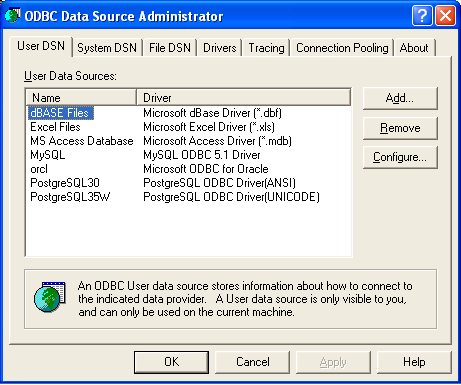
You can also use RODBC package for connecting to your PostgreSQL database but you need to configure your ODBC connections in

Windows Start Panel-

Settings-Control Panel-

Administrative Tools-Data Sources (ODBC)

You should probably see something like this screenshot.
Coming back to R and noting the name of my PostgreSQL DSN from above screenshot-( If not there just click on add-scroll to appropriate database -here PostgreSQL and click on Finish- add in the default values for your database or your own created database values-see screenshot for help with other configuring- and remember to click Test below to check if username and password are working, port is correct etc.
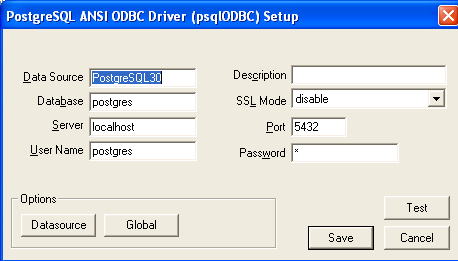
so once the DSN is probably setup in the ODBC (frightening terminology is part of databases)- you can go to R to connect using RODBC package


#loading RODBC

library(RODBC)

#creating a Database connection
# for username,password,database name and DSN name

chan=odbcConnect("PostgreSQL35W","postgres;Password=X;Database=postgres")

#to list all table names

sqlTables(chan)

TABLE_QUALIFIER TABLE_OWNER TABLE_NAME TABLE_TYPE REMARKS
1       postgres      public        bod      TABLE      
 2        postgres      public  database1      TABLE      
 3        postgres      public         tt      TABLE

Now for MySQL databases it is exactly the same code except we download and install the ODBC driver from http://www.mysql.com/downloads/connector/odbc/

and then we run the same configuring DSN as we did for postgreSQL.

After that we use RODBC in pretty much the same way except changing for the default username and password for MySQL and changing the DSN name for the previous step.

channel <- odbcConnect("mysql","jasperdb;Password=XXX;Database=Test")
test2=sqlQuery(channel,"select * from jiuser")
test2
 id  username tenantId   fullname emailAddress  password externallyDefined enabled previousPasswordChangeTime1  1   jasperadmin        1 Jasper Administrator           NA 349AFAADD5C5A2BD477309618DC              NA    01                       
2  2       joe1ser        1             Joe User           NA                 4DD8128D07A               NA    01
odbcClose(channel)
While using RODBC for all databases is a welcome step, perhaps the change release notes for Window Users of R may need to be more substantiative than one given for R 2.12.2

Scoring SAS and SPSS Models in the cloud

Outline of a cloud containing text 'The Cloud'
Image via Wikipedia

An announcement from Zementis and Predixion Software– about using cloud computing for scoring models using PMML. Note R has a PMML package as well which is used by Rattle, data mining GUI for exporting models.

Source- http://www.marketwatch.com/story/predixion-software-introduces-new-product-to-run-sas-and-spss-predictive-models-in-the-cloud-2010-10-19?reflink=MW_news_stmp

——————————————————————————————————–

ALISO VIEJO, Calif., Oct 19, 2010 (BUSINESS WIRE) — Predixion Software today introduced Predixion PMML Connexion(TM), an interface that provides Predixion Insight(TM), the company’s low-cost, self-service in the cloud predictive analytics solution, direct and seamless access to SAS, SPSS (IBM) and other predictive models for use by Predixion Insight customers. Predixion PMML Connexion enables companies to leverage their significant investments in legacy predictive analytics solutions at a fraction of the cost of conventional licensing and maintenance fees.

The announcement was made at the Predictive Analytics World conference in Washington, D.C. where Predixion also announced a strategic partnership with Zementis, Inc., a market leader in PMML-based solutions. Zementis is exhibiting in Booth #P2.

The Predictive Model Markup Language (PMML) standard allows for true interoperability, offering a mature standard for moving predictive models seamlessly between platforms. Predixion has fully integrated this PMML functionality into Predixion Insight, meaning Predixion Insight users can now effortlessly import PMML-based predictive models, enabling information workers to score the models in the cloud from anywhere and publish reports using Microsoft Excel(R) and SharePoint(R). In addition, models can also be written back into SAS, SPSS and other platforms for a truly collaborative, interoperable solution.

“Predixion’s investment in this PMML interface makes perfect business sense as the lion’s share of the models in existence today are created by the SAS and SPSS platforms, creating compelling opportunity to leverage existing investments in predictive and statistical models on a low-cost cloud predictive analytics platform that can be fed with enterprise, line of business and cloud-based data,” said Mike Ferguson, CEO of Intelligent Business Strategies, a leading analyst and consulting firm specializing in the areas of business intelligence and enterprise business integration. “In this economy, Predixion’s low-cost, self-service predictive analytics solutions might be welcome relief to IT organizations chartered with quickly adding additional applications while at the same time cutting costs and staffing.”

“We are pleased to be partnering with Zementis, truly a PMML market leader and innovator,” said Predixion CEO Simon Arkell. “To allow any SAS or SPSS customer to immediately score any of their predictive models in the cloud from within Predixion Insight, compare those models to those created by Predixion Insight, and share the results within Excel and Sharepoint is an exciting step forward for the industry. SAS and SPSS customers are fed up with the high prices they must pay for their business users just to access reports generated by highly skilled PhDs who are burdened by performing routine tasks and thus have become a massive bottleneck. That frustration is now a thing of the past because any information worker can now unlock the power of predictive analytics without relying on experts — for a fraction of the cost and from anywhere they can connect to the cloud,” Arkell said.

Dr. Michael Zeller, Zementis CEO, added, “Our mission is to significantly shorten the time-to-market for predictive models in any industry. We are excited to be contributing to Predixion’s self-service, cloud-based predictive analytics solution set.”

About Predixion Software

Predixion Software develops and markets collaborative predictive analytics solutions in the public and private cloud. Predixion enables self-service predictive analytics, allowing customers to use and analyze large amounts of data to make actionable decisions, all within the familiar environment of Excel and PowerPivot. Predixion customers are achieving immediate results across a multitude of industries including: retail, finance, healthcare, marketing, telecommunications and insurance/risk management.

Predixion Software is headquartered in Aliso Viejo, California with development offices in Redmond, Washington. The company has venture capital backing from established investors including DFJ Frontier, Miramar Venture Partners and Palomar Ventures. For more information please contact us at 949-330-6540, or visit us atwww.predixionsoftware.com.

About Zementis

Zementis, Inc. is a leading software company focused on the operational deployment and integration of predictive analytics and data mining solutions. Its ADAPA(R) decision engine successfully bridges the gap between science and engineering. ADAPA(R) was designed from the ground up to benefit from open standards and to significantly shorten the time-to-market for predictive models in any industry. For more information, please visit www.zementis.com.


So which software is the best analytical software? Sigh- It depends


Graph of typical Operating System placement on...
Image via Wikipedia


Here is the software matrix that I am trying to develop for analytical software- It should help as a tentative guide for software purchases- it’s independent so unbiased (hopefully)- and it will try and bring as much range or sensitivity as possible. The list (rather than matrix) is of the format-

Type 0f analysis-

  • Data Visualization (Reporting with Pivot Ability to aggregate, disaggregate)
  • Reporting without Pivot Ability
  • Regression -Logistic Regression for Propensity or Risk Models
  • Regression- Linear for Pricing Models
  • Hypothesis Testing
  • A/B Scenario Testing
  • Decision Trees (CART, CHAID)
  • Time Series Forecasting
  • Association Analysis
  • Factor Analysis
  • Survey (Questionnaires)
  • Clustering
  • Segmentation
  • Data Manipulation

Dataset Size-

  • small dataset (upto X mb)
  • big dataset (upto Y gb)
  • enterprise class production BigData datasets (no limit)

Pricing of Software that can be used-

Ease of using Software

  • GUI vs Non GUI
  • Software that require not much extensive training
  • Software that require extensive training

Installation, Customization, Maintainability (or Support) for Software

  • Installation Dependencies- Size- Hardware (costs and  efficiencies)
  • Customization provided for specific use
  • Support Channels (including approximate Turn Around Time)

Software

  • Software I have used personally
  • SAS (Base, Stat,Enterprise,Connect,ETS) WPS KXEN SPSS (Base,Trends),Revolution R,R,Rapid Miner,Knime,JMP,SQL SERVER,Rattle, R Commander,Deducer
  • Software I know by reputation- SAS Enterprise Miner etc etc

Are there any other parameters for judging software?  let me know at http://twitter.com/decisionstats

LibreOffice Beta 2 (Office Fork off Oracle) launches!


Windows 7, the latest client version in the Mi...
Image via Wikipedia


Announcement from Code Ninjas at Document Foundation

10 years after the StarOffice code has been opened as OpenOffice.org, The Document Foundation is proud to announce the availability of LibreOffice Beta 2 for public testing. Please, download the suitable package(s) from

http://www.documentfoundation.org/download/


Ajay- Note that first beta was downloaded almost 100,000 times

install them, and start testing! Should you find bugs, please report them to the FreeDesktop Bugzilla:

https://bugs.freedesktop.org

If you want to get involved in this exciting project, you can contribute code:

http://www.documentfoundation.org/develop/

translate LibreOffice to your language:

http://www.freedesktop.org/wiki/Software/LibreOffice/i18n/translating_3.3

or just donate:

http://www.documentfoundation.org/contribution/
A list of known issues with Beta 2 is available in our wiki:

http://wiki.documentfoundation.org/Beta2

Beta Release Notes

This beta release is not intended for production use!

There are a number of known issues being worked on:

  • The Windows build is an International build – you can choose the user interface language that is suitable for you, but the help is always English. We are currently working on improving the delivery mechanism to be able to provide you with the localized help. We are also working on smaller problems like wrong description of several languages.
  • The Linux and MacOSX builds are English builds with the possibility to install language packs. Please browse the archives to get the langugage pack you need for your platform.
  • The LibreOffice branding and renaming is new and work in progress. You may still see old graphics, icons or websites. So please bear with us. This also applies to the BrOffice.org branding – applicable in Brazil.
  • Filters for the legacy StarOffice binary formats are missing.

I tested it- it seems okay enough. Once again Open Source tends to underplay expectations (when was the last time you saw that in enterprise software?)

Enterprise Linux rises rapidly:New Report

Tux, as originally drawn by Larry Ewing
Image via Wikipedia

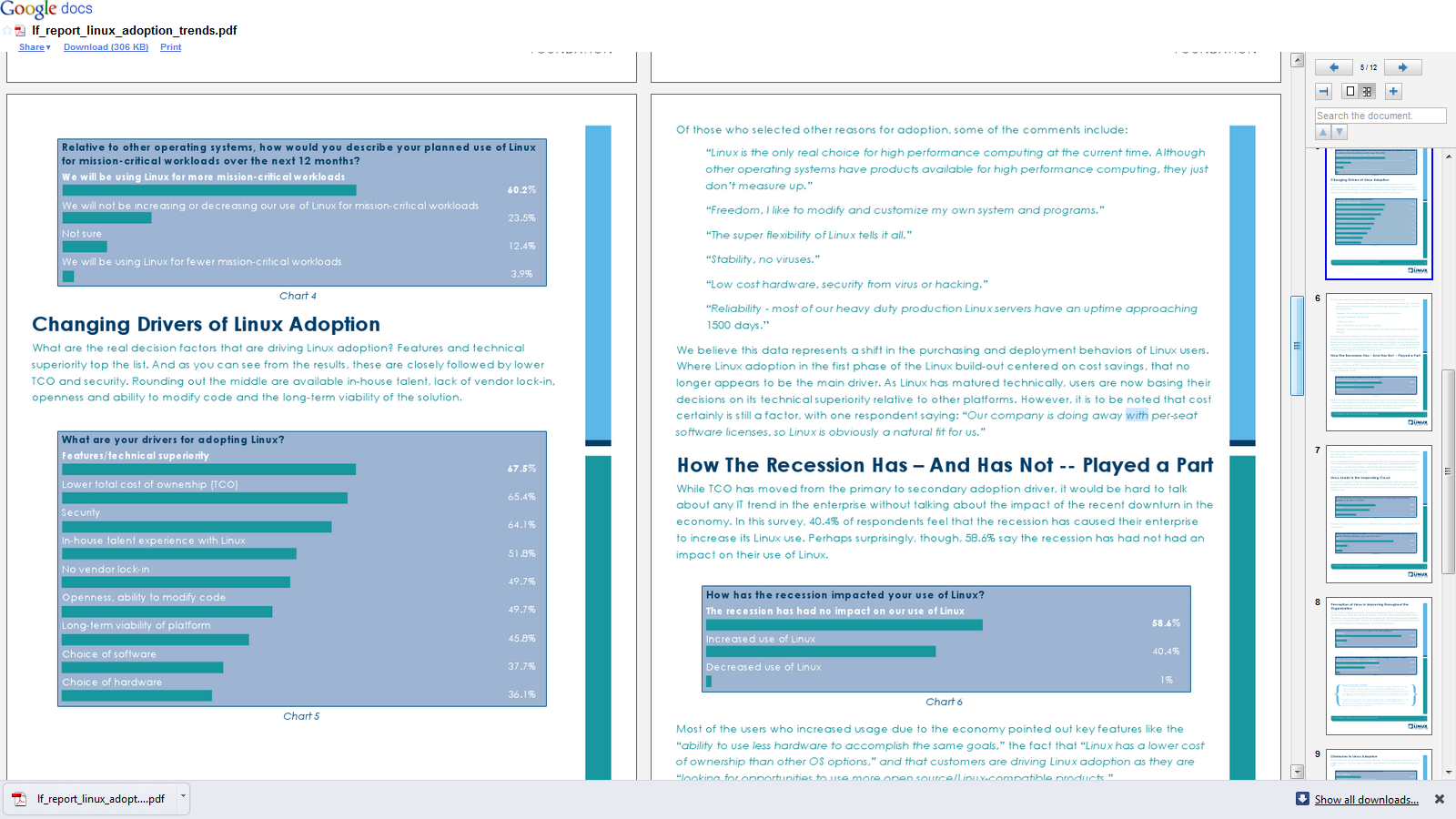
A new report from Linux Foundation found significant growth trends for enterprise usage of Linux- which should be welcome to software companies that have enabled Linux versions of software, service providers that provide Linux based consulting (note -lesser competition, lower overheads) and to application creators.

From –

http://www.linuxfoundation.org/news-media/announcements/2010/10/new-linux-foundation-user-survey-shows-enterprise-linux-achieve-sig

Key Findings from the Report
• 79.4 percent of companies are adding more Linux relative to other operating systems in the next five years.

• More people are reporting that their Linux deployments are migrations from Windows than any other platform, including Unix migrations. 66 percent of users surveyed say that their Linux deployments are brand new (“Greenfield”) deployments.

• Among the early adopters who are operating in cloud environments, 70.3 percent use Linux as their primary platform, while only 18.3 percent use Windows.

• 60.2 percent of respondents say they will use Linux for more mission-critical workloads over the next 12 months.

• 86.5 percent of respondents report that Linux is improving and 58.4 percent say their CIOs see Linux as more strategic to the organization as compared to three years ago.

• Drivers for Linux adoption extend beyond cost: technical superiority is the primary driver, followed by cost and then security.

• The growth in Linux, as demonstrated by this report, is leading companies to increasingly seek Linux IT professionals, with 38.3 percent of respondents citing a lack of Linux talent as one of their main concerns related to the platform.

• Users participate in Linux development in three primary ways: testing and submitting bugs (37.5 percent), working with vendors (30.7 percent) and participating in The Linux Foundation activities (26.0 percent).

and from the report itself-

download here-

http://www.linuxfoundation.org/lp/page/download-the-free-linux-adoption-trends-report

Which software do we buy? -It depends

Software (novel)
Image via Wikipedia

Often I am asked by clients, friends and industry colleagues on the suitability or unsuitability of particular software for analytical needs.  My answer is mostly-

It depends on-

1) Cost of Type 1 error in purchase decision versus Type 2 error in Purchase Decision. (forgive me if I mix up Type 1 with Type 2 error- I do have some weird childhood learning disabilities which crop up now and then)

Here I define Type 1 error as paying more for a software when there were equivalent functionalities available at lower price, or buying components you do need , like SPSS Trends (when only SPSS Base is required) or SAS ETS, when only SAS/Stat would do.

The first kind is of course due to the presence of free tools with GUI like R, R Commander and Deducer (Rattle does have a 500$ commercial version).

The emergence of software vendors like WPS (for SAS language aficionados) which offer similar functionality as Base SAS, as well as the increasing convergence of business analytics (read predictive analytics), business intelligence (read reporting) has led to somewhat brand clutter in which all softwares promise to do everything at all different prices- though they all have specific strengths and weakness. To add to this, there are comparatively fewer business analytics independent analysts than say independent business intelligence analysts.

2) Type 2 Error- In this case the opportunity cost of delayed projects, business models , or lower accuracy – consequences of buying a lower priced software which had lesser functionality than you required.

To compound the magnitude of error 2, you are probably in some kind of vendor lock-in, your software budget is over because of buying too much or inappropriate software and hardware, and still you could do with some added help in business analytics. The fear of making a business critical error is a substantial reason why open source software have to work harder at proving them competent. This is because writing great software is not enough, we need great marketing to sell it, and great customer support to sustain it.

As Business Decisions are decisions made in the constraints of time, information and money- I will try to create a software purchase matrix based on my knowledge of known softwares (and unknown strengths and weakness), pricing (versus budgets), and ranges of data handling. I will add in basically an optimum approach based on known constraints, and add in flexibility for unknown operational constraints.

I will restrain this matrix to analytics software, though you could certainly extend it to other classes of enterprise software including big data databases, infrastructure and computing.

Noted Assumptions- 1) I am vendor neutral and do not suffer from subjective bias or affection for particular software (based on conferences, books, relationships,consulting etc)

2) All software have bugs so all need customer support.

3) All software have particular advantages , strengths and weakness in terms of functionality.

4) Cost includes total cost of ownership and opportunity cost of business analytics enabled decision.

5) All software marketing people will praise their own software- sometimes over-selling and mis-selling product bundles.

Software compared are SPSS, KXEN, R,SAS, WPS, Revolution R, SQL Server,  and various flavors and sub components within this. Optimized approach will include parallel programming, cloud computing, hardware costs, and dependent software costs.

To be continued-


Libre Office

Some ambiguity about Libre Office and why it needed to change from Open Office- just when Open Office seemed so threatening on the desktop

FROM- http://www.documentfoundation.org/faq/

Q: So is this a breakaway project?

A: Not at all. The Document Foundation will continue to be focused on developing, supporting, and promoting the same software, and it’s very much business as usual. We are simply moving to a new and more appropriate organisational model for the next decade – a logical development from Sun’s inspirational launch a decade ago.

Q: Why are you calling yourselves “The Document Foundation”?

A: For ten years we have used the same name – “OpenOffice.org” – for both the Community and the software. We’ve decided it removes ambiguity to have a different name for the two, so the Community is now “The Document Foundation”, and the software “LibreOffice”. Note: there are other examples of this usage in the free software community – e.g. the Mozilla Foundation with the Firefox browser.

Q: Does this mean you intend to develop other pieces of software?

A: We would like to have that possibility open to us in the future…

Q: And why are you calling the software “LibreOffice” instead of “OpenOffice.org”?

A: The OpenOffice.org trademark is owned by Oracle Corporation. Our hope is that Oracle will donate this to the Foundation, along with the other assets it holds in trust for the Community, in due course, once legal etc issues are resolved. However, we need to continue work in the meantime – hence “LibreOffice” (“free office”).

Q: Why are you building a new web infrastructure?

A: Since Oracle’s takeover of Sun Microsystems, the Community has been under “notice to quit” from our previous Collabnet infrastructure. With today’s announcement of a Foundation, we now have an entity which can own our emerging new infrastructure.

Q: What does this announcement mean to other derivatives of OpenOffice.org?

A: We want The Document Foundation to be open to code contributions from as many people as possible. We are delighted to announce that the enhancements produced by the Go-OOo team will be merged into LibreOffice, effective immediately. We hope that others will follow suit.

Q: What difference will this make to the commercial products produced by Oracle Corporation, IBM, Novell, Red Flag, etc?

A: The Document Foundation cannot answer for other bodies. However, there is nothing in the licence arrangements to stop companies continuing to release commercial derivatives of LibreOffice. The new Foundation will also mean companies can contribute funds or resources without worries that they may be helping a commercial competitor.

Q: What difference will The Document Foundation make to developers?

A: The Document Foundation sets out deliberately to be as developer friendly as possible. We do not demand that contributors share their copyright with us. People will gain status in our community based on peer evaluation of their contributions – not by who their employer is.

Q: What difference will The Document Foundation make to users of LibreOffice?

A: LibreOffice is The Document Foundation’s reason for existence. We do not have and will not have a commercial product which receives preferential treatment. We only have one focus – delivering the best free office suite for our users – LibreOffice.

—————————————————————————————————-

Non Microsoft and Non Oracle vendors are indeed going to find it useful the possiblities of bundling a free Libre Office that reduces the total cost of ownership for analytics software. Right now, some of the best free advertising for Microsoft OS and Office is done by enterprise software vendors who create Windows Only Products and enable MS Office integration better than  Open Office integration. This is done citing user demand- but it is a chicken egg dilemma- as functionality leads to enhanced demand. Microsoft on the other hand is aware of this dependence and has made SQL Server and SQL Analytics (besides investing in analytics startups like Revolution Analytics) along with it’s own infrastructure -Azure Cloud Platform/EC2 instances.