The Latest GUI for R- BioR

Once more a spanking new shiny software –

Bio7 is a integrated development environment for ecological modelling based on the Rich-Client-Platformconcept of the Java IDE Eclipse. The Bio7 platform contains several perspectives which arrange several views for a special purpose useful for the development and analysis of ecological models. One special perspective bundles a feature rich GUI (Graphical User Interface) for the statistical software R.
For the bidirectional communication between Java and R the Rserve application is used (as a backend to evaluate R code and transfer data from and to Java).
The Bio7 R perspective (see figure below) is divided into a R-Shell view on the left side (conceptual the R side) and a Table view on the right side (conceptual the Java side).
Data can be imported to a spreadsheet, edited and then transferred to the R workspace. Vice versa data from R can be transferred to a sheet of the Table view and then exported e.g. to an Excel or OpenOffice file.

and

General:

Built upon Eclipse 3.6.1.

Now works with the latest Java version! (Windows version bundled with the latest JRE release).

Removed the Soil perspective (now soils can be modeled with ImageJ (float precision). Active images can be displayed in the 3D discrete view (new example available).

Removed the database perspective and the plant layer. You can now built any discrete models without any plant layer.

Removed several controls in the Control view. Added the “Custom Controls” view. In addition ported the Swing component of the Time panel to Swt.

Deleted the avi to swf converter in the ImageJ menu.

Now patterns can be saved with opened Java editor source. If this file is reopened and dragged on Bio7 the pattern is loaded, the source is compiled and the setup method (if available) is executed. In this way model files can be used for presentations ->drag, setup and run. The save actions are located in the Speadsheet view toolbar.

More options available to disable panel painting and recording of values (if not needed for speed!).

New Setup button in the toolbar of Bio7 to trigger a compiled setup method if available.

Removed the load and save pattern buttons from the toolbar of Bio7. Discrete patterns can now be stored with the available action in the spreadsheet view menu.

New P2 Update Manager available in Bio7.

Updated the Janino Compiler.

New HTML perspective added with a view which embeds the TinyMC editor.

New options to disable painting operations for the discrete panels.

New option to explicitly enable scripts at startup (for a faster startup).

Quadgrid (Hexgrid)

Only states are now available which can be created in the “Spreadsheet” view menu easily. Patterns can be stored and restored as usual but are now stored in an *.exml file.

New method to transfer the quadgrid pattern as a matrix to R.

New method to transfer the population data of all quadgrid states to R.

ImageJ:

Update to the latest version (with additional fixes).

Fixed a bug to rename the image.

Thumbnail browser can now open images recursevely(limited to 1000 pics), the magnifiyng glass can be disabled, too.

Plugins can be installed dynamically with a drag and drop operation on the ImageJ view or toolbar (as known from ImageJ).

Installed plugins now extend the plugin menu as submenus or subsubmenus (not finished yet!).

Plugins can now be created with the Java editor. New Bio7 Wizard available to create a plugin template.

Compiled Java files can be added to a *.jar file with a new available action in the Navigator view (if you rightclick on the files in the Navigator). In this way ImageJ plugins can be packaged in a *.jar.

Floweditor:

Fixed a repaint bug in the debug mode of a flow (now draws correctly the active shape in the flow).

Resize with Strg+Scrollwheel works again.

Comments with more than one line works again.

New Test action to verify connections in a flow.

Debug mode now shows all executed Shapes.

Integrated more default tests (for the verification of a regular flow).

A mouse-click now deletes colored shapes in a flow (e.g. in debug mode).

Points panel:

Integrated (dynamic) Voronoi, Delauney visualization (with area and clip to rectangle action).

Points coordinates can now be set in double precision.

Transfer of point coordinates to R now in double precision.

Bio7 Table:

New import and export of Excel 2007 OOXML.

Row headers can now be resized with the mouse device.

R:

Updated R (2.12.1) and Rserve (0.6.3) to the latest version.

New help action in the R-Shell view.

New action to display help for R specific commands in the embedded Bio7 browser (which opens automatically).

New Key actions to copy the selected variable names to the expression dialog (c=cocatenate (+), a=add (,)).

New action to transfer character or numeric vectors horizontally or vertically in an opened spread (Table view) at selection coordinates.

Empty spaces in the filepath are now allowed under Windows if Rserve is started with a system shell or the RGUI (for the tempfile select a location in the Preferences dialog which is writeable) is started.This works also for the RGUI action.

Improved the search for the “Install packages” action (option “Case Sensitive” added).

API:

New API methods available!

And:

Many fixes since the last version!


Installation

Important information:

A certain firewall software can corrupt the Bio7 *.zip file (as well as other files).
Please ensure that you have downloaded a functioning Bio7 1.5 version. In addition it is also reported that a certain antivirus software detects the bundled R software (on Windows) as malware. Often the R specific “open.exe” is detected as malware. Please use a different scanner to make sure that the software is not infected if you have any doubts. For more details see:

http://r.789695.n4.nabble.com/trojan-at-current-development-version-td3244348.html


R Graphs Resources

Relevant GUI-

GrapheR and Deducer

https://rforanalytics.wordpress.com/graphical-user-interfaces-for-r/

Websites-


Graphics by Examples

. UCLA: Academic Technology Services,  Statistical Consulting Group. from https://www.ats.ucla.edu/stat/R/gbe/default.htm (accessed Feb 10, 2011)

https://www.ats.ucla.edu/stat/R/gbe/default.htm

Quick-R

http://www.statmethods.net/graphs/

Graph Gallery

http://addictedtor.free.fr/graphiques/allgraph.php

Frank McCown

https://www.harding.edu/fmccown/r/

Detailed Tutorial

https://math.illinoisstate.edu/dhkim/rstuff/rtutor.html

Advanced Data Visualization

Hadley Wickham

Courses- http://had.co.nz/stat645/

and Package-  http://had.co.nz/ggplot2/

example-

http://had.co.nz/ggplot2/geom_density.html

Using R from other Software

Bridge to R for WPS

http://www.minequest.com/Bridge2R.html

SAS/IML Interface to R

http://www.sas.com/technologies/analytics/statistics/iml/index.html

Official Screenshot-

RapidMiner Extension to R

https://rapid-i.com/content/view/202/206/lang,en/#r

(UN)Official Screenshot-

IBM SPSS plugin for R

https://www.spss.com/software/statistics/developer/

and

https://www.spss.com/devcentral/index.cfm?pg=rresources

Tutorial-

https://sites.google.com/site/r4statistics/running-r-from-spss

http://rwiki.sciviews.org/doku.php?id=tips:callingr:spss

(UN)official Screenshot

Knime

http://www.knime.org/downloads/extensions

Official Screenshot-

Oracle Data Miner

http://www.oracle.com/technetwork/database/options/odm/odm-r-integration-089013.html

Official Screenshot-

JMP

http://jmp.com/software/jmp9/keyfeatures.shtml

and

http://www.jmp.com/applications/analytical_apps/

Tutorial

http://blogs.sas.com/jmp/index.php?/archives/298-JMP-Into-R!.html

Screenshot-

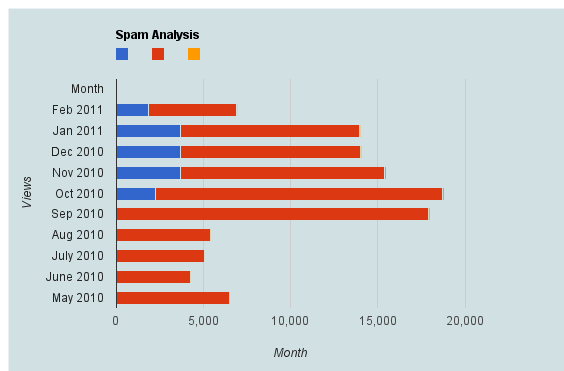
Spam Analysis Akismet-WPStats-Blogging

Here is a brief dataset I out after one hour of cutting and pasting from WordPress.com’s creative data style formats. It shows spam,comments,traffic, and number of posts written monthly.

Clearly monthly traffic is directly related to number I write (suppose A + B* Posts)

But Spam is showing a discontinuous growth especially after a big month (in which Reddit helped)

Akismet had some missing historical values (which is curious)

So what can we do with this dataframe in R or any other statistical software.

Spam Analysis
Month Spam detected Traffic excluding spam Posts Written Traffic /Post Spam /Post Spam/Traffic Ham detected Missed spam False positives
Feb-11 1848 5079 18 282.17 102.6667 36.39% 4.00 6.00 0.0%
Jan-11 3724 10238 35 292.51 106.4 36.37% 0.00 3.00 0.0%
Dec-10 3676 10345 35 295.57 105.0286 35.53% 8.00 6.00 0.0%
Nov-10 3680 11723 71 165.11 51.83099 31.39% 24.00 3.00 0.0%
Oct-10 2292 16430 71 231.41 32.28169 13.95% 24.00 18.00 0.0%
Sep-10 0 17913 63 284.33 0 0.00% 0.00 0.00 0.0%
Aug-10 0 5403 17 317.82 0 0.00% 0.00 0.00 0.0%
Jul-10 2 5041 10 504.1 0.2 0.04% 0.00 0.00 0.0%
Jun-10 5 4271 11 388.27 0.454545 0.12% 10.00 1.00 0.0%

PSPP – SPSS 's Open Source Counterpart

A Bold GNU Head
Image via Wikipedia

New Website for Windows Installers for PSPP– try at your own time if you are dedicated to either SPSS or free statistical computing.

http://pspp.awardspace.com/

This page is intended to give a stable root for downloading the PSPP-for-Windows setup from free mirrors.

Highlights of the current PSPP-for-Windows setup
PSPP info:

Current version: Master version = 0.7.6
Release date: See filenames
Information about PSPP: http://www.gnu.org/software/pspp
PSPP Manual: PDF or HTML
(current version will be installed on your PC by the installer package)
Package info:

Windows version: Windows XP and newer
Package Size: 15 Mb
Size on disk: 34 Mb
Technical: MinGW based
Cross-compiled on openSUSE 11.3

Downloads:
There are issues with the latest build. Some users report crashes on their systems on other systems it works fine.

Version Installer for multi-user installation.
Administrator privileges required.
Recommended version.
Installer for single-user installation.
No administrator privileges required
0.7.6-g38ba1e-blp-build20101116
0.7.5-g805e7e-blp-build20100908
0.7.5-g7803d3-blp-build20100820
0.7.5-g333ac4-blp-build20100727
PSPP-Master-2010-11-16
PSPP-Master-2010-09-08
PSPP-Master-2010-08-20
PSPP-Master-2010-07-27
PSPP-Master-single-user-2010-11-16
PSPP-Master-single-user-2010-09-08
PSPP-Master-single-user-2010-08-20
PSPP-Master-single-user-2010-07-27


Sources can be found here.

Also see http://en.wikipedia.org/wiki/PSPP

At the user’s choice, statistical output and graphics are done in ASCIIPDFPostScript or HTML formats. A limited range of statistical graphs can be produced, such as histogramspie-charts and np-charts.

PSPP can import GnumericOpenDocument and Excel spreadsheetsPostgres databasescomma-separated values– and ASCII-files. It can export files in the SPSS ‘portable’ and ‘system’ file formats and to ASCII files. Some of the libraries used by PSPP can be accessed programmatically; PSPP-Perl provides an interface to the libraries used by PSPP.

and

http://www.gnu.org/software/pspp/

A brief list of some of the features of PSPP follows:

  • Supports over 1 billion cases.
  • Supports over 1 billion variables.
  • Syntax and data files are compatible with SPSS.
  • Choice of terminal or graphical user interface.
  • Choice of text, postscript or html output formats.
  • Inter-operates with GnumericOpenOffice.Org and other free software.
  • Easy data import from spreadsheets, text files and database sources.
  • Fast statistical procedures, even on very large data sets.
  • No license fees.
  • No expiration period.
  • No unethical “end user license agreements”.
  • Fully indexed user manual.
  • Free Software; licensed under GPLv3 or later.
  • Cross platform; Runs on many different computers and many different operating systems.


Open Source Compiler for SAS language/ GNU -DAP

A Bold GNU Head
Image via Wikipedia

I am still testing this out.

But if you know bit more about make and .compile in Ubuntu check out

http://www.gnu.org/software/dap/

I loved the humorous introduction

Dap is a small statistics and graphics package based on C. Version 3.0 and later of Dap can read SBS programs (based on the utterly famous, industry standard statistics system with similar initials – you know the one I mean)! The user wishing to perform basic statistical analyses is now freed from learning and using C syntax for straightforward tasks, while retaining access to the C-style graphics and statistics features provided by the original implementation. Dap provides core methods of data management, analysis, and graphics that are commonly used in statistical consulting practice (univariate statistics, correlations and regression, ANOVA, categorical data analysis, logistic regression, and nonparametric analyses).

Anyone familiar with the basic syntax of C programs can learn to use the C-style features of Dap quickly and easily from the manual and the examples contained in it; advanced features of C are not necessary, although they are available. (The manual contains a brief introduction to the C syntax needed for Dap.) Because Dap processes files one line at a time, rather than reading entire files into memory, it can be, and has been, used on data sets that have very many lines and/or very many variables.

I wrote Dap to use in my statistical consulting practice because the aforementioned utterly famous, industry standard statistics system is (or at least was) not available on GNU/Linux and costs a bundle every year under a lease arrangement. And now you can run programs written for that system directly on Dap! I was generally happy with that system, except for the graphics, which are all but impossible to use,  but there were a number of clumsy constructs left over from its ancient origins.

http://www.gnu.org/software/dap/#Sample output

  • Unbalanced ANOVA
  • Crossed, nested ANOVA
  • Random model, unbalanced
  • Mixed model, balanced
  • Mixed model, unbalanced
  • Split plot
  • Latin square
  • Missing treatment combinations
  • Linear regression
  • Linear regression, model building
  • Ordinal cross-classification
  • Stratified 2×2 tables
  • Loglinear models
  • Logit  model for linear-by-linear association
  • Logistic regression
  • Copyright © 2001, 2002, 2003, 2004 Free Software Foundation, Inc., 51 Franklin Street, Fifth Floor, Boston, MA 02110-1301, USA

    sounds too good to be true- GNU /DAP joins WPS workbench and Dulles Open’s Carolina as the third SAS language compiler (besides the now defunct BASS software) see http://en.wikipedia.org/wiki/SAS_language#Controversy


    Also see http://en.wikipedia.org/wiki/DAP_(software)

    Dap was written to be a free replacement for SAS, but users are assumed to have a basic familiarity with the C programming language in order to permit greater flexibility. Unlike R it has been designed to be used on large data sets.

    It has been designed so as to cope with very large data sets; even when the size of the data exceeds the size of the computer’s memory

    WPS Version 2.5.1 Released – can still run SAS language/data and R

    However this is what Phil Rack the reseller is quoting on http://www.minequest.com/Pricing.html

    Windows Desktop Price: $884 on 32-bit Windows and $1,149 on 64-bit Windows.

    The Bridge to R is available on the Windows platforms and is available for free to customers who
    license WPS through MineQuest,LLC. Companies and organizations outside of North America
    may purchase a license for the Bridge to R which starts at $199 per desktop or $599 per server

    Windows Server Price: $1,903 per logical CPU for 32-bit and $2,474 for 64-bit.

    Note that Linux server versions are available but do not yet support the Eclipse IDE and are
    command line only

    WPS sure seems going well-but their pricing is no longer fixed and on the home website, you gotta fill a form. Ditt0 for the 30 day free evaluation

    http://www.teamwpc.co.uk/products/wps/modules/core

    Data File Formats

    The table below provides a summary of data formats presently supported by the WPS Core module.

    Data File Format Un-Compressed
    Data
    Compressed
    Data
    Read Write Read Write
    SD2 (SAS version 6 data set)
    SAS7BDAT (SAS version 7 data set)
    SAS7BDAT (SAS version 8 data set)
    SAS7BDAT (SAS version 9 data set)
    SASSEQ (SAS version 8/9 sequential file)
    V8SEQ (SAS version 8 sequential file)
    V9SEQ (SAS version 9 sequential file)
    WPD (WPS native data set)
    WPDSEQ (WPS native sequential file)
    XPORT (transport format)

    Additional access to EXCEL, SPSS and dBASE files is supported by utilising the WPS Engine for DB Filesmodule.

    and they have a new product release on Valentine Day 2011 (oh these Europeans!)

    From the press release at http://www.teamwpc.co.uk/press/wps2_5_1_released

    WPS Version 2.5.1 Released 

    New language support, new data engines, larger datasets, improved scalability

    LONDON, UK – 14 February 2011 – World Programming today released version 2.5.1 of their WPS software for workstations, servers and mainframes.

    WPS is a competitively priced, high performance, highly scalable data processing and analytics software product that allows users to execute programs written in the language of SAS. WPS is supported on a wide variety of hardware and operating system platforms and can connect to and work with many types of data with ease. The WPS user interface (Workbench) is frequently praised for its ease of use and flexibility, with the option to include numerous third-party extensions.

    This latest version of the software has the ability to manipulate even greater volumes of data, removing the previous 2^31 (2 billion) limit on number of observations.

    Complimenting extended data processing capabilities, World Programming has worked hard to boost the performance, scalability and reliability of the WPS software to give users the confidence they need to run heavy workloads whilst delivering maximum value from available computer power.

    WPS version 2.5.1 offers additional flexibility with the release of two new data engines for accessing Greenplum and SAND databases. WPS now comes with eleven data engines and can access a huge range of commonly used and industry-standard file-formats and databases.

    Support in WPS for the language of SAS continues to expand with more statistical procedures, data step functions, graphing controls and many other language items and options.

    WPS version 2.5.1 is available as a free upgrade to all licensed users of WPS.

    Summary of Main New Features:

    • Supporting Even Larger Datasets
      WPS is now able to process very large data sets by lifting completely the previous size limit of 2^31 observations.
    • Performance and Scalability Boosted
      Performance and scalability improvements across the board combine to ensure even the most demanding large and concurrent workloads are processed efficiently and reliably.
    • More Language Support
      WPS 2.5.1 continues the expansion of it’s language support with over 70 new language items, including new Procedures, Data Step functions and many other language items and options.
    • Statistical Analysis
      The procedure support in WPS Statistics has been expanded to include PROC CLUSTER and PROC TREE.
    • Graphical Output
      The graphical output from WPS Graphing has been expanded to accommodate more configurable graphics.
    • Hash Tables
      Support is now provided for hash tables.
    • Greenplum®
      A new WPS Engine for Greenplum provides dedicated support for accessing the Greenplum database.
    • SAND®
      A new WPS Engine for SAND provides dedicated support for accessing the SAND database.
    • Oracle®
      Bulk loading support now available in the WPS Engine for Oracle.
    • SQL Server®
      To enhance existing SQL Server database access, a new SQLSERVR (please note spelling) facility in the ODBC engine.

    More Information:

    Existing Users should visit www.teamwpc.co.uk/support/wps/release where you can download a readme file containing more information about all the new features and fixes in WPS 2.5.1.

    New Users should visit www.teamwpc.co.uk/products/wps where you can explore in more detail all the features available in WPS or request a free evaluation.

    and from http://www.teamwpc.co.uk/products/wps/data it seems they are going on the BIG DATA submarine as well-

    Data Support 

    Extremely Large Data Size Handling

    WPS is now able to handle extremely large data sets now that the previous limit of 2^31 observations has been lifted.

    Access Standard Databases

    Use I/O Features in WPS Core

    • CLIPBOARD (Windows only)
    • DDE (Windows only)
    • EMAIL (via SMTP or MAPI)
    • FTP
    • HTTP
    • PIPE (Windows and UNIX only)
    • SOCKET
    • STDIO
    • URL

    Use Standard Data File Formats