Lovely forecasting blog

Eight different random walks.
Image via Wikipedia

I really loved this simple, smart and yet elegant explanation of forecasting. even a high school quarterback could understand it, and maybe get a internship job building and running and re running code for Mars shot.

Despite my plea that you remain svelte in real life, I implore you to be naïve in business forecasting – and use a naïve forecasting model early and often. A naïve forecasting model is the most important model you will ever use in business forecasting.

and now the killer line

Purists may argue that the only true naïve forecast is the “no-change” forecast, meaning either a random walk (forecast = last known actual) or a seasonal random walk (e.g. forecast = actual from corresponding period last year). These are referred to as NF1 and NF2 in the Makridakis text (where NF = Naïve Forecast). In our 2006 SAS webseries Finding Flaws in Forecasting, an attendee asked “What about using a simple time series forecast with no intervention as the naïve forecast?” Is that allowed?

i did write a blog article on forecasting some time back, but back then I was a little blogger, with the website name being http://iwannacrib.com

great work in helping make forecasting easier to understand for people who have flower shops and dont have a bee, to help them with the forecasts, nor an geeky email list, not 4000$.

make it easier for the little guy to forecast his sales, so he cuts down on his supply chain inventory, lowering his carbon footprint.

Blog.sas.com take a bow, on labour day, helping workers with easy to understand models.

http://blogs.sas.com/forecasting/index.php?/archives/68-Which-Naive-Model-to-Use.html

Protected: Happy Labour Day to American Stats-ical Association

This content is password-protected. To view it, please enter the password below.

Revolution releases R Windows for Academics for free

Logo for R
Image via Wikipedia

Based on the official email from them, God bless the merry coders at Revo-

Revolution Analytics has just released Revolution R Enterprise 4.3 for 32-bit and 64-bit Windows, a significant step forward in enterprise data analytics.  It features an updated RevoScaleR package for scalable, fast (multicore), and extensible data analysis with R. Revolution R Enterprise 4.3 for Windows also provides R 2.12.2, and includes an enhanced R Productivity Environment (RPE), a full-featured integrated development environment with visual debugging capabilities. Also available is an updated Windows release of our deployment server solution, RevoDeployR 1.2, designed to help you deliver R analytics via the Web.

As a registered user of the Academic version of Revolution R Enterprise for Windows, you can take advantage of these improvements by downloading and installing Revolution R Enterprise 4.3 today. You can install Revolution R Enterprise 4.3 side-by-side with your existing Revolution R Enterprise installations; there is no need to uninstall previous versions.


Free and Open Source cannot get basic economics correct

Nutch robots
Image via Wikipedia

Before you rev up those keyboards, and shoot off a snarky comment- consider this statement- there are many ways to run (and ruin economies). But they still have not found a replacement for money. Yes Happiness is important. Search Engine is good.

So unless they start a new branch of economics with lots more motivational theory and psychology and lot less quant especially for open source projects, money ,revenue, sales is the only true measure of success in enterprise software. Particularly if you have competitors who are making more money selling the same class of software.

Popularity contests are for high school quarterbacks —so even if your open source software is popular in downloads, email discussions, stack overflow or Continue reading “Free and Open Source cannot get basic economics correct”

Google releases V1.2 of Google Prediction API

Diagram showing overview of cloud computing in...
Image via Wikipedia

To join the preview group, go to the APIs Console and click the Prediction API slider to “ON,” and then sign up for a Google Storage account.

For the past several months, I have been member of a semi-public beta test/group/forum – that is headed by Travis Green of the Google Prediction API Team (not the hockey player). Basically in helping the Google guys more feedback on the feature list for model building via cloud computing. I couldn’t talk about it much , because it was all NDA hush hush.

Anyways- as of today the version 1.2 of Google Prediction API has been launched. What does this do to the ordinary Joe Modeler? Well it helps gives your models -thats right your plain vanilla logistic regression,arima, arimax, models an added ensemble option of using Google’s Machine Learning Continue reading “Google releases V1.2 of Google Prediction API”

High Performance Analytics

Marry Big Data Analytics to High Performance Computing, and you get the buzzword of this season- High Performance Analytics.

It basically consists of Parallelized code to run in parallel on custom hardware, in -database analytics for speed, and cloud computing /high performance computing environments. On an operational level, it consists of software (as in analytics) partnering with software (as in databases, Map reduce, Hadoop) plus some hardware (HP or IBM mostly). It is considered a high margin , highly profitable, business with small number of deals compared to say desktop licenses.

As per HPC Wire- which is a great tool/newsletter to keep updated on HPC , SAS Institute has been busy on this front partnering with EMC Greenplum and TeraData (who also acquired  SAS Partner AsterData to gain a much needed foot in the MR/SQL space) Continue reading “High Performance Analytics”

Using Color Palettes in R

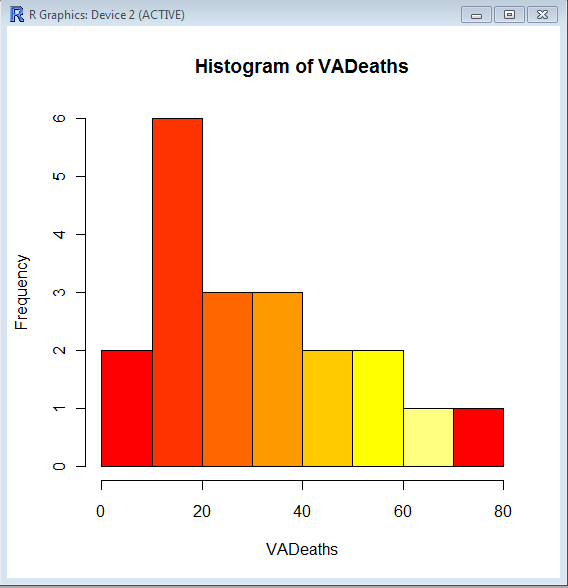
If you like me, are unable to decide whether blue or brown is a better color for graph- color palettes in R are a big help for aesthetically acceptable alternatives.

Using the same graphs, I choose the 5 main kinds of color palettes, using them is as easy as specifying the col= parameter in graphical display in Base Graphs. And I modified the n parameter for number of colors to be used- you can specify more or less depending how much you want the gradient or difference in colors to be.

> hist(VADeaths,col=heat.colors(7))

> hist(VADeaths,col=terrain.colors(7))

Continue reading “Using Color Palettes in R”