Some of the most important technology programs that keep Washington accountable are in danger of being eliminated. Data.gov, USASpending.gov, the IT Dashboard and other federal data transparency and government accountability programs are facing a massive budget cut, despite only being a tiny fraction of the national budget. Help save the data and make sure that Congress doesn’t leave the American people in the dark.
I wonder why the federal government/ non profit agencies can help create a SPARQL database, and in days of cloud computing, why a tech major cannot donate storage space to it, after all despite US corporate tax rate being high, US technological companies do end up paying a lower rate thanks to tax breaks/routing overseas revenue.
In the new age data is power, and the US has led in its mission to use technology to further its own values even especially in Middle East. The datasets should be made public and transitioned to the private sector/academia for research and re designing for data augmentation with out straining the massive deficit /borrowing/ fighting 3 wars. Of particular interest would be datasets of campaign finances and donors especially given large number of retail/small donors/internet marketing in elections as it will also help serve as an example of democracy and change. Even countries like China can create a corruption/expense efficiency tracking internal dashboard with restricted rights to help with rural and urban governance.
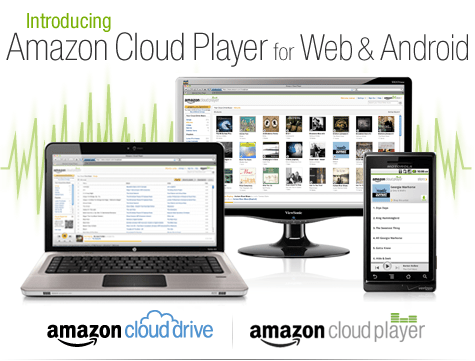
An interesting development is Amazon’s Cloud Player (though Cannonical may be credited for thinking of the idea first for Ubuntu One). Since Ubuntu One is dependent on the OS (and not the browser) this makes Amazon \s version more of a mobile Cloud Player (as it seems to be an Android app and not an app that is independent of any platform, os or browser.
Since Android and Ubuntu are both Linux flavors, I am not sure if Cannonical has an exiting mobile app for Ubuntu One. Apple’s cloud plans also seems kind of ambiguous compared to Microsoft (Azure et al)
I guess we will have to wait for a true Cloud player.
Purchase a song or album from the Amazon MP3 Store and click the Save to Amazon Cloud Drive button when your purchase is complete. Your purchase will be saved for free.
Click the Launch Amazon Cloud Player button to start listening to your purchase. Add more music from your library by clicking theUpload to Cloud Drive button from the Cloud Player screen. Start with 5 GB of free Cloud Drive storage. Upgrade to 20 GB with an MP3 album purchase (see details). Use Cloud Player to browse and search your library, create playlists, and download to your computer.
Install the Amazon MP3 for Android app to use Cloud Player on your Android device. Shop the full Amazon MP3 store, save your purchases to Cloud Drive, stream your Cloud Player library, and download to your device right from your Android phone or tablet.
The Ubuntu One Music Store is integrated with the Ubuntu One service making it a cloud-enabled digital music store. All purchases are transferred to your Ubuntu One personal cloud for safe storage and then conveniently downloaded to your synchronizing computers. And don’t worry aboutgoing over your storage quota with music purchases. You won’t need to pay more for personal cloud storage of music purchased from the Ubuntu One Music Store.
An Ubuntu One subscription is required to purchase music from the Ubuntu One Music Store. Choose from either the free 2 GB option or the 50 GB plan for $10 (USD) per month to synchronize more of your digital life.
5 regional stores and more in the works
The Ubuntu One Music requires Ubuntu 10.04 LTS and offers digital music through five regional stores.
The US, UK, and Germany stores offer music from all major and independent labels.
The EU store serves most of the EU member countries (2) and offers music from fewer major label artists.
The World store offers only independent label music and serves the countries not covered by the other regional stores.
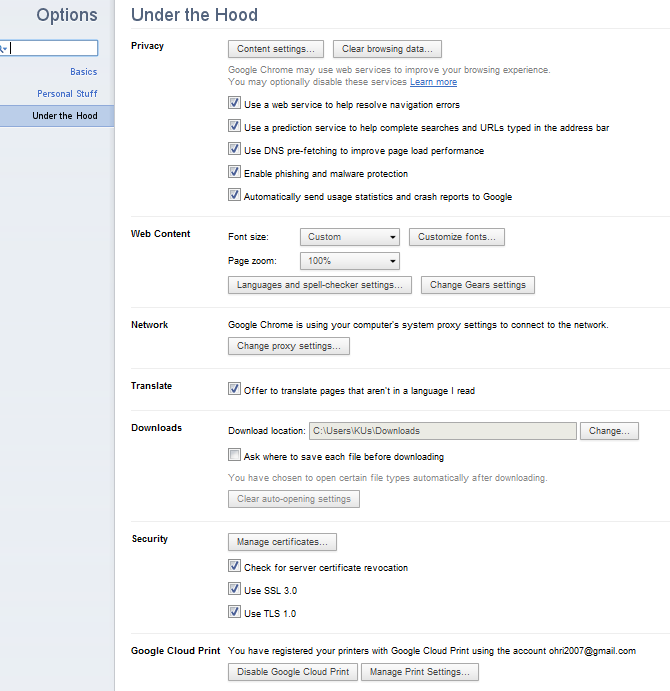
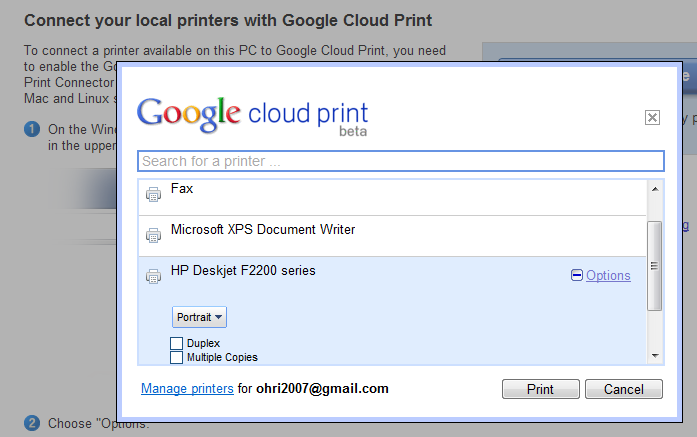
Print Jobs just got easier- especially if you prefer one printer, use Google Chrome, and can take 2 minutes to set up your printer to print from anywhere in the world through the internet.
It’s called Google Cloud Print– and it makes my life a lot easier when I travel and need to give to printer at home some documents to print rather than rely on external printers. See screenshots below and check out http://www.google.com/cloudprint/ for more
Summary- Thats cloud computing scoring of models on EC2 (Zementis) partnering with the actual modeling software in R (Revolution Analytics RevoDeployR)
strategic partnership with Revolution Analytics, the leading commercial provider of software and support for the popular open source R statistics language. With this partnership, predictive models developed on Revolution R Enterprise are now accessible for real-time scoring through the ADAPA Decisioning Engine by Zementis.
ADAPA is an extremely fast and scalable predictive platform. Models deployed in ADAPA are automatically available for execution in real-time and batch-mode as Web Services. ADAPA allows Revolution R Enterprise to leverage the Predictive Model Markup Language (PMML) for better decision management. With PMML, models built in R can be used in a wide variety of real-world scenarios without requiring laborious or expensive proprietary processes to convert them into applications capable of running on an execution system.
“By partnering with Zementis, Revolution Analytics is building an end-to-end solution for moving enterprise-level predictive R models into the execution environment,” said Jeff Erhardt, Revolution Analytics Chief Operation Officer. “With Zementis, we are eliminating the need to take R applications apart and recode, retest and redeploy them in order to obtain desirable results.”
Got demo?
Yes, we do! Revolution Analytics and Zementis have put together a demo which combines the building of models in R with automatic deployment and execution in ADAPA. It uses Revolution Analytics’ RevoDeployR, a new Web Services framework that allows for data analysts working in R to publish R scripts to a server-based installation of Revolution R Enterprise.
RevoDeployR & ADAPA allow for real-time analysis and predictions from R to be effectively used by existing Excel spreadsheets, BI dashboards and Web-based applications, all in real-time.
Predictive analytics with RevoDeployR from Revolution Analytics and ADAPA from Zementis put model building and real-time scoring into a league of their own. Seriously!
and recently became aware of the R Pentaho integration.
“R” is a popular open source statistical and analytical language that academics and commercial organizations alike have used for years to get maximum insight out of information using advanced analytic techniques. In this twelve-minute video, David Reinke from Pentaho Certified Partner OpenBI provides an overview of R, as well as a demonstration of integration between R and Pentaho.
This promotional offer enables you to try a limited amount of the Windows Azure platform at no charge. The subscription includes a base level of monthly compute hours, storage, data transfers, a SQL Azure database, Access Control transactions and Service Bus connections at no charge. Please note that any usage over this introductory base level will be charged at standard rates.
Included each month at no charge:
Windows Azure
25 hours of a small compute instance
500 MB of storage
10,000 storage transactions
SQL Azure
1GB Web Edition database (available for first 3 months only)
Windows Azure platform AppFabric
100,000 Access Control transactions
2 Service Bus connections
Data Transfers (per region)
500 MB in
500 MB out
Any monthly usage in excess of the above amounts will be charged at the standard rates. This introductory special will end on March 31, 2011 and all usage will then be charged at the standard rates.
As part of AWS’s Free Usage Tier, new AWS customers can get started with Amazon EC2 for free. Upon sign-up, new AWScustomers receive the following EC2 services each month for one year:
750 hours of EC2 running Linux/Unix Micro instance usage
750 hours of Elastic Load Balancing plus 15 GB data processing
10 GB of Amazon Elastic Block Storage (EBS) plus 1 million IOs, 1 GB snapshot storage, 10,000 snapshot Get Requests and 1,000 snapshot Put Requests
15 GB of bandwidth in and 15 GB of bandwidth out aggregated across all AWS services
Paid Instances-
Standard On-Demand Instances
Linux/UNIX Usage
Windows Usage
Small (Default)
$0.085 per hour
$0.12 per hour
Large
$0.34 per hour
$0.48 per hour
Extra Large
$0.68 per hour
$0.96 per hour
Micro On-Demand Instances
Micro
$0.02 per hour
$0.03 per hour
High-Memory On-Demand Instances
Extra Large
$0.50 per hour
$0.62 per hour
Double Extra Large
$1.00 per hour
$1.24 per hour
Quadruple Extra Large
$2.00 per hour
$2.48 per hour
High-CPU On-Demand Instances
Medium
$0.17 per hour
$0.29 per hour
Extra Large
$0.68 per hour
$1.16 per hour
Cluster Compute Instances
Quadruple Extra Large
$1.60 per hour
N/A*
Cluster GPU Instances
Quadruple Extra Large
$2.10 per hour
N/A*
* Windows is not currently available for Cluster Compute or Cluster GPU Instances.
NOTE- Amazon Instance definitions differ slightly from Azure definitions
Instances of this family are well suited for most applications.
Small Instance – default*
1.7 GB memory
1 EC2 Compute Unit (1 virtual core with 1 EC2 Compute Unit)
160 GB instance storage
32-bit platform
I/O Performance: Moderate
API name: m1.small
Large Instance
7.5 GB memory
4 EC2 Compute Units (2 virtual cores with 2 EC2 Compute Units each)
850 GB instance storage
64-bit platform
I/O Performance: High
API name: m1.large
Extra Large Instance
15 GB memory
8 EC2 Compute Units (4 virtual cores with 2 EC2 Compute Units each)
1,690 GB instance storage
64-bit platform
I/O Performance: High
API name: m1.xlarge
Micro Instances
Instances of this family provide a small amount of consistent CPU resources and allow you to burst CPU capacity when additional cycles are available. They are well suited for lower throughput applications and web sites that consume significant compute cycles periodically.
Micro Instance
613 MB memory
Up to 2 EC2 Compute Units (for short periodic bursts)
EBS storage only
32-bit or 64-bit platform
I/O Performance: Low
API name: t1.micro
High-Memory Instances
Instances of this family offer large memory sizes for high throughput applications, including database and memory caching applications.
High-Memory Extra Large Instance
17.1 GB of memory
6.5 EC2 Compute Units (2 virtual cores with 3.25 EC2 Compute Units each)
420 GB of instance storage
64-bit platform
I/O Performance: Moderate
API name: m2.xlarge
High-Memory Double Extra Large Instance
34.2 GB of memory
13 EC2 Compute Units (4 virtual cores with 3.25 EC2 Compute Units each)
850 GB of instance storage
64-bit platform
I/O Performance: High
API name: m2.2xlarge
High-Memory Quadruple Extra Large Instance
68.4 GB of memory
26 EC2 Compute Units (8 virtual cores with 3.25 EC2 Compute Units each)
1690 GB of instance storage
64-bit platform
I/O Performance: High
API name: m2.4xlarge
High-CPU Instances
Instances of this family have proportionally more CPU resources than memory (RAM) and are well suited for compute-intensive applications.
High-CPU Medium Instance
1.7 GB of memory
5 EC2 Compute Units (2 virtual cores with 2.5 EC2 Compute Units each)
350 GB of instance storage
32-bit platform
I/O Performance: Moderate
API name: c1.medium
High-CPU Extra Large Instance
7 GB of memory
20 EC2 Compute Units (8 virtual cores with 2.5 EC2 Compute Units each)
1690 GB of instance storage
64-bit platform
I/O Performance: High
API name: c1.xlarge
Cluster Compute Instances
Instances of this family provide proportionally high CPU resources with increased network performance and are well suited for High Performance Compute (HPC) applications and other demanding network-bound applications. Learn more about use of this instance type for HPC applications.
Cluster Compute Quadruple Extra Large Instance
23 GB of memory
33.5 EC2 Compute Units (2 x Intel Xeon X5570, quad-core “Nehalem” architecture)
1690 GB of instance storage
64-bit platform
I/O Performance: Very High (10 Gigabit Ethernet)
API name: cc1.4xlarge
Cluster GPU Instances
Instances of this family provide general-purpose graphics processing units (GPUs) with proportionally high CPU and increased network performance for applications benefitting from highly parallelized processing, including HPC, rendering and media processing applications. While Cluster Compute Instances provide the ability to create clusters of instances connected by a low latency, high throughput network, Cluster GPU Instances provide an additional option for applications that can benefit from the efficiency gains of the parallel computing power of GPUs over what can be achieved with traditional processors. Learn moreabout use of this instance type for HPC applications.
Cluster GPU Quadruple Extra Large Instance
22 GB of memory
33.5 EC2 Compute Units (2 x Intel Xeon X5570, quad-core “Nehalem” architecture)
2 x NVIDIA Tesla “Fermi” M2050 GPUs
1690 GB of instance storage
64-bit platform
I/O Performance: Very High (10 Gigabit Ethernet)
API name: cg1.4xlarge
versus-
Windows Azure compute instances come in five unique sizes to enable complex applications and workloads.
Compute Instance Size
CPU
Memory
Instance Storage
I/O Performance
Extra Small
1 GHz
768 MB
20 GB*
Low
Small
1.6 GHz
1.75 GB
225 GB
Moderate
Medium
2 x 1.6 GHz
3.5 GB
490 GB
High
Large
4 x 1.6 GHz
7 GB
1,000 GB
High
Extra large
8 x 1.6 GHz
14 GB
2,040 GB
High
*There is a limitation on the Virtual Hard Drive (VHD) size if you are deploying a Virtual Machine role on an extra small instance. The VHD can only be up to 15 GB.
One of the most frustrating things I had to do while working as financial business analysts was working with Data Time Formats in Base SAS. The syntax was simple enough and SAS was quite good with handing queries to the Oracle data base that the client was using, but remembering the different types of formats in SAS language was a challenge (there was a date9. and date6 and mmddyy etc )
Data and Time variables are particularly important variables in financial industry as almost everything is derived variable from the time (which varies) while other inputs are mostly constants. This includes interest as well as late fees and finance fees.
In R, date and time are handled quite simply-
Use the strptime( dataset, format) function to convert the character into string
For example if the variable dob is “01/04/1977) then following will convert into a date object
z=strptime(dob,”%d/%m/%Y”)
and if the same date is 01Apr1977
z=strptime(dob,"%d%b%Y")
does the same
For troubleshooting help with date and time, remember to enclose the formats
%d,%b,%m and % Y in the same exact order as the original string- and if there are any delimiters like ” -” or “/” then these delimiters are entered in exactly the same order in the format statement of the strptime
Sys.time() gives you the current date-time while the function difftime(time1,time2) gives you the time intervals( say if you have two columns as date-time variables)
What are the various formats for inputs in date time?
%a
Abbreviated weekday name in the current locale. (Also matches full name on input.)
%A
Full weekday name in the current locale. (Also matches abbreviated name on input.)
%b
Abbreviated month name in the current locale. (Also matches full name on input.)
%B
Full month name in the current locale. (Also matches abbreviated name on input.)
%c
Date and time. Locale-specific on output, "%a %b %e %H:%M:%S %Y" on input.
%d
Day of the month as decimal number (01–31).
%H
Hours as decimal number (00–23).
%I
Hours as decimal number (01–12).
%j
Day of year as decimal number (001–366).
%m
Month as decimal number (01–12).
%M
Minute as decimal number (00–59).
%p
AM/PM indicator in the locale. Used in conjunction with %I and not with %H. An empty string in some locales.
%S
Second as decimal number (00–61), allowing for up to two leap-seconds (but POSIX-compliant implementations will ignore leap seconds).
%U
Week of the year as decimal number (00–53) using Sunday as the first day 1 of the week (and typically with the first Sunday of the year as day 1 of week 1). The US convention.
%w
Weekday as decimal number (0–6, Sunday is 0).
%W
Week of the year as decimal number (00–53) using Monday as the first day of week (and typically with the first Monday of the year as day 1 of week 1). The UK convention.
%x
Date. Locale-specific on output, "%y/%m/%d" on input.
%X
Time. Locale-specific on output, "%H:%M:%S" on input.
%y
Year without century (00–99). Values 00 to 68 are prefixed by 20 and 69 to 99 by 19 – that is the behaviour specified by the 2004 POSIX standard, but it does also say ‘it is expected that in a future version the default century inferred from a 2-digit year will change’.
%Y
Year with century.
%z
Signed offset in hours and minutes from UTC, so -0800 is 8 hours behind UTC.
%Z
(output only.) Time zone as a character string (empty if not available).
Also to read the helpful documentation (especially for time zone level, and leap year seconds and differences)






 DECISION STATS