Revolution R for Linux

Screenshot of the Redhat Enterprise Linux Desktop
Image via Wikipedia

New software just released from the guys in California (@RevolutionR) so if you are a Linux user and have academic credentials you can download it for free  (@Cmastication doesnt), you can test it to see what the big fuss is all about (also see http://www.revolutionanalytics.com/why-revolution-r/benchmarks.php) –

Revolution Analytics has just released Revolution R Enterprise 4.0.1 for Red Hat Enterprise Linux, a significant step forward in enterprise data analytics. Revolution R Enterprise 4.0.1 is built on R 2.11.1, the latest release of the open-source environment for data analysis and graphics. Also available is the initial release of our deployment server solution, RevoDeployR 1.0, designed to help you deliver R analytics via the Web. And coming soon to Linux: RevoScaleR, a new package for fast and efficient multi-core processing of large data sets.

As a registered user of the Academic version of Revolution R Enterprise for Linux, you can take advantage of these improvements by downloading and installing Revolution R Enterprise 4.0.1 today. You can install Revolution R Enterprise 4.0.1 side-by-side with your existing Revolution R Enterprise installations; there is no need to uninstall previous versions.

Download Information

The following information is all you will need to download and install the Academic Edition.

Supported Platforms:

Revolution R Enterprise Academic edition and RevoDeployR are supported on Red Hat® Enterprise Linux® 5.4 or greater (64-bit processors).

Approximately 300MB free disk space is required for a full install of Revolution R Enterprise. We recommend at least 1GB of RAM to use Revolution R Enterprise.

For the full list of system requirements for RevoDeployR, refer to the RevoDeployR™ Installation Guide for Red Hat® Enterprise Linux®.

Download Links:

You will first need to download the Revolution R Enterprise installer.

Installation Instructions for Revolution R Enterprise Academic Edition

After downloading the installer, do the following to install the software:

  • Log in as root if you have not already.
  • Change directory to the directory containing the downloaded installer.
  • Unpack the installer using the following command:
    tar -xzf Revo-Ent-4.0.1-RHEL5-desktop.tar.gz
  • Change directory to the RevolutionR_4.0.1 directory created.
  • Run the installer by typing ./install.py and following the on-screen prompts.

Getting Started with the Revolution R Enterprise

After you have installed the software, launch Revolution R Enterprise by typing Revo64 at the shell prompt.

Documentation is available in the form of PDF documents installed as part of the Revolution R Enterprise distribution. Type Revo.home(“doc”) at the R prompt to locate the directory containing the manuals Getting Started with Revolution R (RevoMan.pdf) and the ParallelR User’s Guide(parRman.pdf).

Installation Instructions for RevoDeployR (and RServe)

After downloading the RevoDeployR distribution, use the following steps to install the software:

Note: These instructions are for an automatic install.  For more details or for manual install instructions, refer to RevoDeployR_Installation_Instructions_for_RedHat.pdf.

  1. Log into the operating system as root.
    su –
  2. Change directory to the directory containing the downloaded distribution for RevoDeployR and RServe.
  3. Unzip the contents of the RevoDeployR tar file. At prompt, type:
    tar -xzf deployrRedHat.tar.gz
  4. Change directories. At the prompt, type:
    cd installFiles
  5. Launch the automated installation script and follow the on-screen prompts. At the prompt, type:
    ./installRedHat.sh
    Note: Red Hat installs MySQL without a password.

Getting Started with RevoDeployR

After installing RevoDeployR, you will be directed to the RevoDeployR landing page. The landing page has links to documentation, the RevoDeployR management console, the API Explorer development tool, and sample code.

Support

For help installing this Academic Edition, please email support@revolutionanalytics.com

Also interestingly some benchmarks on Revolution R vs R.

http://www.revolutionanalytics.com/why-revolution-r/benchmarks.php

R-25 Benchmarks

The simple R-benchmark-25.R test script is a quick-running survey of general R performance. The Community-developed test consists of three sets of small benchmarks, referred to in the script as Matrix Calculation, Matrix Functions, and Program Control.

R-25 Matrix Calculation R-25 Matrix Functions R-Matrix Program Control
R-25 Benchmarks Base R 2.9.2 Revolution R (1-core) Revolution R (4-core) Speedup (4 core)
Matrix Calculation 34 sec 6.6 sec 4.4 sec 7.7x
Matrix Functions 20 sec 4.4 sec 2.1 sec 9.5x
Program Control 4.7 sec 4 sec 4.2 sec Not Appreciable

Speedup = Slower time / Faster Time – 1   Test descriptions available at http://r.research.att.com/benchmarks

Additional Benchmarks

Revolution Analytics has created its own tests to simulate common real-world computations.  Their descriptions are explained below.

Matrix Multiply Cholesky Factorization
Singular Value Decomposition Principal Component Analysis Linear Discriminant Analysis
Linear Algebra Computation Base R 2.9.2 Revolution R (1-core) Revolution R (4-core) Speedup (4 core)
Matrix Multiply 243 sec 22 sec 5.9 sec 41x
Cholesky Factorization 23 sec 3.8 sec 1.1 sec 21x
Singular Value Decomposition 62 sec 13 sec 4.9 sec 12.6x
Principal Components Analysis 237 sec 41 sec 15.6 sec 15.2x
Linear Discriminant Analysis 142 sec 49 sec 32.0 sec 4.4x

Speedup = Slower time / Faster Time – 1

Matrix Multiply

This routine creates a random uniform 10,000 x 5,000 matrix A, and then times the computation of the matrix product transpose(A) * A.

set.seed (1)
m <- 10000
n <-  5000
A <- matrix (runif (m*n),m,n)
system.time (B <- crossprod(A))

The system will respond with a message in this format:

User   system elapsed
37.22    0.40   9.68

The “elapsed” times indicate total wall-clock time to run the timed code.

The table above reflects the elapsed time for this and the other benchmark tests. The test system was an INTEL® Xeon® 8-core CPU (model X55600) at 2.5 GHz with 18 GB system RAM running Windows Server 2008 operating system. For the Revolution R benchmarks, the computations were limited to 1 core and 4 cores by calling setMKLthreads(1) and setMKLthreads(4) respectively. Note that Revolution R performs very well even in single-threaded tests: this is a result of the optimized algorithms in the Intel MKL library linked to Revolution R. The slight greater than linear speedup may be due to the greater total cache available to all CPU cores, or simply better OS CPU scheduling–no attempt was made to pin execution threads to physical cores. Consult Revolution R’s documentation to learn how to run benchmarks that use less cores than your hardware offers.

Cholesky Factorization

The Cholesky matrix factorization may be used to compute the solution of linear systems of equations with a symmetric positive definite coefficient matrix, to compute correlated sets of pseudo-random numbers, and other tasks. We re-use the matrix B computed in the example above:

system.time (C <- chol(B))

Singular Value Decomposition with Applications

The Singular Value Decomposition (SVD) is a numerically-stable and very useful matrix decompisition. The SVD is often used to compute Principal Components and Linear Discriminant Analysis.

# Singular Value Deomposition
m <- 10000
n <- 2000
A <- matrix (runif (m*n),m,n)
system.time (S <- svd (A,nu=0,nv=0))

# Principal Components Analysis
m <- 10000
n <- 2000
A <- matrix (runif (m*n),m,n)
system.time (P <- prcomp(A))

# Linear Discriminant Analysis
require (‘MASS’)
g <- 5
k <- round (m/2)
A <- data.frame (A, fac=sample (LETTERS[1:g],m,replace=TRUE))
train <- sample(1:m, k)
system.time (L <- lda(fac ~., data=A, prior=rep(1,g)/g, subset=train))

Public Opinion Quarterly

If you are interested in

SURVEY METHODOLOGY FOR PUBLIC HEALTH RESEARCHERS

There is a free virtual issue, Survey Methodology for Public Health Researchers: Selected Readings from 20 years of PublicOpinion Quarterly. The virtual issue’s 18 articles illustrate the range of survey methods material that can be found in POQ and include conclusions that are still valid today. Specially chosen by guest editor Floyd J. Fowler, the articles will be of interest to those who work and research in public health and health services more broadly

Interview Dean Abbott Abbott Analytics

Here is an interview with noted Analytics Consultant and trainer Dean Abbott. Dean is scheduled to take a workshop on Predictive Analytics at PAW (Predictive Analytics World Conference)  Oct 18 , 2010 in Washington D.C

Ajay-  Describe your upcoming hands on workshop at Predictive Analytics World and how it can help people learn more predictive modeling.

Refer- http://www.predictiveanalyticsworld.com/dc/2010/handson_predictive_analytics.php

Dean- The hands-on workshop is geared toward individuals who know something about predictive analytics but would like to experience the process. It will help people in two regards. First, by going through the data assessment, preparation, modeling and model assessment stages in one day, the attendees will see how predictive analytics works in reality, including some of the pain associated with false starts and mistakes. At the same time, they will experience success with building reasonable models to solve a problem in a single day. I have found that for many, having to actually build the predictive analytics solution if an eye-opener. Seeing demonstrations show the capabilities of a tool, but greater value for an end-user is the development of intuition of what to do at each each stage of the process that makes the theory of predictive analytics real.

Second, they will gain experience using a top-tier predictive analytics software tool, Enterprise Miner (EM). This is especially helpful for those who are considering purchasing EM, but also for those who have used open source tools and have never experienced the additional power and efficiencies that come with a tool that is well thought out from a business solutions standpoint (as opposed to an algorithm workbench).

Ajay-  You are an instructor with software ranging from SPSS, S Plus, SAS Enterprise Miner, Statistica and CART. What features of each software do you like best and are more suited for application in data cases.

Dean- I’ll add Tibco Spotfire Miner, Polyanalyst and Unica’s Predictive Insight to the list of tools I’ve taught “hands-on” courses around, and there are at least a half dozen more I demonstrate in lecture courses (JMP, Matlab, Wizwhy, R, Ggobi, RapidMiner, Orange, Weka, RandomForests and TreeNet to name a few). The development of software is a fascinating undertaking, and each tools has its own strengths and weaknesses.

I personally gravitate toward tools with data flow / icon interface because I think more that way, and I’ve tired of learning more programming languages.

Since the predictive analytics algorithms are roughly the same (backdrop is backdrop no matter which tool you use), the key differentiators are

(1) how data can be loaded in and how tightly integrated can the tool be with the database,

(2) how well big data can be handled,

(3) how extensive are the data manipulation options,

(4) how flexible are the model reporting options, and

(5) how can you get the models and/or predictions out.

There are vast differences in the tools on these matters, so when I recommend tools for customers, I usually interview them quite extensively to understand better how they use data and how the models will be integrated into their business practice.

A final consideration is related to the efficiency of using the tool: how much automation can one introduce so that user-interaction is minimized once the analytics process has been defined. While I don’t like new programming languages, scripting and programming often helps here, though some tools have a way to run the visual programming data diagram itself without converting it to code.

Ajay- What are your views on the increasing trend of consolidation and mergers and acquisitions in the predictive analytics space. Does this increase the need for vendor neutral analysts and consultants as well as conferences.

Dean- When companies buy a predictive analytics software package, it’s a mixed bag. SPSS purchasing of Clementine was ultimately good for the predictive analytics, though it took several years for SPSS to figure out what they wanted to do with it. Darwin ultimately disappeared after being purchased by Oracle, but the newer Oracle data mining tool, ODM, integrates better with the database than Darwin did or even would have been able to.

The biggest trend and pressure for the commercial vendors is the improvements in the Open Source and GNU tools. These are becoming more viable for enterprise-level customers with big data, though from what I’ve seen, they haven’t caught up with the big commercial players yet. There is great value in bringing both commercial and open source tools to the attention of end-users in the context of solutions (rather than sales) in a conference setting, which is I think an advantage that Predictive Analytics World has.

As a vendor-neutral consultant, flux is always a good thing because I have to be proficient in a variety of tools, and it is the breadth that brings value for customers entering into the predictive analytics space. But it is very difficult to keep up with the rapidly-changing market and that is something I am weighing myself: how many tools should I keep in my active toolbox.

Ajay-  Describe your career and how you came into the Predictive Analytics space. What are your views on various MS Analytics offered by Universities.

Dean- After getting a masters degree in Applied Mathematics, my first job was at a small aerospace engineering company in Charlottesville, VA called Barron Associates, Inc. (BAI); it is still in existence and doing quite well! I was working on optimal guidance algorithms for some developmental missile systems, and statistical learning was a key part of the process, so I but my teeth on pattern recognition techniques there, and frankly, that was the most interesting part of the job. In fact, most of us agreed that this was the most interesting part: John Elder (Elder Research) was the first employee at BAI, and was there at that time. Gerry Montgomery and Paul Hess were there as well and left to form a data mining company called AbTech and are still in analytics space.

After working at BAI, I had short stints at Martin Marietta Corp. and PAR Government Systems were I worked on analytics solutions in DoD, primarily radar and sonar applications. It was while at Elder Research in the 90s that began working in the commercial space more in financial and risk modeling, and then in 1999 I began working as an independent consultant.

One thing I love about this field is that the same techniques can be applied broadly, and therefore I can work on CRM, web analytics, tax and financial risk, credit scoring, survey analysis, and many more application, and cross-fertilize ideas from one domain into other domains.

Regarding MS degrees, let me first write that I am very encouraged that data mining and predictive analytics are being taught in specific class and programs rather than as just an add-on to an advanced statistics or business class. That stated, I have mixed feelings about analytics offerings at Universities.

I find that most provide a good theoretical foundation in the algorithms, but are weak in describing the entire process in a business context. For those building predictive models, the model-building stage nearly always takes much less time than getting the data ready for modeling and reporting results. These are cross-discipline tasks, requiring some understanding of the database world and the business world for us to define the target variable(s) properly and clean up the data so that the predictive analytics algorithms to work well.

The programs that have a practicum of some kind are the most useful, in my opinion. There are some certificate programs out there that have more of a business-oriented framework, and the NC State program builds an internship into the degree itself. These are positive steps in the field that I’m sure will continue as predictive analytics graduates become more in demand.

Biography-

DEAN ABBOTT is President of Abbott Analytics in San Diego, California. Mr. Abbott has over 21 years of experience applying advanced data mining, data preparation, and data visualization methods in real-world data intensive problems, including fraud detection, response modeling, survey analysis, planned giving, predictive toxicology, signal process, and missile guidance. In addition, he has developed and evaluated algorithms for use in commercial data mining and pattern recognition products, including polynomial networks, neural networks, radial basis functions, and clustering algorithms, and has consulted with data mining software companies to provide critiques and assessments of their current features and future enhancements.

Mr. Abbott is a seasoned instructor, having taught a wide range of data mining tutorials and seminars for a decade to audiences of up to 400, including DAMA, KDD, AAAI, and IEEE conferences. He is the instructor of well-regarded data mining courses, explaining concepts in language readily understood by a wide range of audiences, including analytics novices, data analysts, statisticians, and business professionals. Mr. Abbott also has taught both applied and hands-on data mining courses for major software vendors, including Clementine (SPSS, an IBM Company), Affinium Model (Unica Corporation), Statistica (StatSoft, Inc.), S-Plus and Insightful Miner (Insightful Corporation), Enterprise Miner (SAS), Tibco Spitfire Miner (Tibco), and CART (Salford Systems).

Graphics Presentations

Here are some Wow Presentations on Design and User Interfaces and  Graphics (including R)- you may have seen some before.

From Dataspora-

A Survey of R Graphics

R Graphics using GGPlot

King of all R graphics-Hadley Wickham

and a rather clever Graphics User Interface presentation

Dark Patterns to Trick People

More on Design Anti Patterns

Back to designing well

Back to Polishing your Graphics with Hadley –

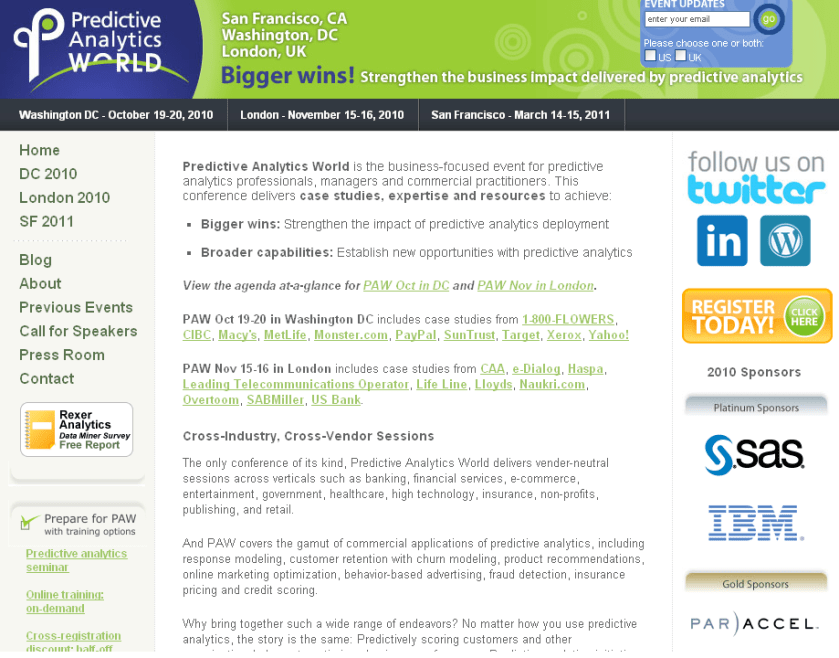
More PAWS

Dr Eric Siegel  (interviewed here at https://decisionstats.wordpress.com/2009/07/14/interview_eric-siege/ )

continues his series of excellent analytical conferences-

Oct 19-20 – WASHINGTON DC: PAW Conference & Workshops (pawcon.com/dc)

Oct 28-29 – SAN FRANCISCO: Workshop (businessprediction.com)

Nov 15-16 – LONDON: PAW Conference & Workshop (pawcon.com/london)

March 14-15, 2011 – SAN FRANCISCO: PAW Conference & Workshops

* Register by Sep 30 for PAW London Early-Bird – Save £200
http://pawcon.com/london/register.php

* For the Oct 28-29 workshop, see http://businessprediction.com

———————–

INFORMATION ABOUT THE PAW CONFERENCES:

Predictive Analytics World ( http://pawcon.com ) is the business-focused event for predictive analytics professionals, managers and commercial practitioners, covering today’s commercial deployment of predictive analytics, across industries and across software vendors.

PAW delivers the best case studies, expertise, keynotes, sessions, workshops, exposition, expert panel, live demos, networking coffee breaks, reception, birds-of-a-feather lunches, brand-name enterprise leaders, and industry heavyweights in the business.

Case study presentations cover campaign targeting, churn modeling, next-best-offer, selecting marketing channels, global analytics deployment, email marketing, HR candidate search, and other innovative applications. The Conference agendas cover hot topics such as social data, text mining, search marketing, risk management, uplift (incremental lift) modeling, survey analysis, consumer privacy, sales force optimization and other innovative applications that benefit organizations in new and creative ways.

PAW delivers two rich conference programs in Oct./Nov. with very little content overlap featuring a wealth of speakers with front-line experience. See which one is best for you:

PAW’s DC 2010 (Oct 19-20) program includes over 25 sessions across two tracks – an “All Audiences” and an “Expert/Practitioner” track — so you can witness how predictive analytics is applied at 1-800-FLOWERS, CIBC, Corporate Executive Board, Forrester, LifeLine, Macy’s, MetLife, Miles Kimball, Monster, Paychex, PayPal (eBay), SunTrust, Target, UPMC Health Plan, Xerox, YMCA, and Yahoo!, plus special examples from the U.S. government agencies DoD, DHS, and SSA.

Sign up for event updates in the US http://pawcon.com/signup-us.php
View the agenda at-a-glance: http://pawcon.com/dc/2010/agenda_overview.php
For more: http://pawcon.com/dc
Register: http://pawcon.com/dc/register.php

PAW London 2010 (Nov 15-16) will feature over 20 speakers from 10 countries with case studies from leading enterprises in e-commerce, finance, healthcare, retail, and telecom such as Canadian Automobile Association, Chessmetrics, e-Dialog, Hamburger Sparkasse, Jeevansathi.com (India’s 2nd-largest matrimony portal), Life Line Screening, Lloyds TSB, Naukri.com (India’s number 1 job portal), Overtoom, SABMiller, Univ. of Melbourne, and US Bank, plus special examples from Anheuser-Busch, Disney, HP, HSBC, Pfizer, U.S. SSA, WestWind Foundation and others.

Sign up for event updates in the UK http://pawcon.com/signup-uk.php
View the agenda at-a-glance: http://pawcon.com/london/2010/agenda_overview.php
For more: http://pawcon.com/london
Register: http://pawcon.com/london/register.php

——————————-

PAW San Francisco Save-the-Date and Call-for-Speakers:

March 14-15, 2011
San Francisco Marriott Marquis
San Francisco, CA

PAW call-for-speakers information and submission form: (Due Oct 8)
http://www.predictiveanalyticsworld.com/submit.php

If you wish to receive periodic call-for-speakers notifications regarding Predictive Analytics World, email chair@predictiveanalyticsworld.com with the subject line “call-for-speakers notifications”.

Predictive Analytics World
http://www.predictiveanalyticsworld.com
Washington DC – London – San Francisco

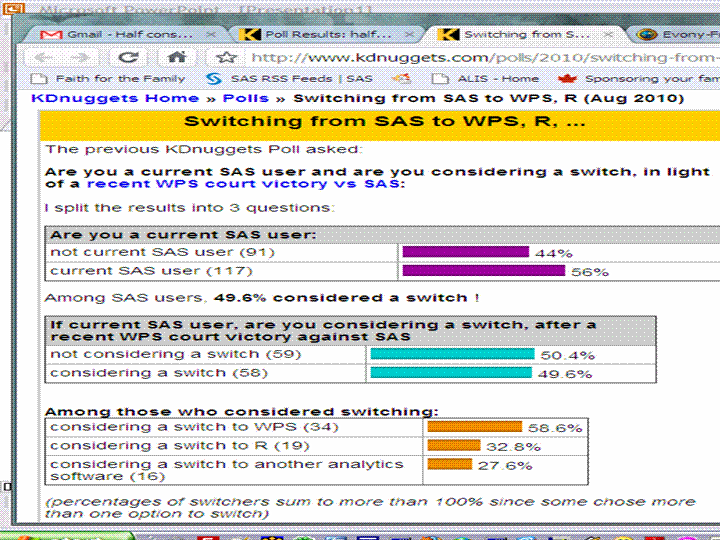
KDNuggets Poll on SAS: Churn in Analytics Users

Here are the some surprising results from the Bible of all Data Miners , KDNuggets.com with some interesting comments about SAS being the Microsoft of analytics.

I believe technically advanced users will probably want to try out R before going in for a commercial license from Revolution Analytics as it is free to try out. Also WPS offers a one month free preview for its software- the latest release of it competes with SAS/Stat and SAS/Access, SAS/Graph and Base SAS- so anyone having these installations on a server would be interested to atleast test it for free. Also WPS would be interested in increasing engines (like they have for Oracle and Teradata).

One very crucial difference for SAS is it’s ability to pull in data from almost all data formats- so if you are using SAS/Connect to remote submit code- then you may not be able to switch soon.

Also the more license heavy customers are not the kind of cutomers who have lots of data in their local desktops but is usually pulled and then crunched before analysed. R has recently made some strides with the RevoScaler package from Revolution Analytics but it’s effectiveness would be tested and tried in the coming months- it seems like a great step in the right direction.

For SAS, the feedback should be a call to improve their product bundling – some of which can feel like over selling at times- but they have been fighting off challenges since past 4 decades and have the pockets and intention to sustain market share battles including discounts ( for repeat customers SAS can be much cheaper than say a first time user of WPS or R)

http://teamwpc.co.uk/home

This really should come as a surprise to some people. You can see the comments on WPS and R at the site itself. Interesting stufff and we can see after say 1 year to see how many actually DID switch.

http://www.kdnuggets.com/polls/2010/switching-from-sas-to-wps.html

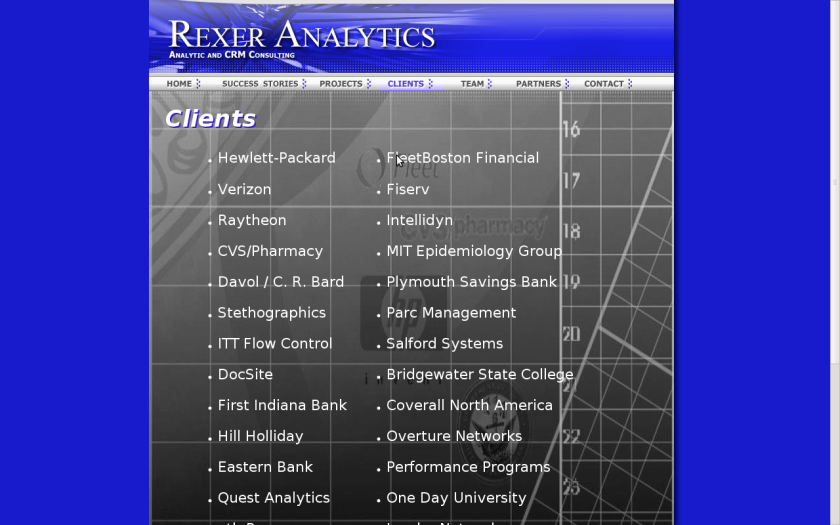
Rexer Analytics Annual Data Miner Survey

HIGHLIGHTS from the 3rd Annual Data Miner Survey:

  • 40-item survey of data miners, conducted on-line in early 2009.
  • 710 participants from 58 countries.
  • Data miners’ most commonly used algorithms are regression, decision trees, and cluster analysis.
  • Data mining is playing an important role in organizations.
    • Half of data miners say their results are helping to drive strategic decisions and operational processes.
    • 58% say they are adding to the knowledge base in the field.
    • 60% of respondents say the results of their modeling are deployed always or most of the time.
  • Most data miners feel that the economy will not negatively impact them.
  • Almost half of industry data miners rate the analytic capabilities of their company as above average or excellent.  But 19% feel their company has minimal or no analytic capabilities.
  • The top challenges facing data miners are dirty data, explaining data mining to others, and difficult access to data.  However, in 2009 fewer data miners listed data quality and data access as challenges than in the previous year.
  • IBM SPSS Modeler (SPSS Clementine), Statistica, and IBM SPSS Statistics (SPSS Statistics) are identified as the “primary tools” used by the most data miners.
    • Open-source tools Weka and R made substantial movement up data miner’s tool rankings this year, and are now used by large numbers of both academic and for-profit data miners.
    • SAS Enterprise Miner dropped in data miner’s tool rankings this year.
  • Users of IBM SPSS Modeler, Statistica, and Rapid Miner are the most satisfied with their software.
  • Fields & Industries:  Data mining is everywhere.  The most sited areas are CRM / Marketing, Academic, Financial Services, & IT / Telecom.  And in the for-profit sector, the departments data miners most frequently work in are Marketing & Sales and Research & Development.


Additional Info can be taken from the Rexer Analytics website- I find their annual survey one of the most useful in summarizing the entire DM and A landscape.