Summary- Thats cloud computing scoring of models on EC2 (Zementis) partnering with the actual modeling software in R (Revolution Analytics RevoDeployR)
strategic partnership with Revolution Analytics, the leading commercial provider of software and support for the popular open source R statistics language. With this partnership, predictive models developed on Revolution R Enterprise are now accessible for real-time scoring through the ADAPA Decisioning Engine by Zementis.
ADAPA is an extremely fast and scalable predictive platform. Models deployed in ADAPA are automatically available for execution in real-time and batch-mode as Web Services. ADAPA allows Revolution R Enterprise to leverage the Predictive Model Markup Language (PMML) for better decision management. With PMML, models built in R can be used in a wide variety of real-world scenarios without requiring laborious or expensive proprietary processes to convert them into applications capable of running on an execution system.
“By partnering with Zementis, Revolution Analytics is building an end-to-end solution for moving enterprise-level predictive R models into the execution environment,” said Jeff Erhardt, Revolution Analytics Chief Operation Officer. “With Zementis, we are eliminating the need to take R applications apart and recode, retest and redeploy them in order to obtain desirable results.”
Got demo?
Yes, we do! Revolution Analytics and Zementis have put together a demo which combines the building of models in R with automatic deployment and execution in ADAPA. It uses Revolution Analytics’ RevoDeployR, a new Web Services framework that allows for data analysts working in R to publish R scripts to a server-based installation of Revolution R Enterprise.
RevoDeployR & ADAPA allow for real-time analysis and predictions from R to be effectively used by existing Excel spreadsheets, BI dashboards and Web-based applications, all in real-time.
Predictive analytics with RevoDeployR from Revolution Analytics and ADAPA from Zementis put model building and real-time scoring into a league of their own. Seriously!
Revolution R Enterprise 4.2 is available immediately for 64-bit Red Hat Enterprise Linux systems and both 32-bit and 64-bit Windows systems. Pricing starts at $1,000 per single-user workstation
And its free for academic licenses- so come on guys it is worth atleast one download, and test.
An interesting announcemnet from Revolution Analytics promises to convert your legacy code in SAS language not only cheaper but faster. It’ s a very very interesting challenge and I wonder how SAS users ,corporates, customers as well as the Institute itself reacts
Are you paying for expensive software licenses and hardware to run time-consuming statistical analyses on big data sets?
If you’re doing linear regressions, logistic regressions, predictions, or multivariate crosstabulations* there’s something you should know: Revolution Analytics can get the same results for a substantially lower cost and faster than SAS®.
For a limited time only, Revolution Analytics invites you take the SAS to R Challenge. Let us prove that we can deliver on our promise of replicating your results in R, faster and cheaper than SAS.
Here’s how it works:
Fill out the short form below, and one of our conversion experts will contact you to discuss the SAS code you want to convert. If we think Revolution R Enterprise can get the same results faster than SAS, we’ll convert your code to R free of charge. Our goal is to demonstrate that Revolution R Enterprise will produce the same results in less time. There’s no obligation, but if you choose to convert, we guarantee that your license cost for Revolution R Enterprise will be less than half what you’re currently paying for the equivalent SAS software.**
It’s that simple.
We’ll show you that you don’t need expensive hardware and software to do high quality statistical analysis of big data. And we’ll show that you don’t need to tie up your computing resources with long running operations. With Revolution R Enterprise, you can run analyses on commodity hardware using Linux or Windows, scale to terabyte-class data problems and do it at processing speeds you would never have thought possible.
Sign up now, and we will be in touch shortly.
—————————-
SAS is a registered trademark of the SAS Institute, Cary, NC, in the US and other countries.
*Additional statistical algorithms are being rapidly added to Revolution R Enterprise. Custom development services are also available.
**Revolution Analytics retains the right to determine eligibility for this offer. Offer available until March 31, 2011.
A new 5 page brochure from Revolution Analytics. Not that slick and some marketing under-kill (which frankly is a surprise)- but I guess Revolution Analytics does not have a full time graphics designer to help with it’s collateral.
Take a look if you are curious how and why R is getting more and more ready for business.
New software just released from the guys in California (@RevolutionR) so if you are a Linux user and have academic credentials you can download it for free (@Cmastication doesnt), you can test it to see what the big fuss is all about (also see http://www.revolutionanalytics.com/why-revolution-r/benchmarks.php) –
Revolution Analytics has just released Revolution R Enterprise 4.0.1 for Red Hat Enterprise Linux, a significant step forward in enterprise data analytics. Revolution R Enterprise 4.0.1 is built on R 2.11.1, the latest release of the open-source environment for data analysis and graphics. Also available is the initial release of our deployment server solution, RevoDeployR 1.0, designed to help you deliver R analytics via the Web. And coming soon to Linux: RevoScaleR, a new package for fast and efficient multi-core processing of large data sets.
As a registered user of the Academic version of Revolution R Enterprise for Linux, you can take advantage of these improvements by downloading and installing Revolution R Enterprise 4.0.1 today. You can install Revolution R Enterprise 4.0.1 side-by-side with your existing Revolution R Enterprise installations; there is no need to uninstall previous versions.
Download Information
The following information is all you will need to download and install the Academic Edition.
Supported Platforms:
Revolution R Enterprise Academic edition and RevoDeployR are supported on Red Hat® Enterprise Linux® 5.4 or greater (64-bit processors).
Approximately 300MB free disk space is required for a full install of Revolution R Enterprise. We recommend at least 1GB of RAM to use Revolution R Enterprise.
For the full list of system requirements for RevoDeployR, refer to the RevoDeployR™ Installation Guide for Red Hat® Enterprise Linux®.
Download Links:
You will first need to download the Revolution R Enterprise installer.
Installation Instructions for Revolution R Enterprise Academic Edition
After downloading the installer, do the following to install the software:
Log in as root if you have not already.
Change directory to the directory containing the downloaded installer.
Unpack the installer using the following command:
tar -xzf Revo-Ent-4.0.1-RHEL5-desktop.tar.gz
Change directory to the RevolutionR_4.0.1 directory created.
Run the installer by typing ./install.py and following the on-screen prompts.
Getting Started with the Revolution R Enterprise
After you have installed the software, launch Revolution R Enterprise by typing Revo64 at the shell prompt.
Documentation is available in the form of PDF documents installed as part of the Revolution R Enterprise distribution. Type Revo.home(“doc”) at the R prompt to locate the directory containing the manuals Getting Started with Revolution R (RevoMan.pdf) and the ParallelR User’s Guide(parRman.pdf).
Installation Instructions for RevoDeployR (and RServe)
After downloading the RevoDeployR distribution, use the following steps to install the software:
Note: These instructions are for an automatic install. For more details or for manual install instructions, refer to RevoDeployR_Installation_Instructions_for_RedHat.pdf.
Log into the operating system as root.
su –
Change directory to the directory containing the downloaded distribution for RevoDeployR and RServe.
Unzip the contents of the RevoDeployR tar file. At prompt, type:
tar -xzf deployrRedHat.tar.gz
Change directories. At the prompt, type:
cd installFiles
Launch the automated installation script and follow the on-screen prompts. At the prompt, type:
./installRedHat.sh Note:Red Hat installs MySQL without a password.
Getting Started with RevoDeployR
After installing RevoDeployR, you will be directed to the RevoDeployR landing page. The landing page has links to documentation, the RevoDeployR management console, the API Explorer development tool, and sample code.
The simple R-benchmark-25.R test script is a quick-running survey of general R performance. The Community-developed test consists of three sets of small benchmarks, referred to in the script as Matrix Calculation, Matrix Functions, and Program Control.
Revolution Analytics has created its own tests to simulate common real-world computations. Their descriptions are explained below.
Linear Algebra Computation
Base R 2.9.2
Revolution R (1-core)
Revolution R (4-core)
Speedup (4 core)
Matrix Multiply
243 sec
22 sec
5.9 sec
41x
Cholesky Factorization
23 sec
3.8 sec
1.1 sec
21x
Singular Value Decomposition
62 sec
13 sec
4.9 sec
12.6x
Principal Components Analysis
237 sec
41 sec
15.6 sec
15.2x
Linear Discriminant Analysis
142 sec
49 sec
32.0 sec
4.4x
Speedup = Slower time / Faster Time – 1
Matrix Multiply
This routine creates a random uniform 10,000 x 5,000 matrix A, and then times the computation of the matrix product transpose(A) * A.
set.seed (1)
m <- 10000
n <- 5000
A <- matrix (runif (m*n),m,n)
system.time (B <- crossprod(A))
The system will respond with a message in this format:
User system elapsed
37.22 0.40 9.68
The “elapsed” times indicate total wall-clock time to run the timed code.
The table above reflects the elapsed time for this and the other benchmark tests. The test system was an INTEL® Xeon® 8-core CPU (model X55600) at 2.5 GHz with 18 GB system RAM running Windows Server 2008 operating system. For the Revolution R benchmarks, the computations were limited to 1 core and 4 cores by calling setMKLthreads(1) and setMKLthreads(4) respectively. Note that Revolution R performs very well even in single-threaded tests: this is a result of the optimized algorithms in the Intel MKL library linked to Revolution R. The slight greater than linear speedup may be due to the greater total cache available to all CPU cores, or simply better OS CPU scheduling–no attempt was made to pin execution threads to physical cores. Consult Revolution R’s documentation to learn how to run benchmarks that use less cores than your hardware offers.
Cholesky Factorization
The Cholesky matrix factorization may be used to compute the solution of linear systems of equations with a symmetric positive definite coefficient matrix, to compute correlated sets of pseudo-random numbers, and other tasks. We re-use the matrix B computed in the example above:
system.time (C <- chol(B))
Singular Value Decomposition with Applications
The Singular Value Decomposition (SVD) is a numerically-stable and very useful matrix decompisition. The SVD is often used to compute Principal Components and Linear Discriminant Analysis.
# Singular Value Deomposition
m <- 10000
n <- 2000
A <- matrix (runif (m*n),m,n)
system.time (S <- svd (A,nu=0,nv=0))
# Principal Components Analysis
m <- 10000
n <- 2000
A <- matrix (runif (m*n),m,n)
system.time (P <- prcomp(A))
# Linear Discriminant Analysis require (‘MASS’)
g <- 5
k <- round (m/2)
A <- data.frame (A, fac=sample (LETTERS[1:g],m,replace=TRUE))
train <- sample(1:m, k)
system.time (L <- lda(fac ~., data=A, prior=rep(1,g)/g, subset=train))
Advantages of using enhanced code editors 1) Readability- Features like syntax coloring helps make the code more readable for documentation as well as debugging and improvement. Example functions may be colored in blue, input parameters in green, and simple default code syntax in black. Especially for lengthy programs or tweaking auto generated code by GUI, this readability comes in handy. 2) Automatic syntax error checking- Enhanced editors can prompt you if certain errors in syntax (like brackets not closed, commas misplaced)- and errors may be highlighted in color (red mostly). This helps a lot in correcting code especially if you are either new to R programming or your main focus is business insights and not just coding. Syntax debugging is thus simplified. 3) Speed of writing code- Most programmers report an increase in writing code speed when using an enhanced editor. 4) Point Breaks- You can insert breaks at certain parts of code to run some lines of code together, or debug a program. This is a big help given that default code editor makes it very cumbersome and you have to copy and paste lines of code again and again to run selectively. On an enhanced editor you can submit lines as well as paragraphs of code. 5) Auto-Completion- Auto completion enables or suggests options you to complete the syntax even when you have typed part of the function name. Some commonly used code editors are – Notepad++ -It supports R and also has a plugin called NPP to R. It can be used for a wide variety of other languages as well, and has all the features mentioned above.
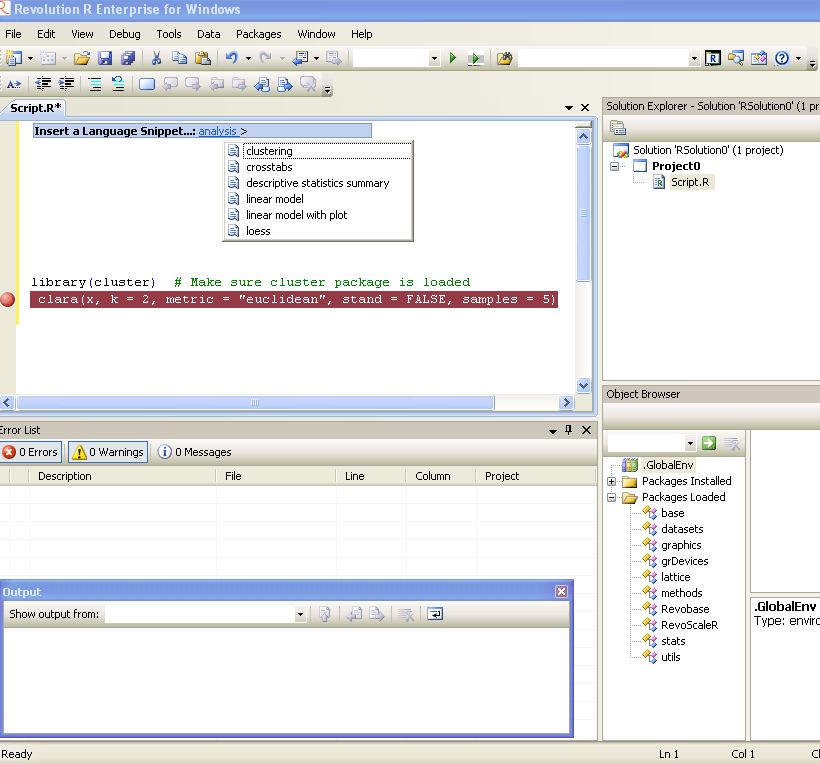
Revolution R Productivity Environment (RPE)-While Revolution R has announced a new GUI to be launched in 2011- the existing enhancements to their software include a code editor called RPE. Syntax color highlighting is already included. Code Snippets work in a fairly simply way. Right click- Click on Insert Code Snippet. You can get a drop down of tasks to do- (like Analysis) Selecting Analysis we get another list of sub-tasks (like Clustering). Once you click on Clustering you get various options. Like clicking clara will auto insert the code for clara clustering. Now even if you are averse to using a GUI /or GUI creators don’t have your particular analysis you can basically type in code at an extremely fast pace. It is useful to even experienced people who do not have to type in the entire code, but it is a boon to beginners as the parameters in function inserted by code snippet are automatically selected in multiple colors. And it can help you modify the auto generated code by your R GUI at a much faster pace. TinnR -The most popular and a very easy to use code editor. It is available at http://www.sciviews.org/Tinn-R/ It’s disadvantage is it supports Windows operating system only. Recommended as the beginner’s chose fore code editor. Eclipse with R plugin http://www.walware.de/goto/statet This is recommended especially to people working with Eclipse and on Unix systems. It enables you to do most of the productivity enhancement featured in other text editors including submitting code the R session. Gvim (http://www.vim.org/) along Vim-R-plugin2 (http://www.vim.org/scripts/script.php?script_id=2628) should be cited. The Vim-R-plugin developer recently added windows support to a lean cross-platform package that works well. It can be suited as a niche text editor to people who like less features in the software. It is not as good as Eclipse or Notepad++ but is probably the simplest to use.
Running R on an Amazon EC2 has following benefits-
1) Elastic Memory and Number of Processors for heavy computation 2) Affordable micro instances for smaller datasets (2 cents per hour for Unix to 3 cents per hour). 3) An easy to use interface console for managing datasets as well as processes
Running R on an Amazon EC2 on Windows Instance has following additional benefits-
1) Remote Desktop makes operation of R very easy 2) 64 Bit R can be used 3) You can also use your evaluation of Revolution R Enterprise (which is free to academics) and quite inexpensive for enterprise software for corporates.
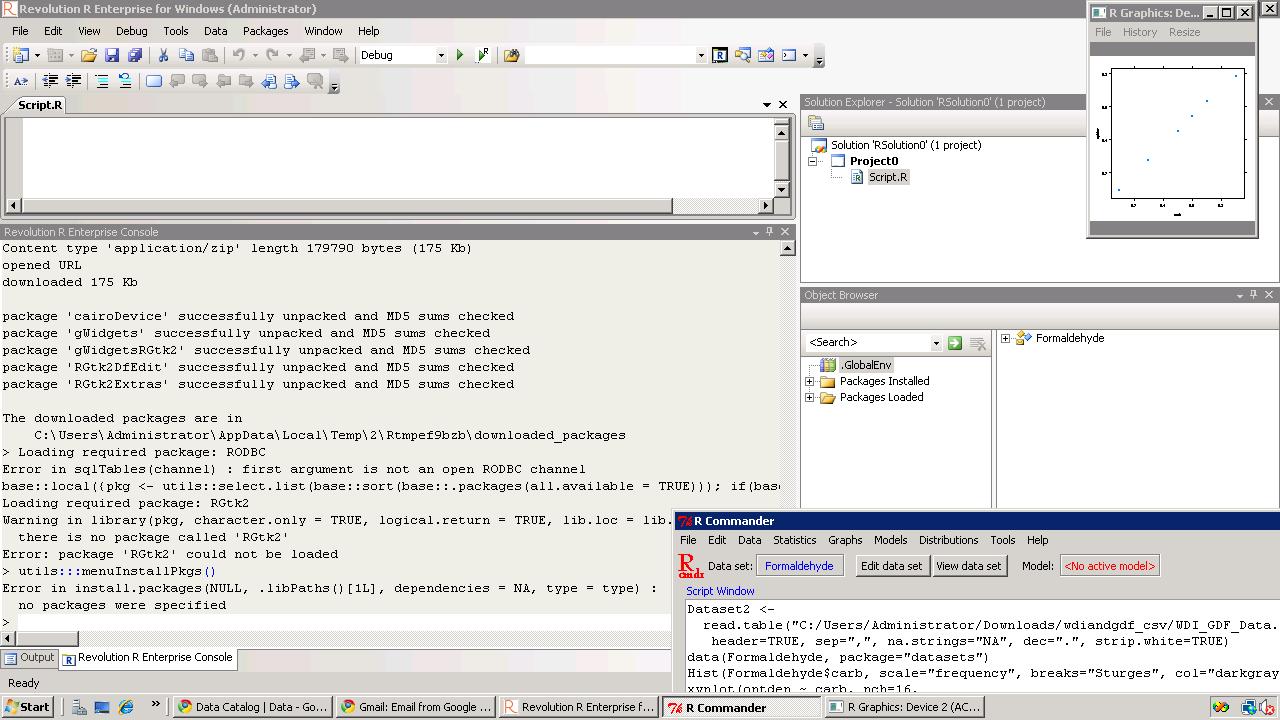
You can thus combine R GUIs (like Rattle , R Cmdr or Deducer based upon your need for statistical analysis, data mining or graphical analysis) , with 64 Bit OS, and Revolution’s REvoScaler Package to manage huge huge datasets at a very easy to use analytics solution.
(note if you select SQL Server it will cost you extra)
Then go through the following steps and launch instance
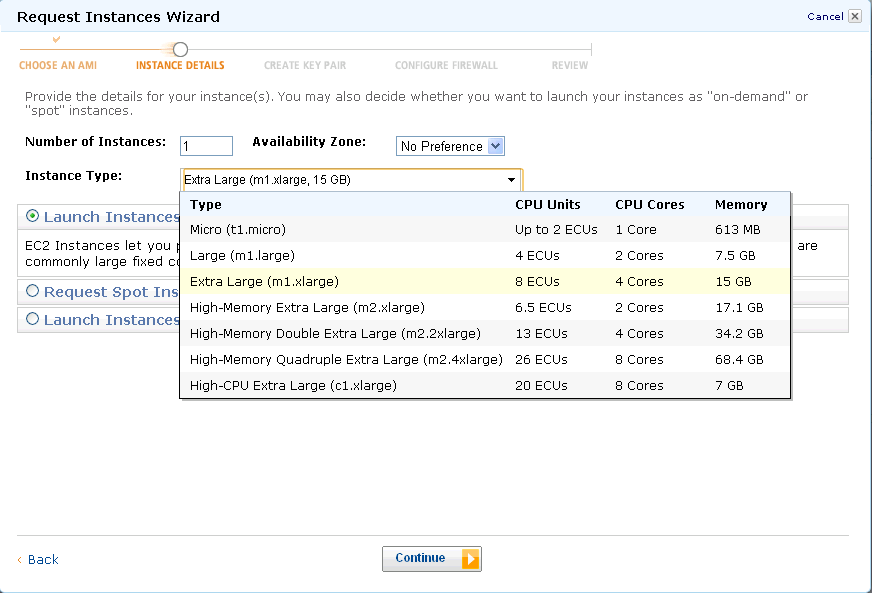
Selecting EC2 compute depending on number of cores, memory needs and budget
Create a key pair (a .pem file which is basically an encrypted password) and download it. For tags, etc just click on and pass (or read and create some tags to help you remember, and organize multiple instances) In configure firewall, remember to Enable Access to RDP (Remote Desktop) and HTTP. You can choose to enable whole internet or your own ip address/es for logging in Review and launch instance
Go to instance (leftmost margin)
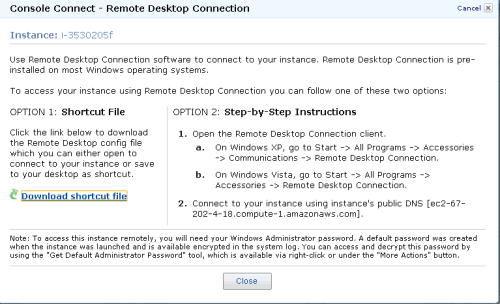
and see status (yellow for pending) Click on Instance Actions-Connect on Top Bar to see following Download the .RDP shortcut file and Click on Instance Actions-Request Admin Password
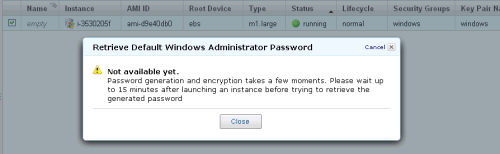
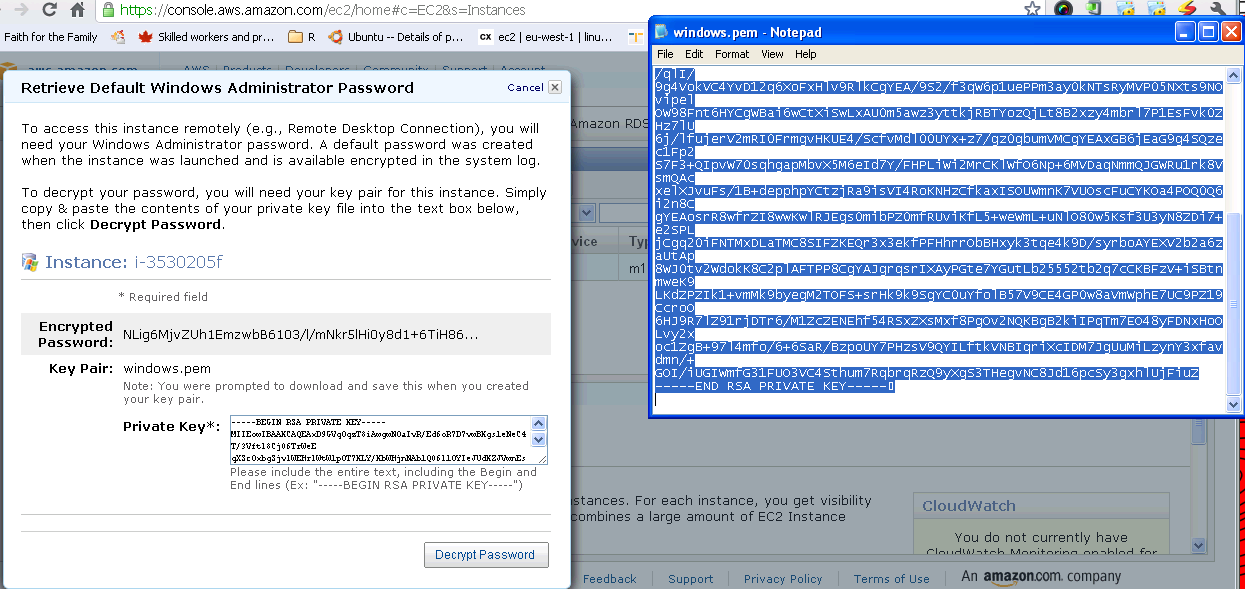
Wait 15 minutes while burning few cents for free as Microsoft creates a password for you Have coffee (or tea is you are health minded) Click Again on Instance Actions-Request Admin Password Open the key pair file (or .pem file created earlier) using
notepad, and copy and paste the Private Key (looks like gibberish)- and click Decrypt.
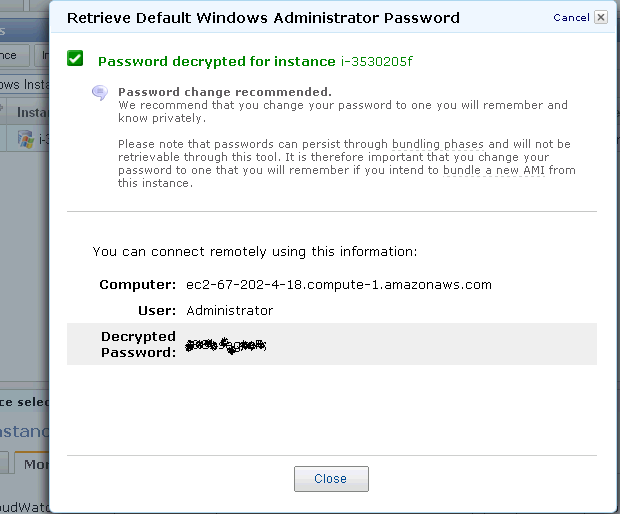
Retrieve Password for logging on.
Note the new password generated- this is your Remote Desktop Password.
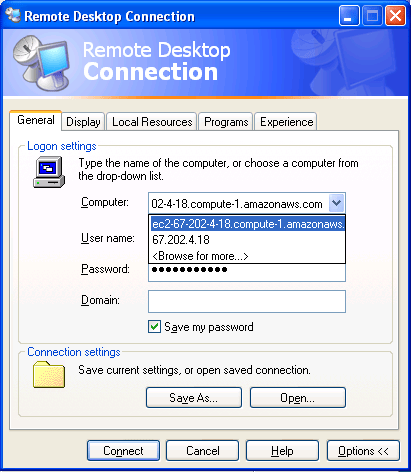
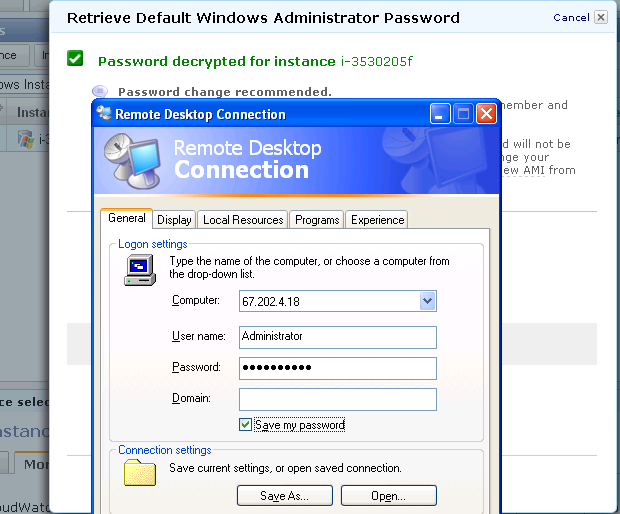
Click on the .rdp file (or Shortcut file created earlier)- It will connect to your Windows instance.
Enter the new generated password in Remote Desktop
Login
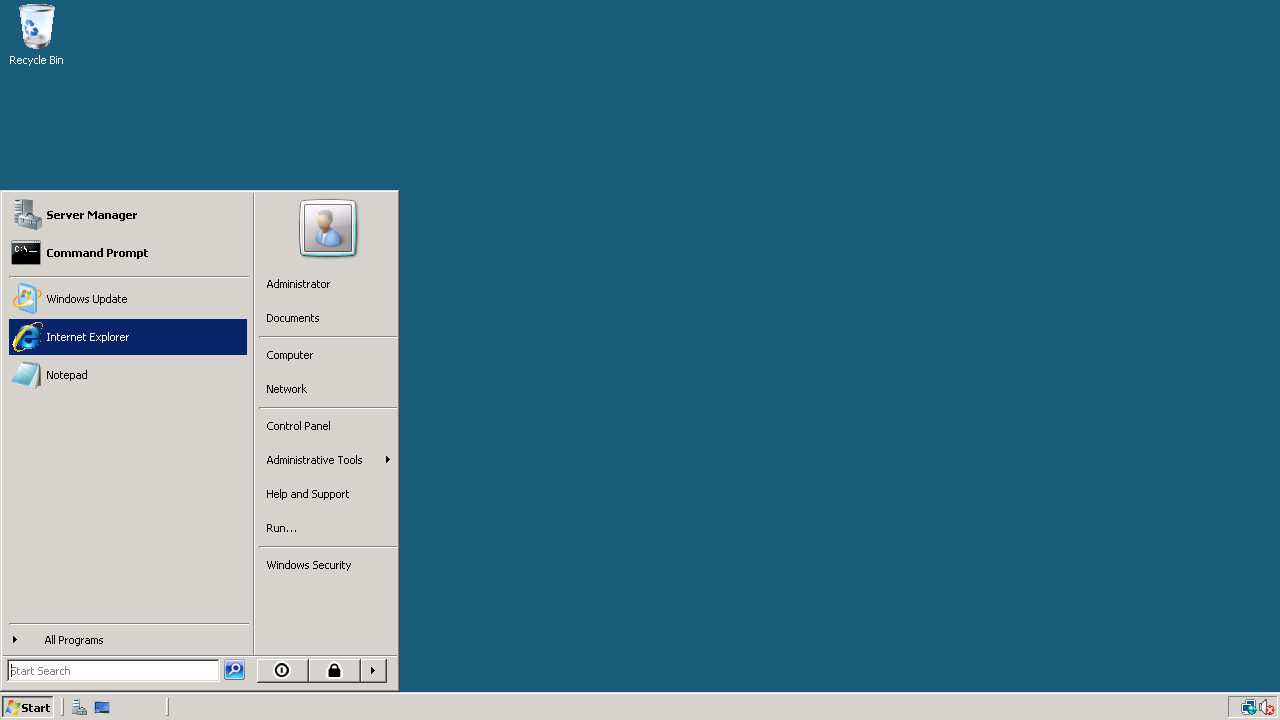
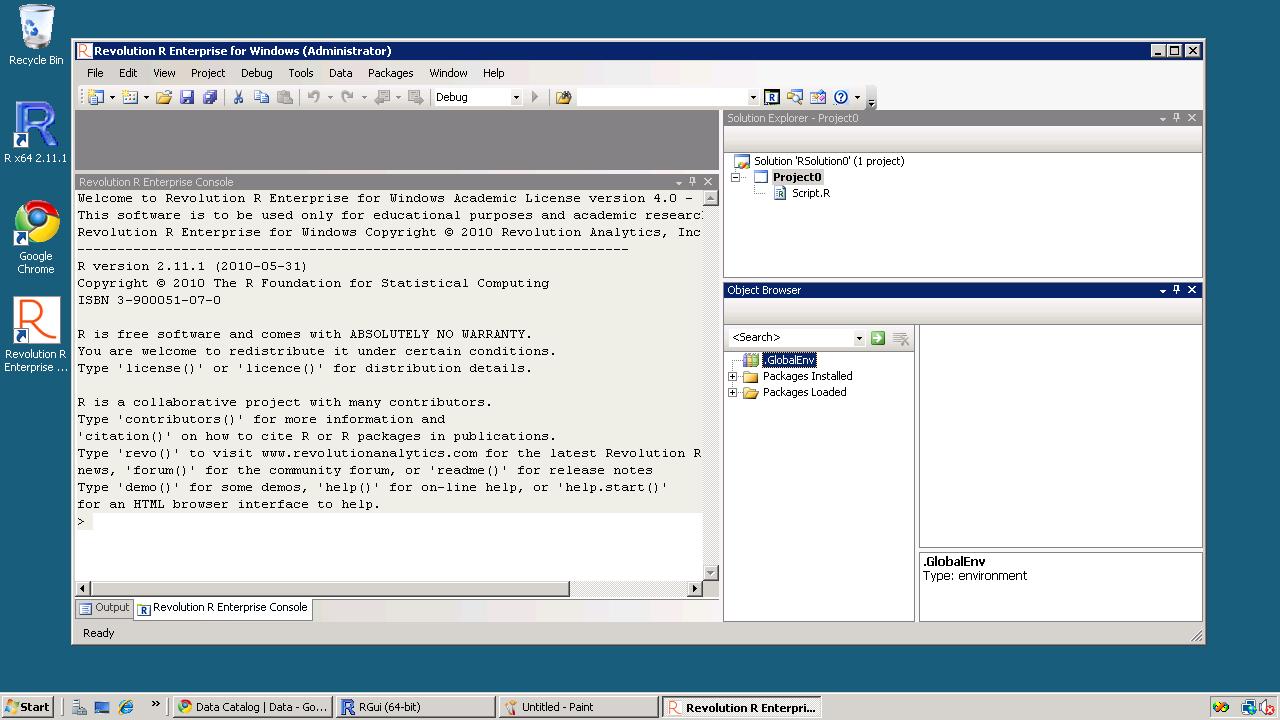
This looks like a new clean machine with just Windows OS installed on it. Install Chrome (or any other browser) if you do not use Internet Explorer Install Acrobat Reader (for documentation), Revolution R Enterprise~ 490 mb (it will automatically ask to install the .NET framework-4 files) and /or R
Install packages (I recommend installing R Commander, Rattle and Deducer). Apart from the fact that these GUIs are quite complimentary- they also will install almost all main packages that you need for analysis (as their dependencies) Revolution R installs parallel programming packages by default.
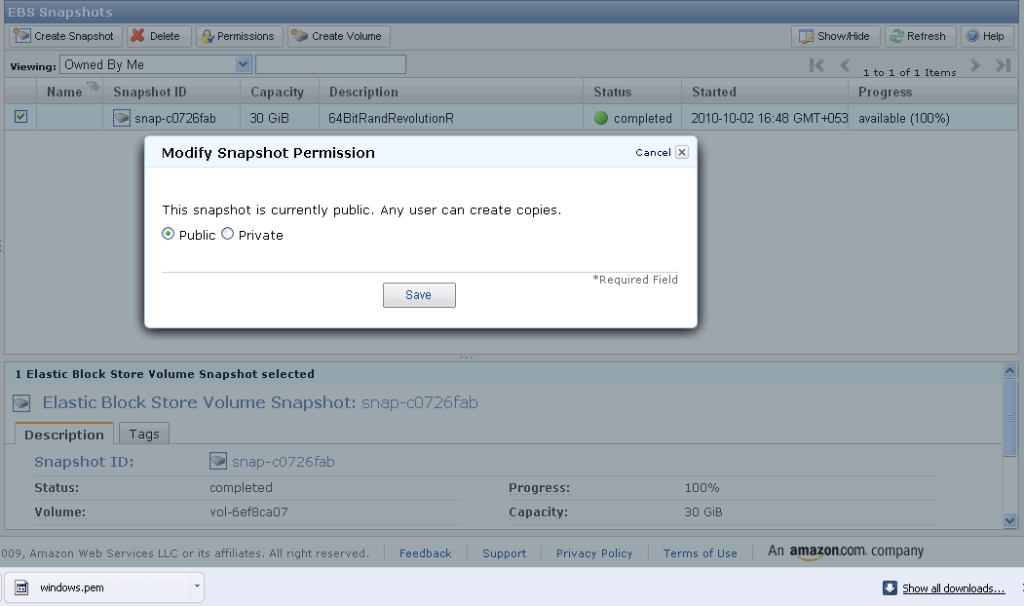
If you want to save your files for working later, you can make a snapshot (go to amazon console-ec2- left margin- ABS -Snapshot- you will see an attached memory (green light)- click on create snapshot to save your files for working later If you want to use my Windows snapshot you can work on it , just when you start your Amazon Ec2 you can click on snapshots and enter details (see snapshot name below) for making a copy or working on it for exploring either 64 bit R, or multi core cloud computing or just trying out Revolution R’s new packages for academic purposes.







 DECISION STATS