Interview- Top Data Mining Blogger on Earth , Sandro Saitta

Surajustement Modèle 2
Image via Wikipedia

If you do a Google search for Data Mining Blog- for the past several years one Blog will come on top. data mining blog – Google Search http://bit.ly/kEdPlE

To honor 5 years of Sandro Saitta’s blog (yes thats 5 years!) , we cover an exclusive interview with him where he reveals his unique sauce for cool techie blogging.

Ajay- Describe your journey as a scientist and data miner, from early experiences, to schooling to your work/research/blogging.

Sandro- My first experience with data mining was my master project. I used decision tree to predict pollen concentration for the following week using input data such as wind, temperature and rain. The fact that an algorithm can make a computer learn from experience was really amazing to me. I found it so interesting that I started a PhD in data mining. This time, the field of application was civil engineering. Civil engineers put a lot of sensors on their structure in order to understand how they behave. With all these sensors they generate a lot of data. To interpret these data, I used data mining techniques such as feature selection and clustering. I started my blog, Data Mining Research, during my PhD, to share with other researchers.

I then started applying data mining in the stock market as my first job in industry. I realized the difference between image recognition, where 99% correct classification rate is state of the art, and stock market, where you’re happy with 55%. However, the company ambiance was not as good as I thought, so I moved to consulting. There, I applied data mining in behavioral targeting to increase click-through rates. When you compare the number of customers who click with the ones who don’t, then you really understand what class imbalance mean. A few months ago, I accepted a very good opportunity at SICPA. I’m looking forward to resolving new challenges there.

Ajay- Your blog is the top ranked blog for “data mining blog”. Could you share some tips on better blogging for analytics and technical people

Sandro- It’s always difficult to start a blog, since at the beginning you have no reader. Writing for nobody may seem stupid, but it is not. By writing my first posts during my PhD I was reorganizing my ideas. I was expressing concepts which were not always clear to me. I thus learned a lot and also improved my English level. Of course, it’s still not perfect, but I hope most people can understand me.

Next come the readers. A few dozen each week first. To increase this number, I then started to learn SEO (Search Engine Optimization) by reading books and blogs. I tested many techniques that increased Data Mining Research visibility in the blogosphere. I think SEO is interesting when you already have some content published (which means not at the very beginning of your blog). After a while, once your blog is nicely ranked, the main task is to work on the content of the blog. To be of interest, your content must be particular: original, informative or provocative for example. I also had the chance to have a good visibility thanks to well-known people in the field like Kevin Hillstrom, Gregory Piatetsky-Shapiro, Will Dwinnell / Dean Abbott, Vincent Granville, Matthew Hurst and many others.

Ajay- Whats your favorite statistical software and what are the various softwares that you have worked with.
Could you compare and contrast these software as well.

Sandro- My favorite software at this point is SAS. I worked with it for two years. Once you know the language, you can perform ETL and data mining so easily. It’s also very fast compared to others. There are a lot of tools for data mining, but I cannot think of a tool that is as powerful as SAS and, in the same time, has a high-level programming language behind it.

I also worked with R and Matlab. R is very nice since you have all the up-to-date data mining algorithms implemented. However, working in the memory is not always a good choice, especially for ETL. Matlab is an excellent tool for prototyping. It’s not so fast and certainly not done for ETL, but the price is low regarding all the possibilities for data mining. According to me, SAS is the best choice for ETL and a good choice for data mining. Of course, there is the price.

Ajay- What are your favorite techniques and training resources for learning basics of data mining to say statisticians or business management graduates.

Sandro- I’m the kind of guy who likes to read books. I read data mining books one after the other. The fact that the same concepts are explained differently (and by different people) helps a lot in learning a topic like data mining. Of course, nothing replaces experience in the field. You can read hundreds of books, you will still not be a good practitioner until you really apply data mining in specific fields. My second choice after books is blogs. By reading data mining blogs, you will really see the issues and challenges in the field. It’s still not experience, but we are closer. Finally, web resources and networks such as KDnuggets of course, but also AnalyticBridge and LinkedIn.

Ajay- Describe your hobbies and how they help you ,if at all in your professional life.

Sandro- One of my hobbies is reading. I read a lot of books about data mining, SEO, Google as well as Sci-Fi and Fantasy. I’m a big fan of Asimov by the way. My other hobby is playing tennis. I think I simply use my hobbies as a way to find equilibrium in my life. I always try to find the best balance between work, family, friends and sport.

Ajay- What are your plans for your website for 2011-2012.

Sandro- I will continue to publish guest posts and interviews. I think it is important to let other people express themselves about data mining topics. I will not write about my current applications due to the policies of my current employer. But don’t worry, I still have a lot to write, whether it is technical or not. I will also emphasis more on my experience with data mining, advices for data miners, tips and tricks, and of course book reviews!

Standard Disclosure of Blogging- Sandro awarded me the Peoples Choice award for his blog for 2010 and carried out my interview. There is a lot of love between our respective wordpress blogs, but to reassure our puritan American readers- it is platonic and intellectual.

About Sandro S-



Sandro Saitta is a Data Mining Research Engineer at SICPA Security Solutions. He is also a blogger at Data Mining Research (www.dataminingblog.com). His interests include data mining, machine learning, search engine optimization and website marketing.

You can contact Mr Saitta at his Twitter address- 

https://twitter.com/#!/dataminingblog

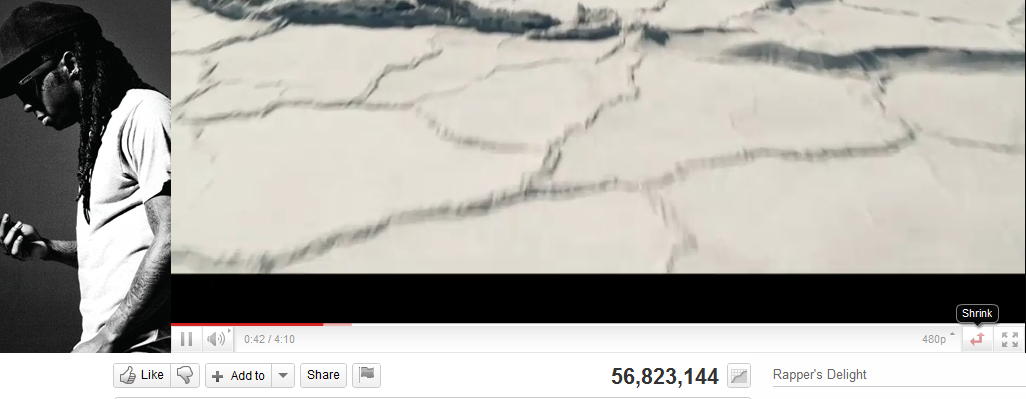
Youtube is coming Home

A continuing series on better design interfaces for my favorite music channel – You Tube

Some things I like.

The shrink- expand button.

The wasted space for advertisement – to the left of the video that is hugely static in terms of changes. It should be rotated more often.

The non existing average time of play- does everyone watch the whole video . or is the whole video watched 56 million times.

the inability to scroll and zoom into the video analytics.

the completely outdated comments button- which can be better used to create a SOCIAL community. but all it shows is top ranked comment, and click before dropping down. I liked the NYT approach to segmented comments including Editors Picks, Most Recommended, Highlights.

The video response feature that can be easily gamed to ensure video views /phishes.

The comments page numbers at the bottom instead of being at the top for the casual scanner of comments.

              Next

Facebook is the first button rather than second button in the minimum shared view list. Is that true? Can these buttons be self learning to my preferred social network instead of a default. (hint- use Google prediction API)

There is no provision to replay a video, unless you put into a playlist- which fortunately has been quite changed, even though the urls for playlists should have a separate url shortener than you.tube

A much better recommended playlist of related videos- they should be customized to the eclectic taste of the signed in user than the actual content. Maybe Try something like iTunes Genius feature.

No provision for a paid , premium channel even for countries that are blocked en masse from watching certain videos, hence depend on illegal video responses.

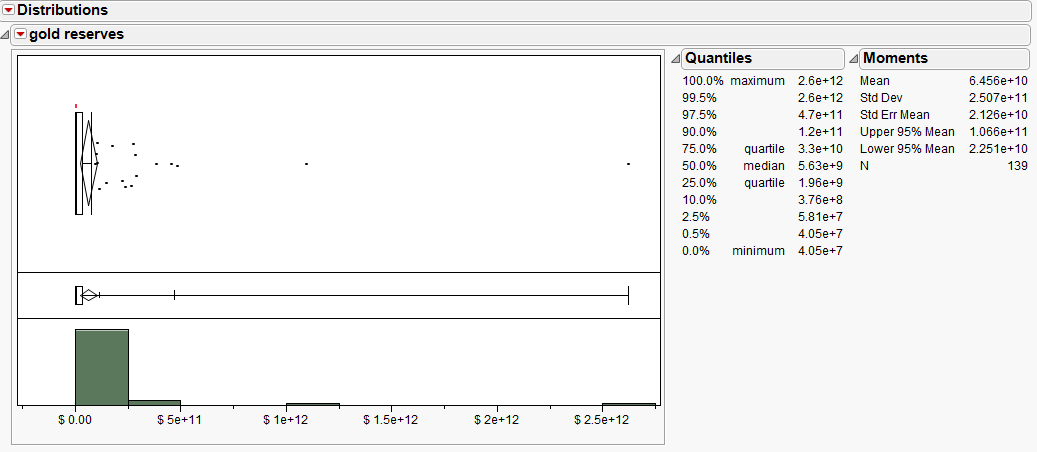
East loves Gold and USD. and chokes on it

A brief analysis shows how Eastern Hemisphere loves gold and USD so much

I did the graph in JMP since it is an easier GUI for me to use (I do have some learning disabilities).

https://www.cia.gov/library/publications/the-world-factbook/rankorder/2188rank.html

RANK
COUNTRY RESERVES OF FOREIGN EXCHANGE AND GOLD DATE OF INFORMATION
1 China
$ 2,622,000,000,000
31 December 2010 est.
2 Japan
$ 1,096,000,000,000
31 December 2010 est.
3 Russia
$ 483,100,000,000
30 November 2010
4 Saudi Arabia
$ 456,200,000,000
31 December 2010 est.
5 Taiwan
$ 387,200,000,000
31 December 2010 est.
6 Brazil
$ 290,900,000,000
31 December 2010 est.
7 India
$ 284,100,000,000
31 December 2010 est.
8 Korea, South
$ 274,600,000,000
31 December 2010 est.
9 Hong Kong
$ 268,900,000,000
31 December 2010 est.
10 Switzerland
$ 236,600,000,000
31 December 2010
11 Singapore
$ 225,800,000,000
31 December 2010 est.
12 Thailand
$ 176,100,000,000
31 December 2010 est.
13 Algeria
$ 150,100,000,000
31 December 2010 est.
14 Mexico
$ 116,400,000,000
31 December 2010 est.
15 Libya
$ 107,300,000,000
31 December 2010 est.
16 Malaysia
$ 106,500,000,000
31 December 2010 est.
17 Poland
$ 99,760,000,000
31 December 2010 est.
18 Indonesia
$ 96,210,000,000
31 December 2010 est.
19 Turkey
$ 78,000,000,000
31 December 2010 est.
20 Iran
$ 75,060,000,000
31 December 2010 est.
21 Israel
$ 66,980,000,000
31 December 2010 est.
22 Philippines
$ 62,370,000,000
31 December 2010 est.
23 Argentina
$ 53,610,000,000
31 December 2010 est.
24 Romania
$ 50,510,000,000
31 December 2010 est.
25 Iraq
$ 45,680,000,000
31 December 2010 est.
26 South Africa
$ 45,520,000,000
31 December 2010 est.
27 Hungary
$ 44,990,000,000
31 December 2010 est.
28 Peru
$ 44,110,000,000
31 December 2010
29 Nigeria
$ 43,360,000,000
31 December 2010 est.
30 Czech Republic
$ 42,340,000,000
31 December 2010 est.
31 Lebanon
$ 41,570,000,000
31 December 2010 est.
32 United Arab Emirates
$ 39,100,000,000
31 December 2010 est.
33 Australia
$ 38,620,000,000
31 December 2010 est.
34 Egypt
$ 35,720,000,000
31 December 2010 est.
35 Ukraine
$ 32,910,000,000
31 December 2010 est.
36 Kazakhstan
$ 32,440,000,000
31 December 2010 est.
37 Venezuela
$ 29,490,000,000
31 December 2010 est.
38 Colombia
$ 28,500,000,000
31 December 2010 est.
39 Chile
$ 26,080,000,000
31 December 2010 est.
40 Morocco
$ 24,570,000,000
31 December 2010 est.
41 Macau
$ 23,730,000,000
42 Kuwait
$ 22,420,000,000
31 December 2010 est.
43 Qatar
$ 22,410,000,000
31 December 2010 est.
44 Austria
$ 21,890,000,000
31 December 2010 est.
45 Syria
$ 17,960,000,000
31 December 2010 est.
46 New Zealand
$ 17,850,000,000
31 December 2010 est.
47 Bulgaria
$ 17,270,000,000
31 December 2010 est.
48 Angola
$ 16,890,000,000
31 December 2010 est.
49 Pakistan
$ 16,100,000,000
31 December 2010 est.
50 Serbia
$ 15,100,000,000
30 November 2010 est.
51 Oman
$ 14,000,000,000
31 December 2010 est.
52 Croatia
$ 13,790,000,000
31 December 2010 est.
53 Vietnam
$ 13,000,000,000
31 December 2010 est.
54 Jordan
$ 12,640,000,000
31 December 2010 est.
55 Tunisia
$ 11,230,000,000
31 December 2010 est.
56 Turkmenistan
$ 10,810,000,000
31 December 2010 est.
57 Bangladesh
$ 10,790,000,000
31 December 2010 est.
58 Uzbekistan
$ 10,500,000,000
31 December 2010 est.
59 Bolivia
$ 9,730,000,000
31 December 2010 est.
60 Trinidad and Tobago
$ 9,659,000,000
31 December 2010 est.
61 Finland
$ 9,128,000,000
31 December 2010 est.
62 Botswana
$ 7,834,000,000
31 December 2010 est.
63 Uruguay
$ 7,700,000,000
31 December 2010 est.
64 Latvia
$ 7,170,000,000
31 December 2010 est.
65 Lithuania
$ 6,418,000,000
31 December 2010 est.
66 Azerbaijan
$ 6,330,000,000
31 December 2010 est.
67 Belarus
$ 5,755,000,000
31 December 2010 est.
68 Yemen
$ 5,744,000,000
31 December 2010 est.
69 Guatemala
$ 5,709,000,000
31 December 2010 est.
70 Sri Lanka
$ 5,630,000,000
31 December 2010 est.
71 Cuba
$ 4,847,000,000
31 December 2010 est.
72 Kenya
$ 4,585,000,000
31 December 2010 est.
73 Costa Rica
$ 4,584,000,000
31 December 2010 est.
74 Iceland
$ 4,206,000,000
31 December 2010 est.
75 Bosnia and Herzegovina
$ 4,200,000,000
31 December 2010 est.
76 Paraguay
$ 4,130,000,000
31 December 2010 est.
77 Congo, Republic of the
$ 4,123,000,000
31 December 2010 est.
78 Equatorial Guinea
$ 4,086,000,000
31 December 2010 est.
79 Cameroon
$ 4,023,000,000
31 December 2010 est.
80 Cote d’Ivoire
$ 3,985,000,000
31 December 2010 est.
81 Cambodia
$ 3,840,000,000
31 December 2010 est.
82 Ghana
$ 3,800,000,000
31 December 2010 est.
83 Bahrain
$ 3,766,000,000
31 December 2010 est.
84 Burma
$ 3,762,000,000
31 December 2010 est.
85 Uganda
$ 3,743,000,000
31 December 2010 est.
86 Tanzania
$ 3,687,000,000
31 December 2010 est.
87 Estonia
$ 3,641,000,000
31 December 2010 est.
88 Ecuador
$ 3,590,000,000
31 December 2010 est.
89 Panama
$ 3,525,000,000
31 December 2010 est.
90 Papua New Guinea
$ 3,017,000,000
31 December 2010 est.
91 El Salvador
$ 2,882,000,000
31 December 2010 est.
92 Dominican Republic
$ 2,705,000,000
31 December 2010 est.
93 Gabon
$ 2,602,000,000
31 December 2010 est.
94 Mauritius
$ 2,360,000,000
31 December 2010 est.
95 Georgia
$ 2,350,000,000
31 December 2010 est.
96 Honduras
$ 2,302,000,000
31 December 2010 est.
97 Zambia
$ 2,287,000,000
31 December 2010 est.
98 Armenia
$ 2,247,000,000
31 December 2010 est.
99 Macedonia
$ 2,217,000,000
30 November 2010 est.
100 Senegal
$ 2,200,000,000
31 December 2010 est.
101 Ireland
$ 2,104,000,000
31 December 2010
102 Sudan
$ 2,063,000,000
31 December 2010 est.
103 Albania
$ 1,992,000,000
31 December 2010 est.
104 Mozambique
$ 1,982,000,000
31 December 2010 est.
105 Namibia
$ 1,961,000,000
31 December 2010 est.
106 Ethiopia
$ 1,880,000,000
31 December 2010 est.
107 Jamaica
$ 1,850,000,000
31 December 2010 est.
108 Moldova
$ 1,710,000,000
31 December 2010 est.
109 Kyrgyzstan
$ 1,615,000,000
31 December 2010 est.
110 Burkina Faso
$ 1,588,000,000
31 December 2010 est.
111 Haiti
$ 1,587,000,000
31 December 2010 est.
112 Nicaragua
$ 1,580,000,000
31 December 2010 est.
113 Benin
$ 1,254,000,000
31 December 2010 est.
114 Slovakia
$ 1,160,000,000
31 January 2010 est.
115 Madagascar
$ 1,038,000,000
31 December 2010 est.
116 Congo, Democratic Republic of the
$ 1,010,000,000
March 2010 est.
117 Lesotho
$ 893,000,000
31 December 2010 est.
118 Chad
$ 868,000,000
31 December 2010 est.
119 Rwanda
$ 816,000,000
31 December 2010 est.
120 Laos
$ 756,000,000
31 December 2010 est.
121 Swaziland
$ 708,000,000
31 December 2010 est.
122 Togo
$ 686,000,000
31 December 2010 est.
123 Barbados
$ 620,000,000
2007
124 Malta
$ 522,000,000
31 December 2010 est.
125 Guyana
$ 506,000,000
31 December 2010 est.
126 Zimbabwe
$ 376,000,000
31 December 2010 est.
127 Burundi
$ 320,000,000
31 December 2010 est.
128 Tajikistan
$ 303,000,000
31 December 2010 est.
129 Malawi
$ 301,000,000
31 December 2010 est.
130 Cape Verde
$ 296,000,000
31 December 2010 est.
131 Suriname
$ 263,300,000
2006
132 Belize
$ 219,000,000
31 December 2010 est.
133 Gambia, The
$ 203,000,000
31 December 2010 est.
134 Seychelles
$ 193,000,000
31 December 2010 est.
135 Eritrea
$ 104,000,000
31 December 2010 est.
136 Samoa
$ 70,150,000
FY03/04
137 Sao Tome and Principe
$ 46,000,000
31 December 2010 est.
138 Tonga
$ 40,830,000
FY04/05
139 Vanuatu
$ 40,540,000
2003

Google Chrome- Unites All Blog Readers across the world

D'où vient le logo de Google Chrome ?
Image by Emilie Ogez via Flickr

ever wondered what Pakistani blogs are saying about UBL. What Libyan bloggers go through to send you a piece.

Dont trust Ne-ew York Times or Fox-y News and /or both.

Read directly using breakthrough machine learning algorithms.

The Boys in Stanford and friends – bring Google Chrome Languages-

Now available at 0 cost. No viruses. Just annoying ads. Superbowl style.

New book on BigData Analytics and Data mining using #Rstats with a GUI

Joseph Marie Jacquard
Image via Wikipedia

I am hoping to put this on my pre-ordered or Amazon Wish list. The book the common people who wanted to do data mining with , but were unable to ask aloud they didnt know much.  It is written by the seminal Australian authority on data mining Dr Graham Williams whom I interviewed here at https://decisionstats.com/2009/01/13/interview-dr-graham-williams/

Data Mining for the masses using an ergonomically designed Graphical User Interface.

Thank you Springer. Thank you Dr Graham Williams

http://www.springer.com/statistics/physical+%26+information+science/book/978-1-4419-9889-7

Data Mining with Rattle and R

Data Mining with Rattle and R

The Art of Excavating Data for Knowledge Discovery

Series: Use R

Williams, Graham

1st Edition., 2011, XX, 409 p. 150 illus. in color.

  • Softcover, ISBN 978-1-4419-9889-7

    Due: August 29, 2011

    54,95 €
  • Encourages the concept of programming with data – more than just pushing data through tools, but learning to live and breathe the data
  • Accessible to many readers and not necessarily just those with strong backgrounds in computer science or statistics
  • Details some of the more popular algorithms for data mining, as well as covering model evaluation and model deployment

Data mining is the art and science of intelligent data analysis. By building knowledge from information, data mining adds considerable value to the ever increasing stores of electronic data that abound today. In performing data mining many decisions need to be made regarding the choice of methodology, the choice of data, the choice of tools, and the choice of algorithms.

Throughout this book the reader is introduced to the basic concepts and some of the more popular algorithms of data mining. With a focus on the hands-on end-to-end process for data mining, Williams guides the reader through various capabilities of the easy to use, free, and open source Rattle Data Mining Software built on the sophisticated R Statistical Software. The focus on doing data mining rather than just reading about data mining is refreshing.

The book covers data understanding, data preparation, data refinement, model building, model evaluation,  and practical deployment. The reader will learn to rapidly deliver a data mining project using software easily installed for free from the Internet. Coupling Rattle with R delivers a very sophisticated data mining environment with all the power, and more, of the many commercial offerings.

Content Level » Research

Keywords » Data mining

Related subjects » Physical & Information Science

Related- https://decisionstats.com/2009/01/13/interview-dr-graham-williams/

Google releases V1.2 of Google Prediction API

Diagram showing overview of cloud computing in...
Image via Wikipedia

To join the preview group, go to the APIs Console and click the Prediction API slider to “ON,” and then sign up for a Google Storage account.

For the past several months, I have been member of a semi-public beta test/group/forum – that is headed by Travis Green of the Google Prediction API Team (not the hockey player). Basically in helping the Google guys more feedback on the feature list for model building via cloud computing. I couldn’t talk about it much , because it was all NDA hush hush.

Anyways- as of today the version 1.2 of Google Prediction API has been launched. What does this do to the ordinary Joe Modeler? Well it helps gives your models -thats right your plain vanilla logistic regression,arima, arimax, models an added ensemble option of using Google’s Machine Learning Continue reading “Google releases V1.2 of Google Prediction API”

Using Views in R and comparing functions across multiple packages

Some RDF hacking relating to updating probabil...
Image via Wikipedia

R has almost 2923 available packages

This makes the task of searching among these packages and comparing functions for the same analytical task across different packages a bit tedious and prone to manual searching (of reading multiple Pdfs of help /vignette of packages) or sending an email to the R help list.

However using R Views is a slightly better way of managing all your analytical requirements for software rather than the large number of packages (see Graphics view below).

CRAN Task Views allow you to browse packages by topic and provide tools to automatically install all packages for special areas of interest. Currently, 28 views are available. http://cran.r-project.org/web/views/

Bayesian Bayesian Inference
ChemPhys Chemometrics and Computational Physics
ClinicalTrials Clinical Trial Design, Monitoring, and Analysis
Cluster Cluster Analysis & Finite Mixture Models
Distributions Probability Distributions
Econometrics Computational Econometrics
Environmetrics Analysis of Ecological and Environmental Data
ExperimentalDesign Design of Experiments (DoE) & Analysis of Experimental Data
Finance Empirical Finance
Genetics Statistical Genetics
Graphics Graphic Displays & Dynamic Graphics & Graphic Devices & Visualization
gR gRaphical Models in R
HighPerformanceComputing High-Performance and Parallel Computing with R
MachineLearning Machine Learning & Statistical Learning
MedicalImaging Medical Image Analysis
Multivariate Multivariate Statistics
NaturalLanguageProcessing Natural Language Processing
OfficialStatistics Official Statistics & Survey Methodology
Optimization Optimization and Mathematical Programming
Pharmacokinetics Analysis of Pharmacokinetic Data
Phylogenetics Phylogenetics, Especially Comparative Methods
Psychometrics Psychometric Models and Methods
ReproducibleResearch Reproducible Research
Robust Robust Statistical Methods
SocialSciences Statistics for the Social Sciences
Spatial Analysis of Spatial Data
Survival Survival Analysis
TimeSeries Time Series Analysis

To automatically install these views, the ctv package needs to be installed, e.g., via

install.packages("ctv")
library("ctv")
Created by Pretty R at inside-R.org


and then the views can be installed via install.views or update.views (which first assesses which of the packages are already installed and up-to-date), e.g.,

install.views("Econometrics")
 update.views("Econometrics")
 Created by Pretty R at inside-R.org

CRAN Task View: Graphic Displays & Dynamic Graphics & Graphic Devices & Visualization

Maintainer: Nicholas Lewin-Koh
Contact: nikko at hailmail.net
Version: 2009-10-28

R is rich with facilities for creating and developing interesting graphics. Base R contains functionality for many plot types including coplots, mosaic plots, biplots, and the list goes on. There are devices such as postscript, png, jpeg and pdf for outputting graphics as well as device drivers for all platforms running R. lattice and grid are supplied with R’s recommended packages and are included in every binary distribution. lattice is an R implementation of William Cleveland’s trellis graphics, while grid defines a much more flexible graphics environment than the base R graphics.

R’s base graphics are implemented in the same way as in the S3 system developed by Becker, Chambers, and Wilks. There is a static device, which is treated as a static canvas and objects are drawn on the device through R plotting commands. The device has a set of global parameters such as margins and layouts which can be manipulated by the user using par() commands. The R graphics engine does not maintain a user visible graphics list, and there is no system of double buffering, so objects cannot be easily edited without redrawing a whole plot. This situation may change in R 2.7.x, where developers are working on double buffering for R devices. Even so, the base R graphics can produce many plots with extremely fine graphics in many specialized instances.

One can quickly run into trouble with R’s base graphic system if one wants to design complex layouts where scaling is maintained properly on resizing, nested graphs are desired or more interactivity is needed. grid was designed by Paul Murrell to overcome some of these limitations and as a result packages like latticeggplot2vcd or hexbin (on Bioconductor ) use grid for the underlying primitives. When using plots designed with grid one needs to keep in mind that grid is based on a system of viewports and graphic objects. To add objects one needs to use grid commands, e.g., grid.polygon() rather than polygon(). Also grid maintains a stack of viewports from the device and one needs to make sure the desired viewport is at the top of the stack. There is a great deal of explanatory documentation included with grid as vignettes.

The graphics packages in R can be organized roughly into the following topics, which range from the more user oriented at the top to the more developer oriented at the bottom. The categories are not mutually exclusive but are for the convenience of presentation:

  • Plotting : Enhancements for specialized plots can be found in plotrix, for polar plotting, vcd for categorical data, hexbin (on Bioconductor ) for hexagon binning, gclus for ordering plots and gplots for some plotting enhancements. Some specialized graphs, like Chernoff faces are implemented in aplpack, which also has a nice implementation of Tukey’s bag plot. For 3D plots latticescatterplot3d and misc3d provide a selection of plots for different kinds of 3D plotting. scatterplot3d is based on R’s base graphics system, while misc3d is based on rgl. The package onion for visualizing quaternions and octonions is well suited to display 3D graphics based on derived meshes.
  • Graphic Applications : This area is not much different from the plotting section except that these packages have tools that may not for display, but can aid in creating effective displays. Also included are packages with more esoteric plotting methods. For specific subject areas, like maps, or clustering the excellent task views contributed by other dedicated useRs is an excellent place to start.
    • Effect ordering : The gclus package focuses on the ordering of graphs to accentuate cluster structure or natural ordering in the data. While not for graphics directly cba and seriation have functions for creating 1 dimensional orderings from higher dimensional criteria. For ordering an array of displays, biclust can be useful.
    • Large Data Sets : Large data sets can present very different challenges from moderate and small datasets. Aside from overplotting, rendering 1,000,000 points can tax even modern GPU’s. For univariate datalvplot produces letter value boxplots which alleviate some of the problems that standard boxplots exhibit for large data sets. For bivariate data ash can produce a bivariate smoothed histogram very quickly, and hexbin, on Bioconductor , can bin bivariate data onto a hexagonal lattice, the advantage being that the irregular lines and orientation of hexagons do not create linear artifacts. For multivariate data, hexbin can be used to create a scatterplot matrix, combined with lattice. An alternative is to use scagnostics to produce a scaterplot matrix of “data about the data”, and look for interesting combinations of variables.
    • Trees and Graphs ape and ade4 have functions for plotting phylogenetic trees, which can be used for plotting dendrograms from clustering procedures. While these packages produce decent graphics, they do not use sophisticated algorithms for node placement, so may not be useful for very large trees. igraph has the Tilford-Rheingold algorithm implementead and is useful for plotting larger trees. diagram as facilities for flow diagrams and simple graphs. For more sophisticated graphs Rgraphviz and igraph have functions for plotting and layout, especially useful for representing large networks.
  • Graphics Systems lattice is built on top of the grid graphics system and is an R implementation of William Cleveland’s trellis system for S-PLUS. lattice allows for building many types of plots with sophisticated layouts based on conditioning. ggplot2 is an R implementation of the system described in “A Grammar of Graphics” by Leland Wilkinson. Like latticeggplot (also built on top of grid) assists in trellis-like graphics, but allows for much more. Since it is built on the idea of a semantics for graphics there is much more emphasis on reshaping data, transformation, and assembling the elements of a plot.
  • Devices : Whereas grid is built on top of the R graphics engine, many in the R community have found the R graphics engine somewhat inflexible and have written separate device drivers that either emphasize interactivity or plotting in various graphics formats. R base supplies devices for PostScript, PDF, JPEG and other formats. Devices on CRAN include cairoDevice which is a device based libcairo, which can actually render to many device types. The cairo device is desgned to work with RGTK2, which is an interface to the Gimp Tool Kit, similar to pyGTK2. GDD provides device drivers for several bitmap formats, including GIF and BMP. RSvgDevice is an SVG device driver and interfaces well with with vector drawing programs, or R web development packages, such as Rpad. When SVG devices are for web display developers should be aware that internet explorer does not support SVG, but has their own standard. Trust Microsoft. rgl provides a device driver based on OpenGL, and is good for 3D and interactive development. Lastly, the Augsburg group supplies a set of packages that includes a Java-based device, JavaGD.
  • Colors : The package colorspace provides a set of functions for transforming between color spaces and mixcolor() for mixing colors within a color space. Based on the HCL colors provided in colorspacevcdprovides a set of functions for choosing color palettes suitable for coding categorical variables ( rainbow_hcl()) and numerical information ( sequential_hcl()diverge_hcl()). Similar types of palettes are provided in RColorBrewer and dichromat is focused on palettes for color-impaired viewers.
  • Interactive Graphics : There are several efforts to implement interactive graphics systems that interface well with R. In an interactive system the user can interactively query the graphics on the screen with the mouse, or a moveable brush to zoom, pan and query on the device as well as link with other views of the data. rggobi embeds the GGobi interactive graphics system within R, so that one can display a data frame or several in GGobi directly from R. The package has functions to support longitudinal data, and graphs using GGobi’s edge set functionality. The RoSuDA repository maintained and developed by the University of Augsburg group has two packages, iplots and iwidgets as well as their Java development environment including a Java device, JavaGD. Their interactive graphics tools contain functions for alpha blending, which produces darker shading around areas with more data. This is exceptionally useful for parallel coordinate plots where many lines can quickly obscure patterns. playwith has facilities for building interactive versions of R graphics using the cairoDevice and RGtk2. Lastly, the rgl package has mechanisms for interactive manipulation of plots, especially 3D rotations and surfaces.
  • Development : For development of specialized graphics packages in R, grid should probably be the first consideration for any new plot type. rgl has better tools for 3D graphics, since the device is interactive, though it can be slow. An alternative is to use Java and the Java device in the RoSuDA packages, though Java has its own drawbacks. For porting plotting code to grid, using the package gridBase presents a nice intermediate step to embed base graphics in grid graphics and vice versa.