Youtube is coming Home

A continuing series on better design interfaces for my favorite music channel – You Tube

Some things I like.

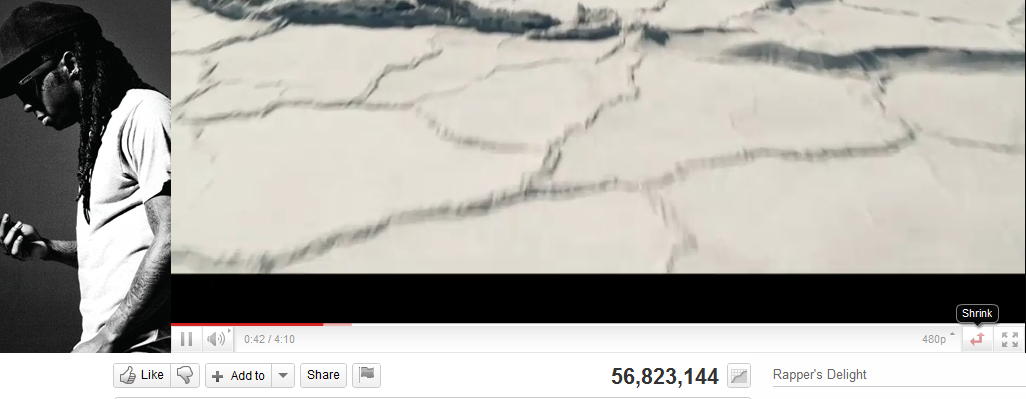
The shrink- expand button.

The wasted space for advertisement – to the left of the video that is hugely static in terms of changes. It should be rotated more often.

The non existing average time of play- does everyone watch the whole video . or is the whole video watched 56 million times.

the inability to scroll and zoom into the video analytics.

the completely outdated comments button- which can be better used to create a SOCIAL community. but all it shows is top ranked comment, and click before dropping down. I liked the NYT approach to segmented comments including Editors Picks, Most Recommended, Highlights.

The video response feature that can be easily gamed to ensure video views /phishes.

The comments page numbers at the bottom instead of being at the top for the casual scanner of comments.

              Next

Facebook is the first button rather than second button in the minimum shared view list. Is that true? Can these buttons be self learning to my preferred social network instead of a default. (hint- use Google prediction API)

There is no provision to replay a video, unless you put into a playlist- which fortunately has been quite changed, even though the urls for playlists should have a separate url shortener than you.tube

A much better recommended playlist of related videos- they should be customized to the eclectic taste of the signed in user than the actual content. Maybe Try something like iTunes Genius feature.

No provision for a paid , premium channel even for countries that are blocked en masse from watching certain videos, hence depend on illegal video responses.

FlattR goes free for all bloggers

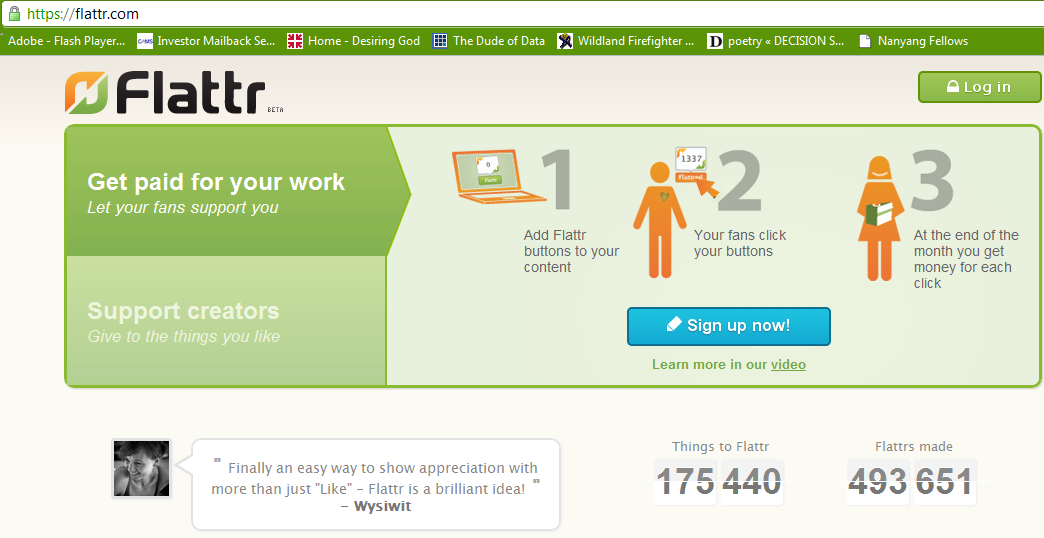
This is the Flattr right now
Image via Wikipedia

Email from people at FlattR. What is FlattR- social micropayments. like small Paypal button that gives a fraction of your monthly budget (say 2 euros) to people you retweet/like (called Flattered in this social media service).

Some angels are smiling over some bays , it seems. congrats FlattR and their team (which includes tech team of largest bit torrent search engine in the world). Apparently this was done in time for the royal wedding.

Important service announcement

Hello!

Flattr’s first year has been great. And not just for us but for tens of thousands of bloggers, podcasters, developers, designers and other creators out there. Just ask Tim. We’re now making an important change to the service, one which should open the floodgates of Flattr, if you will.
From May 1st we no longer require users to flattr others before they can be flattrd. Or in other words, it’s not mandatory to add money to your account to have an active Flattr button.

How does this affect you?

If you’re mainly using Flattr to make payments you will soon have much more content to flattr.If you’re using Flattr both to make and receive payments then you no longer need to check your balance at the end of each month to see whether your Flattr button is still active or not. It is and always will be.

If your Flattr button was once deactivated because balance dropped to zero, it is now active again. Forever.

This makes Flattr simpler

We have good reasons for making this change and we’ve just added a post about it on our blog. In a nutshell, we just didn’t need to force the give before you get principle onto people. During the the last year we’ve learned that people want to flattr the content they like and therefore we decided to drop any rules that made the service restrictive or outright complicated.We hope you’ll like the simpler more straightforward Flattr. If you have any comments, questions or feedback please get in touch via our blog or support page.

Linus, Peter and the rest of Flattr team

Getting Flatr on a wordpress.com blog

What is Flattr?

social micro payments- aka another way for bloggers, tweeters, facebookies to make money.

Thing of it as the Paypal plus a ReTweetmeme button.

FlattR is the new legal business of the creator of Pirate Bay- the large search engine for bit torrent data.

 and how to enable it on WordPress.com

Read some snarkly grrovy instructions here with a screenshot

http://thereturnofthepublic.wordpress.com/2011/04/10/putting-flattr-on-a-wordpress-com-blog-a-guide-for-drooling-imbeciles/

1.) Open a Flattr.com account here. This should be reasonably straightforward. A monkey hitting keys at random could manage it in about half an hour. It took me less than 45 minutes.

2.) In the top right of ‘Your Flattr Dashboard’ there is a button ‘Submit Thing’. Click on that and enter the details of your blog – the URL (like decisionstats.com for me) and a description (make that atleast 3 sentences). Flattr will create a page – for example,https://flattr.com/thing/162940/example-blog


Now go to your wordpress dashboard- sharing tab.

/wp-admin/options-general.php?page=sharing

Add the following lines to your New Add Service in respective tabs

URL= https://flattr.com/thing/175763/DecisionStats (change this to the one created for yourself instep2 above)

ICON = http://api.flatrr.com/button/flattr-badge-large.png

 If you have a non WordPress blog see instructions at http://markup.io/v/jz3wv155bsfg or screenshot of instructions here-

+ 1 your website -updated

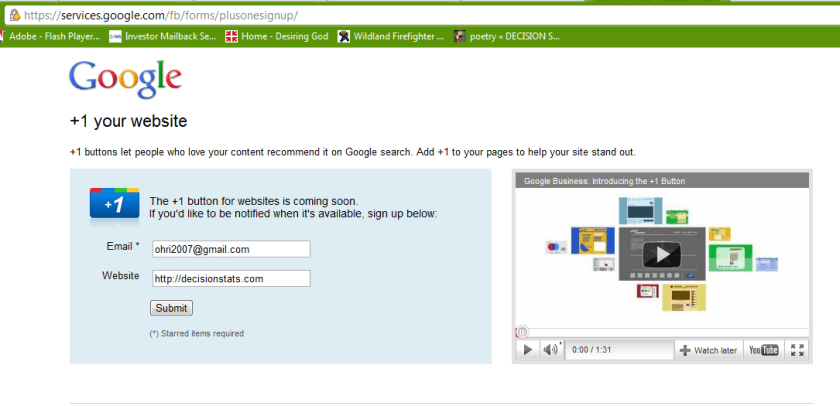
how to add the all new plus one button to your own website

just go here.

submit form

wait

https://services.google.com/fb/forms/plusonesignup/

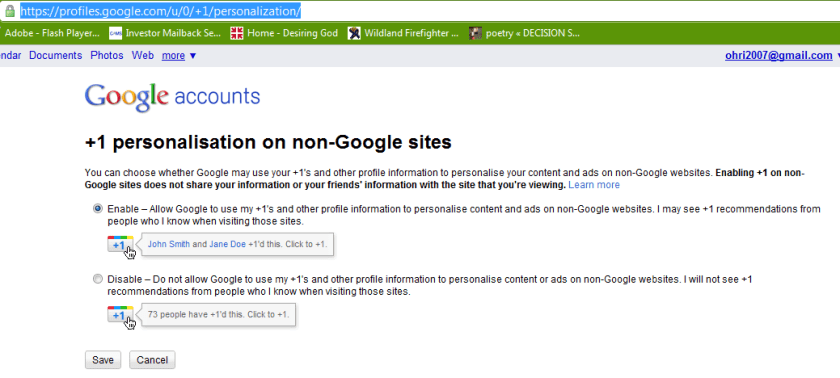
also see https://profiles.google.com/u/0/+1/personalization/

or read the hack here

http://www.yvoschaap.com/weblog/the_google_1_button_discovered

The buttons does exists because there is personalisation option available refering to non-Google sites.

Google claims the button is “coming soon” but I couldn’t wait, so I looked around the code, and looked some more, untill I found the button endpoint hiding from me, obfuscated, in a stray piece of javascript.

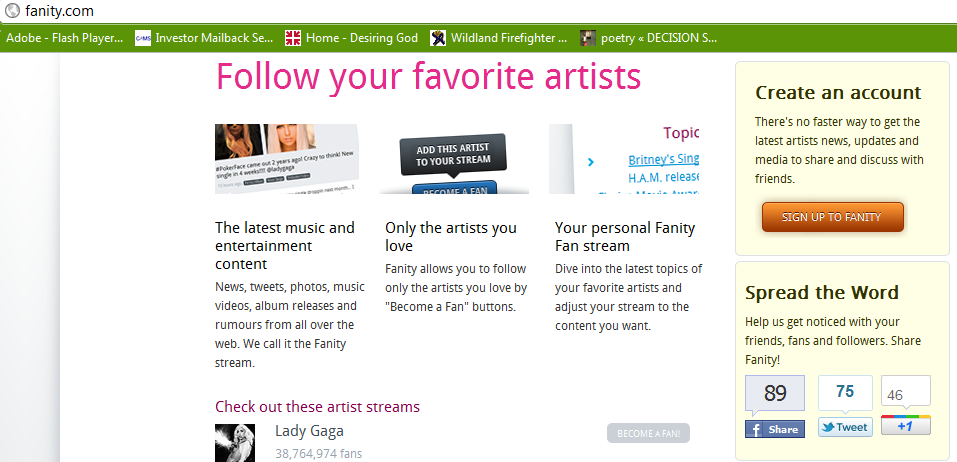
Check out these live Google +1 buttons:

at

http://fanity.com/


Google Experimental search

Image representing Google as depicted in Crunc...
Image via CrunchBase

Google just rolled out three new experiements. You can join only one of these at http://www.google.com/experimental/index.html

———————————————————————————————————————————–

Google is always experimenting with new features aimed at improving the search experience. Take one for a spin and let us know what you think.

Your selected experiment: You have joined the +1 button experiment. Note that you can only join ONE experiment at a time.

+1 button This is your selected experiment.
Use +1 to give something your public stamp of approval, so friends, contacts, and others can find the best stuff when they search. Get recommendations for the things that interest you, right when you want them, in your search results. 

To participate in this experiment:

  1. Make sure you’re signed into your Google Account (required)
  2. Click ‘Join this experiment’
  3. Search for something you love on Google.com
  4. Click the new +1 button, and make your mark on the web

Your +1’s are public. They can appear in Google search results, on ads, and sites across the web. You’ll always be able to see your own +1’s in a new tab on your Google Profile, and if you want, you can share this tab with the world.

Please note, it may take a while before you see the button in search results, and it may occasionally disappear as we make improvements. Your feedback will help us make it better!

Learn more about +1

Keyboard shortcuts
Navigate search results quickly and easily, minimizing use of your mouse. Current keyboard shortcuts include: 

Key Action
J Selects the next result.
K Selects the previous result.
O Opens the selected result.
<Enter> Opens the selected result.
/ Puts the cursor in the search box.
<Esc> Removes the cursor from the search box.
Try out this queryrattlesnake

Accessible View
Navigate search results quickly and easily, with just your keyboard. As you navigate, items are magnified for easier viewing. If you use a screen reader or talking browser, the relevant information is spoken automatically as you navigate. 

Current keyboard shortcuts include:

Key Action
j or DOWN Selects the next item.
k or UP Selects the previous item.
l or RIGHT Moves to the next category (results, sponsored links, refinements).
h or LEFT Moves to the previous category (results, sponsored links, refinements).
<Enter> Opens the selected result.
/ Puts the cursor in the search box.
n Moves to the next result, and fetches more results if necessary.
p Moves to the previous result, reloading earlier results if necessary.
= Magnifies current item
Shrinks current item
A Switches to Accessible Search Results
W Switches to regular Web Search Results

For now, you need to use the Firefox 3 web browser with this experiment. This note will be updated as other browsers are added. Magnification already works with Google Chrome andApple’s Safari.

Try out this queryenhancing web 2.0 accessibility

iTunes finally gets some competition ?- Amazon Cloud Player


An interesting development is Amazon’s Cloud Player (though Cannonical may be credited for thinking of the idea first for Ubuntu One). Since Ubuntu One is dependent on the OS (and not the browser) this makes Amazon \s version more of a  mobile Cloud Player (as it seems to be an Android app and not an app that is independent of any platform, os or browser.

Since Android and Ubuntu are both Linux flavors, I am not sure if Cannonical has an exiting mobile app for Ubuntu One. Apple’s cloud plans also seems kind of ambiguous compared to Microsoft (Azure et al)

I guess we will have to wait for a true Cloud player.


http://www.amazon.com/b/ref=tsm_1_tw_s_dm_liujd5?node=2658409011&tag=cloudplayer-20

How to Get Started with Cloud Drive and Cloud Player


Step 1. Add music to Cloud Drive

Purchase a song or album from the Amazon MP3 Store and click the Save to Amazon Cloud Drive button when your purchase is complete. Your purchase will be saved for free.


Step 2. Play your music in Cloud Player for Web

Click the Launch Amazon Cloud Player button to start listening to your purchase. Add more music from your library by clicking theUpload to Cloud Drive button from the Cloud Player screen. Start with 5 GB of free Cloud Drive storage. Upgrade to 20 GB with an MP3 album purchase (see details). Use Cloud Player to browse and search your library, create playlists, and download to your computer.


Step 3. Enjoy your music on the go with Cloud Player for Android

Install the Amazon MP3 for Android app to use Cloud Player on your Android device. Shop the full Amazon MP3 store, save your purchases to Cloud Drive, stream your Cloud Player library, and download to your device right from your Android phone or tablet.

compare this with

https://one.ubuntu.com/music/

A cloud-enabled music store

The Ubuntu One Music Store is integrated with the Ubuntu One service making it a cloud-enabled digital music store. All purchases are transferred to your Ubuntu One personal cloud for safe storage and then conveniently downloaded to your synchronizing computers. And don’t worry aboutgoing over your storage quota with music purchases. You won’t need to pay more for personal cloud storage of music purchased from the Ubuntu One Music Store.

An Ubuntu One subscription is required to purchase music from the Ubuntu One Music Store. Choose from either the free 2 GB option or the 50 GB plan for $10 (USD) per month to synchronize more of your digital life.

5 regional stores and more in the works

  • The Ubuntu One Music requires Ubuntu 10.04 LTS and offers digital music through five regional stores.
  • The US, UK, and Germany stores offer music from all major and independent labels.
  • The EU store serves most of the EU member countries (2) and offers music from fewer major label artists.
  • The World store offers only independent label music and serves the countries not covered by the other regional stores.


The Latest GUI for R- BioR

Once more a spanking new shiny software –

Bio7 is a integrated development environment for ecological modelling based on the Rich-Client-Platformconcept of the Java IDE Eclipse. The Bio7 platform contains several perspectives which arrange several views for a special purpose useful for the development and analysis of ecological models. One special perspective bundles a feature rich GUI (Graphical User Interface) for the statistical software R.
For the bidirectional communication between Java and R the Rserve application is used (as a backend to evaluate R code and transfer data from and to Java).
The Bio7 R perspective (see figure below) is divided into a R-Shell view on the left side (conceptual the R side) and a Table view on the right side (conceptual the Java side).
Data can be imported to a spreadsheet, edited and then transferred to the R workspace. Vice versa data from R can be transferred to a sheet of the Table view and then exported e.g. to an Excel or OpenOffice file.

and

General:

Built upon Eclipse 3.6.1.

Now works with the latest Java version! (Windows version bundled with the latest JRE release).

Removed the Soil perspective (now soils can be modeled with ImageJ (float precision). Active images can be displayed in the 3D discrete view (new example available).

Removed the database perspective and the plant layer. You can now built any discrete models without any plant layer.

Removed several controls in the Control view. Added the “Custom Controls” view. In addition ported the Swing component of the Time panel to Swt.

Deleted the avi to swf converter in the ImageJ menu.

Now patterns can be saved with opened Java editor source. If this file is reopened and dragged on Bio7 the pattern is loaded, the source is compiled and the setup method (if available) is executed. In this way model files can be used for presentations ->drag, setup and run. The save actions are located in the Speadsheet view toolbar.

More options available to disable panel painting and recording of values (if not needed for speed!).

New Setup button in the toolbar of Bio7 to trigger a compiled setup method if available.

Removed the load and save pattern buttons from the toolbar of Bio7. Discrete patterns can now be stored with the available action in the spreadsheet view menu.

New P2 Update Manager available in Bio7.

Updated the Janino Compiler.

New HTML perspective added with a view which embeds the TinyMC editor.

New options to disable painting operations for the discrete panels.

New option to explicitly enable scripts at startup (for a faster startup).

Quadgrid (Hexgrid)

Only states are now available which can be created in the “Spreadsheet” view menu easily. Patterns can be stored and restored as usual but are now stored in an *.exml file.

New method to transfer the quadgrid pattern as a matrix to R.

New method to transfer the population data of all quadgrid states to R.

ImageJ:

Update to the latest version (with additional fixes).

Fixed a bug to rename the image.

Thumbnail browser can now open images recursevely(limited to 1000 pics), the magnifiyng glass can be disabled, too.

Plugins can be installed dynamically with a drag and drop operation on the ImageJ view or toolbar (as known from ImageJ).

Installed plugins now extend the plugin menu as submenus or subsubmenus (not finished yet!).

Plugins can now be created with the Java editor. New Bio7 Wizard available to create a plugin template.

Compiled Java files can be added to a *.jar file with a new available action in the Navigator view (if you rightclick on the files in the Navigator). In this way ImageJ plugins can be packaged in a *.jar.

Floweditor:

Fixed a repaint bug in the debug mode of a flow (now draws correctly the active shape in the flow).

Resize with Strg+Scrollwheel works again.

Comments with more than one line works again.

New Test action to verify connections in a flow.

Debug mode now shows all executed Shapes.

Integrated more default tests (for the verification of a regular flow).

A mouse-click now deletes colored shapes in a flow (e.g. in debug mode).

Points panel:

Integrated (dynamic) Voronoi, Delauney visualization (with area and clip to rectangle action).

Points coordinates can now be set in double precision.

Transfer of point coordinates to R now in double precision.

Bio7 Table:

New import and export of Excel 2007 OOXML.

Row headers can now be resized with the mouse device.

R:

Updated R (2.12.1) and Rserve (0.6.3) to the latest version.

New help action in the R-Shell view.

New action to display help for R specific commands in the embedded Bio7 browser (which opens automatically).

New Key actions to copy the selected variable names to the expression dialog (c=cocatenate (+), a=add (,)).

New action to transfer character or numeric vectors horizontally or vertically in an opened spread (Table view) at selection coordinates.

Empty spaces in the filepath are now allowed under Windows if Rserve is started with a system shell or the RGUI (for the tempfile select a location in the Preferences dialog which is writeable) is started.This works also for the RGUI action.

Improved the search for the “Install packages” action (option “Case Sensitive” added).

API:

New API methods available!

And:

Many fixes since the last version!


Installation

Important information:

A certain firewall software can corrupt the Bio7 *.zip file (as well as other files).
Please ensure that you have downloaded a functioning Bio7 1.5 version. In addition it is also reported that a certain antivirus software detects the bundled R software (on Windows) as malware. Often the R specific “open.exe” is detected as malware. Please use a different scanner to make sure that the software is not infected if you have any doubts. For more details see:

http://r.789695.n4.nabble.com/trojan-at-current-development-version-td3244348.html