Webinar: Using R within Oracle #rstats

Webinar: Using R within Oracle — Nov 30, noon EST

==========================================
Oracle now supports the R open source statistical programming language. Come to this webinar to learn more about using R within an Oracle environment.

— URL for TechCast: https://stbeehive.oracle.com/bconf/confDetails?confID=334B:3BF0:owch:38893C00F42F38A1E0404498C8A6612B0004075AECF7&guest=true&confKey=608880
— Web Conference ID: 303397
— Web Conference Key: 608880
— Dialup:             1-866-682-4770      , ID 5548204, passcode 1234

After a steady rise in the past few years, in 2010 the open source data mining software R overtook other tools to become the tool used by more data miners (43%) than any other (http://www.rexeranalytics.com/Data-Miner-Survey-Results-2010.html).

Several analytic tool vendors have added R-integration to their software. However, Oracle is the largest company to throw their weight behind R. On October 3, Oracle unveiled their integration of R: Oracle R Enterprise (http://www.oracle.com/us/corporate/features/features-oracle-r-enterprise-498732.html) as part of their Oracle Big Data Appliance announcement (http://www.oracle.com/us/corporate/press/512001).

Oracle R Enterprise allows users to perform statistical analysis with advanced visualization on data stored in Oracle Database. Oracle R Enterprise enables scalable R solutions, while facilitating production deployment of R scripts and Hadoop based solutions, as well as integration of R results with Oracle BI Publisher and OBIEE dashboards.

This TechCast introduces the various Oracle R Enterprise components and features, along with R script demonstrations that interface with Oracle Database.

TechCast presenter: Mark Hornick, Senior Manager, Oracle Advanced Analytics Development.
This TechCast is part of the ongoing TechCasts series coordinated by Oracle BIWA: The BI, Warehousing and Analytics SIG (http://www.oracleBIWA.org).
Data Mining with R GUI -Rattle #Rstats

Why is RATTLE my favorite R package?
because it allows data mining in a very nice interface.
Complicated software need not have complicated interfaces.
Have a look-

(Note- download rattle from http://rattle.togaware.com)

For better visibility please click the full screen button or click the second pps below- automatically advances every 5 secs

Using R with MySQL #rstats

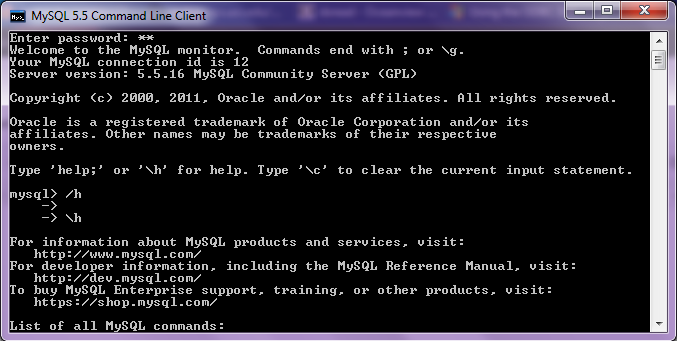
A brief tutorial to working with R and MySQL. MySQL belongs to Oracle is one of the most widely used databases now.

1. Download mySQL from
http://www.mysql.com/downloads/mysql/  or (http://www.mysql.com/downloads/mirror.php?id=403831)
Click Install -use default options, remember to note down the password=XX
2.Download the ODBC connector from http://www.mysql.com/downloads/connector/odbc/5.1.htmlThe Data Sources (ODBC) can be located from the Control Panel in Windows7

Install ODBC Connector by double clicking the .msi file downloaded in Step 2-
Check this screenshot in ODBC Connectors to verify-
Note this is the Drivers tab in ODBC Data Source Administrator
Click the System DSN and Configure MySQL using the add button Use the configuration options shown exactly here. The user is root, the TCP/IP Server is local host, use the same password in Step 1 and the Database is MySQL
Test the connection

Click OK to finish this step.
Click the User DSN tab (and repeating the step  immediately above -Add, and Configure the connection using options The user is root, the TCP/IP Server is local host, use the same password in Step 1 and the Database is MySQL , Test the connection and OK to add the connection
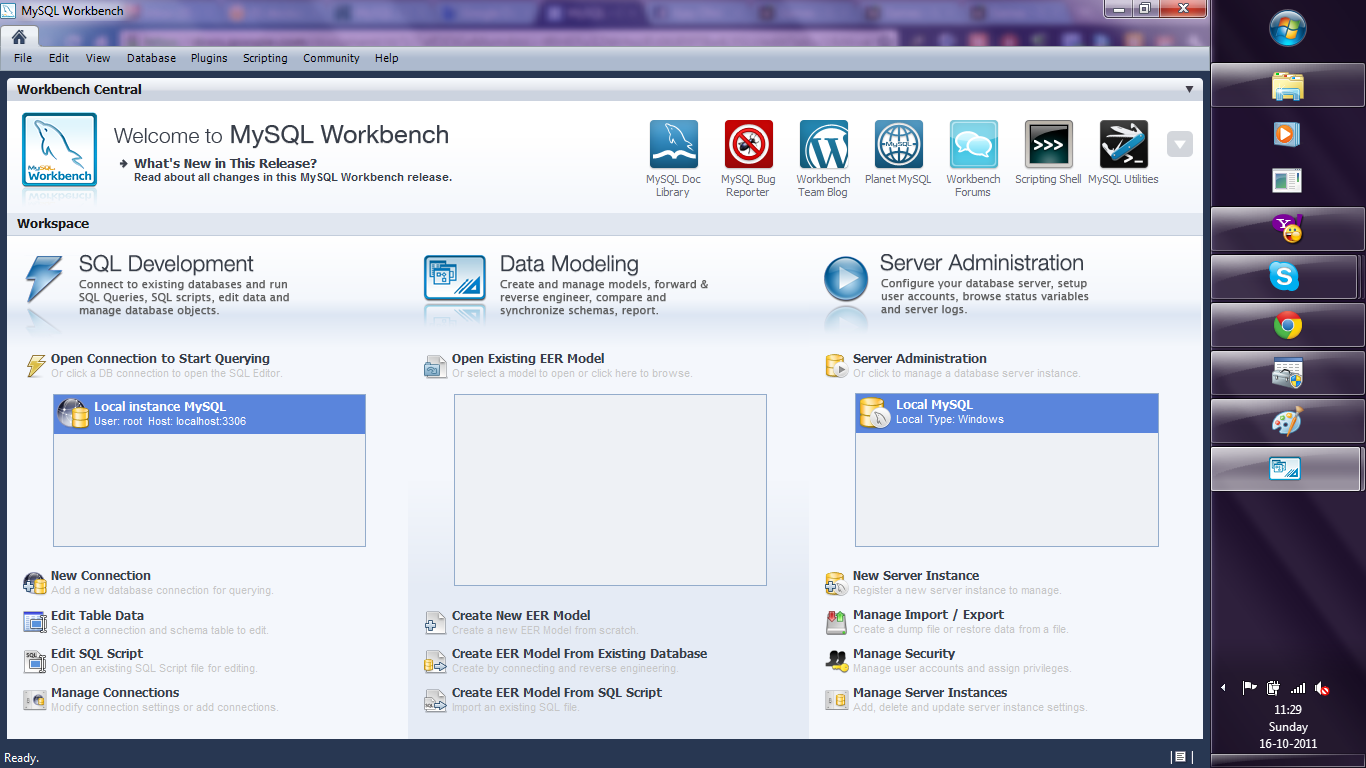
3. Download the MySQL workbench from http://www.mysql.com/downloads/workbench/

This is very helpful to configuring the database
http://www.mysql.com/downloads/mirror.php?id=403983#mirrors

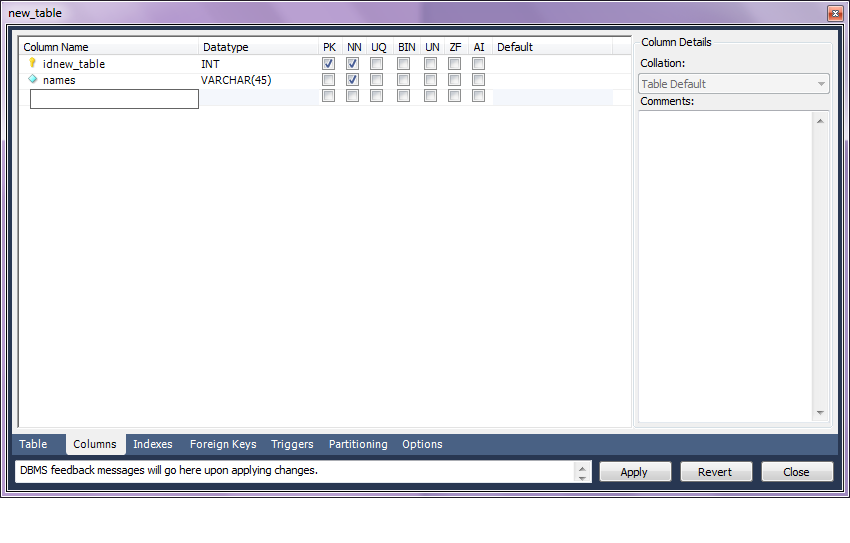
Create a new table using the options in the screenshots below

Open Connection

You can create a new table using the options as below,
Once created you can also add new variables (using the Columns Tab)

MySQL allows you create new columns very easily
The  SQL commands are automatically generated.
Click Apply  to execute the changes to the Database.

Now we start R
Type the commands in the screenshot below to create a connection to the Database in MySQL
> library(RODBC)
> odbcDataSources()
> ajay=odbcConnect(“MySQL”,uid=”root”,pwd=”XX”)
> ajay
> sqlTables(ajay)
>tested=sqlFetch(ajay,”host”)

Note- this is a brief tutorial for beginners without getting into too many complexities of database administration and management, to start using R and MySQL.

Knowledge Discovery in Databases -KDD using PostgreSQL and #Rstats

Here is a small brief primer for beginners on configuring an open source database and using an open source analytics package.

All you need to know – is to read!


1. download PostgreSQL from
http://www.postgresql.org/download/windowsInstall PostgreSQL

Remember to store /memorize the password for the user postgres!

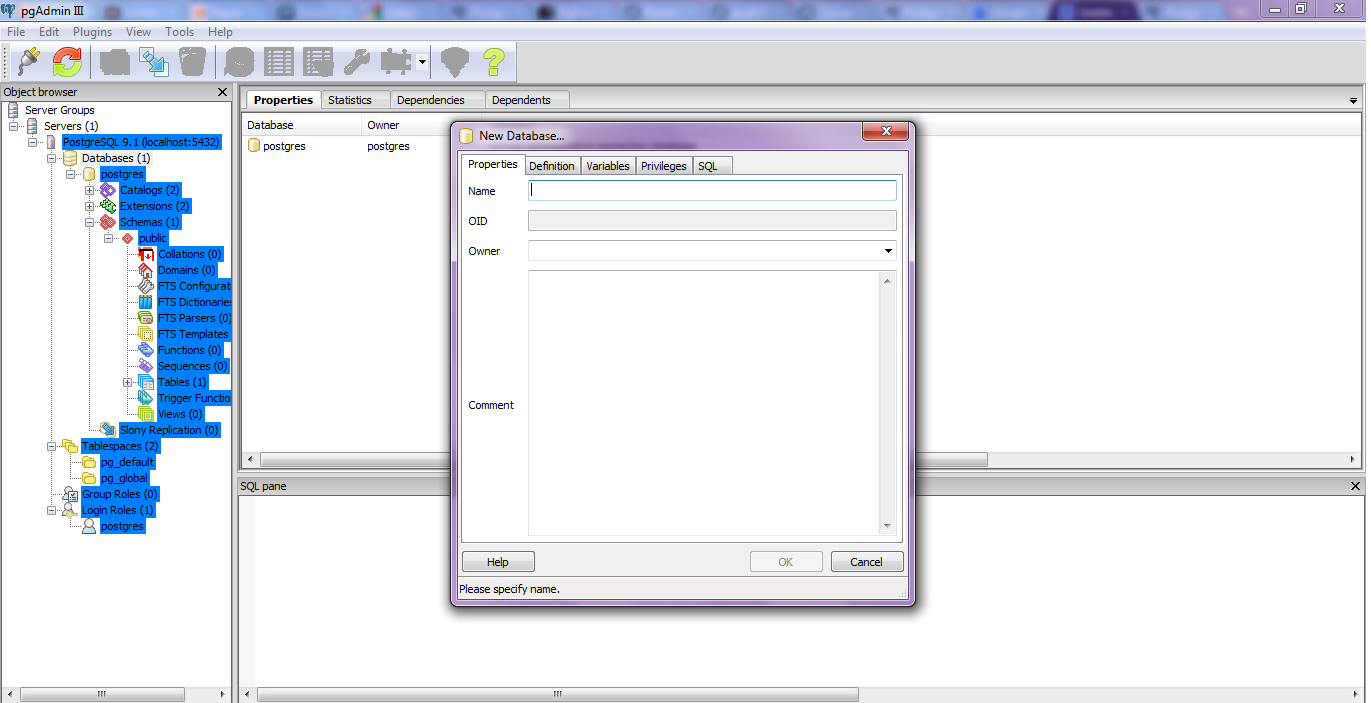
Create a connection using pgAdmin feature in Start Menu

2. download ODBC driver from
http://www.postgresql.org/ftp/odbc/versions/msi/
and the Win 64 edition from
http://wwwmaster.postgresql.org/download/mirrors-ftp/odbc/versions/msi/psqlodbc_09_00_0310-x64.zip

install ODBC driver

3. Go to

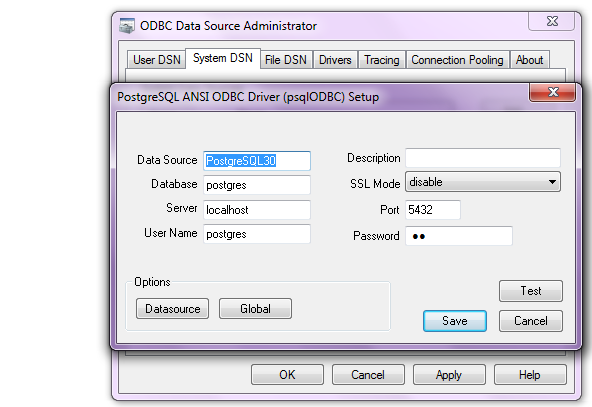
Start Menu\Control Panel\All Control Panel Items\Administrative Tools\Data Sources (ODBC)

4. Configure the following details in System DSN and  User DSN using the ADD tabs .Test connection to check if connection is working

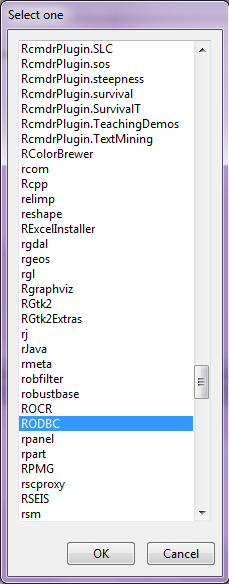
5. Start R and install and load library RODBC

6. Use following initial code for R- if you know SQL you can  do the rest
> library(RODBC)

> odbcDataSources(type = c(“all”, “user”, “system”))
SQLServer              PostgreSQL30             PostgreSQL35W
“SQL Server”    “PostgreSQL ANSI(x64)” “PostgreSQL Unicode(x64)”

> ajay=odbcConnect(“PostgreSQL30”, uid = “postgres”, pwd = “XX”)

> sqlTables(ajay)
TABLE_QUALIFIER TABLE_OWNER TABLE_NAME TABLE_TYPE REMARKS
1        postgres      public      names      TABLE

> crimedat <- sqlFetch(ajay, “names”)

Building a Regression Model in R – Use #Rstats

One of the most commonly used uses of Statistical Software is building models, and that too logistic regression models for propensity in marketing of goods and services.


If building a model is what you do-here is a brief easy essay on  how to build a model in R.

1) Packages to be used-

For smaller datasets

use these

  1. CAR Package http://cran.r-project.org/web/packages/car/index.html
  2. GVLMA Package http://cran.r-project.org/web/packages/gvlma/index.html
  3. ROCR Package http://rocr.bioinf.mpi-sb.mpg.de/
  4. Relaimpo Package
  5. DAAG package
  6. MASS package
  7. Bootstrap package
  8. Leaps package

Also see

http://cran.r-project.org/web/packages/rms/index.html or RMS package

rms works with almost any regression model, but it was especially written to work with binary or ordinal logistic regression, Cox regression, accelerated failure time models, ordinary linear models, the Buckley-James model, generalized least squares for serially or spatially correlated observations, generalized linear models, and quantile regression.

For bigger datasets also see Biglm http://cran.r-project.org/web/packages/biglm/index.html and RevoScaleR packages.

http://www.revolutionanalytics.com/products/enterprise-big-data.php

2) Syntax

  1. outp=lm(y~x1+x2+xn,data=dataset) Model Eq
  2. summary(outp) Model Summary
  3. par(mfrow=c(2,2)) + plot(outp) Model Graphs
  4. vif(outp) MultiCollinearity
  5. gvlma(outp) Heteroscedasticity using GVLMA package
  6. outlierTest (outp) for Outliers
  7. predicted(outp) Scoring dataset with scores
  8. anova(outp)
  9. > predict(lm.result,data.frame(conc = newconc), level = 0.9, interval = “confidence”)


For a Reference Card -Cheat Sheet see

http://cran.r-project.org/doc/contrib/Ricci-refcard-regression.pdf

3) Also read-

http://cran.r-project.org/web/views/Econometrics.html

http://cran.r-project.org/web/views/Robust.html


Interview Markus Schmidberger ,Cloudnumbers.com

Here is an interview with Markus Schmidberger, Senior Community Manager for cloudnumbers.com. Cloudnumbers.com is the exciting new cloud startup for scientific computing. It basically enables transition to a R and other platforms in the cloud and makes it very easy and secure from the traditional desktop/server model of operation.

Ajay- Describe the startup story for setting up Cloudnumbers.com

Markus- In 2010 the company founders Erik Muttersbach (TU München), Markus Fensterer (TU München) and Moritz v. Petersdorff-Campen (WHU Vallendar) started with the development of the cloud computing environment. Continue reading “Interview Markus Schmidberger ,Cloudnumbers.com”

Use R for Business- Competition worth $ 20,000 #rstats

All you contest junkies, R lovers and general change the world people, here’s a new contest to use R in a business application

http://www.revolutionanalytics.com/news-events/news-room/2011/revolution-analytics-launches-applications-of-r-in-business-contest.php

REVOLUTION ANALYTICS LAUNCHES “APPLICATIONS OF R IN BUSINESS” CONTEST

$20,000 in Prizes for Users Solving Business Problems with R


PALO ALTO, Calif. – September 1, 2011 – Revolution Analytics, the leading commercial provider of R software, services and support, today announced the launch of its “Applications of R in Business” contest to demonstrate real-world uses of applying R to business problems. The competition is open to all R users worldwide and submissions will be accepted through October 31. The Grand Prize winner for the best application using R or Revolution R will receive $10,000.

The bonus-prize winner for the best application using features unique to Revolution R Enterprise – such as itsbig-data analytics capabilities or its Web Services API for R – will receive $5,000. A panel of independent judges drawn from the R and business community will select the grand and bonus prize winners. Revolution Analytics will present five honorable mention prize winners each with $1,000.

“We’ve designed this contest to highlight the most interesting use cases of applying R and Revolution R to solving key business problems, such as Big Data,” said Jeff Erhardt, COO of Revolution Analytics. “The ability to process higher-volume datasets will continue to be a critical need and we encourage the submission of applications using large datasets. Our goal is to grow the collection of online materials describing how to use R for business applications so our customers can better leverage Big Analytics to meet their analytical and organizational needs.”

To enter Revolution Analytics’ “Applications of R in Business” competition Continue reading “Use R for Business- Competition worth $ 20,000 #rstats”