Google Snappy

Diagram of how a 32-bit integer is arranged in...
Image via Wikipedia

a cool sounding software- yet again by the guys from California, this one enables to zip and unzip Big Data much much faster

http://news.ycombinator.com/item?id=2356735

and

https://code.google.com/p/snappy/

Snappy is a compression/decompression library. It does not aim for maximum compression, or compatibility with any other compression library; instead, it aims for very high speeds and reasonable compression. For instance, compared to the fastest mode of zlib, Snappy is an order of magnitude faster for most inputs, but the resulting compressed files are anywhere from 20% to 100% bigger. On a single core of a Core i7 processor in 64-bit mode, Snappy compresses at about 250 MB/sec or more and decompresses at about 500 MB/sec or more.

Snappy is widely used inside Google, in everything from BigTable and MapReduce to our internal RPC systems. (Snappy has previously been referred to as “Zippy” in some presentations and the likes.)

For more information, please see the README. Benchmarks against a few other compression libraries (zlib, LZO, LZF, FastLZ, and QuickLZ) are included in the source code distribution.

Introduction
============
Snappy is a compression/decompression library. It does not aim for maximum
compression, or compatibility with any other compression library; instead,
it aims for very high speeds and reasonable compression. For instance,
compared to the fastest mode of zlib, Snappy is an order of magnitude faster
for most inputs, but the resulting compressed files are anywhere from 20% to
100% bigger. (For more information, see “Performance”, below.)
Snappy has the following properties:
* Fast: Compression speeds at 250 MB/sec and beyond, with no assembler code.
See “Performance” below.
* Stable: Over the last few years, Snappy has compressed and decompressed
petabytes of data in Google’s production environment. The Snappy bitstream
format is stable and will not change between versions.
* Robust: The Snappy decompressor is designed not to crash in the face of
corrupted or malicious input.
* Free and open source software: Snappy is licensed under the Apache license,
version 2.0. For more information, see the included COPYING file.
Snappy has previously been called “Zippy” in some Google presentations
and the like.
Performance
===========
Snappy is intended to be fast. On a single core of a Core i7 processor
in 64-bit mode, it compresses at about 250 MB/sec or more and decompresses at
about 500 MB/sec or more. (These numbers are for the slowest inputs in our
benchmark suite; others are much faster.) In our tests, Snappy usually
is faster than algorithms in the same class (e.g. LZO, LZF, FastLZ, QuickLZ,
etc.) while achieving comparable compression ratios.
Typical compression ratios (based on the benchmark suite) are about 1.5-1.7x
for plain text, about 2-4x for HTML, and of course 1.0x for JPEGs, PNGs and
other already-compressed data. Similar numbers for zlib in its fastest mode
are 2.6-2.8x, 3-7x and 1.0x, respectively. More sophisticated algorithms are
capable of achieving yet higher compression rates, although usually at the
expense of speed. Of course, compression ratio will vary significantly with
the input.
Although Snappy should be fairly portable, it is primarily optimized
for 64-bit x86-compatible processors, and may run slower in other environments.
In particular:
– Snappy uses 64-bit operations in several places to process more data at
once than would otherwise be possible.
– Snappy assumes unaligned 32- and 64-bit loads and stores are cheap.
On some platforms, these must be emulated with single-byte loads
and stores, which is much slower.
– Snappy assumes little-endian throughout, and needs to byte-swap data in
several places if running on a big-endian platform.
Experience has shown that even heavily tuned code can be improved.
Performance optimizations, whether for 64-bit x86 or other platforms,
are of course most welcome; see “Contact”, below.
Usage
=====
Note that Snappy, both the implementation and the interface,
is written in C++.
To use Snappy from your own program, include the file “snappy.h” from
your calling file, and link against the compiled library.
There are many ways to call Snappy, but the simplest possible is
snappy::Compress(input, &output);
and similarly
snappy::Uncompress(input, &output);
where “input” and “output” are both instances of std::string.

Google Cloud Print -print documents from the internet

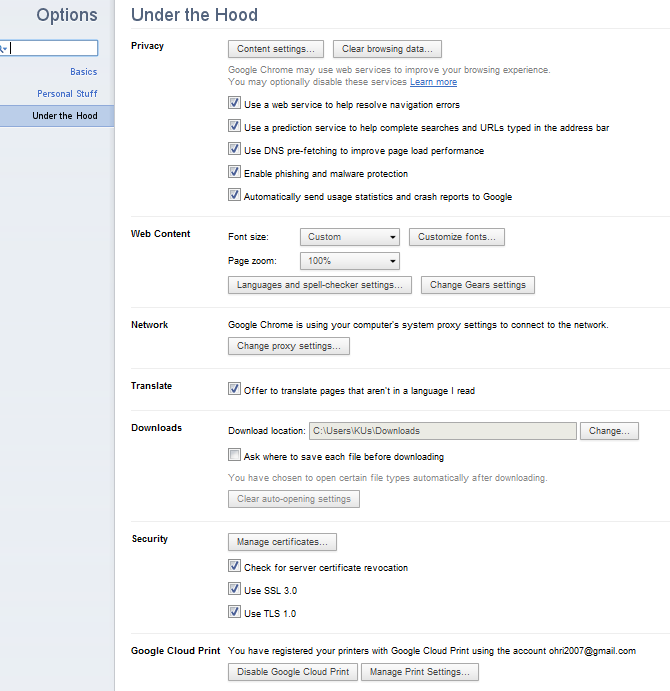
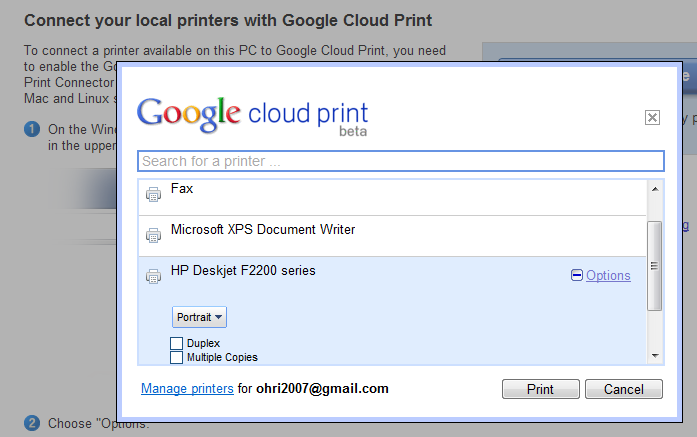
Print Jobs just got easier- especially if you prefer one printer, use Google Chrome, and can take 2 minutes to set up your printer to print from anywhere in the world through the internet.

It’s called Google Cloud Print– and it makes my life a lot easier when I travel and need to give to printer at home some documents to print rather than rely on external printers. See screenshots below and check out http://www.google.com/cloudprint/ for more

Google Refine

An interesting data cleaning software from Google at

https://code.google.com/p/google-refine/

From the page at

https://code.google.com/p/google-refine/wiki/UserGuide

The Basics

First, although Google Refine might start out looking like a spreadsheet program (Microsoft Excel, Google Spreadsheets, etc.), don’t expect it to work like a spreadsheet program. That’s almost like expecting a database to work like a text editor.

Google Refine is NOT for entering new data one cell at a time. It is NOT for doing accounting.

Google Refine is for applying transformations over many existing cells in bulk, for the purpose of cleaning up the data, extending it with more data from other sources, and getting it to some form that other tools can consume.

To use Google Refine, think in big patterns. For example, to spot errors, think

  • Show me every row where the string length of the customer’s name is longer than 50 characters (because I suspect that the customer’s address is mistakenly included in the name field)
  • Show me every row where the contract fee is less than 1 (because I suspect the fee was entered in unit of thousand dollars rather than dollars)
  • Show me every row where the description field (scraped from some web site) contains “&” (because I suspect it wasn’t decoded properly)

To edit data, think

  • For every row where the contract fee is less than 1, multiply the fee by 1000.
  • For every row where the customer name contains a comma (it has been entered as “last_name, first_name”), split the name by the comma, reverse the array, and join it back with a space (producing “first_name last_name”)

To specify patterns, use filters and facets. Typically, you create a filter or facet on a particular column. For example, you can create a numeric facet on the “contract fee” column and adjust its range selector to select values less than 1. If the default facet doesn’t do what you want, you can configure it (by clicking “change” on the facet’s header). For example, you can create a text facet with on the same “contract fee” column with this expression:

  value < 1

It will show 2 choices: true and false. Just select true. Then, invoke the Transform command on that same column and enter the expression

  value * 1000

That Transform command affects only rows where the “contract fee” cell contains a value less than 1.

You can use several filters and facets together. Only rows that are selected by all facets and filters will be shown in the data table. For example, say you have two text facets, one on the “contract fee” column with the expression

  value < 1

and another on the “state” column (with the default expression). If you select “true” in the first facet and “Nevada” in the second, then you will only see rows for contracts in Nevada with fees less than 1.

Analogies

Databases

If you have programmed databases before (performing SQL queries), then what Google Refine works should be quite familiar to you. Creating filters and facets and selecting something in them is like performing this SELECT statement:

  SELECT *
  WHERE ... constraints determined by selection in facets and filters ...

And invoking the Transform command on a column while having some filters and facets selected is like performing this UPDATE statement

  UPDATE whole_table SET column_X = ... expression ...
  WHERE ... constraints determined by selection in facets and filters ...

The difference between Google Refine and databases is that the facets show you choices that you can select, whereas databases assume that you already know what’s in the data.


Is Random Poetry Click Fraud

Meta-search-vi
Image via Wikipedia

Is poetry when randomized

Tweaked, meta tagged , search engine optimized

Violative of unseen terms and conditional clauses

Is random poetry or aggregated prose farmed for click fraud uses


I dont know, you tell me, says the blog boy,

Tapping away at the keyboard like a shiny new toy,

Geeks unfortunately too often are men too many,

Forgive the generalization, but the tech world is yet to be equalized.


If a New York Hot Dog  is a slice of heaven at four bucks a piece

Then why is prose and poetry at five bucks an hour considered waste

Ah I see, you have grown old and cynical,

Of the numerous stupid internet capers and cyber ways


The clicking finger clicks on

swiftly but mostly delightfully virally moves on

While people collect its trails and

ponder its aggregated merry ways


All people are equal but all links are not,

Thus overturning two centuries of psychology had you been better taught,

But you chose to drop out of school, and create that search engine so big

It is now a fraud catchers head ache that millions try to search engine optimize and rig


Once again, people are different, in so many ways so prettier

Links are the same hyper linked code number five or earlier

People think like artificial artificial (thus natural) neural nets

Biochemically enhanced Harmonically possessed.


rather than  analyze forensically and quite creepily

where people have been

Gentic Algorithms need some chaos

To see what till now hasnt been seen.


Again this was a random poem,

inspired by a random link that someone clicked

To get here, on a carbon burning cyber machine,

Having digested poem, moves on, unheard , unseen.

(Inspired by the Hyper Link at http://goo.gl/a8ijW )

Also-

QGIS and R

Logo graphic for the Quantum GIS free software...
Image via Wikipedia

Qgis is Quantum GIS http://www.qgis.org/

Quantum GIS (QGIS) is a user friendly Open Source Geographic Information System (GIS) licensed under the GNU General Public License. QGIS is an official project of the Open Source Geospatial Foundation (OSGeo). It runs on Linux, Unix, MacOSX, and Windows and supportsnumerous vector, raster, and database formats and functionalities.

Learn more about QGIS

Quantum GIS provides a continously growing number of capabilities provided by core functions and plugins. You can visualize, manage, edit, analyse data, and compose printable maps

Also you can use both Qgis and R through Python (!!!)

http://www.qgis.org/wiki/HomeRange_plugin#Home-range_analyses_in_QGIS_using_R_through_Python

Interesting app for webs (sometimes better suited than some R map packages)

https://plugins.qgis.org/plugins/HomeRange_plugin/

Based on a Google Summer of Code _

 Also

https://sites.google.com/site/eospansite/introqgis_r

and

HomeRange_plugin

http://hub.qgis.org/projects/quantum-gis/wiki/HomeRange_plugin


Also read-

http://blog.qgis.org/node/51

Related Articles-

R Graphs Resources

https://rforanalytics.wordpress.com/r-graphs-resources/

Using R from other Software

https://rforanalytics.wordpress.com/using-r-from-other-software/

and

Visualize NHL Play-by-Play using Tableau Public and R

http://brocktibert.wordpress.com/2011/02/13/visualize-nhl-play-by-play-using-tableau-public-and-r/

Google Chrome Web Store

Google Chrome Icon
Image via Wikipedia

If  you are a Google Chrome user and especially

if you are a not a Chrome user- check out the great web store with Games , Free apps (including for Blogging)

Nice1


Google Realtime Live Updates on Egypt Yemen Tunisia Jordan..

Using Google RealTime, a small icon on the left margin, you can monitor the latest uprisings. Apparently you can still get shot in most of the world to ask for freedom. What a trillion dollars of industrial arms complex could not do in Iraq or Afghanistan, hackers at Wikileaks, Bloggers in Middle East and Media people at Al Jazzera are doing right now. I am probably too young in 1989 when communists fell, but watching dictators fall by people power than external arms is good, no.

Now if only a few more people could listen to some Chinese Democracy