Google Takeout rocks!

I love the new Google Takeout. Just take out all the data stored within Google and download.

and unlike Facebook – it kind of builds this almost within a minute thus showing they are serious on privacy. Facebook takes too long to build the archive.

I would also prefer to download the data as a torrent or anything which is resumable if the connection breaks


Coming up-

yet another preview of Google +


Google Product Launches

So dear G launched a whole new set of Products. Some thoughts-

1) Join up the Social Invite List here – it is called Google Plus. We hope it doesnt end up like Buzz http://www.google.com/buzz or Orkut https://groups.google.com/group/opensocial-api/?pli=1 or Plus One http://www.google.com/webmasters/+1/button/ or Wave (email killer) http://googlewave.blogspot.com/

When the biggest cloud computing company in the world announces a phased rollout to a product- we wonder if they are really sure on launching the product rollout or just were in a hurry again.

Machine learning wont work with social , chaps. Well not everything in social. And the Google Social Blog forgot to write about it http://googlesocialweb.blogspot.com/

Well anyways, even Google Finance’s automated announcements feed failed to pick many of their own  product launches (or it does in an automated manner depending on which time period you choose – yes still no social buttons up http://www.google.com/finance?q=google

BACK TO GOOGLE PLUS

https://services.google.com/fb/forms/googleplus/

Google+

Thanks for stopping by.We’re still ironing out a few kinks in Google+, so it’s not quite ready for everyone to climb aboard. But, if you want, we’ll let you know the minute the doors are open for real. Cool? Cool.

  • First Name *
  • Email *

Google+ Privacy Policy

2) Google Web Fonts- Great product, how and hey http://googlewebfonts.blogspot.com/ when do you plan to monetize uhm  web fonts. Not that would be awesome. Not even a single ad on those pages- not even for philanthropy. or poor poets. or even Google Book Authors who self publish . Sound of silence….

http://www.google.com/webfonts/v2


3) Google Analytics gets some groove back. I really want to see much better integration of Google Apps and Google Analytics and Google Desktop search. Ditto for the interface. Enterprise software uses different fonts than retail software, dude. More fries, http://analytics.blogspot.com/ ?

Feature 1- Custom Reports for metrics I can slice and dice on my own

Feature 2 Awesome analytics for In-Page Analytics (beta feature) Beta is boring if overused. Try Theta maybe?

Feature 3 Daily Automated Alerts for Unusual Server /Traffic Activity

Feature 4 event Tracking is cool esp for understanding social media impact


It is still too early for mobile (in terms of traffic) as well as tablet analytics (?)

4) Angry Birds is still the best feature in Chrome  (but there are lots others at http://chrome.blogspot.com/) and esp http://googlecode.blogspot.com/2011/06/working-with-chromes-file-browser.html

Try http://chrome.angrybirds.com/

There are ways to make software that are not evil. Very very disappointed at total lack of monetization of this chrome app. Not even a T Shirt for me to buy ad . sighs

Funny thing- the product manager forgot to take off Facebook like button or even add the +1 button or even the Tweet this button.

Quo Vadis ?


5) What do you love?

http://www.wdyl.com/#

How to make a bomb

A trip-wire triggered pipe bomb mock-up used t...
Image via Wikipedia

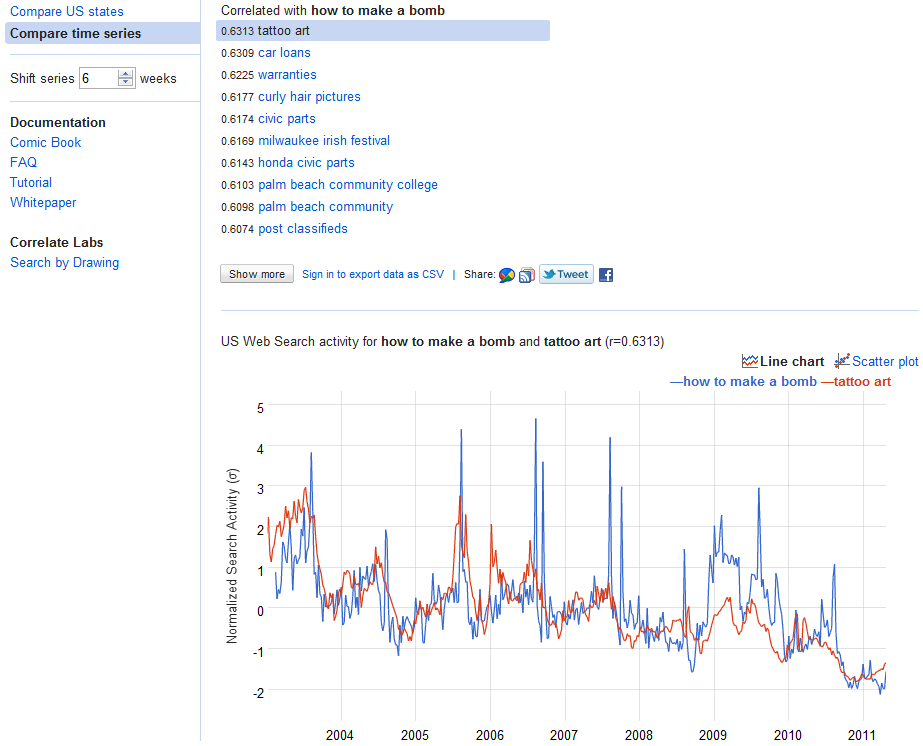
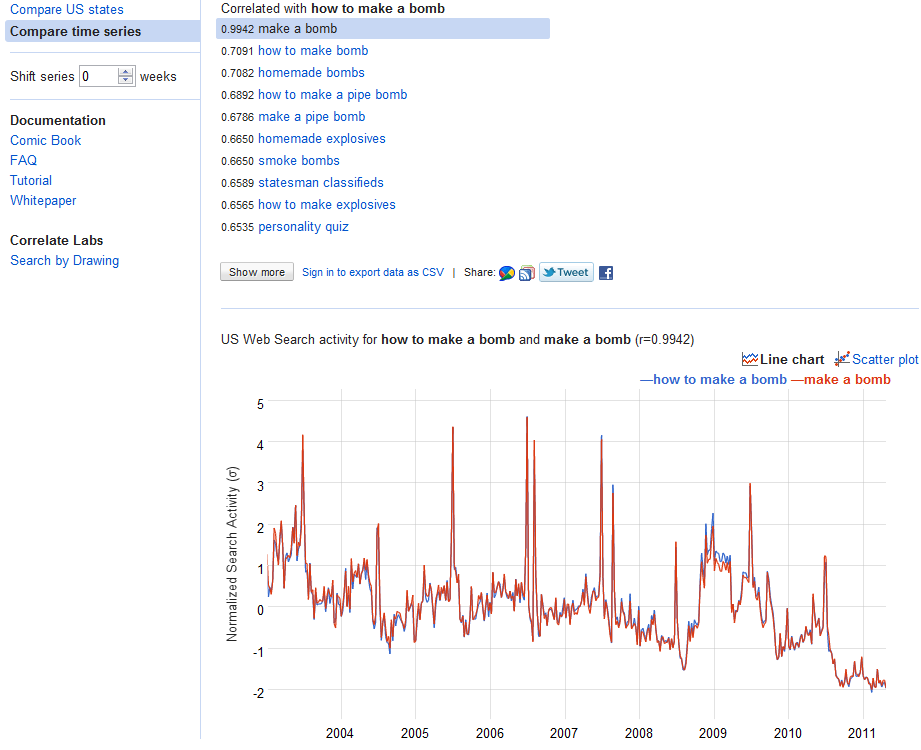
How to make a bomb search activity using Google CoRelate

First we search for how to make a bomb, it seems this has annual spikes.

http://correlate.googlelabs.com/search?e=how+to+make+a+bomb&t=weekly

Then we shift series by 6 weeks, assuming the dumbass takes 6 weeks to actually make the bomb.

http://correlate.googlelabs.com/search?e=how+to+make+a+bomb&t=weekly&shift=6

Note -corelation between making pipe bombs and tattoo art is not the same as causation. corelation is not causation unless google comes out with http://causation.google.com

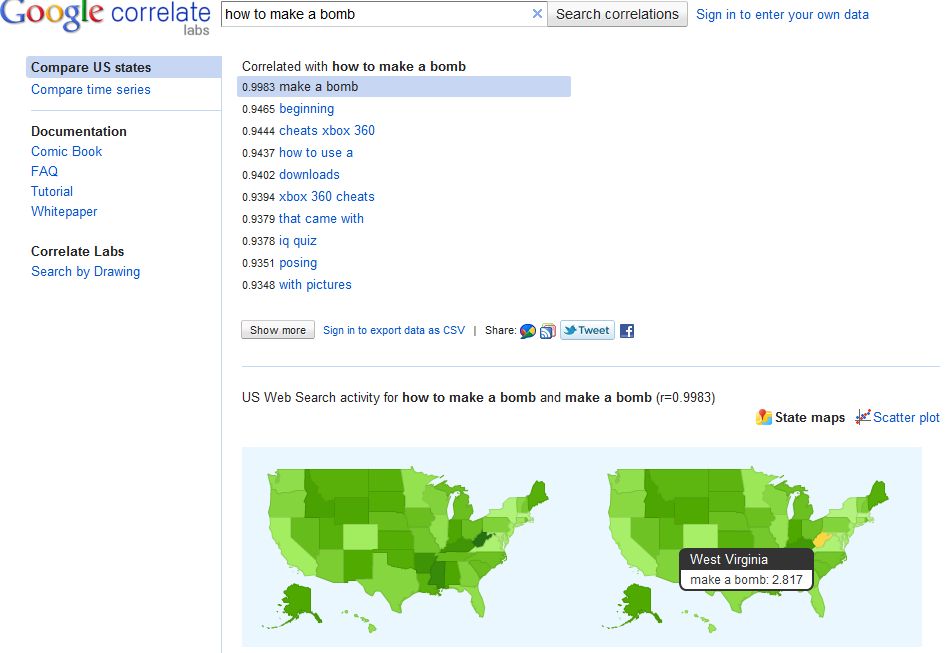
and we see West Virginia likes to search for “how to make a bomb ” 🙂 yeah, right 😉


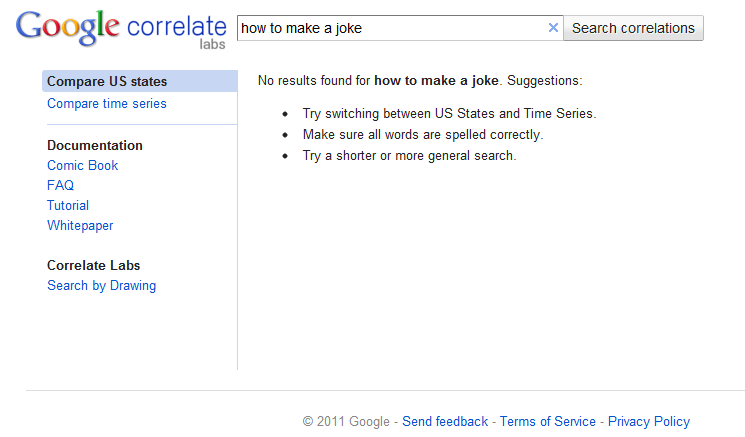
but heres the big oops.

http://correlate.googlelabs.com/search?e=how+to+make+a+joke&t=all

Google Storage for Developers goes into Enterprise Mode

Schematic representation of the SSL handshake ...
Image via Wikipedia

To help unify and uniform, collobrative work and data management and business models across the enterprise in secure SSL cloud environments- Google Storage has been rolling out some changes (read below)-this also gives you more options on the day Amazon goes ahem down (cough cough) because they didn’t think someone in their data environment could be sympathetic to free data.

——————————————————————————————————————————————————————–

https://groups.google.com/group/gs-announce

And now to the actual update.

We’re making some changes to Google Storage for Developers to make team-based development easier. As part of this work, we are introducing the concept of a project. In preparation for this feature, we will be creating projects for every user and migrating their buckets to it.

What does this mean for you?

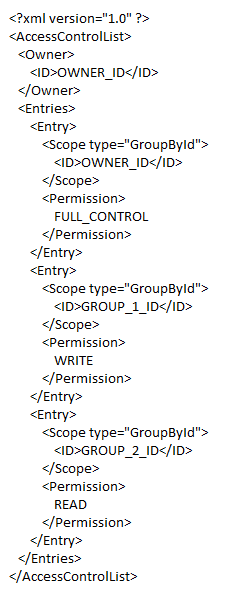
Everything will continue to work as it always has. However, you will notice that if you perform a get-acl operation on any of your buckets, you will see extra ACL entries. These entries correspond to project groups. Each group has only one member – the person who owned the buckets before the bucket migration;  no additional rights have been granted to any of your buckets or objects. You should preserve these new ACL grants if you modify bucket ACLs.

An example entry for a modified ACL would look like this:

We’ll be rolling out these changes over the next few days,

http://blog.cloudberrylab.com/2011/04/cloudberry-explorer-for-google-storage.html

Detailed Note on GS-

https://code.google.com/apis/storage/

Google Storage for Developers is a RESTful service for storing and accessing your data on Google’s infrastructure. The service combines the performance and scalability of Google’s cloud with advanced security and sharing capabilities. Highlights include:

Fast, scalable, highly available object store

  • All data replicated to multiple U.S. data centers
  • Read-your-writes data consistency
  • Objects of hundreds of gigabytes in size per request with range-get support
  • Domain-scoped bucket namespace

Easy, flexible authentication and sharing

  • Key-based authentication
  • Authenticated downloads from a web browser
  • Individual- and group-level access controls

In addition, Google Storage for Developers offers a web-based interface for managing your storage and GSUtil, an open source command line tool and library. The service is also compatible with many existing cloud storage tools and libraries. With pay-as-you-go pricing, it’s easy to get started and scale as your needs grow.

Google Storage for Developers is currently only available to a limited number of developers. Please sign up to join the waiting list.

Why does Matt (of WordPress) hate Matt (of Google)

Biz Stone, co-founder of Twitter
Image via Wikipedia

I want to show some bad ads of Google Ad sense. I pay through my nose for video upgrades and extra space to keep people happy.

120,000 views in 2010

Money earned By Matt (of WordPress)= $$$$$ from me

Money earned by Mutt -(thats me)= 000,000,000

Please allow me to run ads on wordpress.com

or create your own fucking ad networks

but do it PHAST.

ESLE blog trsnfer using Blog Export, divide Xml file into 13 files  using Notepad copy and paste

go to Appspot

Convert files to Blogger files\

Thats the company BIZ stone OF tWITTER  made

before these Two matts got into dog fights.

https://wordpress2blogger.appspot.com/

Ever wanted to move your WordPress blogs over to Blogger? This site can aid in the process!

Instructions

  1. Login to your WordPress account and navigate to the Dashboard for the blog that you’d like to transfer to Blogger.
  2. Click on the Manage tab below the Blog name.
  3. Click on the Export link below the Manage tab.
  4. Download the WordPress WXR export file by clicking on Download Export File.
  5. Save this file to your local machine.
  6. Browse to that saved document with the form below and click Convert.
     
  7. Save this file to your local machine. This file will be the contents of your posts/comments from WordPress in a Blogger export file.
  8. Login to your Blogger or create a new user.
  9. Once logged in, click on the Create a Blog link from the user dashboard, and then click on the Import Blog Tool
  10. Follow the instructions and upload your Blogger export file when prompted.
  11. After completing the import wizard, you should have a set of imported posts from WordPress that you can now publish to Blogger. Have fun!

NOTE: This hosted application will only allow downloads smaller than 1MB.

For information on how to run this conversion on your own, visit the open source project hosted at code.google.com

Powered by Google App Engine