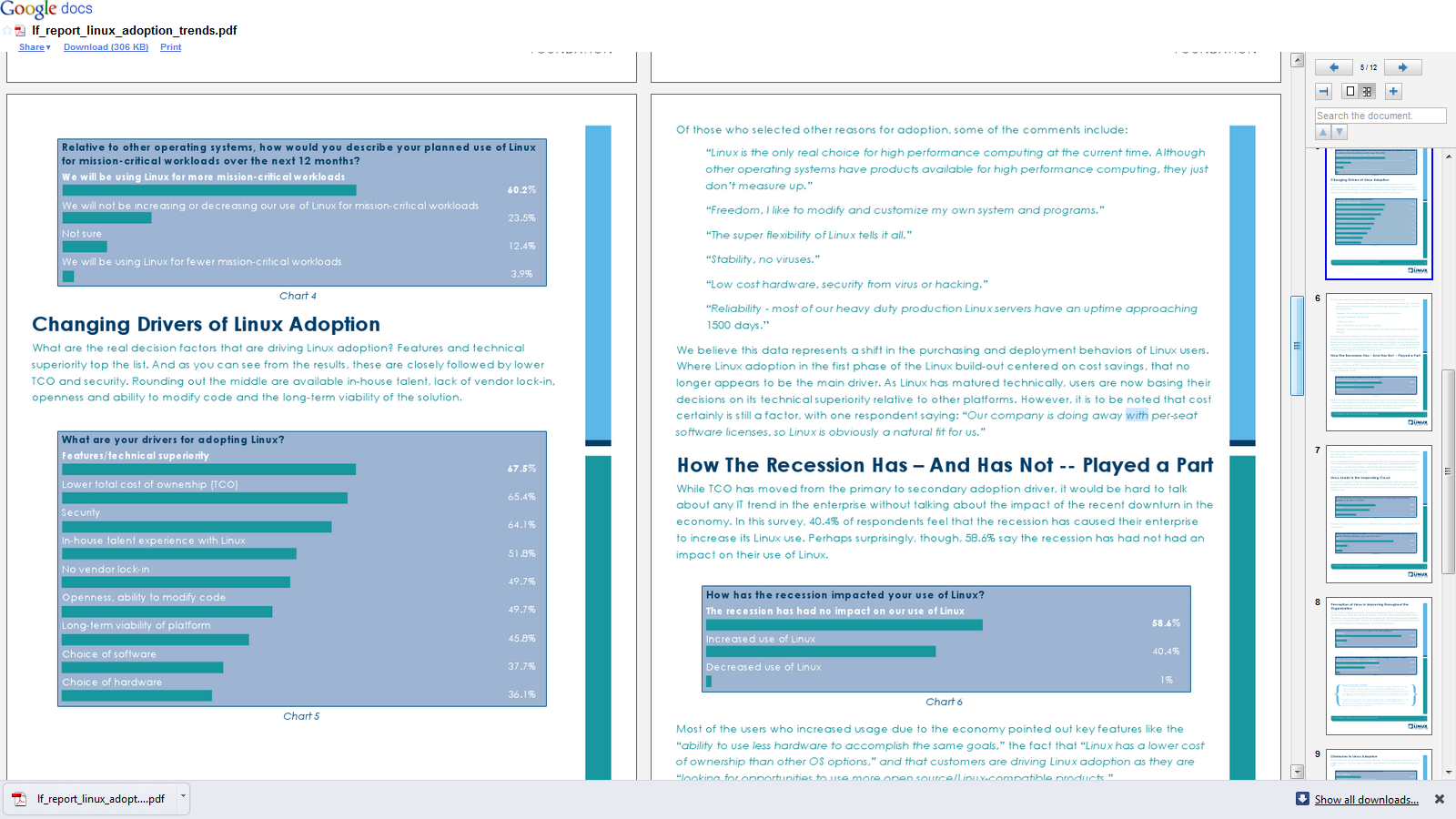
A new report from Linux Foundation found significant growth trends for enterprise usage of Linux- which should be welcome to software companies that have enabled Linux versions of software, service providers that provide Linux based consulting (note -lesser competition, lower overheads) and to application creators.
Key Findings from the Report
• 79.4 percent of companies are adding more Linux relative to other operating systems in the next five years.
• More people are reporting that their Linux deployments are migrations from Windows than any other platform, including Unix migrations. 66 percent of users surveyed say that their Linux deployments are brand new (“Greenfield”) deployments.
• Among the early adopters who are operating in cloud environments, 70.3 percent use Linux as their primary platform, while only 18.3 percent use Windows.
• 60.2 percent of respondents say they will use Linux for more mission-critical workloads over the next 12 months.
• 86.5 percent of respondents report that Linux is improving and 58.4 percent say their CIOs see Linux as more strategic to the organization as compared to three years ago.
• Drivers for Linux adoption extend beyond cost: technical superiority is the primary driver, followed by cost and then security.
• The growth in Linux, as demonstrated by this report, is leading companies to increasingly seek Linux IT professionals, with 38.3 percent of respondents citing a lack of Linux talent as one of their main concerns related to the platform.
• Users participate in Linux development in three primary ways: testing and submitting bugs (37.5 percent), working with vendors (30.7 percent) and participating in The Linux Foundation activities (26.0 percent).
and from the report itself-
It is an interesting report (and for some reason in a blue font-making it more like a blue paper than a white paper)
Here is an important new step in Python- the established statistical programming language (used to be really pushed by SPSS in pre-IBM days and the rPy package integrates R and Python).
Well the news ( http://www.kdnuggets.com/2010/10/eap-evolutionary-algorithms-in-python.html ) is the release of Distributed Evolutionary Algorithms in Python. If your understanding of modeling means running regression and iterating it- you may need to read some more. If you have felt frustrated at lack of parallelization in statistical software as well as your own hardware constraints- well go DEAP (and for corporate types the licensing is
DEAP is intended to be an easy to use distributed evolutionary algorithm library in the Python language. Its two main components are modular and can be used separately. The first module is a Distributed Task Manager (DTM), which is intended to run on cluster of computers. The second part is the Evolutionary Algorithms in Python (EAP) framework.
The most basic features of EAP requires Python2.5 (we simply do not offer support for 2.4). In order to use multiprocessing you will need Python2.6 and to be able to combine the toolbox and the multiprocessing module Python2.7 is needed for its support to pickle partial functions.
If you want your project listed here, simply send us a link and a brief description and we’ll be glad to add it.
and from the wordpress.com blog (funny how people like code.google.com but not blogger.google.com anymore) at http://deapdev.wordpress.com/
EAP is part of the DEAP project, that also includes some facilities for the automatic distribution and parallelization of tasks over a cluster of computers. The D part of DEAP, called DTM, is under intense development and currently available as an alpha version. DTM currently provides two and a half ways to distribute workload on a cluster or LAN of workstations, based on MPI and TCP communication managers.
This public release (version 0.6) is more complete and simpler than ever. It includes Genetic Algorithms using any imaginable representation, Genetic Programming with strongly and loosely typed trees in addition to automatically defined functions, Evolution Strategies (including Covariance Matrix Adaptation), multiobjective optimization techniques (NSGA-II and SPEA2), easy parallelization of algorithms and much more like milestones, genealogy, etc.
We are impatient to hear your feedback and comments on that system at .
Best,
François-Michel De Rainville
Félix-Antoine Fortin
Marc-André Gardner
Christian Gagné
Marc Parizeau
Laboratoire de vision et systèmes numériques
Département de génie électrique et génie informatique
Université Laval
Quebec City (Quebec), Canada
and if you are new to Python -sigh here are some statistical things (read ad-van-cED analytics using Python) by a slideshare from Visual numerics (pre Rogue Wave acquisition)
1) It is slower with bigger datasets than SPSS language and SAS language .If you use bigger datasets, then you should either consider more hardware , or try and wait for some of the ODBC connect packages.
2) It needs more time to learn than SAS language .Much more time to learn how to do much more.
3) R programmers are lesser paid than SAS programmers.They prefer it that way.It equates the satisfaction of creating a package in development with a world wide community with the satisfaction of using a package and earning much more money per hour.
4) It forces you to learn the exact details of what you are doing due to its object oriented structure. Thus you either get no answer or get an exact answer. Your customer pays you by the hour not by the correct answers.
5) You can not push a couple of buttons or refer to a list of top ten most commonly used commands to finish the project.
6) It is free. And open for all. It is socialism expressed in code. Some of the packages are built by university professors. It is free.Free is bad. Who pays for the mortgage of the software programmers if all softwares were free ? Who pays for the Friday picnics. Who pays for the Good Night cruises?
7) It is free. Your organization will not commend you for saving them money- they will question why you did not recommend this before. And why did you approve all those packages that expire in 2011.R is fReeeeee. Customers feel good while spending money.The more software budgets you approve the more your salary is. R thReatens all that.
8) It is impossible to install a package you do not need or want. There is no one calling you on the phone to consider one more package or solution. R can make you lonely.
9) R uses mostly Command line. Command line is from the Seventies. Or the Eighties. The GUI’s RCmdr and Rattle are there but still…..
10) R forces you to learn new stuff by the month. You prefer to only earn by the month. Till the day your job got offshored…
Ajay- The above post was reprinted by personal request. It was written on Jan 2009- and may not be truly valid now. It is meant to be taken in good humor-not so seriously.
If you are an analytics blogger who writes, and is aggregated on an analytical community- read on- Here’s how blog aggregation communities can help you lose 30% of all future traffic long term, while giving you a short term.
The problem is not created by Blogging Communities (like R-Bloggers, or PlanteR, or Smart Data Collective or AnalyticBridge or even BeyeBlogs )
It is created by the way Google Page Rank is structured- you see given exactly the same content on two different we pages- Google Page Rank will place the higher Page Rank results higher. This is counter intutive and quite simple to rectify- The Google Spider can just use the Time Stamp for choosing which article was published where first (Obviously on your blog, AND then later to the aggregator).
How bad is the mess? Well joining ANY blog aggregation will lead to an instant lift of upto 10-50 % of your current traffic as similar bloggers try and read about you. However you can lose the long term 30% proportion which is a benchmark of search engine created traffic for you.
So do you opt out of blog aggregation? No. It’s a SEO mess and it’s unfair to punish your blog aggregator, most of whom are running on ad-supported sponsors or their own funds on dry fumes to publish your content. Most of the fore mentioned communities are created by excellent people I interacted with heavily- and they are genuinely motivated to give readers an easy way to keep up with blogs. Especially Smart Data Collective, Analyticbridge and R-bloggers whose founders I have known personally.
You can do one thing- create manual summaries in the excerpt feature of your blog posts- it’s just below the WordPress page. And switch your RSS feed to summary rather than full. It avoids losing keyword rank to other websites, it prevents the Blog Aggregation from gaining too much influence in key word related searches, and it keeps your whole eco system happy, Best of All it helps readers of Blog Aggregators- since most of them use a summary on the front page anyways.
An additional thought on Google Page Rank- something I have sulked over but not spoken for a long long time. It ignores the value of reader- If Bill Gates, Steve Jobs, and 500 ceos from Fortune 500 companies read my blog but do not link to it- it will count daily traffic as 500. Probably it will give more weightage to Paris Hilton fans.
A suggestion-humbly- you can use IP Address lookup of visitors to see if traffic is coming from corporate sources or retail sources -Clicky from GetClicky does this. Use it as feedback in Google Analytics as well as Google Trends.
And maybe PageRank needs to add quantity and quality of visitors as additional variables . Do a A/B test guys some Chi Square juice- its not quite Mad Men Adverting but its still good fun.
New software just released from the guys in California (@RevolutionR) so if you are a Linux user and have academic credentials you can download it for free (@Cmastication doesnt), you can test it to see what the big fuss is all about (also see http://www.revolutionanalytics.com/why-revolution-r/benchmarks.php) –
Revolution Analytics has just released Revolution R Enterprise 4.0.1 for Red Hat Enterprise Linux, a significant step forward in enterprise data analytics. Revolution R Enterprise 4.0.1 is built on R 2.11.1, the latest release of the open-source environment for data analysis and graphics. Also available is the initial release of our deployment server solution, RevoDeployR 1.0, designed to help you deliver R analytics via the Web. And coming soon to Linux: RevoScaleR, a new package for fast and efficient multi-core processing of large data sets.
As a registered user of the Academic version of Revolution R Enterprise for Linux, you can take advantage of these improvements by downloading and installing Revolution R Enterprise 4.0.1 today. You can install Revolution R Enterprise 4.0.1 side-by-side with your existing Revolution R Enterprise installations; there is no need to uninstall previous versions.
Download Information
The following information is all you will need to download and install the Academic Edition.
Supported Platforms:
Revolution R Enterprise Academic edition and RevoDeployR are supported on Red Hat® Enterprise Linux® 5.4 or greater (64-bit processors).
Approximately 300MB free disk space is required for a full install of Revolution R Enterprise. We recommend at least 1GB of RAM to use Revolution R Enterprise.
For the full list of system requirements for RevoDeployR, refer to the RevoDeployR™ Installation Guide for Red Hat® Enterprise Linux®.
Download Links:
You will first need to download the Revolution R Enterprise installer.
Installation Instructions for Revolution R Enterprise Academic Edition
After downloading the installer, do the following to install the software:
Log in as root if you have not already.
Change directory to the directory containing the downloaded installer.
Unpack the installer using the following command:
tar -xzf Revo-Ent-4.0.1-RHEL5-desktop.tar.gz
Change directory to the RevolutionR_4.0.1 directory created.
Run the installer by typing ./install.py and following the on-screen prompts.
Getting Started with the Revolution R Enterprise
After you have installed the software, launch Revolution R Enterprise by typing Revo64 at the shell prompt.
Documentation is available in the form of PDF documents installed as part of the Revolution R Enterprise distribution. Type Revo.home(“doc”) at the R prompt to locate the directory containing the manuals Getting Started with Revolution R (RevoMan.pdf) and the ParallelR User’s Guide(parRman.pdf).
Installation Instructions for RevoDeployR (and RServe)
After downloading the RevoDeployR distribution, use the following steps to install the software:
Note: These instructions are for an automatic install. For more details or for manual install instructions, refer to RevoDeployR_Installation_Instructions_for_RedHat.pdf.
Log into the operating system as root.
su –
Change directory to the directory containing the downloaded distribution for RevoDeployR and RServe.
Unzip the contents of the RevoDeployR tar file. At prompt, type:
tar -xzf deployrRedHat.tar.gz
Change directories. At the prompt, type:
cd installFiles
Launch the automated installation script and follow the on-screen prompts. At the prompt, type:
./installRedHat.sh Note:Red Hat installs MySQL without a password.
Getting Started with RevoDeployR
After installing RevoDeployR, you will be directed to the RevoDeployR landing page. The landing page has links to documentation, the RevoDeployR management console, the API Explorer development tool, and sample code.
The simple R-benchmark-25.R test script is a quick-running survey of general R performance. The Community-developed test consists of three sets of small benchmarks, referred to in the script as Matrix Calculation, Matrix Functions, and Program Control.
Revolution Analytics has created its own tests to simulate common real-world computations. Their descriptions are explained below.
Linear Algebra Computation
Base R 2.9.2
Revolution R (1-core)
Revolution R (4-core)
Speedup (4 core)
Matrix Multiply
243 sec
22 sec
5.9 sec
41x
Cholesky Factorization
23 sec
3.8 sec
1.1 sec
21x
Singular Value Decomposition
62 sec
13 sec
4.9 sec
12.6x
Principal Components Analysis
237 sec
41 sec
15.6 sec
15.2x
Linear Discriminant Analysis
142 sec
49 sec
32.0 sec
4.4x
Speedup = Slower time / Faster Time – 1
Matrix Multiply
This routine creates a random uniform 10,000 x 5,000 matrix A, and then times the computation of the matrix product transpose(A) * A.
set.seed (1)
m <- 10000
n <- 5000
A <- matrix (runif (m*n),m,n)
system.time (B <- crossprod(A))
The system will respond with a message in this format:
User system elapsed
37.22 0.40 9.68
The “elapsed” times indicate total wall-clock time to run the timed code.
The table above reflects the elapsed time for this and the other benchmark tests. The test system was an INTEL® Xeon® 8-core CPU (model X55600) at 2.5 GHz with 18 GB system RAM running Windows Server 2008 operating system. For the Revolution R benchmarks, the computations were limited to 1 core and 4 cores by calling setMKLthreads(1) and setMKLthreads(4) respectively. Note that Revolution R performs very well even in single-threaded tests: this is a result of the optimized algorithms in the Intel MKL library linked to Revolution R. The slight greater than linear speedup may be due to the greater total cache available to all CPU cores, or simply better OS CPU scheduling–no attempt was made to pin execution threads to physical cores. Consult Revolution R’s documentation to learn how to run benchmarks that use less cores than your hardware offers.
Cholesky Factorization
The Cholesky matrix factorization may be used to compute the solution of linear systems of equations with a symmetric positive definite coefficient matrix, to compute correlated sets of pseudo-random numbers, and other tasks. We re-use the matrix B computed in the example above:
system.time (C <- chol(B))
Singular Value Decomposition with Applications
The Singular Value Decomposition (SVD) is a numerically-stable and very useful matrix decompisition. The SVD is often used to compute Principal Components and Linear Discriminant Analysis.
# Singular Value Deomposition
m <- 10000
n <- 2000
A <- matrix (runif (m*n),m,n)
system.time (S <- svd (A,nu=0,nv=0))
# Principal Components Analysis
m <- 10000
n <- 2000
A <- matrix (runif (m*n),m,n)
system.time (P <- prcomp(A))
# Linear Discriminant Analysis require (‘MASS’)
g <- 5
k <- round (m/2)
A <- data.frame (A, fac=sample (LETTERS[1:g],m,replace=TRUE))
train <- sample(1:m, k)
system.time (L <- lda(fac ~., data=A, prior=rep(1,g)/g, subset=train))
Cloudera Certification establishes you as a trusted and valuable resource for those working with Hadoop. Whether your company is just looking into the technology or your customers are asking for help, Cloudera Certification demonstrates your ability to solve problems using Hadoop.
Consultants, developers and technical leaders can use Cloudera Certification to demonstrate their experience with Hadoop.
Employers can use Cloudera Certification to identify candidates for new jobs or internal promotions, as well as ensure team members share a common knowledge base.
Customers can reduce risk by relying on contractors and suppliers who retain current Cloudera Certification for their personnel.
If you’d like to obtain Cloudera Certification for Developers or Administrators





 Cloudera Certification establishes you as a trusted and valuable resource for those working with Hadoop. Whether your company is just looking into the technology or your customers are asking for help, Cloudera Certification demonstrates your ability to solve problems using Hadoop.
 DECISION STATS