BORN IN THE USA


While Tor remains the tool of choice with pseudo-techie hacker wannabes , there is enough juice and smoke and mirrors on the market to confuse your average Joe.
For a secure browsing experience on Mobile – do NOT use either Apple or Windows OS
Use Android and this app called Orbot in particular
Installing Tor with a QR code
Orbot is easy to install by simply scanning the following QR code with your Android Barcode scanner.
Installing Tor from the Android Market
Orbot is available in the Android Market.
ENTER PEERNET
If you have a Dell PC, well just use PeerNet to configure and set up your own network around the neighbourhood. This is particularly applicable if you are in country that is both repressive and not so technologically advanced. Wont work in China or USA.
http://support.dell.com/support/edocs/network/p70008/EN/vista_7/peernet.htm
What is a peer network?
A peer network is a network in which one computer can connect directly to another computer. This capability is accomplished by enabling access point (AP) functionality on one of the computers. Other computers can then connect to this computer in the same way that they would connect to a physical AP. If Internet Connection Sharing is enabled on the computer that has the AP functionality, computers that connect to that computer have Internet connectivity as well.
A basic peer network, which requires no networking knowledge or experience to set up, should meet the needs of most home users and small businesses. By default, a basic peer network is configured with the strongest available security (see How do I set up a basic peer network?).
For users who are familiar with wireless networking technology, advanced configuration features are available to do the following:
• Change security settings (see How do I configure my peer network?)
• Choose which method (push button or PIN) computers with Wi-Fi Protected Setup™ capability can join your peer network (see How do I allow peer devices to join my peer network using Wi-Fi Protected Setup technology?)
• Change the DHCP Server IP address (see How do I configure my peer network?).
• Change the channel on which to operate your peer network (see How do I configure my peer network?)
If you are really really in a need for secure browsing (like you are maybe a big hot shot in the tech world), I suggest go over to VMWare
http://www.vmware.com/products/player/
create a seperate Linux (Ubuntu for ease) virtual disc, then download the Tor Browser Bundle from
https://www.torproject.org/projects/torbrowser.html.en for surfing and a Peernet (above) or a prepaid one time use disposable mobile pre-paid wireless card. It is also quite easy to delete your virtual disc in times of emergencies (but it is best to use encryption even when in Ubuntu https://help.ubuntu.com/community/EncryptedHome)
IRC chat is less secure than you think it is thanks to BOT Trawlers- so I am hoping someone in the open source community updates Waste Again for encrypted chats http://wasteagain.sourceforge.net/
What is “WASTE again”?
“WASTE again” enables you to create a decentralized and secure private mesh network using an unsecure network, such as the internet. Once the public encryption keys are exchanged, sending messages, creating groupchats and transferring files is easy and secure.
Creating a mesh
To create a mesh you need at least two computers with “WASTE again” installed. During installation, a unique pair of public and private keys for each computer is being generated. Before the first connection can be established, you need to exchange these public keys. These keys enable “WASTE again” to authenticate every connection to other “WASTE again” clients.
After exchanging the keys, you simply type in the computers IP address to connect to. If that computer is located behind a firewall or a NAT-router, you have to create a portmap first to enable incoming connections.
At least one computer in your mesh has to be able to accept incoming connections, making it a “public node”. If no direct connection between two firewalled computers can be made, “WASTE again” automatically routes your traffic through one or more of the available public nodes.
Every new node simply has to exchange keys with one of the connected nodes and then connect to it. All the other nodes will exchange their keys automatically over the mesh.
This is an interesting use case of anonymous surfing through mobile by using Tor Project on the Android Mobile OS.
Source- https://guardianproject.info/apps/orbot/
Orbot requires different configuration depending on the Android operating system version it is used on.
For standard Android 1.x devices (G1, MyTouch3G, Hero, Droid Eris, Cliq, Moment)
For Android 2.x devices: Droid, Nexus, Evo, Galaxy
If you are new to using Chrome, there are many delightful features just beneath the surface.
If you are an Internet Explorer or Firefox or Safari or Arora or Opera or Sea Monkey browser user- this is one more reason to test, just test Chrome.
Ok so who Made chrome- (note the link i.e about:credits is what you type in chrome to see features)


This is a ten step program to fight hacking attacks. You may or may not choose to ignore it, laugh at it, or ponder on it.
1) Internet security is a billion dollar business which will only grow in size as cloud computing approaches. Pioneers in providing security will earn considerable revenue like McAffee , Norton did in the PC era. Incidentally it also means the consulting/partner group that is willing to work with virtual workers and virtual payments to offshore consultants.
2) Industrial espionage has existed from the days the West stole Gunpowder and Silk formula from China (and China is now doing the same to its software). The company and country will the best hackers will win. Keep your team motivated mate, or it is very easy for them to defect to the other side of the (cyber) wall.
3) When 2 billion people have access to internet the number of hackers will grow in number and quality much more rapidly than when only 100 million people across the world had access. Thanks to Google Translate, Paypal, Skype video Call, Tor Project, and Google Voice i can and have collaborative with hackers almost in all geographies. You can only imagine what the black hats are doing.
4) Analyzing hackers is like reading Chinese Tea Leaves. If you have experienced analysts, you will slip up. recruit the hackers in the dormitory before China recruits them using Lulz Security as a bogus cover. or USA recruits them as cover for spreading democracy in the Arab countries.
5) get your website audited for security breaches. sponsor a hack my website contest. before someone else does it for you.
6) Fighting hackers was always tough. But now we have part time hackers , people with perfectly respectable jobs who look like Mr Andersen and hack like Neo from the Matrix. Every kid once wanted to be a firefighter. Every geek dreams of the one ultimate hack.
7) if you cant beat hackers, join them.
8) the more machine data is generated, the more you need external experts and newer software interfaces. Investing in open data, datasets is good. Keeping Bradley manning naked in his cell is bad. ignore the bad PR at your own cost.
9) Stop blaming China for every hack attack. You are a techie not a politician
10) Hack hard. Hack well. If someone hacks you, you will need to hack them off offensively unless you just want to be an easy mark for the rest of your lives. Counter -hacking expertise needs to be strengthened and groomed. hacking is an offense not just a defense game.

How to disguise your IP Address from your most wonderful glorious leaders-

From
https://www.torproject.org/projects/torbrowser.html.en
The Tor software protects you by bouncing your communications around a distributed network of relays run by volunteers all around the world: it prevents somebody watching your Internet connection from learning what sites you visit, it prevents the sites you visit from learning your physical location, and it lets you access sites which are blocked.
The Tor Browser Bundle lets you use Tor on Windows, Mac OS X, or Linux without needing to install any software. It can run off a USB flash drive, comes with a pre-configured web browser, and is self-contained. The Tor IM Browser Bundleadditionally allows instant messaging and chat over Tor. If you would prefer to use your existing web browser, install Tor permanently, or if you don’t use Windows, see the other ways to download Tor.
Freedom House has produced a video on how to find and use the Tor Browser Bundle. If you don’t see a video below, view it at Youtube . Know of a better video or one translated into your language? Let us know!

and if you now want to see or check your own website for a Denial of Service attack , download this
http://sourceforge.net/projects/loic/
This is the software for which 32 Turkish teenagers got arrested for bringing down their govt websites. Do NOT USE it for ILLEGAL purposes,
because 1) it is hosted on a western website that due to Patriot Act would tracking downloads as well as most likely be inserting some logging code into your computer (especially if you are still on Windows)
2) Turkey being a NATO member got rather immediate notice of this – which makes it very likely that this tool is compromised in the Western Hemisphere. You can probably use this in Eastern Hemisphere country excluding Israel, Turkey, China, India ,Korea or Japan because these countries do have sophisticated hackers working for the government as well.
3) This is just a beginners tool to understand how flooding a website with requests work.
http://sourceforge.net/projects/loic/files/

Basically download, unzip the file
Enter URL and click Lock on to know IP address.
use HTTP Method. Make say 1000 threads.
Then press the IMMA CHARGING MY LAZER big button.
Note the Failed Tab tells you how good or bad this method is.
Note – it wont work on my blogs hosted on wordpress.com- but then those blogs had a root level breach some time back. It did work on both my blogspot and my tumblr blogs, and it completely shattered my son’s self hosted wordpress blog (see below)

or Surfing the Net Anonmously and Having some Fun.
On the weekend, while browsing through http://freelancer.com I came across an intriguing offer-
http://www.freelancer.com/projects/by-job/YouTube.html
Basically projects asking for increasing Youtube Views-
Hmm.Hmm.Hmm
So this is one way I though it could be done-
1) Create an IP Address Anonymizer
Thats pretty simple- I used the Tor Project at http://www.torproject.org/easy-download.html.en
Basically it uses a peer to peer network to connect to the internet and you can reset the connection as you want-so it hides your IP address.
Also useful for sending hatemail- limitation uses Firefox browser only.And also your webpage default keeps changing languages as the ip address changes.

Note-
Check your IP address at http://www.whatismyip.com/The Tor Project is a 501(c)(3) non-profit based in the United States. The official address of the organization is:
The Tor Project
969 Main Street, Suite 206
Walpole, MA 02081 USA
2) Creating a Bot or an automatic clicking code ( without knowing code)
Go to https://addons.mozilla.org/en-US/firefox/addon/3863/
Remember when you could create an Excel Macro by just recording the Macro (in Excel 2003)
So while surfing if you need to do something again and again (like go the same Youtube video and clicking Like 5000 times) you can press record Macro
see screenshot below-
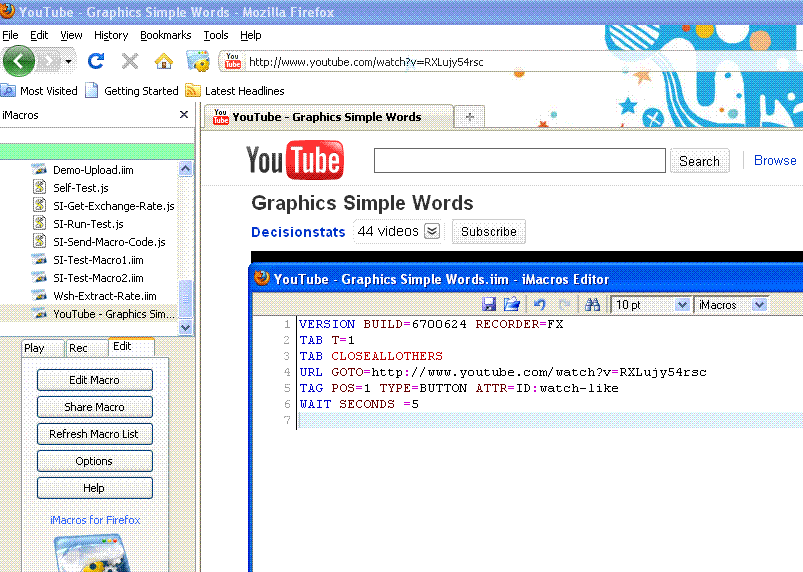
Note I have added two lines of code -WAIT SECONDS= 6
This means everytime the code runs in a loop it will wait for 6 seconds and then reload.
However I recommend you create a random number of wait seconds using Google Spreadsheet and the function RANDBETWEEN(5,400) (to limit between 5 and 400 seconds) and also use CONCATENATE with click and drag to create RANDOM wait times (instead of typing it say 500 times yourself)
see https://spreadsheets.google.com/ccc?key=tr18JVEE2TmAuH5V8fzJLRA#gid=0

That’s it – Your Anonymous Bot is ready.
See the analytical results for my personal favourite Streaming Poetry video http://www.youtube.com/watch?v=a5yReaKRHOM
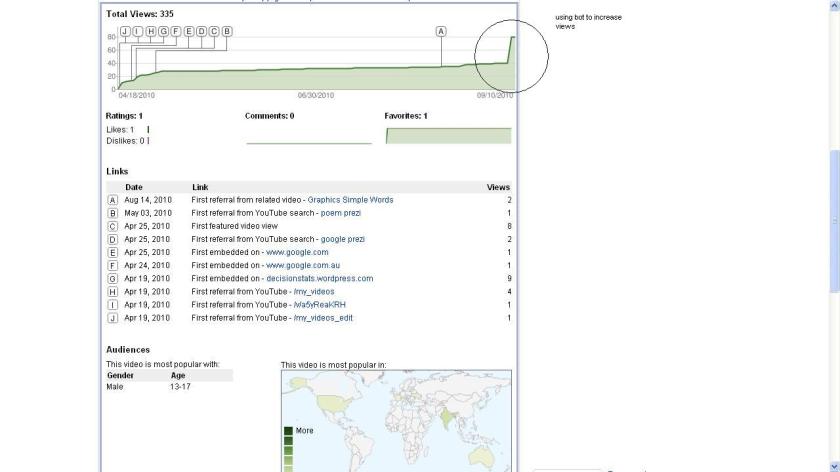
Easy isn’t it. Lines of code written= 0 , Number of Views =335 (before I grew bored)
Note- Officially it is against Youtube Terms http://www.youtube.com/t/terms to use scripts or Bots so I did it for Research Purposes only. And the http://Freelancer.com needs to look into the activities underway at http://www.freelancer.com/projects/by-job/YouTube.html and also http://www.freelancer.com/projects/by-job/Facebook.html and http://www.freelancer.com/projects/by-job/Social-Networking.html
The final word on these activities is by http://xkcd.com or


 DECISION STATS