Please use the following code to get a 15% discount on the 2 Day Conference Pass: AJAY11.
Predictive Analytics World announces new full-day workshops coming to San Francisco March 13-19, amounting to seven consecutive days of content.
These workshops deliver top-notch analytical and business expertise across the hottest topics.
Register now for one or more workshops, offered just before and after the full two-day Predictive Analytics World conference program (March 14-15). Early Bird registration ends on January 31st – take advantage of reduced pricing before then.
Make savings now with the early bird rate. Receive $200 off your registration rate for Predictive Analytics World – San Francisco (March 14-15), plus $100 off each workshop for which you register.
Some common analytical tasks from the diary of the glamorous life of a business analyst-
1) removing duplicates from a dataset based on certain key values/variables
2) merging two datasets based on a common key/variable/s
3) creating a subset based on a conditional value of a variable
4) creating a subset based on a conditional value of a time-date variable
5) changing format from one date time variable to another
6) doing a means grouped or classified at a level of aggregation
7) creating a new variable based on if then condition
8) creating a macro to run same program with different parameters
9) creating a logistic regression model, scoring dataset,
10) transforming variables
11) checking roc curves of model
12) splitting a dataset for a random sample (repeatable with random seed)
13) creating a cross tab of all variables in a dataset with one response variable
14) creating bins or ranks from a certain variable value
15) graphically examine cross tabs
16) histograms
17) plot(density())
18)creating a pie chart
19) creating a line graph, creating a bar graph
20) creating a bubbles chart
21) running a goal seek kind of simulation/optimization
22) creating a tabular report for multiple metrics grouped for one time/variable
23) creating a basic time series forecast
and some case studies I could think of-
As the Director, Analytics you have to examine current marketing efficiency as well as help optimize sales force efficiency across various channels. In addition you have to examine multiple sales channels including inbound telephone, outgoing direct mail, internet email campaigns. The datawarehouse is an RDBMS but it has multiple data quality issues to be checked for. In addition you need to submit your budget estimates for next year’s annual marketing budget to maximize sales return on investment.
As the Director, Risk you have to examine the overdue mortgages book that your predecessor left you. You need to optimize collections and minimize fraud and write-offs, and your efforts would be measured in maximizing profits from your department.
As a social media consultant you have been asked to maximize social media analytics and social media exposure to your client. You need to create a mechanism to report particular brand keywords, as well as automated triggers between unusual web activity, and statistical analysis of the website analytics metrics. Above all it needs to be set up in an automated reporting dashboard .
As a consultant to a telecommunication company you are asked to monitor churn and review the existing churn models. Also you need to maximize advertising spend on various channels. The problem is there are a large number of promotions always going on, some of the data is either incorrectly coded or there are interaction effects between the various promotions.
As a modeller you need to do the following-
1) Check ROC and H-L curves for existing model
2) Divide dataset in random splits of 40:60
3) Create multiple aggregated variables from the basic variables
4) run regression again and again
5) evaluate statistical robustness and fit of model
6) display results graphically
All these steps can be broken down in little little pieces of code- something which i am putting down a list of.
Are there any common data analysis tasks that you think I am missing out- any common case studies ? let me know.
Analyzing data can have many challenges associated with it. In the case of business analytics data, these challenges or constraints can have a marked effect on the quality and timeliness of the analysis as well as the expected versus actual payoff from the analytical results.
Challenges of Analytical Data Processing-
1) Data Formats- Reading in complete data, without losing any part (or meta data), or adding in superfluous details (that increase the scope). Technical constraints of data formats are relatively easy to navigate thanks to ODBC and well documented and easily search-able syntax and language.
The costs of additional data augmentation (should we pay for additional credit bureau data to be appended) , time of storing and processing the data (every column needed for analysis can add in as many rows as whole dataset, which can be a time enhancing problem if you are considering an extra 100 variables with a few million rows), but above all that of business relevance and quality guidelines will ensure basic data input and massaging are considerable parts of whole analytical project timeline.
2) Data Quality-Perfect data exists in a perfect world. The price of perfect information is one business will mostly never budget or wait for. To deliver inferences and results based on summaries of data which has missing, invalid, outlier data embedded within it makes the role of an analyst just as important as which ever tool is chosen to remove outliers, replace missing values, or treat invalid data.
3) Project Scope-
How much data? How much Analytical detail versus High Level Summary? Timelines for delivery as well as refresh of data analysis? Checks (statistical as well as business)?
How easy is it to load and implement the new analysis in existing Information Technology Infrastructure? These are some of the outer parameters that can limit both your analytical project scope, your analytical tool choice, and your processing methodology.
4) Output Results vis a vis stakeholder expectation management-
Stakeholders like to see results, not constraints, hypothesis ,assumptions , p-value, or chi -square value. Output results need to be streamlined to a decision management process to justify the investment of human time and effort in an analytical project, choice,training and navigating analytical tool complexities and constraints are subset of it. Optimum use of graphical display is a part of aligning results to a more palatable form to stakeholders, provided graphics are done nicely.
Eg Marketing wants to get more sales so they need a clear campaign, to target certain customers via specific channels with specified collateral. In order to base their business judgement, business analytics needs to validate , cross validate and sometimes invalidate this business decision making with clear transparent methods and processes.
Given a dataset- the basic analytical steps that an analyst will do with R are as follows. This is meant as a note for analysts at a beginner level with R.
Package -specific syntax
update.packages() #This updates all packages
install.packages(package1) #This installs a package locally, a one time event
library(package1) #This loads a specified package in the current R session, which needs to be done every R session
CRAN________LOCAL HARD DISK_________R SESSION is the top to bottom hierarchy of package storage and invocation.
ls() #This lists all objects or datasets currently active in the R session
> names(assetsCorr) #This gives the names of variables within a dataframe
[1] “AssetClass” “LargeStocksUS” “SmallStocksUS”
[4] “CorporateBondsUS” “TreasuryBondsUS” “RealEstateUS”
[7] “StocksCanada” “StocksUK” “StocksGermany”
[10] “StocksSwitzerland” “StocksEmergingMarkets”
> dim(assetsCorr) #gives dimensions observations and variable number
[1] 12 11
str(Dataset) – This gives the structure of the dataset (note structure gives both the names of variables within dataset as well as dimensions of the dataset)
head(dataset,n1) gives the first n1 rows of dataset while
tail(dataset,n2) gives the last n2 rows of a dataset where n1,n2 are numbers and dataset is the name of the object (here a data frame that is being considered)
summary(dataset) gives you a brief summary of all variables while
library(Hmisc)
describe(dataset) gives a detailed description on the variables
simple graphics can be given by
hist(Dataset1)
and
plot(Dataset1)
As you can see in above cases, there are multiple ways to get even basic analysis about data in R- however most of the syntax commands are intutively understood (like hist for histogram, t.test for t test, plot for plot).
For detailed analysis throughout the scope of analysis, for a business analytics user it is recommended to using multiple GUI, and multiple packages. Even for highly specific and specialized analytical tasks it is recommended to check for a GUI that incorporates the required package.
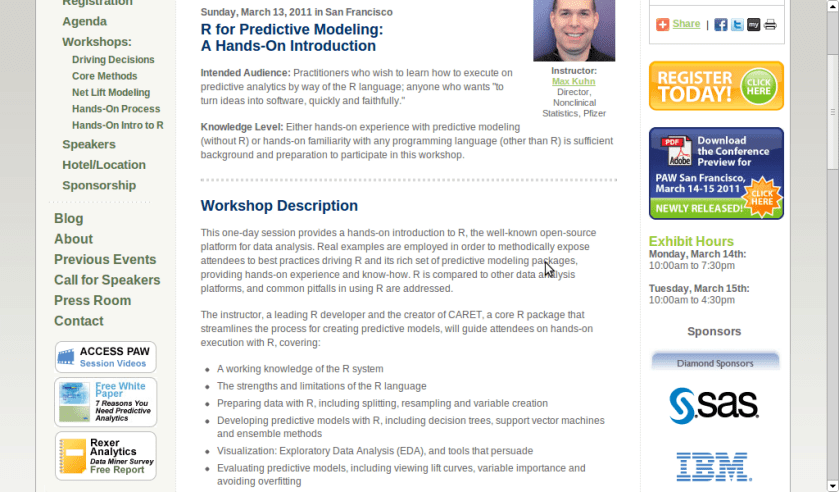
A workshop on using R for Predictive Modeling, by the Director, Non Clinical Stats, Pfizer. Interesting Bay Area Event- part of next edition of Predictive Analytics World
Sunday, March 13, 2011 in San Francisco
R for Predictive Modeling:
A Hands-On Introduction
Intended Audience: Practitioners who wish to learn how to execute on predictive analytics by way of the R language; anyone who wants “to turn ideas into software, quickly and faithfully.”
Knowledge Level: Either hands-on experience with predictive modeling (without R) or hands-on familiarity with any programming language (other than R) is sufficient background and preparation to participate in this workshop.
Workshop Description
This one-day session provides a hands-on introduction to R, the well-known open-source platform for data analysis. Real examples are employed in order to methodically expose attendees to best practices driving R and its rich set of predictive modeling packages, providing hands-on experience and know-how. R is compared to other data analysis platforms, and common pitfalls in using R are addressed.
The instructor, a leading R developer and the creator of CARET, a core R package that streamlines the process for creating predictive models, will guide attendees on hands-on execution with R, covering:
A working knowledge of the R system
The strengths and limitations of the R language
Preparing data with R, including splitting, resampling and variable creation
Developing predictive models with R, including decision trees, support vector machines and ensemble methods
Visualization: Exploratory Data Analysis (EDA), and tools that persuade
Evaluating predictive models, including viewing lift curves, variable importance and avoiding overfitting
Hardware: Bring Your Own Laptop
Each workshop participant is required to bring their own laptop running Windows or OS X. The software used during this training program, R, is free and readily available for download.
Attendees receive an electronic copy of the course materials and related R code at the conclusion of the workshop.
Max Kuhn, Director, Nonclinical Statistics, Pfizer
Max Kuhn is a Director of Nonclinical Statistics at Pfizer Global R&D in Connecticut. He has been apply models in the pharmaceutical industries for over 15 years.
He is a leading R developer and the author of several R packages including the CARET package that provides a simple and consistent interface to over 100 predictive models available in R.
Mr. Kuhn has taught courses on modeling within Pfizer and externally, including a class for the India Ministry of Information Technology.
Here is an interview with Prof Luis Torgo, author of the recent best seller “Data Mining with R-learning with case studies”.
Ajay- Describe your career in science. How do you think can more young people be made interested in science.
Luis- My interest in science only started after I’ve finished my degree. I’ve entered a research lab at the University of Porto and started working on Machine Learning, around 1990. Since then I’ve been involved generally in data analysis topics both from a research perspective as well as from a more applied point of view through interactions with industry partners on several projects. I’ve spent most of my career at the Faculty of Economics of the University of Porto, but since 2008 I’m at the department of Computer Science of the Faculty of Sciences of the same university. At the same time I’ve been a researcher at LIAAD / Inesc Porto LA (www.liaad.up.pt).
I like a lot what I do and like science and the “scientific way of thinking”, but I cannot say that I’ve always thought of this area as my “place”. Most of all I like solving challenging problems through data analysis. If that translates into some scientific outcome than I’m more satisfied but that is not my main goal, though I’m kind of “forced” to think about that because of the constraints of an academic career.
That does not mean I’m not passionate about science, I just think there are many more ways of “doing science” than what is reflected in the usual “scientific indicators” that most institutions seem to be more and more obsessed about.
Regards interesting young people in science that is a hard question that I’m not sure I’m qualified to answer. I do tend to think that young people are more sensible to concrete examples of problems they think are interesting and that science helps in solving, as a way of finding a motivation for facing the hard work they will encounter in a scientific career. I do believe in case studies as a nice way to learn and motivate, and thus my book 😉
Ajay- Describe your new book “Data Mining with R, learning with case studies” Why did you choose a case study based approach? who is the target audience? What is your favorite case study from the book
Luis- This book is about learning how to use R for data mining. The book follows a “learn by doing it” approach to data mining instead of the more common theoretical description of the available techniques in this discipline. This is accomplished by presenting a series of illustrative case studies for which all necessary steps, code and data are provided to the reader. Moreover, the book has an associated web page (www.liaad.up.pt/~ltorgo/DataMiningWithR) where all code inside the book is given so that easy copy-paste is possible for the more lazy readers.
The language used in the book is very informal without many theoretical details on the used data mining techniques. For obtaining these theoretical insights there are already many good data mining books some of which are referred in “further readings” sections given throughout the book. The decision of following this writing style had to do with the intended target audience of the book.
In effect, the objective was to write a monograph that could be used as a supplemental book for practical classes on data mining that exist in several courses, but at the same time that could be attractive to professionals working on data mining in non-academic environments, and thus the choice of this more practically oriented approach.
Regards my favorite case study that is a hard question for an author… still I would probably choose the “Predicting Stock Market Returns” case study (Chapter 3). Not only because I like this challenging problem, but mainly because the case study addresses all aspects of knowledge discovery in a real world scenario and not only the construction of predictive models. It tackles data collection, data pre-processing, model construction, transforming predictions into actions using different trading policies, using business-related performance metrics, implementing a trading simulator for “real-world” evaluation, and laying out grounds for constructing an online trading system.
Obviously, for all these steps there are far too many options to be possible to describe/evaluate all of them in a chapter, still I do believe that for the reader it is important to see the overall picture, and read about the relevant questions on this problem and some possible paths that can be followed at these different steps.
In other words: do not expect to become rich with the solution I describe in the chapter !
Ajay- Apart from R, what other data mining software do you use or have used in the past. How would you compare their advantages and disadvantages with R
Luis- I’ve played around with Clementine, Weka, RapidMiner and Knime, but really only playing with teaching goals, and no serious use/evaluation in the context of data mining projects. For the latter I mainly use R or software developed by myself (either in R or other languages). In this context, I do not think it is fair to compare R with these or other tools as I lack serious experience with them. I can however, tell you about what I see as the main pros and cons of R. The main reason for using R is really not only the power of the tool that does not stop surprising me in terms of what already exists and keeps appearing as contributions of an ever growing community, but mainly the ability of rapidly transforming ideas into prototypes. Regards some of its drawbacks I would probably mention the lack of efficiency when compared to other alternatives and the problem of data set sizes being limited by main memory.
I know that there are several efforts around for solving this latter issue not only from the community (e.g. http://cran.at.r-project.org/web/views/HighPerformanceComputing.html), but also from the industry (e.g. Revolution Analytics), but I would prefer that at this stage this would be a standard feature of the language so the the “normal” user need not worry about it. But then this is a community effort and if I’m not happy with the current status instead of complaining I should do something about it!
Ajay- Describe your writing habit- How do you set about writing the book- did you write a fixed amount daily or do you write in bursts etc
Luis- Unfortunately, I write in bursts whenever I find some time for it. This is much more tiring and time consuming as I need to read back material far too often, but I cannot afford dedicating too much consecutive time to a single task. Actually, I frequently tease my PhD students when they “complain” about the lack of time for doing what they have to, that they should learn to appreciate the luxury of having a single task to complete because it will probably be the last time in their professional life!
Ajay- What do you do to relax or unwind when not working?
Luis- For me, the best way to relax from work is by playing sports. When I’m involved in some game I reset my mind and forget about all other things and this is very relaxing for me. A part from sports I enjoy a lot spending time with my family and friends. A good and long dinner with friends over a good bottle of wine can do miracles when I’m too stressed with work! Finally,I do love traveling around with my family.
Short Bio: Luis Torgo has a degree in Systems and Informatics Engineering and a PhD in Computer Science. He is an Associate Professor of the Department of Computer Science of the Faculty of Sciences of the University of Porto. He is also a researcher of the Laboratory of Artificial Intelligence and Data Analysis (LIAAD) belonging to INESC Porto LA. Luis Torgo has been an active researcher in Machine Learning and Data Mining for more than 20 years. He has lead several academic and industrial Data Mining research projects. Luis Torgo accompanies the R project almost since its beginning, using it on his research activities. He teaches R at different levels and has given several courses in different countries.
For reading “Data Mining with R” – you can visit this site, also to avail of a 20% discount the publishers have generously given (message below)-
For more information and to place an order, visit us at http://www.crcpress.com. Order online and apply 20% Off discount code 907HM at checkout. CRC is pleased to offer free standard shipping on all online orders!
Price: $79.95 Cat. #: K10510 ISBN: 9781439810187 ISBN 10: 1439810184 Publication Date: November 09, 2010 Number of Pages: 305 Availability: In Stock Binding(s): Hardback
# Colored Histogram with Different Number of Bins

hist(mtcars$mpg, breaks=12, col="red")
click to view
# Add a Normal Curve (Thanks to Peter Dalgaard)

x <- mtcars$mpg

h<-hist(x, breaks=10, col="red", xlab="Miles Per Gallon",

main="Histogram with Normal Curve")

xfit<-seq(min(x),max(x),length=40)

yfit<-dnorm(xfit,mean=mean(x),sd=sd(x))

yfit <- yfit*diff(h$mids[1:2])*length(x)

lines(xfit, yfit, col="blue", lwd=2)
click to view
Histograms can be a poor method for determining the shape of a distribution because it is so strongly affected by the number of bins used.
KERNEL DENSITY PLOTS
Kernal density plots are usually a much more effective way to view the distribution of a variable. Create the plot using plot(density(x)) where x is a numeric vector.
# Kernel Density Plot

d <- density(mtcars$mpg) # returns the density data

plot(d) # plots the results
click to view
# Filled Density Plot

d <- density(mtcars$mpg)

plot(d, main="Kernel Density of Miles Per Gallon")

polygon(d, col="red", border="blue")
click to view
COMPARING GROUPS VIA KERNAL DENSITY
The sm.density.compare( ) function in the smpackage allows you to superimpose the kernal density plots of two or more groups. The format is sm.density.compare(x, factor) where x is a numeric vector and factor is the grouping variable.
# Compare MPG distributions for cars with

# 4,6, or 8 cylinders

library(sm)

attach(mtcars)
I have received numerous requests for a hardcopy version of this site, so over the past year I have been writing a book that takes the material here and significantly expands upon it. If you are interested, early access is available.
If you have not been to that website, I recommend it highly (though the tagline or logo of R for SAS/SPSS/Stata users seems a bit familiar)-http://www.statmethods.net/index.html












 DECISION STATS