Track 2: Social Data and Telecom
Case Study: Major North American Telecom
Social Networking Data for Churn Analysis
A North American Telecom found that it had a window into social contacts – who has been calling whom on its network. This data proved to be predictive of churn. Using SQL, and GAM in R, we explored how to use this data to improve the identification of likely churners. We will present many dimensions of the lessons learned on this engagement.
Speaker: David Katz, Senior Analyst, Dataspora, and President, David Katz Consulting
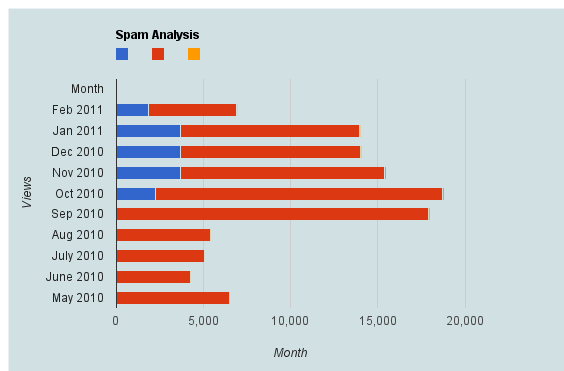
Here is a brief dataset I out after one hour of cutting and pasting from WordPress.com’s creative data style formats. It shows spam,comments,traffic, and number of posts written monthly.
Clearly monthly traffic is directly related to number I write (suppose A + B* Posts)
But Spam is showing a discontinuous growth especially after a big month (in which Reddit helped)
Akismet had some missing historical values (which is curious)
At the user’s choice, statistical output and graphics are done in ASCII, PDF, PostScript or HTML formats. A limited range of statistical graphs can be produced, such as histograms, pie-charts and np-charts.
Dap is a small statistics and graphics package based on C. Version 3.0 and later of Dap can read SBS programs (based on the utterly famous, industry standard statistics system with similar initials – you know the one I mean)! The user wishing to perform basic statistical analyses is now freed from learning and using C syntax for straightforward tasks, while retaining access to the C-style graphics and statistics features provided by the original implementation. Dap provides core methods of data management, analysis, and graphics that are commonly used in statistical consulting practice (univariate statistics, correlations and regression, ANOVA, categorical data analysis, logistic regression, and nonparametric analyses).
Anyone familiar with the basic syntax of C programs can learn to use the C-style features of Dap quickly and easily from the manual and the examples contained in it; advanced features of C are not necessary, although they are available. (The manual contains a brief introduction to the C syntax needed for Dap.) Because Dap processes files one line at a time, rather than reading entire files into memory, it can be, and has been, used on data sets that have very many lines and/or very many variables.
I wrote Dap to use in my statistical consulting practice because the aforementioned utterly famous, industry standard statistics system is (or at least was) not available on GNU/Linux and costs a bundle every year under a lease arrangement. And now you can run programs written for that system directly on Dap! I was generally happy with that system, except for the graphics, which are all but impossible to use, but there were a number of clumsy constructs left over from its ancient origins.
sounds too good to be true- GNU /DAP joins WPS workbench and Dulles Open’s Carolina as the third SAS language compiler (besides the now defunct BASS software) see http://en.wikipedia.org/wiki/SAS_language#Controversy
Dap was written to be a free replacement for SAS, but users are assumed to have a basic familiarity with the C programming language in order to permit greater flexibility. Unlike R it has been designed to be used on large data sets.
It has been designed so as to cope with very large data sets; even when the size of the data exceeds the size of the computer’s memory

 • XL Solutions




 DECISION STATS