Google Cloud Print -print documents from the internet

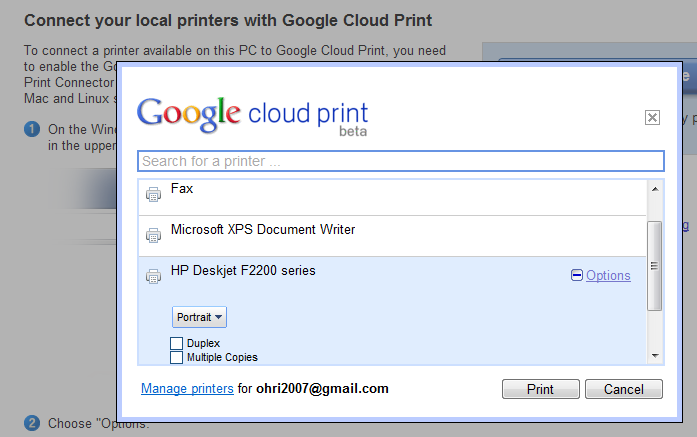
Print Jobs just got easier- especially if you prefer one printer, use Google Chrome, and can take 2 minutes to set up your printer to print from anywhere in the world through the internet.

It’s called Google Cloud Print– and it makes my life a lot easier when I travel and need to give to printer at home some documents to print rather than rely on external printers. See screenshots below and check out http://www.google.com/cloudprint/ for more
Google Refine

An interesting data cleaning software from Google at

https://code.google.com/p/google-refine/

From the page at

https://code.google.com/p/google-refine/wiki/UserGuide

The Basics

First, although Google Refine might start out looking like a spreadsheet program (Microsoft Excel, Google Spreadsheets, etc.), don’t expect it to work like a spreadsheet program. That’s almost like expecting a database to work like a text editor.

Google Refine is NOT for entering new data one cell at a time. It is NOT for doing accounting.

Google Refine is for applying transformations over many existing cells in bulk, for the purpose of cleaning up the data, extending it with more data from other sources, and getting it to some form that other tools can consume.

To use Google Refine, think in big patterns. For example, to spot errors, think

  • Show me every row where the string length of the customer’s name is longer than 50 characters (because I suspect that the customer’s address is mistakenly included in the name field)
  • Show me every row where the contract fee is less than 1 (because I suspect the fee was entered in unit of thousand dollars rather than dollars)
  • Show me every row where the description field (scraped from some web site) contains “&” (because I suspect it wasn’t decoded properly)

To edit data, think

  • For every row where the contract fee is less than 1, multiply the fee by 1000.
  • For every row where the customer name contains a comma (it has been entered as “last_name, first_name”), split the name by the comma, reverse the array, and join it back with a space (producing “first_name last_name”)

To specify patterns, use filters and facets. Typically, you create a filter or facet on a particular column. For example, you can create a numeric facet on the “contract fee” column and adjust its range selector to select values less than 1. If the default facet doesn’t do what you want, you can configure it (by clicking “change” on the facet’s header). For example, you can create a text facet with on the same “contract fee” column with this expression:

  value < 1

It will show 2 choices: true and false. Just select true. Then, invoke the Transform command on that same column and enter the expression

  value * 1000

That Transform command affects only rows where the “contract fee” cell contains a value less than 1.

You can use several filters and facets together. Only rows that are selected by all facets and filters will be shown in the data table. For example, say you have two text facets, one on the “contract fee” column with the expression

  value < 1

and another on the “state” column (with the default expression). If you select “true” in the first facet and “Nevada” in the second, then you will only see rows for contracts in Nevada with fees less than 1.

Analogies

Databases

If you have programmed databases before (performing SQL queries), then what Google Refine works should be quite familiar to you. Creating filters and facets and selecting something in them is like performing this SELECT statement:

  SELECT *
  WHERE ... constraints determined by selection in facets and filters ...

And invoking the Transform command on a column while having some filters and facets selected is like performing this UPDATE statement

  UPDATE whole_table SET column_X = ... expression ...
  WHERE ... constraints determined by selection in facets and filters ...

The difference between Google Refine and databases is that the facets show you choices that you can select, whereas databases assume that you already know what’s in the data.


Is Random Poetry Click Fraud

Meta-search-vi
Image via Wikipedia

Is poetry when randomized

Tweaked, meta tagged , search engine optimized

Violative of unseen terms and conditional clauses

Is random poetry or aggregated prose farmed for click fraud uses


I dont know, you tell me, says the blog boy,

Tapping away at the keyboard like a shiny new toy,

Geeks unfortunately too often are men too many,

Forgive the generalization, but the tech world is yet to be equalized.


If a New York Hot Dog  is a slice of heaven at four bucks a piece

Then why is prose and poetry at five bucks an hour considered waste

Ah I see, you have grown old and cynical,

Of the numerous stupid internet capers and cyber ways


The clicking finger clicks on

swiftly but mostly delightfully virally moves on

While people collect its trails and

ponder its aggregated merry ways


All people are equal but all links are not,

Thus overturning two centuries of psychology had you been better taught,

But you chose to drop out of school, and create that search engine so big

It is now a fraud catchers head ache that millions try to search engine optimize and rig


Once again, people are different, in so many ways so prettier

Links are the same hyper linked code number five or earlier

People think like artificial artificial (thus natural) neural nets

Biochemically enhanced Harmonically possessed.


rather than  analyze forensically and quite creepily

where people have been

Gentic Algorithms need some chaos

To see what till now hasnt been seen.


Again this was a random poem,

inspired by a random link that someone clicked

To get here, on a carbon burning cyber machine,

Having digested poem, moves on, unheard , unseen.

(Inspired by the Hyper Link at http://goo.gl/a8ijW )

Also-

Google Chrome Web Store

Google Chrome Icon
Image via Wikipedia

If  you are a Google Chrome user and especially

if you are a not a Chrome user- check out the great web store with Games , Free apps (including for Blogging)

Nice1


Google Realtime Live Updates on Egypt Yemen Tunisia Jordan..

Using Google RealTime, a small icon on the left margin, you can monitor the latest uprisings. Apparently you can still get shot in most of the world to ask for freedom. What a trillion dollars of industrial arms complex could not do in Iraq or Afghanistan, hackers at Wikileaks, Bloggers in Middle East and Media people at Al Jazzera are doing right now. I am probably too young in 1989 when communists fell, but watching dictators fall by people power than external arms is good, no.

Now if only a few more people could listen to some Chinese Democracy

Computer Education grants from Google

Image representing Google as depicted in Crunc...
Image via CrunchBase

message from the official google blog-

http://googleblog.blogspot.com/2011/01/supporting-computer-science-education.html

With programs like Computer Science for High School (CS4HS), we hope to increase the number of CS majors —and therefore the number of people entering into careers in CS—by promoting computer science curriculum at the high school level.

For the fourth consecutive year, we’re funding CS4HS to invest in the next generation of computer scientists and engineers. CS4HS is a workshop for high school and middle school computer science teachers that introduces new and emerging concepts in computing and provides tips, tools and guidance on how to teach them. The ultimate goals are to “train the trainer,” develop a thriving community of high school CS teachers and spread the word about the awe and beauty of computing.

If you’re a university, community college, or technical School in the U.S., Canada, Europe, Middle East or Africa and are interested in hosting a workshop at your institution, please visit www.cs4hs.com to submit an application for grant funding.Applications will be accepted between January 18, 2011 and February 18, 2011.

In addition to submitting your application, on the CS4HS website you’ll find info on how to organize a workshop, as well as websites and agendas from last year’s participants to give you an idea of how the workshops were structured in the past. There’s also a collection ofCS4HS curriculum modules that previous participating schools have shared for future organizers to use in their own program.

Google – Turns the Page

Duderstadt Center "The Dude", which ...
Image via Wikipedia

Meet Google’s new CEO

Larry Page
Co-Founder and President, Products

Larry Page was Google’s founding CEO and grew the company to more than 200 employees and profitability before moving into his role as president of products in April 2001. He continues to share responsibility for Google’s day-to-day operations with Eric Schmidt and Sergey Brin.

The son of Michigan State University computer science professor Dr. Carl Victor Page, Larry’s love of computers began at age six. While following in his father’s footsteps in academics, he became an honors graduate from the University of Michigan, where he earned a bachelor’s degree in engineering, with a concentration on computer engineering. During his time in Ann Arbor, Larry built an inkjet printer out of Lego™ bricks.

While in the Ph.D. program in computer science at Stanford University, Larry met Sergey Brin, and together they developed and ran Google, which began operating in 1998. Larry went on leave from Stanford after earning his master’s degree.

In 2002, Larry was named a World Economic Forum Global Leader for Tomorrow. He is a member of the National Advisory Committee (NAC) of the University of Michigan College of Engineering, and together with co-founder Sergey Brin, Larry was honored with the Marconi Prize in 2004. He is a trustee on the board of the X PRIZE, and was elected to the National Academy of Engineering in 2004.

and no coincidence but it reminded me of the Metallica video- Turn the Page. Forgive the Pun, herr Eric

https://www.youtube.com/watch?v=dOibtqWo6z4