What are the most iconic screen shots from 1980s era videogames? 9 answers on Quora
What are the most iconic screen shots from 1980s era videogames?

What are the most iconic screen shots from 1980s era videogames? 9 answers on Quora
What are the most iconic screen shots from 1980s era videogames?
My profile on Quora
Why did Amazon pull the plug on Wikileaks and will it bite them? 6 answers on Quora
Why did Amazon pull the plug on Wikileaks and will it bite them?
I was reading David Smith’s blog http://blog.revolutionanalytics.com/
where he mentioned this interview of Norman Nie, at TDWI
http://tdwi.org/Articles/2010/11/17/R-101.aspx?Page=2–
where I saw this link (its great if you want to study Data Mining btw)
http://www.kdnuggets.com/education/usa-canada.html –
and I c/liked the U Toronto link
http://chem-eng.utoronto.ca/~datamining/
Best of All- I really liked this online book created by Professor S. Sayad
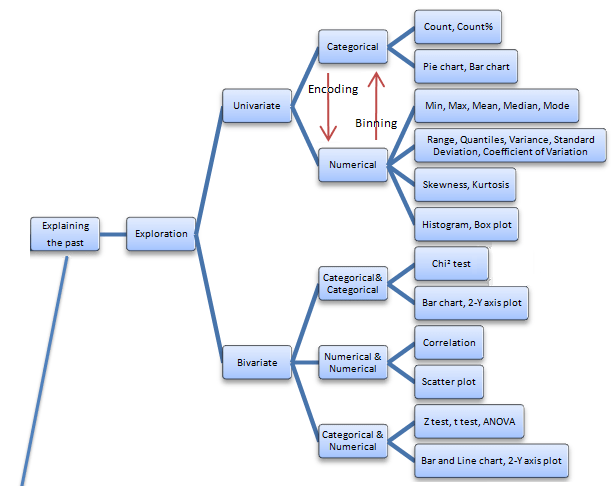
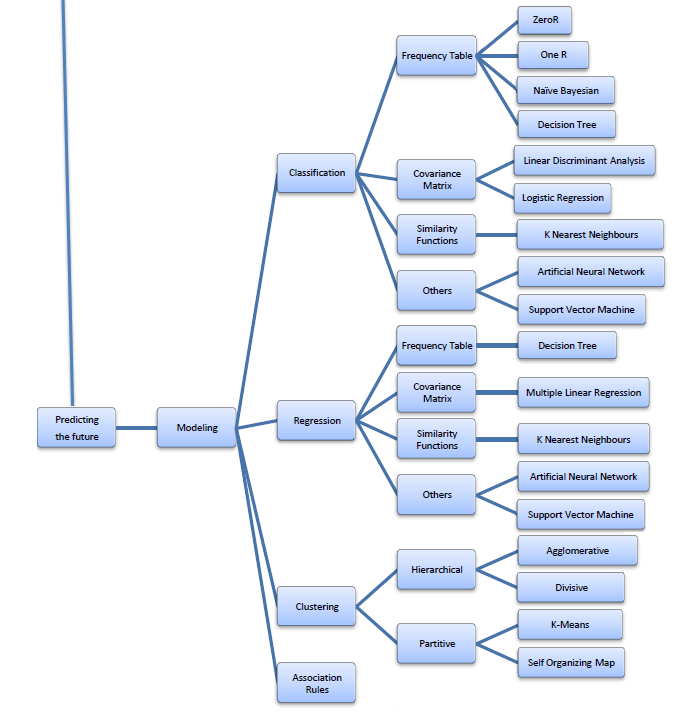
Its succinct and beautiful and describes all of the Data Mining you want to read in one Map (actually 4 images painstakingly assembled with perfection)
The best thing is- in the original map- even the sub items are click-able for specifics like Pie Chart and Stacked Column chart are not in one simple drop down like Charts- but rather by nature of the kind of variables that lead to these charts. For doing that- you would need to go to the site itself- ( see http://chem-eng.utoronto.ca/~datamining/dmc/categorical_variables.htm
vs
http://chem-eng.utoronto.ca/~datamining/dmc/categorical_numerical.htm
Again- there is no mention of the data visualization software used to create the images but I think I can take a hint from the Software Page which says software used are-
| Software | |
See it on your own-online book (c)Professor S. Sayad |
|
Really good DIY tutorial
http://chem-eng.utoronto.ca/~datamining/dmc/data_mining_map.htm

in the middle of essential and inevitable tasks
restless inner conscience wakens and asks
stuck again today to the computer are we now
please remind me this state we reached how
oh we had bills to pay student loans to repay
once we got hooked t’was easy to be carried away
just a matter of time before inevitable voices query
this is my machine that I want to marry
I spend more time with him/her as it is
the Machinery is devoted with focused loyalties
meanwhile the non machine world goes round
strives forth on things less profound
as we stroke the keys and click the mouse
machine addictions will only add to human grouse

Here is a great R application created by http://sysbio.mrc-bsu.cam.ac.uk
R Wui for creating R Web Interfaces
its been there for some time now- but presumably R Apache is more well known.
From-
http://sysbio.mrc-bsu.cam.ac.uk/Rwui/tutorial/Rwui_Rnews_final.pdf
The web application Rwui is used to create web interfaces for running R scripts. All the code is generated automatically so that a fully functional web interface for an R script can be downloaded and up and running in a matter of minutes.
Rwui is aimed at R script writers who have scripts that they want people unversed in R to use. The script writer uses Rwui to create a web application that will run their R script. Rwui allows the script writer to do this without them having to do any web application programming, because Rwui generates all the code for them.
The script writer designs the web application to run their R script by entering information on a sequence of web pages. The script writer then downloads the application they have created and installs it on their own server.
http://sysbio.mrc-bsu.cam.ac.uk/Rwui/tutorial/Technical_Report.pdf
 Features of web applications created by Rwui
In order to use the completed web applications created by Rwui you will need:
Using Rwui to create a web application for an R script simply involves:



 DECISION STATS