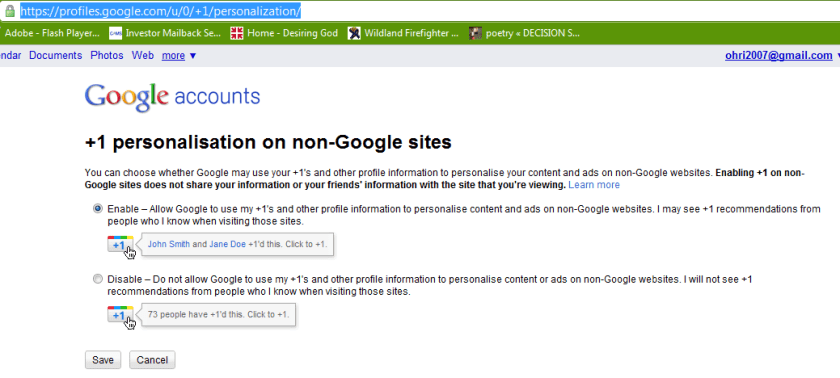
The buttons does exists because there is personalisation option available refering to non-Google sites.
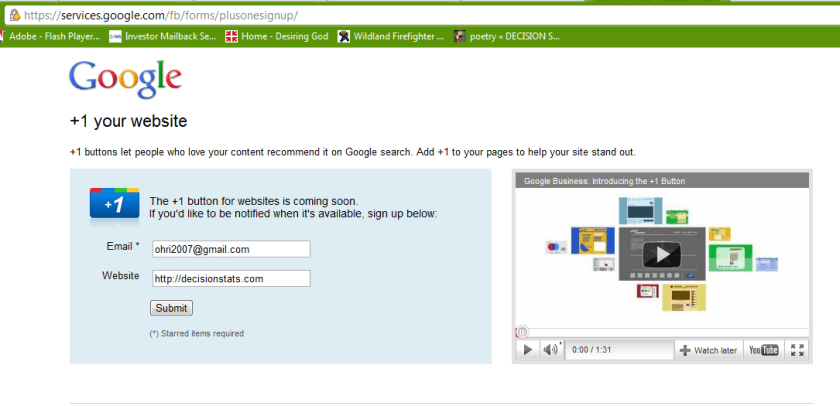
Google claims the button is “coming soon” but I couldn’t wait, so I looked around the code, and looked some more, untill I found the button endpoint hiding from me, obfuscated, in a stray piece of javascript.
Google is always experimenting with new features aimed at improving the search experience. Take one for a spin and let us know what you think.
Your selected experiment: You have joined the +1 button experiment. Note that you can only join ONE experiment at a time.
+1 button
This is your selected experiment.
Use +1 to give something your public stamp of approval, so friends, contacts, and others can find the best stuff when they search. Get recommendations for the things that interest you, right when you want them, in your search results.
To participate in this experiment:
Make sure you’re signed into your Google Account (required)
Click the new +1 button, and make your mark on the web
Your +1’s are public. They can appear in Google search results, on ads, and sites across the web. You’ll always be able to see your own +1’s in a new tab on your Google Profile, and if you want, you can share this tab with the world.
Please note, it may take a while before you see the button in search results, and it may occasionally disappear as we make improvements. Your feedback will help us make it better!
Navigate search results quickly and easily, with just your keyboard. As you navigate, items are magnified for easier viewing. If you use a screen reader or talking browser, the relevant information is spoken automatically as you navigate.
Current keyboard shortcuts include:
Key
Action
j or DOWN
Selects the next item.
k or UP
Selects the previous item.
l or RIGHT
Moves to the next category (results, sponsored links, refinements).
h or LEFT
Moves to the previous category (results, sponsored links, refinements).
<Enter>
Opens the selected result.
/
Puts the cursor in the search box.
n
Moves to the next result, and fetches more results if necessary.
p
Moves to the previous result, reloading earlier results if necessary.
For now, you need to use the Firefox 3 web browser with this experiment. This note will be updated as other browsers are added. Magnification already works with Google Chrome andApple’s Safari.
For a detailed timeline and further information about the program, review our Frequently Asked Questions.
About Google Summer of Code
Google Summer of Code is a global program that offers student developers stipends to write code for various open source software projects. We have worked with several open source, free software, and technology-related groups to identify and fund several projects over a three month period. Since its inception in 2005, the program has brought together over 4500 successful student participants and over 3000 mentors from over 100 countries worldwide, all for the love of code. Through Google Summer of Code, accepted student applicants are paired with a mentor or mentors from the participating projects, thus gaining exposure to real-world software development scenarios and the opportunity for employment in areas related to their academic pursuits. In turn, the participating projects are able to more easily identify and bring in new developers. Best of all, more source code is created and released for the use and benefit of all.
For those of you who would like to participate in the program, there are many resources available for you to learn more. Check out the information pages from the 2005, 2006, 2007, 2008, 2009, and 2010 instances of the program to get a better sense of which projects have participated as mentoring organizations in Google Summer of Code each year. If you are interested in a particular mentoring organization, just click on its name and you’ll find more information about the project, a summary of their students’ work and actual source code produced by student participants. You may also find the program Frequently Asked Questions (FAQs) pages for each year to be useful. Finally, check out all the great content and advice on participation produced by the community, for the community, on our program wiki.
If you don’t find what you need in the documentation, you can always ask questions on our program discussion list or the program IRC channel, #gsoc on Freenode.
For a detailed timeline and further information about the program, review our Frequently Asked Questions.
About Google Summer of Code
Google Summer of Code is a global program that offers student developers stipends to write code for various open source software projects. We have worked with several open source, free software, and technology-related groups to identify and fund several projects over a three month period. Since its inception in 2005, the program has brought together over 4500 successful student participants and over 3000 mentors from over 100 countries worldwide, all for the love of code. Through Google Summer of Code, accepted student applicants are paired with a mentor or mentors from the participating projects, thus gaining exposure to real-world software development scenarios and the opportunity for employment in areas related to their academic pursuits. In turn, the participating projects are able to more easily identify and bring in new developers. Best of all, more source code is created and released for the use and benefit of all.
For those of you who would like to participate in the program, there are many resources available for you to learn more. Check out the information pages from the 2005, 2006, 2007, 2008, 2009, and 2010 instances of the program to get a better sense of which projects have participated as mentoring organizations in Google Summer of Code each year. If you are interested in a particular mentoring organization, just click on its name and you’ll find more information about the project, a summary of their students’ work and actual source code produced by student participants. You may also find the program Frequently Asked Questions (FAQs) pages for each year to be useful. Finally, check out all the great content and advice on participation produced by the community, for the community, on our program wiki.
If you don’t find what you need in the documentation, you can always ask questions on our program discussion list or the program IRC channel, #gsoc on Freenode.
Snappy is a compression/decompression library. It does not aim for maximum compression, or compatibility with any other compression library; instead, it aims for very high speeds and reasonable compression. For instance, compared to the fastest mode of zlib, Snappy is an order of magnitude faster for most inputs, but the resulting compressed files are anywhere from 20% to 100% bigger. On a single core of a Core i7 processor in 64-bit mode, Snappy compresses at about 250 MB/sec or more and decompresses at about 500 MB/sec or more.
Snappy is widely used inside Google, in everything from BigTable and MapReduce to our internal RPC systems. (Snappy has previously been referred to as “Zippy” in some presentations and the likes.)
For more information, please see the README. Benchmarks against a few other compression libraries (zlib, LZO, LZF, FastLZ, and QuickLZ) are included in the source code distribution.
Introduction
============
Snappy is a compression/decompression library. It does not aim for maximum
compression, or compatibility with any other compression library; instead,
it aims for very high speeds and reasonable compression. For instance,
compared to the fastest mode of zlib, Snappy is an order of magnitude faster
for most inputs, but the resulting compressed files are anywhere from 20% to
100% bigger. (For more information, see “Performance”, below.)
Snappy has the following properties:
* Fast: Compression speeds at 250 MB/sec and beyond, with no assembler code.
See “Performance” below.
* Stable: Over the last few years, Snappy has compressed and decompressed
petabytes of data in Google’s production environment. The Snappy bitstream
format is stable and will not change between versions.
* Robust: The Snappy decompressor is designed not to crash in the face of
corrupted or malicious input.
* Free and open source software: Snappy is licensed under the Apache license,
version 2.0. For more information, see the included COPYING file.
Snappy has previously been called “Zippy” in some Google presentations
and the like.
Performance
===========
Snappy is intended to be fast. On a single core of a Core i7 processor
in 64-bit mode, it compresses at about 250 MB/sec or more and decompresses at
about 500 MB/sec or more. (These numbers are for the slowest inputs in our
benchmark suite; others are much faster.) In our tests, Snappy usually
is faster than algorithms in the same class (e.g. LZO, LZF, FastLZ, QuickLZ,
etc.) while achieving comparable compression ratios.
Typical compression ratios (based on the benchmark suite) are about 1.5-1.7x
for plain text, about 2-4x for HTML, and of course 1.0x for JPEGs, PNGs and
other already-compressed data. Similar numbers for zlib in its fastest mode
are 2.6-2.8x, 3-7x and 1.0x, respectively. More sophisticated algorithms are
capable of achieving yet higher compression rates, although usually at the
expense of speed. Of course, compression ratio will vary significantly with
the input.
Although Snappy should be fairly portable, it is primarily optimized
for 64-bit x86-compatible processors, and may run slower in other environments.
In particular:
– Snappy uses 64-bit operations in several places to process more data at
once than would otherwise be possible.
– Snappy assumes unaligned 32- and 64-bit loads and stores are cheap.
On some platforms, these must be emulated with single-byte loads
and stores, which is much slower.
– Snappy assumes little-endian throughout, and needs to byte-swap data in
several places if running on a big-endian platform.
Experience has shown that even heavily tuned code can be improved.
Performance optimizations, whether for 64-bit x86 or other platforms,
are of course most welcome; see “Contact”, below.
Usage
=====
Note that Snappy, both the implementation and the interface,
is written in C++.
To use Snappy from your own program, include the file “snappy.h” from
your calling file, and link against the compiled library.
There are many ways to call Snappy, but the simplest possible is
snappy::Compress(input, &output);
and similarly
snappy::Uncompress(input, &output);
where “input” and “output” are both instances of std::string.
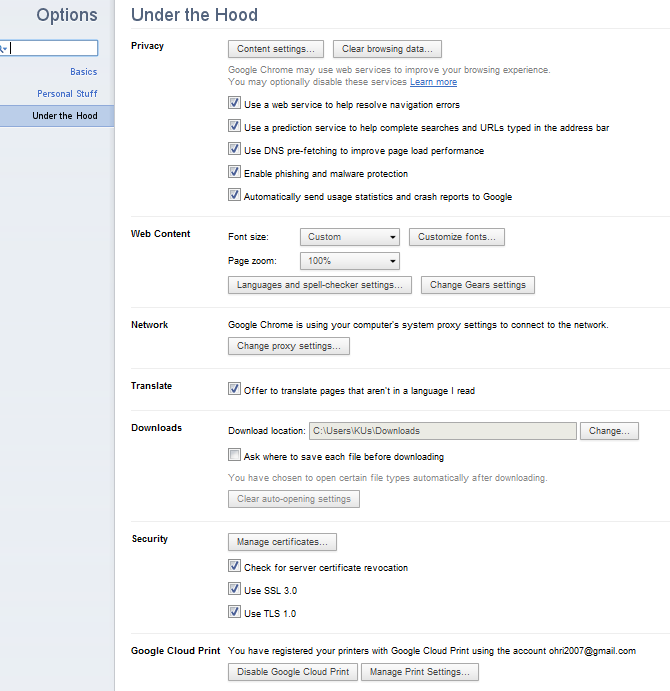
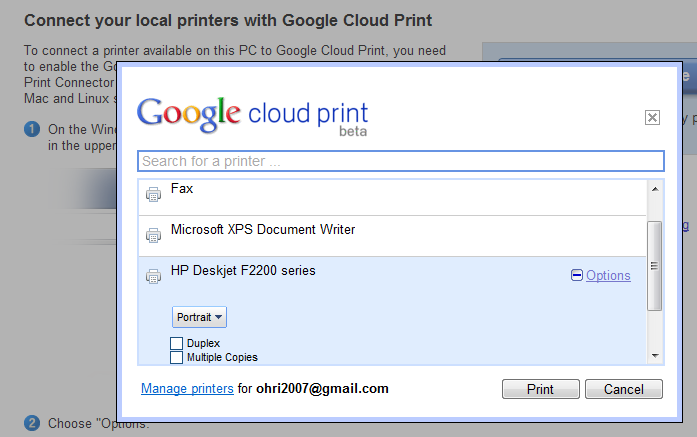
Print Jobs just got easier- especially if you prefer one printer, use Google Chrome, and can take 2 minutes to set up your printer to print from anywhere in the world through the internet.
It’s called Google Cloud Print– and it makes my life a lot easier when I travel and need to give to printer at home some documents to print rather than rely on external printers. See screenshots below and check out http://www.google.com/cloudprint/ for more
First, although Google Refine might start out looking like a spreadsheet program (Microsoft Excel, Google Spreadsheets, etc.), don’t expect it to work like a spreadsheet program. That’s almost like expecting a database to work like a text editor.
Google Refine is NOT for entering new data one cell at a time. It is NOT for doing accounting.
Google Refine is for applying transformations over many existing cells in bulk, for the purpose of cleaning up the data, extending it with more data from other sources, and getting it to some form that other tools can consume.
To use Google Refine, think in big patterns. For example, to spot errors, think
Show me every row where the string length of the customer’s name is longer than 50 characters (because I suspect that the customer’s address is mistakenly included in the name field)
Show me every row where the contract fee is less than 1 (because I suspect the fee was entered in unit of thousand dollars rather than dollars)
Show me every row where the description field (scraped from some web site) contains “&” (because I suspect it wasn’t decoded properly)
To edit data, think
For every row where the contract fee is less than 1, multiply the fee by 1000.
For every row where the customer name contains a comma (it has been entered as “last_name, first_name”), split the name by the comma, reverse the array, and join it back with a space (producing “first_name last_name”)
To specify patterns, use filters and facets. Typically, you create a filter or facet on a particular column. For example, you can create a numeric facet on the “contract fee” column and adjust its range selector to select values less than 1. If the default facet doesn’t do what you want, you can configure it (by clicking “change” on the facet’s header). For example, you can create a text facet with on the same “contract fee” column with this expression:
value < 1
It will show 2 choices: true and false. Just select true. Then, invoke the Transform command on that same column and enter the expression
value * 1000
That Transform command affects only rows where the “contract fee” cell contains a value less than 1.
You can use several filters and facets together. Only rows that are selected by all facets and filters will be shown in the data table. For example, say you have two text facets, one on the “contract fee” column with the expression
value < 1
and another on the “state” column (with the default expression). If you select “true” in the first facet and “Nevada” in the second, then you will only see rows for contracts in Nevada with fees less than 1.
Analogies
Databases
If you have programmed databases before (performing SQL queries), then what Google Refine works should be quite familiar to you. Creating filters and facets and selecting something in them is like performing this SELECT statement:
  SELECT *
  WHERE ... constraints determined by selection in facets and filters ...
And invoking the Transform command on a column while having some filters and facets selected is like performing this UPDATE statement
  UPDATE whole_table SET column_X = ... expression ...
  WHERE ... constraints determined by selection in facets and filters ...
The difference between Google Refine and databases is that the facets show you choices that you can select, whereas databases assume that you already know what’s in the data.



 DECISION STATS