Who was that? Blog Comments

If someone has been spamming you with dumb comments here is a method to find who they are without even having advanced analytics knowledge.

This assumes you use WordPress Blogs.

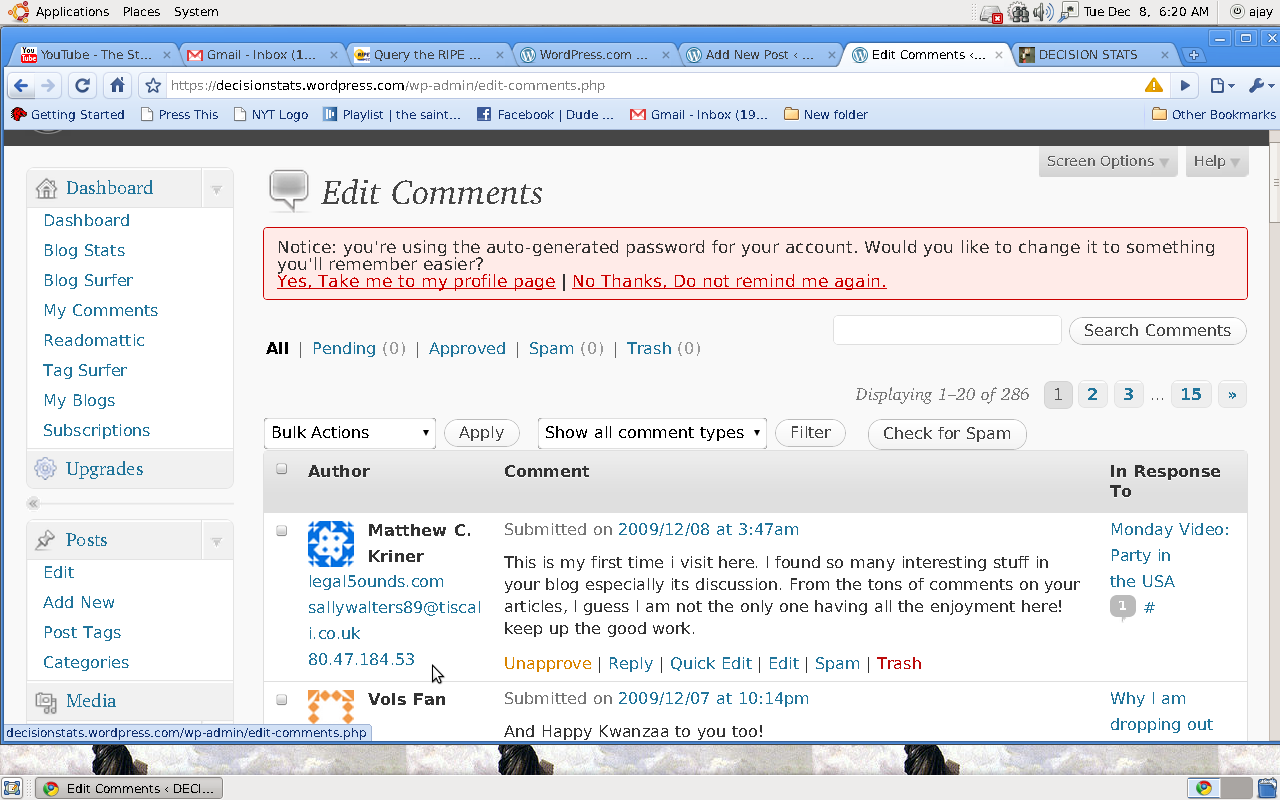
See the screenshot of comment to get the IP Address.

It appears below each comment as a number like 89.99.139.67 or see below- the place for the Mouse Pointer

From Wikipedia

http://en.wikipedia.org/wiki/IP_address

“A name indicates what we seek. An address indicates where it is. A route indicates how to get there.”

Take the number and search it here

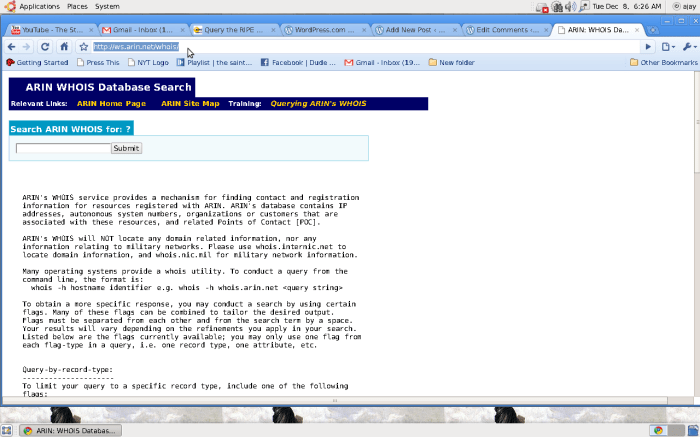
http://ws.arin.net/whois/

Thats the American Registry for Internet Numbers.

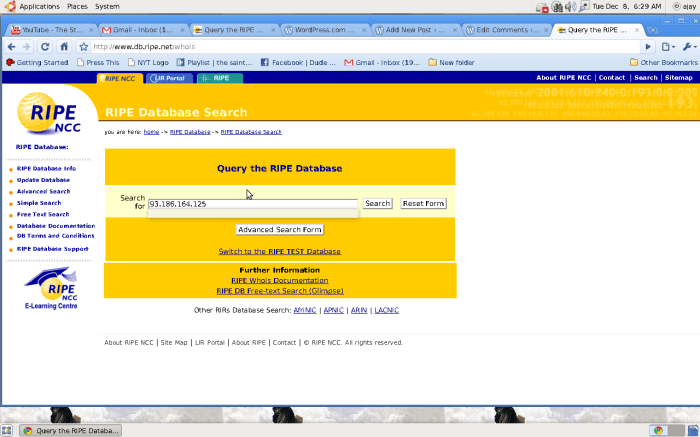
or Search it here.

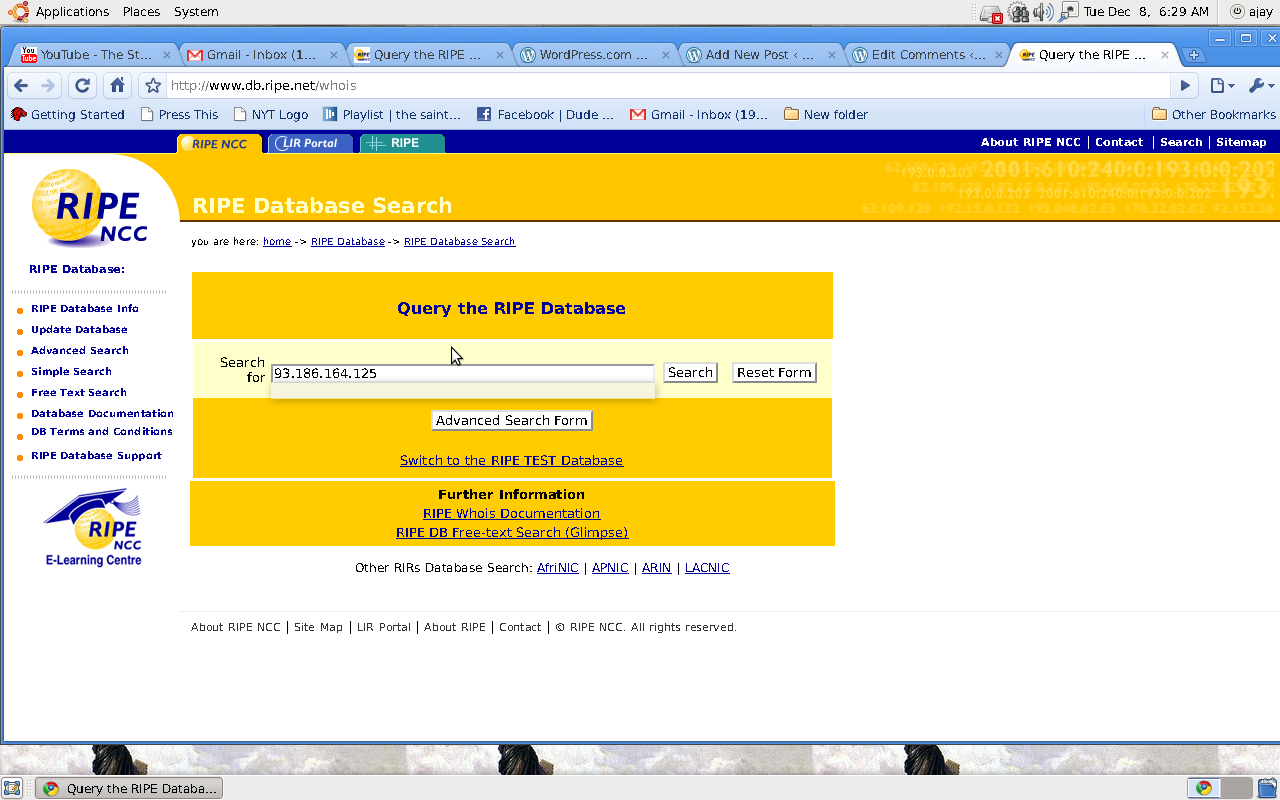
http://www.db.ripe.net/whois

Now that you know your friendly spammer is what do you do next

Forgive them

Tis the season of Joy.


A website for God

Here is a website I built in less than 15 minutes for my fellow Bible Study and Church members. I am hoping to introduce the concepts of search engine optimization and social media to the people who have prayed for me all this year in 2009 and helped me out of very torrid personal times and battles.

It is called

Prayers2Go.com

Basically: you order dinner or burgers for friends all the time. Maybve all they ever needed was a prayer.

For Here or For to Go.

Backedup or Hacked Up

Decisionstats.com was undergoing some hacking attacks this past two weeks.

Backing up WordPress Blog-

  • use export feature in wordpress to create files.
  • If your number of articles is more than 70, then create multiple usernames, export using bulk apply to seperate wordpress xml files.
  • then in wordpress.com site, import the various xml files ( note multiple file method avoid corruption and using bulk apply -change author – makes it very fast)

Hackedup

  1. once your wordpress.com blog is updated, use a wild card redirect so as to preserve your search engine traffic. Your Backup is now online even if your original site is hacked
  2. Use the server to access your .htaccess file to check whether rouge redirects happened.
  3. Use logs of server access ( painful but true) to pinpoint IP addresses of hack attacks ( note hackers WOULD use relay servers to disguise IP addresses)
  4. To prevent domain name hijacking, make sure your who.is information is private
  5. Change your email passwords, security questions, server passwords. Use random password generators to create secure passwords.
  6. To prevent rogue malware from infecting your laptop create a dual boot Ubuntu/Windows laptop using a 10 minute tutorial. Use the Ubuntu Linux boot to do all the above operations.
  7. Inform the Federal authorities in cyber crime division with the server logs and a SPECIFIC complaint ( no rambling sob stories)
  8. Pray to God, Matt ( both Cutts and Mullenweg), and if all above steps fail ask Donncha O Caoimh at http://ocaoimh.ie/about/ to step in. 

Buddypress for Analytical Buddies??

Let us assume there are top 100 analysts in the world mostly using WordPress or Typepad or Blogger to make posts

Managing them is quite a challenge.

What is marketing ROI of analyst relationships for a Business Intelligence vendor- Curt Monash is the Aerosmith of Business Intelligence Analysts so he can tell it better.

How about a magical community where you just use their mostly Feedburner of Feedblitz RSS feeds to create a self automated community.

Serach Engine Optimization can be tricked by keeping that community website free from Google or Search Engines ( yes it can be done).

Use numerical etc as in Linkedin to spur rivalry by shifting their page positions up and down, or by clicking repeatedly on some posts to manipulate their views on blog posts.

What would SAS pay to have all SAS analysts in one webpage. or SPSS to have all SPSS analysts in one webpage.

Six months later suddenly open the website for search engines, and the RSS feed has downloaded all the posts of all the top 50 analysts of the world. Google advertsing wont matter because hey we have a mega vendor sponsor- while individual bloggers / analysts have no collective strength now as the community is too big.

So much blah blah-

What software would you use.

you can choose between

Ning.com ( but it mostly non Blog feeds based)

or Wordframe.com ( which interface and name sounds suspiciously like WordPress software)

Or you can choose a customized WordPress Solution called Buddy Press.

Here is the software-

BuddyPress

BuddyPress will transform an installation of WordPress MU into a social network platform.

BuddyPress is a suite of WordPress plugins and themes, each adding a distinct new feature. BuddyPress contains all the features you’d expect from WordPress but aims to let members socially interact. Read More ?

Note this was just a generic case study for making a case for open source based community softwares. Resemblance to any thing is a matter of coincidence – except for Curt Monash of course.

Cost of Customized WordPress Software for communties is a big zero- it is free and open source and tjousands of plugins can be installed and maintained for it.

See an existing installation here

www.decisionstats.com/community

or at www.buddypress.org

Advanced Services from WordPress

http://en.wordpress.com/advanced-services/


Advanced Services

We’ve got some things that might be of interest to our more advanced users:

Need help to choose a self hosted smaller blog.

http://en.wordpress.com/advanced-services/

WordPress Web Hosting

There are hundreds of thousands of web hosts out there, the vast majority of which meet the WordPress minimum requirements, and choosing one from the crowd can be a chore. Just like flowers need the right enviroment to grow, WordPress works best when it’s in a rich hosting environment.

We’ve dealt with more hosts than you can imagine; in our opinion, the hosts below represent some of the best and brightest of the hosting world. If you do decide to go with one of the hosts below and click through from this page, some will donate a portion of your fee back—so you can have a great host and support WordPress at the same time.

If you don’t need the flexibility of a full web host, you may consider getting a free blog on WordPress.com.

Blue Host Blue Host

“WordPress Auto-Install — new WordPress updates are made available within 24 hours! Unlimited disk storage, Unlimited monthly data transfer, host unlimited domains on 1 account, 1 free domain name for as long as you host with BlueHost, 2500 POP / WebMail addresses, 50 MySQL databases, free control panel, free Fantastico, free SimpleScripts, 24/7 network monitoring, 99% uptime guarantee, mirrored storage backups, no hidden fees, voted best support in 2004, 2005, 2006, 2007, and 2008!”

DreamHost DreamHost

“WordPress auto-install and upgrade, 1 TB disk storage, 10 TB bandwidth, free domain, unlimited databases, 3000 email accounts, unlimited domain forwarding, Jabber support.”

MediaTemple MediaTemple

“Hosting that’s ready for traffic spikes. Start your new blog on a clustered hosting platform that’s ready for you to hit the big time. Whether you reach the front page of Digg or get an unexpected shout-out on Oprah, your blog will always be available. Get started right-away with our WordPress one-click installer and enough high-speed storage and bandwidth to run a blogging empire.”

Go Daddy GoDaddy.com

“Take advantage of hosting plans featuring up to unlimited disk space, unlimited transfer, unlimited MySQL databases, unlimited websites, and 1,000 email accounts all from the world’s largest Web host GoDaddy.com. Enjoy free set-up, no annual commitment, and free auto-install of over 50 applications, including WordPress. Best of all, 99.9% network uptime and Go Daddy’s world-class data centers keep you up and running, and plans start at just $4.25/mo! Virtual Dedicated and Dedicated Servers also available. Save 20% on one year or more of web site hosting! Use code WORDPRESS2 at checkout.”

JustHost JustHost

“Just Host offers the perfect solution for your WordPress blog. With unlimited disk space, bandwidth and MySQL databases, usage restrictions are a thing of the past. Just Host has offices in the US, UK and Australia and is serviceable in 195 countries worldwide. No matter where you live though, Just Host offers first class support 24/7 support via phone, email and live chat support.”

Laughing Squid Laughing Squid

“Laughing Squid Web Hosting is an independently owned and operated web host, based out of San Francisco, that provides friendly, dependable and secure web hosting services to artists, individuals, bloggers, non-profits, and small businesses. We are open source geeks who are here to help you get your content online and rescue you from the endless void of impersonal and unreliable web hosting.”

Requirements: PHP 4.3 or higher, MySQL 4.0 or higher, Apache or Litespeed recommended.

Host Feedback

We’re committed to helping create a wholesome and hassle-free WordPress hosting environment. If you feel there are issues with one of the hosts listed here, please send a note to hosting-2009@wordpress.org. If the situation warrants we’ll work with you and your host on a solution. We also realize that we can’t highlight every good host, but if you have a favorite host you think we should feature here, let us know.

Note before contacting us: Please don’t send us legal takedown orders or threats, we don’t actually host every WordPress blog in the world. If you don’t understand that, you probably shouldn’t be sending legal notices anyway.

  • LinkedIn Apps : Blogging and Twitter

    I like the following two LinkedIn Apps the most for sheer usefulness .Try them out – the blog gets extra readers and Company Buzz helps you track company. See them right below the all new LinkedIn inbox.

    image

    This would take you to the Application Directory.

    http://www.linkedin.com/static?key=application_directory

    The WordPress blog helps me when I need to post some article to one of the 50 groups.

    I then use the Add to Any button from www.addtoany.com and click share on LinkedIn.

    LinkedIn indeed is quite convenient for sharing ( but be careful of overdoing it –lest it goes spam)

    image

    I use the Company Buzz with a slight twist though.By using broad keywords I get a list of say people I want to follow in the world of data mining or business intelligence.

    Next I follow NOT the people following the influential tweeters, but the people who they are using RT or messaging replies @.

    image

    Hope this helps your LinkedIn account. You can send me a LinkedIn Invite at www.linkedin.com/in/ajayohri .

    And do take part in the Social Media School group on LinkedIn here http://www.linkedin.com/groups?gid=1854626