The Top Statistical Softwares (GUI)

The list of top Statistical Softwares (GUI) is continued below. You can see the earlier post here

6. R Commander– While initially aimed at being a basic statistics GUI, the tremendous popularity of R Commander and the extensions in the form of plugins has helped make this one of the most widely used GUI. In short if you dont know ANY R, and still want to do basic descriptive stats and modeling this will come in handy- with an added script window for custom code for advanced users and extensions like that for DoE (design of experiments) and QCC (Quality Control) packages the e-plugins are a great way to extend this. I suspect the only thing holding it back is Dr Fox and the rest of R Core’s reluctance to fully embrace GUI as a software medium. You can read his earlier interview here-https://decisionstats.wordpress.com/2009/09/14/interview-professor-john-fox-creator-r-commander/

Technically it is possible to convert just about any package to a GUI menu in R Commander using the e-plugins.

7. SAS GUIs

Enterprise (Guide)

SAS Enterprise Guide was the higher end (and higher priced solution) to enhanced editor’s lack of menu driven commands. It works but many people I know prefer the text editor just as well.


The Enterprise Miner is a separate software and works more like Red R or SPSS Modeler does. Again EM is one of the major DM softwares out there, but the similarity in names is a bit confusing.
Even the Base SAS Enhanced Editor does have some menus for importing data, or querying etc, but it is rarely confused for being a GUI.

8. Oracle Data Miner and Knime

I like both the ODM and Knime but I find the lack of advertising or promotional support puzzling. Both these softwares can do well to combine technical excellence with some marketing. And since they are both free you can check them out yourself here

Oracle Data Mining

You can download it here-(note- the Oracle Web Site itself is a bit aging 🙂 )

http://www.oracle.com/technology/products/bi/odm/odminer.html

Knime is the open source GUI which can be found here-

http://www.knime.org/introduction/features

9. RAwkard

Another R GUI- it stands out on the comprehensive ways you can customize your code in menus rather than writing all or learning by rote the syntax.

From http://sourceforge.net/apps/mediawiki/rkward/index.php?title=Main_Page

you can see it below. I recommend this GUI over other GUIs especially if you are new to R and do more data visualization which needs custom graphics.

10. Red R and R JGR/ Deducer

Red R and RJGR/Deducer are both up and coming GUIs for R. While REd R is R version for Enterprise Miner, Deducer is coming up with a new GUI for ggplot the powerful graphics package in R.

Some GUIs excluded from this list are – Statistica, MatLab, EViews(?) because I dont really work with them, and thought it best to turn them over to someone who knows them better.

Hope this list of GUIs helps you- note most of the softwares can be learnt within a quick hour and two if you know basic software skills/data manipulation so going through the GUI list is a faster way of adding value to your resume/knowledge base as well.
CommeRcial R- Integration in software

Some updates to R on the commercial side.

Revolution Computing is apparently now renamed Revolution Analytics. Hopefully this and the GUI development will help pay more focused attention on working in R in a mainstream office situation. I am still waiting for David Smith’s cheery hey-guys-we-changed-again blog post though at a new site called inside-r.org/ or his old blog site at blog.revolution-computing.com

They probably need to hire more people now – Curt Monash, noted all-things-data software guru has the inside dope here

Techworld writes more here at http://www.techworld.com.au/article/345288/startup_wants_r_alternative_ibm_sas

The company’s software is priced “aggressively” versus IBM and SAS. A single supported workstation costs $2,000 for an annual subscription. Pricing for server-based licenses varies depending on the implementation.

But Revolution Analytics faces a tough challenge from those larger vendors, as well as the likes of XLSolutions, which offers R training and a competing software package, R-Plus.

SPSS though continues to integrate R solidly and also march ahead with Python (which is likely to be the next gen in statistical programming if it keeps up) http://insideout.spss.com/

With the release of Version 18 of IBM SPSS Statistics and the Developer product, easy-to-install versions of the Python and R materials are posted.  In particular, look for the R Essentials link on the main page or from the Plugins page.  It installs the R Plugin, the correct version of R, and a bunch of example R integrations as bundles.  It’s much easier to get going with this now.

Netezza , a business intelligence vendor promises more integration and even a training in R based analytics here

R Modeling for TwinFin i-Class

Objective
Learn how to use TwinFin i-Class for scaling up the R language.

Description
In this class, you’ll learn how to use R to create models using huge data and how to create R algorithms that exploit our asymmetric massively parallel (AMPP®) architecture. Netezza has seamlessly integrated with R to offload the heavy lifting of the computational processing on TwinFin i-Class. This results in higher performance and increased scalability for R. Sign up for this class to learn how to take advantage of TwinFin i-Class for your R modeling. Topics include:

  1. R CRAN package installation on TwinFin i-Class
  2. Creating models using R on TwinFin i-Class
  3. Creating R algorithms for TwinFin i-Class

Format
Hands-on classroom lecture, lab exercises, tour

Audience
Knowledgeable R users – modelers, analytic developers, data miners

Course Length
0.5 day: 12pm-4pm Wednesday, June 23 OR 8am-12pm Thursday, June 24 OR 1pm-5pm Thursday, June 24, 2010

Delivery
Enzee Universe 2010, Boston, MA

Student Prerequisites

  • Working knowledge of R and parallel computing
  • Have analytic, compute-intensive challenges
  • Understanding of data mining and analytics”

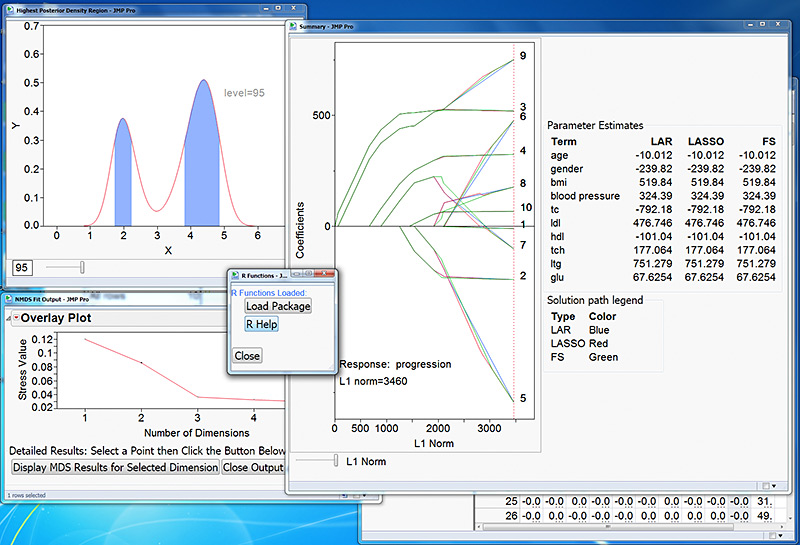
My favourite GUI in stats , JMP (also from SAS Institute) is going to deploy R integration as soon as this September – Read more here- http://www.sas.com/news/preleases/JMP-to-R-integrationSGF10.html

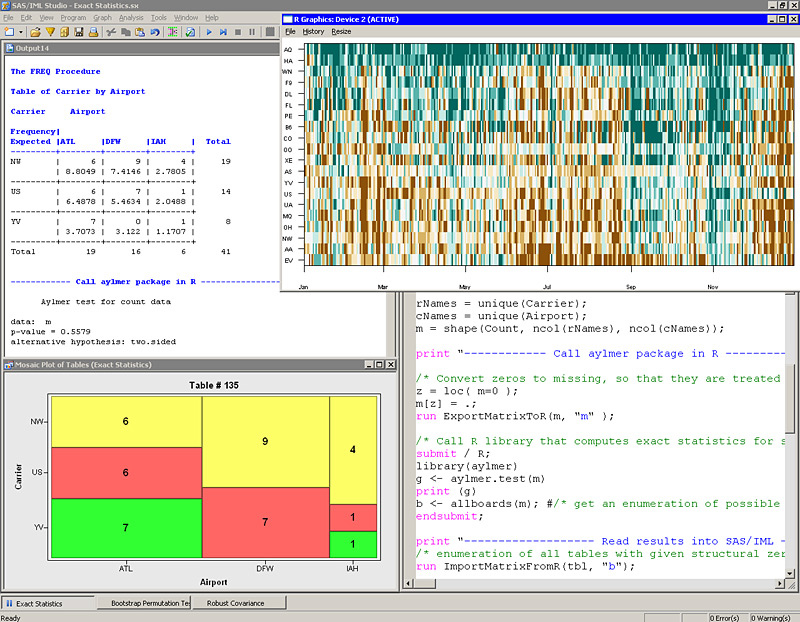
Also SAS-IML studio is not lagging behind

The next release of SAS/IML will extend R integration to the server environment – enabling users to deploy results in batch mode and access R from SAS on additional platforms, such as UNIX and Linux.

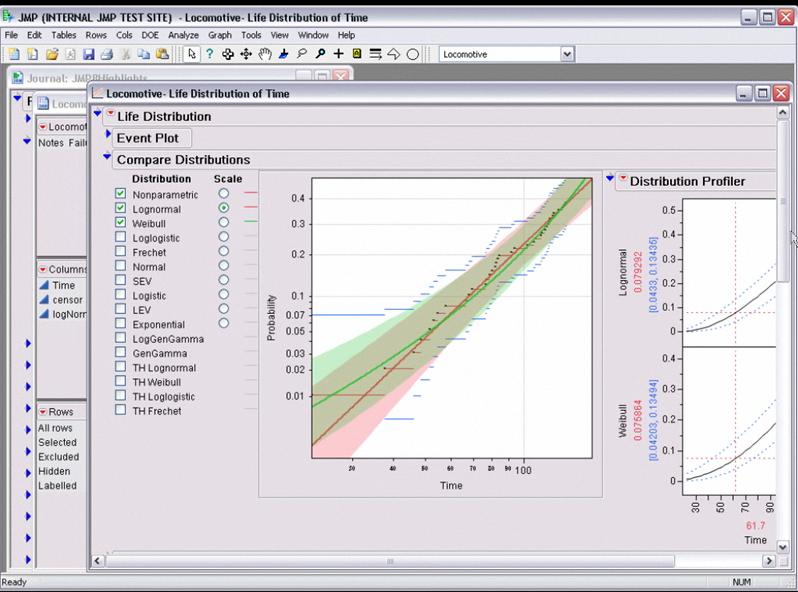
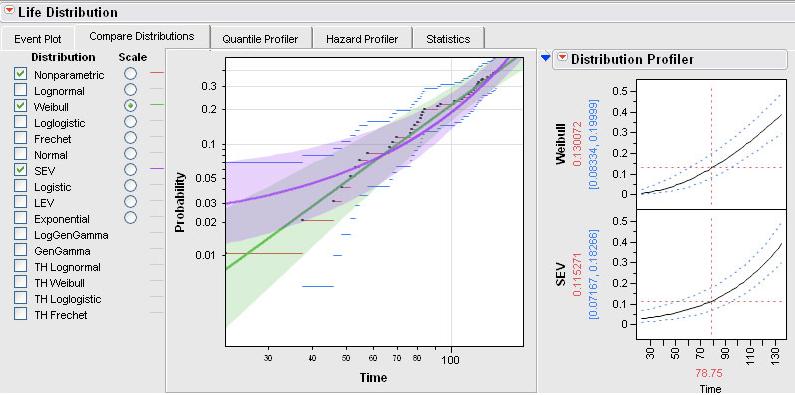
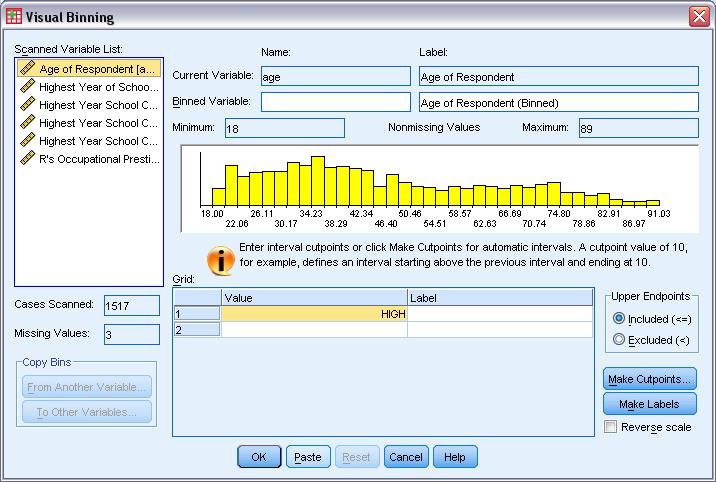
I am kind of happy at one of the best GUI’s integrating with one of the most innovative stats softwares. It’s like two of your best friends getting married. (see screenshots of the softwares)

All in all- R as a platform making good overall progress from all sides of the corporate software spectrum which can only be good for R developers as well as users/students.

Top 10 Graphical User Interfaces in Statistical Software

Here is a list of top 10 GUIs in Statistical Software. The overall criterion is based on-

  • User Friendly Nature for a New User to begin click and point and learn.
  • Cleanliness of Automated Code or Log generated.
  • Practical application in consulting and corporate world.
  • Cost and Ease of Ownership (including purchase,install,training,maintainability,renewal)
  • Aesthetics (or just plain pretty)

However this list is not in order of ranking- ( as beauty (of GUI) lies in eyes of the beholder). For a list of top 10 GUI in R language only please see –

https://rforanalytics.wordpress.com/graphical-user-interfaces-for-r/

This is only a GUI based list so it excludes notable command line or text editor submit commands based softwares which are also very powerful and user friendly.

  1. JMP –

While critics of SAS Institute often complain on the premium pricing of the basic model (especially AFTER the entry of another SAS language software WPS from http://www.teamwpc.co.uk/products/wps – they should try out JMP from http://jmp.com – it has a 1 month free evaluation, is much less expensive and the GUI makes it very very easy to do basic statistical analysis and testing. The learning curve is surprisingly fast to pick it up (as it should be for well designed interfaces) and it allows for very good quality output graphics as well.

2.SPSS

The original GUI in this class of softwares- it has now expanded to a big portfolio of products. However SPSS 18 is nice with the increasing focus on Python and an early adoptee of R compatible interfaces, SPSS does offer a much affordable solution as well with a free evaluation. See especially http://www.spss.com/statistics/ and http://www.spss.com/software/modeling/modeler-pro/

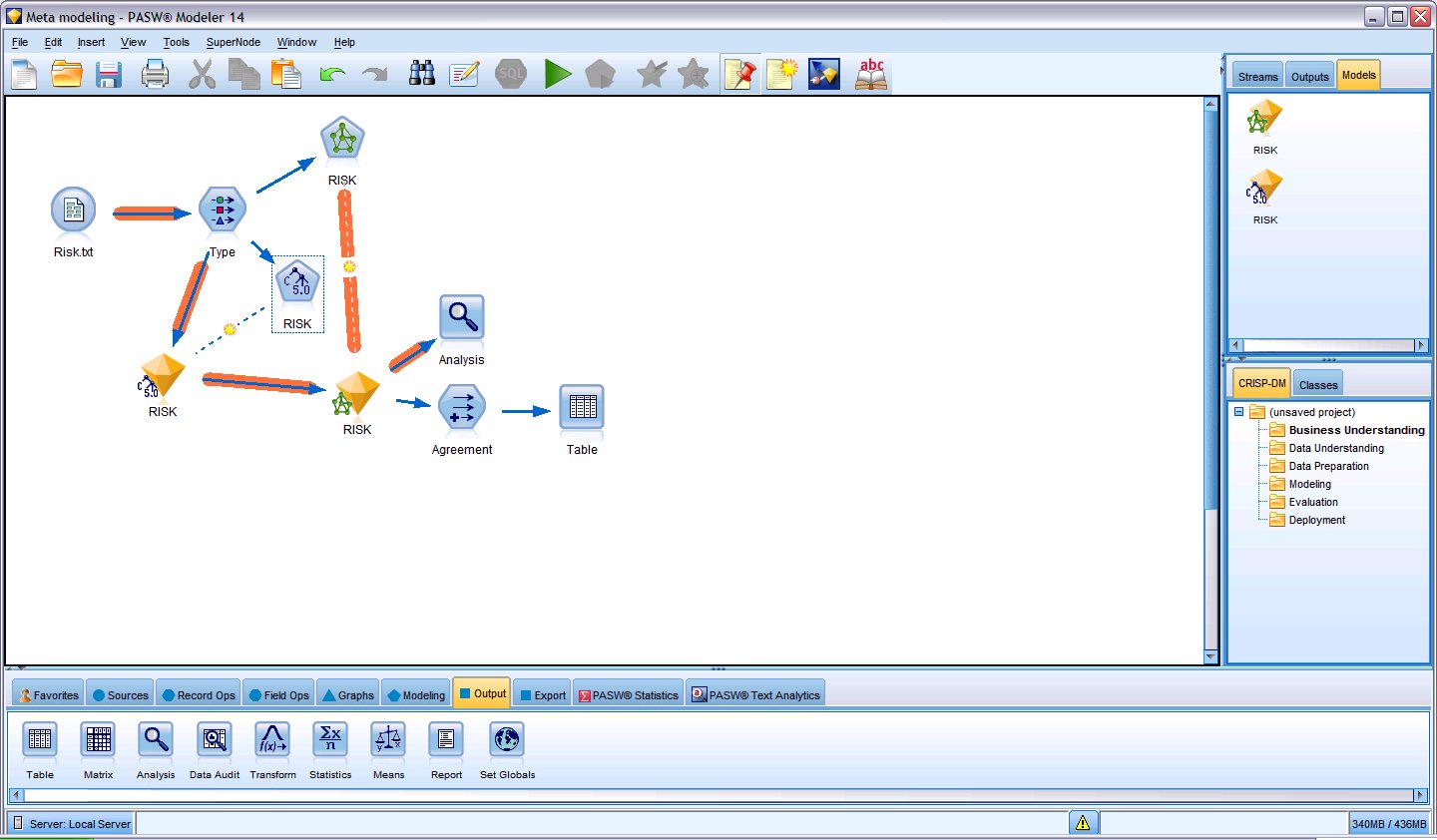
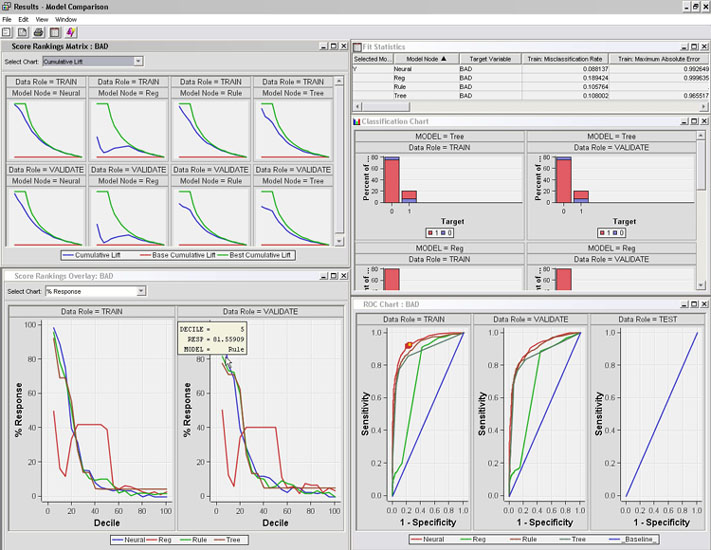
the screenshot here is of SPSS Modeler

3. WPS

While it offers an alternative to Base SAS and SAS /Access software , I really like the affordability (1 Month Free Evaluation and overall lower cost especially for multiple CPU servers ), speed (on the desktop but not on the IBM OS version ) and the intuitive design as well as extensibility of the Workbench. It may look like an integrated development environment and not a proper GUI, but with all the menu features it does qualify as a GUI in my opinion. Continue reading “Top 10 Graphical User Interfaces in Statistical Software”

Norman Nie: R GUI and More

Here is an interview from Norman Nie, SPSS Founder and CEO, REvolution Computing (R Platform).

Some notable thoughts

For example, SPSS was really among the first to deliver rich GUIs that make it easier to use by more people. This is why one of the first things you’ll see from REvolution is a GUI for R – to make R more accessible and hereby further accelerate adoption.

This is good news if executed- I have often written (in agony actually because I use it) for the need for GUIs for R. My last post on that was here. Indeed the one reason SPSS was easily adopted by business school students (like me) in India in 2001-3 was the much better GUI over SAS ‘s GUIs.

However some self delusion/ PR / cognitive dissonance seems at play at Dr Nie’s words

If you look at the last 40 years of university curriculum, SPSS – the product I helped build – has been the dominant player, even becoming the common thread uniting a diverse range of disciplines, which have in turn been applied to business. Data is ubiquitous: tools and data warehouses allow you to query a given set of data repeatedly. R does these things better than the alternatives out there; it is indeed the wave of the future.

SPSS has been a strong number 2- but it has never overtaken SAS. Part of that is SAS handles much bigger datasets much more easily than SPSS did ( and that is where R’s RAM only size can be a concern). Given the decreasing prices of RAM memory, the BIG-LM like packages, and the shift for cloud based computing(with rampable memory on demand) this can be less of an issue- but analysts generally like to have a straight way of handling bigger datasets. Indeed SAS with vertical focus and the recent social media analytics continues to innovate both itself as well as through its alliance partnerships in the Enterprise software world- and REvolution Computing would further need to tie up or sew these analytical partners especially data warehousing or BI providers to ensure R’s analytical functions can be used where there is maximum value for their usage to the corporate customer as well as the academic customer.

Part 2 of Nie’s interview should be interesting .

2010-2011 would likely see

Round 2 : Red Corner ( Nie)                             Gray Corner (Goodnight)

if

Norman Nie can truly deliver a REvolution in Computing

or else

he becomes number two again the second time around to Jim Goodnight’s software giant.

Book Review- Laws of Simplicity -John Maeda

Simple Review- Simple 100 Page Book Expounding on Ten Laws of Simplicity with Profound Applications in Design.

Complex Review-An excellent book by MIT Design Guru, John Maeda, it talks of the essential process in thinking in simplified manner and the tremendous edge that product and service strategists can gain from it. Essential reading for any strategist and can be read in an hour or two as well.

The Ten Laws are-

  1. Reduce
  2. Organize
  3. Time- Reduce time to do things
  4. Learn
  5. Differences
  6. Context- Appropriate
  7. Emotion- More
  8. Trust-
  9. Failure- What we cant simplify
  10. The One- Subtract obvious and add the meaningful

Three Keys

  1. Away-More appears like less by simply moving it far, far away.
  2. Open- Openness simplifies complexity.
  3. Power- Use less, gain more.

An abstract video on the same is here

or you can watch the TED talk yourself at

http://video.ted.com/talks/podcast/JohnMaeda_2007_480.mp4

Towards better Statistical Interfaces

I was just walking about the U Tenn campus thinking about my next month departure from the school back to India when I ran into Bob Muenchen , head of the Stats consulting centre and more famously the author of ” R for SAS and SPSS users” . Bob mentioned that the edition for R for Stata should be ready for next month. It was also his idea for the article on Red R.

In fact what perplexes users of statistical software like me is why complex softwares like R or SAS choose interfaces that are clearly not as well designed in simplicity as they are in statistical rigor. I think SPSS to some extent and JMP to a much greater extent represent well designed user interfaces. While Rattle , R Commander , R Analytical Flow and Red R are examples for R interfaces SAS also invested in the Enterprise class interfaces.

On all these I belive there is a much greater need for say a Pro UI designer and clean it up. I was reading Prof Maeda’s laws of simplicity ( see http://lawsofsimplicity.com ) and just comparing and contrasting that with some of the softwares I end up using.

The Principles of Reduce ( Shrink, Hide , Embody ) and Organize ( Sort , Label , Integrate and Priortize ) need to be looked into by the Chief Software Interface designers for analytics and BI. While attempts to create more and more robust and faster algorithms and prettier dashboards are important is it not important to simplify the process and procedures to do so . The software which is easier to learn and pick up will tend to have an edge over less visually designed softwares. Keeping it simple helped Apple in the retail electronics and software , it needs to be seen who or which enterprise BI or BA software will make attempts to do the same. An ideal stats or BI interface should be simple and powerful enough to be used by decision makers directly on occasion rather rely on the middleware of analysts and consultants solely.