Cloud Computing (Cooler and Lower)

The changes in Google Docs means that cloud computing now enables you to imbed web like objects in mundane spreadsheets (for free) and also allows you to backup your Google Docs using the Google Gears application.The Google gadgets are also nifty like displaying Gannt charts.

http://gears.google.com/?platform=win

You can collaborate on a spreadsheet on the internet also

With these changes- Google Docs is more than a big alternative to Windows Office- especially thanks to much lower initial  costs, and zero maintainace costs. Also with the offline Google Gears backup,you do have access to your data even without the internet, it allows you to de facto create a cloud version of Windows OS -My Briefcase .

Not 100 % of the data or office documents within an organization need to reside locally. Yet System administrators continue to resist Google docs (because well you don’t need system administrators once you totally get into this cloud computing business).

Of course, Google will need to address privacy and ownership issues, which given its battles with retail data will cast a cloud on it’s cloud for the corporate version of the retail services.

Monetizing my Linked In network

This are the stats of my linked in network.

Now having 3219 contacts is clearly more valuable than 32 contacts. But the quality of contacts is important as well.I manage two groups on Linkedin ,Decision Stats and Creative Destruction, have got 1 job , lots of CXO level contacts , got ideas for two websites (including this one), been interviewed once for a website (www.analyticbrdige.com) and get increasing numbers of recruiter calls everyday. But how do I convert this value into a number.

So whats the true economic value of my Linked In network.

1) Lets assume each contact has a minimum value of 10 cents. This is to remove duplication and negate the effect of Linkedin Open Networkers or LIONs.

2) Lets assume each CXO level contact is worth 5 dollars.Thats about 300 CXO networkers.

3)Lets assume each recruiter is worth 1 $. Thats about 500 recruiters.

4) Going forward regional contacts – Lets put the value of a Bay Area contact at 2$ while New York Contact at 1.1 $. New York contacts are less helpful when it comes to technology.

Well, doing the maths I come to a value of 6500 USD or a utility value of around 2 $ per contact. Now compare this with Linkedin ‘s valuation which is at 1 billion for 25 million people. Thats 40 USD per unique contact.

So my calculation assumes a duplication of 40/2 =20 times atleast. Which is reasonable. This assumes of course that LI gets the same value for each contact that I do, which may or may not be true.

So whats the value of your Linkedin Network today. 🙂

Joomla 1.5

Joomla 1.5 is a terrific CMS release. I did some work for half an hour, and the results are here. Its almost as easy to use as WordPress (note almost) and quite powerful in content customization.

https://decisionstats.com/joomla15/

The New WordPress

WordPress : For people who would rather spend time on the content than the code.

Easy to install,maintain,upgrade, beautiful themes,lots of plug-ins –

The easy -sleek dashboard

The best is of course the ease by which I can now insert pictures-

This is much much better than Blogger..though other Typepad-s like blogging platforms are said to be good too. Google seems to have forgotten re designing blogspot and news.google.com- and the competition is taking it all.

Google :Protocol Buffers and Lively

1) An Alternative to XML. This is quite a cool initiative as long as it doesnot lead to more skirmishes with the guys from redmond.http://code.google.com/apis/protocolbuffers/docs/overview.html

“”For example, let’s say you want to model a person with a name and an email. In XML, you need to do:
John Doe
jdoe@example.com

while the corresponding protocol buffer message definition (in protocol buffer text format) is:

# Textual representation of a protocol buffer.
# This is *not* the binary format used on the wire.
person {
name: “John Doe”
email: “jdoe@example.com”
}

In binary format, this message would probably be 28 bytes long and take around 100-200 nanoseconds to parse. The XML version is at least 69 bytes (if you remove whitespace) and would take around 5,000-10,000 nanoseconds to parse.

Also, manipulating a protocol buffer is much easier:

cout << “Name: ” << person.name() << endl;
cout << “E-mail: ” << person.email() << endl;

Whereas with XML you would have to do something like:

cout << “Name: ”
<< person.getElementsByTagName(“name”)->item(0)->innerText()
<< endl;
cout << “E-mail: ”
<< person.getElementsByTagName(“email”)->item(0)->innerText()
<< endl;

However, protocol buffers are not always a better solution than XML – for instance, protocol buffers would not be a good way to model a text-based document with markup (e.g. HTML), since you cannot easily interleave structure with text. In addition, XML is human-readable and human-editable; protocol buffers, at least in their native format, are not. XML is also – to some extent – self-describing. A protocol buffer is only meaningful if you have the message definition (the .proto file).””

We think it is one more Google googly at Microsoft (!). But if its faster for consumers so be it.

2) www.lively.com

This one is like Yahoo Avatars or a crude Second Life. We downloaded  it, the app was quite small, but running it was slow ,and  bandwidth heavy (I tested Eve online on the same bandwidth)As more developers pile on, it should get bigger inevitably. Its a fun project but yes you can prompted to click remember chat history ( so as Google can tie up more behavioral ad- targeting to your IP address). Ouch !


LifeBlob

This is www.lifeblob.com. Entry is by invites only (a bit like Gmail’s launch). It’s a bit like Plurk in the horizontal style of the posts except for a big difference. I can import my blog (www.decisionstats.com for me) in this and all posts are imported in a time bound manner. I can zoom in and out and even tag my connections with relevant posts.Click on the screen shot if you want a better view.

And yes I can import Gmail and Yahoo address books to (which i did= and sent an invite to my top 3500 friends only).  What’s more you can expand the posts (so you are not limited to 140 words only).

Big Drawback- Only One Blog can be imported . Well suppose I wanted to import all blogs I like to read (reading is an equally part of my life as writing , right) .Other big drawback- I had to manually click update 85 times for my 85 posts on Decision Stats.The love kind of softened there.

Good things- once I am done, i can pretty well zoom in and out. So its like a enhanced blog reader for me, an online journal, a micro blog hence the name -lifeblob.

I wonder how they measure the online metrics for these- time spent ,number of accounts,number of posts, number of friends,number of invites,number of tags to friends, number of readers of posts etc.

One more thought- Can we use softwares like these to track project progress as like a wiki.Import the RSS feed of the project wiki/project Google Site page. Just kidding! Check it out if  you want to have a better way to organize your blog, or just keep a good online journal.

Fast R Graphics

So you don’t know R  because you were always working on office projects and did not have time to learn. The R list looked down on you and told you to read the documentation first. And then you needed to create some fast R graphics and some R code.

Help is here-

Download R from http://www.r-project.org,install it

open it-go to packages> set CRAN Mirror > to your country from drop down

type following in the R GUI near the ‘ >’ prompt-

“install.packages(“rattle”, dependencies=TRUE)”

so it should loook like

>install.packages(“rattle”, dependencies=TRUE)

Wait 15 minutes while downloads happen

Then packages>load package>rattle

Type rattle() at the command prompt

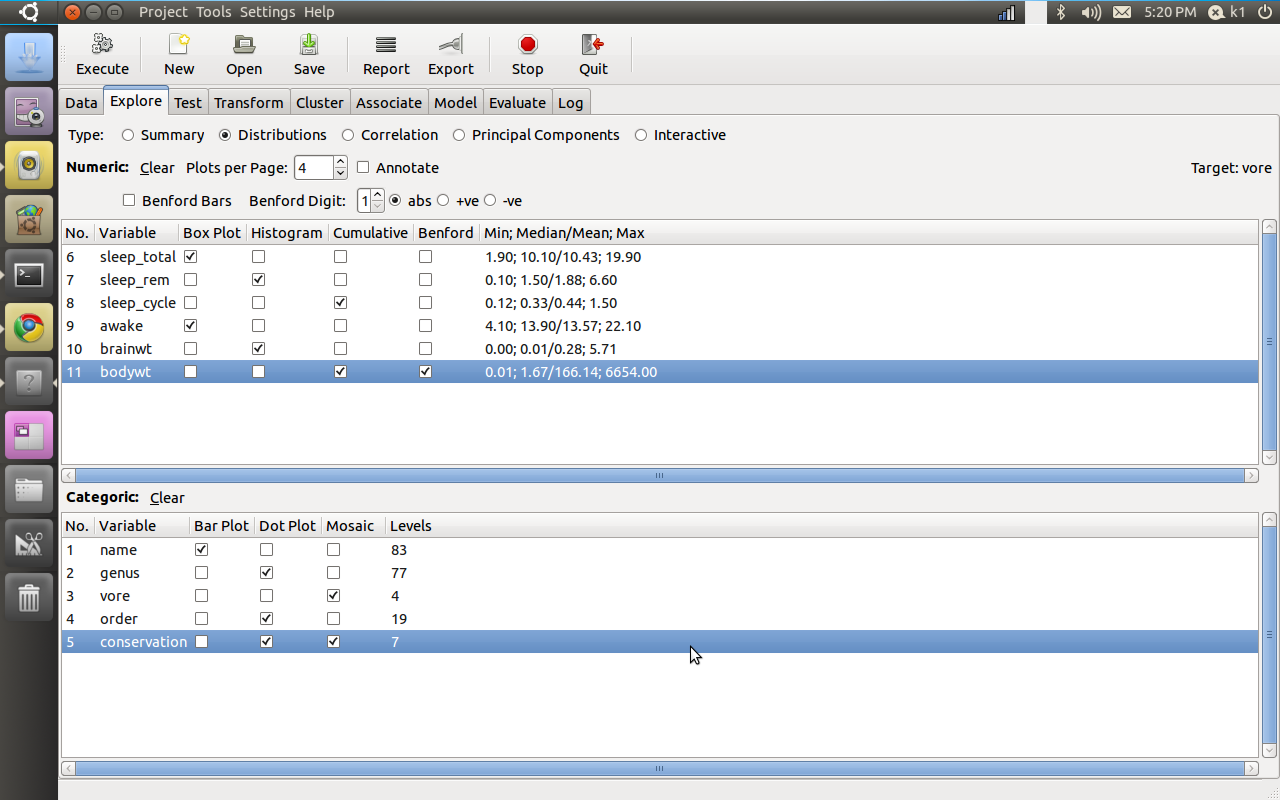
Now – in the new window called Rattle

load data from a .csv file using the browse options

click execute

Go straight to Explore-and click on distibutions.

Note you can also download rattle from www.rattle.togaware.com , these guys are the best.

Here are the graphs


But what about the code (note some variable names disguised).The code may be intimidating to a novice R user but it is auto generated , its like jumping straight to SAS Enterprise without learning SAS Editor-

Go to the last tab -log and

see the auto generated code.