How to be a Happy Hacker

I write on and off on hackers (see http://bit.ly/VWxSvP) and even some poetry on them (http://bit.ly/11RznQl) . During meetups, conferences, online discussions I run into them, I have interviewed them , and I have trained some of them (in analytics). Based on this decade long experience of observing hackers, and two decade long experience of hanging out with them- some thoughts on making you a better hacker, and a happier hacker even if you are a hacker activist or a hacker in enterprise software.

1) Everybody can be a hacker, but you need to know the basic attitude first.  Not every Python or Java coder is a hacker. Coding is not hacking. More details here- https://decisionstats.com/2012/02/12/how-to-learn-to-be-a-hacker-easily/

2) Use tools like Coursera, Udacity, Codeacdemy to learn new languages. Even if you dont have the natural gift for memorizing syntax, some of it helps. (I forget syntax quite often. I google)

3) Learn tools like Metasploit if you want to learn the lucrative and romantic art of exploits hacking (http://www.offensive-security.com/metasploit-unleashed/Main_Page). The demand for information security is going to be huge. hackers with jobs are happy hackers.

4) Develop a serious downtime hobby.

Lets face it- your body was not designed to sit in front of a computer for 8 hours. But being a hacker will mean that commitment and maybe more.


Continue reading “How to be a Happy Hacker”

Funny Stuff on Book Resellers and Dynamic Pricing at Amazon

I have been keeping an eye on the pricing figure of R for Business Analytics at Amazon.com and have watched it fluctuate between 49$ to 59$ while it is currently at 50$. (Incidentally- Per Capita GDP of India is 3700$ per year or ~$10 per day)

My point is

  1. why should a used book reseller offer to sell the same book at a HIGHER price,
  2. while a new book reseller offers to sell the same book that Amazon is selling (in stock) at a higher price.
  3. On top of that, these resellers have hundreds of thousands of ratings from delighted book buyers (of other books) who were very happy at buying the same book (used or new) at higher prices including upto twice the price.

Funny Stuff , huh!

Continue reading “Funny Stuff on Book Resellers and Dynamic Pricing at Amazon”

Eric Siegel’s Book

Message from Founder of Predictive Analytics Conference, Eric Siegel whom we have interviewed here

To drive early orders for my about-to-launch book, “Predictive Analytics: The Power to Predict Who Will Click, Buy, Lie, or Die” (published by Wiley Feb 18), we’re providing this offer:

PREORDER NOW ($15 on Amazon, currently) and receive:

1) FREE ACCESS to the first of four modules of my online training program, “Predictive Analytics Applied”

2) A 40% DISCOUNT CODE off the full online training ($495), or its in-person version, “Predictive Analytics for Business, Marketing and Web” ($1,495 – April 25-26 in NYC)


DETAILS ON THIS OFFER: http://www.pawcon.com/blog/?p=855

– – – – – – – – – – – –

5 REASONS THIS BOOK MATTERS TO EXPERTS: http://www.pawcon.com/patimes/january13

FULL PREFACE: http://www.pawcon.com/patimes/december12

39 COLLEAGUES WHO LOVED THIS BOOK: http://www.pawcon.com/book/praise.php

MORE INFO: http://www.thepredictionbook.com

– – – – – – – – – – – –

“Exciting and engaging – reads like a thriller!”
– Marianna Dizik, Statistician, Google

In this rich, entertaining primer, former Columbia University professor and Predictive Analytics World founder Eric Siegel reveals the power and perils of prediction.

“What Nate Silver did for poker and politics, this does for everything else. A broad, well-written book easily accessible to non-nerd readers.”

—David Leinweber, author, Nerds on Wall Street: & Math, Machines and Wired Markets

“This book is an operating manual for 21st century life. Drawing predictions from big data is at the heart of nearly everything, whether it’s in science, business, finance, sports, or politics. And Eric Siegel is the ideal guide.”

—Stephen Baker, author, The Numerati and Final Jeopardy: Man vs Machine and the Quest to Know Everything

With a foreword from Thomas H. Davenport, coauthor of Competing on Analytics.

Blog Disclaimer-Eric is founder of PAW Conferences , which is a Blog Sponsor here.


Ajay uses this

Ajay Ohri-

  Writer, Fighter, Blogger,Slogger

20130110_200657

Who are you, and what do you do?

I’m Ajay Ohri , I’m a  writer.
I write on my own blog on analytics at Decisionstats.com . I am focused on actionable analytics which helps users.

I am also interested in interface design for statistical software, cloud computing interfaces, unorthodox cryptography , and hacker activism.

I also write books. And poetry.

Recently I have been working in R a lot.

What hardware do you use?

I use a Dell  N5010 ,i5 CPU , with Dual Cores (2.67 Hz) , with 4 gb RAM (and with a Virtual Machine)

I also use a Samsung 10 Galaxy Tab 2 tablet.

For offline data storage -I use an Ipad classic  (80 gb) , Sandisk USB  (16gb) and a Nokia Phone.

This is when I am not on an Azure, Google Compute or AWS.

And what software?

I use Chrome (Version 24.0.1312.52 m) and Firefox (18.0) mostly. But sometimes like Sea Monkey. For Cloud Computing 🙂

Windows 7 Home Edition /(VM Ware Player- Ubuntu 12). Android  4.X works for my tablet.

Google Docs and Libre Office  for Documents . WordPress for Blogging.

Lyx 2.0 for Writing Books ( Latex).

R (2.X) for Coding mostly, though I sometimes play on Codeacademy on learning some JS, CSS.

What would be your dream setup?

A massive cloud computer  >60 gb RAM, <= 8 cores with a very easy to use interface  that I can use from  my Android tablet without getting into developer/ rooting issues.

Attribution-

http://usesthis.com/


Visualizing Hadley Wickham #rstats

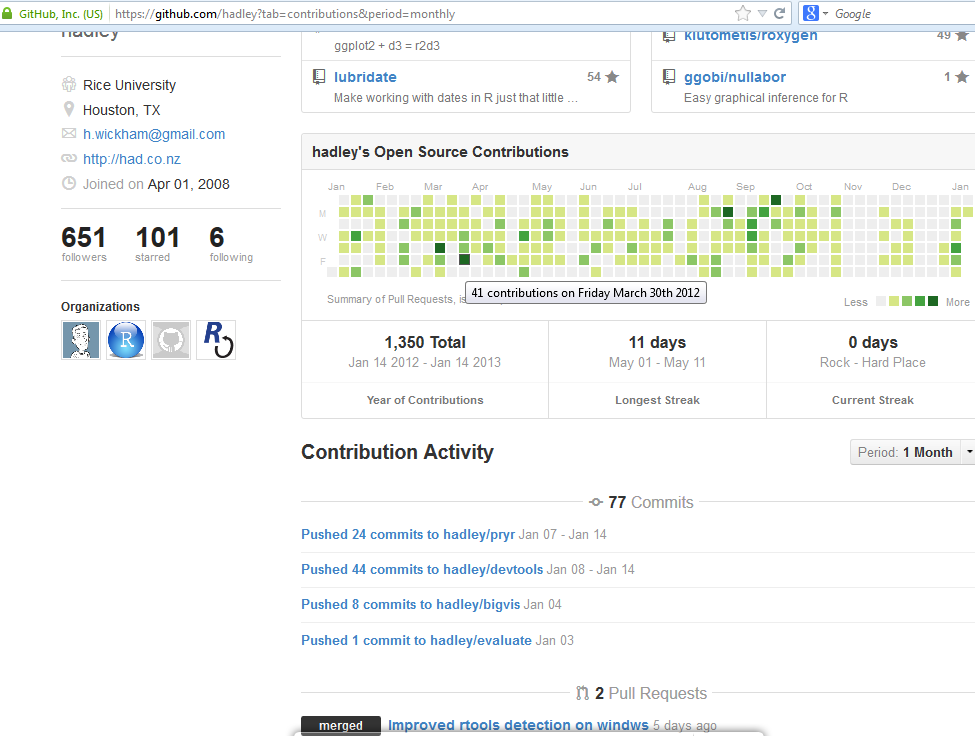
I like the visual appeal of commits by users over time at Github. For example, we can see Hadley Wickham is committed. But you already knew that. Nice to see a calender heat map being used effectively.

Now if we could only do that to CRAN (?) commits. Come on , Brian- you are not too old for this.

visualizing

Mathematica latest software to offer built-in Integration with R #rstats

Just got a message from the good chaps at Wolfram Alpha/Mathematica


Mathematica 9 offers built-in ways to integrate R code into your Mathematica workflow, combining Mathematica‘s broad range of capabilities with the statistical computing language. RLink uses J/Link and rJava/JRI Java libraries to allow the user to exchange data between Mathematica and R and to execute R code from within Mathematica. With RLink, R users can use thousands of functions from across the full Mathematica system.

see more at

http://www.wolfram.com/mathematica/new-in-9/built-in-integration-with-r/

wolfram

Running R GUI on Google Compute

I wanted to run R GUIs ( rattle, Rcmdr, Deducer) on my Google Compute Instance, but didnt know how to figure out how to enable x11.

Initially I just tried to enable x11 forwarding in the local ssh (Ubuntu) and remote sshd( GCE), but it still needed some more.

Note I use gedit to edit files locally ( since it is easier) and vi to edit files remotely ( because I didnt have a graphical environment there yet) . I used vi help from the link here  (basically sudo vi filename opens the file in Linux, you scroll down and press Insert to write your changes, then hit escape, then write this to save and quit :qw ( or :q! to NOT save and quit), your mouse is quite useless and the arrow keys dont help much in vi- I assure you that)

[local]
/etc/ssh_config or ~/.ssh/config
ForwardX11 yes

restarted local ssh

[remote]
/etc/sshd_config
X11Forwarding yes

restarted remote sshd

Well this is how it is done- following is a copy and paste from actual discussion-

here are two steps you have to do in order to run X-windows applications on your instance.

1) You have to install some X-windows applications on your instance.  I used the command
sudo apt-get install xterm
which works on Ubuntu.  On Centos, you would use the command
yum install xterm
but I didn’t test that.
2) You have to create an X-windows tunnel through SSH.  You do that with the -X switch to the gcutil ssh command:
 gcutil ssh –ssh_arg -X INSTANCE
When you login to the instance, verify that the tunnel is in place.
$rman@test-pd:~$ echo $DISPLAY
localhost:10.0
rman@test-pd:~$
By way of contrast, this is what it looks like if the tunnel didn’t work:
rman@test-pd:~$ echo $DISPLAY
rman@test-pd:~$

Hat Tip- gce discussion group on google groups  https://groups.google.com/forum/#!forum/gce-discussion  and Jeff Silverman from the GCE team.