
Skip to content

DECISION STATS

Better Decisions === Faster Stats

  • Interviews
  • About DecisionStats
    • Decisionstats.org
  • Interviews
  • About DecisionStats
DECISION STATS

Tag: User (computing)

Deleting Twitter, Facebook,LinkedIn- Accepting Life

This Thanksgiving as I prayed to God for my family– I prayed to him to give me more time with my loving family. An insight or revelation struck me-

I was spending more time with my computer than with my loved ones.

Is Twitter, Facebook, LinkedIn essential to living? No

I have 1700 followers on Twitter

1100 “Friends” on Facebook, and 9429 “Connections” on Linkedin

Deleting Facebook was an emotionally wrenching decision- see this screenshot- I tried to download all my account- family photos (320 mb) but connection kept breaking-

so I had just deactivate and not delete the account. You win, Zuckenberg

How to-

Right Hand Top Corner —-Account Settings- Deactivate Account

After Facebook de activates your account- it mocks you by saying this this in YELLOW “

Your Facebook account has been deactivated.

To reactivate your account, log in using your old login email and password. You will be able to use the site like you used to.

We hope you come back soon.”


I go back to Facebook to download all my family photos before final deletion (and not just de activation)- I get this message


It may take a little while for us to gather all of your photos, wall posts, messages, and other information. We will then ask you to verify your identity in order to help protect the security of your account.

Yeah Yeah Mark.

One Down Two to Go

Deleting Twitter

Twitter was disappointingly easy-

Go to http://twitter.com/settings/account

At bottom left you see Deactivate my account.

Twitter tries to scare me now-

Is this goodbye?


This action is permanent.

Are you sure you don’t want to reconsider? Was it something we said? Tell us.

Before you deactivate your account, know this:

  • This action is permanent: account restoration is currently disabled.
  • You do not need to deactivate your account to change your username. (You can change it on the settings page. All @replies and followers will remain unchanged.)
  • Your account may be viewable on twitter.com for a few days after deactivation.
  • We have no control over content indexed by search engines like Google.
  • If you’re creating a new account and want to use the same user name, phone number and/or email address associated with this account, you must first change them on this account before you deactivate it. If you don’t, the information will be tied to this account and unavailable for use.
  • Okay, fine, deactivate my account (thats the button)
I clicked the Okay fine Button.
One more pop up-
Re-enter your Twitter password to deactivate @DecisionStats.
Ok Done-
Twitter tries to scare me again —-

You deactivated your account.

Account restoration is currently unavailable. Here is the message you agreed to before deactivating your account:

his action is permanent.

Before you deactivate your account, know this:

  • This action is permanent: account restoration is currently disabled.
  • You do not need to deactivate your account to change your username. (You can change it on the settings page. All @replies and followers will remain unchanged.)
  • Your account may be viewable on twitter.com for a few days after deactivation.
  • We have no control over content indexed by search engines like Google.
  • If you’re creating a new account and want to use the same user name, phone number and/or email address associated with this account, you must first change them on this account before you deactivate it. If you don’t, the information will be tied to this account and unavailable for use.
So Long Twitter, I gotta spend more time with my offline family okay.
And probably anyone trying to do sentiment analysis on my twitter feed for social media analytics now has an incomplete data point (hehe)
Last One- Linkedin 9349 connections are valuable- I was thinking of auctioning this on E Bay but they kicked me out.
So I just go for deletion.
I spend 10 minuted looking for the delete account button-this is getting a bit annoying now.
I finally go to
http://help.linkedin.com/
Item 4- Closing my Account-
Linkedin neither scares me nor emotionally coddles me – This is what is says-

Closing Your Account

How do I close my account?

  1. Log into the account you wish to close.
  2. Hover your cursor over your name in the top right of your home page and then click “Settings”.
  3. Click on “Close Your Account” under Personal Information.
  4. Select a reason for closing your account.
  5. Click on “Continue”.
Members should only have one LinkedIn account. Multiple accounts can prevent the ability to accept an Invitation. Closing additional accounts should resolve this dilemma. Prior to closing any secondary accounts:
  1. Inventory all connections and identify any that may be missing from the primary account you wish to keep.
  2. Send Invitations to those connections missing from the primary account.
  3. Update any profile information that maybe on other account profiles.
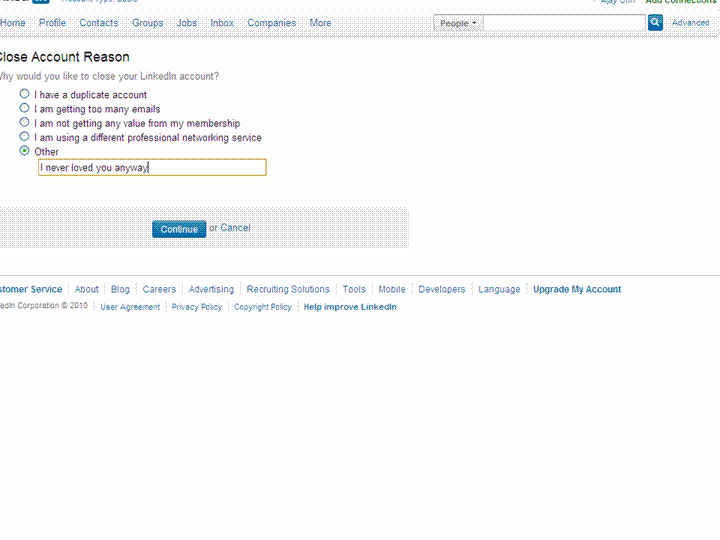
So I try exporting all 9300 + connections using http://www.linkedin.com/addressBookExport
I dont think I will send that many invites again- but some of these people have been good to me ( 18 of them even wrote recommendations- which are non exportable it seems)
I check my downloaded csv file- yup all 9379 email addresses are there.
Final round-
Update- Linkedin does NOT get deleted. I get this-

Your close account request must be processed by customer support for the following reason:

  • You have more than 250 connections.

You will receive a confirmation email from customer support indicating that they received your request to close your account.

The account that customer support will process for closure is below:


  • Ajay Ohri

  • 9,429 Connections
  • 16 Recommendations
  • ohri2007@gmail.com (primary address)
and the email says
Member Comment: ajay ohri 11/24/2010 23:10
Member ID: 6691344
Member Name: Ajay Ohri

The member has attempted to self close this account and was unable because:

The member has a large network of connections to close. Please close during non peak hours.

Please confirm with the member when his or her account has been successfully closed.

So long people- you know where to find me- on this blog (and some on skype).

And if you dont’ know how to find me on my blog-

Happy Thanksgiving-and kill that Turkey 🙂

Related Articles
  • Demi Lovato Deactivates Her Twitter Account (shoppingblog.com)
  • John Mayer Deactivates His Twitter Account (shoppingblog.com)
  • New Facebook privacy tip: ‘Super-logoff’ (cnn.com)
  • LinkedIn CEO: We’re adding a new user every second (money.cnn.com)
  • Stephen Fry says ‘bye-bye’ to Twitter … again (cbc.ca)
  • Making Friends: LinkedIn vs. Facebook vs. Twitter (e1evation.com)
28.635308 77.224960

Please share:

  • Click to share on LinkedIn (Opens in new window) LinkedIn
  • Click to share on Facebook (Opens in new window) Facebook
  • Click to share on X (Opens in new window) X
Like Loading...
Unknown's avatarAuthor Ajay OhriPosted on November 24, 2010November 25, 2010Categories InternetTags ajay, analysis, articles, blog, change, computer, content, csv, Customer, data, email, facebook, Friends, Home, how to, linkedin, Login, network, online communities, people, personal, phone, photos, privacy, search, search engines, security, sentiment analysis, social media, social networking, Thanksgiving, Time, Turkey, twitter, US, use, User (computing)1 Comment on Deleting Twitter, Facebook,LinkedIn- Accepting Life

Blog Stats

  • 1,339,957 hits

BitCoin Address

BitCoin Wallet

12FxL4og4MqtZt6pRZ1LkcMQq6ddgJK4Yg

Latest Book

SAS for R Users

Books by Ajay Ohri

Python for R USers

R for Business Analytics


R for Cloud Computing

On FB

On FB

Archives

  • February 2025 (1)
  • July 2024 (1)
  • January 2024 (1)
  • August 2023 (1)
  • June 2023 (8)
  • April 2023 (1)
  • March 2022 (1)
  • August 2021 (1)
  • June 2021 (1)
  • March 2021 (1)
  • January 2021 (1)
  • December 2020 (1)
  • September 2020 (1)
  • July 2020 (1)
  • June 2020 (1)
  • May 2020 (1)
  • March 2020 (1)
  • February 2020 (2)
  • January 2020 (8)
  • December 2019 (1)
  • November 2019 (2)
  • October 2019 (1)
  • May 2019 (2)
  • March 2019 (3)
  • February 2019 (1)
  • January 2019 (1)
  • December 2018 (3)
  • October 2018 (1)
  • September 2018 (7)
  • August 2018 (3)
  • July 2018 (6)
  • June 2018 (2)
  • May 2018 (1)
  • April 2018 (2)
  • March 2018 (7)
  • February 2018 (16)
  • January 2018 (4)
  • December 2017 (10)
  • November 2017 (8)
  • October 2017 (6)
  • September 2017 (4)
  • August 2017 (6)
  • July 2017 (6)
  • June 2017 (3)
  • May 2017 (4)
  • March 2017 (1)
  • February 2017 (2)
  • January 2017 (2)
  • December 2016 (3)
  • November 2016 (7)
  • September 2016 (7)
  • August 2016 (12)
  • July 2016 (12)
  • June 2016 (8)
  • May 2016 (11)
  • April 2016 (5)
  • March 2016 (22)
  • February 2016 (6)
  • January 2016 (4)
  • December 2015 (26)
  • November 2015 (19)
  • October 2015 (44)
  • September 2015 (18)
  • August 2015 (28)
  • July 2015 (12)
  • June 2015 (6)
  • May 2015 (9)
  • April 2015 (9)
  • March 2015 (11)
  • February 2015 (5)
  • January 2015 (8)
  • December 2014 (9)
  • November 2014 (10)
  • October 2014 (3)
  • September 2014 (5)
  • August 2014 (5)
  • July 2014 (14)
  • June 2014 (21)
  • May 2014 (10)
  • April 2014 (14)
  • March 2014 (15)
  • February 2014 (11)
  • January 2014 (4)
  • December 2013 (16)
  • November 2013 (19)
  • October 2013 (23)
  • September 2013 (12)
  • August 2013 (14)
  • July 2013 (9)
  • June 2013 (8)
  • May 2013 (15)
  • April 2013 (16)
  • March 2013 (8)
  • February 2013 (16)
  • January 2013 (18)
  • December 2012 (7)
  • November 2012 (8)
  • October 2012 (10)
  • September 2012 (1)
  • August 2012 (26)
  • July 2012 (31)
  • June 2012 (12)
  • May 2012 (10)
  • April 2012 (12)
  • March 2012 (27)
  • February 2012 (31)
  • January 2012 (26)
  • December 2011 (27)
  • November 2011 (40)
  • October 2011 (32)
  • September 2011 (29)
  • August 2011 (30)
  • July 2011 (30)
  • June 2011 (33)
  • May 2011 (50)
  • April 2011 (51)
  • March 2011 (31)
  • February 2011 (38)
  • January 2011 (36)
  • December 2010 (35)
  • November 2010 (77)
  • October 2010 (73)
  • September 2010 (65)
  • August 2010 (19)
  • July 2010 (14)
  • June 2010 (11)
  • May 2010 (20)
  • April 2010 (18)
  • March 2010 (8)
  • February 2010 (10)
  • January 2010 (42)
  • December 2009 (38)
  • November 2009 (60)
  • October 2009 (41)
  • September 2009 (45)
  • August 2009 (37)
  • July 2009 (21)
  • June 2009 (28)
  • May 2009 (49)
  • April 2009 (29)
  • March 2009 (39)
  • February 2009 (34)
  • January 2009 (42)
  • December 2008 (18)
  • November 2008 (37)
  • October 2008 (20)
  • September 2008 (52)
  • August 2008 (62)
  • July 2008 (42)
  • June 2008 (16)
  • May 2008 (10)
  • April 2008 (20)
  • March 2008 (15)
  • February 2008 (30)
  • January 2008 (20)
  • December 2007 (13)

This slideshow requires JavaScript.

  • Interviews
  • About DecisionStats
    • Decisionstats.org
  • Interviews
  • About DecisionStats
DECISION STATS Blog at WordPress.com.
  • Subscribe Subscribed
    • DECISION STATS
    • Join 440 other subscribers
    • Already have a WordPress.com account? Log in now.
    • DECISION STATS
    • Subscribe Subscribed
    • Sign up
    • Log in
    • Report this content
    • View site in Reader
    • Manage subscriptions
    • Collapse this bar
 

Loading Comments...
 

    %d