With special articles by my two favorite GUI creators ,
Dr John Fox (Basic Stats and DoE) and Dr Graham Williams (Rattle- Advanced Data Mining)
Notice : The look in the revised scribd is much better than the slideshare.net chaps

With special articles by my two favorite GUI creators ,
Dr John Fox (Basic Stats and DoE) and Dr Graham Williams (Rattle- Advanced Data Mining)
Notice : The look in the revised scribd is much better than the slideshare.net chaps
Here is an interview with the genius behind many of the R Project’s Graphical Packages- Dr Hadley Wickham.

Ajay– Describe your pivotal moments in your career in science from a high school science student leading up till here as a professor.
Hadley– After high school I went to medical school. After three years and a degree I realised that I really didn’t want to be a doctor so I went back to two topics that I had enjoyed in high school: programming and statistics. I really loved the practice of statistics, digging in to data and figuring out what was going on, but didn’t find the theoretical study of computer science so interesting. That spurred me to get my MSc in Statistics and then to apply to graduate school in the US.
The next pivotal moment occurred when I accepted a PhD offer from Iowa State. I applied to ISU because I was interested in multivariate data and visualisation and heard that the department had a focus on those two topics, through the presence of Di Cook and Heike Hofmann. I couldn’t have made a better choice – Di and Heike were fantastic major professors and I loved the combination of data analysis, software development and teaching that they practiced. That in turn lead to my decision to look for a job in academia.
Ajay– You have created almost ten R Packages as per your website http://had.co.nz/. Do you think there is a potential for a commercial version for a data visualization R software? What are your views on the current commercial R packages?
Hadley– I think there’s a lot of opportunity for the development of user-friendly data visualisation tools based on R. These would be great for novices and casual users, wrapping up the complexities of the command-line into an approachable GUI – see Jeroen Oom’s http://yeroon.net/ggplot2 for an example.
Developing these tools is not something that is part of my research endeavors. I’m a strong believer in the power of computational thinking and the advantages that programming (instead of pointing and clicking) brings. Creating visualizations with code makes reproducibility, automation and communication much easier – all of which are important for good science.
Commercial packages fill a hole in the R ecosystem. They make R more palatable to enterprise customers with guaranteed support, and they can offer a way to funnel some of that money back into the R ecosystem. I am optimistic about the future of these endeavors.
Ajay– Clearly with your interest in graphics, you seem to favor visual solutions. Do you also feel that R Project could benefit from better R GUIs or GUIs for specific packages?
Hadley– See above – while GUIs are useful for novices and casual users, they are not a good fit for the demands of science. In my opinion, what R needs more are better tutorials and documentation so that people don’t need to use GUIs. I’m very excited about the new dynamic html help system – I think it has huge potential for making R easier to use.
Compared to other programming languages, R currently lacks good online (free) introductions for new users. I think this is because many R developers are academics and the incentives aren’t there to make freely available documentation. Personally, I would love to make (e.g.) the ggplot2 book available openly available under a creative common license, but I would receive no academic credit for doing so.
Ajay– Describe the top 3-5 principles which you have explained in your book, ggplot2: Elegant graphics for data analysis). What are other important topics that you cover in the book?
Hadley– The ggplot2 book gives you the theory to understand the construction of almost any statistical graphic. With this theory in hand, you are much better equipped to create visualisations that are tailored to the exact problem you face, rather than having to rely on a canned set of pre-made graphics.
The book is divided into sections based on the components of this theory, called the layered grammar of graphics, which is based on Lee Wilkinson’s excellent “The Grammar of Graphics”. It’s quite possible to use ggplot2 without understanding these components, but the better you understand, the better your ability to critique and improve your graphics.
Ajay– What are the five best tutorials that you would recommend for students learning data visualization in R? As a data visualization person do you feel that R could do with more video tutorials?
Hadley– If you want to learn about ggplot2, I’d highly recommend the following two resources:
* The Learning R blog, http://learnr.wordpress.com/
* The ggplot2 mailing list, http://groups.google.com/group/ggplot2
For general data management and manipulation (often needed before you can visualise data) and visualisation using base graphics, Quick-R (http://www.statmethods.net/) is very useful.
Local useR groups can be an excellent if you live nearby. Lately, the bay area (http://www.meetup.com/R-Users/) and the New York (http://www.meetup.com/nyhackr/) useR groups have had some excellent speakers on visualisation, and they often post slides and videos online.
Ajay– What are your personal hobbies? How important are work-life balance and serendipity for creative, scientific and academic people?
Hadley– When I’m not working, I enjoy reading and cooking. I find it’s important to take regular breaks from my research and software development work. When I come back I’m usually bursting with new ideas. Two resources that have helped shape my views on creativity and productivity are Elizabeth’s Gilbert TED talk on nurturing creativity (http://www.ted.com/index.php/talks/elizabeth_gilbert_on_genius.html) and
“The Creative Habit: Learn It and Use It for Life”, by Twyla Twarp (http://amzn.com/0743235266). I highly recommend both of them.
Dr Wickham’s impressive biography can be best seen at http://had.co.nz/
A New Data Mining Book in Town and it’s actually free to use. The software is free too.
Easy to read.
Citation
The results for the question-
Which software do you plan to use/learn in the next one year ?
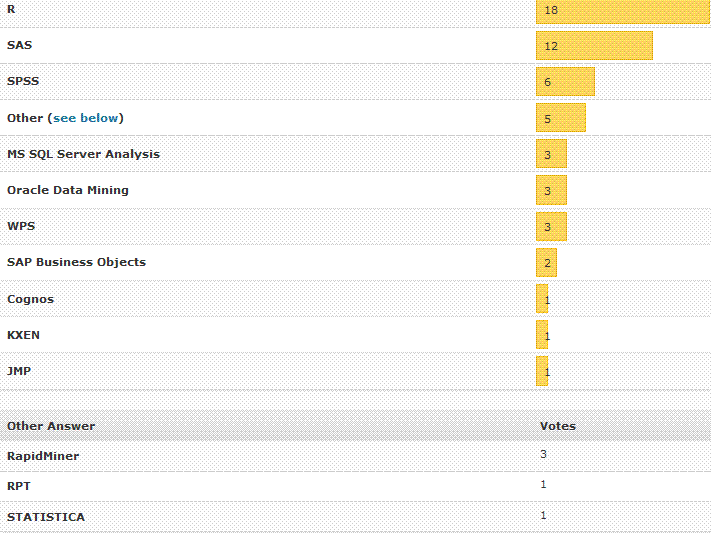
Here are some survey results from Rexer Analytics–
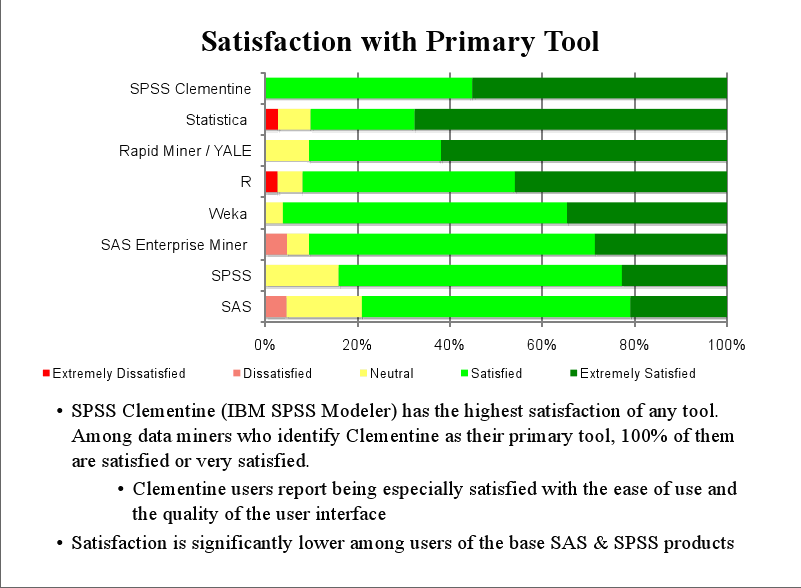
The Graphics seem self explanatory: terrific Data Visualization
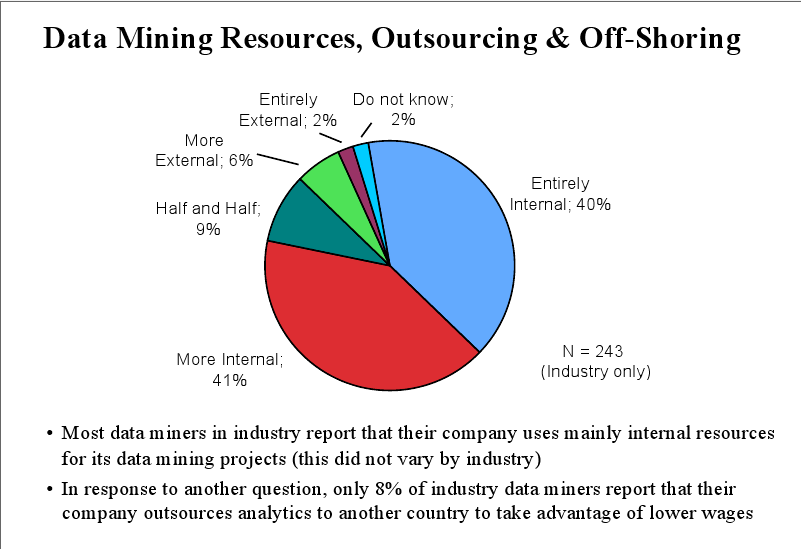
1) The field of Data Mining seems ripe for either more offshoring to cut down costs or
there will be price pressures to cut costs on software ( read More R and SaaS) and Hardware ( more cloud /time sharing ?)
2) Satisfaction with both R and SAS seems similar but R seems to score higher than other flavors.
3) An added dimension of utility ( or say
(satisfaction in terms of analyst comfort + functionality in terms of business benefit) divided by (License + Training + Installation + Transition costs)
would have even extra analysis.
But these are not final results- for that you need to see Dr Karl at Rexer Analytics
It seems there is a little known component called SAS Toolkit that enables you to create customized SAS commands.
[tweetmeme=”decisionstats”]
I am still trying to find actual usage of this software but it basically can be used to create additional customization in SAS. The price is reportedly 12000 USD a year for the Tool Kit but academics could be encouraged to write thesis or projects in newer algols using standard SAS discounting. In addition there is no licensing constraint as of now to reselling your customized sas algol ( but check with Cary,NC or http://www.sas.com on this before you go ahead and develop)
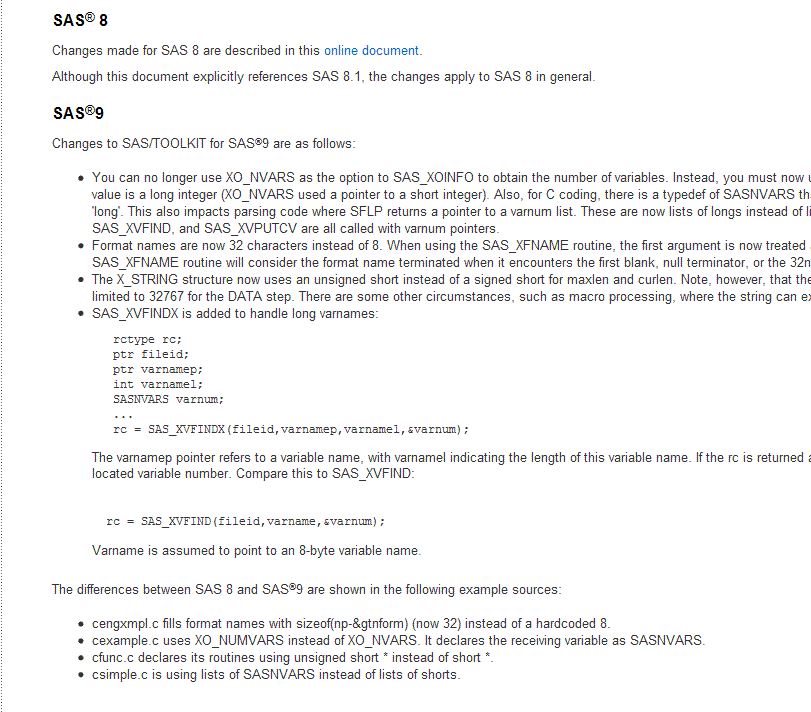
So if you have an existing R package (with open source) and someone wants to port it to SAS language or SAS software, they can simply use the SAS Toolkit to transport the algorithm ( which to my knowledge are mostly open in R). Specific instances are graphics, Hmisc, Pl.ier or even lattice and clustering (like mclust) packages. or maybe even license it.
Citation-http://www.sas.com/products/toolkit/index.html
SAS/TOOLKIT® SAS/TOOLKIT software enables you to write your own customized SAS procedures (including graphics procedures), informats, formats, functions (including IML and DATA step functions), CALL routines, and database engines in several languages including C, FORTRAN, PL/I, and IBM assembler. SAS Procedures A SAS procedure is a program that interfaces with the SAS System to perform a given action. The SAS System provides services to the procedure such as:
- statement processing
- data set management
- memory allocation
SAS Informats, Formats, Functions, and CALL Routines (IFFCs) You can use SAS/TOOLKIT software to write your own SAS informats, formats, functions, and CALLroutines in the same choice of languages: C, FORTRAN, PL/I, and IBM assembler. Like procedures, user-written functions and CALL routines add capabilities to the SAS System that enable you to tailor the system to your site’s specific needs. Many of the same reasons for writing procedures also apply to writing SAS formats and CALL routines. SAS/TOOLKIT Software and PROC FORMAT You may wonder why you should use SAS/TOOLKIT software to create user-written formats and informats when base SAS software includes PROC FORMAT. SAS/TOOLKIT software enables you to create formats and informats that perform more than the simple table lookup functions provided by the FORMAT procedure. When you write formats and informats with SAS/TOOLKIT software, you can do the following:
- assign values according to an algorithm instead of looking up a value in a table.
- look up values in a Database to assign formatted values.
Writing a SAS IFFC
The routines you are most likely to use when writing an IFFC perform the following tasks:
- provide a mechanism to interface with functions that are already written at your site
- use algorithms to implement existing programs
- handle problems specific to the SAS environment, such as missing values.
SAS Engines SAS engines allow data to be presented to the SAS System so it appears to be a standard SAS data set. Engines supplied by SAS Institute consist of a large number of subroutines, all of which are called by the portion of the SAS System known as the engine supervisor.
However, with SAS/TOOLKIT software, an additional level of software, the engine middle-manager simplifies how you write your user-written engine. An Engine versus a Procedure To process data from an external file, you can write either an engine or a SAS procedure. In general, it is a good idea to implement data extraction mechanisms as procedures instead of engines. If your applications need to read most or all of a data file, you should consider creating a procedure—-but if they need random access to the file, you should consider creating an engine. Writing SAS Engines When you write an engine, you must include in your program a prescribed set of routines to perform the various tasks required to access the file and interact with the SAS System. These routines:
- open and close the data set
- obtain information about variables
- provide information about an external file or database
- read and write observations.
In addition, your program uses several structures defined by the SAS System for storing information needed by the engine and the SAS System. The SAS System interacts with your engine through the SAS engine middle-manager.
Using the USERPROC Procedure Before you run your grammar, procedure, IFFC, or engine, use SAS/TOOLKIT software’s USERPROC procedure.
- For grammars, the USERPROC procedure produces a grammar function.
- For procedures, IFFCs, and engines, the USERPROC procedure produces a program constants object file, which is necessary for linking all of the compiled object files into an executable module.
Compile and link the output of PROC USERPROC with the SAS System so that the system can access the procedure, IFFC, or engine when a user invokes it.
Using User-Written Procedures, IFFCs, and Engines After you have created a SAS procedure, IFFC, or engine, you need to tell the SAS System where to find the module in order to run it. You can store your executable modules in any appropriate library. Before you invoke the SAS System, use operating system control language to specify the fileref SASLIB for the directory or load library where your executables are stored. When you invoke the SAS System and use the name of your procedure, IFFC, or engine, the SAS System checks its own libraries first and then looks in the SASLIB library for a module with that name.
Debugging Capabilities The TLKTDBG facility allows you to obtain debug information concerning SAS routines called by your code, and works with any of the supported programming languages. You can turn this facility on and off without having to recompile or relink your code. Debug messages are sent to the SAS log. In addition to the SAS/TOOLKIT internal debugger, the C language compiler used to create your extension to the SAS System can be used to debug your program.
The SAS/C Compiler, the VMS Compiler, and the dbx debugger for AIX can all be used. NOTE: SAS/TOOLKIT software is used to develop procedures, IFFCs, and engines. Users do not need to license SAS/TOOLKIT software to run procedures developed with the software
SAS/C Compiler
March 2008 Level B support is effective beginning January 1, 2008 until December 31, 2009.March 2005 The SAS/C and SAS/C++ compiler and runtime components are reclassified as SAS Retired products for z/OS, VM/ESA and cross-compiler platforms. SAS has no plans to develop or deliver a new release of the SAS/C product.
The SAS/C and SAS/C++ family of products provides a versatile development environment for IBM zSeries® and System/390® processors. Enhancements and product features for SAS/C 7.50F include support for z/Architecture instructions and 64-bit addressing, IEEE floating-point, C99 math library and a number of C++ language enhancements and extensions. The SAS/C runtime library, optimizer and debugging environments have been updated and enhanced to fully support the breadth of C/C++ 64-bit addressing, IEEE and C++ product features.
Finally, the SAS/C and SAS/C++ 7.50.06 Cross-compiler products for Windows, Linux, Solaris and Aix incorporate the same enhancements and features that are provided with SAS/C and SAS/C++ 7.50F for z/OS.
Also see- http://support.sas.com/kb/15/647.html

 DECISION STATS