Christmas Carol: The Best Software (BI-Stats-Analytics)

There is no best software- they are just optimized for various constraints and tangible as well as intangible needs as defined for users.

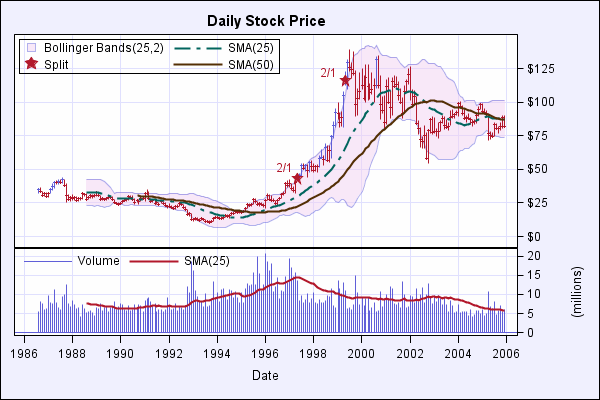
  1. There is no best software- they are just optimized for various constraints and tangible as well as intangible needs as defined for users.  ( Image below Citation- support.sas.com )
  2. Price in products is defined as Demand divided by Supply. Sometimes this is Expected Demand over Expected Supply ( see Oil Prices) Everyone grumbles over prices but we pay what we think is fair. ( citation http://bm2.genes.nig.ac.jp/RGM2/index.php?ctv=Survival
  3. Prices in services are defined by value creation as well- Value= Benefit Divided by Cost  Benefits are tangible as in how much money it saves in fraud as well as intangible – how easy it is to start using JMP versus R Commander  Costs are Tangible- How much do we have to pay using our cheque book for this annual license or perpetual license or one time license or maintain contract or application support.Intangible costs are how long I have to hold the phone while talking to customer support and how much time it takes me to find the best solution using the website on my own without a sales person bothering me with frequent calls. (citation- http://academic.udayton.edu/gregelvers/psy216/spss/graphs.htm#tukey
  4. All sales people ( especially in the software industry) spam you with frequent calls, email reminders and how their company is the best company ever with the best software in the history of mankind. That is their job and they are pushed by sales quotas and pulled by their own enthusiasm to sell more to same customer. If you ever bought three licences and found out you just needed two at the end of the year- forgive the salesman. As Arthur Miller said’ All Salesmen are Dreamers  (Citation of STATA graph below http://www.ats.ucla.edu/stat/Stata/library/GraphExamples/code/grbartall.htm)
  5. Technology moves faster than you can say Jackie Robinson. and it is getting faster. Research and Development ( R and D) will always move slower than the speed at which Marketing thinks they can move. See http://www.dilbert.com for more insights on this. You either build a Billion Dollar in house lab ( like Palo Alto – remember) or you go for total outsourcing (like semi conductors and open source do). Or you go for a mix and match. ( Citation- http://people.sc.fsu.edu/~burkardt/html/matlab_graphics/matlab_graphics.html )

Based on the above parameters the best statistical software for 2009 continues to be the software that uses a mixture of Genetic Algorithms, Time Series Based Regression and Sampling – it is the software that runs in the head of the statistical /mathematical / customer BRAIN

Thats the best Software ever.

(Citation – Hugh of http://gapingvoid.com/ )

Happy Hols

Creating Customized Packages in SAS Software

It seems there is a little known component called SAS Toolkit that enables you to create customized SAS commands.

[tweetmeme=”decisionstats”]

I am still trying to find actual usage of this software but it basically can be used to create additional customization in SAS. The price is reportedly 12000 USD a year for the Tool Kit but academics could be encouraged to write thesis or projects in newer algols using standard SAS discounting. In addition there is no licensing constraint as of now to reselling your customized sas algol ( but check with Cary,NC or http://www.sas.com on this before you go ahead and develop)
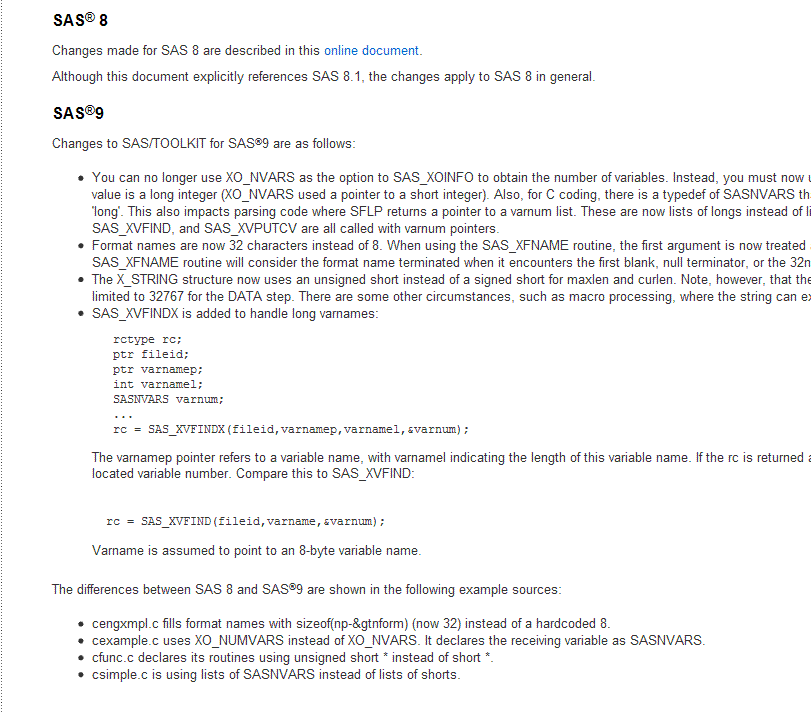
So if you have an existing R package (with open source) and someone wants to port it to SAS language or SAS software, they can simply use the SAS Toolkit to transport the algorithm ( which to my knowledge are mostly open in R). Specific instances are graphics, Hmisc, Pl.ier or even lattice and clustering (like mclust) packages. or maybe even license it.

Citation-http://www.sas.com/products/toolkit/index.html

SAS/TOOLKIT® SAS/TOOLKIT software enables you to write your own customized SAS procedures (including graphics procedures), informats, formats, functions (including IML and DATA step functions), CALL routines, and database engines in several languages including C, FORTRAN, PL/I, and IBM assembler. SAS Procedures A SAS procedure is a program that interfaces with the SAS System to perform a given action. The SAS System provides services to the procedure such as:

  • statement processing
  • data set management
  • memory allocation

SAS Informats, Formats, Functions, and CALL Routines (IFFCs) You can use SAS/TOOLKIT software to write your own SAS informats, formats, functions, and CALLroutines in the same choice of languages: C, FORTRAN, PL/I, and IBM assembler. Like procedures, user-written functions and CALL routines add capabilities to the SAS System that enable you to tailor the system to your site’s specific needs. Many of the same reasons for writing procedures also apply to writing SAS formats and CALL routines. SAS/TOOLKIT Software and PROC FORMAT You may wonder why you should use SAS/TOOLKIT software to create user-written formats and informats when base SAS software includes PROC FORMAT. SAS/TOOLKIT software enables you to create formats and informats that perform more than the simple table lookup functions provided by the FORMAT procedure. When you write formats and informats with SAS/TOOLKIT software, you can do the following:

  • assign values according to an algorithm instead of looking up a value in a table.
  • look up values in a Database to assign formatted values.

Writing a SAS IFFC

The routines you are most likely to use when writing an IFFC perform the following tasks:

  • provide a mechanism to interface with functions that are already written at your site
  • use algorithms to implement existing programs
  • handle problems specific to the SAS environment, such as missing values.

SAS Engines SAS engines allow data to be presented to the SAS System so it appears to be a standard SAS data set. Engines supplied by SAS Institute consist of a large number of subroutines, all of which are called by the portion of the SAS System known as the engine supervisor.

However, with SAS/TOOLKIT software, an additional level of software, the engine middle-manager simplifies how you write your user-written engine. An Engine versus a Procedure To process data from an external file, you can write either an engine or a SAS procedure. In general, it is a good idea to implement data extraction mechanisms as procedures instead of engines. If your applications need to read most or all of a data file, you should consider creating a procedure—-but if they need random access to the file, you should consider creating an engine. Writing SAS Engines When you write an engine, you must include in your program a prescribed set of routines to perform the various tasks required to access the file and interact with the SAS System. These routines:

  • open and close the data set
  • obtain information about variables
  • provide information about an external file or database
  • read and write observations.

In addition, your program uses several structures defined by the SAS System for storing information needed by the engine and the SAS System. The SAS System interacts with your engine through the SAS engine middle-manager.

Using the USERPROC Procedure Before you run your grammar, procedure, IFFC, or engine, use SAS/TOOLKIT software’s USERPROC procedure.

  • For grammars, the USERPROC procedure produces a grammar function.
  • For procedures, IFFCs, and engines, the USERPROC procedure produces a program constants object file, which is necessary for linking all of the compiled object files into an executable module.

Compile and link the output of PROC USERPROC with the SAS System so that the system can access the procedure, IFFC, or engine when a user invokes it.

Using User-Written Procedures, IFFCs, and Engines After you have created a SAS procedure, IFFC, or engine, you need to tell the SAS System where to find the module in order to run it. You can store your executable modules in any appropriate library. Before you invoke the SAS System, use operating system control language to specify the fileref SASLIB for the directory or load library where your executables are stored. When you invoke the SAS System and use the name of your procedure, IFFC, or engine, the SAS System checks its own libraries first and then looks in the SASLIB library for a module with that name.

Debugging Capabilities The TLKTDBG facility allows you to obtain debug information concerning SAS routines called by your code, and works with any of the supported programming languages. You can turn this facility on and off without having to recompile or relink your code. Debug messages are sent to the SAS log. In addition to the SAS/TOOLKIT internal debugger, the C language compiler used to create your extension to the SAS System can be used to debug your program.

The SAS/C Compiler, the VMS Compiler, and the dbx debugger for AIX can all be used. NOTE: SAS/TOOLKIT software is used to develop procedures, IFFCs, and engines. Users do not need to license SAS/TOOLKIT software to run procedures developed with the software

SAS/C Compiler attention

March 2008 Level B support is effective beginning January 1, 2008 until December 31, 2009.March 2005 The SAS/C and SAS/C++ compiler and runtime components are reclassified as SAS Retired products for z/OS, VM/ESA and cross-compiler platforms. SAS has no plans to develop or deliver a new release of the SAS/C product.


The SAS/C and SAS/C++ family of products provides a versatile development environment for IBM zSeries® and System/390® processors. Enhancements and product features for SAS/C 7.50F include support for z/Architecture instructions and 64-bit addressing, IEEE floating-point, C99 math library and a number of C++ language enhancements and extensions. The SAS/C runtime library, optimizer and debugging environments have been updated and enhanced to fully support the breadth of C/C++ 64-bit addressing, IEEE and C++ product features.

Finally, the SAS/C and SAS/C++ 7.50.06 Cross-compiler products for Windows, Linux, Solaris and Aix incorporate the same enhancements and features that are provided with SAS/C and SAS/C++ 7.50F for z/OS.

Also see- http://support.sas.com/kb/15/647.html

News on R Commercial Development -Rattle- R Data Mining Tool

R RANT- while the European R Core leadership led by the Great Dane, Pierre Dalgaard focuses on the small picture and virtually handing the whole commercial side to Prof Nie and David Smith at Revo Computing other smaller package developers have refused to be treated as cheap R and D developers for enterprise software. How’s the book sales coming along, Prof Peter? Any plans to write another R Book or are you done with writing your version of Mathematica (Ref-Newton). Running the R Core project team must be so hard I recommend the Tarantino movie “Inglorious B…” for Herr Doktors. -END

I believe that individual R Package creators like Prof Harell (Hmisc) , or Hadley Wickham (plyr) deserve a share of the royalties or REVENUE that Revolution Computing, or ANY software company that uses R.

On this note-Some updated news on Rattle the Data Mining Tool created by Dr Graham Williams. Once again R development taken ahead by Down Under chaps while the Big Guys thrash out the road map across the Pond.

Data Mining Resources

Citation –http://datamining.togaware.com/

Rattle is a free and open source data mining toolkit written in the statistical language R using the Gnome graphical interface. It runs under GNU/Linux, Macintosh OS X, and MS/Windows. Rattle is being used in business, government, research and for teaching data mining in Australia and internationally. Rattle can be purchased on DVD (or made available as a downloadable CD image) as a standalone installation for $450USD ($560AUD), using one of the following payment buttons.

The free and open source book, The Data Mining Desktop Survival Guide (ISBN 0-9757109-2-3) simply explains the otherwise complex algorithms and concepts of data mining, with examples to illustrate each algorithm using the statistical language R. The book is being written by Dr Graham Williams, based on his 20 years research and consulting experience in machine learning and data mining. An electronic PDF version is available for a small fee from Togaware ($40AUD/$35USD to cover costs and ongoing development);

Other Resources

  • The Data Mining Software Repository makes available a collection of free (as in libre) open source software tools for data mining
  • The Data Mining Catalogue lists many of the free and commercial data mining tools that are available on the market.
  • The Australasian Data Mining Conferences are supported by Togaware, which also hosts the web site.
  • Information about the Pacific Asia Knowledge Discovery and Data Mining series of conferences is also available.
  • Data Mining course is taught at the Australian National University.
  • See also the Canberra Analytics Practise Group.
  • A Data Mining Course was held at the Harbin Institute of Technology Shenzhen Graduate School, China, 6 December – 13 December 2006. This course introduced the basic concepts and algorithms of data mining from an applications point of view and introduced the use of R and Rattle for data mining in practise.
  • Data Mining Workshop was held over two days at the University of Canberra, 27-28 November, 2006. This course introduced the basic concepts and algorithms for data mining and the use of R and Rattle.

Using R for Data Mining

The open source statistical programming language R (based on S) is in daily use in academia and in business and government. We use R for data mining within the Australian Taxation Office. Rattle is used by those wishing to interact with R through a GUI.

R is memory based so that on 32bit CPUs you are limited to smaller datasets (perhaps 50,000 up to 100,000, depending on what you are doing). Deploying R on 64bit multiple CPU (AMD64) servers running GNU/Linux with 32GB of main memory provides a powerful platform for data mining.

R is open source, thus providing assurance that there will always be the opportunity to fix and tune things that suit our specific needs, rather than rely on having to convince a vendor to fix or tune their product to suit our needs.

Also, by being open source, we can be sure that the code will always be available, unlike some of the data mining products that have disappearded (e.g., IBM’s Intelligent Miner).

See earlier interview-

https://decisionstats.wordpress.com/2009/01/13/interview-dr-graham-williams/

SAS and JMP : Visual Data Discovery

While R packagers have a lot to be proud of in the graphics packages of R, the truth of the matter is that the lack of GUI even for Graphical Analysis hinders the ease of usage in adopting R’s powerful graphics for statistical analysis. As a contrast , SAS and JMP have been combined together in the SAS Visual Data Discovery Environment

[tweetmeme source=”decisionstats”]

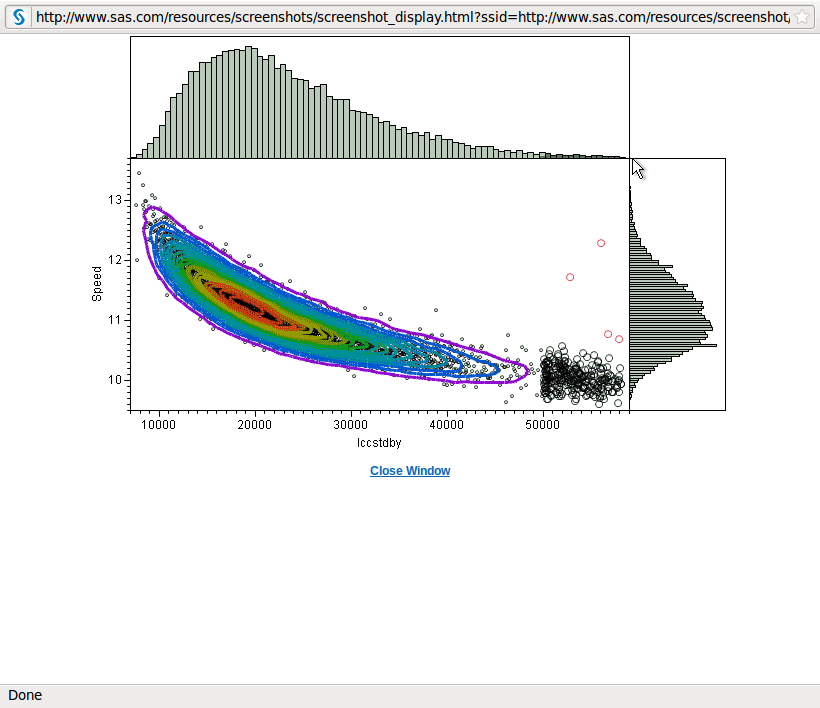
I really liked the GUI of JMP ( which is very rich in stats testing) and with the powerful data handling capabilities on the desktop of SAS, this is clearly an outstanding effort to create terrific graphics ( see below)

Note the combination of the two- Great Graphics WITH a GUI. in R the GUI that comes closest to matching JMP is R Commander, but it’s graphical capabilities are kept basic as it is not meant for replacement of the beloved Kommand prompt

( maybe an expanded plugin for graphics or hexabin would help)

It would be interesting to see an on demand  Ec2 cloud hosted version of visual data discovery by SAS (with JMP as the front end) even for a limited pilot of six months and targeted at the SMB segment. Or a Salesforce.com application that integrates Salesforce.com data with the tests and standard procedures in SAS and JMP.

Note of Discontent- The JMP Website is terrible. It has a different font from the SAS Website ( they could atleast use the same CSS ) and overall is the worst part of the otherwise excellently elegant JMP. Hope they upgrade their website soon ( they havent done it this year atleast).

Scrennshot Citation-

http://www.sas.com/technologies/analytics/statistics/datadiscovery/index.html


Who will forecast for the forecasters?

An interesting blog post appeared here at http://www.information-management.com/blogs/business_intelligence_bi_statistics-10016491-1.html basically laying down the competitive landscape for analytical companies.

“-One safe bet is that IBM, with newly-acquired SPSS and Cognos, is gearing up to take on SAS in the high-end enterprise analytics market that features very large data and operational analytics with significant capacity challenges. In this segment, IBM can leverage its hardware, database and consulting strengths to become a formidable SAS competitor.

and

A number of start-up companies promoting competitive SAS language tools at a fraction of SAS prices may begin chipping away at many SAS annuity customers. As I wrote in last week’s blog, WPS from World Programming Systems is an outstanding SAS compiler that can replace expensive SAS licenses in many cases – especially those primarily used for data step programs. Similarly, another competitor, Carolina, from Dulles Research, LLC, converts Base SAS program code to Java, which can then be deployed in a Java run-time environment. Large SAS customer Discover Card is currently evaluating Carolina as a replacement for some its SAS applications.

CITATION-Steve Miller’s blog can also be found at miller.openbi.com.”

I think all companies have hired smart enough people and many of their efforts would cancel each other out in a true game theory manner.

I also find it extremely hypocritical for commercial vendors not to incentive R algorithm developers and treat the 2000 plus packages as essentially free ware.

If used for academics and research, R package creators expect and demand no money. But if used commercially – shouldnt the leading analytical vendors like SAS, SPSS, and even the newly cash infused REVolution create some kind of royalty sharing agreement.

If iTunes can help sell songs for 99 cents per download and really help the Music industry come to the next generation- how much would commercial vendors agree to share their solutions which ARE DEPENDENT on popular R packages like Plier or even Dr Frank’s Hmisc.

Unless you think Britney Spears has a better right to intellectual property than venerable professors and academics.

Even a monthly 10000 USD prize for the best R package created ( that can be used by that specific company’s use for commercial packages) can help speed up the R software movement- just like NetFlix prize.

More importantly – it can free up valuable resources for companies to concentrate on customer solutions like data quality, systems integration and computational environment shift to clouds which even todayis sadly lacking in the whole analytical ecosystem.

One interesting paradigm I find is that who ever masters the new computational requirements of unstructured large amounts of data ( not just row and column numeric data) but text sentiment analysis like data, and can integrate this for a complete customer solution in an easy to understand data visualization enabled system- that specific package,platform  or company would be leading the next decade

( Q -if the 90s were the Nineties will the next decade be the teen years)

Not so AWkward after all: R GUI RKWard

I saw two packages bundled with Ubuntu ( one was R Cmdr) which I have talked about before ( for some reason Rattle continues to give some problem with Ubuntu)

The other R GUI is RKWard.

This one is clearly inspired by SPSS GUI design and though not so nifty and lite as R Cmdr can be used for higher end stuff

The website is here-

http://rkward.sourceforge.net/

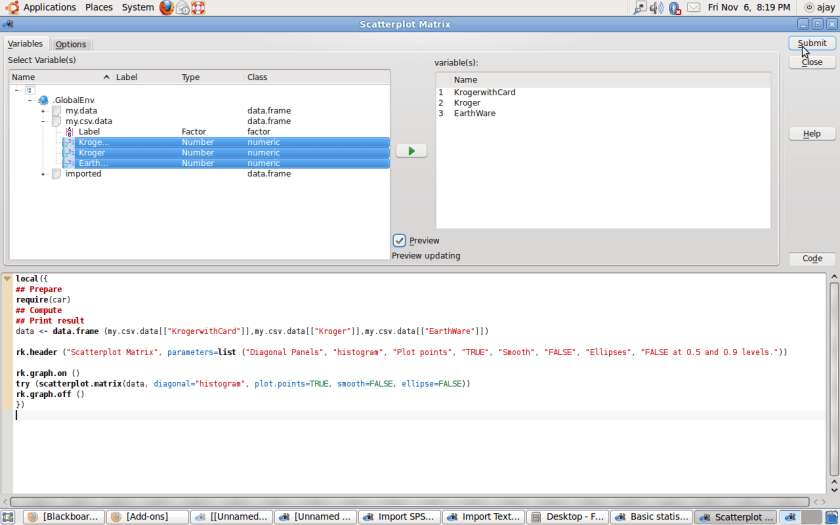
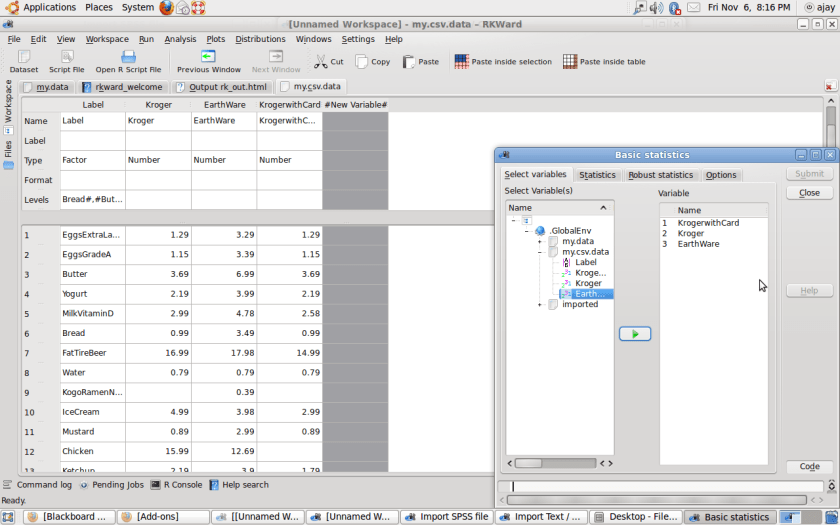
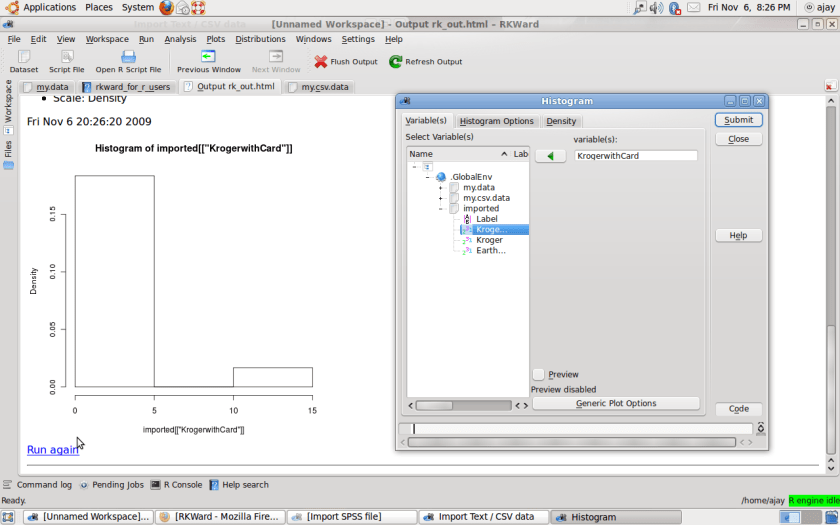
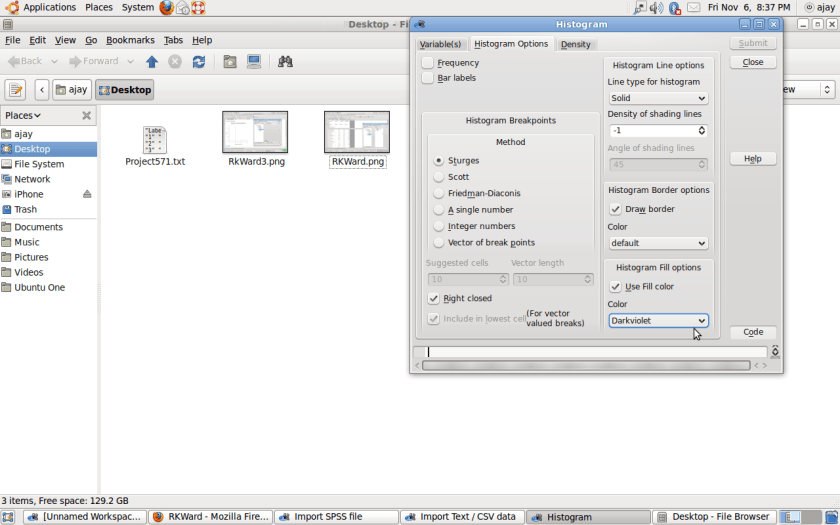
Some screenshots created by me- I swear I only used the mouse while doing this- no keyboard hence a true GUI.

RKward2RKWard

RkWard3

  • New features / improvements in latest version

– Add Stata data file import plugin (by Michael Ash) –

For much better screenshots see-

http://sourceforge.net/apps/mediawiki/rkward/index.php?title=Screenshots

Screenshot


It still could do with more community testing and support and some of the Desktop performance was not that great ( code generated was clunky and reminded me of other GUIs that sit too heavy on command line unlike RCmdr)

Truly impressive is the multiple flexibility offered in details ( like for Plots or for Graphical Analysis)-

and with the help of a Citrix Server on the INTERNET, can POTENTIALLY be offered on Amazon EC2 environment for as low as 2.5 $ per hour for heavy data processing AND stats analysis (with no hardware OR software legacy costs)

.