Harvard DropOut Writes Open Letter- His Startup has 350m users

Note from Mark “zucken”berg

An Open Letter from Facebook Founder Mark Zuckerberg
by Mark Zuckerberg Yesterday at 9:23pm

It has been a great year for making the world more open and connected. Thanks to your help, more than 350 million people around the world are using Facebook to share their lives online.

To make this possible, we have focused on giving you the tools you need to share and control your information. Starting with the very first version of Facebook five years ago, we’ve built tools that help you control what you share with which individuals and groups of people. Our work to improve privacy continues today.

Facebook’s current privacy model revolves around “networks” — communities for your school, your company or your region. This worked well when Facebook was mostly used by students, since it made sense that a student might want to share content with their fellow students.

Over time people also asked us to add networks for companies and regions as well. Today we even have networks for some entire countries, like India and China.

However, as Facebook has grown, some of these regional networks now have millions of members and we’ve concluded that this is no longer the best way for you to control your privacy. Almost 50 percent of all Facebook users are members of regional networks, so this is an important issue for us. If we can build a better system, then more than 100 million people will have even more control of their information.

The plan we’ve come up with is to remove regional networks completely and create a simpler model for privacy control where you can set content to be available to only your friends, friends of your friends, or everyone.

We’re adding something that many of you have asked for — the ability to control who sees each individual piece of content you create or upload. In addition, we’ll also be fulfilling a request made by many of you to make the privacy settings page simpler by combining some settings. If you want to read more about this, we began discussing this plan back in July.

Since this update will remove regional networks and create some new settings, in the next couple of weeks we’ll ask you to review and update your privacy settings. You’ll see a message that will explain the changes and take you to a page where you can update your settings. When you’re finished, we’ll show you a confirmation page so you can make sure you chose the right settings for you. As always, once you’re done you’ll still be able to change your settings whenever you want.

We’ve worked hard to build controls that we think will be better for you, but we also understand that everyone’s needs are different. We’ll suggest settings for you based on your current level of privacy, but the best way for you to find the right settings is to read through all your options and customize them for yourself. I encourage you to do this and consider who you’re sharing with online.

Thanks for being a part of making Facebook what it is today, and for helping to make the world more open and connected.

Well atleast he can write open code.

Weak Security in Internet Databases for Statisticians

A year ago while working as a virtual research assistant to Dr Vincent Granville( of Analyticbridge.com and who signed my recommendation form for University of Tennessee) I helped download almost 22000 records of almost all the statisticians and economists of the world. This included databases like American Statistical Association and Royal Society ( ASA, ACME, RS etc).

After joining University of Tennessee, i sent a sample of code and database with me by email  to two professors ( one a fellow of ASA and the other an expert into internet protocols to make it an academic paper except they did not know any journal or professor who knew stuff on data scraping 😦 )

I am publishing this now in the hope they would have plugged the gap before someone gets that kind of database and exploits for spamming or commercial mal use.

The weak link was once you were in the database using a valid login and password, you can use automated HTML capture to basically do a lot of data scraping using the iMacro macro or Firefox Plugin. Since the login were done on Christmas Eve and during year end- this also used the fact that admins were likely to overlook into analytical logs ( if they had software like clicky or were preserving logs).

Here is the code that was used for scraping the whole database for ASA ( Note the scraping was not used by me- it was sent to Dr Granville and this was an academic research project).

See complete code here- http://docs.google.com/View?id=dcvss358_335dg2xmdcp

1) Use Firefox Browser  ( or Download from  http://www.mozilla.com/en-US/firefox/ )

2) Install  IMacros from https://addons.mozilla.org/en-US/firefox/addon/3863

3) Use the following code, paste in a notepad file and save as “macro1.iim”.

VERSION BUILD=6111213 RECORDER=FX

Note the ‘ prefix denotes commented out code

‘AUTOMATED ENTRY INTO WEBSITE IN CORRECT POSITION

TAB T=1

‘URL GOTO=xxxxxxxxxxxxxxxxxxxxxxxxxxxxxxxxxxxxxxxxxxxxxx

‘TAG POS=1:TEXT FORM=NAME:frmLogin ATTR=NAME:txtUser CONTENT=USERNAME

‘SET !ENCRYPTION NO

‘TAG POS=1:PASSWORD FORM=NAME:frmLogin ATTR=NAME:txtPassword CONTENT=USERPASSWORD

‘TAG POS=1:SUBMIT FORM=NAME:frmLogin ATTR=NAME:btnSubmit&&VALUE:Login

‘TAG POS=1 ATTR=ID:el34


‘ENTER FORM INPUTS

‘TAG POS=1 FORM=NAME:frmSearch ATTR=NAME:txtState CONTENT=%CA

‘TAG POS=1:TEXT FORM=NAME:frmSearch ATTR=NAME:txtName CONTENT=b

‘TAG POS=1:SUBMIT FORM=NAME:frmSearch ATTR=NAME:btnSubmit&&VALUE:Submit

‘END FORM INPUTS

SET !ERRORIGNORE YES

SET !EXTRACT_TEST_POPUP NO

SET !LOOP 1

SET !ERRORIGNORE YES

SET !EXTRACT_TEST_POPUP NO

TAG POS=1 ATTR=TXT:Name

TAG POS=R{{!LOOP}} ATTR=HREF:* EXTRACT=HREF

SET !VAR1 {{!EXTRACT}}

‘PROMPT {{!EXTRACT}}

URL GOTO={{!VAR1}}

TAG POS=1 ATTR=TXT:Name

TAG POS=R1 ATTR=TXT:* EXTRACT=TXT

TAG POS=1 ATTR=TXT:Email

TAG POS=R1 ATTR=TXT:* EXTRACT=TXT

‘PROMPT {{!EXTRACT}}


BACK

SAVEAS FOLDER=* FILE=*

4) The code should be run after logging in and after giving inputs for name (use wild card of a single alphabet say a)  and state  from drop down

5) Click submit to get number of records

6)Click on the IOpus Macro button next to address bar in Firefox  and load the macro file above

7) Run macro ( Click on run loop button from 1 to X where X is number of records returned in step5.

Repeat Steps 4 to 7 till a single State ( which is the group by variable here ) is complete.

8) Go to  C:\Documents and Settings\admin\My Documents\iMacros\Downloads (Check this from IMacros settings and options in your installation)

9) Rename the file index as “state.csv”

10) Open CSV file

11) Use the following Office 2003 Macro to clean the file

Sub Macro1()

‘ Macro1 Macro

‘ Macro recorded 12/22/2008 by ajay

‘ Keyboard Shortcut: Ctrl+q

Cells.Select

Selection.Replace What:=”#NEWLINE#”, Replacement:=””, LookAt:=xlPart, _

SearchOrder:=xlByRows, MatchCase:=False, SearchFormat:=False, _

ReplaceFormat:=False

Columns(“B:B”).Select

Selection.TextToColumns Destination:=Range(“B1”), DataType:=xlDelimited, _

TextQualifier:=xlDoubleQuote, ConsecutiveDelimiter:=True, Tab:=True, _

Semicolon:=False, Comma:=False, Space:=False, Other:=False, FieldInfo _

:=Array(Array(1, 9), Array(2, 1)), TrailingMinusNumbers:=True

Columns(“C:C”).Select

Selection.TextToColumns Destination:=Range(“C1”), DataType:=xlDelimited, _

TextQualifier:=xlDoubleQuote, ConsecutiveDelimiter:=True, Tab:=True, _

Semicolon:=False, Comma:=False, Space:=False, Other:=False, FieldInfo _

:=Array(Array(1, 9), Array(2, 1)), TrailingMinusNumbers:=True

Columns(“B:B”).ColumnWidth = 23.71

Columns(“A:A”).EntireColumn.AutoFit

ActiveWindow.SmallScroll Down:=9

ActiveWorkbook.Save

End Sub


12) In case you have Office 2007 Use The Record Macro feature to create your unique Macro in your personal Macro Workbook, basically replacing all #NEWFILE# with space (using Ctrl+H) and using Text to columns for column 2 and column 3, with type delimited,next, treat successive delimiters as one (check box),next,do not import first column (BY selecting that column”)

13) To append lots of files into 1 file use the following R Commands


Download R from www.r-project.org


>setwd(“C:\\Documents and Settings\\admin\\My Documents\\iMacros\\Downloads”)

Note this is the same folder as in Step 8 above

>list.files(path = “.”, pattern = NULL, all.files = FALSE, full.names = FALSE,

+     recursive = FALSE, ignore.case = FALSE)


The R output is something like below


> list.files(path = “.”, pattern = NULL, all.files = FALSE, full.names = FALSE,  +     recursive = FALSE, ignore.case = FALSE)  [1] “Automation Robot – Documents – Office Live Workspace” “Book1.xls”                                             [3] “cala.csv”                                             “calb.csv”                                              [5] “calc.csv”                                             “cald.csv”                                              [7] “cale.csv”                                             “calf.csv”                                              [9] “calg.csv”                                             “calh.csv”                                             [11] “cali.csv”                                             “calj.csv”                                             [13] “calk.csv”                                             “call.csv”                                             [15] “calm.csv”                                             “caln.csv”                                             [17] “calo.csv”                                             “calp.csv”                                             [19] “calq.csv”                                             “calr.csv”                                             [21] “cals.csv”                                             “calt.csv”                                             [23] “calu.csv”                                             “calv.csv”                                             [25] “calw.csv”                                             “calx.csv”                                             [27] “caly.csv”                                             “calz.csv”                                             [29] “cola.csv”                                             “colac.csv”                                            [31] “colad.csv”                                            “colae.csv”                                            [33] “colaf.csv”                                            “colag.csv”                                            [35] “coloa.csv”                                            “colob.csv”                                            [37] “index”                                                “login”                                                > file.append(“coloa.csv”,”colob.csv”) [1] TRUE > file.append(“coloa.csv”,”colac.csv”) [1] TRUE > file.append(“coloa.csv”,”colad.csv”) [1] TRUE > file.append(“coloa.csv”,”colae.csv”) [1] TRUE > file.append(“coloa.csv”,”colaf.csv”) [1] TRUE > file.append(“coloa.csv”,”colag.csv”) [1] TRUE > file.append(“cala.csv”,”calb.csv”) [1] TRUE > file.append(“cala.csv”,”calc.csv”) [1] TRUE > file.append(“cala.csv”,”cald.csv”) [1] TRUE > file.append(“cala.csv”,”cale.csv”) [1] TRUE > file.append(“cala.csv”,”calf.csv”) [1] TRUE > file.append(“cala.csv”,”calg.csv”) [1] TRUE > file.append(“cala.csv”,”calh.csv”) [1] TRUE > file.append(“cala.csv”,”cali.csv”) [1] TRUE > file.append(“cala.csv”,”calj.csv”) [1] TRUE > file.append(“cala.csv”,”calk.csv”) [1] TRUE > file.append(“cala.csv”,”call.csv”) [1] TRUE > file.append(“cala.csv”,”calm.csv”) [1] TRUE > file.append(“cala.csv”,”caln.csv”) [1] TRUE > file.append(“cala.csv”,”calo.csv”) [1] TRUE > file.append(“cala.csv”,”calp.csv”) [1] TRUE > file.append(“cala.csv”,”calq.csv”) [1] TRUE > file.append(“cala.csv”,”calr.csv”) [1] TRUE > file.append(“cala.csv”,”cals.csv”) [1] TRUE > file.append(“cala.csv”,”calt.csv”) [1] TRUE > file.append(“cala.csv”,”calu.csv”) [1] TRUE > file.append(“cala.csv”,”calv.csv”) [1] TRUE > file.append(“cala.csv”,”calw.csv”) [1] TRUE > file.append(“cala.csv”,”calx.csv”) [1] TRUE > file.append(“cala.csv”,”caly.csv”) [1] TRUE > file.append(“cala.csv”,”calz.csv”) [1] TRUE

ACTUAL EXECUTION TIME REVISED MACRO


This uses multiple tabs ( using TAB T=1 and TAB T=2) to switch between Tabs. Thus you can search for a big name in Tab 1 , while Tab 2 consists of the details of the table components ( here Name and Email positioned relatively)


Execution of Loop is by the Loop Button on IMacros


VERSION BUILD=6111213 RECORDER=FX TAB T=1 SET !LOOP  This sets Initial value of Loop to start from Value=1 SET !ERRORIGNORE YES Setting Errors to be Ignored ( Like in cases when Email is not present ) and thus resume the rest of code SET !EXTRACT_TEST_POPUP NO Setting Popups to be disabled. Note Popups are useful while creating the code, but reduce execution time. TAG POS=1 ATTR=TXT:Name TAG POS=R{{!LOOP}} ATTR=HREF:* EXTRACT=HREF Note here the extratced value takes position of the link (HREF) positioned at (R1) Row 1(from Loop) using the reference from Text ( In Strong) Name SET !VAR1 {{!EXTRACT}} Passing Value of Extract to the new variable var2. TAB T=2 Creating a new tab in Firefox within same window  URL GOTO={{!VAR1}} Going to the new URL (which is the link of the table constituent – referenced by its name) TAG POS=1 ATTR=TXT:Name TAG POS=R1 ATTR=TXT:* EXTRACT=TXT Extracting Name TAG POS=1 ATTR=TXT:Email TAG POS=R1 ATTR=TXT:* EXTRACT=TXT Extracting Email ‘ONDIALOG POS=1 BUTTON=OK CONTENT= Commented out section- Used when Firefox gives a message to resubmit the data TAB T=1 Back to Tab 1 or where Form Inputs Search are present ‘BACK Commented out , instead of using back in same tab, we are moving across tabs to avoid submitting the search again and again SAVEAS FOLDER=* FILE=* Downloading the data into default folder, default format(File)Back to same Steps (Click here)

If you are interested in knowing more you can see the Google Docs


http://docs.google.com/View?id=dcvss358_335dg2xmdcp


Twitter Cloud and a note on Cloud Computing

That’s what I use twitter for. If you have a twitter account you can follow me here

http://twitter.com/decisionstats

A couple of weeks ago I accidentally deleted many followers using a Twitter App called Refollow- I was trying to clean up people I follow and checked the wrong tick box-

so please if you feel I unfollowed you- it was a mistake. Seriously.

[tweetmeme=”decisionstats”]


On Cloud Computing- and Google- rumours ( 🙂 ) are emerging that Google’s push for cloud computing is to turn desktop computing to IBM like mainframe computing .  Except that there are too many players this time. Where is the Department of Justice and anti trust – does Amazon qualify for being too big in cloud computing currently.

Or the rumours could be spread by Microsoft/ Apple / Amazon competitors etc. Geeks are like that sometimes.

The Great Game- How social media changes the Intelligence Industry

Since time immemorial, countries and corporations have used spies to displace existing equilibriums in balance of power or market share dynamics. An integral part of that was technology. From the pox infested rugs given to natives, to the plague rats, to the smuggling of the secret of silk and gunpowder from China to the West to the latest research in cloud seeding by China and Glaciars melting by India- technology espionage has been an integral part in keeping up with each other.

For the first time in history, technology has evolved to the point where tools for communicating securely , storing data has become cheap to the point of just having a small iPhone 3GS with applications for secure transmission. From an analytical purpose the need for analyzing signal from noise and the criticality in mapping chatter with events (like Major Hasan’s online activities)  has also created an opportunity for social media as well as an headache for the people involved. With Citizen Journalism, foreign relations office, and ambassadors with their bully pulpits have been brought down to defending news leaked by Twitter ( Iran) You Tube ( Thailand/Burma/Tibet) and Blogs ( Russia/Georgia). The rise of bot nets, dark clouds to create disruptions as well as hack into accounts for enhancing favourable noise and reducing unfavourable signals has only increased. Blogs have potential to influence customer behavior as they are seen more credible than public relations which is mostly public and rarely on relations.

Techniques like sentiment analysis , social network analysis, text mining and co relation of keywords to triggers remain active research points.

[tweetmeme=”decisionstats”]

The United States remains a leader as you can only think creatively out of a box if you are permitted to behave accordingly out of the box. The remaining countries are torn between a  mix of admiration , envy and plain old copy cat techniques. The rising importance of communities that act more tribal than hitherto loyal technology user lists is the reason almost all major corporates actively seek to cultivate social media communities. The market for blogs and twitter in China or Iran or Russia will have impacts on those government’s efforts to manage their growth as per their national strategic interests. Just like the title of an old and quaint novel- “The Brave New World” of social media and it’s convergence with increasing amounts of text data generated on customers, or citizens is evolving into creating new boundaries and space for itself.A fascinating Great Game in itself.

Holiday Fun: Analyzing Facebook Privacy for Ads

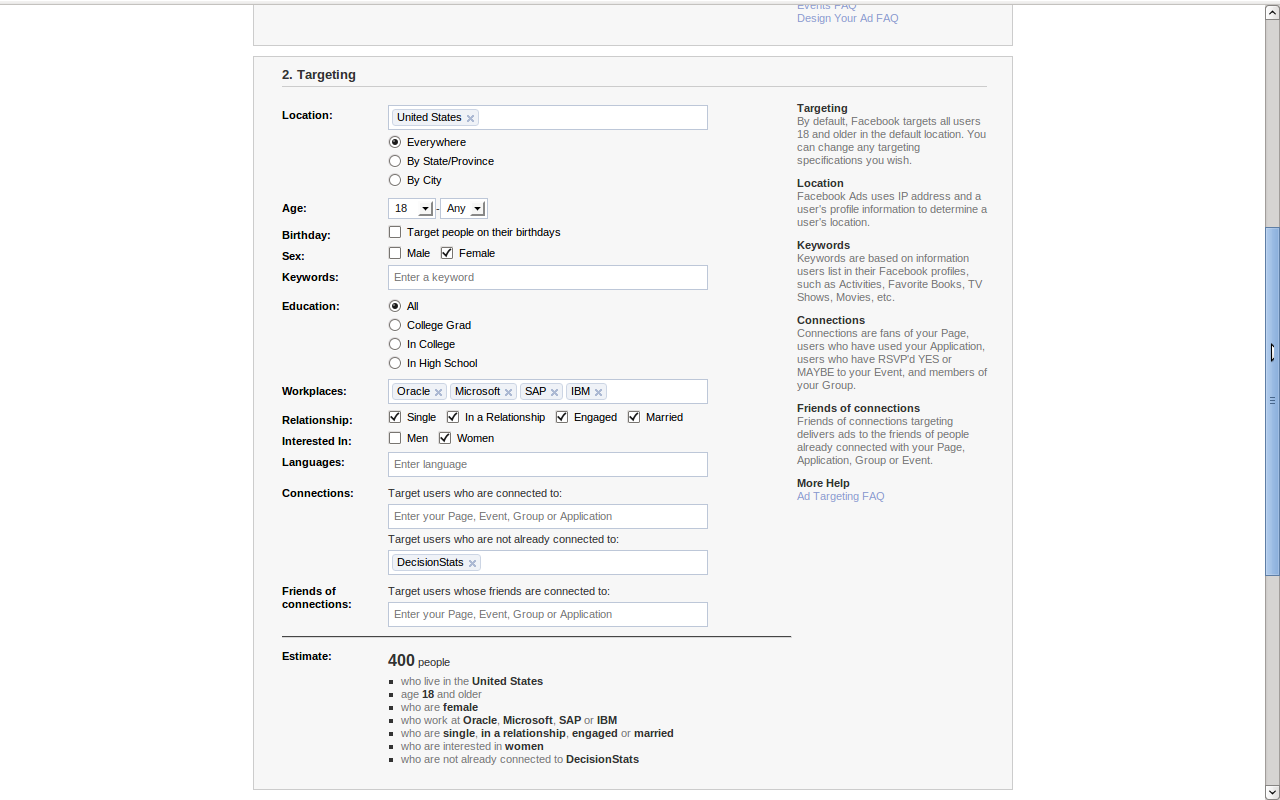
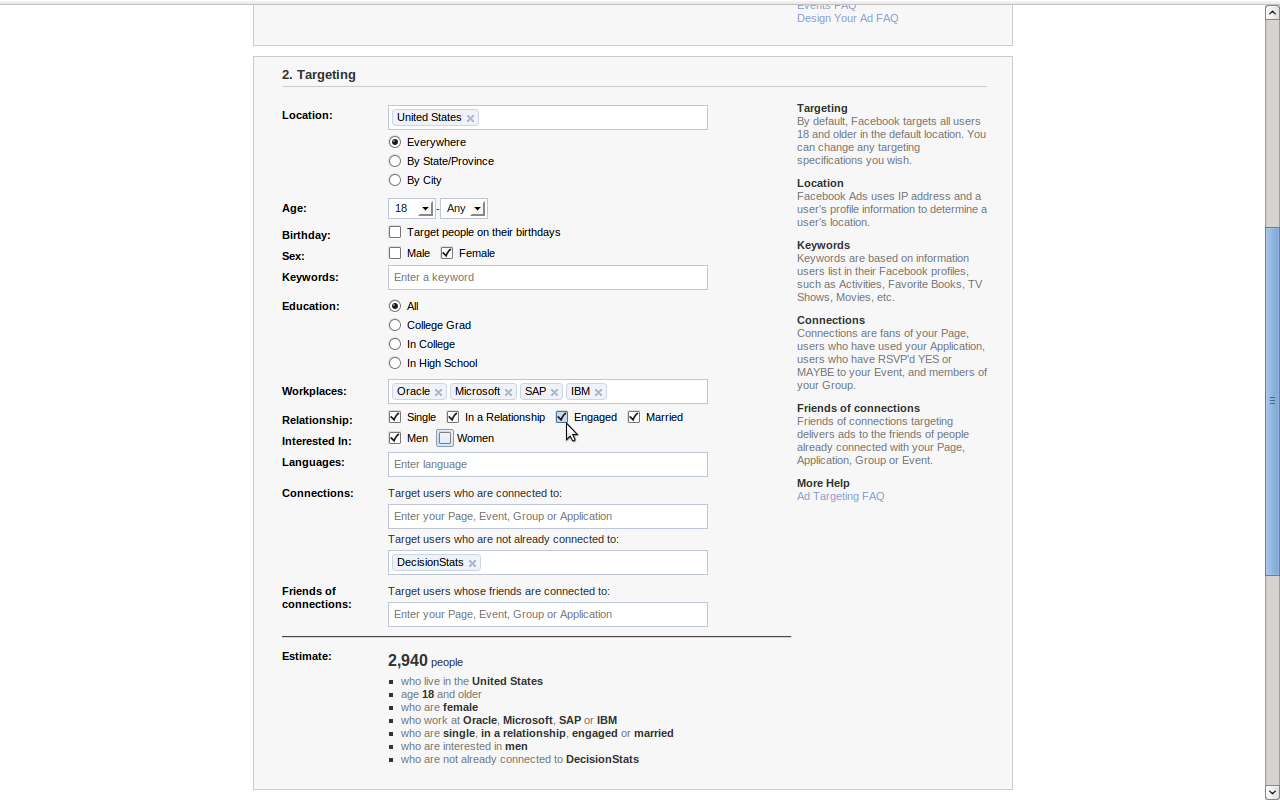
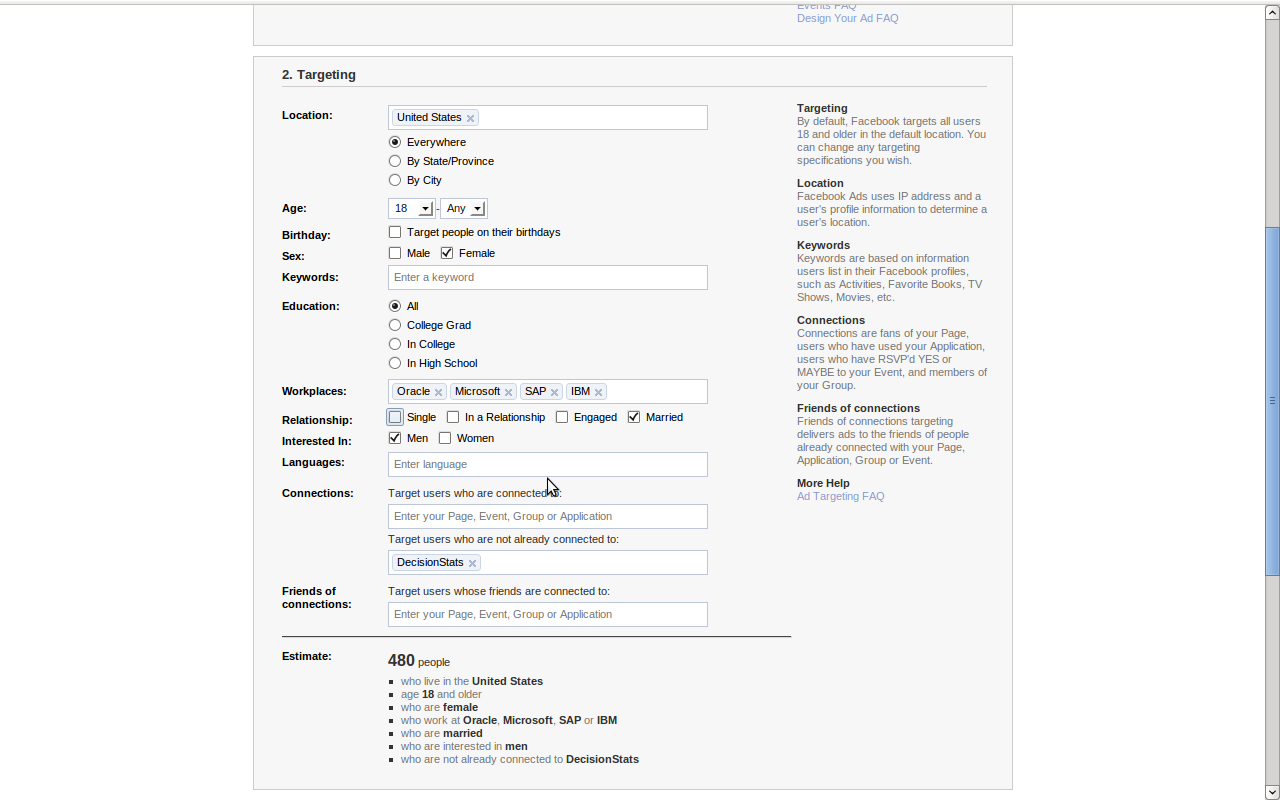
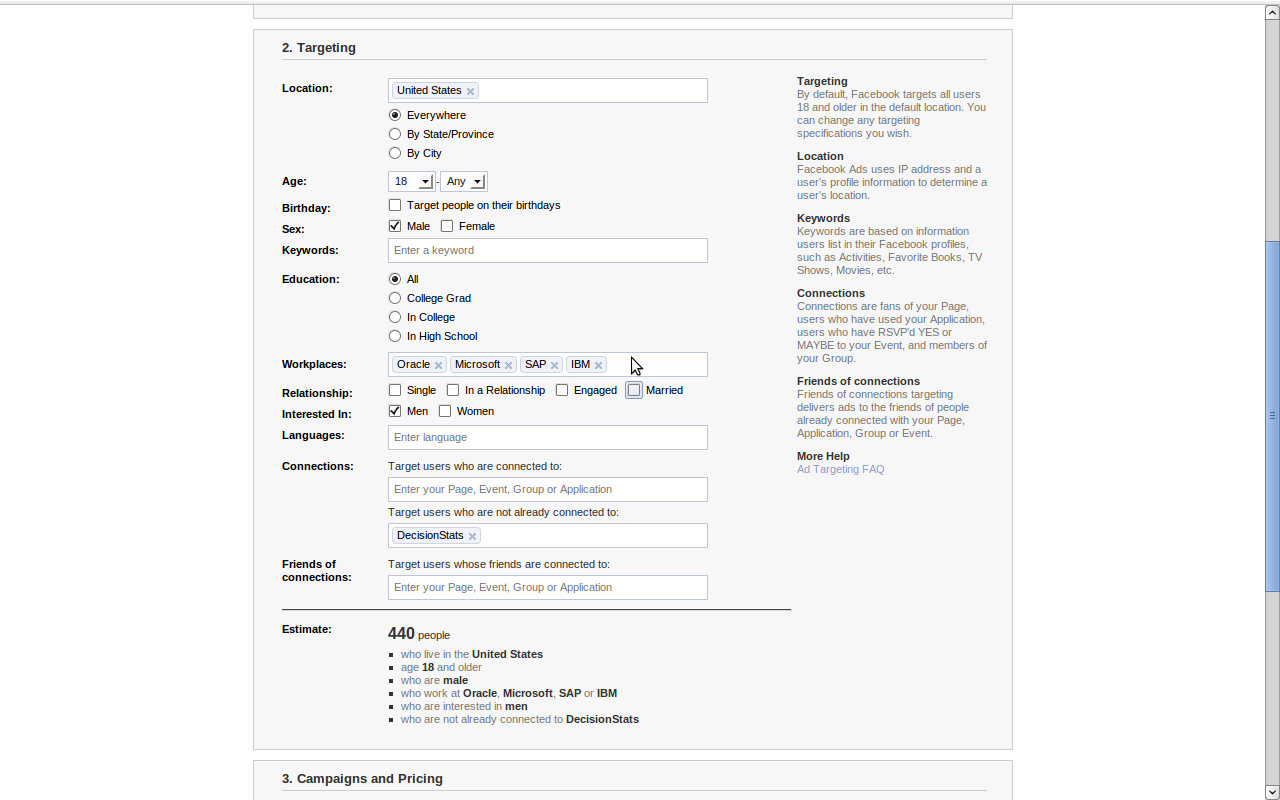
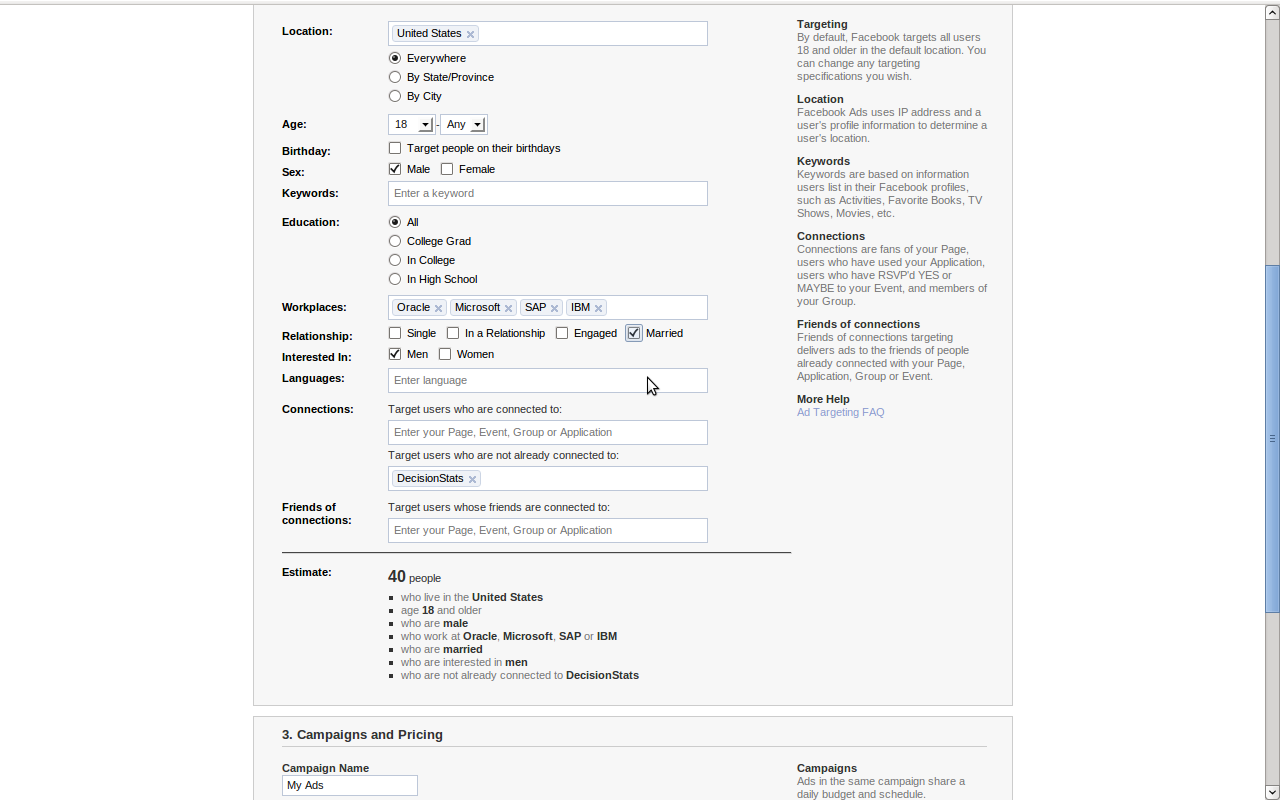
So you got a Facebook ID and ticked it in a hurry AND added in your work info. Bad Choice. Even small advertisers like me ( with 225 fans for Decisionstats) can see aggregate numbers of work info BEFORE even advertising.
This can lead to hilarious results-

See Screenshots below- AND note the numbers

1) 400 US females > age 18 work at IBM, SAP, Oracle or Microsoft AND are interested in Women

2) 2940 US females or males > age 18 work at IBM, SAP, Oracle or Microsoft AND are interested in Women

3) 480 US females > age 18 work at IBM, SAP, Oracle or Microsoft AND are interested in Men AND are married

4) 440 US males > age 18 work at IBM, SAP, Oracle or Microsoft AND are interested in Men

5) 40 US males > age 18 work at IBM, SAP, Oracle or Microsoft AND are interested in Men AND are married

[tweetmeme=”decisionstats”]

Interested in males/females while giving out your work info AND your marital status. I hope these are ahem False Positives but seriously do you think these are violations of privacy or not.

Ps- i decided not to advertise after seeing the err statistics.
pps- This is meant to showcase lax ad related privacy for professionals rather than any individual preference or judgment.

How to be a BAD blogger?

Here are some tips to being a BAD blogger. This assumes that –

[tweetmeme source=”decisionstats”]

  • you are intelligent enough to know what you speak ( NO- STUPID CLAUSE),
  • are otherwise an interesting person in your offline life,
  • have a good story to tell about yourself, your product or your company ( NO BORING CLAUSES),
  • can spell-check (mostly) (NOT LAZY CLAUSE),
  • can create a free account on wordpress.com or have access to a website where you can post material (NOT LAZY AND STUPID CLAUSES)
  • AND otherwise have a desire to try and be a good blogger.
BAD

Step 1

Credibility

On the Internet everyone is an experienced expert in something.

Ways to wreck credibility-

  1. Offer ads from Adsense before your blog traffic crosses 100 average a day and maximum 200 visitors a day( not views).
  2. Take offers like free travel, books, software from people, products and companies- dont disclose that- and pump them up by flattering reviews.
  3. Scratch the back of a fellow blog monkey- Also known as you praise me in my blog- I will praise you in mine and we think we fooled everyone that we are just networking.
  4. Use shock words and images to differentiate.
  5. Offer ads from Non Adsense advertisers before your traffic crosses 500 average a day and maximum 1000 visitors a day( not views)
  6. Have only ONE advertiser and offer PRIME placement to news of it AND IGNORE corporate rivals completely.
  7. Claim to know people intimately whom you only know via Facebook Mafia Wars.
  8. Offer stuff to guest blogger and forget to follow up on the promise.
  9. Spam people on email and tell them how you are spamming them to HELP them with NEW stuff.
  10. Take money from sponsors, and free content from people. Call it aggregation and community. Pocket all the money
  11. Accept advertising from pornography. Claim you did not know what it was.
  12. Give tips on hacking websites. What goes around will never come around, right?

That should wreck your credibility completely. To build up your credibility ,  do the reverse of the above.

Hard Work

Hard work never killed anyone, but try to blog on boring stuff. Or on politics ,guns, gays and religion (preferably at the same time)

  1. Post a stupid  picture of yourself in the about page  and tell yourself people don’t care on photos anyway.
  2. Touch up your photo image by ADOBE Photoshop or Post an image 10 years younger (or 10 pounds thinner).
  3. Choose a bad theme. Like Violet background and yellow font.
  4. Post images of your kids or your vacation in a professional blog OR /AND post images of your computer or conferences in a personal blog.
  5. DO NOT SPELL CHECK.
  6. Use HTM4.0 . Pretend that CSS is a hit TV show.
  7. Pretend SEO , Tags and Categories is for others. DO NOT make it easy to search your blog.

WRITING

Coleridge was a drug addict. Poe was an alcoholic. Marlowe was killed by a man whom he was treacherously trying to stab. Pope took money to keep a woman’s name out of a satire then wrote a piece so that she could still be recognized anyhow. Chatterton killed himself. Byron was accused of incest. Do you still want to a writer – and if so, why?

Bennett Cerf ( from http://koti.mbnet.fi/pasenka/quotes/q-writ.htm#Writing%20is%20hell

  1. Write on politics and guns on a tech blog, or technology on a politics blog.
  2. Write dis jointed sentences in a hurry and claim it’s okay people wont notice anyways.
  3. Write only in text without ANY Images.
  4. Write 5 posts a day. or Write once in 5 weeks.
  5. Never explore VIDEO or AUDIO in your blog. Podcasts are for frozen peas.
  6. Have an ego bigger than your talent. Write about it.
  7. Be an expert in social media without crossing 1.5 years of blogging, or 25000 unique visitors. or 100,000 views on Internet. Twitter followers and Linkedin connections doesn’t count. Facebook  Fans don’ count either.
  8. Generally make an ass of yourself by not editing or not proof reading your posts.

This should generally make sure that you become a BAD blogger, your blog traffic never crosses into two digits a day and you get back to work on your day job which you are probably good at.

If you do that, tell everyone blogs don’t matter in the 2010’s just as websites never mattered in the 1990’s, or Novels in the 1980’s, or TV in the 1950’s or Talking Pictures in the 1930’s.

Yup.