So many R Packages Everywhere, which one do I use? #rstats

Some thoughts on R Packages

  • CRAN is no longer the sole repository for many useful R packages. This includes R Forge, Google Code and increasingly Github
  • CRAN lacks the flexibility and social aspect of Github.
  • CRAN Views is the only thing that lists subject wide listing of R packages. The categorization is however done more on methods than on use cases or business domains.
  • Multiple R packages for the same thing. Which one do I use? Only Stack Overflow helps with that. No rating , no recommendation system
  • The packages suggested by R package feature needs better and automatic association analysis . Right now it is manual and dependent on package author and maintainer.
  • Quis custodiet ipsos custodes? Who guards the guardians of R packages. In an era of cyber security, we need better transparency on security measures within R packages especially given the international nature of the project.  I am very sure I ( or anyone) can create R code to communicate discretely especially on Windows

  • I would rather not install anything on my local machine, and read the package directly from the CRAN . CRAN was designed in an era of low bandwidth- this needs to be upgraded.
  • Note I am refraining respectfully from the atrocious nature of aesthetics in the home website. Many statisticians feel no use of making R user friendly. My professors at U tenn (from which I dropped out in 2 sems) were horrified when I took courses in graphic design as I wanted to know more on the A and B, which make the A/B testing of statistical design. Now that I am getting older, I get horrified by the lack of HTML, CSS and JQuery by some of the brightest programmers in this project.
  • Please comment below.


1-click Random Decision Forests

petersp's avatarThe Official Blog of BigML.com

One of the pitfalls of machine learning is that creating a single predictive model has the potential to overfit your data. That is, the performance on your training data might be very good, but the model does not generalize well to new data. Ensemble learning of decision trees, also referred to as forests or simply ensembles,  is a tried-and-true technique for reducing the error of single machine-learned models. By learning multiple models over different subsamples of your data and taking a majority vote at prediction time, the risk of overfitting a single model to all of the data is mitigated. You can read more about this in our previous post.

Early this year, we showed how BigML ensembles outperform their solo counterparts and even beat other machine learning services. However, up until now creating ensembles with BigML has only been available via our API. We are excited to announce that ensembles are now available via our…

View original post 869 more words

A SunBurst of Insight

a nice addition to Big Data Visualization- sunbursts (which I have covered in the Dat Viz chapter of my R book)

Great work by BigML.com

davidgerster's avatarThe Official Blog of BigML.com

This is a guest post by David Gerster (@gerster), a data scientist and investor in BigML.

I work at a consumer web company, and recently used BigML to understand what drives return visits to our site. I followed Standard Operating Procedure for data mining, sampling a group of users, dividing them into two classes, and creating several features that I hoped would be useful in predicting these classes. I then fed this training data to BigML, which quickly and obediently produced a decision tree:

decision_tree

Next I used BigML’s interface to examine the tree’s many subsets, shown as “nodes” in the diagram above. I moused over a node at the top of the tree and saw that it achieved high separation for a large fraction of the training set:

Shhh, I'm hunting nodes!

This one node covered 58% of the data, and separated the two classes with 73% confidence. (“Confidence” is a measure…

View original post 546 more words

Predictive Analytics World goes to Chicago

Message from our Sponsors and my favorite Analytics conference ( only if I could attend a cool analytics conference nearby in Asia (singapore/turkey?)  -sighs) Even useR wont come to Asia ever?-

This is the number 1 conference for analytics in the world and it is next month in Chicago, USA? So you think you have the best analytics software or product or service. Here is where you can find it out!

It’s time to amp-up your analytics strategy. It’s time to beef up your analytics strategy by attending Predictive Analytics World Chicago, June 10-13, 2013. With over 30 case studies from leading organizations across a spectrum of industries, this is the must-attend event for anyone serious about their analytics strategy.

Here’s what your peers had to say about their experience at PAW:

“Great speakers, interesting content, and great networking. PAW conferences are among my favorite analytic events!”
– Karl Rexer, Ph.D. Rexer Analytics“This vendor neutral conference always gives me tangible ideas I can put to work right away.”
– Greg Hayworth, Humana

“Predictive Analytics World did a great job keeping up with the trends in Predictive Modeling. There were also plenty of opportunities to learn about the most valuable resources available to data scientists.”
– Conor Sontag, Marketing Evolution

“People who are in analytics must join Predictive Analytics World and see the state of the art projects.”
– Burak Buyuktombak, Avea Telecommunication Services (Turkey)

And there is more where that came from.

Who’s attending PAW Chicago 2013?

Here are just a few of the many companies attending:

Whose attending PAW Chicago

And many more!

Registration options for all budgets.

PAW Chicago has a variety of conference pass options available to meet budgets of all sizes.

Learn more about pricing and how to register.

Register Now!

2013 Chicago Sponsors
Follow Us on Twitter Be a Fan on Facebook LinkedIn Group Live Twitter Feed

Using a Linux only package in Windows #rstats

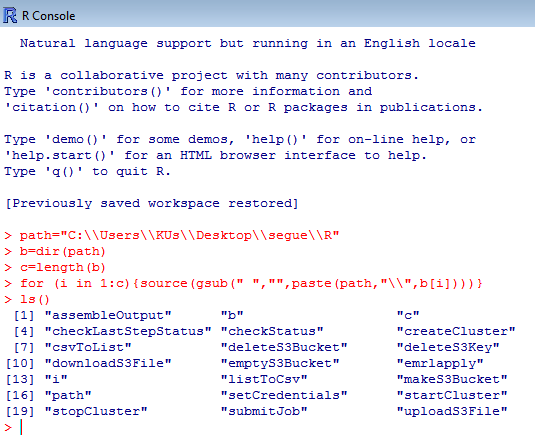
Here is some R code for using a R package that has only a tar.gz file available (used to load R packages in Linux) and no Zip file available (used to load R packages in Windows).

Step 1- Download the tar.gz file.

Step 2 Unzip it (twice) using 7zip

Step 3 Change the path variable below to your unzipped, downloaded location for the R sub folder within the package folder .

Step 4 Copy and Paste this in R

Step 5 Start using the R package in Windows (where 75% of the money and clients and businesses still are)

Caveat Emptor- No X Dependencies (ok!)

path="C:\\Users\\KUs\\Desktop\\segue\\R"
b=dir(path)
c=length(b)
for (i in 1:c){source(gsub(" ","",paste(path,"\\",b[i])))}
ls()


R2D2

Adding a + to the bit.ly link you get to get analytics on your spammers

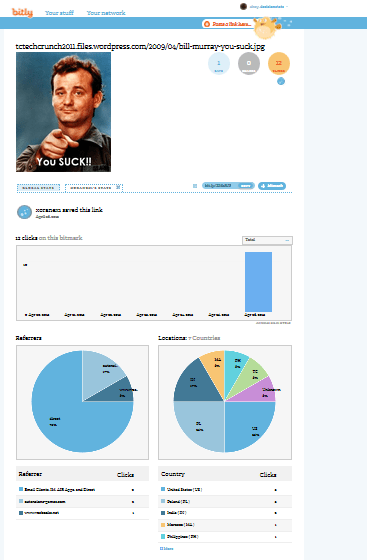
Just add a + sign to any bit.ly link and you get to see associated analytics for that link.

you can get information (traffic, referrers, locations, conversations) about any Bit.ly link simply by taking the short URL and adding a “+” at the end (minus the quotes)

Click on the image below and notice the + sign in the URL.

Read more here this can be useful than just fun-

Using Bit.ly for Spying, Link Building and Happiness

Unrelated- I interview Hilary Mason, Analytics legend and Bit.ly Chief Scientist here –

Interview Hilary Mason Chief Scientist bitly

nah

Using R for Cricket Analysis #rstats #IPL

#Downloading the Data for batting across all formats of cricket
library(XML)
url="http://stats.espncricinfo.com/ci/engine/stats/index.html?class=11;template=results;type=batting"
tables=readHTMLTable(url,stringsAsFactors = F)
#Note we wrote stringsAsFactors=F in this to avoid getting factor variables, 
#since we will need to convert these variables to numeric variables
table2=tables$"Overall figures"
rm(tables)
#Creating new variables from Span
table2$Debut=as.numeric(substr(table2$Span,1,4))
table2$LastYr=as.numeric(substr(table2$Span,6,10))
table2$YrsPlayed=table2$LastYr-table2$Debut
#Creating New Variables. In cricket a not out score is denoted by * which can cause data quality error. 
#This is treated by grepl for finding and gsub for removing the *. 
#Note the double \ to escape regex charachter
table2$HSNotOut=grepl("\\*",table2$HS)
table2$HS2=gsub("\\*","",table2$HS)
#Creating a FOR Loop (!) to convert variables to numeric variables
for (i in 3:17) {
+     table2[, i] <- as.numeric(table2[, i])
+ }

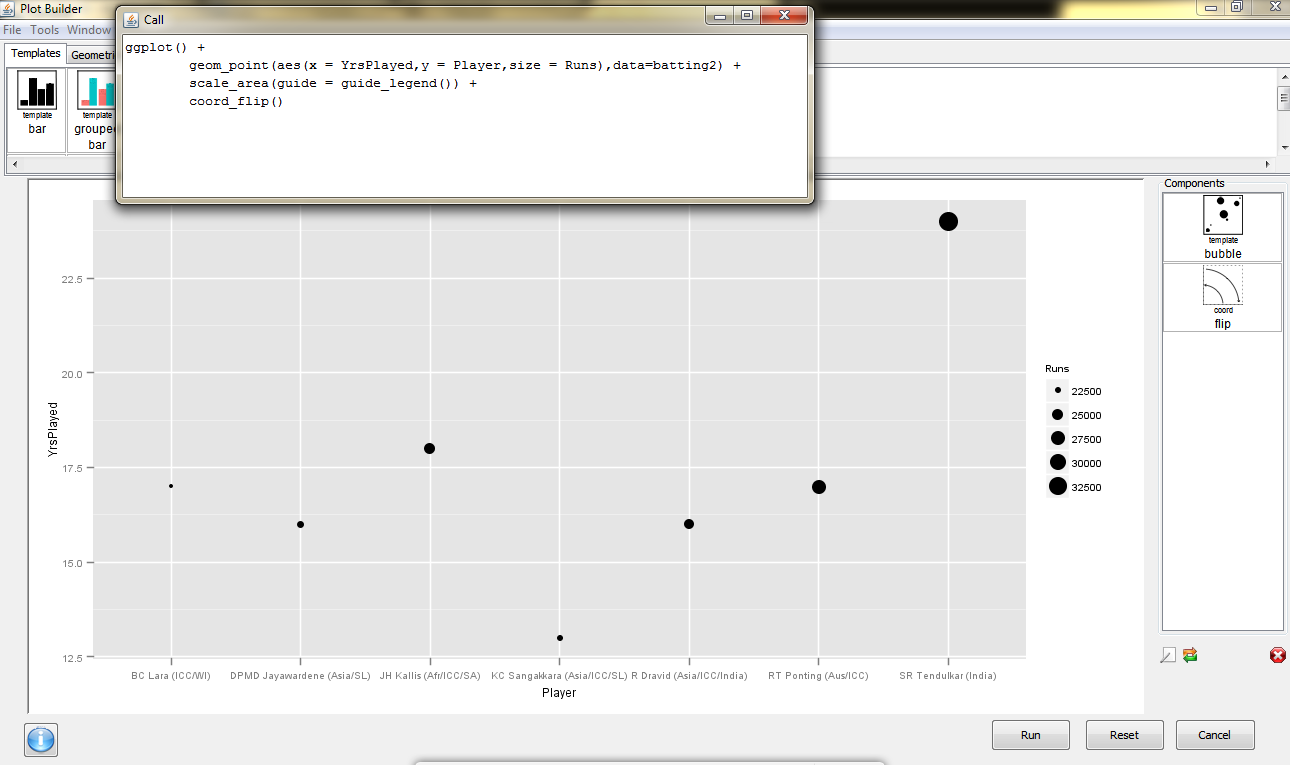
and we see why Sachin Tendulkar is the best (by using ggplot via Deducer)

dmancasestudy5

Also see 

  • Freaknomics Challenge-
    1. Prove match fixing does not and cannot exist in IPL
    2. Create an ideal fantasy team