Using ifelse in R for creating new variables #rstats #data #manipulation

The ifelse function is simple and powerful and can help in data manipulation within R. Here I create a categoric variable from specific values in a numeric variable

> data(iris)

> iris$Type=ifelse(iris$Sepal.Length<5.8,”Small Flower”,”Big Flower”)
> table(iris$Type)
Big Flower Small Flower
77           73

The parameters  of ifelse is quite simple

Usage

ifelse(test, yes, no)
Arguments

test
an object which can be coerced to logical mode.

yes
return values for true elements of test.

no
return values for false elements of tes


Basics of Data Handling for R beginners #rstats

  • Assigning Objects

We can create new data objects and variables quite easily within R. We use the = or the → operator to denote assigning an object to it’s name. For the purpose of this article we will use = to assign objectnames and objects. This is very useful when we are doing data manipulation as we can reuse the manipulated data as inputs for other steps in our analysis.


Types of Data Objects in R

  • Lists

A list is simply a collection of data. We create a list using the c operator.

The following code creates a list named numlist from 6 input numeric data

numlist=c(1,2,3,4,5,78)


The following code creates a list named charlist from 6 input character data

charlist=c(“John”,”Peter”,”Simon”,”Paul”,”Francis”)


The following code creates a list named mixlistfrom both numeric and character data.

mixlist=c(1,2,3,4,”R language”,”Ajay”)


  • Matrices

Matrix is a two dimensional collection of data in rows and columns, unlike a list which is basically one dimensional. We can create a matrix using the matrix command while specifying the number of rows by nrow and number of columns by ncol paramter.

In the following code , we create an matrix named ajay and the data is input in 3 rows as specified, but it is entered into first column, then second column , so on.

ajay=matrix(c(1,2,3,4,5,6,12,18,24),nrow=3)

ajay

[,1] [,2] [,3]

[1,] 1 4 12

[2,] 2 5 18

[3,] 3 6 24


However please note the effect of using the byrow=T (TRUE) option. In the following code we create an matrix named ajay and the data is input in 3 rows as specified, but it is entered into first row, then second row , so on.


>ajay=matrix(c(1,2,3,4,5,6,12,18,24),nrow=3,byrow=T)

>ajay

[,1] [,2] [,3]

[1,] 1 2 3

[2,] 4 5 6

[3,] 12 18 24

  • Data Frames

A data frame is a list of variables of the same number of rows with unique row names. The column names are the names of the variables.


6 weeks Data Scientist Online Courses #rstats

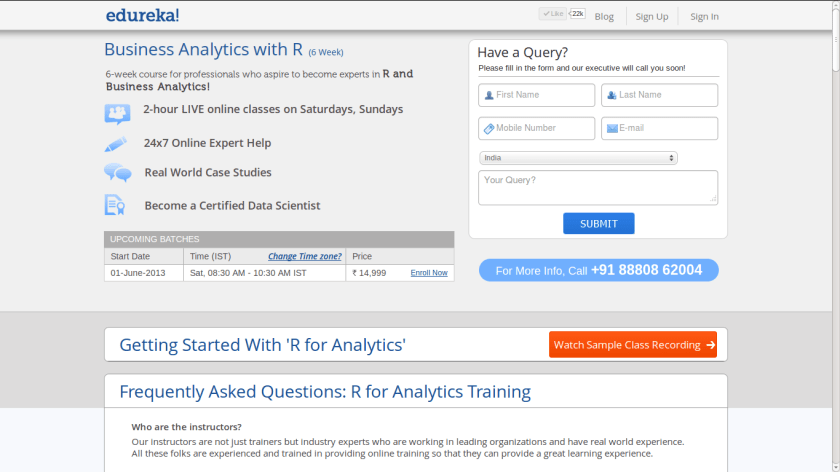
Hosting a 6 weekend live online certification course on Business Analytics with R starting June 1 at Edureka.Check www.edureka.in/r-for-analytics for more details. Course has been decided to ensure more open data science than current expensive offerings that are tech rather than business oriented but more support and customization than a MOOC This is because many business customers don’t care if it is lapply or ddapply, or command line or GUI, as long  as they get good ROI on time and money spent in shifting to R from other analytics software.

Screenshot from 2013-05-28 07:16:41


Using a Linux only package in Windows #rstats

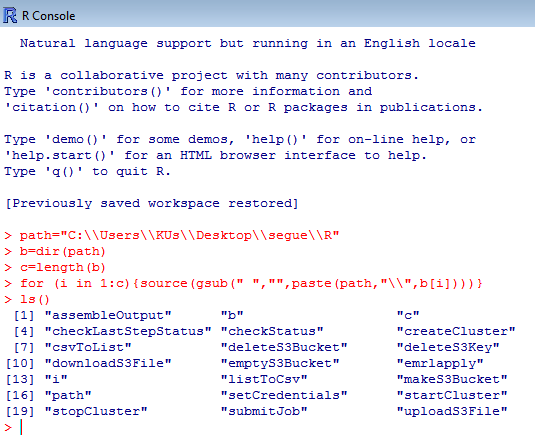
Here is some R code for using a R package that has only a tar.gz file available (used to load R packages in Linux) and no Zip file available (used to load R packages in Windows).

Step 1- Download the tar.gz file.

Step 2 Unzip it (twice) using 7zip

Step 3 Change the path variable below to your unzipped, downloaded location for the R sub folder within the package folder .

Step 4 Copy and Paste this in R

Step 5 Start using the R package in Windows (where 75% of the money and clients and businesses still are)

Caveat Emptor- No X Dependencies (ok!)

path="C:\\Users\\KUs\\Desktop\\segue\\R"
b=dir(path)
c=length(b)
for (i in 1:c){source(gsub(" ","",paste(path,"\\",b[i])))}
ls()


R2D2

Using R for Cricket Analysis #rstats #IPL

#Downloading the Data for batting across all formats of cricket
library(XML)
url="http://stats.espncricinfo.com/ci/engine/stats/index.html?class=11;template=results;type=batting"
tables=readHTMLTable(url,stringsAsFactors = F)
#Note we wrote stringsAsFactors=F in this to avoid getting factor variables, 
#since we will need to convert these variables to numeric variables
table2=tables$"Overall figures"
rm(tables)
#Creating new variables from Span
table2$Debut=as.numeric(substr(table2$Span,1,4))
table2$LastYr=as.numeric(substr(table2$Span,6,10))
table2$YrsPlayed=table2$LastYr-table2$Debut
#Creating New Variables. In cricket a not out score is denoted by * which can cause data quality error. 
#This is treated by grepl for finding and gsub for removing the *. 
#Note the double \ to escape regex charachter
table2$HSNotOut=grepl("\\*",table2$HS)
table2$HS2=gsub("\\*","",table2$HS)
#Creating a FOR Loop (!) to convert variables to numeric variables
for (i in 3:17) {
+     table2[, i] <- as.numeric(table2[, i])
+ }

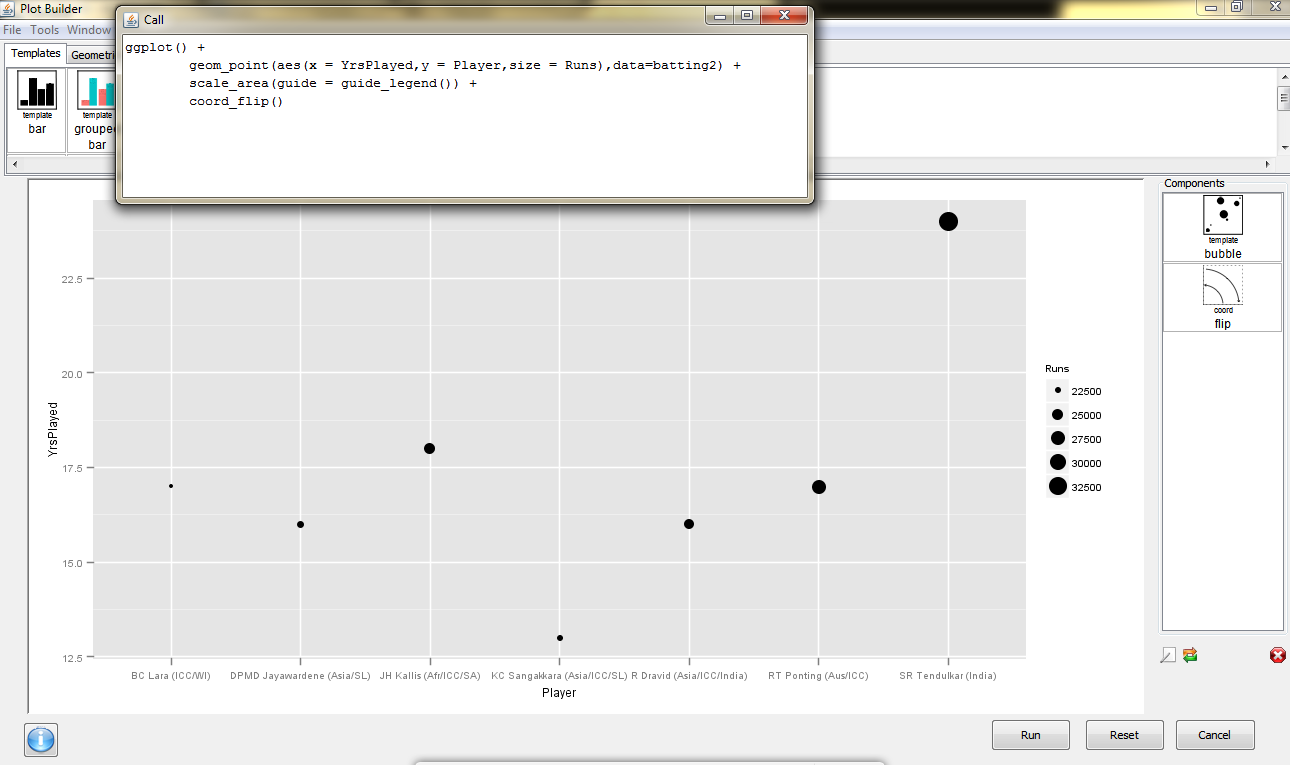
and we see why Sachin Tendulkar is the best (by using ggplot via Deducer)

dmancasestudy5

Also see 

  • Freaknomics Challenge-
    1. Prove match fixing does not and cannot exist in IPL
    2. Create an ideal fantasy team


Using R for Cricket Analysis #rstats

ESPN Crincinfo is the best site for cricket data (you can see an earlier detailed post on the database  here https://decisionstats.com/2012/04/07/cricinfo-statsguru-database-for-statistical-and-graphical-analysis/  ), and using the XML package in R we can easily scrape and manipulate data

Here is the code.

library(XML)
url="http://stats.espncricinfo.com/ci/engine/stats/index.html?class=1;team=6;template=results;type=batting"
#Note I can also break the url string and use paste command to modify this url with parameters
tables=readHTMLTable(url)
tables$"Overall figures"

#Now see this- since I only got 50 results in each page, I look at the url of next page

table1=tables$"Overall figures"
url="http://stats.espncricinfo.com/ci/engine/stats/index.html?class=1;page=2;team=6;template=results;type=batting"
tables=readHTMLTable(url)
table2=tables$"Overall figures"

#Now I need to join these two tables vertically

table3=rbind(table1,table2)

Note-I can also automate the web scraping .
Now the data is within R, we can use something like Deducer to visualize.
Created by Pretty R at inside-R.org

R 3.0 launched #rstats

The 3.0 Era for R starts today! Changes include  better Big Data support.

Read the NEWS here

  • install.packages() has a new argument quiet to reduce the amount of output shown.
  • New functions cite() and citeNatbib() have been added, to allow generation of in-text citations from "bibentry" objects. A cite() function may be added to bibstyle() environments.
  • merge() works in more cases where the data frames include matrices. (Wish of PR#14974.)
  • sample.int() has some support for n >= 2^31: see its help for the limitations.A different algorithm is used for (n, size, replace = FALSE, prob = NULL) for n > 1e7 and size <= n/2. This is much faster and uses less memory, but does give different results.
  • list.files() (aka dir()) gains a new optional argument no.. which allows to exclude "." and ".." from listings.
  • Profiling via Rprof() now optionally records information at the statement level, not just the function level.
  • available.packages() gains a "license/restricts_use" filter which retains only packages for which installation can proceed solely based on packages which are guaranteed not to restrict use.
  • File ‘share/licenses/licenses.db’ has some clarifications, especially as to which variants of ‘BSD’ and ‘MIT’ is intended and how to apply them to packages. The problematic licence ‘Artistic-1.0’ has been removed.
  • The breaks argument in hist.default() can now be a function that returns the breakpoints to be used (previously it could only return the suggested number of breakpoints).

LONG VECTORS

This section applies only to 64-bit platforms.

  • There is support for vectors longer than 2^31 – 1 elements. This applies to raw, logical, integer, double, complex and character vectors, as well as lists. (Elements of character vectors remain limited to 2^31 – 1 bytes.)
  • Most operations which can sensibly be done with long vectors work: others may return the error ‘long vectors not supported yet’. Most of these are because they explicitly work with integer indices (e.g. anyDuplicated() and match()) or because other limits (e.g. of character strings or matrix dimensions) would be exceeded or the operations would be extremely slow.
  • length() returns a double for long vectors, and lengths can be set to 2^31 or more by the replacement function with a double value.
  • Most aspects of indexing are available. Generally double-valued indices can be used to access elements beyond 2^31 – 1.
  • There is some support for matrices and arrays with each dimension less than 2^31 but total number of elements more than that. Only some aspects of matrix algebra work for such matrices, often taking a very long time. In other cases the underlying Fortran code has an unstated restriction (as was found for complex svd()).
  • dist() can produce dissimilarity objects for more than 65536 rows (but for example hclust() cannot process such objects).
  • serialize() to a raw vector is unlimited in size (except by resources).
  • The C-level function R_alloc can now allocate 2^35 or more bytes.
  • agrep() and grep() will return double vectors of indices for long vector inputs.
  • Many calls to .C() have been replaced by .Call() to allow long vectors to be supported (now or in the future). Regrettably several packages had copied the non-API .C() calls and so failed.
  • .C() and .Fortran() do not accept long vector inputs. This is a precaution as it is very unlikely that existing code will have been written to handle long vectors (and the R wrappers often assume that length(x) is an integer).
  • Most of the methods for sort() work for long vectors.
  • rank(), sort.list() and order() support long vectors (slowly except for radix sorting).
  • sample() can do uniform sampling from a long vector.

PERFORMANCE IMPROVEMENTS

  • More use has been made of R objects representing registered entry points, which is more efficient as the address is provided by the loader once only when the package is loaded.

    This has been done for packages base, methods, splines and tcltk: it was already in place for the other standard packages.

    Since these entry points are always accessed by the R entry points they do not need to be in the load table which can be substantially smaller and hence searched faster. This does mean that .C / .Fortran / .Call calls copied from earlier versions of R may no longer work – but they were never part of the API.

  • Many .Call() calls in package base have been migrated to .Internal() calls.
  • solve() makes fewer copies, especially when b is a vector rather than a matrix.
  • eigen() makes fewer copies if the input has dimnames.
  • Most of the linear algebra functions make fewer copies when the input(s) are not double (e.g. integer or logical).
  • A foreign function call (.C() etc) in a package without a PACKAGE argument will only look in the first DLL specified in the ‘NAMESPACE’ file of the package rather than searching all loaded DLLs. A few packages needed PACKAGE arguments added.
  • The @<- operator is now implemented as a primitive, which should reduce some copying of objects when used. Note that the operator object must now be in package base: do not try to import it explicitly from package methods.

SIGNIFICANT USER-VISIBLE CHANGES

  • Packages need to be (re-)installed under this version (3.0.0) of R.
  • There is a subtle change in behaviour for numeric index values 2^31 and larger. These never used to be legitimate and so were treated as NA, sometimes with a warning. They are now legal for long vectors so there is no longer a warning, and x[2^31] <- y will now extend the vector on a 64-bit platform and give an error on a 32-bit one.
  • It is now possible for 64-bit builds to allocate amounts of memory limited only by the OS. It may be wise to use OS facilities (e.g. ulimit in a bash shell, limit in csh), to set limits on overall memory consumption of an R process, particularly in a multi-user environment. A number of packages need a limit of at least 4GB of virtual memory to load.

    64-bit Windows builds of R are by default limited in memory usage to the amount of RAM installed: this limit can be changed by command-line option –max-mem-size or setting environment variable R_MAX_MEM_SIZE.