Lost in New York : A R Writer uses code to analyze

I was in New York for past two days. New York is very pretty, very cold and the trains are very confusing. So I ended up walking and going back and forth.

Later on, when I reached home, heat, food, bed and jet lag, I decided to analyze where and what did I see in the visual ephiphany tour.

This was my route
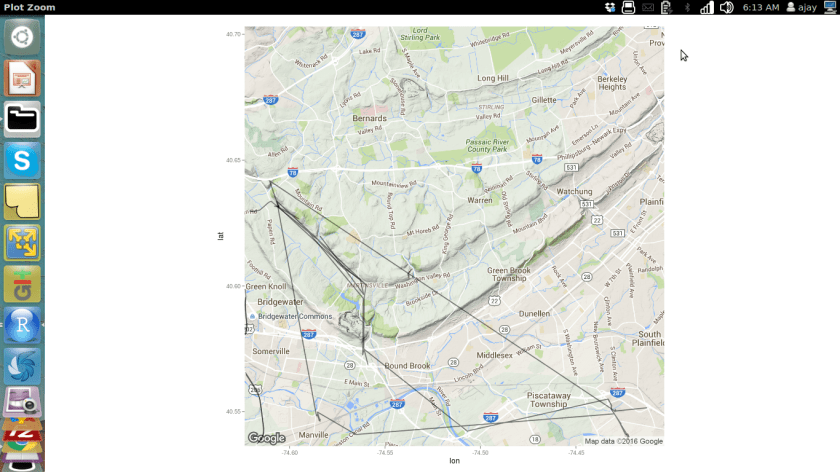
Screenshot from 2016-02-10 06:13:03

This was my R code

library(jsonlite)
a=fromJSON("/home/ajay/Desktop/Takeout/Location History/LocationHistory.json")
b=as.data.frame(a)
 
mygoog=NULL
mygoog$latitude=b$locations.latitudeE7/10000000
mygoog$longitude=b$locations.longitudeE7/10000000
mygoog$time=as.POSIXct(as.numeric(b$locations.timestampMs)/1000 , origin="1970-01-01")
 
 
mygoog=as.data.frame(mygoog)
head(mygoog)
nrow(mygoog)
#Clearly that is over the API limit for free usage
length(unique(mygoog$longitude))
library(magrittr) #to make code easier to read
mygoog$longitude%>%unique%>%length
unique(mygoog$latitude)
mygoog$latitude%>%unique%>%length
 
fivenum(mygoog$latitude) #tukey
 
#or using Dr H over Tukey
library(Hmisc)
describe(mygoog$latitude)
describe(mygoog$longitude)
 
#deleting Non NY data
mygoog2=mygoog[mygoog$longitude<0,]
describe(mygoog2$longitude)
rm(mygoog2)
mygoog2=mygoog[mygoog$latitude<48,]
describe(mygoog2$latitude)
rm(mygoog2)
 
mygoog=mygoog[mygoog$longitude<0&mygoog$latitude<48,]
 
 
library(ggmap)=
#Starting Point
revgeocode(c(mygoog$longitude[1],mygoog$latitude[1]))
#Starting Time
mygoog$time[1]
------
  #Median Location
a1=median(mygoog$longitude)
print(a1)
a2=median((mygoog$latitude))
print(a2)
revgeocode(c(a1,a2))
 
#Lingering Location
Mode <- function(x) {
  ux <- unique(x)
  ux[which.max(tabulate(match(x, ux)))]
}
b1=Mode(mygoog$longitude)
b1
b2=Mode(mygoog$latitude)
b2
 
revgeocode(c(b1,b2))
#Creating New Fields to minimize API calls to Google Maps
unique(mygoog$longitude)
unique(mygoog$latitude)
 mygoog2=mygoog[!duplicated(mygoog[c("longitude", "latitude")]),]
nrow(mygoog2)
 
result <- do.call(rbind,
                  lapply(1:nrow(mygoog2),
                         function(i)revgeocode(as.numeric(mygoog2[i,1:2]))))
mygoog2 <- cbind(mygoog2,result)
 
library(stringr)
mygoog2$zipcode <- substr(str_extract(mygoog2$result," [0-9]{5}, .+"),2,6)
mygoog2[,-4]
 
#merge(x, y, by=c("k1","k2")) # NA's match
 
#Cleaning up workspace
             #rm(a1)
             #rm(a2)
             #gc()
 
Map <- get_googlemap(center = c(lon = median(mygoog$longitude), lat = median(mygoog$latitude)),
                     zoom = 13, 
                     size = c(640, 640), 
                     scale = 2, maptype = c("terrain"), 
                     color = "color")
 
plot1 <- ggmap(Map) + 
  geom_path(data = mygoog, aes(x = longitude, y = latitude
  ), 
  alpha = I(0.9), 
  size = 1.8)
suppressWarnings(print(plot1))

Code contains Easter Eggs created by Pretty R at inside-R.org

How I became a social media expert without spamming people

  • social_media_expertPolite hello gets me more work contracts than aggressive pitches. I am not afraid to say hello, but I always write a crisp two line on why I am saying hello. Short and sweet messaging rules today’s era. Attention span is short. Brevity is the soul of tweet.


 

  • There is no such thing as a free lunch or a free connection. People are getting too many emails asking them for stuff. I dont ask for free advice, jobs, or anything in first three exchanges on a digital medium


  • I try to curb my impatience and listen to people. Everyone has an interesting story.


  • Internet and Social media change everyday. This will lead to you making mistakes if you are passionate on expanding your network. I make mistakes while learning new things on internet. I learn from mistakes. I make new mistakes next time not repeat them


  • everyone dislikes spammers. A spam is an unsolicited email a digital cold call that asks the receiver for his time. yes we all have to build our brand, project our knowledge and sell our services. minimize digital spam.


  • Sense of humor helps build connections. If you can make them smile they are on the hook. 1902893_10152395459325658_5599190800305402465_n


  • I avoid search engine optimization because I assume people at Google are smarter than me. I use honesty and common sense in my blog writing titles and categories.


  • Loving my job and my field of expertise is more important than showing my greed for new contracts or clients. As Warren Buffet said , balance your greed and your fear.


  • When someone is unpleasant to me on Internet, I use block button very fast. That is why I try and not lose my temper at all on internet. It is working better as I am growing older


  • I am curious to learn new things from new people. 80% of my business has come from my 11000 LinkedIn  connections in past five years.

Dr Eric Siegel updates popular book on Predictive Analytics

Dr Eric Siegel has just released the updated version of his very popular book on Predictive Analytics, Predictive Analytics: The Power to Predict Who Will Click, Buy, Lie, or Die

at http://www.predictiveanalyticsworld.com/book/overview.php

The book which is a bestseller in many categories on Amazon has met with overwhelming praise from industry. One of the reasons is that it is chockablock with real case studies that make it much more easy to learn and execute predictive analytics. I frequently recommend it as an additional book when I am teaching data science online. Here is the link to my 2013 review of the earlier edition

https://decisionstats.com/2013/02/25/book-review-predictive-analytics-the-power-to-predict-who-will-click-buy-lie-or-die/

9781119145677.pdf


Blogging Conflict of Interest Disclaimer – The book author is also founder of Predictive Analytics Conference, a sponsor of this site since many years.

Analyze Wireshark Data in R

Wireshark is the world’s foremost network protocol analyzer. It lets you see what’s happening on your network at a microscopic level. It is the de facto (and often de jure) standard across many industries and educational institutions.

INSTALL 

First, we install Wireshark from the terminal.


Source-

http://www.dickson.me.uk/2012/09/17/installing-wireshark-on-ubuntu-12-04-lts/


CAPTURE

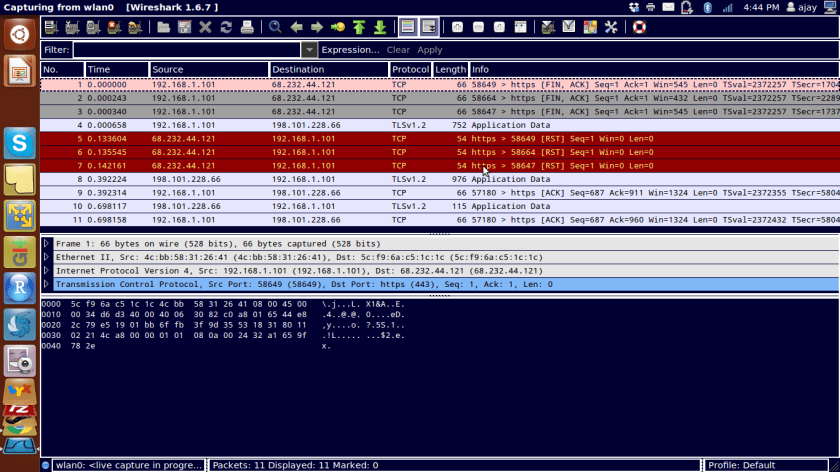
Type wireshark from terminal.Screenshot from 2016-01-08 16:43:46

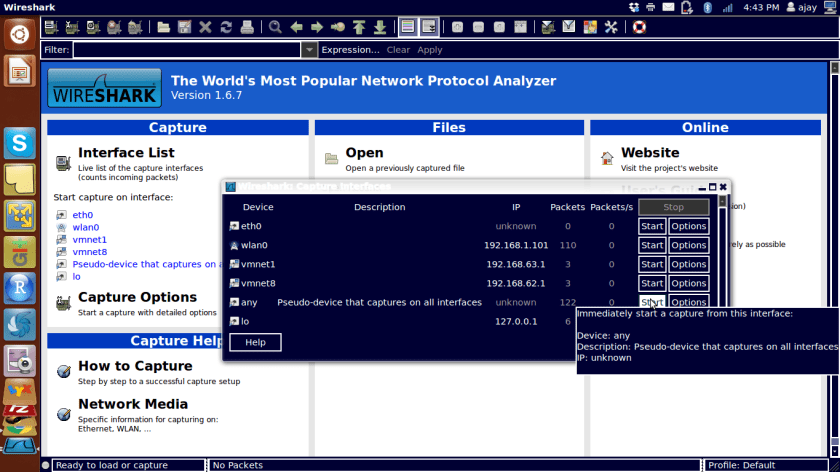
Start capture by looking at Capture Tab and interfaces

Screenshot from 2016-01-08 16:44:34


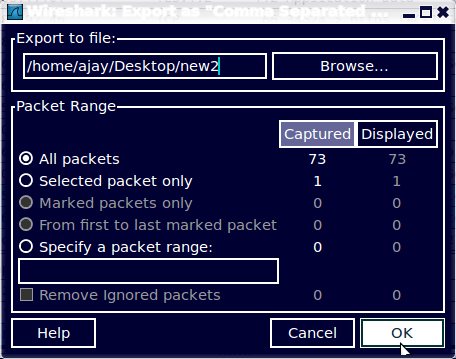
Export data as a csvScreenshot from 2016-01-08 16:45:41

ANALYZE

Import file in R to analyze

(from http://www.statmethods.net/input/importingdata.html )

Slideshare for DataScience

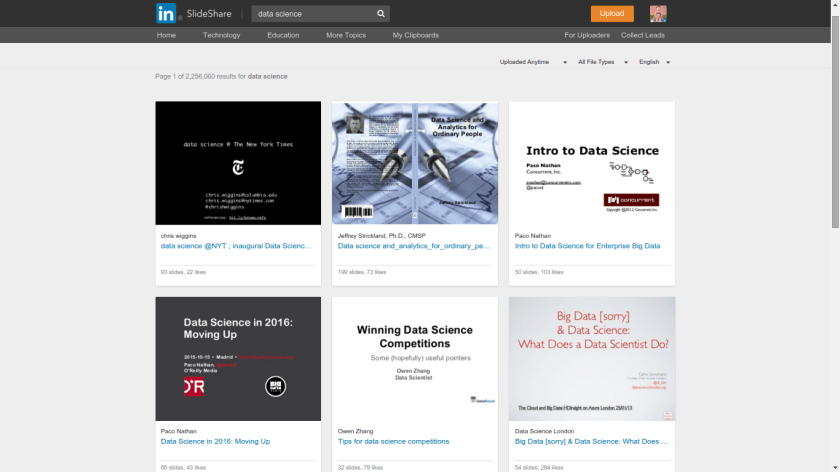
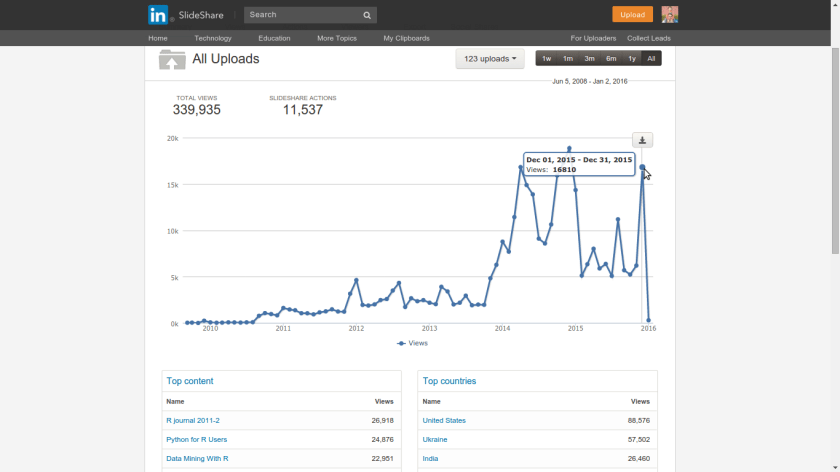
I increasingly use Slideshare since the past few years for dumping my Presentations or material I read and want to  share. While Google Docs remains my tool of choice for making Presentations, Slideshare.net is just a one click upload and gets a wide audience for my presentations. I also like just browsing through for stuff as in http://www.slideshare.net/featured/category/data-analytics or searchingScreenshot from 2016-01-02 20:35:53

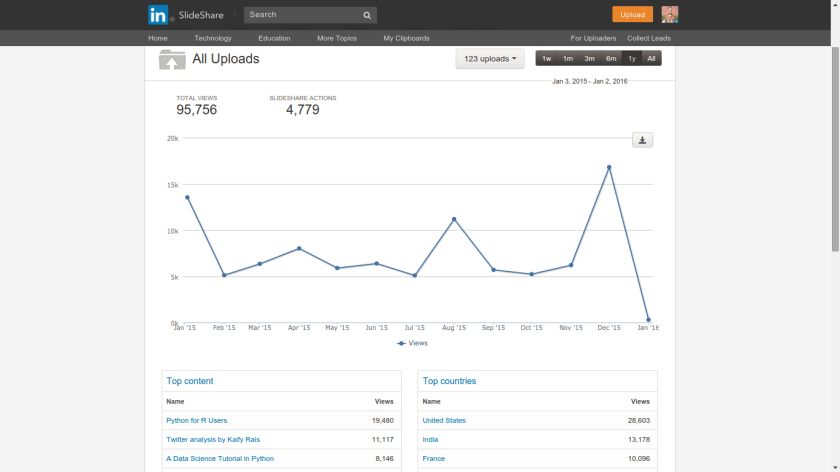
Plus I can embed it a much easier to read format for a ready to go blog post. Even my latest slideshare on a Py data science tutorial got 8000+ views in a single week ( of Christmas … hmm)


These are my stats (all time and last year). You can get yours at http://www.slideshare.net/insight

Screenshot from 2016-01-02 20:33:33

Screenshot from 2016-01-02 20:33:56


2015

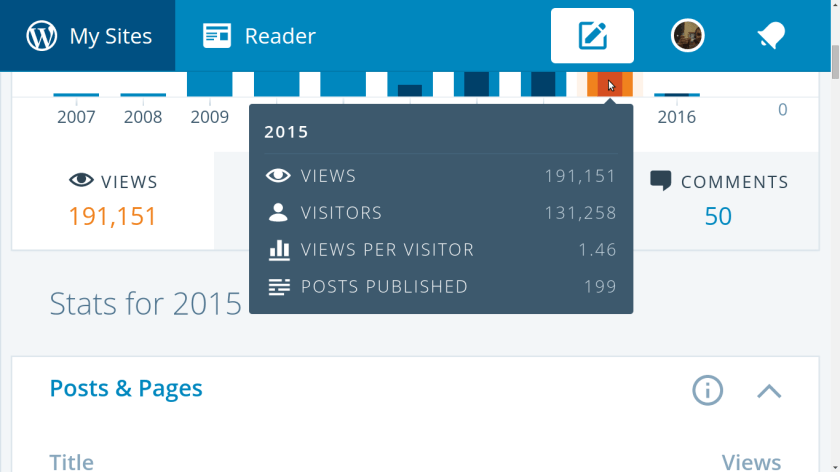
We got the maximum number of views in Year 8 of DecisionStats. Created in 2007, with 191,000 views DecisionStats continues to be one of the largest single author blogs in open source data science.

This year we began our dalliance with Pythonic power.

With the seventh year itch firmly behind us, lets have a rocking 2016. Lets be more honest in 2016!!!

I would like to thank the readers, all 131,258 of you 😉

and the sponsors, Predictive Analytics Conference.


Screenshot from 2016-01-01 13:16:01