Writing on SAS for R Users

It might seem counter intuitive for me to write on SAS language for R users for the following reasons-

1) I have already written 2 books on R for Springer. Clearly R is my weapon of choice for data analysis.

2) R has been quite lucrative for me in my writing. It has positioned me as one of the earliest R trainers in India. I started up R curriculum for Jigsaw Analytics and Edureka and WeekendR which means thousands of people have viewed content written by me, or a video of me speaking on R or been trained on pedagogy derived on my original work.

3) I have spoken on R at colleges like LSR , DSE, DCE- DTU, VIT, MS Ramiah and IIT Delhi

4) I am currently writing “Python for R users” for Wiley

However I am writing SAS for R users because

1) They are fundamental different languages aimed at different audiences

2) I realize students are now trained in R in the west in colleges, but a lot of corporates still use SAS because switching cost of business disruption is a lot. The benefit of analytics is much more than the expensive annual fee ( as in a few basis points as best out of Total Cost of Ownership)

3) Existing books on both SAS and R are not updated for newer packages (basically hadley and dirk are making packages faster than people can write about them)

4) India’s outsourcing hires many students and needs polyglots who know both SAS and R language. Ergo a new book.

5) I am bored and I need a challenge. Plus I always more hugs and love from SAS Institute than some package creators

The fundamental difference between R and SAS remain

1) R is object oriented and SAS is not

2) SAS is much easier to learn and R is not

3) While R refers to objects through $ and [[ ]] , SAS uses CLASS and VAR operator as parameters to various procs ( functions)

4) SAS bundling of modules can be confusing to people used to download R’s packages.

Accordingly a student of mine has been working in my direction here https://welcomedata.wordpress.com/category/sas/

We intend to create a proposal for Wiley soon. What do you think? What would you like to read?
Top 15 functions for Analytics in Python #python #rstats #analytics

Here is a list of top ten  fifteen functions for analysis in Python

  1. import (imports a particular package library in Python)
  2. getcwd (from os library) – get current working directory
  3. chdir (from os) -change directory
  4. listdir (from os ) -list files in the specified directory
  5. read_csv(from pandas) reads in a csv file
  6. objectname.info (like proc contents in SAS or str in R , it describes the object called objectname)
  7. objectname.columns (like proc contents in SAS or names in R , it describes the object variable names of the object called objectname)
  8. objectname.head (like head in R , it prints the first few rows in the object called objectname)
  9. objectname.tail (like tail in R , it prints the last few rows in the object called objectname)
  10. len (length)
  11. objectname.ix[rows] (here if rows is a list of numbers this     will give those rows (or index) for the object called objectname)
  12. groupby -group by a categorical variable
  13. crosstab -cross tab between two categorical variables
  14. describe – data analysis exploratory of numerical variables
  15. corr – correlation between numerical variables
In [1]:
import pandas as pd #importing packages
import os as os
In [2]:
os.getcwd() #current working directory
Out[2]:
'/home/ajay/Desktop'
In [3]:
os.chdir('/home/ajay/Downloads') #changes the working directory
In [4]:
os.getcwd()
Out[4]:
'/home/ajay/Downloads'
In [5]:
a=os.getcwd()
os.listdir(a) #lists all the files in a directory

In [105]:
diamonds=pd.read_csv("diamonds.csv")
#note header =0 means we take the first row as a header (default) else we can specify header=None
In [106]:
diamonds.info()
<class 'pandas.core.frame.dataframe'="">
Int64Index: 53940 entries, 0 to 53939
Data columns (total 10 columns):
carat      53940 non-null float64
cut        53940 non-null object
color      53940 non-null object
clarity    53940 non-null object
depth      53940 non-null float64
table      53940 non-null float64
price      53940 non-null int64
x          53940 non-null float64
y          53940 non-null float64
z          53940 non-null float64
dtypes: float64(6), int64(1), object(3)
memory usage: 3.9+ MB
In [36]:
diamonds.head()
Out[36]:
carat cut color clarity depth table price x y z
0 0.23 Ideal E SI2 61.5 55 326 3.95 3.98 2.43
1 0.21 Premium E SI1 59.8 61 326 3.89 3.84 2.31
2 0.23 Good E VS1 56.9 65 327 4.05 4.07 2.31
3 0.29 Premium I VS2 62.4 58 334 4.20 4.23 2.63
4 0.31 Good J SI2 63.3 58 335 4.34 4.35 2.75
In [37]:
diamonds.tail(10)
Out[37]:
carat cut color clarity depth table price x y z
53930 0.71 Premium E SI1 60.5 55 2756 5.79 5.74 3.49
53931 0.71 Premium F SI1 59.8 62 2756 5.74 5.73 3.43
53932 0.70 Very Good E VS2 60.5 59 2757 5.71 5.76 3.47
53933 0.70 Very Good E VS2 61.2 59 2757 5.69 5.72 3.49
53934 0.72 Premium D SI1 62.7 59 2757 5.69 5.73 3.58
53935 0.72 Ideal D SI1 60.8 57 2757 5.75 5.76 3.50
53936 0.72 Good D SI1 63.1 55 2757 5.69 5.75 3.61
53937 0.70 Very Good D SI1 62.8 60 2757 5.66 5.68 3.56
53938 0.86 Premium H SI2 61.0 58 2757 6.15 6.12 3.74
53939 0.75 Ideal D SI2 62.2 55 2757 5.83 5.87 3.64
In [38]:
diamonds.columns
Out[38]:
Index([u'carat', u'cut', u'color', u'clarity', u'depth', u'table', u'price', u'x', u'y', u'z'], dtype='object')
In [92]:
b=len(diamonds) #this is the total population size
print(b)
53940
In [93]:
import numpy as np
In [98]:
rows = np.random.choice(diamonds.index.values, 0.0001*b)
print(rows)
sampled_df = diamonds.ix[rows]
[45653  7503 47794 12017 46125]
In [99]:
sampled_df
Out[99]:
carat cut color clarity depth table price x y z
45653 0.25 Ideal H IF 61.4 57 525 4.05 4.08 2.49
7503 1.05 Premium G SI2 61.3 58 4241 6.55 6.60 4.03
47794 0.71 Ideal J VS2 62.4 54 1899 5.72 5.76 3.58
12017 1.00 Premium F SI1 59.8 59 5151 6.55 6.49 3.90
46125 0.51 Ideal F VS1 61.7 54 1744 5.14 5.17 3.18
In [108]:
diamonds.describe()
Out[108]:
carat depth table price x y z
count 53940.000000 53940.000000 53940.000000 53940.000000 53940.000000 53940.000000 53940.000000
mean 0.797940 61.749405 57.457184 3932.799722 5.731157 5.734526 3.538734
std 0.474011 1.432621 2.234491 3989.439738 1.121761 1.142135 0.705699
min 0.200000 43.000000 43.000000 326.000000 0.000000 0.000000 0.000000
25% 0.400000 61.000000 56.000000 950.000000 4.710000 4.720000 2.910000
50% 0.700000 61.800000 57.000000 2401.000000 5.700000 5.710000 3.530000
75% 1.040000 62.500000 59.000000 5324.250000 6.540000 6.540000 4.040000
max 5.010000 79.000000 95.000000 18823.000000 10.740000 58.900000 31.800000
In [109]:
cut=diamonds.groupby("cut")
In [110]:
cut.count()
Out[110]:
carat color clarity depth table price x y z
cut
Fair 1610 1610 1610 1610 1610 1610 1610 1610 1610
Good 4906 4906 4906 4906 4906 4906 4906 4906 4906
Ideal 21551 21551 21551 21551 21551 21551 21551 21551 21551
Premium 13791 13791 13791 13791 13791 13791 13791 13791 13791
Very Good 12082 12082 12082 12082 12082 12082 12082 12082 12082
In [114]:
cut.mean()
Out[114]:
carat depth table price x y z
cut
Fair 1.046137 64.041677 59.053789 4358.757764 6.246894 6.182652 3.982770
Good 0.849185 62.365879 58.694639 3928.864452 5.838785 5.850744 3.639507
Ideal 0.702837 61.709401 55.951668 3457.541970 5.507451 5.520080 3.401448
Premium 0.891955 61.264673 58.746095 4584.257704 5.973887 5.944879 3.647124
Very Good 0.806381 61.818275 57.956150 3981.759891 5.740696 5.770026 3.559801
In [115]:
cut.median()
Out[115]:
carat depth table price x y z
cut
Fair 1.00 65.0 58 3282.0 6.175 6.10 3.97
Good 0.82 63.4 58 3050.5 5.980 5.99 3.70
Ideal 0.54 61.8 56 1810.0 5.250 5.26 3.23
Premium 0.86 61.4 59 3185.0 6.110 6.06 3.72
Very Good 0.71 62.1 58 2648.0 5.740 5.77 3.56
In [117]:
pd.crosstab(diamonds.cut, diamonds.color)
Out[117]:
color D E F G H I J
cut
Fair 163 224 312 314 303 175 119
Good 662 933 909 871 702 522 307
Ideal 2834 3903 3826 4884 3115 2093 896
Premium 1603 2337 2331 2924 2360 1428 808
Very Good 1513 2400 2164 2299 1824 1204 678
In [121]:
diamonds.corr()
Out[121]:
carat depth table price x y z
carat 1.000000 0.028224 0.181618 0.921591 0.975094 0.951722 0.953387
depth 0.028224 1.000000 -0.295779 -0.010647 -0.025289 -0.029341 0.094924
table 0.181618 -0.295779 1.000000 0.127134 0.195344 0.183760 0.150929
price 0.921591 -0.010647 0.127134 1.000000 0.884435 0.865421 0.861249
x 0.975094 -0.025289 0.195344 0.884435 1.000000 0.974701 0.970772
y 0.951722 -0.029341 0.183760 0.865421 0.974701 1.000000 0.952006
z 0.953387 0.094924 0.150929 0.861249 0.970772 0.952006 1.000000
 

using R for Cricket Analysis #rstats

New Zealand just made it to their first ever world cup final ( yes it is cricket) and they made it with a thrilling six ( like a home run) for the last ball. Congrats to New Zealand .Of course R was created in New Zealand too and Hadley Wickham is from New Zealand

I recently installed the rvest package from https://github.com/hadley/rvest and its now on CRAN as well


rvest helps you scrape information from web pages. It is designed to work with magrittr to make it easy to express common web scraping tasks, inspired by libraries like beautiful soup.

library(rvest)
lego_movie <- html("http://www.imdb.com/title/tt1490017/")

rating <- lego_movie %>% 
  html_nodes("strong span") %>%
  html_text() %>%
  as.numeric()
rating
#> [1] 7.9

cast <- lego_movie %>%
  html_nodes("#titleCast .itemprop span") %>%
  html_text()
cast
#>  [1] "Will Arnett"     "Elizabeth Banks" "Craig Berry"    
#>  [4] "Alison Brie"     "David Burrows"   "Anthony Daniels"
#>  [7] "Charlie Day"     "Amanda Farinos"  "Keith Ferguson" 
#> [10] "Will Ferrell"    "Will Forte"      "Dave Franco"    
#> [13] "Morgan Freeman"  "Todd Hansen"     "Jonah Hill"

poster <- lego_movie %>%
  html_nodes("#img_primary img") %>%
  html_attr("src")
poster
#> [1] "http://ia.media-imdb.com/images/M/MV5BMTg4MDk1ODExN15BMl5BanBnXkFtZTgwNzIyNjg3MDE@._V1_SX214_AL_.jpg"

The most important functions in rvest are:

  • Create an html document from a url, a file on disk or a string containing html with html().
  • Select parts of a document using css selectors: html_nodes(doc, "table td") (or if you’ve a glutton for punishment, use xpath selectors with html_nodes(doc, xpath = "//table//td")). If you haven’t heard of selectorgadget, make sure to read vignette("selectorgadget") to learn about it.
  • Extract components with html_tag() (the name of the tag), html_text() (all text inside the tag), html_attr() (contents of a single attribute) and html_attrs() (all attributes).
  • (You can also use rvest with XML files: parse with xml(), then extract components using xml_node(), xml_attr(), xml_attrs(), xml_text() and xml_tag().)
  • Parse tables into data frames with html_table().
  • Extract, modify and submit forms with html_form(), set_values() and submit_form().
  • Detect and repair encoding problems with guess_encoding() and repair_encoding().
  • Navigate around a website as if you’re in a browser with html_session(), jump_to(), follow_link(), back(), forward(), submit_form() and so on. (This is still a work in progress, so I’d love your feedback.)


While Hadley Wickham seems busy with reading excel files ( see https://github.com/hadley/readxl) maybe using rvest can help in more sports analysis now!

https://decisionstats.com/2013/04/25/using-r-for-cricket-analysis-rstats-ipl/

Meanwhile I am searching for equivalent of readHTMLtable

Unblocking Wireless on Dell Inspiron on Ubuntu 12

Due to recent shenanigans—

To unblock all hardware

rfkill unblock all
rfkill list all

For wireless drivers

  1. Open the Terminal
  2. Install the build dependencies if you don’t have it already (but it is installed by default):sudo apt-get install build-essential
  3. Type the commands (steps 3-9): wget https://www.kernel.org/pub/linux/kernel/projects/backports/stable/v3.18.1/backports-3.18.1-1.tar.xzHere you can get the latest ones from kernel.org site
  4. tar xvf backports-3.18.1-1.tar.xz
  5. cd backports-3.18.1-1/
  6. make defconfig-ath9k
  7. make
  8. sudo make install
    • (type your password)
  9. sudo update-initramfs-u
    • (type your password if needed)
  10. Reboot your pc. #sudo reboot
  11. Remember that after a Kernel update (sudo apt-get dist-upgrade) we have to repeat the steps 4 to 9.

Sources-

http://askubuntu.com/questions/406531/cant-reach-wi-fi-signal-on-ubuntu-but-can-do-it-on-other-os-devices-ath9k

http://askubuntu.com/questions/139036/how-do-i-fix-a-wireless-is-disabled-by-hardware-switch-error

R Website Homepage gets a facelift and looks better #rstats

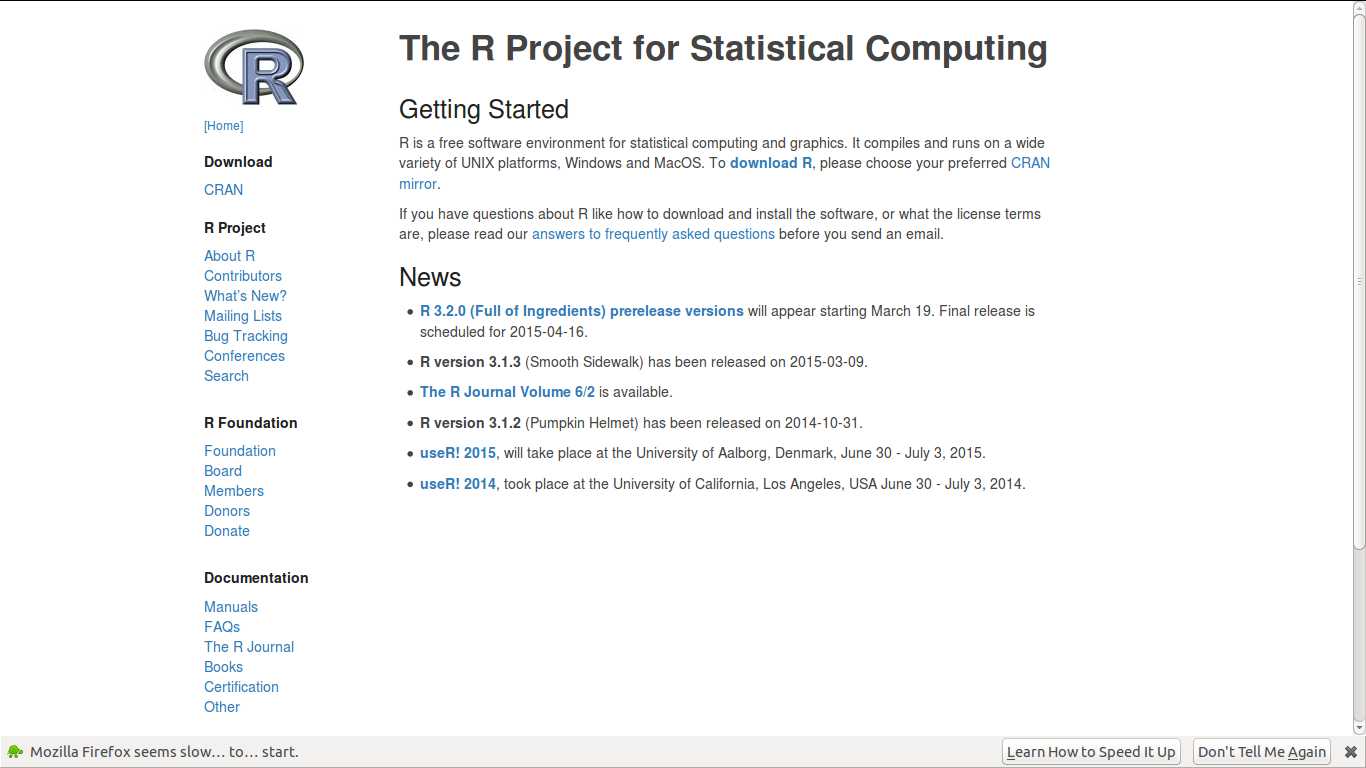
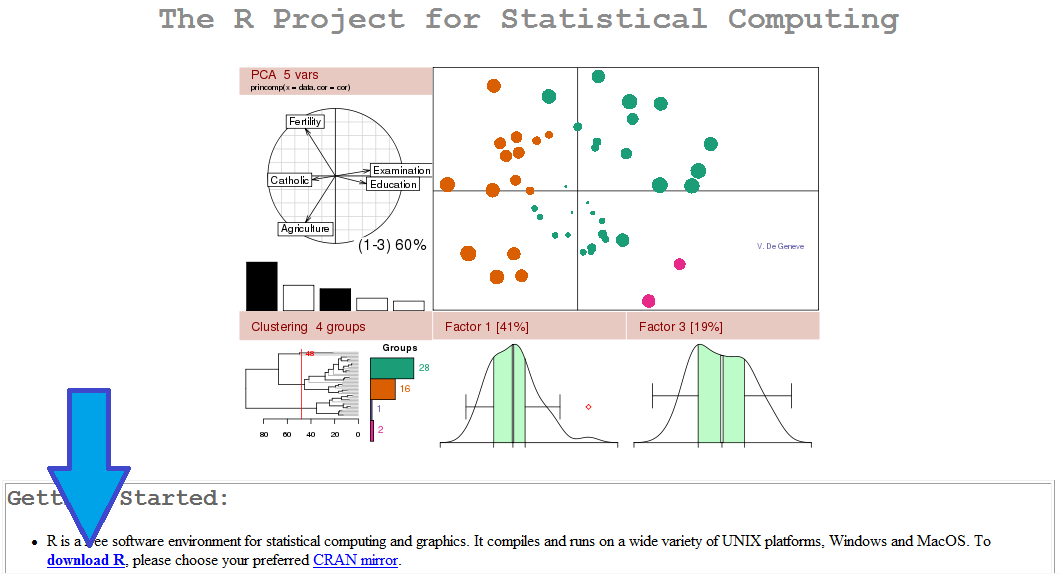
What used to be this

CRAN homepage

is

now this


Yay!

Screenshot from 2015-03-17 13:23:35

Even aging websites need injections of CSS and Markdown ( which is like botox for HTML)


Markdown with R Commander #rstats

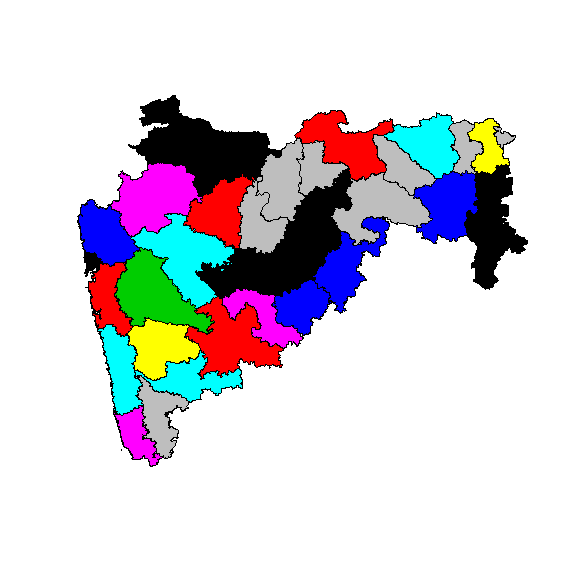
Just training and fiddling with spatial analytics

Markdown with R Commander

Ajay Ohri

2015-03-15

> library(maptools)
> library(raster)
> adm <- getData('GADM', country='IND', level=2)
> mahadm=adm[adm$NAME_1=="Maharashtra",]
> head(mahadm,20)
      PID ID_0 ISO NAME_0 ID_1      NAME_1 ID_2         NAME_2 NL_NAME_2                    VARNAME_2   TYPE_2 ENGTYPE_2
306 17478  105 IND  India   21 Maharashtra  306     Ahmednagar                             Ahmadnagar District  District
307 17479  105 IND  India   21 Maharashtra  307          Akola                                        District  District
308 17480  105 IND  India   21 Maharashtra  308       Amravati           Amaravati, Amraoti, Amaraoti District  District
309 17481  105 IND  India   21 Maharashtra  309     Aurangabad                                        District  District
310 17482  105 IND  India   21 Maharashtra  310       Bhandara                                        District  District
311 17483  105 IND  India   21 Maharashtra  311            Bid                     Bir|Beed|Bhir|Bidh District  District
312 17484  105 IND  India   21 Maharashtra  312        Buldana                                        District  District
313 17485  105 IND  India   21 Maharashtra  313     Chandrapur                                 Chanda District  District
314 17486  105 IND  India   21 Maharashtra  314          Dhule                  Dhulia, West Khandesh District  District
315 17487  105 IND  India   21 Maharashtra  315    Garhchiroli                                        District  District
316 17488  105 IND  India   21 Maharashtra  316        Gondiya                                        District  District
317 17489  105 IND  India   21 Maharashtra  317 Greater Bombay                                        District  District
318 17490  105 IND  India   21 Maharashtra  318        Hingoli                                        District  District
319 17491  105 IND  India   21 Maharashtra  319        Jalgaon                          East Khandesh District  District
320 17492  105 IND  India   21 Maharashtra  320          Jalna                                        District  District
321 17493  105 IND  India   21 Maharashtra  321       Kolhapur                                        District  District
322 17494  105 IND  India   21 Maharashtra  322          Latur                Kulaba, Kolaba, Kolabad District  District
323 17495  105 IND  India   21 Maharashtra  323         Nagpur                                        District  District
324 17496  105 IND  India   21 Maharashtra  324         Nanded                                 Nander District  District
325 17497  105 IND  India   21 Maharashtra  325      Nandurbar                                        District  District
> mahadm$pop=as.factor(sample(1:10,34,T))
> mahadm$pop2=as.factor(sample(1:10,34,T))
> mahadm$pop3=as.factor(sample(1:10,34,T))
> head(mahadm,20)
      PID ID_0 ISO NAME_0 ID_1      NAME_1 ID_2         NAME_2 NL_NAME_2                    VARNAME_2   TYPE_2 ENGTYPE_2
306 17478  105 IND  India   21 Maharashtra  306     Ahmednagar                             Ahmadnagar District  District
307 17479  105 IND  India   21 Maharashtra  307          Akola                                        District  District
308 17480  105 IND  India   21 Maharashtra  308       Amravati           Amaravati, Amraoti, Amaraoti District  District
309 17481  105 IND  India   21 Maharashtra  309     Aurangabad                                        District  District
310 17482  105 IND  India   21 Maharashtra  310       Bhandara                                        District  District
311 17483  105 IND  India   21 Maharashtra  311            Bid                     Bir|Beed|Bhir|Bidh District  District
312 17484  105 IND  India   21 Maharashtra  312        Buldana                                        District  District
313 17485  105 IND  India   21 Maharashtra  313     Chandrapur                                 Chanda District  District
314 17486  105 IND  India   21 Maharashtra  314          Dhule                  Dhulia, West Khandesh District  District
315 17487  105 IND  India   21 Maharashtra  315    Garhchiroli                                        District  District
316 17488  105 IND  India   21 Maharashtra  316        Gondiya                                        District  District
317 17489  105 IND  India   21 Maharashtra  317 Greater Bombay                                        District  District
318 17490  105 IND  India   21 Maharashtra  318        Hingoli                                        District  District
319 17491  105 IND  India   21 Maharashtra  319        Jalgaon                          East Khandesh District  District
320 17492  105 IND  India   21 Maharashtra  320          Jalna                                        District  District
321 17493  105 IND  India   21 Maharashtra  321       Kolhapur                                        District  District
322 17494  105 IND  India   21 Maharashtra  322          Latur                Kulaba, Kolaba, Kolabad District  District
323 17495  105 IND  India   21 Maharashtra  323         Nagpur                                        District  District
324 17496  105 IND  India   21 Maharashtra  324         Nanded                                 Nander District  District
325 17497  105 IND  India   21 Maharashtra  325      Nandurbar                                        District  District
    pop pop2 pop3
306   5    2    6
307   8    5    1
308   2    4    4
309   2    6   10
310   8    7    5
311   9   10    1
312   8    9    4
313   4    9    3
314   1    8    7
315   9    5    7
316   7    8    4
317   9    8    6
318   1   10    3
319   1    8    6
320   8    6   10
321   8    4    8
322   4    9    2
323   5    3    5
324   4    8   10
325   1    5    1
> par(mfrow=c(3,1))
> plot(mahadm,col=mahadm$pop)
1
> plot(mahadm,col=mahadm$pop2)
> plot(mahadm,col=mahadm$pop3)

Some SAS code for beginners

So I was talking to someone on SAS University Edition  and I wanted to show how easy SAS language is. This was some code I came up with with output commented out

SAS code here;

/*NOTE COMMENTS CAN BE GIVEN BY SELECTING A LINE AND PRESSING CTRL and / */
/* AUTOEXEC file loads starting up commands*/
/* Using different formats */
data test;
format ajay ddmmyy6. ajay2 date9.;
ajay=today();
ajay2=today();
ajay3=today();
run; 

/* printing out output */
proc print data=test;
run;


/* The SAS System */
/* Obs ajay ajay2 ajay3 */
/* 1 080315 08MAR2015 20155 */
/* what datasets are there in a library */
proc datasets lib=work;
quit;

proc datasets lib=sashelp;
quit;

/* copying a dataset from one to another */
data test2;
set sashelp.cars;
run;

/* NOTE: The data set WORK.TEST2 has 428 observations and 15 variables. */
/* conditionally copying a dataset from one to another */
data test2;
set sashelp.cars;
where cylinders=8;
run;

/* */
/* NOTE: There were 87 observations read from the data set SASHELP.CARS. */
/* WHERE cylinders=8; */
/* what variables are there in a dataset */
proc contents data=test2 varnum;
quit;

/* what is the frequency and number of levels of certain variables in a dataset */
proc freq data=sashelp.cars nlevels;
tables make*cylinders/nocol nopercent nocum norow;
quit;

/* what is a cross tab frequency of two or more variables */
proc freq data=test2;
tables make*cylinders;
quit;

/* what are some summary statistics of a variable */
proc means data=test2;
var mpg_city;
quit;

/* The MEANS Procedure */
/* Analysis Variable : MPG_City MPG (City) */
/* N Mean Std Dev Minimum Maximum */
/* 428 20.0607477 5.2382176 10.0000000 60.0000000 */

/* what are some summary statistics of a variable grouped by a class variable */
proc means data=test2 n p1 p75 std median mean max;
var mpg_city;
class cylinders;
quit;

/* The MEANS Procedure */
/* Analysis Variable : MPG_City MPG (City) */
/* Cylinders N Obs N 1st Pctl 75th Pctl Std Dev Median Mean Maximum */
/* 3 1 1 60.0000000 60.0000000 . 60.0000000 60.0000000 60.0000000 */
/* 4 136 136 18.0000000 26.0000000 5.2093430 24.0000000 24.9411765 59.0000000 */
/* 5 7 7 18.0000000 20.0000000 0.8997354 20.0000000 19.8571429 21.0000000 */
/* 6 190 190 14.0000000 20.0000000 1.7630130 19.0000000 18.5157895 23.0000000 */
/* 8 87 87 10.0000000 17.0000000 1.8912565 16.0000000 15.8735632 18.0000000 */
/* 10 2 2 10.0000000 12.0000000 1.4142136 11.0000000 11.0000000 12.0000000 */
/* 12 3 3 12.0000000 13.0000000 0.5773503 13.0000000 12.6666667 13.0000000 */
/* making a libname */
libname sas2 "/folders/myfolderssasuser.v94";
quit;

/* importing data from a file */
proc import datafile="/folders/myfolders/sasuser.v94/adult.data" dbms=csv
out=ajay.adult;
quit;

proc contents data=adult varnum;
quit;
/*--Histogram--*/
proc sgplot data=sashelp.cars(where=(type ne 'Hybrid'));
histogram mpg_city;
/* density mpg_city / lineattrs=(pattern=solid); */
/* density mpg_city / type=kernel lineattrs=(pattern=solid); */
/* keylegend / location=inside position=topright across=1; */
/* yaxis offsetmin=0 grid; */
run;
title 'mpg_city';
proc sgplot data=sashelp.cars;
histogram mpg_city ;
/* density mpg_city / lineattrs=(pattern=solid); */
/* density mpg_city / type=kernel lineattrs=(pattern=solid); */
/* keylegend / location=inside position=topright across=1; */
/* yaxis offsetmin=0 grid; */
run;

proc contents data =sashelp.cars varnum;
run;