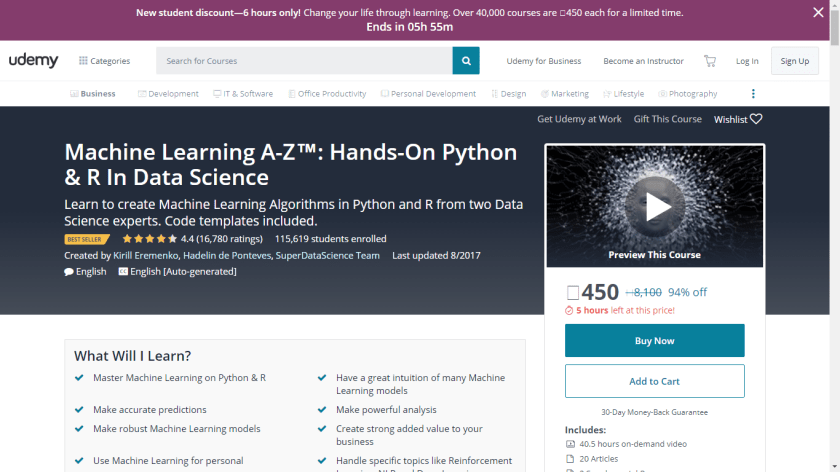
Be a data scientist online with economical courses from Udemy

Sorry if it sounds like an ad, (but it isnt) I was just blown away from these courses for Rs 450 ~ 8 USD   each. Apparently 100,000 students have taken the course which I find dubious since I dont really see a 100,000 data scientists when we try and hire . Still it is a good economical package!

  1. https://lnkd.in/faCJ4mS

  2. https://lnkd.in/fbkWzEY

  3. https://lnkd.in/fv7Dama

  4. https://lnkd.in/f4a76cp

  5. https://lnkd.in/fmfrngn

  6. https://lnkd.in/fgZyyVS

Basic Data Analysis using Iris and PySpark

Collecting pyspark
  Downloading pyspark-2.2.0.post0.tar.gz (188.3MB)
Collecting py4j==0.10.4 (from pyspark)
  Downloading py4j-0.10.4-py2.py3-none-any.whl (186kB)
Building wheels for collected packages: pyspark
  Running setup.py bdist_wheel for pyspark: started
  Running setup.py bdist_wheel for pyspark: finished with status 'done'
  Stored in directory: C:\Users\Dell\AppData\Local\pip\Cache\wheels\5f\0b\b3\5cb16b15d28dcc32f8e7ec91a044829642874bb7586f6e6cbe
Successfully built pyspark
Installing collected packages: py4j, pyspark
Successfully installed py4j-0.10.4 pyspark-2.2.0
In [3]:
from pyspark import SparkContext,SparkConf
sc=SparkContext()
In [4]:
import os
In [5]:
os.getcwd()
Out[5]:
'C:\\Users\\Dell'
In [6]:
os.chdir('C:\\Users\\Dell\\Desktop')
In [8]:
os.listdir()
Out[8]:
['desktop.ini',
 'dump 2582017',
 'Fusion Church.html',
 'Fusion Church_files',
 'iris.csv',
 'KOG',
 'NF22997109906610.ETicket.pdf',
 'R Packages',
 'Telegram.lnk',
 'twitter_share.jpg',
 'winutils.exe',
 '~$avel Reimbursements.docx',
 '~$thonajay.docx']
In [10]:
#load data
data=sc.textFile('C:\\Users\\Dell\\Desktop\\iris.csv')
In [11]:
type(data)
Out[11]:
pyspark.rdd.RDD
In [12]:
data.top(1)
Out[12]:
['7.9,3.8,6.4,2,"virginica"']
In [13]:
data.first()
Out[13]:
'"Sepal.Length","Sepal.Width","Petal.Length","Petal.Width","Species"'
In [14]:
from pyspark.sql import SparkSession
In [16]:
spark= SparkSession.builder \
    .master("local") \
    .appName("Data Exploration") \
    .getOrCreate()
In [17]:
#load data as Spark DataFrame
data2=spark.read.format("csv") \
    .option("header","true") \
    .option("mode","DROPMALFORMED") \
    .load('C:\\Users\\Dell\\Desktop\\iris.csv')
In [18]:
type(data2)
Out[18]:
pyspark.sql.dataframe.DataFrame
In [19]:
data2.printSchema()
root
 |-- Sepal.Length: string (nullable = true)
 |-- Sepal.Width: string (nullable = true)
 |-- Petal.Length: string (nullable = true)
 |-- Petal.Width: string (nullable = true)
 |-- Species: string (nullable = true)

In [25]:
data2.columns
Out[25]:
['Sepal.Length', 'Sepal.Width', 'Petal.Length', 'Petal.Width', 'Species']
In [28]:
data2.schema.names
Out[28]:
['Sepal.Length', 'Sepal.Width', 'Petal.Length', 'Petal.Width', 'Species']
In [27]:
newColumns=['Sepal_Length', 'Sepal_Width', 'Petal_Length', 'Petal_Width', 'Species']
In [30]:
from functools import reduce
In [32]:
data2 = reduce(lambda data2, idx: data2.withColumnRenamed(oldColumns[idx], newColumns[idx]), range(len(oldColumns)), data2)
data2.printSchema()
data2.show()
root
 |-- Sepal_Length: string (nullable = true)
 |-- Sepal_Width: string (nullable = true)
 |-- Petal_Length: string (nullable = true)
 |-- Petal_Width: string (nullable = true)
 |-- Species: string (nullable = true)

+------------+-----------+------------+-----------+-------+
|Sepal_Length|Sepal_Width|Petal_Length|Petal_Width|Species|
+------------+-----------+------------+-----------+-------+
|         5.1|        3.5|         1.4|        0.2| setosa|
|         4.9|          3|         1.4|        0.2| setosa|
|         4.7|        3.2|         1.3|        0.2| setosa|
|         4.6|        3.1|         1.5|        0.2| setosa|
|           5|        3.6|         1.4|        0.2| setosa|
|         5.4|        3.9|         1.7|        0.4| setosa|
|         4.6|        3.4|         1.4|        0.3| setosa|
|           5|        3.4|         1.5|        0.2| setosa|
|         4.4|        2.9|         1.4|        0.2| setosa|
|         4.9|        3.1|         1.5|        0.1| setosa|
|         5.4|        3.7|         1.5|        0.2| setosa|
|         4.8|        3.4|         1.6|        0.2| setosa|
|         4.8|          3|         1.4|        0.1| setosa|
|         4.3|          3|         1.1|        0.1| setosa|
|         5.8|          4|         1.2|        0.2| setosa|
|         5.7|        4.4|         1.5|        0.4| setosa|
|         5.4|        3.9|         1.3|        0.4| setosa|
|         5.1|        3.5|         1.4|        0.3| setosa|
|         5.7|        3.8|         1.7|        0.3| setosa|
|         5.1|        3.8|         1.5|        0.3| setosa|
+------------+-----------+------------+-----------+-------+
only showing top 20 rows

In [33]:
data2.dtypes
Out[33]:
[('Sepal_Length', 'string'),
 ('Sepal_Width', 'string'),
 ('Petal_Length', 'string'),
 ('Petal_Width', 'string'),
 ('Species', 'string')]
In [35]:
data3 = data2.select('Sepal_Length', 'Sepal_Width', 'Species')
data3.cache()
data3.count()
Out[35]:
150
In [36]:
data3.show()
+------------+-----------+-------+
|Sepal_Length|Sepal_Width|Species|
+------------+-----------+-------+
|         5.1|        3.5| setosa|
|         4.9|          3| setosa|
|         4.7|        3.2| setosa|
|         4.6|        3.1| setosa|
|           5|        3.6| setosa|
|         5.4|        3.9| setosa|
|         4.6|        3.4| setosa|
|           5|        3.4| setosa|
|         4.4|        2.9| setosa|
|         4.9|        3.1| setosa|
|         5.4|        3.7| setosa|
|         4.8|        3.4| setosa|
|         4.8|          3| setosa|
|         4.3|          3| setosa|
|         5.8|          4| setosa|
|         5.7|        4.4| setosa|
|         5.4|        3.9| setosa|
|         5.1|        3.5| setosa|
|         5.7|        3.8| setosa|
|         5.1|        3.8| setosa|
+------------+-----------+-------+
only showing top 20 rows

In [37]:
data3.limit(5)
Out[37]:
DataFrame[Sepal_Length: string, Sepal_Width: string, Species: string]
In [50]:
data3.limit(5).show()
+------------+-----------+-------+
|Sepal_Length|Sepal_Width|Species|
+------------+-----------+-------+
|         5.1|        3.5| setosa|
|         4.9|          3| setosa|
|         4.7|        3.2| setosa|
|         4.6|        3.1| setosa|
|           5|        3.6| setosa|
+------------+-----------+-------+

In [45]:
data3.limit(5).limit(2).show()
+------------+-----------+-------+
|Sepal_Length|Sepal_Width|Species|
+------------+-----------+-------+
|         5.1|        3.5| setosa|
|         4.9|          3| setosa|
+------------+-----------+-------+

In [61]:
data4=data2.selectExpr('CAST(Sepal_Length AS INT) AS Sepal_Length')
In [62]:
data4
Out[62]:
DataFrame[Sepal_Length: int]
In [63]:
from pyspark.sql.functions import *
In [65]:
data4.select('Sepal_Length').agg(mean('Sepal_Length')).show()
+-----------------+
|avg(Sepal_Length)|
+-----------------+
|5.386666666666667|
+-----------------+

In [66]:
data5=data2.selectExpr('CAST(Sepal_Length AS INT) AS Sepal_Length','CAST(Petal_Width AS INT) AS Petal_Width','CAST(Sepal_Width AS INT) AS Sepal_Width','CAST(Petal_Length AS INT) AS Petal_Length','Species')
In [67]:
data5
Out[67]:
DataFrame[Sepal_Length: int, Petal_Width: int, Sepal_Width: int, Petal_Length: int, Species: string]
In [68]:
data5.columns
Out[68]:
['Sepal_Length', 'Petal_Width', 'Sepal_Width', 'Petal_Length', 'Species']
In [76]:
data5.select('Sepal_Length','Species').groupBy('Species').agg(mean("Sepal_Length")).show()
+----------+-----------------+
|   Species|avg(Sepal_Length)|
+----------+-----------------+
| virginica|             6.08|
|versicolor|             5.48|
|    setosa|              4.6|
+----------+-----------------+

Importing data from csv file using PySpark

There are two ways to import the csv file, one as a RDD and the other as Spark Dataframe(preferred).  MLLIB is built around RDDs while ML is generally built around dataframes. https://spark.apache.org/docs/latest/mllib-clustering.html and https://spark.apache.org/docs/latest/ml-clustering.html

!pip install pyspark

from pyspark import SparkContext, SparkConf
sc =SparkContext()

A SparkContext represents the connection to a Spark cluster, and can be used to create RDD and broadcast variables on that cluster.  https://spark.apache.org/docs/latest/rdd-programming-guide.html#overview

To create a SparkContext you first need to build a SparkConf object that contains information about your application.Only one SparkContext may be active per JVM. You must stop() the active SparkContext before creating a new one.

Configuration for a Spark application. Used to set various Spark parameters as key-value pairs.

dir(SparkContext)

[‘PACKAGE_EXTENSIONS’,
class‘,
delattr‘,
dict‘,
dir‘,
doc‘,
enter‘,
eq‘,
exit‘,
format‘,
ge‘,
getattribute‘,
getnewargs‘,
gt‘,
hash‘,
init‘,
init_subclass‘,
le‘,
lt‘,
module‘,
ne‘,
new‘,
reduce‘,
reduce_ex‘,
repr‘,
setattr‘,
sizeof‘,
str‘,
subclasshook‘,
weakref‘,
‘_active_spark_context’,

dictToJavaMap’,
‘_do_init’,
‘_ensure_initialized’,
‘_gateway’,
‘_getJavaStorageLevel’,
‘_initialize_context’,
‘_jvm’,
‘_lock’,
‘_next_accum_id’,
‘_python_includes’,
‘_repr_html
‘,
‘accumulator’,
‘addFile’,
‘addPyFile’,
‘applicationId’,
‘binaryFiles’,
‘binaryRecords’,
‘broadcast’,
‘cancelAllJobs’,
‘cancelJobGroup’,
‘defaultMinPartitions’,
‘defaultParallelism’,
‘dump_profiles’,
’emptyRDD’,
‘getConf’,
‘getLocalProperty’,
‘getOrCreate’,
‘hadoopFile’,
‘hadoopRDD’,
‘newAPIHadoopFile’,
‘newAPIHadoopRDD’,
‘parallelize’,
‘pickleFile’,
‘range’,
‘runJob’,
‘sequenceFile’,
‘setCheckpointDir’,
‘setJobGroup’,
‘setLocalProperty’,
‘setLogLevel’,
‘setSystemProperty’,
‘show_profiles’,
‘sparkUser’,
‘startTime’,
‘statusTracker’,
‘stop’,
‘textFile’,
‘uiWebUrl’,
‘union’,
‘version’,
‘wholeTextFiles’]

# Loads data.
data = sc.textFile(“C:/Users/Ajay/Desktop/test/new_sample.csv”)

type(data)

pyspark.rdd.RDD
 # Loads data. Be careful of indentations and whitespace

from pyspark.sql import SparkSession

spark = SparkSession.builder \
.master(“local”) \
.appName(“Data cleaning”) \
.getOrCreate()

dataframe2 = spark.read.format(“csv”).option(“header”,”true”).option(“mode”,”DROPMALFORMED”).load(“C:/Users/Ajay/Desktop/test/new_sample.csv”)

type(dataframe2)

pyspark.sql.dataframe.DataFrame

dataframe2.printSchema() (same as str(dataframe) in R and dataframe.info() in Pandas)

Random Sample of RDD in Spark

2) To get a random sample of your RDD (named data) say with 100000 rows and to get 20% values

data.sample(False,0.02,None).collect()

where data.sample takes the parameters

?data.sample
Signature: data.sample(withReplacement, fraction, seed=None)

and .collect helps in getting data

2) takeSample when I specify  by size of sample (say 100)

data.takeSample(False,100)

data.takeSample(withReplacement, num, seed=None)
Docstring:
Return a fixed-size sampled subset of this RDD.


Simple isnt it

Random Sample with Hive and Download results

Random Selection

select * from data_base.table_name
where rand() <=0.01
distribute by rand()
sort by rand()
limit 100000;

Download Manually

Run the Hive Query.

When it is finished, scroll down to where results are and use the download icon (fourth from top)


Download from Hive Programmatically

Use MOBAXTERM to connect to server

Use VI/VIM to put query in a .hql file. Use i to insert and :wq to save and exit

Use nohup to run and direct the .hql results to a file

[ajayuser@server~]$ mkdir ajay

[ajayuser@server~]$ cd ajay

[ajayuser@serverajay]$ ls

[ajayuser@serverajay]$ vi agesex.hql

[ajayuser@serverajay]$ mv agesex.hql customer_demo.hql

[ajayuser@serverajay]$ ls

customer_demo.hql

[ajayuser@serverajay]$ nohup hive -f customer_demo.hql >>  log_cust.${date}.log;

[ajayuser@serverajay]$ nohup: ignoring input and redirecting stderr to stdout


To check progress

[ajayuser@serverajay]$ tail -f log_cust.${date}.log

The transformation trend of data science

  1. Data science (Python , R )  is incomplete without Big Data (Hadoop , Spark) software
  2. SAS continues to  be the most profitable stack in data science because of much better customer support ( than say the customer support available for configuring Big  Data Analytics for other stacks)
  3. Cloud Computing is increasingly an option for companies that are scaling up but it is not an option for sensitive data (Telecom, Banking) and there is enough juice in Moore’s law and server systems
  4. Data scientists (stats + coding in R/Py/SAS +business) and Data engineers (Linux+ Hadoop +Spark) are increasingly expected to have cross domain skills from each other
  5. Enterprises are at a massive inflection point for digital transformation (apps, websites to get data), cloud to process data, Hadoop/Spark/Kafka to store data, and Py/ R/ SAS to analyze data in a parallel processing environment
  6. BI and Data Visualization will continue to be relevant just because of huge data and limited human cognition. So will be traditional statisticians for designing test and control experiments
  7. Data science will move from tools to insights requiring much shorter cycle times from data ingestion to data analysis to business action

These are my personal views only