Crime Forecasting Challenge : Data Science Contest

The Real-Time Crime Forecasting Challenge seeks to harness the advances in data science to address the challenges of crime and justice. It encourages data scientists across all scientific disciplines to foster innovation in forecasting methods. The goal is to develop algorithms that advance place-based crime forecasting through the use of data from one police jurisdiction.

aims to:

  1. Encourage “nontraditional” crime forecasting researchers to compete against more “traditional” crime forecasting researchers.
  2. Compare available crime forecasting methods.
  3. Improve place-based crime forecasting.

Accordingly, the Challenge will have three categories of contestants: students; individuals/small businesses; and large businesses

This Challenge will be based on the locations listed in calls-for-service (CFS) records provided by the Portland Police Bureau (PPB) for the period of March 1, 2012 through February 28, 2017

find:

  1. Overview
  2. How to Enter
  3. Important Dates
  4. Judges
  5. Judging Criteria
  6. Prizes
  7. Other Rules and Conditions
  8. Prize Disbursement and Challenge Winners
  9. Contact Information
  10. Data for Download


Source

http://nij.gov/funding/Pages/fy16-crime-forecasting-challenge.aspx?utm_source=KDNuggets&utm_medium=Ad&utm_content=Digital&utm_campaign=ForecastingChallenge


How do I shift to a data science career

I get this question a  lot – How do I shift to a data science career. I have been doing data analysis since 2004 (in SAS) when we used to call it business analytics , and since 2007 in R, Since 2014 in Python,  by when we re branded business analytics as data science. So here are a few basics to people trying to SHIFT to data science.

My answer is learn coding, learn math, and most importantly know when to use what for insights. Data scientists are as good as the insights they create or miss not the code they write.

See this first

A slideshare I put forward last year for Summer School

Do this self examination-

  1. What are you good at – programming , stats, or business
  2. What are you bad at- programming , stats or business
  3. What can you learn and at what proficiency

Learning Programming

Learning R, SAS, Python is easy but there is a confusing clutter of resources out there on the internet.

SAS Language -should be learnt from SAS University Edition and for the SAS Certification Exam.

Dont wanna be SAS Certified (its just 100$ psst)

Here is some free SAS Training by Decisionstats

There is no certification in R or Python, though Hadoop has it just like SAS has it.

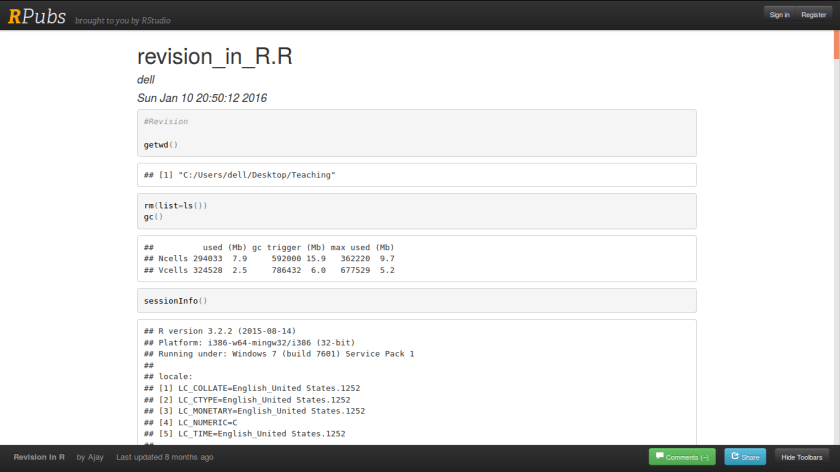
For R- learn R and RStudio till you can master some of the code here

http://rpubs.com/ajaydecis

Screenshot from 2016-08-23 10-48-29

or see all the R packages here at CRAN VIEWS https://cran.r-project.org/web/views/

For Python-

A shorter tutorial on Python by the author is here

http://www.statisticsviews.com/details/feature/8868901/A-Tutorial-on-Python.html

Learn PANDAS and SCIKIT-LEARN  example https://github.com/ipython/ipython/wiki/A-gallery-of-interesting-IPython-Notebooks


Learning Statistics and Techniques


Data Mining in R

http://rattle.togaware.com/rattle-examples.html

Where to learn machine learning

http://scikit-learn.org/stable/tutorial/basic/tutorial.html

Learning Business

This comes with experiences and domain research and study.


I hope this helps. I will follow with specific answers to specific career questions in data science soon.


Analytics as a career

At Business Analytics Summit hosted by WeekendR,

I presented at the Delhi School of Economics Economics Department placement workshop a small presentation on careers in analytics

I basically talked of my 12 years of adventures in consulting, writing and teaching around data science and analytics


13914172_1363844703645649_4806824798457040891_o


Some thoughts on the Revolution Sellout

The revolution will not be televised, brother –Gil Scott-Heron


Veteran R Community members must recall R founder’s Ross Ihaka ‘s warning against Revolution Analytics not being truly open source,

and the sale to Microsoft will be keeping Revolution R open source in the time being ,

it did proved Ross Ihaka was right.

How do you help create an open source revolution in statistics by selling a company to Microsoft beats me.

And how do you just take 6000 packages for free from open source community, add 6-9 packages of your own and then repackage the bundle as a new innovation?

Even though Revolution analytics created 3 CEO JOBs,including SPSS founder Norman Nie, and 1 name change  (from computing to analytics) and  1 mass firing ( with a 50% layoff they wont be winning the best employer award),  in the end what drives software is lots of sales and not lots of blogs

(quoting Larry Ellison‘s purchase of Sun ).

In addition

love for computing and not hypocrisy on love for money should drive science.

A potato is a potato.

In Australia or Seattle or San Fransisco

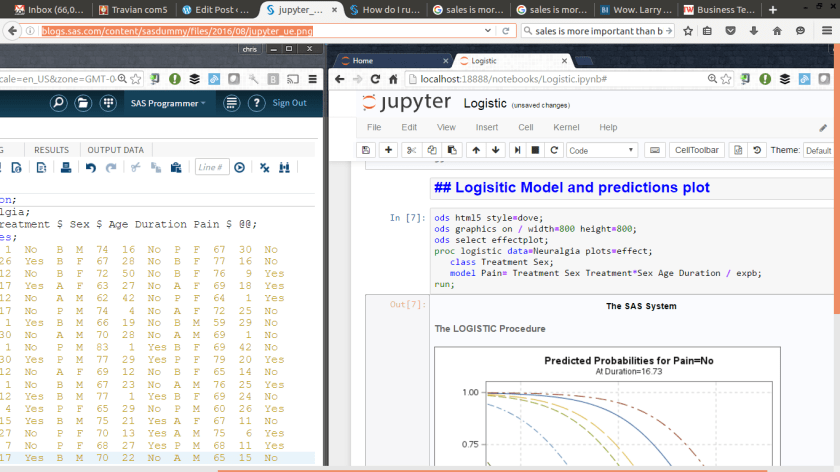
SAS and Jupyter work well together now


While  R community continues to move ahead with  RStudio (open source still),  and other interfaces,

SAS is moving forward to embrace Jupyter in it’s free University Edition. The word Jupyter itself is made from Julia, Python and R. Note whether you are a R fan or Py fan or a SAS fan, you should compare and contrast the quality of blogs, the documentation and the interface on your own. As a blogger and data scientist (?) I actually love all science

Screenshot from 2016-08-12 19-24-19

Using Jupyter and SAS together with SAS University Edition

A few months ago I shared the news about Jupyter notebook support for SAS. If you have SAS for Linux, you can install a free open-source project called sas-kernel and begin running SAS code within your Jupyter notebooks. In my post, I hinted that support for this might be coming in the SAS University Edition. I’m pleased to say that this is one time where my crystal ball actually worked — Jupyter support has arrived!

(Need to learn more about SAS and Jupyter? Watch this 7-minute video from SAS Global Forum.)

https://support.sas.com/software/products/university-edition/faq/jn_runvirtualbox.htm


How do I run Jupyter Notebook in SAS University Edition using VirtualBox?

In order to run Jupyter Notebook in SAS University Edition, you must first add the SAS University Edition vApp to VirtualBox. When you specify the URL to run Jupyter Notebook, you must specify the port number for Jupyter Notebook.

  1. Follow the steps to add the SAS University Edition vApp to VirtualBox.
    Note If you want to access files from or save files to your local computer from Jupyter Notebook in SAS University Edition, you must also set up a shared folder. For more information, see the following topics:

  2. If you downloaded a new version in July 2016, the additional port is automatically added for you. Skip this step and proceed to step 3.