Hacking and Cyberwar

Is cyberwar better than war? is hacking weapon systems and centrifuges better than killing babies

The West faces inevitable demographic decline and would perish in a war of attrition based on conventional norms.

Introducing cyberwarfare as a bogey can also be a proxy to sell cyberweapons to allies?

So many questions and so little time

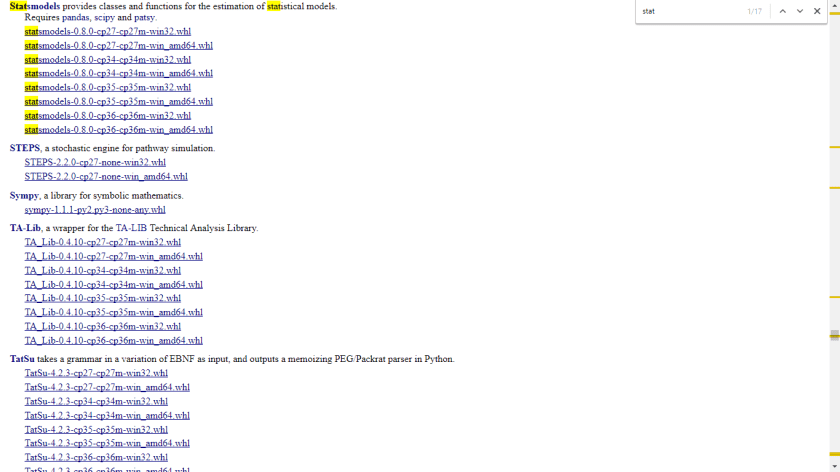
image courtesy https://www.guru99.com/learn-sql-injection-with-practicalexample.html
Python for R Users is now published

with the grace of God and blessings of everyone, I am humbly announcing the publication of my third book in data science- Python for R Users – A Data Science Approach http://as.wiley.com/WileyCDA/WileyTitle/productCd-1119126762.html


Unable to find vcvarsall.bat while installing Python package

Solution to error message above

  1. Upgrade pip  (https://stackoverflow.com/questions/15221473/how-do-i-update-pip-itself-from-inside-my-virtual-environment )

on Windows

python -m pip install --upgrade pip

2. Download unofficial window binaries from http://www.lfd.uci.edu/~gohlke/pythonlibs/ then install the local wheel using pip


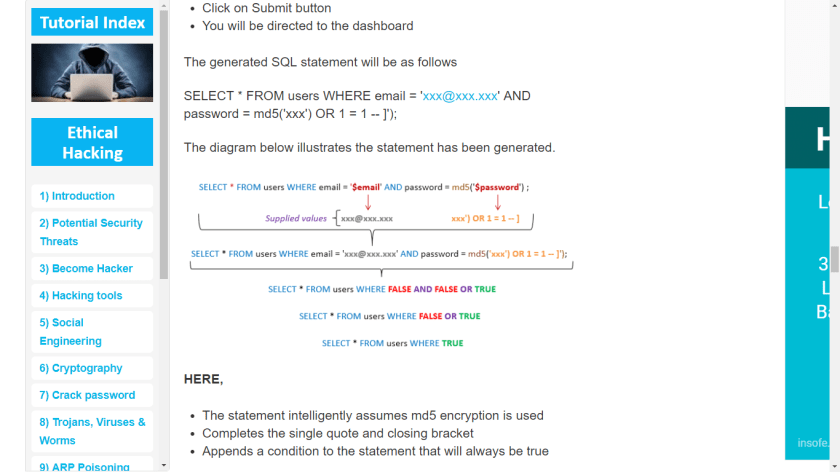
C:\Users\Ajay>pip install statsmodels-0.8.0-cp34-cp34m-win_amd64.whl

3 Other more complicated ways- above two methods work best for me

https://blogs.msdn.microsoft.com/pythonengineering/2016/04/11/unable-to-find-vcvarsall-bat/

https://stackoverflow.com/questions/27670365/python-pip-install-error-unable-to-find-vcvarsall-bat-tried-all-solutions

https://stackoverflow.com/questions/2817869/error-unable-to-find-vcvarsall-bat

Change Python Version for Jupyter Notebook

Three ways to do it- sometimes package dependencies force analysts and developers to require older versions of Python

  1. use conda to downgrade Python version (if Anaconda installed already)
 conda install python=3.5.0

Hat tip- http://chris35wills.github.io/conda_python_version/

https://docs.anaconda.com/anaconda/faq#how-do-i-get-the-latest-anaconda-with-python-3-5

2. you download the latest version of Anaconda and then make a Python 3.5 environment.

To create the new environment for Python 3.6, in your Terminal window or an Anaconda Prompt, run:

conda create -n py35 python=3.5 anaconda


3) Uninstall Anaconda and install older version of Anaconda https://repo.continuum.io/archive/  (download the most recent Anaconda that included Python 3.5 by default, Anaconda 4.2.0)